
Commercial-grade document cameras are built for more than basic classroom snapshots. They need dependable image quality, flexible connectivity, and enough durability to handle daily teaching, training, and presentation use.
In this roundup, we focus on models that can support live demos, hybrid lessons, and professional environments without adding setup headaches.
Best 10 Commercial-Grade Document Cameras Picks for 2026
Best for daily classroom capture
IPEVO V4K Ultra High Definition 8MP USB Document Camera

- 8MP image capture up to 3264 x 2448
- Up to 30 fps at Full HD for smooth streaming
- Multi-jointed stand built for heavy daily use
Best For: Teachers and presenters who need a dependable USB document camera across Mac, Windows, and Chromebook.
Best for zoom-heavy presentations
AVer F50+ 4K Versatile Document Camera

- 4K video capture for crisp presentation output
- 10x optical zoom for close-up detail
- HDMI and USB connectivity for easy setup
Best For: Presenters who need 4K capture and strong optical zoom in a versatile setup.
Best for dual-mode flexibility
IPEVO VZ-R HDMI/USB Dual Mode 8MP Visual Communication Tool
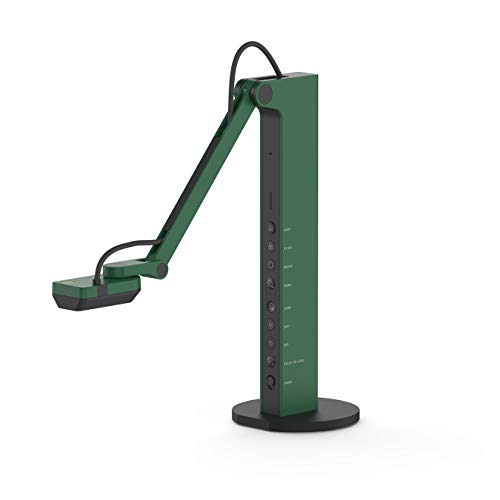
- Works through HDMI or USB, with or without a computer
- 8MP capture up to 3264 x 2448 in USB mode
- Built-in LED light and reinforced stand
Best For: Teams that need a flexible camera for direct display use and computer-based workflows.
Best for optical zoom in HDMI rooms
Epson DC-21 High-Definition Document Camera

- 12x optical zoom plus 10x digital zoom
- 1080p HD output through HDMI
- Microscope adapter included for specialty use
Best For: HDMI-based classrooms and labs that need strong zoom and included accessories.
Compact Classroom Choice
INSWAN INS-1 8MP USB Document Camera

- 8MP SONY sensor with up to 3264 x 2448 capture
- Compact multi-joint design with a 14.72 x 11-inch viewing area
- LED light, autofocus, anti-glare sheet, and Documate software
Best For: teachers and presenters who need a compact plug-and-play document camera
High-Zoom Presenter Pick
Elmo TT-12ID Interactive Document Camera

- 96x total zoom for detailed close-up viewing
- 3.4MP CMOS sensor with smooth 30 fps motion
- HDMI input and adjustable free-angle head and arm
Best For: classrooms and training rooms that need flexible positioning and strong zoom
Portable High-Resolution Pick
IPEVO V4K-13MP Ultra USB Document Camera

- 13MP imaging with up to 3840 x 3104 resolution
- Lightweight 578g design for portable use
- Brighter LEDs plus Visualizer and SnapCapture OCR support
Best For: educators who want a portable high-resolution document camera
Compact 4K Visualiser
4K USB Document Camera for Teachers

- 8MP capture with up to 2448P output
- Manual image reversal and brightness control
- Foldable A3-size design with dual microphones
Best For: Teachers and presenters who want a compact plug-and-play visualiser
Premium Classroom Zoomer
Elmo TT-12G Interactive Document Camera
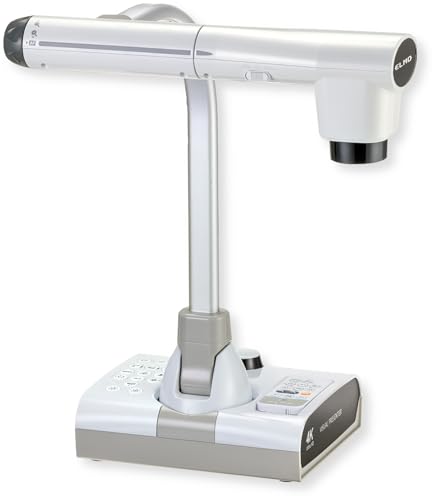
- 4K Ultra HD with 12MP sensor
- 192x total zoom and flexible multi-angle arm
- HDMI, USB, VGA, and SD card recording
Best For: Classrooms and conference rooms needing premium zoom and connectivity
AI-Tracking Classroom Cam
OKIOCAM S2-4K Ultra HD Document Camera

- 8MP Sony sensor with smooth 30 fps streaming
- AI-tracking software follows your pointer in real time
- Strong low-light performance and broad compatibility
Best For: Hybrid teachers who want AI-assisted tracking and dependable low-light capture
Best for daily classroom capture – IPEVO V4K Ultra High Definition 8MP USB Document Camera
If you need a commercial-grade document camera for frequent live demos, remote teaching, or web conferencing, the IPEVO V4K focuses on dependable day-to-day performance. Its 8MP sensor, fast focusing, and high frame rate help keep real-time presentations smooth, while broad Mac, Windows, and Chromebook support makes it easy to drop into mixed-device environments.
Best For: Teachers, trainers, and presenters who want a reliable USB document camera for everyday use across multiple platforms.
Pros:
- 8MP capture up to 3264 x 2448 for detailed live images
- Up to 30 fps at Full HD for lag-free streaming
- Fast focus and Sony CMOS sensor improve clarity and color
- Multi-jointed stand is designed to handle heavy daily use
Cons:
- Requires a compatible computer for USB-based workflows
- Full-resolution streaming is lower at 3264 x 2448 than at 1080p
Overall, the V4K is a practical pick when your priority is smooth live capture and cross-platform flexibility rather than maximum optical zoom or standalone operation. It fits well in classrooms and office settings where the camera will be used often and needs to stay responsive.
Best for zoom-heavy presentations – AVer F50+ 4K Versatile Document Camera
The AVer F50+ is aimed at commercial-grade document camera use where image detail and zoom control matter. With 4K video, 10x optical zoom, and easy HDMI or USB connectivity, it’s well suited for classrooms, training rooms, and presentation setups that need a flexible, higher-end visual tool.
Best For: Educators and presenters who want strong zoom capability and 4K capture in a versatile document camera.
Pros:
- 4K video capture for crisp presentation output
- 10x optical zoom adds real reach for close-up detail
- HDMI and USB connectivity support simple setup
- One-touch software is designed for convenience
Cons:
- At 8.9 pounds, it is heavier than many portable options
- Focus and exposure can be manual or automatic, which may require adjustment
For rooms that need serious zoom and strong output quality, the F50+ stands out as a capable workhorse. Its mix of 4K, optical zoom, and straightforward connectivity makes it a solid choice when versatility is more important than ultra-light portability.
Best for dual-mode flexibility – IPEVO VZ-R HDMI/USB Dual Mode 8MP Visual Communication Tool
For commercial-grade document cameras that need to work with or without a computer, the IPEVO VZ-R offers unusual flexibility. Its dual HDMI/USB design, 8MP sensor, and built-in LED light make it a practical option for live demos, distance learning, and video conferencing in rooms where setups can change quickly.
Best For: Teams and educators who want a document camera that can connect directly to a display or run through a computer.
Pros:
- Dual HDMI and USB modes support direct or computer-based use
- 8MP sensor captures up to 3264 x 2448 in USB mode
- Built-in LED light helps in dimly lit environments
- Reinforced stand adds durability for daily use
Cons:
- HDMI cable and wall power adapter are not included
- HDMI mode is limited to 1920 x 1080 capture
The VZ-R is a smart pick when flexibility and fast setup matter. It gives you a straightforward path to display content on a projector or monitor, while still working as a computer-connected visual tool when needed.
Best for optical zoom in HDMI rooms – Epson DC-21 High-Definition Document Camera
The Epson DC-21 is a straightforward commercial-grade document camera for rooms that rely on HDMI display hardware. It delivers 1080p output, 12x optical zoom, and a built-in microphone, plus it includes a microscope adapter for more specialized demonstrations and teaching moments.
Best For: Classrooms and presentation spaces that want HDMI-based document camera output with strong optical zoom.
Pros:
- 12x optical zoom plus 10x digital zoom for close detail
- 1080p HD resolution over HDMI
- Microscope adapter included for specialty viewing
- Built-in microphone and software add presentation utility
Cons:
- Heavier than compact USB-only document cameras
- Designed around HDMI input, so it is less flexible for other workflows
If your setup is centered on HDMI and you want strong zoom without extra complexity, the DC-21 remains a capable choice. It is especially useful where optical detail and included accessories matter more than modern plug-and-play portability.
Compact Classroom Choice – INSWAN INS-1 8MP USB Document Camera
If you want a practical option among commercial-grade document cameras without giving up desk space, the INSWAN INS-1 is built around a compact multi-joint body and smooth USB operation. Its 8MP SONY sensor, built-in LED, autofocus, and bundled Documate software give it a strong everyday teaching and conferencing feature set.
Best For: Teachers, trainers, and presenters who need a space-saving document camera with solid image quality and easy plug-and-play use.
Pros:
- 8MP SONY camera captures up to 3264 x 2448 resolution with 30 fps video streaming.
- Multi-joint design offers a 14.72 x 11-inch viewing area while staying compact.
- Built-in LED, anti-glare sheet, autofocus, and macro capability help in varied lighting.
- Documate software adds zoom, annotation, image rotation, recording, and snapshots.
Cons:
- Best suited to desktop setups rather than larger, fixed classroom installations.
- Mac and iPad compatibility have specific OS and USB-C requirements.
The INS-1 is a good fit if you want a straightforward document camera that balances portability, image quality, and useful software tools. It feels especially practical for users who need a reliable daily driver rather than a high-end installed system.
High-Zoom Presenter Pick – Elmo TT-12ID Interactive Document Camera
For users comparing commercial-grade document cameras for more advanced presentation setups, the Elmo TT-12ID stands out with its 96x total zoom and interactive controls. It combines a 3.4MP CMOS sensor, 30 fps motion, HDMI input, and a free-angle camera head and arm for viewing material from multiple positions.
Best For: Classrooms, lecture halls, and training rooms that need powerful zoom and flexible positioning.
Pros:
- 96x total optical plus digital zoom for close inspection of documents and objects.
- 3.4MP CMOS sensor delivers smooth 30 fps motion.
- Free-angle head and arm make it easier to view material from different angles.
- HDMI input, audio I/O, and presentation support tools add versatility.
Cons:
- Less portable than compact USB models due to its more substantial presentation-focused design.
- 3.4MP resolution is lower than newer high-resolution document cameras.
The TT-12ID is a strong choice when zoom range and presentation flexibility matter more than portability. It is clearly aimed at professional environments where users want a built-in switcher and hands-on control during live instruction.
Portable High-Resolution Pick – IPEVO V4K-13MP Ultra USB Document Camera
If you need commercial-grade document cameras with sharper imaging for text-heavy teaching or scanning tasks, the IPEVO V4K-13MP is built around a 13MP sensor and up to 3840 x 3104 resolution. It also adds a brighter LED system, autofocus, and IPEVO Visualizer software for educators who want a flexible USB document camera that travels easily.
Best For: Educators and presenters who want high-resolution imaging in a compact, portable design.
Pros:
- 13MP sensor captures up to 3840 x 3104 resolution for fine text and graphics.
- Compact 578g body makes it easy to carry between classrooms or presentations.
- Brighter LED illumination helps visibility in low-light settings.
- Visualizer software and SnapCapture OCR support teaching and scanning workflows.
Cons:
- Designed as a USB camera, so it is best suited to computer-based setups.
- Optional scanner upgrade module and OCR tools are separate from the base camera.
The V4K-13MP is the most resolution-focused option here, making it a smart pick when detail and OCR-friendly capture matter. Its portability also gives it an advantage for users who move between rooms or need one camera for multiple teaching spaces.
Compact 4K Visualiser – 4K USB Document Camera for Teachers
If you want commercial-grade document cameras for classrooms, demos, or hybrid lessons without giving up desk space, this 4K USB model is built around practicality. It offers 8MP capture, manual image reversal, adjustable brightness, and a foldable arm, so you can adapt quickly to different lighting and presentation setups.
Best For: Teachers, trainers, and presenters who need a compact plug-and-play visualiser with flexible image controls.
Pros:
- 8MP sensor with up to 2448P output and 30fps live transmission
- Manual image reversal plus left/right and up/down adjustment
- 3-level brightness control for darker or brighter rooms
- Foldable, multi-joint design with A3-size capture area
Cons:
- USB-based design relies on a connected computer for use
- Best fit is presentation and teaching rather than standalone recording
Overall, this is a strong pick if you need a straightforward classroom document camera with useful image controls and broad compatibility. It keeps setup simple while covering the essentials that matter in live teaching and web conferencing.
Premium Classroom Zoomer – Elmo TT-12G Interactive Document Camera
For buyers comparing commercial-grade document cameras, the Elmo TT-12G stands out as a more fully equipped classroom and presentation tool. It pairs 4K Ultra HD imaging with 192x total zoom, multiple output options, and a flexible arm, making it well suited to detailed demonstrations and mixed-device environments.
Best For: Schools, trainers, and conference rooms that need high zoom, broad connectivity, and robust presentation features.
Pros:
- 4K Ultra HD output with a 12MP sensor for sharp visuals
- 192x total zoom combines 12x optical and 16x digital zoom
- HDMI, USB, and VGA outputs support modern and legacy devices
- Integrated LED lighting, autofocus, and SD card recording
Cons:
- Larger and heavier than compact USB-only document cameras
- May be more than needed for simple one-person desk setups
This model makes sense when presentation quality and compatibility matter more than portability. Its combination of zoom, imaging, and connection flexibility gives it a strong case for classrooms and professional meeting spaces.
AI-Tracking Classroom Cam – OKIOCAM S2-4K Ultra HD Document Camera
If your shortlist includes commercial-grade document cameras for interactive teaching, the OKIOCAM S2-4K brings a modern mix of image quality and software tools. It uses an 8MP Sony Exmor R sensor, supports 30 fps streaming, and adds AI-tracking through OKIOPoint to help keep attention on the right part of the page or object.
Best For: Teachers and hybrid presenters who want low-light performance, AI-assisted tracking, and broad platform support.
Pros:
- 8MP Sony Exmor R sensor with up to 3264 x 2448 capture
- AI-tracking in OKIOPoint software follows your pointer in real time
- Works with Windows, Mac, Chromebook, iPad, and interactive displays
- Low-light-friendly design with no extra LED lights needed
Cons:
- AI tracking depends on the included software workflow
- Capture area is smaller than some larger classroom document cameras
In practice, this is a smart option for anyone who values software features as much as hardware. Its combination of smooth streaming, low-light clarity, and cross-platform support makes it a flexible classroom tool.
How We Picked These Commercial-Grade Document Cameras
We prioritized models with strong image resolution, easy connectivity, stable performance, and features that matter in real classrooms or business settings. That means looking at autofocus behavior, light performance, zoom range, mounting flexibility, and whether the camera works smoothly with common platforms and devices.
We also favored options that make sense for frequent use, not just occasional demos. For commercial settings, reliability and workflow speed often matter more than flashy extras.
Quick Comparison
When comparing Commercial-Grade Document Cameras, narrow the field by connection type first. USB models are usually easiest for laptops and classrooms, HDMI models are better for direct display setups, and dual-mode units offer the most flexibility. From there, compare resolution, zoom, lighting, and portability based on how you plan to use the camera.
Key Buying Factors for Commercial-Grade Document Cameras
Image Quality and Zoom
Higher resolution helps preserve text clarity, diagrams, and small objects when projected or recorded. Optical zoom is especially valuable for detail-heavy lessons, while digital zoom can help in a pinch but may soften the image.
Connectivity and Compatibility
Check whether the camera supports USB, HDMI, VGA, or hybrid output. Commercial environments often benefit from plug-and-play operation across Windows, macOS, and Chromebook systems, plus easy integration with conferencing or recording software.
Lighting and Focus
Built-in LED lighting improves readability in dim rooms, and fast autofocus keeps documents and objects sharp during live movement. If you teach or present often, these features can save time and reduce interruptions.
Build Quality and Mobility
Frequent setup and teardown demand a camera with a stable base, practical arm design, and durable components. If you move between rooms, consider weight, foldability, and cable management as part of the purchase decision.
Who Should Buy Which Commercial-Grade Document Cameras?
If you need a simple, flexible option for mixed-use classrooms or remote demos, choose a USB model with broad compatibility. If your priority is large-screen projection in a fixed room, look for HDMI output and strong zoom. For advanced teaching spaces and professional presentation setups, higher-end Commercial-Grade Document Cameras with multi-interface support, superior sensors, and better low-light performance are usually worth the investment.
In short, match the camera to your daily workflow. The best choice is the one that keeps your lessons, meetings, and demonstrations clear, quick, and dependable.
