
The best commercial-grade controller charging docks keep gaming stations organized, controllers ready, and spare batteries or cables under control. For businesses, esports rooms, entertainment venues, and busy households, the right dock should combine dependable charging with a durable, easy-to-manage design.
We compared options for Xbox, PlayStation, and Nintendo Switch controllers, including dedicated docks and flexible multi-device charging stations. The selections below emphasize compatibility, charging convenience, capacity, footprint, and day-to-day usability.
Best 10 Commercial-Grade Controller Charging Docks Picks for 2026
Extended-Play Xbox Charging

- Two 6200mWh rechargeable battery packs
- Supports multiple official Xbox controllers
- Protection features and charging LEDs
Best For: Xbox players seeking long sessions and dual-controller charging
Multi-Platform Charging

- Charges up to six supported controllers
- Works with Joy-Cons, Switch Pro, and PS5
- USB-C input with safety protection
Best For: Households with both Nintendo Switch and PS5 controllers
Official Wireless Xbox Charging
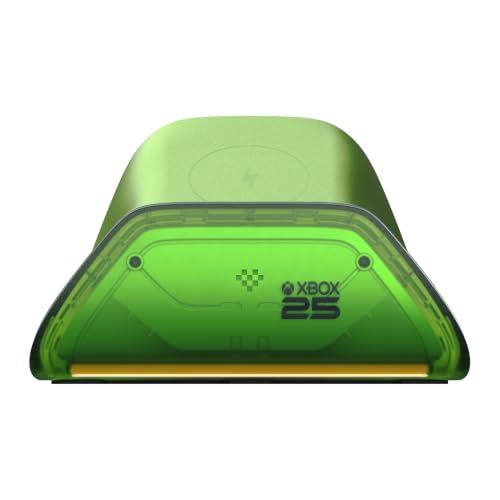
- Officially licensed Xbox design
- Contact-free automatic wireless charging
- Adjustable charging-status LED brightness
Best For: X25 Special Edition owners wanting a polished single-controller dock
Licensed Xbox Display Stand
PowerA Solo Xbox Charging Stand

- Includes an 1100mAh rechargeable battery
- Works with Xbox Series X|S and Xbox One
- Officially licensed with a two-year warranty
Best For: Single-controller Xbox setups needing a simple charging stand
Compact Joy-Con Station
FASTSNAIL Switch Controller Charging Dock

- Charges up to four Joy-Cons at once
- Individual LEDs indicate charge status
- Lightweight USB-powered storage stand
Best For: Switch and Switch OLED users who want compact four-controller charging
Official Xbox Charging Base
8BitDo Charging Dock for Xbox Controllers

- Officially licensed for Xbox controllers
- Magnetic secure charging with amber and white LEDs
- Includes 1100 mAh battery pack and two battery doors
Best For: Xbox Series X|S and Xbox One owners wanting a dedicated tabletop dock
RGB Four-Slot Dock
SUPCASE Charging Dock for Switch 2 Joy-Con

- Charges four Switch 2 Joy-Cons simultaneously
- Supports dual-side magnetic charging
- Offers nine RGB lighting modes and status LEDs
Best For: Switch 2 owners wanting flexible four-controller charging with lighting
Best Multi-Device Organizer

- Four USB charging ports plus controller and headset storage
- Up to 2.4A per port with automatic device detection
- Stable, scratch-conscious design with charging protection
Best For: Gamers managing several devices and accessories on one desk
Best Switch Accessory Dock
FASTSNAIL Joy-Con and Pro Controller Charger

- Stores and charges up to four Joy-Cons and two Pro Controllers
- Magnetic drop-in connections and six charging LEDs
- Designed only for specified official Nintendo controllers
Best For: Nintendo Switch households with multiple compatible controllers
Best Cross-Platform Dual Charger
HEATFUN 2-Port Controller Dock

- Charges two compatible controllers simultaneously
- Supports specified Switch, PS5, and Xbox controllers
- Includes USB-C adapters and red/green status LEDs
Best For: Multi-console setups using compatible first-party controllers
Extended-Play Xbox Charging – Dual 6200mWh Battery Dock
For Xbox owners comparing commercial-grade controller charging docks, this dual-bay station emphasizes long playtime, broad official-controller compatibility, and built-in charging protection. It includes two 6200mWh battery packs, four battery covers, and visual charging indicators.
Best For: Xbox players who want two rechargeable battery packs and extended gaming sessions.
Pros:
- Includes two 6200mWh batteries rated for 18–25 hours of playtime.
- Supports Xbox One, One S, One X, Elite, and Series X|S official wireless controllers.
- Offers individual X-shaped LED indicators and protection against overcharging, over-current, overheating, and short circuits.
Cons:
- Controllers are not included.
- Not compatible with Xbox 360, Xbox Elite Series 2, or third-party controllers.
- Battery packs require approximately 4–5 hours to charge.
With two battery slots, high stated capacity, and a claimed 2,000-plus recharge cycle life, this is a practical choice for households that regularly rotate between Xbox controllers.
Multi-Platform Charging – 6-in-1 Switch and PS5 Dock
This multi-platform option stands out among commercial-grade controller charging docks by charging Nintendo Switch Joy-Cons, Switch Pro controllers, and PS5 controllers from one compact station. Its USB-C input and status LEDs make it flexible for desks or entertainment centers.
Best For: Gamers who use Switch and PlayStation controllers and want one shared charging station.
Pros:
- Can charge four Joy-Cons plus two Switch Pro or two PS5 controllers at the same time.
- Supports power from a console, USB hub, or wall charger.
- Includes overcharge, over-voltage, over-current, and short-circuit protection.
Cons:
- Joy-Cons and other controllers are not included.
- It is a charging dock rather than a controller-and-battery bundle.
- Charging power depends on the connected USB power source.
The six-device capacity is the main advantage here, making this a useful consolidation dock for mixed Nintendo and PS5 setups rather than a platform-specific stand.
Official Wireless Xbox Charging – 8BitDo X25 Xbox Charging Dock
For a streamlined commercial-grade controller charging docks setup, the officially licensed 8BitDo Ultimate Charging Dock pairs with Xbox One and Series X|S wireless controllers. Its contact-free wireless charging design starts charging when the controller is placed on the stand.
Best For: Xbox X25 Special Edition owners who want a coordinated, easy-drop charging dock.
Pros:
- Officially licensed for Xbox One and Series X|S wireless controllers.
- Charging begins automatically without aligning contact pins.
- Amber and white LEDs show charging status, with two brightness settings.
Cons:
- Designed to pair specifically with the Xbox Wireless Controller X25 Special Edition.
- Only one controller can be charged at a time.
- The supplied notes do not indicate that a rechargeable battery pack is included.
This dock prioritizes presentation and convenience over multi-controller capacity, making it a strong match for a dedicated X25 setup and users who prefer contact-free placement.
Licensed Xbox Display Stand – PowerA Solo Xbox Charging Stand
The PowerA Solo is a straightforward choice among commercial-grade controller charging docks for Xbox owners who want one controller charged and displayed. It includes an 1100mAh rechargeable battery, two battery doors, and a 3.3-foot USB cable.
Best For: Xbox players who want an officially licensed single-controller stand with a bundled battery.
Pros:
- Works with Xbox Series X|S and Xbox One wireless controllers.
- Includes an 1100mAh rechargeable battery and two battery doors.
- Officially licensed and backed by a two-year limited warranty.
Cons:
- Charges and displays one controller at a time.
- It does not include the controller itself.
- Its single-controller design is less suitable for multi-controller households.
With a simple vertical form factor, included battery, and official licensing, the Solo is a sensible everyday dock for individual Xbox setups rather than a high-capacity charging hub.
Compact Joy-Con Station – FASTSNAIL Switch Controller Charging Dock
For Switch owners seeking commercial-grade controller charging docks in a compact format, the FASTSNAIL stand offers four simultaneous charging positions, individual charge indicators, and a simple USB-powered setup. It also keeps Joy-Cons organized when they are not in use.
Best For: Nintendo Switch and Switch OLED users who want a lightweight, portable charging and storage stand for up to four Joy-Cons.
Pros:
- Charges up to four Joy-Cons simultaneously.
- Individual LED indicators show charging status.
- Slide-in, plug-and-play design with USB Type-C connectivity.
- Lightweight metal-and-plastic construction doubles as a display stand.
Cons:
- Joy-Cons are not included.
- Uses a single USB connection and is rated for 5V output.
- The 180-day warranty is shorter than some competing options.
This is a practical choice when charging capacity and tidy controller storage matter more than premium extras. Its straightforward design makes it well suited to everyday Switch setups.
Official Xbox Charging Base – 8BitDo Charging Dock for Xbox Controllers
The 8BitDo dock is a polished option among commercial-grade controller charging docks for Xbox setups. It combines magnetic secure charging with a tabletop storage compartment and includes a rechargeable battery pack and two battery doors for compatible controllers.
Best For: Xbox Series X|S and Xbox One owners who want an officially licensed, dedicated charging station with a clean first-party-inspired design.
Pros:
- Officially licensed for Xbox wireless controllers.
- Compatible with Xbox Series X|S and Xbox One controllers.
- Magnetic charging helps secure the controller in place.
- Includes a 1100 mAh rechargeable battery pack and two battery doors.
Cons:
- Designed for compatible Xbox controllers rather than multi-platform use.
- Includes one rechargeable battery pack, so additional controllers may require more accessories.
- The station uses a proprietary connector.
With its licensed design, charging indicator, and included battery accessories, this dock is a strong fit for a dedicated Xbox station. The storage compartment also helps keep the controller and charging setup together.
RGB Four-Slot Dock – SUPCASE Charging Dock for Switch 2 Joy-Con
For newer Nintendo hardware, the SUPCASE dock brings several convenience features to the commercial-grade controller charging docks category. It supports four Switch 2 Joy-Cons, offers dual-side charging, and adds magnetic placement, status LEDs, and nine RGB lighting modes.
Best For: Nintendo Switch 2 owners who need simultaneous four-controller charging with flexible placement and customizable lighting.
Pros:
- Charges up to four Switch 2 Joy-Cons at the same time.
- Dual-side charging supports stable charging regardless of placement.
- Magnetic alignment makes docking easier and helps reduce port wear.
- Nine RGB lighting modes add customization to the gaming setup.
Cons:
- Compatible with Nintendo Switch 2 Joy-Cons from the 2025 release, not listed as compatible with earlier Joy-Cons.
- Joy-Cons are not included.
- Its lighting features may be unnecessary for users seeking a basic charging stand.
The SUPCASE is especially appealing for shared gaming spaces where multiple Switch 2 controllers need to stay charged and organized. Its smart-chip protection, magnetic design, and visual indicators add convenience beyond simple charging.
Best Multi-Device Organizer – KDD 6-in-1 Charging Station
For shoppers comparing commercial-grade controller charging docks, the KDD stands out as a multifunctional desk organizer rather than a controller-only charger. It combines four USB charging ports with detachable controller storage and a rotatable headset hanger, helping consolidate gaming accessories and mobile devices in one station.
Best For: Gamers who want to charge controllers, phones, tablets, and other USB devices while keeping headphones and accessories organized.
Pros:
- Combines four USB ports, a controller stand, and a headphone holder.
- Supports automatic charging detection with up to 2.4A per port.
- Includes rubber feet and padded hooks to improve stability and help prevent scratches.
- Offers overload, short-circuit, and over-current protection.
Cons:
- It does not include a built-in controller-specific charging connector.
- The enclosure is plastic rather than metal.
- It has a listed 180-day warranty.
The KDD is a practical choice when charging flexibility and desk organization matter more than a dedicated drop-in charging system. Its multiple ports and accessory storage make it especially useful for crowded gaming setups.
Best Switch Accessory Dock – FASTSNAIL Joy-Con and Pro Controller Charger
Among commercial-grade controller charging docks, the FASTSNAIL is tailored specifically to Nintendo Switch accessories. It can store and charge four Switch 2 Joy-Cons and two official Switch 1/2 Pro Controllers at the same time, with magnetic alignment and individual LED status indicators.
Best For: Nintendo Switch owners using 2025 Joy-Con 2 controllers and official Switch Pro Controllers who want high-capacity accessory charging.
Pros:
- Charges four Switch 2 Joy-Cons and two official Pro Controllers simultaneously.
- Magnetic connections support convenient plug-and-play placement.
- Six LED indicators show charging status.
- Built-in protection helps guard against overcharge, overcurrent, short circuit, and overvoltage.
Cons:
- Compatibility is limited to specified Nintendo accessories; third-party controllers are not supported.
- Its 0.5A output is more specialized than high-power universal docks.
- It is designed for Switch accessories rather than phones or general USB devices.
The FASTSNAIL makes the most sense for a Nintendo-focused setup with several controllers to manage. Confirm that your accessories are official and compatible before buying, since the dock has narrow device support.
Best Cross-Platform Dual Charger – HEATFUN 2-Port Controller Dock
The HEATFUN is a compact option among commercial-grade controller charging docks for households with more than one console. Its two charging bays support specified Switch Pro, PS5, Xbox Series X|S, and Xbox Elite Series 2 controllers, using removable USB-C adapters for drop-in charging.
Best For: Multi-console gamers who need to charge two compatible first-party controllers at once in a compact tabletop station.
Pros:
- Charges two compatible controllers simultaneously.
- Supports specified Switch Pro, PS5, Xbox Series X|S, and Xbox Elite Series 2 controllers.
- Removable USB-C adapters make drop-in charging easier.
- Red and green LEDs show charging and full-charge status.
Cons:
- PowerA, Luna, and other third-party controllers are not supported.
- A 5V/2A wall adapter is recommended but not included.
- Thick controller cases may need to be removed for proper charging.
The HEATFUN is a sensible cross-platform choice if your controllers match the listed compatibility requirements. Its compact base and dual-bay layout suit a desk or TV setup, but the missing wall adapter adds an extra purchase consideration.
How We Picked These Commercial-Grade Controller Charging Docks
We focused on docks that simplify repeated controller charging rather than merely adding another USB port. Our comparison considered controller compatibility, charging method, capacity, stand stability, included rechargeable batteries, cable management, LED indicators, and the amount of desk or counter space required.
Because “commercial-grade” can describe a use case rather than a formal durability standard, buyers should verify the manufacturer’s specifications for duty cycle, warranty coverage, replacement parts, and electrical certifications before deploying a dock across a public or professional gaming space.
Quick Comparison
| Best For | Look For | Most Suitable Dock Type |
|---|---|---|
| Xbox stations | Exact Xbox generation and battery fit | Dedicated Xbox charging stand |
| Nintendo Switch setups | Joy-Con, Pro Controller, or Switch 2 compatibility | Dedicated Nintendo charging dock |
| Mixed controller collections | Multi-platform support and separate charging positions | Universal or multi-controller dock |
| Shared gaming rooms | Stable construction, visible charge status, and simple placement | Stand-style dock with clear indicators |
| Accessory-heavy desks | Extra USB ports and headset storage | Multi-device charging station |
Key Buying Factors for Commercial-Grade Controller Charging Docks
Compatibility Comes First
Check the exact controller model, not just the console family. Xbox One, Xbox Series X|S, Elite, Joy-Con, Switch Pro, Switch 2, and PS5 controllers can use different contacts, battery covers, or adapters. A dock that supports one generation may not charge another without an included accessory.
Capacity and Charging Method
Count how many controllers need to be ready at the same time. Dual-controller docks suit small setups, while multi-slot or multi-port stations work better for venues and shared rooms. Magnetic contacts and drop-in cradles are usually faster to use than loose cables, but they require accurate alignment.
Power, Safety, and Battery Management
Confirm the included power adapter’s output and whether all slots can charge simultaneously. Rechargeable battery packs can reduce disposable-battery costs, but check their capacity, charging time, expected lifespan, and replacement availability. For commercial installations, favor reputable brands, protected charging circuitry, clear status indicators, and a warranty that matches the expected workload.
Layout and Durability
A wide, weighted base is less likely to tip when users remove controllers. Look for protected charging contacts, strain relief, non-slip feet, and a footprint that fits the intended counter or shelf. A headset stand or extra USB ports may be valuable, but only if they do not make the station unnecessarily crowded.
Who Should Buy Which Commercial-Grade Controller Charging Docks?
Choose a dedicated Xbox dock when most users share Xbox Wireless Controllers and you want the simplest drop-in routine. A Nintendo-specific dock is the better choice for Joy-Con or Pro Controller collections, especially when Switch generations or controller types are clearly identified. Select a universal dock when your setup mixes Xbox, PlayStation, and Nintendo controllers, but verify every listed compatibility detail before ordering.
For offices, esports areas, arcades, and family gaming rooms, prioritize stable stands, simultaneous charging, visible indicators, and replaceable batteries over decorative features. Smaller households can save space with a compact dual dock, while larger setups should use multiple dedicated stations or a multi-device charging hub with enough power and clearly labeled positions.
