
If you need a sturdier, more flexible desk setup, the right monitor arm can make a major difference in comfort and productivity. The best commercial-grade computer monitor arms are built to handle larger displays, heavier loads, and longer workdays without sagging or drifting.
In this roundup, we focus on options that balance reach, stability, motion control, and VESA compatibility so you can find the right fit for your screen size and workspace.
Best 10 Commercial-Grade Computer Monitor Arms Picks for 2026
Heavy-Duty Dual-Screen Pick
HUANUO Dual Monitor Stand for 13–40" with USB

- Holds two monitors up to 26.4 lbs each
- Clamp and grommet mounting with USB ports
- Long, adjustable arms for wider desks
Best For: Dual-monitor workstations needing stability and extra reach
Premium Single-Arm Choice
Ergotron LX Monitor Arm for 34" Screens

- Supports single monitors up to 34 inches and 25 lbs
- Clamp and grommet mounting included
- 10-year warranty with clean cable management
Best For: A premium single-monitor setup with strong adjustability
Ultra-Large Vertical Stack Pick
Heavy Duty Dual Monitor Arm for 17–49" Screens

- Supports up to 44 lbs per arm
- Extra-tall pole for vertical stacking
- Gas spring arms with full motion adjustment
Best For: Large ultrawide monitors in a stacked or high-reach setup
Budget-Friendly Single Arm
VIVO Single Ultrawide Monitor Arm Desk Mount

- Fits 13" to 32" screens and ultrawides up to 38"
- Clamp and grommet mounting included
- 16" height adjustment with full articulation
Best For: Everyday single-monitor setups with solid adjustability
Stacked Dual Vertical Workstation
ARES WING Stacked Dual Vertical Monitor Arm

- Supports 17–49 inch monitors up to 44 lbs each
- Industrial-grade gas springs tested over 20,000 cycles
- USB-C and USB-A ports add convenient charging
Best For: Stacked dual-monitor setups with large ultrawide or curved screens
Heavy-Duty Single Arm
WALI Heavy Duty Single Monitor Arm

- Supports flat and 1000R curved displays up to 49 inches
- Full-motion adjustment with cable management
- Tested through 20,000+ cycles for daily use
Best For: Single-monitor desks that need space-saving lift and strong adjustability
Dual Ultrawide Support Arm
ErgoFocus Heavy Duty Dual Monitor Arm
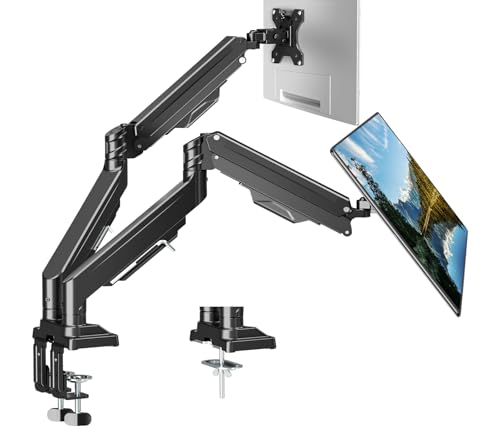
- Fits two flat or curved monitors from 13–43 inches
- Up to 33.1 lbs per screen with gas-spring adjustability
- Cable management plus Allen-key storage keeps desks organized
Best For: Dual ultrawide or curved monitor setups needing strong ergonomics
Commercial-Grade Pick
HUANUO FlowLift Pro Monitor Arm

- MechaSpring design aims for longer service life.
- Tool-free VESA mounting speeds setup.
- TÜV Rheinland certified with visible tension feedback.
Best For: Compatible wood-desk setups needing a durable, ergonomic single arm
Ultrawide Dual Setup

- Supports 17"–49" monitors, including curved ultrawides.
- Each arm handles up to 44 lbs.
- Tilt, swivel, rotation, and cable management add flexibility.
Best For: Users with large dual-monitor or ultrawide desk setups
Heavy-Duty Stability

- Holds monitors up to 49 inches with 37.4 lbs capacity.
- Dual C-clamp and thickened steel improve stability.
- Full motion range supports ergonomic positioning.
Best For: Heavy single-monitor workstations needing rock-solid support
Heavy-Duty Dual-Screen Pick – HUANUO Dual Monitor Stand for 13–40" with USB
If you need commercial-grade computer monitor arms for a dual-screen setup, this HUANUO model is built around stability, long reach, and flexible positioning. It supports larger displays, includes clamp and grommet mounting, and adds USB ports for a more practical desk setup.
Best For: Users who want a sturdy dual monitor arm for ultrawide or heavier screens on a busy workstation.
Pros:
- Supports two 13″ to 40″ monitors up to 26.4 lbs per arm.
- Dual C-clamp design, larger base, and aluminum arms are aimed at improved stability.
- Full motion adjustment with swivel, tilt, rotation, and taller/longer arms for easier positioning.
- Clamp and bolt-through grommet mounting plus integrated cable management and USB ports.
Cons:
- Maximum supported screen size in the details is listed as 32 inches, so buyers should double-check fit for larger displays.
- Requires a desk and grommet size that meet the stated mounting limits.
This is a strong choice if you want a feature-rich dual arm with extra adjustability and desk organization benefits. The built-in charging ports are a useful bonus, but the size specs should be verified carefully before pairing it with very large monitors.
Premium Single-Arm Choice – Ergotron LX Monitor Arm for 34" Screens
The Ergotron LX is a polished option in commercial-grade computer monitor arms, especially if you want a single mount with a refined finish and dependable movement. It supports flat and curved ultrawide displays, offers multiple mounting options, and is backed by a long warranty.
Best For: Professionals who want a premium single-monitor arm with a clean look and long-term support.
Pros:
- Fits monitors up to 34 inches and 7 to 25 lbs with VESA 75x75mm or 100x100mm.
- Includes both desk clamp and grommet mounting options.
- Offers 13 inches of lift, 360 degrees of rotation, and 75 degrees of tilt.
- 10-year warranty and built-in cable management add value for long-term use.
Cons:
- Single-monitor design only, so it is not suited for dual-screen setups.
- Premium positioning may make it a less budget-friendly option than basic arms.
If you want a durable, well-finished monitor arm for one display, this model checks the key boxes. It focuses on stability, flexibility, and a neat workspace rather than maximizing screen count or budget value.
Ultra-Large Vertical Stack Pick – Heavy Duty Dual Monitor Arm for 17–49" Screens
For oversized displays, this heavy-duty model stands out among commercial-grade computer monitor arms because it is designed for large ultrawide screens and vertical stacking. The extra-tall center pole and gas spring arms make it a practical choice when you need more screen area and more room to fine-tune placement.
Best For: Users stacking large ultrawide monitors or building a high-capacity productivity and gaming setup.
Pros:
- Supports 17″ to 49″ monitors up to 44 lbs per arm.
- Extra-tall 19.69″ pole is designed for vertical dual-monitor stacking.
- Gas spring arms provide smooth height adjustment and can be tuned with the included Allen wrench.
- Full motion adjustment includes tilt, swivel, and 360-degree rotation.
Cons:
- Non-VESA monitors need a separate adapter.
- Its heavy-duty design may be more than needed for smaller, lighter displays.
This is a strong fit if your priority is handling large screens with a tall stacked layout. It is clearly built for bigger workloads and larger desks rather than simple, compact monitor setups.
Budget-Friendly Single Arm – VIVO Single Ultrawide Monitor Arm Desk Mount
If you want a straightforward option in commercial-grade computer monitor arms, this VIVO mount covers common monitor sizes without unnecessary complexity. It supports ultrawides up to 38 inches, includes both clamp and grommet mounting, and gives you the adjustment range most desk users need.
Best For: Users who want a simple, adjustable single monitor arm for a typical office or home workspace.
Pros:
- Supports screens from 13″ to 32″ and ultrawides up to 38″ at up to 22 lbs.
- Offers +90° to -90° tilt, 360° swivel, 360° rotation, and height adjustment up to 16″.
- Clamp mounts to desks up to 3.25″ thick, with grommet hardware also included.
- Detachable cable clips help keep cords organized.
Cons:
- Single-arm design only, so it won’t work for dual-monitor needs.
- Maximum weight capacity is lower than heavy-duty premium alternatives.
This VIVO arm is a practical pick if you want useful movement and clean cable handling without jumping to a larger or more expensive setup. It is best suited to everyday single-monitor use rather than oversized or dual-screen workstations.
Stacked Dual Vertical Workstation – ARES WING Stacked Dual Vertical Monitor Arm
If you need commercial-grade computer monitor arms for a stacked dual-screen setup, this ARES WING model is built for big, heavy displays and frequent repositioning. It supports flat and curved monitors from 17 to 49 inches, with up to 44 lbs per arm, and adds a flexible gas spring design for smooth tilt, swivel, rotation, and height changes.
Best For: Users who want a heavy-duty stacked dual arm for large ultrawide or curved monitors, plus built-in USB charging.
Pros:
- Holds up to 49-inch monitors and 44 lbs per arm.
- Industrial-grade gas springs are tested for 20,000+ cycles.
- Built-in USB-C and USB-A ports can charge two devices at once.
- Supports multiple stacked screen layouts with broad tilt, swivel, and rotation.
Cons:
- Requires VESA holes, or a separate adapter if your monitor lacks them.
- Desk thickness limits apply for clamp and grommet installation.
For demanding desks that need both size capacity and adjustability, this is the most feature-rich option in the group. The stacked format and USB ports make it especially practical for modern workstations that handle large displays every day.
Heavy-Duty Single Arm – WALI Heavy Duty Single Monitor Arm
This WALI heavy-duty monitor arm is a strong fit for commercial-grade computer monitor arms when you want a single screen lifted off the desk and easy to reposition. It supports flat and 1000R curved screens up to 49 inches and 44 lbs, with full-motion adjustability for a more ergonomic viewing angle.
Best For: A single large monitor setup where desk space, cable management, and stable articulation matter.
Pros:
- Supports up to 49-inch screens and 44 lbs.
- Offers tilt, swivel, rotation, and up to 21.57 inches of extension.
- Built-in cable management helps keep the desk tidy.
- Uses a wider VESA head and has 20,000+ cycle testing for stability.
Cons:
- Listed maximum supported screen size in the details is 35 inches, so buyers should verify fit carefully.
- Installation is recommended on a wooden desk, preferably without a crossbeam underneath.
If you want a single-arm solution with strong motion control and a cleaner workspace, this WALI model is a practical pick. Just double-check your monitor size, VESA pattern, and desk setup before ordering.
Dual Ultrawide Support Arm – ErgoFocus Heavy Duty Dual Monitor Arm
For commercial-grade computer monitor arms that can handle two larger screens, this ErgoFocus dual mount is aimed at heavier flat or curved monitors from 13 to 43 inches. Its gas spring design, upgraded tilting head, and broad movement range make it a useful choice for users who need fine-tuned positioning without sacrificing stability.
Best For: Dual-monitor setups with heavier ultrawide or curved screens that need strong ergonomic adjustment.
Pros:
- Supports two monitors from 13 to 43 inches, up to 33.1 lbs each.
- Gas spring arm has passed 20,000+ fatigue tests.
- Offers tilt, swivel, and 360-degree rotation, plus up to 22.4 inches of height adjustment.
- Includes cable management and a storage spot for Allen keys.
Cons:
- Maximum supported screen size in the details is listed as 34 inches, so large-screen compatibility should be checked carefully.
- Weight capacity is lower than some heavy-duty competitors at 33.1 lbs per arm.
This arm stands out for dual-screen ergonomics and desk organization, especially if you want a tidy setup with strong motion control. It is a solid fit for demanding workspaces, but the size and weight limits should be verified against your exact monitors.
Commercial-Grade Pick – HUANUO FlowLift Pro Monitor Arm
If you want commercial-grade computer monitor arms with a polished, work-focused feel, the HUANUO FlowLift Pro is built around stability, smoother adjustment, and ergonomic positioning. It supports 13″–32″ monitors, keeps compatible screens steady with its MechaSpring design, and is aimed at setups where the monitor is adjusted often or left in a fixed position for deep work.
Best For: Users who want a sturdy single monitor arm for coding, design, gaming, or focused office work on a compatible wood desk.
Pros:
- MechaSpring arm is designed for up to 2x the service life of conventional gas-based mounts.
- Tool-free VESA plate makes installation faster and easier.
- PrecisionView window gives visible tension feedback instead of pure guesswork.
- TÜV Rheinland certified and tested at 3x its load for added safety.
Cons:
- Only supports monitors within the stated weight and VESA limits.
- Recommended mainly for wood desks in a specific thickness range.
- Irregular desk edges may make fit less ideal.
The FlowLift Pro stands out if you value controlled movement, visual tension adjustment, and a more durable feel than a basic arm. It is a practical choice for professional desks, but it does require careful compatibility checking before purchase.
Ultrawide Dual Setup – Dual Monitor Arm Desk Mount
For commercial-grade computer monitor arms that can handle a serious dual-screen workspace, this ARES WING mount is built around ultrawide support and strong adjustability. It is designed for 17″–49″ monitors, including 1000R curved displays, and each arm can hold up to 44 lbs, making it a capable option for large office or gaming setups.
Best For: Dual-monitor users with large or ultrawide screens who want strong support and broad positioning flexibility.
Pros:
- Supports very large monitors up to 49 inches, including 1000R curved screens.
- Each arm holds up to 44 lbs for heavy dual-monitor setups.
- Offers tilt, swivel, rotation, and extension for flexible positioning.
- Built-in cable management helps keep the desk cleaner.
Cons:
- Monitors without VESA holes need an adapter.
- Desk thickness must fit the clamp or grommet limits.
- Best suited to users who actually need a dual-arm mount.
This mount is a strong fit if your priority is supporting oversized displays without sacrificing adjustability. It combines heavy-duty capacity with a clean cable setup and should appeal to users building a high-end dual-monitor workstation.
Heavy-Duty Stability – ErGear Heavy Duty Monitor Arm
If you need commercial-grade computer monitor arms for a large display, the ErGear Heavy Duty Monitor Arm focuses on strength and steadiness first. It fits 13″–49″ monitors, supports VESA 75×75 and 100x100mm, and is built to keep heavier screens planted while still offering a full range of motion for daily work.
Best For: Heavy single-monitor setups where stability, desk space, and long-term reliability matter most.
Pros:
- 37.4 lbs capacity is designed for heavier and ultrawide screens.
- Dual C-clamp design and thickened steel arm help reduce shaking.
- Full motion adjustment includes tilt, swivel, rotation, and extension.
- Pre-assembled design makes installation more straightforward.
Cons:
- Only works with VESA-compatible monitors.
- Desk thickness still has to fit the clamp or grommet limits.
- Single-arm design is not meant for dual-monitor use.
This is the most stability-focused option in the group, especially if your setup uses a larger or heavier monitor. It should suit users who want a clean desk and a mount that stays dependable through everyday use.
How We Picked These Commercial-Grade Computer Monitor Arms
We prioritized load capacity, screen-size support, range of motion, build quality, and mounting versatility. For Commercial-Grade Computer Monitor Arms, stability matters as much as flexibility, so we looked for arms that can hold position reliably while still offering smooth adjustment.
We also considered whether each option works well for single monitors, dual-monitor layouts, ultrawide displays, and curved screens, since those use cases are common in offices, home studios, and trading desks.
Quick Comparison: Which Type Fits Your Setup?
Single-arm models are usually best for one primary display, especially if you want a clean desk and precise positioning. Dual-arm and stacked vertical designs work better for multitasking, coding, spreadsheets, and surveillance-style workflows. Heavy-duty ultrawide arms are the safest choice for larger panels or curved monitors that put extra stress on the mount.
Key Buying Factors for Commercial-Grade Computer Monitor Arms
Weight Capacity and Screen Size
Always check both the maximum weight rating and the supported screen size. A monitor can fall within the size range but still be too heavy for the spring or gas lift mechanism to hold properly.
Range of Motion
Look for tilt, swivel, rotation, and extension depth that match how you work. If you shift between seated and standing positions, height adjustability becomes especially important.
Mounting Style and Desk Compatibility
C-clamp and grommet mounts are the most common, but your desk thickness, lip clearance, and cable routing needs should guide the final choice. Heavier arms often need a more solid desktop for best performance.
VESA Support and Cable Management
Confirm your monitor uses standard VESA patterns, and check whether the arm includes tidy cable management. Clean routing helps prevent strain and keeps multi-monitor setups easier to maintain.
Who Should Buy Which Commercial-Grade Computer Monitor Arms?
If you use a single ultrawide or a large curved screen, choose a heavy-duty single arm with a high weight limit. If you manage two monitors, a dual-arm model is usually the most efficient option, while stacked vertical arms are ideal when desk width is limited. For buyers who want a dependable all-around option, prioritize smooth adjustability, strong springs, and a reputation for stable long-term support.
In short, the best Commercial-Grade Computer Monitor Arms are the ones that match your monitor’s size and weight first, then deliver the movement and durability your workflow needs.
