
If you’re a graphic designer, you know the importance of vibrant prints. Choosing the right color laser printer can elevate your work considerably. With so many options available, it can be tough to pinpoint the best fit for your creative needs. From speed to print quality, several factors come into play. Let’s explore some top contenders that promise to deliver stunning results for your projects.
Xerox C325 Color All-in-One Printer

If you’re a graphic designer seeking a versatile printing solution, the Xerox C325 Color All-in-One Printer is an excellent choice. It delivers impressive speeds of up to 35 pages per minute, ensuring you meet tight deadlines. With a print resolution of 1200 x 1200 dpi, your designs come to life with vibrant colors. The built-in Wi-Fi and Apple AirPrint features allow seamless printing from your devices. Plus, its automatic document feeder and sustainable materials make it both efficient and eco-friendly. The intuitive touchscreen simplifies navigation, making it a user-friendly option for all your graphic design needs.
Best For: Graphic designers and small businesses looking for a versatile, high-quality all-in-one printing solution.
Pros:
- High print speed of up to 35 pages per minute, ideal for meeting tight deadlines.
- Impressive print resolution of 1200 x 1200 dpi, resulting in vibrant and detailed designs.
- User-friendly touchscreen interface and seamless connectivity options, including built-in Wi-Fi and Apple AirPrint.
Cons:
- Weighing 59.5 pounds, it may be difficult to move or set up in smaller spaces.
- Customer ratings are average at 3.6 out of 5 stars, indicating mixed user experiences.
- Limited media size compatibility, with a maximum of 8.5 x 14 inches, which may restrict larger projects.
Brother Color Laser Printer (HL-L3220CDW)

The Brother Color Laser Printer (HL-L3220CDW) is an excellent choice for graphic designers who need high-quality prints without sacrificing speed. With a print speed of 19 pages per minute, it delivers crisp text and vibrant graphics, perfect for your professional documents. Its automatic duplex printing saves both time and paper, while the 250-sheet paper tray minimizes frequent refills. You’ll love the advanced wireless connectivity that allows seamless printing from your laptop or smartphone. Plus, Brother’s mobile integration guarantees compatibility with major platforms, making it easy to print from anywhere. This printer truly transforms your workspace into a productivity powerhouse.
Best For: Graphic designers and professionals who require high-quality prints with fast output speeds.
Pros:
- High print speed of 19 pages per minute delivers efficient performance for busy environments.
- Automatic duplex printing reduces paper usage and saves time by allowing double-sided printing.
- Advanced wireless connectivity enables seamless printing from various devices, enhancing convenience.
Cons:
- The 250-sheet paper tray may require frequent refills for high-volume printing needs.
- Initial setup for wireless printing can be complex for some users.
- Limited specialty media handling compared to some other professional printers on the market.
Canon Color imageCLASS MF662Cdw Wireless Duplex Laser Printer

Graphic designers seeking a reliable all-in-one solution will find the Canon Color imageCLASS MF662Cdw Wireless Duplex Laser Printer an excellent choice. With its 3-in-1 functionality, you can print, scan, and copy effortlessly. Enjoy quick print speeds of 26 pages per minute and a first print time of just 10.3 seconds. The auto duplex printing feature helps save paper, while the 250-sheet standard cassette guarantees you won’t run out of supplies quickly. Plus, with easy wireless setup and compatibility with mobile printing apps, you’ll have everything you need for vibrant, professional-quality prints right at your fingertips.
Best For: Graphic designers and small businesses looking for a reliable all-in-one printer that delivers high-quality prints, scans, and copies efficiently.
Pros:
- 3-in-1 functionality allows for printing, scanning, and copying, making it a versatile option for various tasks.
- Fast print speeds of 26 pages per minute and a quick first print time of just 10.3 seconds enhance productivity.
- Easy wireless setup and compatibility with mobile printing apps provide convenient printing options from various devices.
Cons:
- Limited paper capacity with a 250-sheet standard cassette may require frequent refills for high-volume printing.
- High-capacity toner can be expensive, potentially increasing overall operating costs.
- Size and weight may be cumbersome for smaller workspaces or home offices.
HP Color LaserJet Pro MFP 3301sdw All-in-One Printer

Designed for small teams, the HP Color LaserJet Pro MFP 3301sdw All-in-One Printer excels in delivering professional-quality prints, making it an excellent choice for graphic designers. With print speeds of up to 26 ppm, it’s quick and efficient, featuring a 250-sheet input tray and automatic duplex printing. The next-generation TerraJet toner guarantees your colors are vivid and true to life. Plus, the auto document feeder simplifies multi-page scanning and copying. Recognized for reliability, it’s perfect for high-demand environments, though it only works with HP chips, guaranteeing you get the best performance with every print.
Best For: The HP Color LaserJet Pro MFP 3301sdw is best for small teams and graphic designers seeking professional-quality color printing in a high-demand office environment.
Pros:
- Fast print speeds of up to 26 ppm for both black and color documents.
- Automatic duplex printing and an auto document feeder for efficient multi-page tasks.
- Next-generation TerraJet toner ensures vivid and true-to-life color prints.
Cons:
- Only compatible with HP chips, which may limit third-party cartridge options.
- Requires periodic firmware updates to maintain performance.
- May be overkill for users with lower printing demands.
Canon Color imageCLASS LBP646Cdw Wireless Laser Printer

For home offices and small businesses seeking reliable and high-quality prints, the Canon Color imageCLASS LBP646Cdw Wireless Laser Printer stands out with its impressive print speed of up to 26 pages per minute. It offers automatic duplex printing, ensuring efficient use of paper. With a compact design (16.5 x 16.8 x 10.5 inches) and a weight of 39 pounds, it’s perfect for limited spaces. You can easily connect via wireless setup or USB, and it’s compatible with mobile printing apps. Plus, it uses high-capacity toner for cost-effective printing. Enjoy vibrant colors and sharp details in every print!
Best For: Those in home offices and small businesses looking for a reliable, high-speed color laser printer with efficient duplex printing capabilities.
Pros:
- Fast print speed of up to 26 pages per minute for both color and monochrome documents.
- Automatic duplex printing helps save paper and reduces printing costs.
- Wireless and mobile printing compatibility allows for convenient printing from various devices.
Cons:
- Print-only functionality limits versatility as it does not support scanning or copying.
- Weight of 39 pounds may make it less portable for users who need to move it frequently.
- Limited paper capacity with a standard 250-sheet cassette may require more frequent refills for larger print jobs.
HP Color LaserJet Pro 3201dw Wireless Color Laser Printer

If you’re part of a small team that needs to produce professional-quality color documents, the HP Color LaserJet Pro 3201dw Wireless Color Laser Printer is an excellent choice. With print speeds of up to 26 pages per minute for both black and color, you won’t have to wait long for your vibrant prints. Its upgraded TerraJet toner guarantees colors pop vividly, making your reports stand out. Plus, features like auto duplex printing and a 250-sheet input tray enhance productivity. The dual-band Wi-Fi connection simplifies setup and keeps you connected, assuring reliable performance for your business needs.
Best For: Small teams looking to produce professional-quality color documents efficiently.
Pros:
- Fast print speeds of up to 26 pages per minute for both black and color.
- Upgraded TerraJet toner produces vivid colors for eye-catching prints.
- Auto duplex printing and a 250-sheet input tray enhance overall productivity.
Cons:
- Designed to work only with original HP cartridges, limiting options for users.
- Non-HP cartridges will be blocked, potentially increasing ongoing costs.
- May require periodic firmware updates, which could interrupt usage.
Epson EcoTank Pro ET-5150 Wireless All-in-One Printer

The Epson EcoTank Pro ET-5150 Wireless All-in-One Printer stands out as an excellent choice for graphic designers who demand high-quality prints without breaking the bank. With a resolution of up to 4800 x 1200 dpi, it delivers vibrant colors and sharp details on media up to 13 x 19 inches. You’ll appreciate the cost efficiency, saving up to 80% on ink compared to traditional cartridges. Plus, its wireless connectivity lets you print from your PC or smartphone effortlessly. Weighing just 15 pounds, it’s compact enough for any workspace, making it a smart addition to your design toolkit.
Best For: Graphic designers and small businesses looking for high-quality prints at a lower cost.
Pros:
- Cost-effective ink replacement system saves up to 80% compared to traditional cartridges.
- High print resolution of up to 4800 x 1200 dpi for vibrant colors and sharp details.
- Versatile functions including printing, copying, scanning, and duplex printing.
Cons:
- Initial cost may be higher compared to standard inkjet printers.
- Requires registration for advanced features and voice activation.
- Some users report connectivity issues depending on router range.
Canon Color imageCLASS MF751Cdw II Wireless Duplex Laser Printer

Graphic designers seeking a reliable and efficient printing solution will find the Canon Color imageCLASS MF751Cdw II an excellent choice. This wireless duplex laser printer offers multifunction capabilities—print, scan, and copy—making it versatile for your design needs. With impressive print speeds of up to 35 pages per minute and a first print time of just 7 seconds, you won’t be kept waiting. The 5-inch color touchscreen simplifies navigation, while mobile printing compatibility guarantees you can print directly from your devices. Plus, its automatic document feeder and expandable paper capacity streamline workflow, helping you stay focused on your creative projects.
Best For: Graphic designers and small businesses seeking a reliable, multifunction printer with fast printing capabilities.
Pros:
- Multifunction capabilities allow for printing, scanning, and copying, offering versatility for various tasks.
- High print speeds of up to 35 pages per minute and a first print time of just 7 seconds enhance productivity.
- Mobile printing compatibility enables printing from smartphones and tablets, facilitating convenience and ease of use.
Cons:
- Initial cost may be higher compared to basic printers, which could be a consideration for budget-conscious buyers.
- Large footprint may require ample space in a work area, limiting placement options.
- Requires Canon Genuine Toner, which can be more expensive than third-party alternatives, impacting long-term operating costs.
Brother MFC-L3720CDW Wireless Color Laser Printer

For graphic designers seeking a reliable and versatile printing solution, the Brother MFC-L3720CDW Wireless Color Laser Printer stands out with its impressive functionality. This printer isn’t just for vibrant prints; it also scans, copies, and faxes. With speeds up to 19 pages per minute and automatic duplex printing, you’ll boost your productivity. Its 250-sheet adjustable paper tray and 50-sheet auto document feeder cater to high-volume tasks. Plus, the 3.5-inch color touchscreen and customizable shortcuts streamline your workflow. Enjoy seamless connectivity with dual-band wireless options and mobile capabilities, ensuring you can print from anywhere with ease.
Best For: Graphic designers and small businesses looking for a multifunctional printer that delivers high-quality color prints and efficient performance.
Pros:
- Versatile all-in-one functionality: print, scan, copy, and fax capabilities.
- Fast printing speeds of up to 19 pages per minute and automatic duplex printing enhance productivity.
- User-friendly interface with a 3.5-inch color touchscreen and customizable shortcuts for streamlined workflow.
Cons:
- May have higher initial costs compared to standard printers without multifunction capabilities.
- Limited print speed compared to high-end professional printers designed for heavy graphic printing.
- Some users may find the mobile app and connectivity features less intuitive to set up.
Xerox C230/DNI Color Printer, Laser, Wireless
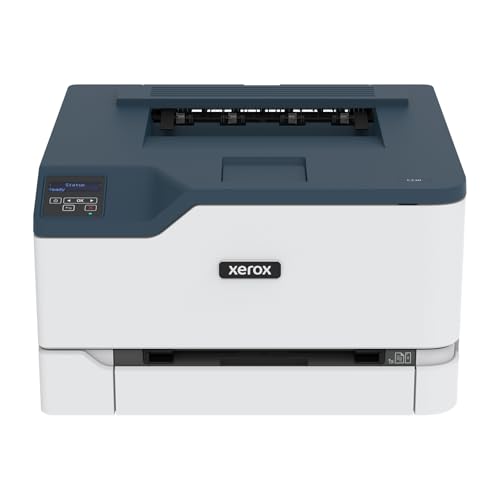
Compact and reliable, the Xerox C230/DNI Color Printer is perfect for small teams or home offices that demand high-quality prints without taking up too much space. With print speeds reaching 24 pages per minute, you’ll enjoy efficiency alongside stunning image quality. It features automatic two-sided printing and holds up to 250 sheets, making it both user-friendly and practical. You can easily connect via built-in Wi-Fi, supporting Apple AirPrint and Chromebook. Plus, thorough security measures protect your sensitive data. Being ENERGY STAR qualified and EPEAT certified, it also aligns with your environmental values, ensuring hassle-free toner recycling through the Xerox Green World Alliance.
Best For: The Xerox C230/DNI Color Printer is best for small teams and home offices seeking a compact, reliable, and high-quality printing solution.
Pros:
- High print speeds of up to 24 pages per minute for increased productivity.
- Automatic two-sided printing and a capacity of 250 sheets enhance user convenience.
- Comprehensive security measures protect sensitive data and access against cyber threats.
Cons:
- Limited to a maximum paper capacity of 250 sheets, which may not suffice for larger print jobs.
- As a laser printer, it may have higher upfront costs compared to inkjet printers.
- Wireless connectivity issues can arise in environments with poor Wi-Fi signals.
Factors to Consider When Choosing Color Laser Printers for Graphic Designers
When choosing a color laser printer, you need to take into account several key factors that impact your design work. Print quality, speed, and connectivity options can greatly affect your workflow and output. Additionally, think about media handling capacity and the overall cost of ownership to guarantee you make the best investment for your needs.
Print Quality Importance
While selecting a color laser printer, understanding the importance of print quality is vital for graphic designers. A higher resolution, like 1200 x 1200 dpi, provides sharper images and vivid color reproduction. Look for printers that offer advanced color quality, reaching up to 4800 dpi, which greatly enhances detail and richness in your prints. Consistency in color output is essential; variations can disrupt your design projects, so choose printers that support color calibration and profiling. Additionally, the ability to print on various media types, such as glossy paper and card stock, allows you to produce professional-grade prints that reflect your intended aesthetics. Prioritizing these factors guarantees your designs come to life exactly as you envisioned.
Speed and Efficiency
Speed and efficiency are essential for graphic designers who need to produce high-quality prints without delays. A printer’s speed, measured in pages per minute, directly impacts your turnaround times, so look for models that offer higher rates. Aim for printers with a fast first print time, ideally under 10 seconds, to keep your workflow smooth. Automatic duplex printing is also vital, saving you time and resources by eliminating manual re-feeding for double-sided documents. Additionally, a large paper capacity, like a 250-sheet tray, minimizes interruptions for paper refills. Finally, make sure the printer can handle various media sizes and types, including card stock and specialty papers, giving you the flexibility you need for diverse printing tasks.
Connectivity Options Available
Connectivity options play an essential role in your color laser printer choice, especially as a graphic designer. You’ll want a printer that supports various wireless options like Wi-Fi, Apple AirPrint, and Mopria Print Service for seamless printing from smartphones and tablets. Look for Ethernet and USB 2.0 connections for reliable wired printing, particularly in environments with weak wireless signals. Dual-band Wi-Fi capabilities are a plus, as they enhance stability and speed by switching between 2.4GHz and 5GHz bands. Easy wireless setup is vital, allowing for quick connections without needing extensive IT support. Finally, verify compatibility with major mobile printing platforms and cloud services to streamline your workflow and boost productivity.
Media Handling Capacity
When choosing a color laser printer, media handling capacity is essential for graphic designers. First, consider the maximum media size supported; you may need larger prints, up to 13 x 19 inches, for your projects. A printer with substantial paper capacity, like a 250-sheet tray, helps reduce the frequency of refills during high-volume tasks. Look for models that include a manual feed slot for versatility when handling specialty media, such as envelopes or thicker cardstock. Evaluate the automatic document feeder (ADF) capabilities to streamline scanning and copying multi-page designs. Finally, check for automatic duplex printing features to save paper and enhance efficiency when producing double-sided materials like brochures or flyers.
Cost of Ownership
Understanding the cost of ownership is essential for graphic designers selecting a color laser printer, as it encompasses the initial purchase price, ongoing toner replacement, and maintenance expenses. High-capacity toner cartridges can greatly lower your cost per page, with some models costing around 2 cents per color page, compared to 14 cents with standard cartridges. Keep an eye on monthly duty cycles and recommended page volumes, as they affect longevity and how often you’ll need to replace parts. Energy efficiency ratings, like ENERGY STAR certification, help reduce electricity bills and support sustainability. Finally, consider the lifespan of components, such as drums and fusers, and warranty options, as these will impact your overall cost of ownership.
