
A small-office printer needs to handle more than the occasional color page. The right multifunction model can keep invoices, presentations, scans, and shared printing moving without taking over the workspace.
These 10 color laser MFPs span compact print-scan-copy options and more capable models with fax, document feeders, and advanced controls. Start with your monthly workload and the tasks your team performs most often.
Best 10 Color Laser Mfp Printers for Small Offices Picks for 2026
Best for Everyday Office Tasks

- 19 ppm color and black printing
- 50-sheet feeder and automatic duplex printing
- Dual-band Wi-Fi and 3.5-inch touchscreen
Best For: Small offices prioritizing versatile, wireless daily use
Best for Fast Team Printing
HP Color LaserJet Pro MFP 4301fdw
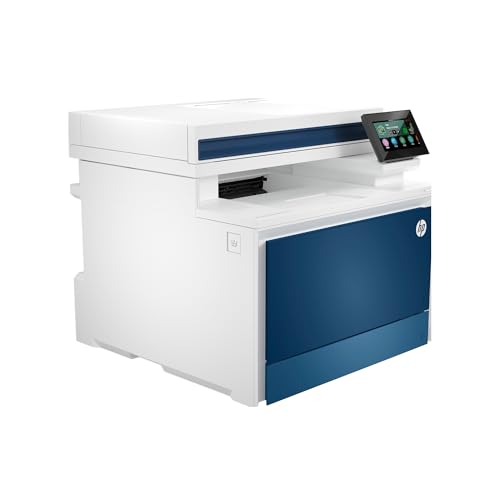
- Up to 35 ppm black and 33 ppm color
- Wireless, Ethernet, and Bluetooth connectivity
- HP Wolf Pro Security settings
Best For: Teams of up to 10 needing fast shared printing
Best for Straightforward 3-in-1 Use
Canon Color imageCLASS MF662Cdw

- 26 ppm color and monochrome printing
- 250-sheet cassette and automatic duplex printing
- Three-year limited warranty
Best For: Offices needing print, scan, and copy without fax
Best for Scan-Heavy Workflows

- 33 ppm color and black printing
- 80-page feeder and fast two-sided scanning
- Gigabit Ethernet and NFC badge authentication
Best For: Document-heavy offices with shared scanning needs
Compact Office Pick
Canon Color imageCLASS MF652Cw

- Prints, scans, and copies
- Up to 22 ppm in color or black
- 250-sheet cassette; three-year warranty
Best For: Small offices needing straightforward wireless color printing
Duplex Workflow Pick
HP Color LaserJet Pro MFP 3301sdw

- Up to 26 ppm in black or color
- Automatic duplex and document feeder
- 250-sheet input tray
Best For: Teams handling two-sided reports and multipage scans
Fax-Ready Office Pick
Canon Color imageCLASS MF753Cdw II

- Print, scan, copy, and fax
- Up to 35 ppm; automatic duplex
- ADF scanner; three-year warranty
Best For: Offices needing fax and faster two-sided color output
Flexible Office Pick
HP Color LaserJet Pro MFP 3301fdw

- Up to 26 ppm in color or black
- Single-pass two-sided scanning
- Ethernet, USB, and dual-band Wi-Fi
Best For: Small teams handling frequent two-sided documents
Touchscreen Workflow Pick
Canon Color imageCLASS MF665Cdw

- 5-inch customizable color touchscreen
- 50-sheet single-pass duplex feeder
- Three-year limited warranty
Best For: Offices scanning two-sided documents regularly
Certified Refurbished Pick
HP Color LaserJet Pro MFP 3301cdw

- Renewed unit with one-year warranty
- Up to 26 ppm color or black
- Single-pass two-sided scanning
Best For: Teams open to a certified-refurbished office MFP
Best for Everyday Office Tasks – Brother MFC-L3720CDW
Among color laser mfp printers for small offices, the Brother MFC-L3720CDW is a practical choice for teams that need printing, scanning, copying, and faxing without a complicated setup. It prints up to 19 pages per minute in color or black and white.
Best For: Small offices that value everyday document handling and flexible wireless access over maximum print speed.
Pros:
- 50-sheet document feeder, 250-sheet paper tray, and automatic two-sided printing.
- Dual-band Wi-Fi, Wi-Fi Direct, and USB connectivity.
- 3.5-inch touchscreen with customizable shortcuts and access to supported cloud services.
Cons:
- 19 ppm output is slower than the faster models in this roundup.
- Listed connectivity does not include Ethernet.
Its strongest appeal is the combination of paper-handling and workflow features. Choose it when shared wireless convenience matters more than high-volume speed.
Best for Fast Team Printing – HP Color LaserJet Pro MFP 4301fdw
For teams comparing color laser mfp printers for small offices, the HP Color LaserJet Pro MFP 4301fdw emphasizes speed and shared access. It prints, scans, copies, and faxes, with listed speeds of up to 35 ppm in black and 33 ppm in color.
Best For: Workgroups of up to 10 people that need fast color documents and multiple connection options.
Pros:
- Automatic two-sided printing and a document feeder support routine office jobs.
- Wireless printing plus Ethernet and Bluetooth connectivity.
- HP Wolf Pro Security includes customizable settings.
Cons:
- Uses cartridges with original HP chips or circuitry and blocks cartridges using non-HP chips or circuitry.
- Included introductory cartridges have lower stated yields than the available high-yield replacements.
This is a strong fit when print speed and network flexibility take priority. Account for HP’s cartridge requirements when estimating ongoing costs.
Best for Straightforward 3-in-1 Use – Canon Color imageCLASS MF662Cdw
The Canon Color imageCLASS MF662Cdw offers a focused option among color laser mfp printers for small offices: color printing, scanning, and copying at up to 26 ppm. Its 5-inch touchscreen and wireless setup keep common tasks accessible.
Best For: Offices that want a print-scan-copy machine with automatic duplex printing and a longer limited warranty.
Pros:
- Up to 26 ppm in color and monochrome, with an approximately 10.3-second first print time.
- 250-sheet cassette, one-sheet multipurpose tray, and automatic two-sided printing.
- Three-year limited warranty and support for Canon PRINT, AirPrint, and Mopria.
Cons:
- No fax function is listed.
- The supplied specifications list a flatbed scanner but no automatic document feeder.
Pick this Canon when straightforward document output and warranty coverage matter more than automated multi-page scanning or faxing.
Best for Scan-Heavy Workflows – Brother MFC-L8930CDW
Among color laser mfp printers for small offices, the Brother MFC-L8930CDW stands out for document-intensive teams. It pairs up to 33 ppm color and black printing with an 80-page document feeder and two-sided scanning rated up to 104 images per minute.
Best For: Busy offices that regularly scan multipage documents and need shared network access.
Pros:
- Two-sided scanning, legal-size glass, and scan destinations including cloud services, email, and SharePoint.
- Dual-band Wi-Fi, Gigabit Ethernet, and a 7-inch touchscreen with customizable shortcuts.
- Included toner is rated for 3,000 black pages and 1,800 color pages; higher-yield replacements are available.
- Security features include an integrated NFC reader for badge authentication.
Cons:
- At 71.2 pounds and 21.6 inches tall, it requires more space and handling than the smaller models listed.
- Fax capability is not specified in the supplied notes.
Its scanning and security features make the strongest case for choosing it. Check the available space and required functions before committing to this larger machine.
Compact Office Pick – Canon Color imageCLASS MF652Cw
Among color laser mfp printers for small offices, the Canon Color imageCLASS MF652Cw suits teams that need wireless printing, scanning, and copying without a fax function. It prints up to 22 pages per minute in color or black and white.
Best For: Small offices that want basic color multifunction printing and a 250-sheet cassette.
Pros:
- Wi-Fi, Ethernet, USB, and mobile printing options.
- 250-sheet cassette plus a one-sheet multipurpose tray.
- Three-year limited manufacturer warranty.
Cons:
- Simplex printing; no automatic two-sided printing is listed.
- No fax function or automatic document feeder is listed.
This is a practical choice for everyday documents when wireless access and warranty coverage matter more than automated paper handling.
Duplex Workflow Pick – HP Color LaserJet Pro MFP 3301sdw
HP Color LaserJet Pro MFP 3301sdw | Color Printer | Wireless | All-in-One | Duplex
Check Price On AmazonFor teams comparing color laser mfp printers for small offices, the HP Color LaserJet Pro MFP 3301sdw adds automatic two-sided printing and an automatic document feeder to its print, scan, and copy functions. HP lists print speeds up to 26 pages per minute in black or color.
Best For: Small teams that regularly print two-sided reports and scan multipage documents.
Pros:
- Automatic duplex printing and an automatic document feeder.
- 250-sheet input tray.
- Wi-Fi, USB, and Ethernet connectivity listed.
Cons:
- No fax function is listed.
- Designed to block cartridges without HP chips or circuitry, including through firmware updates.
Its paper-handling features make it a stronger fit for recurring office workflows, provided HP’s cartridge restrictions suit your purchasing plans.
Fax-Ready Office Pick – Canon Color imageCLASS MF753Cdw II
The Canon Color imageCLASS MF753Cdw II stands out among color laser mfp printers for small offices that still need fax alongside printing, scanning, and copying. It lists automatic duplex printing and speeds up to 35 pages per minute in color and black and white.
Best For: Offices needing fax, two-sided color printing, and an automatic document feeder.
Pros:
- Four-in-one print, scan, copy, and fax functionality.
- Automatic duplex printing and an ADF scanner.
- Wi-Fi, Ethernet, and USB connectivity; three-year manufacturer warranty.
Cons:
- At 50 pounds, it is the heaviest of these three models.
- Listed maximum sheet capacity is 250 sheets.
Choose this model if its faster rated output and fuller feature set justify the extra weight; check whether its 250-sheet capacity meets your refill schedule.
Flexible Office Pick – HP Color LaserJet Pro MFP 3301fdw
HP Color LaserJet Pro MFP 3301fdw | Color Printer | Wireless | All-in-One | Duplex
Check Price On AmazonAmong color laser mfp printers for small offices, the HP Color LaserJet Pro MFP 3301fdw is a practical choice for teams that need printing, scanning, copying, and faxing in one machine. It prints up to 26 pages per minute in color or black and white.
Best For: Small teams that regularly handle two-sided documents and want wired or wireless connectivity.
Pros:
- Automatic two-sided printing and single-pass two-sided scanning help with multipage work.
- 250-sheet input tray and automatic document feeder support routine office jobs.
- Ethernet, USB, and dual-band Wi-Fi offer multiple connection options.
Cons:
- Uses one 250-sheet input tray, which may require refilling during larger runs.
- Blocks cartridges with non-HP chips or circuitry; firmware updates maintain this restriction.
The combination of fax, duplex scanning, and several connection options makes this a capable everyday office MFP. Factor HP’s cartridge restrictions into the purchase decision.
Touchscreen Workflow Pick – Canon Color imageCLASS MF665Cdw
The Canon Color imageCLASS MF665Cdw stands out among color laser mfp printers for small offices with a 5-inch color touchscreen and customizable shortcuts. It combines print, scan, copy, and fax functions, with rated speeds up to 26 pages per minute in color or monochrome.
Best For: Offices that want quick access to common tasks and a 50-sheet feeder for two-sided originals.
Pros:
- 50-sheet, single-pass duplex automatic document feeder streamlines two-sided scanning.
- 250-sheet cassette plus a one-sheet multipurpose tray accommodates occasional alternate media.
- Supports mobile printing through Canon PRINT, Apple AirPrint, and Mopria.
- Includes a three-year limited manufacturer warranty.
Cons:
- The multipurpose tray feeds just one sheet at a time.
- Included starter toner has stated yields of 500 color pages and 700 black pages.
This Canon is well suited to a desk where staff repeatedly scan, fax, and print. The touchscreen and duplex feeder are useful conveniences, while the starter-toner yields are worth noting when budgeting supplies.
Certified Refurbished Pick – HP Color LaserJet Pro MFP 3301cdw
For shoppers comparing color laser mfp printers for small offices, this renewed HP Color LaserJet Pro MFP 3301cdw offers a certified-refurbished option. The supplied listing describes print, scan, copy, and fax functions, with speeds up to 26 pages per minute in color or black and white.
Best For: Small teams comfortable buying refurbished equipment that need two-sided document handling and wireless printing.
Pros:
- Automatic two-sided printing and single-pass two-sided scanning support multipage workflows.
- 250-sheet input tray and automatic document feeder suit everyday office tasks.
- Dual-band Wi-Fi with self-reset and HP Wolf Pro Security add connectivity and security features.
- Certified refurbishment includes genuine parts and toner and a one-year warranty, according to the listing.
Cons:
- It is a renewed printer rather than a new unit.
- Blocks cartridges using non-HP chips or circuitry; firmware updates maintain this restriction.
This model covers the core office functions while offering a refurbished purchase path. Check the listing’s condition and included supplies before ordering, and account for its cartridge restrictions.
How We Picked the Best Color Laser Mfp Printers for Small Offices
We considered the features that affect daily office use: printing and scanning functions, automatic duplex capabilities, paper capacity, connectivity, security options, and the likely cost of replacement supplies. The selection includes simpler print-scan-copy machines as well as models suited to frequent multipage scanning or faxing. Published specifications help narrow the field, but check the exact model and seller listing before buying; similar model names can have different features.
Quick Comparison: Start with the Workflow
For a basic shared printer, compare the Canon imageCLASS MF652Cw and HP Color LaserJet Pro MFP 3301sdw with your required scan and copy tasks. If fax is essential, start with the Brother MFC-L3720CDW or the HP 3301fdw and 3301cdw, then verify their other scanning features. For offices prioritizing heavier document workflows or administrative controls, look more closely at the Brother MFC-L8930CDW, HP 4301fdw, and Canon MF753Cdw II. The Canon MF662Cdw and MF665Cdw are also worth comparing when duplex features and the available warranty matter. These are starting points, not rankings: the right choice depends on what your team actually does.
Key Buying Factors for Color Laser Mfp Printers for Small Offices
Document Handling
An automatic document feeder (ADF) saves time when scanning or copying multipage files. If you regularly process two-sided originals, check specifically for automatic two-sided scanning; duplex printing does not guarantee it. Confirm fax support only if your office still uses it.
Volume, Paper, and Running Costs
Estimate pages per month, including how many are in color. Compare recommended monthly volume, input capacity, and the availability of high-yield cartridges. Calculate cost per page using current toner prices and stated yields, and check whether a separate drum or other maintenance item needs replacing. The lowest purchase price may not be the lowest long-term cost.
Sharing and Security
Check whether your office needs Wi-Fi, Ethernet, mobile printing, or scan-to-network destinations rather than assuming every model supports the same setup. For shared devices, consider access controls, firmware updates, and secure-print options. Also measure the printer’s footprint with trays and access doors open.
Who Should Buy Which Color Laser Mfp Printers for Small Offices?
Choose a straightforward model if most jobs are short print runs and occasional single-document scans. Pay for an ADF and faster document handling if staff routinely digitize contracts, forms, or receipts. Prioritize larger paper capacity, lower projected toner costs, and security controls for a busier shared office. Before checkout, compare the exact SKU’s feature sheet, replacement-supply prices, and warranty terms against your needs.
