
When it comes to achieving professional results in color grading, having the right control panel can make all the difference. In 2025, several top options stand out, each designed to enhance your workflow and precision. From intuitive layouts to advanced calibration tools, these panels cater to the needs of editors and colorists alike. But which ones truly rise to the top? Let’s explore these essential tools and what sets them apart.
Blackmagic Design Davinci Resolve Micro Panel (BMD-DV-RES-BBPNLMIC)

If you’re an independent editor or colorist looking for a portable and efficient color grading solution, the Blackmagic Design Davinci Resolve Micro Panel (BMD-DV-RES-BBPNLMIC) is an excellent choice. Weighing just 11 pounds and measuring 20.51 x 14.49 inches, it’s easy to transport. With three high-resolution trackballs and 12 precision knobs, you’ll achieve smooth color corrections quickly. Its logical layout guarantees natural hand positioning, enhancing control efficiency. Users rave about its build quality and how it elevates the grading process. Just keep in mind, you may need a standard IEC cord, as it doesn’t come included.
Best For: Independent editors and colorists seeking a portable, efficient solution for color grading.
Pros:
- High-quality build with smooth, weighted trackballs and precision-engineered knobs for enhanced control.
- Portable design makes it ideal for on-set grading and easy transport.
- Users report significant improvements in grading efficiency and satisfaction compared to mouse use.
Cons:
- Lacks backlit knobs and a power switch for ease of use in low-light environments.
- Absence of a dedicated save button can be inconvenient during workflow.
- Requires a standard IEC cord for power, which is not included with the product.
DKK 5 x 7 Set of 2 White Balance and Color Calibration Charts
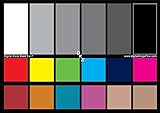
The DKK 5 x 7 Set of 2 White Balance and Color Calibration Charts is an essential tool for photographers and videographers seeking precise color accuracy in their work. This double-sided set features both 12% and 18% gray references, along with 18 scientifically prepared color patches for accurate color correction. Designed for mirrorless cameras, DSLRs, and HD camcorders, these charts help you achieve proper white balance and exposure settings. They’re compatible with software like Adobe Photoshop and Lightroom, making post-production seamless. Plus, the included paper frame folder adds convenience for tabletop displays during shoots. Experience improved color accuracy effortlessly!
Best For: Photographers and videographers who require precise color accuracy and exposure settings for their work.
Pros:
- Effective for color accuracy: Users report improved color correction and white balance in various lighting conditions.
- Compatible with popular software: Works seamlessly with Adobe Photoshop and Lightroom for easy post-production adjustments.
- Convenient design: Includes a paper frame folder for easy tabletop display during shoots.
Cons:
- Glossiness issues: Some users note that the glossy finish can affect neutral shots.
- Durability concerns: The thin material may impact the longevity of the charts with frequent use.
- Limited size: The 5 x 7 inch dimensions may not suit all photography needs or preferences.
Tangent Wave2 Large OLED Panel, 11.4×15.3 Size

Colorists seeking a powerful tool for enhancing their workflow will find the Tangent Wave2 Large OLED Panel, measuring 11.4×15.3 inches, particularly appealing. Weighing just 4.49 pounds, this sleek black panel features 9 dials, 9 buttons, and 3 trackballs, offering an intuitive design for efficient editing. Its wireless functionality allows for greater freedom while working on projects. However, you might experience some issues with trackball security and layout ergonomics. Still, many users praise its compatibility with software like DaVinci Resolve. Overall, it’s a solid choice for those aiming to speed up their color correction tasks.
Best For: Colorists and video editors looking for an intuitive and efficient tool to enhance their workflow during color correction tasks.
Pros:
- Effective for colorists, particularly compatible with DaVinci Resolve and Assimilate Scratch.
- Wireless functionality provides freedom of movement while editing.
- Intuitive design with multiple dials and buttons allows for streamlined editing processes.
Cons:
- Trackballs may fall out easily, compromising transport security.
- Ergonomic layout requires extensive reaching, which could be improved for user comfort.
- Lack of native software support for certain applications leads to functionality limitations.
Calibrite ColorChecker Display Pro (CCDIS3)
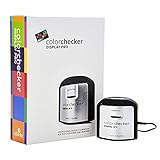
For photographers and videographers seeking precise color calibration, the Calibrite ColorChecker Display Pro (CCDIS3) stands out as an essential tool. Weighing just 4.9 ounces and measuring 1.5 inches on each side, it’s compact and easy to handle. Compatible with ccProfiler or i1Profiler software, it guarantees high repeatability for consistent results across displays. Users praise its ability to enhance color accuracy, especially in shadow details and skin tones. While some have reported issues with specific monitors and customer support, its effectiveness in color grading across various spaces makes it a valuable investment for achieving professional results.
Best For: Photographers and videographers needing precise color calibration for accurate prints and professional results.
Pros:
- High repeatability ensures consistent color profiling across different display types.
- Compact design makes it easy to handle and suitable for various environments.
- Users report significant improvements in color accuracy, especially for shadow detail and skin tones.
Cons:
- Some users experience issues with specific monitor types, affecting color accuracy.
- Reports of unresponsive customer support from Calibrite can be concerning.
- Complicated software installation may require additional resources or tutorials.
LILLIPUT RM-1731S 17.3 HDR and 3D LUTs Rackmount Monitor
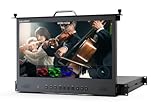
When precision and versatility are crucial in your studio or post-production environment, the LILLIPUT RM-1731S 17.3 HDR and 3D LUTs Rackmount Monitor stands out as an essential tool. With its 17.3-inch IPS panel and a Full HD resolution of 1920 x 1080p60, you’ll enjoy stunning visuals. The monitor’s 300 cd/m² brightness and 700:1 contrast ratio guarantee clear viewing from any angle, thanks to its 178° viewing angles. Plus, its robust connectivity options, including HDMI 2.0 and 3G-SDI, facilitate seamless integration. Functional features like waveform and vectorscope enhance your color grading workflow, making it ideal for any project.
Best For: The LILLIPUT RM-1731S is best for professionals in studio and post-production environments who require high precision and versatile monitoring capabilities.
Pros:
- High resolution of 1920 x 1080p60 for detailed visuals.
- Robust connectivity options including HDMI 2.0 and 3G-SDI for seamless integration.
- Functional features such as waveform and vectorscope enhance color grading workflows.
Cons:
- Limited brightness at 300 cd/m² may not be sufficient for very bright environments.
- Single form factor may restrict use in some setups where different configurations are needed.
- Potentially higher cost compared to basic monitors without advanced features.
SmallHD Cine 7 On-Camera Monitor B-Stock

The SmallHD Cine 7 On-Camera Monitor B-Stock is an exceptional choice for filmmakers seeking precision and clarity in their projects. With a 7-inch Full HD IPS LCD display boasting a resolution of 1920 x 1200 and a brightness of 1800 nits, you can easily monitor your shots even in direct sunlight. Its 10-bit color processing guarantees accurate color representation, while the 160-degree viewing angle offers flexibility. The monitor features 3G-SDI and HDMI inputs, along with an Ethernet port for seamless camera control. With PageBuilder OS, you gain access to essential tools like Focus Peaking and 3D LUTs to enhance your workflow.
Best For: Filmmakers and cinematographers who require a high-quality monitor for accurate color representation and visibility in bright lighting conditions.
Pros:
- High brightness of 1800 nits allows for clear visibility in direct sunlight.
- 10-bit color processing ensures accurate and vibrant color representation.
- Versatile connectivity options including 3G-SDI, HDMI, and Ethernet for enhanced camera control.
Cons:
- B-Grade panel may have minor defects such as less than 5 pixel defects and unfelt scratches.
- Limited portability due to its 2-pound weight, which may not be ideal for all setups.
- Requires camera-specific cables and licenses for full functionality with certain camera models.
ASUS ProArt Display 14” Portable Touchscreen Monitor (PA148CTV)

Looking for a portable monitor that elevates your color grading workflow? The ASUS ProArt Display 14” (PA148CTV) is your perfect companion. With its Full HD IPS anti-glare panel and 10-point multitouch functionality, it guarantees an immersive experience. You’ll appreciate the stunning 1080P resolution and 100% sRGB and Rec. 709 color gamut for precise color accuracy, verified by Calman with a Delta E < 2. Its intuitive OSD control via ASUS Dial and sturdy metal kickstand make operation seamless. Plus, with multiple connectivity options, including USB Type-C and Micro HDMI, connecting devices is a breeze. Enjoy comfortable viewing with ASUS Eye Care technology!
Best For: Creative professionals and content creators seeking a portable monitor for precise color grading and enhanced workflow.
Pros:
- Excellent Color Accuracy: With a Calman Verified Delta E < 2, it ensures precise color reproduction for accurate editing.
- Versatile Connectivity: Features multiple ports including USB Type-C and Micro HDMI for easy connection to various devices.
- User-Friendly Design: The intuitive OSD control via ASUS Dial and sturdy metal kickstand enhance usability on the go.
Cons:
- Limited Screen Size: At 14 inches, it may be smaller than desired for some users who prefer larger displays.
- Brightness Levels: Although adequate, the 300 cd/㎡ brightness may not be sufficient for brightly lit environments.
- Touch Functionality Limitations: While it supports 10-point multitouch, some users may find touch response less precise than dedicated graphics tablets.
Desview R6 Camera Field Monitor (5.5inch Touchscreen)
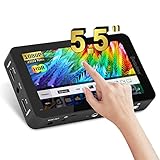
For filmmakers aiming for professional results, the Desview R6 Camera Field Monitor stands out with its impressive 2800 nits brightness, making it an essential tool for outdoor shoots. Its 5.5-inch IPS touchscreen offers Full HD resolution and a wide 178° viewing angle, ensuring clarity from any position. You can easily navigate advanced monitoring features, including LUT support, waveform, and peaking focus assist. With HDMI connectivity for 4K UHD and real-time audio monitoring, it covers all your needs. While it’s lightweight, be cautious about build quality and potential color accuracy issues. Overall, it delivers great value for budget-conscious professionals.
Best For: Filmmakers looking for a budget-friendly field monitor with high brightness and advanced monitoring features for outdoor shooting.
Pros:
- Bright 2800 nits display ideal for use in bright outdoor environments.
- Comprehensive monitoring tools including LUT support, waveform, and peaking focus assist for enhanced shooting precision.
- HDMI connectivity allows for high-quality 4K UHD monitoring and real-time audio monitoring.
Cons:
- Concerns about build quality and durability, with reports of it feeling cheap and potential screen separation.
- Users have noted issues with color accuracy, which could impact critical applications.
- Possible lag through HDMI may affect real-time monitoring for some users.
FEELWORLD F5 Pro DSLR Camera Field Monitor

With a brightness of 1600 nits, the FEELWORLD F5 Pro DSLR Camera Field Monitor stands out as an ideal choice for filmmakers and videographers working in bright environments. Its 5.5-inch Full HD IPS screen guarantees you see every detail with clarity. You’ll appreciate the professional tools, including 3D LUT support and peaking focus assist, enhancing your color grading workflow. The lightweight design and multiple mounting options provide versatility in any setup. Keep in mind the battery life averages 2-3 hours, but with included accessories like a sunshade and HDMI cables, you’re well-equipped for your projects.
Best For: Filmmakers and videographers needing a bright, portable monitor for shooting in sunny conditions.
Pros:
- Brightness of 1600 nits allows for visibility in direct sunlight.
- Lightweight design and multiple mounting options enhance versatility.
- Professional tools like 3D LUT support and peaking focus assist improve color grading workflows.
Cons:
- Battery life averages only 2-3 hours, which may be limiting for longer shoots.
- HDMI cable compatibility issues reported by some users.
- Concerns about durability over time have been noted in customer feedback.
Type-C String Lights, 100 LEDs with Remote Control
Transform your outdoor gatherings into enchanting experiences with the Type-C String Lights, which feature 100 LEDs and a convenient remote control. You’ll love the flexibility of using USB or solar power, ensuring your lights shine bright regardless of the weather. With five lighting modes and adjustable brightness, you can effortlessly set the perfect atmosphere for any occasion. The waterproof design guarantees durability, handling rain and splashes with ease. Plus, the lightweight construction and handy hook make these lights incredibly portable, so you can take them anywhere. Elevate your ambiance and create memorable moments effortlessly!
Best For: Those looking to enhance their outdoor gatherings with versatile, portable, and weather-resistant lighting solutions.
Pros:
- Flexible Power Options: Can be powered by USB or solar energy, ensuring functionality in various conditions.
- Remote Control Convenience: Easily adjust lighting modes and brightness without hassle from a distance.
- Durable and Weatherproof: Built to withstand outdoor elements with an IPX4 waterproof rating.
Cons:
- Limited to 100 LEDs: May not provide adequate lighting for larger areas or spaces.
- Dependent on Solar Conditions: Solar charging may be less effective in consistently overcast weather.
- Remote Control Requires Batteries: Additional battery management for the remote may be needed.
Factors to Consider When Choosing Color Grading Control Panels
When you’re choosing a color grading control panel, several key factors come into play. You’ll want to take into account panel ergonomics and layout, as well as the precision and accuracy of controls. Don’t forget to check for build quality, software compatibility, and customization options that fit your workflow.
Panel Ergonomics and Layout
Choosing the right color grading control panel involves paying close attention to its ergonomics and layout. You’ll want a design that promotes natural hand positioning, allowing easy access to frequently used knobs and buttons without straining. An ergonomic setup enhances your workflow efficiency, letting you make quick adjustments while reducing fatigue during long sessions. Look for logically arranged trackballs and dials to facilitate simultaneous adjustments, improving your overall user experience. A compact design can help prevent excessive reaching, ensuring a comfortable posture while tackling complex projects. Additionally, consider the quality of materials used in the panel’s construction, as this impacts tactile feedback and durability, ultimately influencing your satisfaction and usability.
Control Precision and Accuracy
An ergonomic design not only enhances comfort but also plays a significant role in control precision and accuracy during color grading. High-resolution trackballs and dedicated knobs allow you to make fine adjustments in RGB balance and color correction, which is essential for achieving professional results. The layout of controls should facilitate natural hand positioning, promoting greater accuracy and speed throughout your workflow. Features like still store reference management can streamline your process by giving you quick access to saved color references, reducing time spent on matching colors. The materials used in the construction impact tactile feedback, affecting your ability to make precise adjustments. Additionally, backlit controls improve visibility in low-light conditions, ensuring you can work accurately without straining your eyes.
Build Quality and Durability
Build quality and durability are key factors that can make or break your experience with color grading control panels. High-quality materials enhance longevity and reliability, especially during frequent use in professional settings. When considering weight and dimensions, remember that heavier panels often indicate sturdier construction but might be less convenient for on-the-go setups. Look for smooth and precise control elements like trackballs and knobs; rough movements can hinder your workflow. Weather resistance is also essential; choosing panels with water and dustproof ratings guarantees they can withstand various shooting locations. Finally, prioritize ergonomic design with logically placed controls and comfortable hand positioning, as this will boost user satisfaction and reduce fatigue during extended grading sessions.
Software Compatibility and Integration
When investing in a color grading control panel, software compatibility and integration play a crucial role in maximizing your workflow. Verify the panel works seamlessly with popular software like DaVinci Resolve, FCPX, and Adobe Premiere Pro. Some panels may require third-party software for full functionality, impacting ease of use during your grading tasks. Native support for specific applications enhances efficiency by minimizing setup and troubleshooting time. Pay attention to the mapping capabilities of the control panel, as this can customize controls for your preferred software, greatly affecting your user experience. Finally, check user reviews for insights on integration experiences, helping you identify potential compatibility issues or limitations before making a decision.
Customization and Functionality Options
While exploring color grading control panels, customization and functionality options are key factors that can greatly enhance your workflow. Look for a panel with customizable dials and buttons, so you can tailor it to your needs and access frequently used functions quickly. Supporting user-uploaded LUTs (Look-Up Tables) is essential for flexible color grading and creative control. Additionally, consider models with multiple trackballs, which allow precise adjustments for lift, gamma, and gain—crucial for professional color correction. Make sure the panel integrates seamlessly with popular software to reduce the learning curve and improve efficiency. Finally, evaluate the presence of dedicated keys for functions like still store reference management, helping you save and recall reference images swiftly, streamlining your grading process.
Connectivity and Power Supply
Choosing the right connectivity and power supply options for your color grading control panel is essential for a smooth workflow. Look for panels that offer USB power for flexibility and portability, especially during on-set grading. Wireless operation and battery options can greatly enhance your mobility and ease of use. Make sure the panel is compatible with your existing equipment, as you might need specific power cords or adapters not included with the panel. Also, evaluate the panel’s power consumption; some require more substantial sources for ideal performance during extended use. Finally, check for a backup power solution to prevent interruptions during critical color grading tasks, ensuring you maintain focus on your creative work.
Price and Budget Considerations
After ensuring your color grading control panel has the right connectivity and power supply features, it’s time to think about price and budget considerations. Prices can range from around $200 for basic models to over $1,000 for professional-grade options. Don’t forget to factor in the total cost of ownership, which includes accessories, software compatibility, and potential upgrades. Consider the return on investment (ROI)—a pricier panel might boost your workflow efficiency and improve color grading quality over time. While lower-priced options can be tempting, they often lack essential features or quality, leading to dissatisfaction. Set a realistic budget based on your specific needs and project demands to align your financial constraints with performance expectations.
User Experience and Workflow
How can the right color grading control panel elevate your editing experience? With dedicated knobs and trackballs, these panels streamline your workflow, enabling faster adjustments than mouse-based methods. You’ll find that ergonomic control placement supports your natural hand positioning, reducing fatigue during long sessions. Plus, the tactile feedback from high-quality knobs allows for precise color adjustments, enhancing your overall grading experience. Many panels also feature dedicated keys for common functions, making it easy to save and recall settings, which boosts your productivity. If you opt for a wireless model, you can enjoy the flexibility of working across different environments, freeing you from the constraints of a tethered workstation. Choose wisely, and watch your editing transform!
