
A dependable clamp can turn a desk, shelf, or nearby support into a flexible mounting point for your remote-work setup. The best camera super clamps for remote work hold equipment securely while making it easy to adjust framing, lighting, or audio accessories.
This roundup compares 10 options with different jaw sizes, thread standards, arms, ball heads, and load-bearing designs so you can choose a mount that fits your workspace and gear.
Best 10 Camera Super Clamps for Remote Work Picks for 2026
Flexible Double-Arm Pick
Taisioner Double Socket Camera Clamp

- 360-degree double-socket arm
- Fits 0.67–1.49-inch surfaces
- 1/4-inch-20 device support
Best For: Adjustable webcam, light, and action-camera mounting
Heavy-Duty Desk Pick
NEEWER UA017 Heavy-Duty Super Clamp

- 33-pound maximum load
- Fits desks up to 1.6 inches
- Includes 5/8-inch spring-lock stud
Best For: Stable desk and lighting setups with heavier equipment
Lightweight Threaded Pick

- Multiple 1/4-inch and 3/8-inch threads
- 7.7-pound load capacity
- Fits surfaces up to 2.56 inches
Best For: Compact, modular webcam and monitor mounts
All-in-One Angle Pick
NEEWER ST83 Clamp with Magic Arm
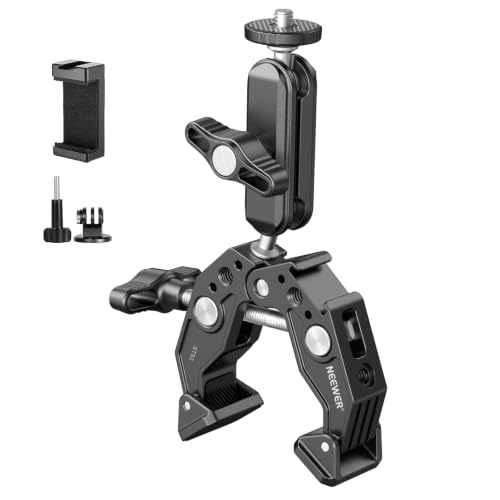
- Dual 360-degree ballhead adjustment
- Built-in cold shoe and 1/4-inch threads
- 6.6-pound maximum payload
Best For: Flexible all-in-one webcam, mic, and light positioning
Best Multi-Pack Value

- Four clamps for multiple setups
- 12mm–54mm adjustable jaw
- 1/4-inch and 3/8-inch threads
Best For: Multiple lightweight remote-work mounting points
Best Heavy-Duty Positioning
NEEWER UA036 Double Super Clamp

- Supports up to 3.5kg
- Dual 360-degree ball heads
- Two clamps plus magic arm
Best For: Heavier desk camera, light, or monitor rigs
Best Compact Adjustable Mount
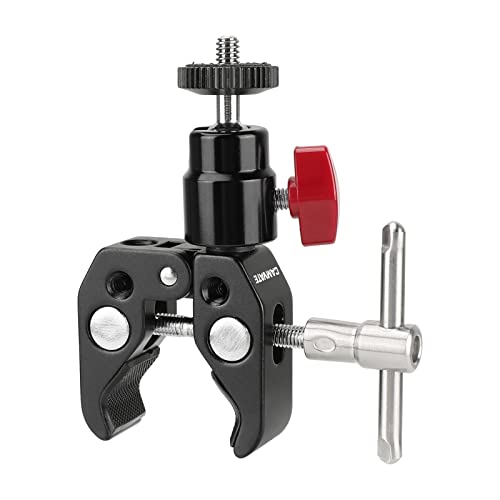
- 360-degree mini ball head
- 54mm maximum clamp opening
- Multiple 1/4-inch and 3/8-inch threads
Best For: A single adjustable camera or light mount
Versatile Dual-Pack Pick
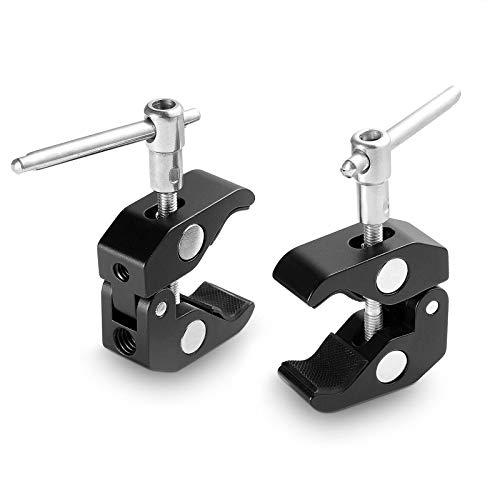
- Two clamps for multi-point setups
- Supports 15mm–40mm rods
- 1/4-inch and 3/8-inch threads
Best For: Remote workers building flexible multi-device rigs
Heavy-Duty Desk Mount

- Supports up to 1.5 kg
- Dual-ball adjustment for positioning
- Includes action-camera adapter
Best For: Desk setups using webcams, monitors, lights, or microphones
Wide-Opening Adjustable Pick

- 60mm maximum clamp opening
- 360-degree adjustable ballhead
- Supports up to 1.5 kg
Best For: Flexible desk, rod, and studio-style remote-work mounts
Flexible Double-Arm Pick – Taisioner Double Socket Camera Clamp
For remote work setups that need a camera, light, or monitor positioned off the desk, the Taisioner is one of the more flexible camera super clamps for remote work. Its double-socket arm and ballhead connection provide 360-degree adjustment, while the rubber-lined clamp helps protect the mounting surface.
Best For: Users mounting a webcam, action camera, small monitor, or light to desks, shelves, poles, tripods, or railings.
Pros:
- Double-socket arm supports broad 360-degree positioning.
- Clamps onto surfaces and objects from 0.67 to 1.49 inches.
- Supports 1/4-inch-20 devices and lists a maximum load of up to 5 pounds in the supplied product notes.
- Rubber padding helps reduce scratches and improve balance.
Cons:
- The listed clamp range is narrower than some competing models.
- The ballhead connection may require an additional adapter for devices without a 1/4-inch-20 mount.
The Taisioner is a practical choice when adjustability matters more than a built-in accessory interface. Check the diameter or thickness of your intended mounting surface and the weight of your remote-work gear before buying.
Heavy-Duty Desk Pick – NEEWER UA017 Heavy-Duty Super Clamp
The NEEWER UA017 stands out among camera super clamps for remote work when you need a substantial load rating and a secure desk grip. Its wedge insert handles flat desks up to 1.6 inches thick, while removing the insert allows clamping to round rods and tubes up to 2.4 inches in diameter.
Best For: Heavy webcams, studio lights, monitors, or other compatible equipment mounted to a desk, pole, tripod leg, or background crossbar.
Pros:
- Supports equipment up to 33 pounds according to the supplied notes.
- Long tightening lever is designed for easier, more secure mounting.
- Works with flat surfaces and round items from 0.2 to 2.4 inches.
- Includes a 5/8-inch stud with a spring lock for compatible lighting equipment.
Cons:
- At 22.5 ounces, it is substantially heavier than lightweight clamp options.
- The 5/8-inch stud is aimed more at lighting gear than basic webcam mounting.
- It is not water resistant.
Choose the UA017 if stability and capacity are higher priorities than portability. It is particularly useful for a permanent home-office or streaming station, provided your desk thickness and equipment interface match its specifications.
Lightweight Threaded Pick – SMALLRIG 3755B Super Clamp
The SMALLRIG 3755B is a compact option for camera super clamps for remote work, with several threaded connection points for building a webcam, light, or monitor setup. Its adjustable jaw handles rods from 0.55 to 2.36 inches and surfaces up to 2.56 inches thick, while the aluminum-alloy and stainless-steel construction keeps the clamp relatively light.
Best For: Lightweight to moderately heavy cameras, monitors, LED lights, and action cameras attached to desks, pipes, handlebars, or tripods.
Pros:
- Offers 1/4-inch-20, 3/8-inch-16, and 1/4-inch-20 locating holes.
- Supports up to 7.7 pounds.
- Wide adjustable jaw range accommodates rods and thicker surfaces.
- Built-in anti-slip cushions improve grip and help protect mounting surfaces.
Cons:
- It does not include a magic arm or ballhead in the supplied component list.
- The 7.7-pound capacity is lower than the NEEWER UA017’s listed rating.
- It is not water resistant.
The SMALLRIG is a sensible foundation for a modular desk setup, especially if you already own a compatible arm or adapter. Its multiple threads provide flexibility, but confirm that your chosen accessory supplies the positioning mechanism you need.
All-in-One Angle Pick – NEEWER ST83 Clamp with Magic Arm
The NEEWER ST83 combines a clamp, dual-ballhead magic arm, and cold shoe in one unit, making it a convenient choice among camera super clamps for remote work. It grips desks, poles, tripods, and stands from 0.6 to 2.4 inches and supports 360-degree angle adjustments for webcam, camera, microphone, or light positioning.
Best For: Users who want an integrated adjustable arm for a webcam, action camera, monitor, microphone, or LED fill light.
Pros:
- Dual 360-degree ballheads make angle changes quick and flexible.
- Clamp fits round poles and flat surfaces from 0.6 to 2.4 inches.
- Includes 1/4-inch threads, locating points, and a built-in cold shoe.
- Supports a maximum payload of 6.6 pounds.
Cons:
- It is not suitable for on-camera speedlite flashes.
- The 6.6-pound capacity is lower than the UA017’s listed maximum.
- It is not water resistant.
The ST83 is a strong convenience pick for a home office because the clamp and positioning arm come together in one package. Its accessory interfaces are useful for mixed setups, but stay within the payload limit and verify compatibility with your specific device.
Best Multi-Pack Value – 4-Pack QYXINC Super Clamps
If you need camera super clamps for remote work across several desks or setups, this four-pack offers a flexible starting point. Each clamp has 1/4-inch and 3/8-inch threaded holes for mounting compatible cameras, lights, monitors, or other accessories.
Best For: Remote workers who want multiple basic clamps for webcams, lights, shelves, rods, or crossbars.
Pros:
- Four clamps provide useful coverage for multiple workstations or accessories.
- Adjustable jaws fit surfaces from 12mm to 54mm.
- Aluminum-alloy and stainless-steel construction includes nonslip rubber pads to improve grip and help prevent scratches.
Cons:
- The stated maximum weight recommendation is 120g, limiting heavier camera or monitor setups.
- No articulated arm or ball head is included for angle adjustment.
This is a practical choice when quantity and mounting compatibility matter more than heavy-duty load capacity or fine positioning. Check your device weight before using it for a remote-work camera setup.
Best Heavy-Duty Positioning – NEEWER UA036 Double Super Clamp
For remote workers building a more adjustable desk camera or lighting rig, this NEEWER model combines double super clamps with a magic arm. It supports surfaces or rods from 14mm to 60mm and offers 360-degree positioning through dual ball heads.
Best For: Desk-based video calls, streaming, and workspaces using heavier cameras, lights, microphones, or monitors.
Pros:
- Supports payloads up to 3.5kg according to the supplied specifications.
- Dual 360-degree ball heads make it easier to position gear at the desired angle.
- Includes 1/4-inch threads, ARRI locating holes, and two cold shoes for compatible accessories.
- Nonslip pads help reduce sliding and scratches on mounting surfaces.
Cons:
- It is a single unit rather than a multi-pack.
- The phone holder is not included.
- The magic arm and clamps are fixed together as one unit.
Among these camera super clamps for remote work, the UA036 is the most versatile option for a substantial, frequently adjusted setup. Its larger clamp range and accessory mounting points are useful, though the integrated design may be more hardware than a simple webcam installation requires.
Best Compact Adjustable Mount – CAMVATE Mini Ball Head Clamp
The CAMVATE Super Clamp pairs a compact clamp with an articulated mini ball head, making it a useful choice for camera super clamps for remote work when you need basic angle adjustment without a larger arm assembly. It provides several mounting thread options and opens to 54mm.
Best For: Lightweight-to-moderate remote-work cameras, monitors, or lights that need adjustable positioning.
Pros:
- The mini ball head rotates 360 degrees for flexible positioning.
- Three 1/4-inch-20 thread holes and one 3/8-inch-16 thread hole support compatible accessories.
- The clamp opens to a maximum of 54mm and has a stated 3kg maximum load.
- Aluminum-alloy construction is anodized black.
Cons:
- Only one clamp is included.
- No nonslip pad or surface-protection feature is specified in the supplied notes.
- It lacks the multiple cold shoes and dual-clamp design of the NEEWER option.
This CAMVATE model strikes a middle ground between a basic fixed clamp and a larger magic-arm system. It is worth considering when a single mounting point, 360-degree adjustment, and multiple thread holes are more important than a multi-pack.
Versatile Dual-Pack Pick – SMALLRIG 2-Pack Super Clamp
For shoppers comparing camera super clamps for remote work, this two-pack offers a flexible way to mount cameras, lights, or other accessories around a desk setup. Its 1/4-inch and 3/8-inch threads, rod compatibility, and protective rubber lining make it practical for varied rigs.
Best For: Remote workers building multi-device camera, light, or monitor setups.
Pros:
- Includes two clamps for flexible mounting options.
- Works with 15mm–40mm rods and multiple accessory types.
- Stainless steel and anodized aluminum construction with non-slip rubber protection.
Cons:
- The broader feature set may be more than needed for a simple webcam mount.
- The notes do not specify a maximum weight capacity.
This is a strong choice when a remote-work station needs more than one mounting point or must support varied accessories. Confirm your rod and thread requirements before buying.
Heavy-Duty Desk Mount – SMALLRIG 1138 Ballhead Clamp
This SMALLRIG model is a capable option among camera super clamps for remote work, especially if you want to secure a webcam, monitor, microphone, or light without drilling. Its dual-ball design supports adjustable positioning, while the upgraded clamp is rated for loads up to 1.5 kg.
Best For: Desk-based creators who need an adjustable mount for cameras, webcams, monitors, or lights.
Pros:
- Supports cameras, webcams, monitors, lights, microphones, and action cameras.
- 1.5 kg maximum weight capacity with non-slip threads and anti-twist construction.
- Includes an action-camera adapter and 1/4-inch-20 screw.
Cons:
- Only one clamp is included.
- Dynamic setups require a safety rope to help prevent accidental drops.
- The supplied notes do not list 3/8-inch threading.
Its stated load rating and desk-friendly clamp make it a practical pick for heavier remote-work accessories. Use the safety-rope guidance seriously when mounting equipment in moving or dynamic situations.
Wide-Opening Adjustable Pick – ULANZI 360° Super Clamp
For camera super clamps for remote work, the ULANZI R094 combines a 60mm maximum opening with a 360-degree ballhead for adaptable desk and studio positioning. It accepts 1/4-inch and 3/8-inch accessories and includes an action-camera adapter.
Best For: Remote workers who want to reposition a camera, monitor, light, or microphone on different rods and surfaces.
Pros:
- 360-degree ballhead helps adjust mounted equipment.
- Opens up to 60mm and supports loads up to 1.5 kg.
- Includes 1/4-inch and 3/8-inch female threads plus an action-camera adapter.
Cons:
- It is a single-clamp package.
- It is not water resistant.
- The included action-camera adapter may need replacement support if missing.
This clamp suits flexible home-office rigs where mounting surfaces and viewing angles change. Its 1.5 kg capacity is useful, but match the load and clamp opening to your equipment before installation.
How We Picked the Best Camera Super Clamps for Remote Work
We focused on the features that matter in a home office or studio: clamp strength, jaw range, thread compatibility, adjustment flexibility, and ease of installation. We also considered whether each design is better suited to compact cameras, webcams, LED lights, microphones, monitors, or accessories such as cold-shoe mounts.
Because desks and shelves vary widely, no single clamp is ideal for every setup. A compact articulated model may be best for a webcam, while a wider dual-ball or magic-arm design can provide more positioning options for heavier equipment.
Quick Comparison
| Feature | What to look for | Best suited to |
|---|---|---|
| Jaw opening | Measure the thickness of your desk, shelf, or support | Stable attachment to different surfaces |
| Mounting threads | 1/4"-20, 3/8"-16, 5/8-inch stud, or cold shoe | Cameras, lights, microphones, and monitors |
| Articulated arm | Magic arm, dual ball head, or adjustable socket arm | Precise positioning and angle changes |
| Clamp count | Single or multipack configuration | One device or a multi-camera workspace |
Key Buying Factors for Camera Super Clamps for Remote Work
Check the Jaw Range and Surface Protection
Measure the support before buying, including any desk lip or trim that could limit the clamp’s reach. A rubber-padded jaw helps protect finished furniture and can reduce slipping, but it should not replace a firm, correctly tightened connection.
Match the Mount to Your Equipment
Most cameras and many small accessories use a 1/4-inch-20 thread, while larger accessories may use 3/8-inch-16 connections. A 5/8-inch stud is useful for compatible lights and grip hardware. Cold-shoe mounts are convenient for compact microphones, lights, and receivers.
Consider Arm Stability and Adjustability
Magic arms and ball heads offer flexible positioning, but more joints can create more opportunities for movement if they are not tightened securely. For a heavy camera or monitor, prioritize a robust clamp and short, well-supported arm over maximum reach.
Protect Your Desk and Your Gear
Look for padded contact points, a strong locking mechanism, and a mounting interface that fits your device without forcing it. Avoid exceeding the manufacturer’s stated capacity, especially when the arm is extended.
Who Should Buy Which Camera Super Clamps for Remote Work?
- For a compact webcam or action camera: Choose a small clamp with a 1/4-inch-20 thread and a simple ball head.
- For a camera and light setup: Choose a model with an articulated magic arm, dual ball head, or multiple mounting points.
- For monitors and heavier accessories: Favor a wide, rigid clamp with secure locking and minimal arm extension.
- For flexible home-office layouts: A clamp with both 1/4-inch and 3/8-inch threads provides broader compatibility.
- For multiple workstations or devices: A two-pack or four-pack can be more practical than buying individual mounts.
Before ordering, verify the clamp’s jaw opening, thread type, clearance, and expected load. Those details will determine whether the mount remains stable when your camera or accessory is repositioned during a call, recording session, or livestream.
