
The right camera crane can turn a crowded home-office desk into a more capable filming setup. These mounts help position webcams, phones, lights, and compact cameras for calls, tutorials, unboxings, and overhead demonstrations.
Our roundup covers flexible gooseneck arms, articulated magic arms, geared mounts, and multi-arm rigs so you can match stability, reach, and workspace constraints to the way you create.
Best 10 Camera Cranes for Home Offices Picks for 2026
Best Overall
NEEWER ST008 Overhead Camera Desk Mount

- Multi-device center column and two boom arms
- Up to 11-pound center-column capacity
- Folds down and includes cable ties
Best For: Multi-device home-office studio setups
Best Long-Reach Arm
K&F CONCEPT 22-Inch Magic Arm Clamp
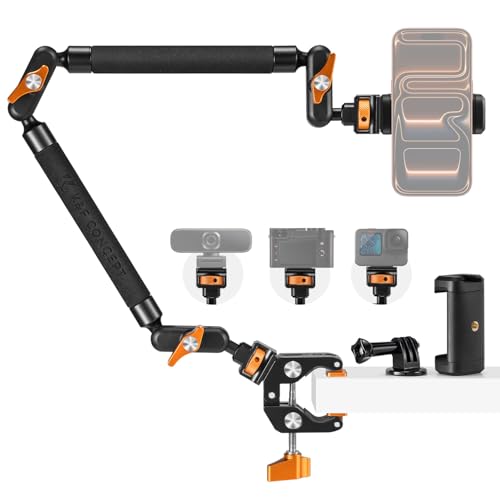
- 22-inch articulated arm for overhead positioning
- Clamp fits flat or cylindrical surfaces
- Supports up to 1 kg for static scenes
Best For: Lightweight cameras, phones, lights, and microphones
Best Simple Webcam Stand
LenTok Telescopic Webcam Mount

- Weighted metal base for stable desk use
- Adjustable height and 360-degree ball head
- Foldable design with included phone holder
Best For: Webcam calls, presentations, and light recording
Best Compact Magic Arm
SMALLRIG 22-Inch Camera Arm Clamp

- 56 cm articulated arm for overhead shots
- Clamp opens to 63.5 mm for desks and tubes
- 600 g recommended load capacity
Best For: Lightweight phones, webcams, lights, and microphones
Best Gear-Joint Overhead Arm

- Three locking joints for controlled overhead angles
- Supports up to 8.8 pounds vertically
- 38-inch reach with 1/4-inch and 3/8-inch mounts
Best For: Top-down creator setups needing firm, repeatable positioning
Best Compact Webcam Stand

- Weighted, non-slip desktop base
- 8.7- to 20.9-inch adjustable height
- 360-degree horizontal ball-head rotation
Best For: Webcams and light accessories in flexible home-office setups
Best Heavy-Duty Spring-Arm Crane

- 11-pound load capacity
- Adjustable spring tension with visible scale
- Includes phone clamp and dual-size screw interface
Best For: Heavier camera and accessory setups on compatible desks
Heavy-Duty Pick
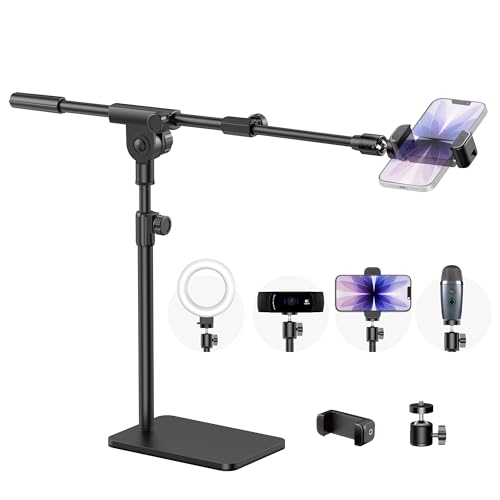
- Weighted metal base minimizes wobble
- Supports phones, webcams, lights, and projectors
- 180-degree ball-head adjustment
Best For: Stable tabletop recording and video calls
Clamp-Mount Pick
K&F CONCEPT 27.5-Inch Gooseneck Arm

- Adjustable 27.5-inch gooseneck arm
- Padded clamp fits 5–45 mm desks
- Compatible with webcams and action cameras
Best For: Flexible overhead mounting on flat desks
Space-Saving Pick

- 33-inch flexible aluminum-core arm
- Compact clamp and included phone holder
- 360-degree camera rotation
Best For: Lightweight webcams and phones in tight spaces
Best Overall – NEEWER ST008 Overhead Camera Desk Mount
For shoppers comparing camera cranes for home offices, the NEEWER ST008 is a highly configurable desktop rig for mounting several devices at once. Its center column and two boom arms accommodate cameras, webcams, lights, and microphones while folding down for storage.
Best For: Home-office creators who need a multi-device overhead setup with substantial load capacity.
Pros:
- Supports up to 11 pounds on the center column and 5.5 pounds per arm, within the stated joint limits.
- Offers adjustable height, 360-degree swivel, and multiple tilt ranges.
- Includes adapters for webcams, lights, microphones, phones, compact cameras, and DSLRs.
- C-clamp, anti-slip pads, serrated joints, and cable ties support a tidy, secure setup.
Cons:
- The multi-part design is more involved to assemble than a simple webcam stand.
- The 3.5-inch clamp requires a compatible desk edge.
The ST008 is the most versatile choice here for a permanent or semi-permanent home-office production station, especially when you want to keep several accessories mounted and organized.
Best Long-Reach Arm – K&F CONCEPT 22-Inch Magic Arm Clamp
The K&F CONCEPT 22-inch kit is a compact option for camera cranes for home offices when you need extra reach from a single clamp-mounted arm. Its articulated ball heads support overhead, level, and angled positioning for a phone, action camera, light, or microphone.
Best For: Remote workers and creators who want a long, adjustable arm for lightweight gear.
Pros:
- Three 360-degree ball heads provide flexible positioning.
- Clamp grips flat surfaces up to 50 mm or cylindrical objects from 20 to 60 mm.
- All-metal construction, anti-twist pins, and silicone pads improve grip and protection.
- Includes a phone holder, action-camera adapter, and 1/4-inch and 3/8-inch accessory threads.
Cons:
- Its maximum recommended load is 1 kg, so it is intended for lighter equipment.
- The manufacturer specifies static scenes rather than dynamic outdoor activity.
This is a practical choice when reach and flexible clamping matter more than heavy-duty capacity. It suits static desk demonstrations, calls, and streaming setups with lightweight accessories.
Best Simple Webcam Stand – LenTok Telescopic Webcam Mount
For a straightforward alternative among camera cranes for home offices, the LenTok webcam stand focuses on stable, eye-level positioning rather than a large boom arm. Its weighted metal base, telescopic height adjustment, and swivel ball head make it useful for meetings, recording, and occasional top-down shots.
Best For: Webcam users who want a compact, foldable desk stand for calls and basic content creation.
Pros:
- Weighted metal base and anti-slip padding help keep the frame steady.
- Telescopic height adjustment can raise the webcam toward eye level.
- Ball head allows 360-degree rotation and tilt adjustment.
- 1/4-inch mount and included phone holder broaden compatibility.
Cons:
- It is a desk stand rather than a multi-arm crane for several devices.
- Supplied notes do not specify a maximum load rating.
The LenTok is best when simplicity and portability are priorities. It provides a cleaner upgrade from stacking books under a webcam, without the bulk of a full overhead rig.
Best Compact Magic Arm – SMALLRIG 22-Inch Camera Arm Clamp
The SMALLRIG 22-inch magic arm is a focused option for camera cranes for home offices, offering overhead positioning from a clamp-mounted aluminum arm. Double-ball joints, anti-deflection hardware, and protective pads help it hold a phone, webcam, light, microphone, or action camera in a compact workspace.
Best For: Creators and remote workers who need a flexible single-arm mount for lightweight equipment.
Pros:
- Long 56 cm arm supports overhead, POV, streaming, and conferencing angles.
- Crab clamp opens to 63.5 mm and can grip desks or round tubes.
- Silicone pads and rubber rings improve friction while helping protect equipment.
- Includes a phone holder, two 1/4-inch screws, and a 1/4-to-3/8-inch adapter.
Cons:
- Recommended load capacity is limited to 600 g/21 oz.
- Heavy phones or gear may require shortening the force arm to prevent slippage.
- It is a single-arm kit, so it offers less expansion than a multi-arm rig.
The SMALLRIG balances reach and portability well for lightweight desk setups. Its load guidance makes it better suited to phones, webcams, and compact accessories than heavier DSLR equipment.
Best Gear-Joint Overhead Arm – TARION TKA01-L
For shoppers comparing camera cranes for home offices, the TARION TKA01-L stands out as a desk-mounted overhead arm built for controlled positioning. Its three locking gear joints, 38-inch reach, and support for vertical and horizontal shooting make it well suited to top-down recording without taking up floor space.
Best For: Creators filming unboxings, cooking demonstrations, document scans, stop-motion, or macro content with a DSLR, webcam, ring light, or projector.
Pros:
- Locking joints provide 180-degree tilt and 360-degree rotation while helping prevent position changes during recording.
- Steel-tube construction supports up to 8.8 pounds vertically and 6.6 pounds horizontally.
- Detachable ball head and 1/4-inch and 3/8-inch connections expand device compatibility.
- Dual-slot clamp opens to 2.36 inches and includes extra mounting threads for accessories.
Cons:
- Horizontal load capacity is lower than the vertical rating.
- The clamp requires a suitable desk rail or surface and may be more involved to reposition than a weighted-base stand.
The TARION is a strong choice when stability and repeatable overhead angles matter more than quick, lightweight repositioning. Its mechanical locking design is particularly useful for longer home-office recording sessions.
Best Compact Webcam Stand – InnoGear WS130
Among camera cranes for home offices, the InnoGear WS130 is the compact option for webcam users who prefer a weighted desktop base over a desk clamp. Its adjustable height, detachable gooseneck, and rotating ball head support flexible positioning for calls, streams, and recordings.
Best For: Home-office video conferencing, live streaming, and webcam setups using compatible 1/4-inch screw-mount devices.
Pros:
- Weighted all-metal base with four non-slip pads helps reduce tipping, scratches, and movement noise.
- Height adjusts from 8.7 to 20.9 inches for different framing needs.
- Ball head rotates 360 degrees horizontally and 140 degrees vertically.
- Compatible with numerous Logitech webcams plus ring lights, GoPro devices, microphones, and Tascam recorders with a 1/4-inch screw hole.
Cons:
- It is intended for devices with a standard 1/4-inch screw hole.
- The manufacturer recommends removing or straightening the gooseneck for maximum stability and load capacity.
- A weighted base occupies desk surface rather than clamping to the edge.
The WS130 is better suited to webcams and lighter accessories than to heavy DSLR overhead work. Choose it when portability, simple repositioning, and a quiet desktop footprint are more important than extended crane reach.
Best Heavy-Duty Spring-Arm Crane – SupeDesk FC200
For home offices that need more capacity, the SupeDesk FC200 is one of the more substantial camera cranes for home offices. Its aluminum spring arm, adjustable tension scale, 11-pound load rating, and 8.26- to 28.34-inch height range give creators broad control over heavier cameras and accessories.
Best For: DSLR filming, heavy microphones, projectors, ring lights, and smartphone recording where a clamped tabletop mount and higher load capacity are useful.
Pros:
- Supports loads up to 11 pounds, helping accommodate heavier cameras and lenses.
- Visible spring-tension scale makes it easier to tune the arm for the mounted device.
- Three articulated arms provide broad positioning, with specified 180-degree and 360-degree horizontal movement.
- Includes a 360-degree ball head, 1/4-inch and 3/8-inch interface, and phone clamp.
Cons:
- The clamp fits tables and workbenches up to 2.95 inches thick, so thicker desks may not be compatible.
- At 3.01 kg, it is substantially heavier than compact webcam stands.
- Its spring-arm design may require tension adjustment when changing equipment weight.
The FC200 is a practical pick for a more permanent production station where capacity and reach outweigh portability. Its spring-tension adjustment is especially helpful when switching among cameras, microphones, and lights.
Heavy-Duty Pick – InnoGear Overhead Phone Mount
For shoppers comparing camera cranes for home offices, the InnoGear stands out with a weighted tabletop base designed to keep phones, webcams, lights, and other compatible gear steady. Its adjustable boom arm and ball head provide flexible positioning for video calls, overhead recording, and tutorials.
Best For: Home-office users who prioritize stability and need one mount for phones, webcams, lights, or small projectors.
Pros:
- Heavy 3.62-pound metal base and 5.07-pound total stand weight help reduce wobbling and imbalance.
- Standard 1/4-inch thread supports smartphones, webcams, GoPros, LED lights, and pico projectors.
- Ball head rotates 180 degrees for flexible shooting and conferencing angles.
- Tool-free detachable design can be used with the boom arm or as a compact stand.
Cons:
- The weighted base occupies more desk space than a clamp-style mount.
- The included phone clamp is intended for phones measuring 2.5–5.5 inches wide.
The InnoGear is the most stability-focused option here. Choose it when a solid tabletop footprint matters more than keeping every inch of desk space clear.
Clamp-Mount Pick – K&F CONCEPT 27.5-Inch Gooseneck Arm
The K&F CONCEPT is a practical choice among camera cranes for home offices when you want an adjustable overhead arm without a large tabletop base. Its gooseneck design, padded clamp, and standard 1/4-inch screw suit webcams, action cameras, and fill lights.
Best For: Remote workers, streamers, and creators who want a flexible clamp mount for a flat desk.
Pros:
- 27.5-inch adjustable gooseneck arm can be shaped into an S-form for added stability.
- Padded clamp fits flat desks measuring 5–45 mm thick and helps protect the surface.
- 1/4-inch screw works with many webcams, action cameras, and fill lights.
- Tool-free setup is useful for video conferencing, teaching, streaming, and product photography.
Cons:
- The clamp is designed for flat surfaces, so unusual desk edges may not be suitable.
- A gooseneck arm generally requires deliberate positioning to achieve the desired angle.
This K&F CONCEPT mount balances desk savings and adjustability. It is a strong fit if your home-office desk has a compatible flat edge and your equipment uses a 1/4-inch mount.
Space-Saving Pick – JCWINY 33-Inch Webcam Mount
For compact camera cranes for home offices, the JCWINY combines a 33-inch flexible gooseneck with a clamp base that can mount to desks, bedframes, bedside surfaces, and counters. It includes a phone holder and supports many 1/4-inch webcams, though its stated load limit is 0.7 kg.
Best For: Users who need a flexible, space-saving mount for lightweight webcams or smartphones.
Pros:
- 33-inch aluminum-core gooseneck can be shaped into an S or Z for improved stability.
- Clamp opens to 2.6 inches and uses anti-slip padding to help protect furniture.
- 360-degree rotating ball joint supports varied camera and phone angles.
- Compact clamping design can help reduce desk clutter compared with a round-base stand.
Cons:
- Maximum load is 0.7 kg (1.5 pounds), so it is not intended for heavy cameras or devices.
- The stiff arm must be bent with both hands to set the desired position.
- Clamp mounting may not suit every desk or furniture edge.
The JCWINY is best when flexibility and a small footprint matter most. Keep the 0.7-kilogram capacity in mind, and use it with lightweight compatible equipment for the most reliable results.
How We Picked the Best Camera Cranes for Home Offices
We compared these Camera Cranes for Home Offices by looking at practical factors that affect everyday use: mounting stability, arm reach, adjustment range, device compatibility, desk fit, and ease of repositioning. We also considered whether each design is better suited to a webcam, phone, light, or compact camera. A mount that looks versatile on paper is only useful if it can hold its intended load without excessive sag, vibration, or desk movement.
Because home-office setups vary widely, the selection includes compact webcam stands, flexible goosenecks, clamp-based magic arms, and more structured overhead rigs. Always confirm the manufacturer’s load rating and thread specifications before attaching heavier equipment.
Quick Comparison
| Mount style | Best for | Main advantage | Potential trade-off |
|---|---|---|---|
| Gooseneck arm | Webcams and phones | Fast, flexible positioning | May vibrate or droop under heavier loads |
| Magic arm clamp | Phones, lights, and compact cameras | Strong adjustment and versatile mounting | Requires careful tightening |
| Articulated or geared arm | Overhead filming and product work | More controlled positioning | Usually bulkier and slower to adjust |
| Multi-arm desk rig | Creators using several devices | Supports a more complete workstation | Needs substantial desk space |
Key Buying Factors for Camera Cranes for Home Offices
Desk Clamp and Workspace Fit
Measure the desk edge and check the clamp’s opening range. A wide, padded clamp is useful for thick desktops, while a compact clamp suits narrow workstations. Leave room for cables and avoid placing the mount where it can interfere with your keyboard, monitor, or chair.
Load Capacity and Stability
Match the mount to the complete setup, including the camera, cage, phone holder, microphone, and any adapter. Heavier devices generally benefit from articulated or geared arms rather than highly flexible goosenecks. A sturdy base and tight locking knobs matter more than maximum advertised reach.
Reach, Movement, and Adjustment
Longer arms provide better overhead coverage but can introduce leverage and vibration. Look for 360-degree ball heads, multiple locking joints, or geared adjustment when precise framing matters. For a fixed webcam, simpler telescopic or flexible designs may be easier to live with.
Compatibility and Mounting Threads
Many mounts use a standard 1/4-inch screw, but accessories may require 3/8-inch fittings, a phone clamp, or a webcam-specific adapter. Confirm that the included holder fits your device and that the camera can be angled without blocking ports or buttons.
Who Should Buy Which Camera Cranes for Home Offices?
Choose a gooseneck webcam stand if you primarily need a simple video-call setup that can be moved quickly. These are convenient for lightweight webcams and phones but are less suitable for heavy cameras.
Choose a magic arm clamp if you want one mount for a phone, small camera, or light and value flexible positioning. It is a strong middle ground for home creators who regularly change angles.
Choose an articulated or geared overhead mount for stable product shots, drawing demonstrations, cooking videos, and other top-down work. The added structure is worthwhile when repeatable framing matters.
Choose a multi-arm rig if your desk doubles as a production station and you need to hold multiple devices at once. Before buying, verify that your desktop can support the combined load and clamp pressure.
