
The right SOLIDWORKS workstation depends on what you do most: build parts, navigate large assemblies, create drawings, or render finished designs. A fast processor helps interactive work, while memory and graphics choices become more important as projects grow.
These 10 options span current small-form-factor PCs, expandable towers, and renewed workstations. Use the guide below to match their configurations to your workload—and check the exact graphics card before buying.
Best 10 Cad Workstations for Solidworks Picks for 2026
Modern Tower Pick
Lenovo ThinkStation P3 Tower Gen 2

- Core Ultra 9 285 and RTX 2000
- 64GB DDR5 and 1TB SSD
- One-year Lenovo on-site warranty
Best For: Current-generation tower performance and large CAD files
High-Memory Renewed Pick

- Xeon W-2245 and P4000 graphics
- 512GB NVMe SSD
- Confirm RAM: title and details disagree
Best For: Renewed Xeon buyers willing to verify the memory configuration
Compact Office Pick

- Stated SOLIDWORKS ISV certification
- 32GB DDR5 and 1TB SSD
- Integrated Intel UHD Graphics 770
Best For: Compact CAD setups that do not require a dedicated GPU
Storage-Focused Renewed Pick

- Xeon W-2133 and Quadro P4000
- 64GB listed RAM and 1TB NVMe SSD
- Renewed; confirm conflicting RAM details
Best For: Renewed tower buyers prioritizing storage and dedicated graphics
Compact Modern Pick

- Core Ultra 7 265 and 32GB DDR5
- RTX A1000 with 8GB GDDR6
- 1TB PCIe 4.0 SSD; 11 USB ports
Best For: Compact CAD setups with dedicated graphics
Renewed Memory Pick

- 64GB installed DDR4 RAM
- Quadro P2000 with 5GB GDDR5
- Renewed, older quad-core Xeon
Best For: Memory-heavy workflows on a renewed workstation
CAD and Creator Pick

- Core i9-10900K; up to 5.3GHz turbo
- RTX 4000 with 8GB GDDR6
- Verify RAM: listing details conflict
Best For: CAD alongside rendering and video editing
Compact i7 Pick
Lenovo ThinkStation P3 Tiny i7-14700
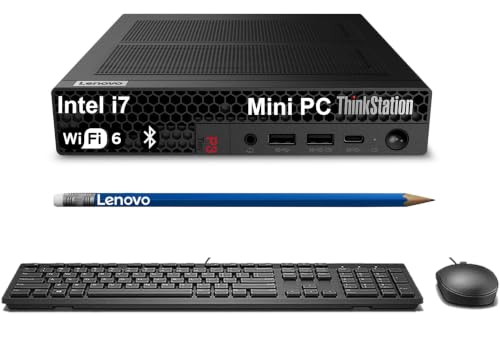
- Core i7-14700 in a roughly 3-pound chassis
- Integrated Intel UHD Graphics 770
- Seller-upgraded memory and SSD options
Best For: Space-limited CAD desks prioritizing a compact desktop
Visualize-Focused Tower
Cloud Ninjas Threadripper 9960X Workstation

- 24-core Threadripper 9960X
- RTX PRO 4000 Blackwell SFF with 24GB
- 128GB ECC DDR5; 1TB and 2TB NVMe SSDs
Best For: SOLIDWORKS Visualize users wanting dedicated GPU hardware
Compact i5 Pick
Lenovo ThinkStation P3 Tiny i5-14500

- 14-core Core i5-14500 vPro
- Small 7.2 x 7 x 1.5-inch chassis
- Integrated UHD 770; configurable RAM and SSD
Best For: Compact CAD desks that do not need a dedicated GPU
Modern Tower Pick – Lenovo ThinkStation P3 Tower Gen 2
Among cad workstations for solidworks, this ThinkStation P3 Tower Gen 2 combines an Intel Core Ultra 9 285, NVIDIA RTX 2000 graphics, 64GB of DDR5 memory, and a 1TB SSD for demanding design workflows.
Best For: Buyers who want a new, high-spec tower for large models and multitasking.
Pros:
- 64GB DDR5-5600 memory and a 1TB SSD support large files and quick loading.
- NVIDIA RTX 2000 graphics and Core Ultra 9 processing suit demanding workstation tasks.
- Includes Windows 11 Pro and a one-year Lenovo on-site warranty.
Cons:
- The one-year included warranty may be short for buyers seeking longer on-site coverage.
- The front USB-C port supports data transfer only.
This is the strongest fit here for buyers prioritizing a current-generation platform and substantial memory. Check the exact graphics configuration against your SolidWorks requirements before ordering.
High-Memory Renewed Pick – PCSP P520 Xeon Workstation
For shoppers comparing cad workstations for solidworks, this renewed PCSP P520 pairs a Xeon W-2245 with P4000 graphics and a 512GB NVMe SSD. The title specifies 128GB of DDR4 memory, though the supplied details also list 16GB, so confirm the installed amount before buying.
Best For: Buyers seeking a renewed Xeon workstation with a potentially high-memory configuration.
Pros:
- Xeon W-2245 is listed at 3.90GHz, with a maximum speed of 4.7GHz.
- Dedicated P4000 graphics come with 8GB of listed video memory.
- Includes Windows 11 Pro and a 512GB NVMe SSD.
Cons:
- Memory information conflicts between the title and supplied details.
- Listed warranty is 90 days.
The P520 offers an appealing processor-and-graphics combination for a renewed system, but the RAM discrepancy makes seller confirmation especially important.
Compact Office Pick – HP Z2 SFF G9 Workstation
Among compact cad workstations for solidworks, the HP Z2 SFF G9 stands out for its stated SOLIDWORKS ISV certification, Core i5-14500 processor, 32GB of DDR5 memory, and 1TB SSD. This configuration uses Intel UHD Graphics 770 rather than a dedicated graphics card.
Best For: Space-conscious teams whose CAD work fits an integrated-graphics configuration.
Pros:
- Listing cites ISV certification for SOLIDWORKS and other professional applications.
- Small-form-factor chassis measures 15.1 by 12.1 by 3.95 inches.
- 32GB DDR5 memory, a 1TB SSD, and Windows 11 Pro are included.
Cons:
- Intel UHD Graphics 770 may not meet workflows requiring a dedicated GPU.
- The new computer was resealed for memory and SSD upgrades.
This is a practical choice when desk space and certification matter. Verify that this exact graphics configuration meets your SolidWorks workload and support needs.
Storage-Focused Renewed Pick – Dell Precision 5820 Tower
Dell Precision Tower 5820 Workstation W-2133 6C 3.6Ghz 64GB 1TB NVMe P4000 Win 11 (Renewed)
Check Price On AmazonFor buyers evaluating renewed cad workstations for solidworks, this Dell Precision 5820 offers a Xeon W-2133, NVIDIA Quadro P4000 graphics, 64GB of RAM, and a 1TB NVMe SSD. Its combination of dedicated graphics and ample storage is useful to weigh against its older processor platform.
Best For: Buyers who want a renewed CAD tower with 64GB RAM and a spacious SSD.
Pros:
- Quadro P4000 provides dedicated graphics with 8GB of GDDR5 memory.
- 64GB RAM supports memory-heavy multitasking.
- 1TB NVMe SSD provides room for applications and project files.
Cons:
- Xeon W-2133 and DDR4-2133 memory are older-generation components.
- The supplied details conflict: installed RAM is listed as 64GB, but maximum RAM is listed as 8GB.
This tower is worth considering for its stated memory, storage, and professional graphics. Because it is renewed and the memory specifications conflict, confirm the exact configuration before purchase.
Compact Modern Pick – HP Z2 G1i Small Form Factor
Among cad workstations for solidworks, the HP Z2 G1i is a compact choice with a Core Ultra 7 265 processor, 32GB of DDR5 memory, and dedicated NVIDIA RTX A1000 graphics with 8GB of GDDR6 memory.
Best For: Buyers who want a current-generation, small-form-factor workstation with dedicated graphics for CAD work.
Pros:
- 20-core Core Ultra 7 265 processor and 32GB DDR5 RAM.
- 1TB PCIe 4.0 SSD for project storage.
- RTX A1000 graphics and 11 USB ports, including two USB-C ports.
Cons:
- The supplied details list a 1TB SSD but no secondary drive.
- Maximum supported RAM is inconsistent across the supplied notes; verify the configuration before planning an upgrade.
This is a practical fit when desk space and newer components matter. Check the exact graphics and memory configuration against your SolidWorks requirements before buying.
Renewed Memory Pick – Dell Precision Tower 5820
Dell Precision Tower 5820 Workstation W-2123 4C 3.6Ghz 64GB 1TB NVMe P2000 Win 11 (Renewed)
Check Price On AmazonFor buyers comparing cad workstations for solidworks, this renewed Dell Precision Tower 5820 pairs a 3.6GHz quad-core Xeon W-2123 with 64GB of DDR4 RAM and NVIDIA Quadro P2000 graphics. The title also lists a 1TB NVMe drive.
Best For: Buyers who prioritize 64GB of installed memory and are comfortable purchasing a renewed workstation.
Pros:
- 64GB DDR4 RAM is included in the listed configuration.
- Quadro P2000 has 5GB of dedicated GDDR5 graphics memory.
- Seven expansion slots and a DVD-RW drive add flexibility.
Cons:
- The four-core Xeon is an older platform; the notes list model year 2017.
- It is sold as renewed rather than new.
The generous installed RAM is its clearest advantage. Confirm the drive capacity and Windows version with the seller, since the supplied listing details are inconsistent.
CAD and Creator Pick – PCSP 3650 Workstation
The PCSP 3650 is positioned for CAD and creative workloads. Among cad workstations for solidworks, its Core i9-10900K, RTX 4000 graphics, and combination of NVMe and hard-drive storage make it worth considering if you also render or edit video.
Best For: CAD users who also need a desktop for rendering, content creation, or video editing.
Pros:
- Core i9-10900K is listed with a 3.7GHz base and up to 5.3GHz turbo speed.
- RTX 4000 graphics are listed with 8GB of GDDR6 memory.
- The title lists a 512GB NVMe SSD plus a 2TB HDD.
Cons:
- The supplied details conflict on installed RAM: the title says 64GB, while the specifications say 16GB.
- The stated warranty is 90 days.
This configuration offers a useful mix of processor speed, dedicated graphics, and two storage types. Verify the installed RAM and exact configuration before ordering.
Compact i7 Pick – Lenovo ThinkStation P3 Tiny i7-14700
Among cad workstations for solidworks, this ThinkStation P3 Tiny suits buyers who need a small desktop for CAD work. It pairs an Intel Core i7-14700 with Intel UHD Graphics 770; the listing also states that the P3 Tiny is ISV-certified for SOLIDWORKS.
Best For: Space-limited engineering desks handling CAD work where a compact system matters more than a dedicated GPU.
Pros:
- Approximately 3-pound chassis frees up desk space.
- DDR5 memory and NVMe SSD configurations offer room to choose a suitable setup.
- DisplayPort, HDMI, six USB-A ports, USB-C, Ethernet, Wi-Fi 6, and Bluetooth 5.1 provide broad connectivity.
Cons:
- Intel UHD Graphics 770 is integrated graphics, not a dedicated workstation GPU.
- The computer is resealed for memory or SSD upgrades and carries a one-year warranty from Issaquash Highlands Tech.
Choose this i7 model for a compact CAD desktop, but check the selected RAM and storage configuration before ordering. Its integrated graphics are an important consideration if your work also calls for demanding visualization.
Visualize-Focused Tower – Cloud Ninjas Threadripper 9960X Workstation
For buyers comparing cad workstations for solidworks with a focus on SOLIDWORKS Visualize, this Cloud Ninjas system is built around a 24-core Ryzen Threadripper 9960X and an RTX PRO 4000 Blackwell SFF 24GB GPU. Its listed 128GB of ECC registered DDR5 memory makes it a markedly different class of machine from a mini PC.
Best For: SOLIDWORKS Visualize users seeking a high-core-count CPU, dedicated GPU, and substantial memory.
Pros:
- 24-core Threadripper CPU and RTX PRO 4000 Blackwell SFF 24GB GPU.
- 128GB ECC registered DDR5 memory and separate 1TB and 2TB NVMe SSDs.
- 10GbE, 2.5GbE, and Wi-Fi 7 connectivity.
Cons:
- Listed at 80 pounds, so it is not a space-saving or easily moved workstation.
- The supplied listing does not state SOLIDWORKS certification.
This is the option to examine when Visualize hardware is the priority. Confirm its physical space requirements and any certification your workflow requires before purchasing.
Compact i5 Pick – Lenovo ThinkStation P3 Tiny i5-14500
If desk space drives your search for cad workstations for solidworks, this ThinkStation P3 Tiny offers a roughly 3-pound mini PC with a 14-core Intel Core i5-14500 vPro. The listing states that the P3 Tiny is ISV-certified for SOLIDWORKS, though this configuration uses integrated Intel UHD 770 graphics.
Best For: Engineers and designers who want a small Windows 11 Pro CAD desktop and do not require a dedicated GPU.
Pros:
- Compact 7.2 x 7 x 1.5-inch chassis leaves more room on the desk.
- Configurable DDR5 memory and NVMe SSD storage.
- DisplayPort and HDMI support dual displays; USB-A, USB-C, Ethernet, Wi-Fi 6, and Bluetooth 5.1 connect peripherals.
Cons:
- Integrated Intel UHD 770 graphics may not suit buyers seeking dedicated GPU hardware.
- The new computer is resealed for memory or SSD upgrades, with a one-year warranty from Issaquash Highlands Tech.
Consider this i5 configuration when footprint and connectivity matter most. Verify the specific memory and storage options at checkout rather than assuming one configuration from the range in the listing.
How We Picked the Best Cad Workstations for Solidworks
We compared the listed processor, memory, graphics, storage, form factor, and whether each system is new or renewed. The selection covers compact modeling PCs, towers with dedicated professional graphics, and a rendering-focused machine. Listings can offer multiple configurations, so verify the exact specifications, warranty, and return policy at checkout. A product name alone does not establish SOLIDWORKS certification.
Quick Comparison: Match the Machine to the Job
For everyday part modeling and drawings, start with a responsive CPU, 32GB of RAM, and an SSD. The HP Z2 SFF G9 and HP Z2 G1i fit the compact-desktop category, but check the exact GPU configuration before choosing either for demanding assemblies. The Lenovo ThinkStation P3 Tiny models save the most desk space; confirm their graphics options and upgrade limits first.
For larger assemblies or more graphics-intensive work, compare the Lenovo ThinkStation P3 Tower with RTX 2000 against the PCSP P520 and Dell Precision 5820 configurations with Quadro P4000 or P2000 graphics. The PCSP 3650 adds an RTX 4000 option. These names span different hardware generations, so weigh current support and condition alongside the listed specifications. For frequent SOLIDWORKS Visualize rendering, the Cloud Ninjas Threadripper system is the most explicitly render-oriented option here, though its performance and suitability depend on the full configuration.
Key Buying Factors for Cad Workstations for Solidworks
CPU and Memory
Interactive modeling often benefits more from strong per-core speed than a high core count. Extra cores become more useful for rendering and other parallel tasks. Treat 32GB RAM as a practical starting point for professional use; consider 64GB or more if you regularly open large assemblies or run several demanding applications at once.
Graphics and Display Needs
Check the precise GPU model, its memory, and driver support—not just the amount of graphics memory in a listing. If certified hardware matters to your organization, check the SOLIDWORKS hardware certification database for the exact card and driver combination. Professional GPUs can be a sensible choice for supported CAD workflows; a powerful GPU is especially relevant to GPU-based Visualize work.
Storage, Size, and Ownership
An NVMe SSD helps with project and application loading; add capacity for libraries, archives, and render output. Towers generally offer more room for upgrades, while small-form-factor and Tiny systems suit tight desks but may limit GPU choices. For renewed machines, inspect warranty coverage, component condition, and whether the installed Windows version and drivers meet your requirements.
Who Should Buy Which Cad Workstations for Solidworks?
Choose a compact Z2 or P3 Tiny for space-conscious modeling after confirming its graphics capabilities. Choose an RTX-equipped P3 Tower or another dedicated-GPU tower when assemblies and viewport demands justify the space and cost. Consider a renewed P520 or Precision 5820 if its price, warranty, and older hardware meet your needs. Prioritize the Threadripper-based system if rendering is a major part of your workflow—not simply because it has the most cores.
