
When it comes to choosing the right CAD workstation for SolidWorks in 2025, power and performance are key. You’ll want a machine that can handle demanding engineering tasks without breaking a sweat. With an array of options available, from compact models to powerhouse desktops, understanding the best choices can make all the difference in your workflow. Let’s explore the top contenders and what features set them apart for serious CAD professionals like you.
Lenovo ThinkStation P3 Tiny Workstation Desktop

If you’re a professional in design or engineering looking for a compact yet powerful workstation, the Lenovo ThinkStation P3 Tiny is an excellent choice for running SolidWorks in 2025. With its Intel Core i7-14700 processor and NVIDIA T400 graphics, you’ll experience smooth multitasking and stunning visuals. The 64GB RAM and 2TB SSD guarantee quick boot times and ample storage for your projects. Plus, its rich connectivity options let you expand to five monitors at 4K resolution. Certified for critical applications, this workstation delivers reliability and performance, making it perfect for your design and engineering needs.
Best For: Professionals in design, architecture, and engineering seeking a compact yet powerful workstation for demanding applications.
Pros:
- Exceptional performance with Intel Core i7-14700 and NVIDIA T400 graphics, ideal for multitasking and high-resolution visuals.
- Ample memory and storage with 64GB RAM and 2TB SSD for fast boot times and extensive project storage.
- Versatile connectivity options allowing expansion to five 4K monitors, enhancing productivity for design and engineering tasks.
Cons:
- Limited upgradeability due to its compact form factor, which may restrict future enhancements.
- Higher price point compared to standard desktops, which might not be suitable for all budgets.
- Potential overkill for casual users or those with less demanding computing needs.
Lenovo ThinkStation P3 Tiny Workstation Mini Desktop PC
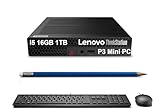
The Lenovo ThinkStation P3 Tiny Workstation Mini Desktop PC stands out as an excellent choice for professionals in engineering, creative fields, and STEM education. With its powerful Intel 14-Core i5-14500 vPro processor and 32GB DDR5 RAM, it handles demanding software like SOLIDWORKS and AutoCAD effortlessly. The 1TB SSD guarantees quick boot times and ample storage for your projects. Its compact design, measuring just 7.2 x 7 x 1.5 inches, makes it portable yet capable of supporting dual 8K monitors. Plus, with robust connectivity options and a one-year warranty, you can count on this workstation for high productivity and performance.
Best For: Professionals in engineering, creative fields, and STEM education seeking a powerful and portable workstation for demanding software applications.
Pros:
- High performance with Intel 14-Core i5-14500 vPro and 32GB DDR5 RAM, ideal for resource-intensive applications.
- Compact design (7.2 x 7 x 1.5 inches) allows for easy portability without sacrificing functionality.
- Versatile connectivity options, including dual monitor support at 8K resolution, Wi-Fi 6, and Bluetooth 5.1.
Cons:
- Limited upgrade potential due to its small form factor, which may restrict future hardware enhancements.
- Higher price point compared to standard desktops, which may not be justified for casual users.
- No discrete graphics card, which may limit performance in graphics-intensive applications compared to workstations with dedicated GPUs.
HP Z800 Workstation (Renewed)
For professionals seeking a powerful yet affordable solution for CAD applications, the HP Z800 Workstation (Renewed) stands out with its robust Intel QUAD CORE Xeon 3.33GHz Processor and impressive memory configuration of 48GB RAM. You’ll also benefit from a 1TB SSD and a spacious 4TB HDD, ensuring ample storage for your projects. The upgraded Nvidia Quadro graphics card supports multiple monitors, making it perfect for SolidWorks and other CAD software. With USB 3.0 connectivity and a reliable 850 Watt power supply, this workstation combines efficiency and performance, backed by solid warranties for peace of mind during your demanding tasks.
Best For: Professionals in need of a high-performance workstation for CAD applications and graphic-intensive tasks.
Pros:
- Robust Performance: Equipped with an Intel QUAD CORE Xeon 3.33GHz Processor and 48GB RAM for efficient multitasking.
- Ample Storage: Features a 1TB SSD for fast access and a 4TB HDD for extensive file storage.
- Multi-Monitor Support: Upgraded Nvidia Quadro graphics card enables the use of multiple monitors, enhancing productivity for design work.
Cons:
- Limited Graphics Capability: The Nvidia Quadro NVS 512MB may not support high-end gaming or intensive graphic rendering.
- Renewed Product: As a renewed workstation, there may be concerns about the longevity and condition compared to a new unit.
- Weight and Size: The workstation may be bulkier and heavier than standard desktop computers, requiring more space.
Adamant Custom 16-Core Modelling Workstation PC
Engineered for professionals who demand high-performance and efficiency, the Adamant Custom 16-Core Modelling Workstation PC excels in handling complex SolidWorks projects. With a 16-Core AMD Ryzen 9 9950X processor running at 4.3GHz and a 240mm AIO liquid cooler, it guarantees peak performance. The X870 TUF motherboard supports 64GB of high-performance DDR5 memory, while the 4TB M.2 SSD and 10TB HDD offer ample storage. The RTX 4500 ADA GPU with 24GB memory delivers stunning graphics. Running on Windows 11 Pro and equipped with Wi-Fi 7, this workstation is designed for seamless connectivity and cutting-edge productivity.
Best For: Professionals in engineering, architecture, and design who require high-performance computing for complex modeling tasks.
Pros:
- Outstanding Performance: The powerful 16-Core AMD Ryzen 9 9950X processor and high-speed DDR5 memory ensure exceptional performance for demanding applications.
- Ample Storage Options: With a 4TB M.2 SSD and an additional 10TB HDD, users have plenty of storage for large files and projects.
- Advanced Graphics Capabilities: The RTX 4500 ADA GPU delivers stunning graphics and efficient rendering for visualization and design work.
Cons:
- High Price Point: The advanced components and specifications may come at a premium cost, making it less accessible for budget-conscious users.
- Complex Setup: The high-performance nature of the system may require professional installation or setup to fully optimize its capabilities.
- Power Consumption: The robust hardware may lead to higher energy consumption compared to less powerful workstations, which could increase operating costs.
Threadripper PRO 9965WX Workstation Desktop PC

Releasing the full potential of your creative projects, the Threadripper PRO 9965WX Workstation Desktop PC stands out as an exceptional choice for professionals engaged in CAD, 3D modeling, and rendering. With its powerful 24-core AMD Ryzen processor and 64GB of high-speed DDR5 RAM, it’ll handle demanding tasks effortlessly. The 2TB PCIe NVMe SSD guarantees lightning-fast load times, while the NVIDIA GeForce RTX 5070 graphics card elevates your visual experience. Designed for connectivity and usability, it’s content creator ready with multiple monitor support. Plus, you’ll benefit from lifetime technical support and a robust 3-year warranty for peace of mind.
Best For: Professionals in creative fields such as CAD, 3D modeling, and rendering who require high-performance computing power.
Pros:
- High-performance 24-core CPU and 64GB of fast DDR5 RAM for seamless multitasking and processing.
- Large storage capacity with a 2TB PCIe NVMe SSD for quick load times and a 3TB HDD for additional data storage.
- Lifetime technical support and a 3-year limited warranty for added peace of mind.
Cons:
- Higher price point compared to standard desktop PCs, which may not be suitable for casual users.
- Weight of 49.8 pounds may make it less portable for users needing mobility.
- Limited graphics card memory (12GB GDDR7) may not suffice for extremely demanding applications or high-end gaming.
Dell 7910 AutoCAD Workstation (Renewed)
The Dell 7910 AutoCAD Workstation is a powerhouse designed for professionals who demand high performance and reliability in their CAD applications. Equipped with dual Intel E5-2643v3 processors, it delivers impressive speed with 12 cores and 24 threads. You’ll appreciate the 32GB DDR4 RAM and a 500GB SSD, ensuring swift data access and storage. The Nvidia Quadro M4000 graphics card enhances your visual experience, making complex designs a breeze. Weighing 45 pounds and measuring 24 x 24 x 12 inches, it fits comfortably in most workspaces. Just note, a mouse and keyboard aren’t included, so plan accordingly!
Best For: Professionals and designers in need of a high-performance workstation for demanding CAD applications.
Pros:
- Powerful Performance: Dual Intel E5-2643v3 processors provide exceptional speed with 12 cores and 24 threads.
- High-Quality Graphics: The Nvidia Quadro M4000 graphics card delivers superior visual rendering for complex designs.
- Fast Storage: Equipped with a 500GB SSD for quick data access and improved overall system responsiveness.
Cons:
- No Peripherals Included: Does not come with a mouse or keyboard, requiring additional purchases.
- Heavy Weight: At 45 pounds, it may not be ideal for those needing a portable workstation.
- Renewed Condition: As a renewed product, it may not have the same warranty or condition as a brand-new unit.
Threadripper PRO 9955WX Workstation Desktop PC
For professionals working with demanding applications like CAD, the Threadripper PRO 9955WX Workstation Desktop PC stands out as an exceptional choice. With a powerful 16-core AMD Ryzen processor, it delivers unmatched performance, reaching speeds up to 5.4 GHz. You’ll enjoy seamless multitasking thanks to 32GB ECC DDR5 RAM and lightning-fast 2TB PCIe NVMe storage. The NVIDIA GeForce RTX 5060 Ti graphics card ensures stunning visuals, supporting resolutions up to 3840×2160. Plus, with lifetime technical support and a 3-year warranty, you can focus on your projects, knowing you’ve got dependable support behind you.
Best For: Professionals working with demanding applications such as CAD, deep learning, and 3D modeling who require high performance and reliability.
Pros:
- High-performance 16-core processor with boost speeds up to 5.4 GHz for demanding workloads.
- Ample memory and storage with 32GB ECC DDR5 RAM and a fast 2TB PCIe NVMe SSD for seamless multitasking.
- Lifetime technical support and a 3-year warranty providing peace of mind for users.
Cons:
- Weighty design at 49.8 pounds, making it less portable compared to other workstations.
- Higher price point may not be suitable for casual users or those with budget constraints.
- Limited graphics options with a single NVIDIA GeForce RTX 5060 Ti, which may not meet the needs of some high-end graphic applications.
Adamant Custom 24-Core Modelling CAD Workstation Desktop Computer PC
Engineered for professionals who demand high-performance computing, the Adamant Custom 24-Core Modelling CAD Workstation stands out with its powerful 24-Core Intel Core Ultra 9 285K processor, clocked at 3.7GHz. Paired with an RTX 2000 ADA GPU boasting 16GB, it guarantees smooth graphics rendering. With 32GB of DDR5 RAM and a 2TB NVMe SSD, multitasking and storage are seamless. Connectivity features like Wi-Fi 7 and multiple USB ports enhance efficiency. This workstation’s robust cooling system and three-year warranty underline its reliability. If you’re serious about SolidWorks, this custom PC delivers the power and performance you need.
Best For: Professionals and engineers who require high-performance computing for CAD software like SolidWorks.
Pros:
- Powerful 24-Core CPU ensures high-speed performance for demanding applications.
- Generous Storage with a 2TB NVMe SSD allows for extensive file storage and quick access.
- Comprehensive Warranty offers peace of mind with 3 years of labor and parts coverage and lifetime tech support.
Cons:
- Heavy Weight at 35 pounds may make it less portable.
- No Returns Accepted After 30 Days may be a concern for those wanting to test the product longer.
- High Initial Cost may not be accessible for all budgets.
Adamant Custom 16-Core SolidWorks CAD Workstation Desktop Computer
Designed for professionals who demand exceptional performance, the Adamant Custom 16-Core SolidWorks CAD Workstation Desktop Computer is a powerhouse that excels in handling complex designs and simulations. With its 16-Core AMD Ryzen 9 9950X3D processor running at 4.3GHz, you’ll experience unparalleled speed. The 128GB DDR5 RAM guarantees multitasking is effortless, while the 4TB NVMe SSD provides rapid access to your files. The RTX A2000 graphics card enhances your visual experience, and the 240mm AIO liquid cooler keeps everything running smoothly. Plus, with Windows 11 Pro and Wi-Fi 7 connectivity, you’re set for any project.
Best For: Professionals in engineering, architecture, and design who require high-performance computing for complex simulations and CAD applications.
Pros:
- Powerful 16-Core Processor: The AMD Ryzen 9 9950X3D provides exceptional speed and performance for demanding tasks.
- Large Memory Capacity: With 128GB of DDR5 RAM, multitasking and handling large projects is seamless.
- Advanced Graphics: The RTX A2000 graphics card enhances visual fidelity and rendering capabilities.
Cons:
- High Price Point: The workstation may be costly for casual users or those with less intensive computing needs.
- Size and Weight: Being a desktop workstation, it may not be as portable as laptops.
- Cooling Requirements: Although it has a liquid cooler, high-performance components may generate significant heat, requiring proper ventilation.
Adamant Custom 24-Core Modelling Workstation Desktop Computer PC
The Adamant Custom 24-Core Modelling Workstation is tailored for professionals who demand high performance and reliability in their CAD applications. With a powerful 24-Core Intel Core Ultra 9 285K processor clocked at 3.7GHz, this workstation handles complex tasks effortlessly. Its 128GB DDR5 RAM guarantees smooth multitasking, while the 2TB M.2 SSD provides quick storage access. The RTX A2000 graphics card enhances rendering capabilities, making it ideal for SolidWorks users. Plus, the 240mm AIO liquid cooler keeps everything running efficiently. With Windows 11 Pro and robust connectivity options, you’ll have all you need for seamless design work.
Best For: Professionals in CAD design and modeling who require high processing power and efficiency for complex tasks.
Pros:
- High-performance 24-Core processor allows for seamless multitasking and handling of demanding applications.
- Generous 128GB DDR5 RAM ensures smooth operation even with multiple applications running simultaneously.
- Advanced RTX A2000 graphics card enhances rendering capabilities, making it ideal for detailed design work.
Cons:
- Higher price point may not be suitable for casual users or those with a limited budget.
- Large physical size may not fit well in smaller workspaces or setups.
- Liquid cooling system may require more maintenance compared to traditional cooling solutions.
Factors to Consider When Choosing Cad Workstations for Solidworks
When you’re choosing a CAD workstation for SolidWorks, consider several key factors that can impact your workflow. You’ll want to assess processor performance, graphics card specifications, and memory capacity to guarantee smooth operation. Additionally, think about your storage options and connectivity features to support your projects effectively.
Processor Performance Requirements
Choosing the right processor for your SolidWorks workstation can greatly influence your design experience and productivity. Focus on core count; processors with 16 or more cores excel in multitasking and managing complex assemblies. For peak performance, aim for a CPU with a base clock speed of at least 3.0 GHz. Multi-threaded performance is crucial, as SolidWorks efficiently utilizes multiple threads for rendering and simulations, making hyper-threading a key feature to seek. Additionally, consider workstation-class processors like Intel Xeon or AMD Ryzen Threadripper for enhanced reliability and performance in CAD tasks. Finally, consult benchmark scores and performance ratings, prioritizing processors specifically tested and certified for SolidWorks to guarantee the best results.
Graphics Card Specifications
A powerful graphics card is essential for achieving ideal performance in SolidWorks, especially when rendering complex 3D models. Look for high-performance options that come with dedicated memory, as this guarantees smooth performance during visualization tasks. It’s imperative to choose graphics cards that support OpenGL and DirectX standards; these are critical for running CAD applications efficiently. Aim for a minimum of 4GB of VRAM to handle large models and complex assemblies effectively. Additionally, opt for graphics cards certified by Independent Software Vendors (ISVs) for enhanced reliability and compatibility, reducing crash risks. Finally, consider maximum resolution and multi-monitor support capabilities to boost workspace efficiency, particularly when working on intricate designs that require multiple views and tools.
Memory Capacity Needs
After selecting a high-performance graphics card, the next critical component to evaluate is memory capacity. For peak performance in SolidWorks, you should aim for a minimum of 16GB of RAM, but 32GB or more is ideal, especially for complex assemblies and large datasets. If you’re tackling simulations, rendering, or multi-threaded tasks, consider 64GB to guarantee seamless operation. Additionally, ECC (Error-Correcting Code) RAM is recommended to maintain data integrity and minimize crashes. Don’t overlook memory speed; using DDR5 RAM with higher frequencies can further enhance performance in memory-intensive applications. Finally, think about future scalability—your projects may grow in complexity, necessitating additional RAM down the line. Investing wisely in memory now pays off later.
Storage Options Available
When working with SolidWorks, understanding your storage options is essential for managing large design files effectively. SolidWorks demands significant storage capacity, making SSDs the preferred choice due to their faster read/write speeds compared to traditional HDDs. NVMe SSDs, particularly those with PCIe 4.0 support, can offer up to 30 times faster data transfer rates than standard HDDs, enhancing load times and overall performance. For extensive projects, consider a combination of SSDs for active files and HDDs for archival storage, balancing speed and capacity. Additionally, choose workstations that allow for easy storage expansion, so you can accommodate growing project files and databases over time. Don’t overlook the importance of data integrity, which can be supported by ECC (Error-Correcting Code) RAM.
Connectivity Features Importance
Efficient storage solutions are just one piece of the puzzle when selecting a CAD workstation for SolidWorks. Connectivity features play an essential role in enhancing your productivity. A workstation with multiple USB ports, including USB-A and USB-C, makes it easy to connect drawing tablets and external drives, streamlining your workflow. High-speed network options like Wi-Fi 6 or Ethernet guarantee quick data transfer, imperative for team collaboration on CAD projects. Additionally, having DisplayPort and HDMI outputs allows for high-resolution displays, letting you view intricate CAD models without lag. These advanced connectivity options guarantee your workstation integrates smoothly with various software and hardware tools, providing a seamless operation in your professional design environment.
Cooling Solutions Efficiency
Choosing the right cooling solutions for your CAD workstation is essential, especially for demanding tasks like SolidWorks modeling. Efficient cooling prevents thermal throttling, which can greatly reduce performance during intensive sessions. Opt for high-performance systems, like AIO liquid coolers, to maintain ideal CPU temperatures and guarantee consistent output during long rendering tasks. Look for designs that incorporate larger heat sinks and multiple fans, as they enhance airflow and heat dissipation. Remember that the ambient temperature of your workspace can affect cooling efficiency, so guarantee proper ventilation. Regular maintenance is also key; cleaning dust from fans and radiators can boost cooling performance and extend your workstation’s lifespan. Prioritize cooling solutions to keep your system running smoothly and efficiently.
Operating System Compatibility
While SolidWorks excels on Windows operating systems, ensuring your CAD workstation is compatible with the right version is essential for peak performance. Windows 10 and Windows 11 Pro are the most commonly supported versions, so make sure your setup aligns with these. Additionally, keeping your system updated with the latest Windows updates and drivers is vital, as SolidWorks often releases updates to take advantage of new features. Check that your workstation meets the minimum system requirements, including CPU, RAM, and graphics card specifications. Also, remember that SolidWorks is certified for specific hardware configurations, which guarantees better stability and performance. Avoid non-Windows platforms, as they may lead to software conflicts and hinder your productivity.
Warranty and Support Services
When selecting a CAD workstation for SolidWorks, warranty and support services play a significant role in guaranteeing your investment remains reliable over time. A thorough warranty that covers hardware failures and defects is vital for long-term reliability. Look for workstations offering at least a three-year warranty on upgraded components, providing peace of mind for critical projects. Additionally, technical support should be available, ideally with lifetime assistance, to address any software or hardware issues that may arise. Verify the warranty includes support for software compatibility, especially for professional applications like SolidWorks. Finally, consider the return policy details; a flexible policy can be beneficial if the workstation doesn’t meet your performance or reliability expectations upon delivery.
