
When your workday involves dozens of browser tabs, large spreadsheets, and video calls, 32GB of RAM and a 1TB SSD offer useful breathing room. The harder choice is finding a laptop with the right processor, screen, ports, and portability for your routine.
These 10 options range from roomy 17-inch HP models to 15.6-inch HP, Dell, and Acer laptops. Use the comparisons below to narrow the field, then confirm the exact configuration before you buy.
Best 10 Business Laptops with 32gb RAM and 1tb SSD Picks for 2026
Best Large-Screen Workspace

- 17.3-inch Full HD IPS anti-glare display
- 32GB RAM and 1TB SSD
- Ryzen 5 7430U and Windows 11 Pro
Best For: Desk-based spreadsheet work and multitasking
Best Ryzen 7 Multitasker

- Eight-core Ryzen 7 7730U
- 32GB RAM and 1TB PCIe SSD
- 15.6-inch Full HD IPS display
Best For: Application-heavy office multitasking
Best Port-Rich Renewed Option

- Two Thunderbolt 4 ports and Ethernet
- 32GB RAM and 1TB SSD
- Renewed; verify warranty terms
Best For: Port-heavy office setups and wired workstations
Best Everyday Office Pick
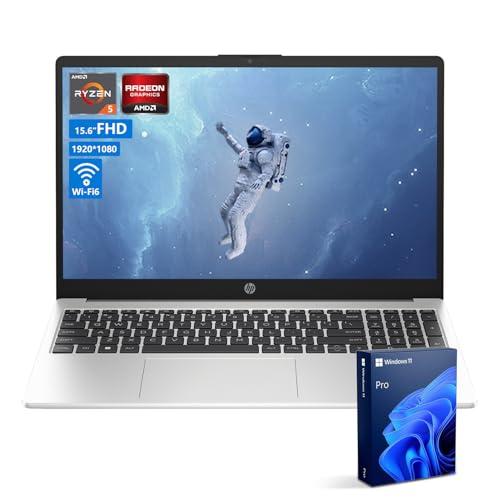
- Six-core Ryzen 5 7530U
- 32GB RAM and 1TB NVMe SSD
- Windows 11 Pro and numeric keypad
Best For: Everyday office and school productivity
Touchscreen Office Pick

- 15.6-inch Full HD IPS touchscreen
- Windows 11 Pro and numeric keypad
- 32GB RAM, 1TB SSD, and HDMI
Best For: Office users and students who want touch input
Multitasking Pick

- Eight-core Ryzen 7 7730U
- 32GB RAM and 1TB SSD
- 15.6-inch Full HD display with Wi-Fi 6
Best For: Professionals juggling multiple work apps
Business Connectivity Pick

- 32GB RAM and 1TB PCIe SSD
- Thunderbolt 4, HDMI, and Ethernet
- Renewed; 90-day limited warranty
Best For: Office users needing versatile wired connections
Everyday Multitasking Pick

- Eight-core Ryzen 7 7730U
- 32GB RAM and 1TB SSD
- Full-size keyboard with numeric keypad
Best For: Spreadsheet work and everyday multitasking
Touchscreen Work Pick
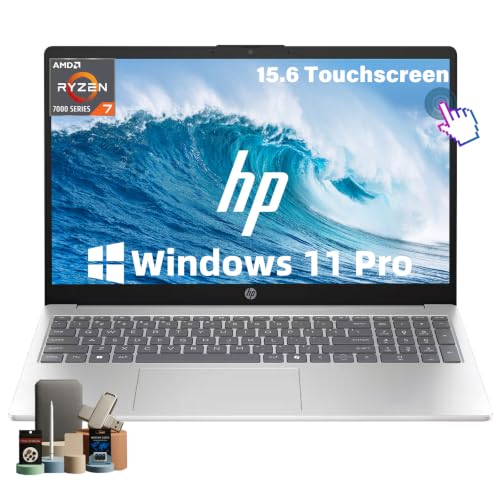
- Full HD IPS touchscreen
- 32GB RAM and 1TB NVMe SSD
- Windows 11 Pro and privacy shutter
Best For: Touch-based office work and study
Best Large-Screen Workspace – HP 17-Inch Ryzen 5 Laptop
Among business laptops with 32GB RAM and 1TB SSD, this HP stands out for its 17.3-inch Full HD IPS anti-glare display. The Ryzen 5 7430U and Windows 11 Pro make it a practical choice for spreadsheets, video calls, and everyday multitasking.
Best For: Desk-based work that benefits from a larger screen and a numeric keypad.
Pros:
- Spacious 17.3-inch Full HD IPS display with wide viewing angles.
- 32GB RAM, 1TB SSD, and a six-core Ryzen 5 processor.
- Wi-Fi 6, USB-C, USB-A, HDMI, and Windows 11 Pro.
- Dedicated Copilot key and HP Fast Charge support.
Cons:
- The 17.3-inch chassis takes up more space than a 15.6-inch laptop.
- Integrated graphics are not aimed at demanding graphics workloads.
Choose this model when screen space matters more than a compact footprint; its display and keypad are particularly useful for spreadsheet-heavy work.
Best Ryzen 7 Multitasker – HP 255 G10 Ryzen 7
If you are comparing business laptops with 32GB RAM and 1TB SSD for busy workdays, this HP 255 G10 pairs that capacity with an eight-core Ryzen 7 7730U. Its 15.6-inch Full HD IPS anti-glare screen and Windows 11 Pro round out a straightforward office setup.
Best For: Professionals who keep numerous applications and browser tabs open while working on a 15.6-inch laptop.
Pros:
- Eight-core, 16-thread Ryzen 7 processor with 32GB RAM.
- 1TB PCIe M.2 SSD and Windows 11 Pro.
- Full HD IPS anti-glare display and numeric keypad.
- Wi-Fi 6, USB-C, two USB-A ports, and HDMI.
Cons:
- The 250-nit, 45% NTSC display is better suited to routine office tasks than color-critical work.
- Integrated Radeon graphics are not intended for demanding GPU-heavy tasks.
This is the stronger fit when processor capacity and a familiar 15.6-inch layout matter more than a particularly bright or wide-gamut display.
Best Port-Rich Renewed Option – Dell Latitude 5520
For shoppers considering renewed business laptops with 32GB RAM and 1TB SSD, the Dell Latitude 5520 offers a notably broad selection of connections. Alongside its Intel Core i7-1185G7 vPro processor and Windows 11 Pro, it lists two Thunderbolt 4 ports, HDMI, Ethernet, and a SmartCard reader.
Best For: Buyers comfortable with a renewed laptop who need connections for monitors, networks, and office peripherals.
Pros:
- Two Thunderbolt 4 ports plus HDMI, USB-A, and RJ45 Ethernet.
- 32GB RAM, 1TB PCIe NVMe SSD, and an Intel vPro processor.
- 15.6-inch Full HD anti-glare display and backlit keyboard.
- SmartCard reader, microSD reader, NFC, and Wi-Fi 6.
Cons:
- Listed as renewed, so confirm condition and seller terms before purchasing.
- Warranty details in the supplied listing conflict; verify the applicable coverage.
- The four-core, 11th-generation processor is older than the Ryzen chips in the other listed models.
The extensive ports are its clearest advantage, especially for a wired workstation. Check the renewed condition and warranty carefully before deciding.
Best Everyday Office Pick – HP 255 G10 Ryzen 5
This HP 255 G10 covers the core requirements for business laptops with 32GB RAM and 1TB SSD without moving to a larger 17-inch design. Its six-core Ryzen 5 7530U, 15.6-inch Full HD anti-glare display, and Windows 11 Pro suit routine office, school, and remote-work tasks.
Best For: Everyday productivity users who want ample memory, storage, and a numeric keypad.
Pros:
- 32GB DDR4 RAM and a 1TB PCIe NVMe M.2 SSD.
- Six-core, 12-thread Ryzen 5 7530U processor.
- Wi-Fi 6, USB-C, two USB-A ports, HDMI, and a numeric keypad.
- Windows 11 Pro and a 720p HD camera.
Cons:
- The 250-nit, 45% NTSC display is not positioned for color-sensitive work.
- The original seal was opened for the RAM and SSD upgrade; check the separate warranty terms.
It is a practical choice for standard business workloads. Buyers should pay particular attention to the stated upgrade and warranty arrangement, rather than assuming all components share identical coverage.
Touchscreen Office Pick – Dell Inspiron 15.6-Inch
Among business laptops with 32gb ram and 1tb ssd, this Dell Inspiron stands out if you want a touchscreen and Windows 11 Pro. Its 15.6-inch Full HD IPS display, numeric keypad, and Intel Core i5-1155G7 suit everyday office work.
Best For: Office users and students who want touch input, a number pad, and Windows 11 Pro.
Pros:
- 32GB RAM and a 1TB SSD provide room for multitasking and files.
- Full HD IPS touchscreen adds a convenient way to navigate.
- HDMI, an SD card reader, and multiple USB-A ports support common peripherals.
Cons:
- 220-nit display brightness may be limiting in bright surroundings.
- Wi-Fi 5 is an older wireless standard than Wi-Fi 6.
Choose this model for its practical mix of touch controls and office-friendly connections, rather than for the latest wireless specification.
For shoppers comparing business laptops with 32gb ram and 1tb ssd, the Acer Aspire Go offers an eight-core, 16-thread Ryzen 7 7730U for busy workflows. Its 15.6-inch Full HD display and Wi-Fi 6 make it a practical choice for spreadsheets, browser tabs, and online meetings.
Best For: Professionals who regularly run several work apps and browser tabs at once.
Pros:
- Ryzen 7 7730U and 32GB RAM support demanding multitasking.
- 1TB SSD offers ample space for work files and software.
- Wi-Fi 6, Ethernet connectivity, and four USB ports offer flexible connections.
Cons:
- The listed operating system is Windows 11, not Windows 11 Pro.
- The supplied specifications list integrated Radeon graphics rather than a dedicated GPU.
This is the stronger fit of these three for CPU-heavy everyday multitasking if Windows 11 Pro is not a requirement.
If screen space matters most in your search for business laptops with 32gb ram and 1tb ssd, the HP 17 pairs a 17.3-inch Full HD IPS display with a six-core Ryzen 5 7430U and Windows 11 Pro. Its listed 1.5TB storage combines a 1TB internal SSD with a separate 500GB external drive.
Best For: Desk-based work that benefits from a large display and numeric keypad.
Pros:
- 17.3-inch Full HD IPS screen offers more viewing area than the 15.6-inch options.
- 32GB RAM and a 1TB SSD support everyday multitasking and local storage.
- Windows 11 Pro and a numeric keypad suit office tasks.
Cons:
- At 4.6 pounds, it is the heaviest model here with a listed weight.
- The extra 500GB is on an external drive, not inside the laptop.
Pick this HP for a roomier workspace, but account for its size if you carry your laptop frequently.
Business Connectivity Pick – Dell Latitude 5520
Among business laptops with 32gb ram and 1tb ssd, this renewed Dell Latitude 5520 stands out for its work-focused ports and Windows 11 Pro. Its 15.6-inch Full HD display and Intel Core i5-1145G7 suit everyday office tasks.
Best For: Office users who want Thunderbolt 4, HDMI, and an IR camera in a 15.6-inch laptop.
Pros:
- 32GB DDR4 RAM and a 1TB PCIe SSD.
- Two Thunderbolt 4 ports, HDMI, Wi-Fi 6, and Ethernet.
- Backlit keyboard, IR camera, and Windows 11 Pro.
Cons:
- Renewed unit with a listed 90-day limited warranty.
- Listed weight of 5 pounds may be less convenient for frequent travel.
Choose this Latitude if business connectivity matters more than a lightweight build; check the renewed condition and warranty terms before buying.
Everyday Multitasking Pick – HP 15 Ryzen 7
If you are comparing business laptops with 32gb ram and 1tb ssd for spreadsheets, meetings, and browser-heavy work, this HP 15 pairs that capacity with an eight-core Ryzen 7 7730U. Its 15.6-inch Full HD display gives you room to work.
Best For: Users who want a full-size keyboard with a numeric keypad for routine office work and data entry.
Pros:
- 32GB DDR4 RAM and a 1TB SSD.
- Eight-core, 16-thread Ryzen 7 7730U processor.
- Numeric keypad, HDMI, Wi-Fi 6, and three USB ports.
Cons:
- Ships with Windows 11 rather than the Pro edition listed for some business-focused alternatives.
- Integrated Radeon graphics are not a dedicated GPU.
This is a practical choice for multitasking and number-heavy work when a touchscreen or Windows 11 Pro is not a priority.
Touchscreen Work Pick – HP 15.6-Inch Ryzen 7
This HP is one of the business laptops with 32gb ram and 1tb ssd to consider if touch input belongs in your workflow. It combines a 15.6-inch Full HD IPS touchscreen with an eight-core Ryzen 7 7730U and Windows 11 Pro.
Best For: Professionals and students who want touch navigation, a numeric keypad, and a camera privacy shutter.
Pros:
- 32GB RAM and a 1TB NVMe SSD.
- Full HD IPS touchscreen and Windows 11 Pro.
- Wi-Fi 6, USB-C, two USB-A ports, and HDMI 1.4.
- Listed 3.52-pound weight and camera privacy shutter.
Cons:
- Integrated Radeon graphics are not a dedicated GPU.
- Listed display color gamut is 45%, which may not suit color-critical work.
The touchscreen and productivity features make it the most flexible input option here; confirm that its display specifications meet your needs if visual accuracy matters.
How We Picked the Best Business Laptops with 32gb RAM and 1tb SSD
We focused on the listed 32GB RAM and 1TB SSD configurations, then compared the details that affect day-to-day work: processor generation, screen size, business features, connectivity, and stated operating system. This is a specification-based roundup, not a claim of hands-on battery, display, or performance testing. Seller-upgraded configurations can differ from factory models, so verify the listing and warranty before ordering.
Quick Comparison: Which Type Fits Your Work?
The 15.6-inch HP 255 G10 models offer a familiar office layout, including a numeric keypad on the listed Ryzen 7 configuration. The Dell Latitude 5520 options are worth considering if features such as vPro, a backlit keyboard, or Thunderbolt 4 matter; check which features apply to the exact i5 or i7 listing. The Acer Aspire Go and other Ryzen-equipped HP options suit buyers comparing general-purpose multitasking specifications. Choose a 17-inch HP if a larger workspace matters more than a compact bag footprint. The Inspiron touchscreen and HP touchscreen provide another input option, but touch alone should not determine the purchase.
Key Buying Factors for Business Laptops with 32gb RAM and 1tb SSD
Processor and Workload
32GB of memory helps keep demanding apps and many tabs open, but it does not compensate for a slower processor. Compare the exact CPU model, not just “Core i7” or “Ryzen 7.” The listed Ryzen 5 and Ryzen 7 chips and older-generation Intel processors may be sufficient for typical office work, but their capabilities differ. For specialized software, check its requirements before choosing.
Screen, Size, and Mobility
A 15.6-inch display balances usable workspace with portability; a 17-inch display gives you more room but needs a larger bag and desk. FHD resolution appears across these listings, yet resolution alone does not establish brightness, color quality, or viewing comfort. Check weight, dimensions, and independent battery information if you commute or work away from outlets.
Ports, Security, and Software
Match the ports to your setup, especially if you use external monitors, wired accessories, or a dock. Do not assume every USB-C port supports charging or video; confirm the exact specification. For managed workplaces, check whether Windows 11 Pro, vPro, an IR camera, and the necessary security features are actually included in the configuration sold. Business labeling does not guarantee an enterprise warranty or support plan.
Storage and Seller Details
Confirm that the full 1TB is internal SSD storage. One listed 17-inch HP advertises 1.5TB total by adding 500GB of external storage; that extra capacity is not a larger internal drive. Also check whether the 32GB memory and SSD were installed by the manufacturer or an aftermarket seller, and who handles returns and warranty service.
Who Should Buy Which Business Laptops with 32gb RAM and 1tb SSD?
For a conventional 15.6-inch office laptop, start with the HP 255 G10 configurations and choose the processor that fits your budget. If your IT requirements call for specific manageability or docking features, examine the Latitude 5520 listings closely. For a larger on-screen workspace, compare the two 17-inch HP options while checking their storage breakdown. If touch input is useful to your workflow, look at the Inspiron and touchscreen HP—but prioritize the complete specification and seller terms over the touchscreen label.
