
As you explore the landscape of budget workstation laptops for 2025, you’ll find that the integration of RTX graphics is a game-changer. These laptops promise not just affordability, but also the performance you need for both professional tasks and gaming. With top brands like Acer, MSI, and HP stepping up, you might wonder which models stand out the most. Let’s take a closer look at the top contenders that could redefine your computing experience.
Acer Nitro V Gaming Laptop (ANV15-52-76NK)

If you’re a gamer or content creator looking for a budget workstation that delivers exceptional performance without breaking the bank, the Acer Nitro V Gaming Laptop (ANV15-52-76NK) is your ideal choice. Powered by an Intel Core i7-13620H and an NVIDIA GeForce RTX 4050 GPU, it handles gaming and multitasking effortlessly. The 15.6″ FHD IPS display with a 165Hz refresh rate offers stunning visuals, while 16GB DDR5 memory and a 1TB PCIe Gen 4 SSD guarantee you’ve got speed and storage covered. With advanced cooling and versatile connectivity options, this laptop elevates your gaming experience without emptying your wallet.
Best For: Gamers and content creators seeking a powerful yet affordable laptop for high-performance multitasking and immersive gaming experiences.
Pros:
- Exceptional performance with Intel Core i7-13620H and NVIDIA GeForce RTX 4050 for gaming and content creation.
- Stunning visuals on a 15.6″ FHD IPS display with a 165Hz refresh rate, enhancing the overall gaming experience.
- Versatile connectivity options including Thunderbolt 4 and multiple USB ports for easy peripheral integration.
Cons:
- Limited upgrade potential with a maximum of 32GB RAM.
- The design may not appeal to users who prefer a more traditional aesthetic.
- Battery life may be shorter during intense gaming sessions due to high-performance components.
Acer Nitro V Gaming Laptop (ANV15-52-586Z)

The Acer Nitro V Gaming Laptop (ANV15-52-586Z) stands out as an ideal choice for gamers and multitaskers seeking a budget-friendly option without sacrificing performance. Powered by an Intel Core i5-13420H and NVIDIA GeForce RTX 4050, it delivers smooth gameplay and multitasking capabilities. The 15.6″ FHD IPS display with a 165Hz refresh rate guarantees vibrant visuals. With 8GB DDR5 RAM (expandable to 32GB) and a 512GB PCIe Gen 4 SSD, storage and speed are ample. Its dual cooling fans keep it running efficiently, while Wi-Fi 6 and multiple ports enhance connectivity. You’ll enjoy a powerful performance experience without breaking the bank.
Best For: Gamers and multitaskers looking for a budget-friendly laptop that delivers high performance and efficient multitasking capabilities.
Pros:
- Excellent graphics performance with NVIDIA GeForce RTX 4050 for immersive gaming experiences.
- Dual cooling fans ensure optimal performance under heavy loads, preventing overheating.
- Expandable memory allows users to upgrade to 32GB RAM for improved multitasking.
Cons:
- Weighs 4.66 lbs, which may be heavier compared to some other gaming laptops.
- Limited initial RAM at 8GB may not be sufficient for more demanding applications without an upgrade.
- The design, while aesthetic, may not appeal to all users who prefer a more understated look.
MSI Thin 15 Gaming Laptop
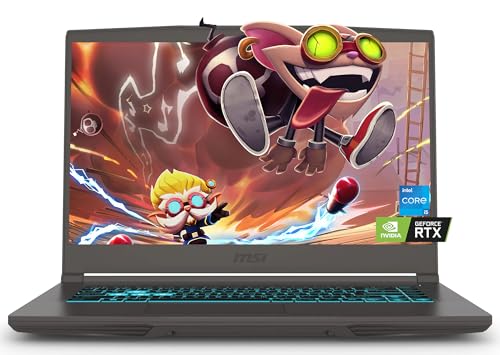
For gamers and creative professionals on a budget, the MSI Thin 15 Gaming Laptop stands out with its powerful Intel Core i5-13420H processor. This 13th Gen CPU enhances multitasking efficiency, allowing you to juggle demanding applications seamlessly. Paired with the NVIDIA GeForce RTX 4060 GPU, you’ll experience stunning graphics and smooth gameplay, even in high FPS scenarios. The 15.6-inch FHD display with a 144Hz refresh rate reduces lag and ghosting, perfect for immersive gaming. With 32GB DDR4 RAM and a 1TB SSD, you’ll enjoy ample storage and quick access to your files. Connectivity options like Wi-Fi 6E keep you online effortlessly.
Best For: Gamers and creative professionals seeking a budget-friendly laptop with powerful performance and graphics capabilities.
Pros:
- Powerful Performance: Equipped with a 13th Gen Intel Core i5 processor for efficient multitasking and smooth operation.
- High-Quality Graphics: NVIDIA GeForce RTX 4060 GPU delivers stunning visuals and supports high FPS gaming with ray tracing.
- Ample Storage and Memory: 32GB RAM and 1TB SSD provide quick access to files and support graphics-intensive applications.
Cons:
- Weight and Portability: The laptop may be heavier compared to ultra-portable options, making it less ideal for frequent travel.
- Battery Life: High-performance components may lead to shorter battery life during intensive use.
- Limited Upgradeability: Some components may be non-upgradable, limiting future enhancements to performance.
Alienware 16 Aurora Laptop (AC16250)
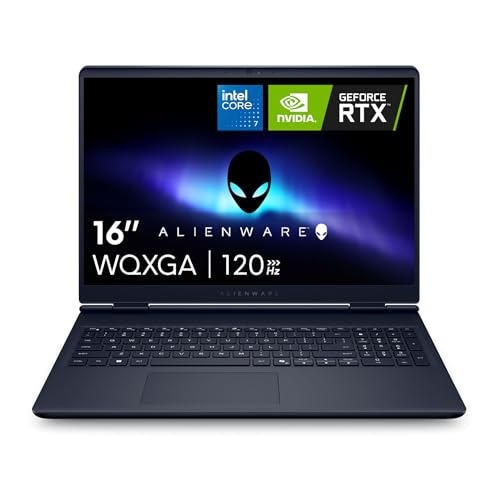
Designed for gamers and creators alike, the Alienware 16 Aurora Laptop (AC16250) stands out with its powerful NVIDIA GeForce RTX 5060 graphics card, ensuring stunning visuals and smooth performance. Featuring a 16-inch WQXGA display with 2560 x 1600 resolution and 300 nits brightness, you’ll enjoy vibrant colors and sharp details. With an Intel Core 7-240H processor and 16GB DDR5 RAM, multitasking is a breeze. The innovative Cryo-Chamber cooling system keeps everything running efficiently. Weighing just 5.49 pounds, it’s portable yet powerful. Plus, with a 1TB SSD, you’ll have ample storage for all your projects.
Best For: Gamers and content creators seeking a high-performance laptop with impressive graphics and multitasking capabilities.
Pros:
- Powerful NVIDIA GeForce RTX 5060 graphics for enhanced gaming and creative experiences.
- 16-inch WQXGA display provides vibrant colors and sharp details for an immersive visual experience.
- Innovative Cryo-Chamber cooling system optimizes airflow and maintains efficient performance during intense use.
Cons:
- No optical drive may limit options for users needing physical media access.
- Weight of 5.49 pounds could be considered heavy for a portable laptop.
- Limited warranty period of only 1 year may not be sufficient for some users seeking longer coverage.
HP Victus 15.6″ Gaming Laptop

Looking for a budget-friendly gaming laptop that doesn’t skimp on performance? The HP Victus 15.6″ Gaming Laptop delivers just that with its vibrant Full HD IPS display and a speedy 144Hz refresh rate. Powered by an Intel Core i5-12450H processor, it reaches clock speeds up to 4.4GHz, ensuring smooth gameplay. You’ll love the NVIDIA GeForce RTX 3050 graphics for stunning visuals. With up to 64GB of RAM and a spacious 2TB PCIe SSD, multitasking and storage won’t be an issue. Plus, features like Wi-Fi 6 and a backlit keyboard enhance your overall experience. It’s perfect for gamers on a budget!
Best For: Budget-conscious gamers seeking a powerful and immersive gaming experience without breaking the bank.
Pros:
- Vibrant Full HD IPS display with a fast 144Hz refresh rate for fluid visuals.
- High-performance Intel Core i5-12450H processor with clock speeds up to 4.4GHz for smooth gameplay.
- Ample memory and storage options with up to 64GB RAM and 2TB PCIe SSD for efficient multitasking and quick data access.
Cons:
- Limited battery life during intensive gaming sessions may require frequent charging.
- Weight may be slightly heavier compared to ultra-portable laptops, affecting portability.
- NVIDIA GeForce RTX 3050 may not handle the latest AAA titles at ultra settings optimally.
MSI Katana 15 HX Gaming Laptop (B14WGK-016US)

The MSI Katana 15 HX Gaming Laptop (B14WGK-016US) stands out as an exceptional choice for gamers and creative professionals who demand high performance without breaking the bank. With its Intel Core i9-14900HX processor and NVIDIA GeForce RTX 5070, you’ll experience stunning graphics and seamless gameplay. The 32GB DDR5 RAM and 1TB NVMe SSD guarantee quick load times and ample storage. Its 15.6” QHD+ display boasts a 165 Hz refresh rate for fluid visuals, while Cooler Boost 5 technology keeps everything cool during intense sessions. Plus, Windows 11 Home enhances your overall experience, making this laptop a solid investment.
Best For: Gamers and creative professionals seeking high performance and superior graphics in an affordable gaming laptop.
Pros:
- High-performance hardware: Equipped with Intel Core i9-14900HX and NVIDIA GeForce RTX 5070 for exceptional gaming and graphics performance.
- Ample memory and storage: 32GB DDR5 RAM and 1TB NVMe SSD ensure quick load times and plenty of space for games and applications.
- Fluid visuals: The 15.6” QHD+ display with a 165 Hz refresh rate provides an immersive gaming experience.
Cons:
- Weight and portability: As a gaming laptop, it may be bulkier and heavier compared to ultrabooks, affecting portability.
- Battery life: High-performance components may lead to reduced battery life during intensive gaming sessions.
- Operating system limitation: Comes with Windows 11 Home, which may not include all features needed for business use.
Dell Precision 7560 Workstation Laptop (Renewed)

If you’re in need of a powerful yet budget-friendly workstation laptop, the Dell Precision 7560 is an excellent choice for professionals and creatives alike. With its Intel Core i7-11850H processor and 32GB of RAM, you’ll experience smooth multitasking and impressive performance. The 15.6″ FHD display guarantees vibrant visuals, while the Nvidia RTX A2000 graphics card with 4GB GDDR6 memory enhances your graphics capabilities. Plus, the 512GB SSD offers fast storage solutions. Running on Windows 11 Pro and equipped with Wi-Fi and Bluetooth, this renewed model balances affordability and power, making it perfect for demanding workloads.
Best For: Professionals and creatives seeking a powerful, budget-friendly workstation laptop for demanding tasks.
Pros:
- Excellent multitasking capabilities with Intel Core i7 processor and 32GB RAM.
- High-quality visuals on a 15.6″ FHD display, perfect for graphics work.
- Fast storage with a 512GB SSD, ensuring quick data access and boot times.
Cons:
- Non-touchscreen display may not suit users preferring touch functionality.
- Graphics card, while capable, may not meet the needs of high-end gaming or 3D rendering.
- Being a renewed model, there may be concerns about long-term reliability compared to new devices.
Acer Nitro V Gaming Laptop (ANV16-72-933F)

For gamers and creators seeking a budget-friendly powerhouse, the Acer Nitro V Gaming Laptop (ANV16-72-933F) stands out with its impressive Intel Core 9 Processor and NVIDIA GeForce RTX 5070 GPU. You’ll enjoy a stunning 16″ WUXGA IPS display with a 180Hz refresh rate, perfect for smooth visuals. With 32GB DDR5 RAM and a 1TB PCIe Gen 4 SSD, multitasking and storage won’t be an issue. The advanced cooling system keeps performance steady during intense sessions, while various connectivity options guarantee you stay connected. Plus, Windows 11 Home enhances your overall experience with modern features and optimizations.
Best For: Gamers and content creators looking for a powerful yet budget-friendly laptop that delivers high performance and vibrant visuals.
Pros:
- High-performance hardware with Intel Core 9 Processor and NVIDIA GeForce RTX 5070 for seamless gaming and multitasking.
- Stunning display with 180Hz refresh rate and 100% sRGB color accuracy for an immersive visual experience.
- Advanced cooling system ensures optimal performance during long gaming sessions.
Cons:
- Weight of 5.29 lbs may be less portable compared to lighter gaming laptops.
- Limited upgrade options as the memory is maxed out at 32GB, which may not suffice for future needs.
- One-year warranty might be shorter than some competitors, offering less long-term security.
Alienware 16 Aurora Gaming Laptop (AC16250)

Designed for gamers and creative professionals alike, the Alienware 16 Aurora Gaming Laptop (AC16250) stands out with its stunning WQXGA display, delivering vibrant visuals and an immersive experience. You’ll appreciate the powerful Intel Core i7-240H processor and 16GB of DDR5 RAM, ensuring smooth multitasking. With NVIDIA GeForce RTX 5050 graphics, gaming and creative tasks are a breeze. The innovative Cryo-Chamber cooling system optimizes airflow, keeping your laptop cool during intense sessions. Weighing just 5.49 pounds and featuring multiple USB 3.0 ports, it’s portable and versatile. Plus, you’ll benefit from a one-year onsite service warranty for peace of mind.
Best For: Gamers and creative professionals seeking a high-performance laptop with immersive graphics and efficient cooling.
Pros:
- High-resolution WQXGA display provides vibrant visuals and an immersive gaming experience.
- Powerful Intel Core i7 processor and 16GB of DDR5 RAM ensure smooth multitasking and performance.
- Innovative Cryo-Chamber cooling system optimizes airflow, keeping the laptop cool during intense sessions.
Cons:
- Weight of 5.49 pounds may be considered heavy for portability compared to other laptops.
- Limited to USB 3.0 ports, which may not support the latest USB standards.
- No optical drive, which could be a disadvantage for users needing to use CDs or DVDs.
MSI Thin 15 Gaming Laptop (B13VE-2678US)

The MSI Thin 15 Gaming Laptop (B13VE-2678US) is an excellent choice for gamers and professionals alike, thanks to its powerful 13th Gen Intel Core i7-13620H processor. With an NVIDIA GeForce RTX 4050, you’ll enjoy realistic ray tracing and a stunning 15.6” FHD display boasting a 144Hz refresh rate for smooth visuals. Its 16GB DDR4 RAM and 512GB NVMe SSD guarantee efficient multitasking and ample storage for your projects. Plus, with WiFi 6E, you’ll experience faster connectivity. Running on Windows 11 Home, it’s optimized for both work and play, making it a versatile addition to your tech arsenal.
Best For: Gamers and professionals seeking a high-performance laptop for immersive gameplay and efficient multitasking.
Pros:
- Powerful Performance: Equipped with a 13th Gen Intel Core i7 processor for seamless multitasking and productivity.
- Enhanced Graphics: Features NVIDIA GeForce RTX 4050 for realistic ray tracing and stunning visuals.
- High Refresh Rate Display: 15.6” FHD display with a 144Hz refresh rate for smooth and immersive gaming experiences.
Cons:
- Limited Storage: The 512GB NVMe SSD may require upgrades for users with extensive storage needs.
- Windows 11 Home: Some business users may prefer the additional features of Windows 11 Pro.
- Weight and Portability: May be less portable compared to ultrabooks due to its gaming design and components.
Factors to Consider When Choosing Budget Workstation Laptops With RTX Graphics
When you’re choosing a budget workstation laptop with RTX graphics, consider several key factors. Performance specifications and display quality are essential for handling demanding tasks, while an efficient cooling system keeps your device running smoothly. Don’t forget to look at connectivity options and the overall design, as these can enhance your user experience.
Performance Specifications Importance
Choosing a budget workstation laptop with RTX graphics means you need to pay close attention to performance specifications, as they directly influence your ability to tackle demanding tasks like gaming, video editing, and 3D rendering. Start with the processor; high-end models like Intel Core i7 or i9 guarantee efficient multitasking and swift application execution. Aim for at least 16GB of RAM to run multiple applications smoothly without lag. Storage also matters—SSDs offer faster data access than traditional HDDs, greatly improving load times. Finally, don’t overlook cooling systems; effective thermal management prevents overheating and throttling, ensuring your laptop maintains peak performance even during intense workloads. Prioritizing these factors will help you make an informed choice.
Display Quality Considerations
After confirming your budget workstation laptop has the right performance specifications, it’s time to focus on display quality, which plays a significant role in your overall experience. Aim for a resolution of at least 1920 x 1080 pixels for sharp visuals, especially useful when handling detailed graphics. A refresh rate of 144Hz or higher enhances animation smoothness and reduces motion blur, benefiting tasks like gaming and video editing. Consider IPS technology for wider viewing angles and better color accuracy. Look for laptops with 100% sRGB color coverage for true-to-life color reproduction, essential for creative work. Finally, a brightness level of 300 nits or more guarantees clarity in various lighting conditions, making your display versatile and effective.
Cooling System Efficiency
While a powerful GPU like the RTX series can elevate your workstation laptop’s performance, it’s essential to make certain that an efficient cooling system is in place to prevent thermal throttling. Look for laptops featuring dual-fan systems and advanced thermal designs that effectively dissipate heat, ensuring your GPU and CPU stay within safe temperature ranges. Models with multiple heat pipes and improved airflow can enhance performance during demanding tasks. Remember, a robust cooling system can also prolong your laptop’s lifespan by reducing wear from high temperatures. Additionally, consider laptops with AI-driven performance management software, allowing you to customize cooling settings in real-time for a best balance between power and noise. Your choice can greatly impact your overall computing experience.
Connectivity Options Available
A powerful workstation laptop needs more than just impressive graphics and an efficient cooling system; connectivity options play a significant role in your overall productivity. Look for models equipped with multiple USB ports, including USB Type-C and USB 3.2, to guarantee compatibility with various peripherals and fast data transfer speeds. HDMI or DisplayPort options are essential for connecting external displays, allowing you to multitask seamlessly. Consider laptops featuring Wi-Fi 6 or 6E technology for improved wireless performance and stability. Ethernet ports are also crucial for reliable wired connections, especially in professional settings. Finally, choose models that support Thunderbolt 4 for versatile connectivity, enabling data transfer, video output, and power delivery through a single port.
Design and Aesthetics
When choosing a budget workstation laptop with RTX graphics, design and aesthetics play an essential role in your overall satisfaction and productivity. You’ll find that many models feature streamlined designs focused on functionality and portability, perfect for professional settings. Look for laptops with advanced thermal management, like dual-fan cooling systems, which guarantee peak performance during demanding tasks. A higher screen-to-body ratio enhances your viewing experience by maximizing display size, while minimizing bezels. Don’t overlook backlit keyboards, as they improve usability in low-light conditions and add to the sleek design. Additionally, gradient finishes and futuristic design elements can offer a modern, professional appearance without compromising on performance. Choose wisely to blend style with functionality!
