
A good USB desk fan can make a workspace, bedside table, or dorm room more comfortable without taking up much room. The best budget models focus on useful airflow, quiet operation, easy positioning, and simple USB power.
We compared 10 affordable options across speed control, portability, rotation, noise, power flexibility, and everyday convenience to help you choose the right compact fan for your setup.
Best 10 Budget USB Desk Fans Picks for 2026
Best Compact Value

- About 4 ounces with a small footprint
- Three speeds and 30-degree tilt
- Works with common USB power sources
Best For: Compact personal cooling at home, work, or while traveling
Best Power and Control
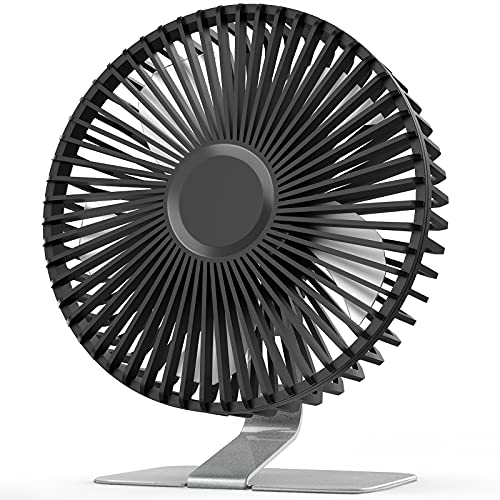
- Four speeds, including super wind
- Stable heavy-duty metal base
- 0-to-90-degree tilt and removable cover
Best For: Desk users wanting stronger control and sturdy placement
Best Flexible Mini

- 25dB stated noise level
- 360-degree vertical rotation
- Stable base with silicone vibration pads
Best For: Quiet, portable cooling with highly adjustable airflow
Best Overall Value
Gaiatop 5.5-Inch Quiet USB Desk Fan

- Three speeds with a 5.3 m/s maximum wind speed
- Detachable cover and nonslip base
- Five-foot USB cable for flexible placement
Best For: Everyday desk, bedside, office, and travel cooling
Quietest Pick

- Quiet design with noise listed under 25 dB
- 360-degree airflow adjustment
- Removable front cover for cleaning
Best For: Quiet workspaces, studying, bedrooms, and offices
Best Metal Design
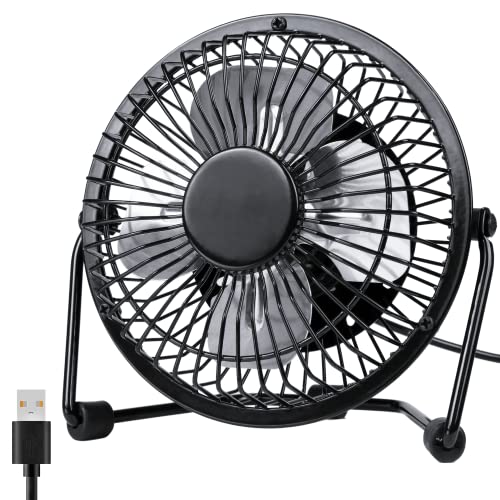
- Metal frame with aluminum blades
- 360-degree rotation for broad positioning
- Two speeds and quiet operation under 40 dB
Best For: Small desks and users who prefer a metal finish
Best Compact Pick
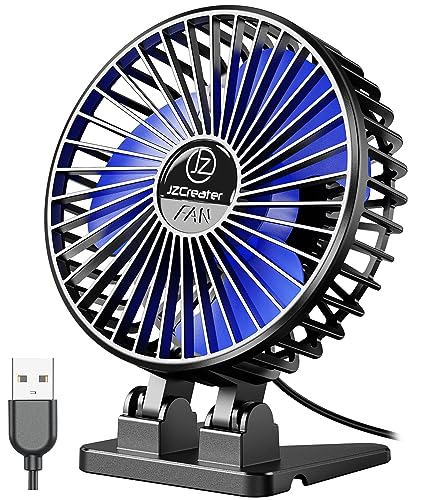
- Lightweight 4.1-inch design
- Three speeds with quiet brushless motor
- USB-powered; front cover is removable
Best For: Small workspaces, travel, and bedside cooling
Best Feature-Rich Pick
Coolhill Rechargeable USB Desk Fan

- 100 speed levels with digital display
- 120-degree oscillation and up to 6 m/s listed airflow
- 3,000 mAh rechargeable battery with USB-C power
Best For: Cordless bedroom, office, and camping use
Best Compact Value – Gaiatop USB Desk Fan
If you need budget USB desk fans for a crowded workspace, the Gaiatop keeps things simple. This lightweight 5-watt model offers three speeds, a compact footprint, and vertical airflow adjustment for personal cooling at a desk, in a car, or while traveling.
Best For: Shoppers who want an especially small, portable fan for personal use.
Pros:
- Weighs about 4 ounces and takes up little desk space.
- Three speed settings provide flexible airflow.
- USB compatibility works with laptops, power banks, wall adapters, and car chargers.
- Tilts vertically up to 30 degrees and operates below 50dB.
Cons:
- The third speed requires a 5V/1A power source.
- Its 30-degree adjustment range is more limited than models with wider rotation.
The Gaiatop is a practical low-cost choice when portability and minimal desk clutter matter more than advanced controls or a larger airflow pattern.
Best Ultra-Quiet Pick – Koonie 5-Inch USB Desk Fan
Among budget USB desk fans, the Koonie stands out for its stated 35dB noise level and seven-blade design. It provides three speeds, a stable triangular base, and 180-degree adjustment while staying compact enough for a crowded desktop.
Best For: Quiet home-office, bedside, or study use where low operating noise is important.
Pros:
- Rated at 35dB for quieter operation.
- Seven-blade design and airflow rated up to 15.4ft/s.
- Three speeds and 180-degree adjustability make aiming the breeze easy.
- Compact 5-inch design fits small work areas.
Cons:
- It is not rechargeable and must remain connected to USB power.
- Uses a USB-C connector, so cable compatibility may differ from USB-A models.
This is a strong fit if quiet performance and flexible positioning are priorities, provided you have a nearby USB power source.
Best Power and Control – SLENPET 6-Inch USB Desk Fan
The SLENPET adds a larger 6-inch format and four speed settings to the budget USB desk fans category. Its metal base stays steady on a desk, while the 0-to-90-degree tilt range helps direct stronger airflow toward your workspace or bedside.
Best For: Buyers who want more speed control and a sturdier metal desktop design.
Pros:
- Four speed levels include a super-wind setting.
- Heavy-duty metal base supports stable tabletop placement.
- Fan head tilts from 0 to 90 degrees.
- Removable front cover makes blade cleaning easier.
Cons:
- The highest setting requires a power source capable of up to 2A output.
- It is USB-powered rather than battery-powered.
- At 50dB, it is not the quietest model in this group.
The SLENPET is the better choice when adjustable power, broad tilt, and a weightier base are more useful than the smallest possible footprint.
Best Flexible Mini – TriPole USB Desk Fan
For shoppers comparing budget USB desk fans, the TriPole offers a compact 4.5-inch design with three speeds and a 360-degree up-and-down rotation range. Its wide base, silicone feet, and 4.9-foot cable make it convenient for desks, nightstands, and travel.
Best For: Portable personal cooling when quiet operation and wide angle adjustment are priorities.
Pros:
- Stated 25dB noise level supports quiet use.
- 360-degree vertical rotation makes airflow easy to aim.
- Wide base and four silicone pads help reduce vibration.
- Detachable cover supports routine cleaning.
Cons:
- The third speed may require a USB charger providing 5V/1A.
- It is corded USB-powered and does not include a built-in battery.
The TriPole is a well-rounded mini option for quiet spaces, especially if you want broad positioning flexibility without taking up much room.
Best Overall Value – Gaiatop 5.5-Inch Quiet USB Desk Fan
If you want budget USB desk fans with flexible airflow and simple controls, the Gaiatop is a well-rounded option. It offers three speeds, a 90-degree rotating design, a five-foot cable, and a compact 5.5-inch body for desks, nightstands, or travel.
Best For: Everyday home-office cooling, studying, travel, and bedside use.
Pros:
- Three speed settings provide a gentle breeze or stronger cooling.
- Quiet operation is rated at 30–50 dB, depending on speed.
- Detachable cover makes cleaning easier, while silicone base pads help prevent slipping.
- Works with USB power sources including laptops, power banks, and car chargers.
Cons:
- Requires a 5 V/2 A power supply for operation.
- No wall charger is included.
- Its 90-degree rotation is less flexible than a fully rotating fan head.
The Gaiatop stands out among budget USB desk fans for balancing portability, cleaning convenience, speed control, and a longer cable. It is a practical pick when you want adaptable everyday airflow without a large desktop footprint.
Quietest Pick – SWEETFULL Small USB Desk Fan
For shoppers prioritizing low noise, the SWEETFULL is one of the more appealing budget USB desk fans. Its 5.8-inch airflow area, three speed settings, and 360-degree adjustment make it easy to direct a quiet breeze around a workspace.
Best For: Quiet office, study, bedroom, and kitchen use.
Pros:
- Designed for quiet operation, with noise listed under 25 dB in the product description.
- 360-degree adjustment helps aim airflow where needed.
- Removable front cover simplifies cleaning.
- Includes a 4.7-foot USB cable and supports laptops, power banks, adapters, and car chargers.
Cons:
- No battery is included.
- USB power means it needs a compatible power source nearby.
- Its one-button control may be less convenient for users wanting separate controls.
The SWEETFULL is a strong choice when minimizing distraction matters more than adding advanced features. Its quiet design, broad adjustment range, and easy-clean front make it especially suitable for focused work or sleep.
Best Metal Design – Zuvas Compact 4-Inch USB Fan
The Zuvas offers a compact alternative for buyers seeking budget USB desk fans with a metal exterior. Its four-inch blades, two speed settings, 360-degree rotation, and USB connectivity suit small desks and personal cooling needs.
Best For: Compact desktops, personal airflow, and shoppers who prefer a metal finish.
Pros:
- Metal exterior and aluminum blades provide a more textured appearance than typical plastic designs.
- 360-degree rotation provides a wide range of airflow direction.
- Runs below 40 dB at its strongest setting, according to the product description.
- Compact six-inch frame and USB cable work well with laptops, adapters, hubs, and power banks.
Cons:
- Only two speed settings are available.
- The included USB cable is shorter than some competing options at 3.6 feet.
- USB power requires a separate compatible adapter or device.
The Zuvas is a good fit if appearance and compactness matter as much as basic cooling. It trades some speed flexibility for a metal-bodied design, quiet operation, and full rotation in a small footprint.
Best Compact Pick – JZCreater Mini USB Desk Fan
If you want budget USB desk fans for a tight workspace, the JZCreater is a lightweight, plug-in option with three speeds and a compact footprint. It connects to USB power and does not include a built-in battery.
Best For: Small desks, office cubicles, travel, and bedside use near a USB port.
Pros:
- Compact 4.1-inch design weighs about 4.8 ounces.
- Three speed settings provide flexible airflow control.
- Brushless motor is rated below 50 dB at high speed, with a listed noise level of 26 dB.
- Front cover can be removed for cleaning.
Cons:
- No built-in battery, so it must remain connected to USB power.
- Its small size may provide less airflow coverage than larger desk fans.
The JZCreater focuses on portability, simple button control, and quiet personal cooling. Choose it when space and low cost matter more than cordless operation or broad room circulation.
Best Stable Base – Gaiatop 5.5-Inch USB Desk Fan
Among budget USB desk fans, the Gaiatop stands out for its wider base, longer cable, and adjustable tilt. It offers three airflow levels and runs from a USB connection to a computer, adapter, power bank, or car charger.
Best For: Desks, dorm rooms, libraries, offices, and travel setups that need stable positioning.
Pros:
- Three speeds reach a listed maximum wind speed of 4.8 m/s.
- 90-degree tilt helps direct airflow where needed.
- Wide base with four rubber pads helps reduce vibration and slipping.
- Includes a 4.9-foot USB cable and weighs about 6.5 ounces.
Cons:
- USB-powered design does not provide cordless battery operation.
- Its 5.5-inch body takes up more desk space than the smallest mini fans.
The Gaiatop is a practical choice when stability and positioning are priorities. Its longer cable and rubberized base make it especially convenient for everyday desk use, while the three speeds keep operation straightforward.
Best Feature-Rich Pick – Coolhill Rechargeable USB Desk Fan
If you want budget USB desk fans with more control than basic three-speed models, this Coolhill fan adds 100 speed levels, a digital display, 120-degree oscillation, and rechargeable operation. It can also run from USB-C power when needed.
Best For: Bedrooms, home offices, camping, and users who want cordless flexibility and precise airflow adjustment.
Pros:
- Offers 100 adjustable speeds with a numeric digital display.
- 120-degree oscillation helps distribute airflow across a wider area.
- Built-in 3,000 mAh battery provides about 3–10 hours of operation after roughly 2.5 hours of charging.
- Listed noise level is 28 dB, and the fan supports USB-C power.
Cons:
- At 14.4 ounces, it is heavier than the two plug-in mini fans.
- The feature-rich design may be more than needed for simple personal cooling.
- Battery runtime varies substantially by speed setting.
The Coolhill offers the broadest feature set in this group, combining fine-grained speed control with cordless use and oscillation. It is the better fit for flexible placement, though shoppers seeking the simplest low-cost USB fan may prefer a basic three-speed model.
How We Picked the Best Budget USB Desk Fans
We focused on practical features that matter most in compact personal fans: airflow control, noise level, size, adjustability, power options, and ease of use. The selection includes simple two-speed models, fans with multiple settings, rotating designs, rechargeable options, and larger 5.5- or 6-inch units for stronger circulation.
Because product listings can vary by seller and configuration, check the current specifications for included cables, battery capacity, charging method, dimensions, and noise claims before ordering.
Quick Comparison
| What to Compare | Best For | What to Look For |
|---|---|---|
| Size | Small desks and travel | About 4 inches for compact placement; 5.5 to 6 inches for broader airflow |
| Speed settings | Flexible comfort | At least three speeds, or more granular digital control |
| Rotation | Wider coverage | Tilt adjustment or 120°/360° rotation |
| Power | Desks and bedside use | USB-A or USB-C compatibility; rechargeable battery for cordless use |
| Noise | Work and sleep | Quiet-mode claims supported by user feedback and low-speed settings |
Key Buying Factors for Budget USB Desk Fans
Airflow and Speed Control
More speeds make it easier to balance cooling and noise. A larger blade or housing may move more air, while a small fan is often better for close-range personal cooling. If you regularly feel overheated, prioritize stronger airflow over the smallest footprint.
Noise and Nighttime Use
For offices, studying, or sleeping, quiet operation is just as important as power. Look for multiple low-speed settings and read recent customer feedback for comments about motor hum, rattling, or vibration.
Positioning and Coverage
A tilting head directs air toward your face or hands. Rotating models can spread airflow across a wider area, but they may occupy more space and have more moving parts. A stable base is essential on crowded or elevated desks.
Power and Portability
USB-powered fans work well with laptops, power banks, wall adapters, and many car chargers. Rechargeable models are more flexible away from an outlet, but battery runtime and charging time should be checked carefully.
Who Should Buy Which Budget USB Desk Fans?
Choose a compact 4-inch fan if you need personal airflow in a tight workspace or want something easy to carry. A 5.5- or 6-inch model is a better choice for stronger desk-level circulation. Select a rotating fan when you want broader coverage, and choose a rechargeable design for travel, outdoor use, or locations without a nearby USB port.
For the quietest work or sleep setup, prioritize low-speed control and verified customer feedback over maximum speed claims. If you want the most flexibility, look for a model combining several speeds, adjustable positioning, and dependable USB compatibility. These priorities make it easier to narrow the field of Budget USB Desk Fans without paying for features you will not use.
