
If you want low-latency recording, clean conversion, and a smoother workflow, Thunderbolt can be a smart upgrade over basic USB gear.
Below, we’ve rounded up 10 of the best budget Thunderbolt audio interfaces for 2026, with options for solo creators, small studios, and expanding setups.
Best 10 Budget Thunderbolt Audio Interfaces Picks for 2026
Compact Low-Latency Pick
Zoom TAC-2 Thunderbolt Audio Interface

- Native Thunderbolt connection
- 24-bit/192kHz conversion
- Includes MixEfx mixer
Best For: Simple low-latency home recording
Premium Single-Channel Upgrade
UA Apollo Solo Heritage Edition

- UAD SOLO Core processing
- Bus-powered portable design
- Includes 5 plug-in titles
Best For: Solo recording with premium plug-in value
High-Channel Expansion Choice
MOTU 16A Thunderbolt 4/USB4 Interface

- 32 in / 34 out design
- 64-channel mixing with effects
- AVB networking support
Best For: Large sessions needing lots of I/O
Upgrade Accessory
Universal Audio Thunderbolt 3 Option Card

- Adds two TB3 USB-C ports
- 40 Gbps bandwidth support
- User-installable Apollo upgrade
Best For: Apollo rackmount expansion and chaining
Budget-Friendly All-Rounder
MOTU M4 4x4 USB-C Audio Interface

- 4-in/4-out USB-C interface
- Two microphone preamps
- Hardware monitoring and LCD screen
Best For: Home studios needing flexible I/O and simple monitoring
Premium DSP Pick
Universal Audio Apollo Twin X DUO Gen 2

- Thunderbolt 3 interface with Unison preamps
- 200+ UAD DSP and Native plug-ins
- Monitor correction and bass management
Best For: Producers who want UA processing and Thunderbolt 3
Compact Value Choice

- 2-in/2-out USB-C interface
- Two preamps with hardware monitoring
- 24-bit/192kHz support
Best For: Solo creators and small recording setups
Premium Apollo Conversion
Universal Audio Apollo Twin X QUAD Gen 2
- Next-generation conversion with wide dynamic range
- Unison preamps for realtime analog-style tracking
- Includes 200+ UAD DSP and Native plug-ins
Best For: Compact home studios that want premium Thunderbolt recording and UAD effects
High-Channel Workhorse
MOTU 848 28x32 Thunderbolt 4/USB4
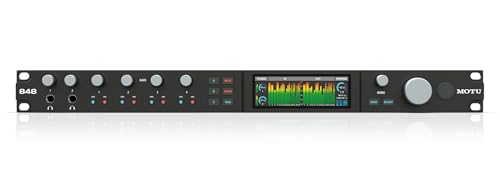
- 28x32 interface with 60 simultaneous audio channels
- Thunderbolt 4/USB4, Mac, Windows, and iOS support
- Built-in DSP mixing plus AVB networking
Best For: Studios needing lots of I/O, flexible routing, and modern connectivity
10-Mic Input Pick
MOTU 10pre 26x28 Thunderbolt 4/USB4
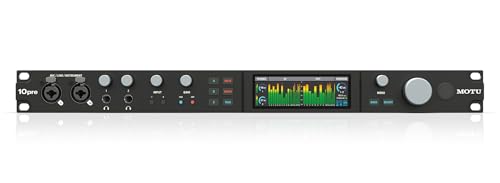
- 10 combo mic/line/instrument inputs for larger sessions
- Thunderbolt 4/USB4 support for Mac, Windows, and iOS
- ESS Sabre32 converters with DSP mixing and AVB networking
Best For: Bands and studios that need many mic inputs and expandability
Compact Low-Latency Pick – Zoom TAC-2 Thunderbolt Audio Interface
If you want budget Thunderbolt audio interfaces to keep latency low without adding a lot of extra bulk, the Zoom TAC-2 is a straightforward 2-in/2-out option. It uses native Thunderbolt connectivity, supports up to 24-bit/192kHz conversion, and includes LED gain meters plus the MixEfx software mixer for basic monitoring control.
Best For: Home recording setups that need simple, ultra-low-latency tracking for guitar, microphone, or PC use.
Pros:
- Fully native Thunderbolt connection for low-latency recording
- 24-bit/192kHz ADA conversion
- LED light gain meters help with input level checks
- MixEfx software mixer is included
Cons:
- Only 2 inputs and 2 outputs
- Windows support is listed, so platform flexibility is limited in the supplied details
- Fewer features than larger multi-channel interfaces
The TAC-2 makes sense if you value a simple Thunderbolt interface over expandability. It is best viewed as a lean tracking tool rather than a large studio hub.
Premium Single-Channel Upgrade – UA Apollo Solo Heritage Edition
The Universal Audio Apollo Solo Heritage Edition is a strong choice if your version of budget Thunderbolt audio interfaces is really about getting premium sound in a compact box. It offers UAD SOLO Core processing, an Unison mic preamp, bus-powered operation, and a headphone amp designed for loud, detailed monitoring, plus a bonus plug-in bundle.
Best For: Solo artists and project studios that want premium tracking tools and bundled plug-ins in a portable interface.
Pros:
- UAD SOLO Core processing for near-zero-latency tracking
- Unison mic preamp and guitar amp emulations
- Bus-powered for easy portability and less cable clutter
- Includes a premium suite of 5 plug-in titles
Cons:
- Only one core of processing is included
- The supplied details note LUNA as Mac only
- Less I/O than larger rack interfaces
This is the most upscale pick in the group, especially if you care about tracking through UA-style processing and value the included software extras. It is less about maximum channel count and more about polished recording in a compact format.
High-Channel Expansion Choice – MOTU 16A Thunderbolt 4/USB4 Interface
If your search for budget Thunderbolt audio interfaces is really about getting serious I/O and routing, the MOTU 16A stands out with 32 inputs and 34 outputs, Thunderbolt 4/USB4 connectivity, and built-in mixing and effects. It also adds network expansion, high-resolution metering, and ESS Sabre32 conversion for a feature set aimed at bigger studio workflows.
Best For: Producers and studios that need lots of channels, flexible routing, and computer/network expansion.
Pros:
- 32 x 34 Thunderbolt 4 / USB4 interface with broad connectivity
- Low latency performance and ESS Sabre32 DAC technology
- 64-channel mixing with effects and patchbay routing
- AVB networking and dual Gigabit network ports for expansion
Cons:
- Large, rack-style unit that is not especially compact
- Far more interface than a basic home setup may need
- Complexity may be overkill for simple two-track recording
The 16A is the most capable option here for larger studios, especially if you need many analog and digital connections. It is not the cheapest-feeling path, but it is the most scalable.
Upgrade Accessory – Universal Audio Thunderbolt 3 Option Card
For buyers comparing budget Thunderbolt audio interfaces, this Universal Audio card is not a standalone interface but an upgrade path for compatible Apollo rackmount units. It adds two Thunderbolt 3 USB-C ports, supports daisy-chaining, and provides up to 40 Gbps bandwidth along with 15W bus power to downstream Thunderbolt peripherals.
Best For: Apollo rackmount owners who want to add Thunderbolt 3 connectivity and peripheral chaining.
Pros:
- Two Thunderbolt 3 USB-C ports for daisy-chaining
- Up to 40 Gbps bandwidth
- Provides 15W bus power to downstream peripherals
- User-installable upgrade for compatible Apollo rackmount interfaces
Cons:
- Not a complete audio interface by itself
- Only works with compatible Apollo rackmount interfaces
- Requires supported macOS or Windows versions
This is a practical expansion part if you already own the right Apollo hardware and want modern Thunderbolt 3 connectivity. It does not belong in a first-time interface purchase, but it can be a useful upgrade for the right system.
Budget-Friendly All-Rounder – MOTU M4 4×4 USB-C Audio Interface
If you’re shopping for budget Thunderbolt audio interfaces, the MOTU M4 is a practical pick for creators who want strong everyday performance without paying for a premium feature set. It offers 4-in/4-out USB-C connectivity, two microphone preamps, hardware monitoring, and a clear LCD screen, making it a flexible option for simple recording setups.
Best For: Home studios and musicians who want a compact interface with 4-in/4-out I/O, two preamps, and easy monitoring.
Pros:
- 4-in/4-out USB-C audio interface for straightforward routing
- Two microphone preamps for recording vocals or instruments
- Hardware monitoring helps reduce latency during tracking
- LCD screen adds at-a-glance level feedback
Cons:
- Uses USB-C rather than Thunderbolt
- Feature set is focused on essentials, not advanced studio extras
Overall, the M4 is a sensible value option if you want useful I/O and monitoring tools in a compact interface. Its included content bundle and cross-platform support add to its appeal for budget-conscious buyers.
Premium DSP Pick – Universal Audio Apollo Twin X DUO Gen 2
Universal Audio Apollo Twin X DUO Gen 2 with UAD Analog Classics Thunderbolt 3 Audio Interface
Check Price On AmazonFor buyers comparing budget Thunderbolt audio interfaces, the Apollo Twin X DUO Gen 2 sits on the premium side of the list, but it stands out for its Thunderbolt 3 connection and built-in UAD processing. It pairs Unison preamps with a large plug-in ecosystem, so it is aimed at users who want to record and mix with UA tools in real time.
Best For: Producers and recording artists who want Thunderbolt 3 connectivity, Unison preamps, and UAD DSP processing.
Pros:
- Thunderbolt 3 audio interface for fast, low-latency workflow
- Unison preamps let you track through classic analog-style emulations
- Access to 200+ UAD DSP and Native plug-ins
- Monitor Correction and bass management add useful mix tools
Cons:
- Much more premium than a true budget interface
- Feature set may be more than casual users need
The Apollo Twin X DUO Gen 2 is best treated as an upscale recording and mixing tool rather than a budget buy. If you value UA plug-ins, real-time tracking effects, and advanced monitoring features, it offers a strong pro-oriented package.
Compact Value Choice – MOTU M2 USB-C Audio Interface
The MOTU M2 is a strong entry-level option for buyers browsing budget Thunderbolt audio interfaces, especially if the goal is simple recording with solid everyday specs. It delivers 2-in/2-out USB-C connectivity, two preamps, hardware monitoring, and 24-bit/192kHz support in a compact desktop design.
Best For: Solo musicians, podcasters, and small setups that need a simple 2-in/2-out interface.
Pros:
- 2-in/2-out USB-C interface keeps the setup simple
- Two preamps are enough for vocals, instruments, or podcasting
- Hardware monitoring helps with low-latency tracking
- Supports up to 24-bit/192kHz recording
Cons:
- Uses USB connectivity rather than Thunderbolt
- Limited to a basic 2-channel input/output layout
For users who want a straightforward interface with useful recording specs, the M2 is an easy recommendation. Its compact size, included content, and two-year warranty make it a practical pick for smaller studios.
Premium Apollo Conversion – Universal Audio Apollo Twin X QUAD Gen 2
Universal Audio Apollo Twin X QUAD Gen 2 with UAD Analog Classics Thunderbolt 3 Audio Interface
Check Price On AmazonIf you want budget Thunderbolt audio interfaces that still point you toward pro-level tracking and mixing, the Apollo Twin X QUAD Gen 2 is more of a premium step-up than a bargain pick. It stands out with next-generation conversion, Unison preamps for realtime analog-style recording, and access to a large UAD plug-in ecosystem for shaping sound as you go.
Best For: Home studios and creators who want Thunderbolt performance, high-end conversion, and UAD processing in a compact desktop interface.
Pros:
- Next-generation audio conversion with very wide dynamic range and low distortion.
- Unison preamps let you track through emulations of classic gear in realtime.
- Includes access to 200+ UAD DSP and Native plug-ins for recording and mixing.
- Apollo Monitor Correction powered by Sonarworks helps mixes translate in different rooms or on headphones.
Cons:
- Not the most affordable option if your main goal is a strict budget buy.
- Thunderbolt 3 connectivity may be less flexible than newer USB4/Thunderbolt 4 models.
- Built around a 1-year warranty, so long-term coverage is limited.
Overall, this is a strong choice if your budget is flexible and you value conversion quality plus the UAD workflow. It is especially compelling for users who want polished tracking tools and a mature plug-in platform in one interface.
High-Channel Workhorse – MOTU 848 28×32 Thunderbolt 4/USB4
For buyers comparing budget Thunderbolt audio interfaces, the MOTU 848 is the kind of unit that makes sense when I/O count matters more than the lowest possible sticker price. It combines Thunderbolt 4/USB4 connectivity, 28 inputs and 32 outputs, high-resolution metering, and built-in mixing effects for a flexible studio hub.
Best For: Larger project studios and hybrid setups that need lots of connections, onboard mixing, and modern Thunderbolt/USB4 compatibility.
Pros:
- 28×32 I/O with 60 simultaneous audio channels gives you plenty of routing flexibility.
- Thunderbolt 4 / USB4 connection works with Mac, Windows, and iOS devices.
- ESS Sabre32 converters deliver 125 dB dynamic range and support up to 192 kHz.
- Built-in DSP mixing, effects, AVB networking, and two front-panel headphone outputs add versatility.
Cons:
- Its feature set is extensive, so it is more interface than a simple stripped-down budget model.
- The depth of networking and DSP options may be more than casual users need.
- Front-panel controls and routing can take time to learn.
If you need a modern interface that can anchor a busy studio, the MOTU 848 offers a strong balance of connectivity, conversion, and expansion. It is one of the more future-ready picks in this group, especially for users who expect their setup to grow.
10-Mic Input Pick – MOTU 10pre 26×28 Thunderbolt 4/USB4
MOTU 10pre 26x28 Thunderbolt 4/USB4 audio interface for Mac, Windows and iOS with 10 mic inputs
Check Price On AmazonThe MOTU 10pre is a practical option for shoppers looking at budget Thunderbolt audio interfaces but needing more microphone inputs than a small desktop unit usually provides. With 10 mic/line/instrument inputs, Thunderbolt 4/USB4 connectivity, and the same style of high-end converters and DSP mixing found in larger MOTU models, it is built for flexible recording setups.
Best For: Bands, podcasters, and project studios that need multiple mic inputs without giving up modern Thunderbolt/USB4 features.
Pros:
- 10 flexible combo mic/line/instrument inputs make it easy to record larger sessions.
- Thunderbolt 4 / USB4 connectivity works across Mac, Windows, and iOS.
- ESS Sabre32 conversion, 125 dB dynamic range, and up to 192 kHz support.
- Includes 64-channel mixing with effects, AVB networking, and two headphone outputs.
Cons:
- It is feature-rich, so it may be more interface than needed for a simple two-input setup.
- Advanced DSP and networking functions add complexity for first-time users.
- The desktop size and feature count may push it beyond a strict entry-level budget.
In practice, this model is best when input count and expansion are just as important as sound quality. If your sessions regularly outgrow compact interfaces, the 10pre gives you a lot of room to scale without changing ecosystems.
How We Picked the Best Budget Thunderbolt Audio Interfaces
We focused on interfaces that deliver strong real-world performance without wasting money on features most buyers won’t use. That means reliable driver support, low-latency monitoring, solid preamps, good conversion, and the right input/output count for each type of user. We also looked for models with practical extras such as loopback, mixer software, pad/line options, and expandability.
Quick Comparison
For simple home recording, compact 2-in/2-out or 4-in/4-out models are usually the best value. If you need more flexibility for bands, drums, or outboard routing, step up to larger desktop or rackmount units. Some options here are clearly studio workhorses, while others are better suited to portable recording, podcasting, or a first serious interface upgrade.
Key Buying Factors for Budget Thunderbolt Audio Interfaces
Input and Output Count
Choose the smallest interface that still covers your current setup, plus a little headroom. Singer-songwriters and producers often do well with 2 inputs, while multi-instrument setups benefit from 4 or more. If you record live drums or multiple performers, consider higher-channel models.
Thunderbolt Version and Compatibility
Confirm that the interface works with your computer’s Thunderbolt generation and operating system. Some models are Thunderbolt 3 focused, while others support Thunderbolt 4 or USB4 for broader compatibility. If you use Mac, Windows, or iPad-based workflows, double-check support before buying.
Latency and Monitoring
One of the biggest reasons to buy from the Budget Thunderbolt Audio Interfaces category is low-latency tracking. Look for direct monitoring, internal mixing software, and stable driver performance so you can record comfortably without distracting delay.
Preamps, Conversion, and Expansion
Cleaner preamps and better converters can make a noticeable difference, especially when tracking vocals or acoustic instruments. If you plan to grow later, look for ADAT, line I/O, or networking features that let the interface scale with your studio.
Who Should Buy Which Budget Thunderbolt Audio Interfaces?
If you’re a solo artist or home producer, a compact interface usually offers the best value and the least setup hassle. If you’re building a more serious project studio, a midrange unit with more I/O and stronger routing tools is often the sweet spot. For larger sessions, bands, or hybrid studios, the higher-channel rackmount options make the most sense because they reduce the need to upgrade again later.
In short, the best choice depends on how many sources you record today, how much you expect to expand, and whether portability or studio scale matters more. Pick the interface that matches your workflow now, then make sure it leaves room for tomorrow.
