
OLED monitors now make exceptional contrast, deep blacks, and fast response times more accessible than ever. The challenge is finding a model that balances color accuracy, resolution, refresh rate, connectivity, and long-term usability without overspending.
We selected 10 budget OLED reference monitors spanning creator-focused displays, high-refresh gaming panels, and versatile 4K QD-OLED options. Use the guide below to match each monitor’s strengths to your workspace and workflow.
Best 10 Budget OLED Reference Monitors Picks for 2026
Best Overall
ASUS ProArt PA279CDV 4K QD-OLED

- 4K QD-OLED with 99% DCI-P3
- Factory calibrated, Delta E < 1.5
- USB-C with 96W Power Delivery
Best For: Color-conscious creators needing accurate 4K output and laptop-friendly connectivity
Best for High-Refresh Gaming

- 240Hz refresh rate with 0.03ms response
- True 10-bit color and 99% DCI-P3
- QHD resolution with FreeSync Premium
Best For: Competitive gamers who want OLED contrast and wide-gamut color
Best Large-Screen Choice
Dell S3225QC 32 Plus 4K QD-OLED

- 31.6-inch 4K QD-OLED panel
- 120Hz, 0.03ms, and 99% DCI-P3
- USB-C power delivery and spatial audio
Best For: Large-screen desktop setups needing 4K detail and built-in multimedia features
Balanced QD-OLED Value
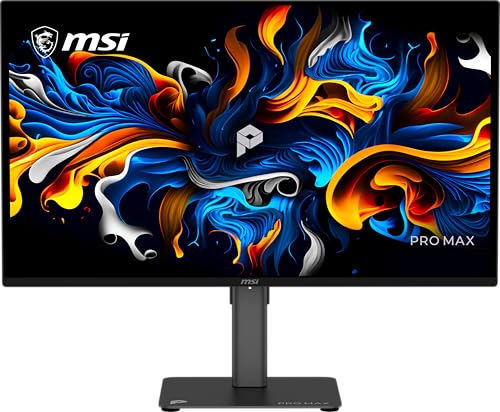
- 27-inch QD-OLED panel with 144Hz refresh
- PANTONE Validated and Delta E≤2 color accuracy
- Three-year warranty includes OLED burn-in coverage
Best For: Mixed work, creative use, and gaming
4K OLED Office Pick

- 27-inch 4K QD-OLED display with true 10-bit color
- 99% DCI-P3 coverage and Delta E<2
- Highly adjustable stand with height, swivel, pivot, and tilt
Best For: 4K office, business, and creative workflows
High-Refresh QD-OLED

- 240Hz refresh rate with a 0.03ms response time
- 10-bit color, 99% DCI-P3, and Delta E≤2
- HDMI 2.1 plus OLED Care 2.0 and adaptive sync
Best For: Competitive gaming and fast PC or console play
Best Glossy QHD Pick

- 1440p glossy WOLED at 240Hz
- 99% DCI-P3 and true 10-bit color
- OLED Care Pro and burn-in coverage
Best For: Fast QHD gaming with color-conscious desktop use
Best 4K Value

- 32-inch 4K QD-OLED display
- 165Hz refresh and 0.03ms response
- HDMI 2.1 with 48Gbps bandwidth
Best For: Large-screen 4K PC and console gaming
Best Colorful 1440p OLED

- 1440p OLED at 240Hz
- 0.03ms response with G-Sync
- HDR10 and wide stated color coverage
Best For: Competitive PC and console gaming
Best Overall – ASUS ProArt PA279CDV 4K QD-OLED
For shoppers comparing budget OLED reference monitors, the ASUS ProArt PA279CDV combines 4K resolution, a 120Hz refresh rate, wide-gamut color, and factory calibration in a productivity-focused design. Its USB-C connectivity and 96W power delivery also make it well suited to laptop-based editing setups.
Best For: Color-conscious creators who need 4K detail, accurate factory calibration, and flexible laptop connectivity.
Pros:
- 4K QD-OLED panel with 100% sRGB, 99% DCI-P3, and true 10-bit color
- Calman Verified and factory-calibrated to Delta E < 1.5
- USB-C with up to 96W Power Delivery, Auto KVM, and built-in USB hub
- Adjustable stand with tilt, swivel, pivot, and height adjustments
Cons:
- Its 27-inch size provides less workspace than larger 32-inch alternatives
- 240 cd/m² listed brightness is lower than some gaming-oriented OLED displays
The PA279CDV is the strongest reference-oriented choice here for users who prioritize calibrated 4K color and workstation features over maximum refresh rate.
Best for High-Refresh Gaming – Acer Predator X27U QD-OLED
The Acer Predator X27U is a compelling budget OLED reference monitors option for buyers who want strong color alongside competitive gaming speed. Its QHD QD-OLED panel delivers 240Hz motion, a 0.03ms response time, and 99% DCI-P3 coverage in a compact 26.5-inch format.
Best For: Competitive gamers who also want wide-gamut color and OLED contrast for creative or media work.
Pros:
- 240Hz refresh rate and 0.03ms response time support highly fluid gameplay
- True 10-bit QD-OLED panel with 99% DCI-P3 coverage
- QHD resolution, HDR10, and AMD FreeSync Premium
- Height, pivot, swivel, and tilt adjustments are included
Cons:
- QHD resolution offers less workspace and detail than the 4K models here
- Gaming-focused features may be less useful for calibration-heavy workflows
The X27U favors speed over resolution, making it a practical pick when fast gaming performance matters more than a 4K editing canvas.
Best Large-Screen Choice – Dell S3225QC 32 Plus 4K QD-OLED
For a larger desktop workspace, the Dell S3225QC pairs a 31.6-inch 4K QD-OLED panel with 120Hz motion and 99% DCI-P3 coverage. It also adds Dolby Vision, built-in spatial audio, and a single USB-C connection with up to 90W power delivery.
Best For: Desktop users who want a spacious 4K OLED display with integrated speakers and simplified USB-C docking.
Pros:
- 31.6-inch 4K QD-OLED display with 99% DCI-P3 coverage
- 120Hz refresh rate and 0.03ms response time
- Dolby Vision, DisplayHDR True Black 400, and FreeSync Premium Pro
- USB-C supports up to 90W power delivery, with AI-enhanced spatial audio
Cons:
- Its 1-year Advanced Exchange and Premium Panel Exchange warranty is shorter than some alternatives
- Large footprint may be less suitable for compact desks
The S3225QC is a versatile big-screen option, especially for users who value immersive media features and one-cable laptop connectivity alongside 4K OLED image quality.
Best Value Gaming Pick – Samsung Odyssey OLED G5 G50SF
The Samsung Odyssey OLED G5 G50SF is a value-oriented choice among budget OLED reference monitors for buyers who want QD-OLED contrast, QHD sharpness, and fast gaming performance. Its 180Hz refresh rate, glare-reducing finish, and adaptive-sync support make it suited to everyday gaming and photo-video use.
Best For: Gamers seeking an affordable QD-OLED display with strong motion performance and useful screen-protection features.
Pros:
- QHD QD-OLED panel with HDR10 and Pantone Validated color reproduction
- 180Hz refresh rate and 0.03ms response time
- G-Sync compatibility and AMD FreeSync support
- OLED Safeguard thermal modulation system and Glare Free technology
Cons:
- QHD resolution is less detailed than the 4K models
- Connectivity is limited to DisplayPort and HDMI in the supplied specifications
- Stand adjustment is limited to tilt
The G50SF offers a balanced route into QD-OLED gaming, with higher refresh than the 4K productivity models and practical features intended to reduce glare and retention concerns.
Balanced QD-OLED Value – MSI PRO MAX 271QPX14G
For shoppers comparing budget OLED reference monitors, the MSI PRO MAX 271QPX14G offers a practical balance of QHD sharpness, fast motion handling, and color-focused features. Its 27-inch QD-OLED panel runs at 144Hz, supports HDR, and includes a three-year warranty with OLED burn-in coverage.
Best For: Buyers who want an all-around QD-OLED monitor for work, creative tasks, and responsive gaming.
Pros:
- QD-OLED panel with a 0.03ms response time and 144Hz refresh rate.
- PANTONE Validated color performance with Delta E≤2.
- HDR curve customization and Uniform Luminance features support a consistent HDR experience.
- Height-adjustable stand, built-in speakers, and FreeSync/G-SYNC compatibility.
Cons:
- QHD resolution is lower than 4K alternatives at a similar screen size.
- Only one HDMI port is listed.
This MSI is a sensible reference-style OLED pick when accurate color, gaming speed, and burn-in coverage matter more than maximum resolution.
4K OLED Office Pick – Acer CE270K 4K QD-OLED
The Acer CE270K is a strong option among budget OLED reference monitors for users who prioritize 4K detail and color-rich presentation. Its 27-inch QD-OLED display combines 3840×2160 resolution, true 10-bit color, 99% DCI-P3 coverage, and a flexible ergonomic stand.
Best For: Office, business, and creative users who want 4K OLED clarity with comfortable positioning options.
Pros:
- 4K UHD QD-OLED resolution with true 10-bit color.
- 99% DCI-P3 coverage, Delta E<2, and DisplayHDR True Black 400.
- 120Hz refresh rate and 0.03ms response time support smooth motion.
- Stand offers height, tilt, swivel, and pivot adjustment.
Cons:
- Lower 120Hz refresh rate than the 240Hz MSI gaming model.
- Adaptive-sync support is specified as FreeSync Premium Pro and G-SYNC Compatible rather than native G-SYNC.
Choose the Acer when pixel density and ergonomic flexibility are central to your setup. It also adds built-in speakers and VisionCare features for general office comfort.
High-Refresh QD-OLED – MSI MAG 274QP QD-OLED X24
For buyers seeking budget OLED reference monitors with serious gaming speed, the MSI MAG 274QP QD-OLED X24 stands out with a 240Hz refresh rate and 0.03ms response time. Its 27-inch WQHD panel also delivers 10-bit color, 99% DCI-P3 coverage, and a 1,500,000:1 native contrast ratio.
Best For: Competitive gamers who want fast QD-OLED motion, deep contrast, and broad PC or console connectivity.
Pros:
- 240Hz refresh rate and 0.03ms response time for fast gameplay.
- 10-bit QD-OLED color with 99% DCI-P3 coverage and Delta E≤2.
- HDMI 2.1, DisplayPort 1.4a, Adaptive-Sync, and console-oriented features.
- OLED Care 2.0 software, graphene heatsink, and a four-way adjustable stand.
Cons:
- WQHD resolution does not provide the pixel density of the Acer’s 4K panel.
- Its glossy finish may be less suitable for brightly lit rooms than a matte display.
The MAG 274QP X24 is the performance-focused choice here. It trades 4K resolution for substantially faster refresh, making it particularly compelling for competitive gaming.
Best Glossy QHD Pick – ASUS ROG XG27AQDMGR
For shoppers comparing budget OLED reference monitors, the ASUS ROG XG27AQDMGR combines a sharp 1440p OLED image with a 240Hz refresh rate and a glossy finish. Its 99% DCI-P3 coverage, true 10-bit color, and Delta E < 2 specification also make it a capable option for color-conscious gaming and desktop use.
Best For: Gamers and creators who want glossy QHD OLED contrast, very fast motion, and strong color accuracy.
Pros:
- QHD OLED panel with 240Hz refresh rate and 0.03ms response time.
- 99% DCI-P3 coverage, true 10-bit color, and Delta E < 2.
- OLED Care Pro with a proximity sensor designed to reduce burn-in risk.
- Three-year warranty with accident replacement and burn-in coverage.
Cons:
- Its 27-inch QHD format offers less workspace than a 4K 32-inch monitor.
- The glossy screen may reflect more ambient light than a matte panel.
- The feature set is primarily gaming-focused.
The XG27AQDMGR is a strong value-oriented choice when speed, OLED contrast, and color accuracy matter more than 4K resolution. Its protection features and warranty add useful reassurance for long-term OLED ownership.
Best 4K Value – MSI MAG 321UP QD-OLED
Among budget OLED reference monitors, the MSI MAG 321UP QD-OLED stands out for pairing a spacious 32-inch 4K display with quantum-dot OLED color and a 165Hz refresh rate. HDMI 2.1 and a full 48Gbps bandwidth make it particularly practical for high-resolution PC or console gaming setups.
Best For: Buyers who prioritize 4K detail, a large screen, and HDMI 2.1 connectivity.
Pros:
- 32-inch 3840 x 2160 QD-OLED panel with a 165Hz refresh rate.
- 0.03ms GtG response time and VESA DisplayHDR True Black 400.
- HDMI 2.1 supports 4K at up to 165Hz with full 48Gbps bandwidth.
- Adjustable stand and MSI OLED Care 2.0.
Cons:
- Its 165Hz refresh rate is lower than some 27-inch 1440p OLED alternatives.
- The 32-inch size and 25-pound weight require a suitably deep, sturdy desk.
- The supplied notes describe it primarily as a gaming monitor.
The MAG 321UP QD-OLED is the most workspace-focused option here, delivering 4K sharpness without giving up OLED response speed. Choose it when screen size, resolution, and console-ready connectivity outweigh maximum refresh rate.
Best Colorful 1440p OLED – AOC Agon Pro AG276QZD2
The AOC Agon Pro AG276QZD2 is a compelling entry in the budget OLED reference monitors category for users who want QHD clarity, OLED blacks, and extremely fluid gaming. Its wide stated color coverage, HDR10 support, and compatibility with up to 120Hz console output broaden its appeal beyond competitive PC play.
Best For: Competitive gamers and console owners who want a fast, vivid 1440p OLED monitor.
Pros:
- 26.5-inch 2560 x 1440 OLED panel with a 240Hz refresh rate.
- 0.03ms response time and G-Sync support for smooth motion.
- HDR10 plus stated coverage of 101% DCI-P3 and 136.7% sRGB.
- Supports up to 120Hz console gaming and includes built-in speakers.
Cons:
- It uses QHD resolution rather than 4K.
- The feature set, including rear lighting and game modes, is strongly gaming-oriented.
- The supplied specifications list a 170-degree viewing angle, narrower than some alternatives.
The AG276QZD2 makes the most sense for players who value high refresh rates, low latency, and saturated OLED color. It is less suited to buyers seeking maximum desktop resolution or a restrained professional design.
How We Picked These Budget OLED Reference Monitors
We compared the selected displays by examining panel technology, resolution, color coverage, factory calibration claims, HDR support, refresh rate, response time, connectivity, and intended use. A true professional reference monitor can cost considerably more, so this list focuses on OLED and QD-OLED models that offer meaningful benefits for creators, gamers, or hybrid users at a comparatively accessible price.
We also considered practical details such as USB-C support, HDMI 2.1 availability, adaptive sync, ergonomic flexibility, pixel density, and the trade-offs between glossy and matte screens. Features such as Delta E ratings and Calman Verification are useful indicators, but real-world accuracy can still vary by picture mode and unit.
Quick Comparison
| Priority | Look for | Best-fit monitor type |
|---|---|---|
| Color-critical creative work | Wide gamut, low Delta E, calibration support | 4K professional OLED |
| Sharp text and detailed media | 3840 × 2160 resolution | 27- or 32-inch 4K QD-OLED |
| Competitive gaming | 240Hz refresh rate, 0.03ms response time, adaptive sync | 27-inch QHD OLED |
| One display for work and play | USB-C or HDMI 2.1, HDR, high refresh rate | Versatile QD-OLED hybrid |
Key Buying Factors for Budget OLED Reference Monitors
Resolution and Screen Size
Choose 4K when fine text, photo editing, video timelines, and detailed design work matter most. QHD is less demanding on your graphics card and often enables higher refresh rates, making it particularly attractive for gaming. A 27-inch QHD screen is sharp enough for most desks, while 32-inch 4K models provide more workspace and immersion.
Color Accuracy and HDR
Look for wide coverage of DCI-P3 or Adobe RGB, a published Delta E value, and calibration verification where available. HDR10 support is useful, but OLED’s contrast does not guarantee accurate HDR mastering. Check whether the monitor offers suitable creator modes and whether calibration controls are available.
Refresh Rate, Ports, and Ergonomics
A 120Hz to 165Hz panel feels smoother for general use, while 240Hz is aimed primarily at competitive gaming. USB-C can simplify laptop docking, but verify its power-delivery wattage. HDMI 2.1 matters for current consoles and high-refresh 4K gaming. Also check height adjustment, tilt, stand depth, and VESA compatibility.
OLED Care and Workspace Conditions
OLED panels can experience permanent image retention when static elements are displayed repeatedly. Use built-in pixel-shift, panel-care, and screen-saver features, vary static content, and avoid leaving bright desktops or taskbars on screen for long periods. A brighter room may favor a model with effective anti-glare treatment, while glossy panels can deliver a more vivid image in controlled lighting.
Who Should Buy Which Budget OLED Reference Monitors?
Choose the ASUS ProArt PA279CDV if color accuracy, Calman verification, and USB-C convenience matter more than maximum gaming speed. The Acer CE270K or Dell S3225QC are better fits for buyers who prioritize 4K workspace and general-purpose productivity. For fast competitive gaming, consider the Acer X27U W1, Samsung Odyssey OLED G5, ASUS ROG XG27AQDMGR, MSI MAG 274QP X24, or AOC AG276QZD2, depending on your preferred resolution, finish, and features.
The MSI PRO MAX 271QPX14G suits users seeking a more balanced creator-and-gaming display, while the MSI MAG 321UP is a strong choice for a larger 4K QD-OLED experience with high refresh support. Before buying, confirm current pricing, warranty terms, included cables, and the manufacturer’s OLED burn-in coverage.
