
The best budget mini desktop computers save space without forcing you to accept sluggish everyday performance. This roundup compares compact Windows PCs suited to office work, browsing, streaming, schoolwork, and light multitasking.
Because the lineup includes both refurbished business desktops and newer low-cost mini PCs, the right choice depends on more than processor speed. Pay close attention to memory, storage, ports, display support, and upgrade options before buying.
Best 10 Budget Mini Desktop Computers Picks for 2026
Best Refurbished Business Pick

- Quad-core Core i5-6500T processor
- 256GB SSD with 8GB DDR4 RAM
- Keyboard, mouse, Wi-Fi, and Bluetooth included
Best For: Compact office and home productivity
Best for Multi-Display Work

- Ryzen 5 3500U with Radeon Vega 8 graphics
- Supports three 4K monitors
- Dual Ethernet, USB-C, Wi-Fi 5, and Bluetooth 5.0
Best For: Multi-monitor productivity and streaming
Best Traditional Business Mini PC
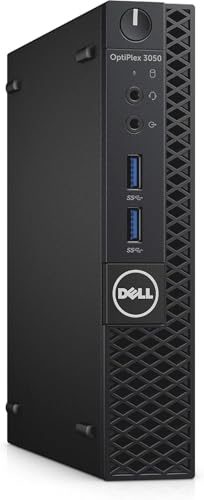
- Quad-core Core i5-7500T processor
- 256GB SSD with 8GB DDR4 RAM
- Windows 11 Pro with keyboard and mouse
Best For: Refurbished office and personal computing
Best All-Around Value

- Ryzen 5 processor with 16GB RAM
- 512GB NVMe SSD included
- Three 4K displays supported
Best For: Home offices, multitasking, and compact multi-monitor setups
Best for Upgrades

- Ryzen 3 PRO processor up to 4.3GHz
- Expandable RAM and dual storage bays
- Three 4K displays supported
Best For: Users planning memory or storage upgrades
Best Refurbished Option

- Quad-core Intel Core i5 processor
- 16GB RAM and 240GB SSD
- Keyboard and mouse included
Best For: Education and basic office computing on a tight budget
Best Entry-Level Value

- Windows 11 Pro with 8GB RAM and 256GB SSD
- Dual 4K HDMI display support
- Storage expansion up to 4TB
Best For: Basic office work, education, browsing, and streaming
Best for Expandable Storage

- 4-core N5030 processor with up to 3.1GHz
- Dual 4K HDMI display support
- Up to 4TB through M.2 and 2.5-inch storage
Best For: Home offices, business files, media storage, and dual-screen productivity
Best Refurbished Business Pick – Lenovo ThinkCentre M710q Tiny
For shoppers comparing budget mini desktop computers, the renewed Lenovo ThinkCentre M710q offers a practical business setup with a quad-core Intel processor, 8GB of RAM, and a 256GB SSD. It also includes a wired keyboard and mouse, so it is ready for basic work and home-office tasks.
Best For: Budget-conscious users who want a compact Windows 11 Pro desktop with included peripherals.
Pros:
- Quad-core Intel Core i5-6500T processor with speeds up to 3.1GHz.
- 256GB SSD and 8GB DDR4 RAM provide a straightforward everyday setup.
- Includes keyboard, mouse, Wi-Fi, Bluetooth, HDMI, and DisplayPort.
Cons:
- Renewed unit includes a stated 90-day warranty.
- Integrated graphics and 8GB of RAM are aimed at general computing rather than demanding workloads.
This Lenovo is a sensible value choice for office documents, browsing, and home productivity. Its included accessories make setup easy, while the compact design helps conserve desk space.
Best for Multi-Display Work – BOSGAME E4 Air Mini PC
Among budget mini desktop computers, the BOSGAME E4 Air stands out for connectivity and display flexibility. Its Ryzen 5 3500U processor, Radeon Vega 8 graphics, and support for three 4K displays make it a useful option for multitasking, streaming, and everyday office work.
Best For: Users who need multiple monitor outputs and versatile wired or wireless connectivity.
Pros:
- Ryzen 5 3500U processor with four cores and eight threads.
- Supports three 4K displays through HDMI, DisplayPort, and USB-C.
- Includes dual Gigabit Ethernet, Wi-Fi 5, Bluetooth 5.0, and a 256GB SATA SSD.
Cons:
- Comes with 8GB of RAM, which may limit heavier multitasking.
- A keyboard is not included.
The E4 Air is a strong fit when display support matters more than having the smallest possible footprint. Its expandable memory and broad connectivity also give it useful flexibility for office or home-entertainment setups.
Best Ultra-Compact Value – Bmax B1 Plus Mini PC
The Bmax B1 Plus is one of the most space-conscious budget mini desktop computers for basic home, study, and office use. Its Intel Celeron processor, 6GB of RAM, and 128GB of onboard storage are suited to everyday tasks, while dual M.2 slots allow substantial storage expansion.
Best For: Students and light-duty users who prioritize a tiny footprint, quiet operation, and expandable storage.
Pros:
- Very compact 4.2-by-4.1-by-1.4-inch design weighing 0.49 pounds.
- Dual M.2 slots support storage expansion up to 2TB according to the supplied notes.
- Dual HDMI outputs support two 4K displays, and a VESA bracket is included.
Cons:
- Intel Celeron J3355 and 6GB LPDDR3 RAM are intended for basic workloads.
- 128GB onboard storage is modest before expansion.
- Windows 11 Home is included rather than Windows 11 Pro.
This Bmax makes sense for browsing, document editing, study, and media use where desk space is limited. Its expansion options help offset the modest starting storage, but it is not designed for demanding applications.
Best Traditional Business Mini PC – Dell OptiPlex 3050 Micro
For buyers seeking budget mini desktop computers from a familiar business line, the renewed Dell OptiPlex 3050 Micro combines a quad-core Core i5-7500T processor with 8GB of DDR4 memory and a 256GB SSD. Its compact micro form factor fits neatly into office or home workspaces.
Best For: Everyday business, education, and personal computing with a compact Windows 11 Pro system.
Pros:
- Quad-core Intel Core i5-7500T processor runs at 2.7GHz.
- 256GB SSD and 8GB DDR4 RAM support quick boot times and everyday multitasking.
- Provides DisplayPort, USB 3.0, Ethernet, Wi-Fi, and included keyboard and mouse.
Cons:
- Renewed unit includes a stated 90-day warranty.
- Display output is listed as DisplayPort, so an adapter may be needed for other monitor inputs.
- Integrated Intel HD Graphics 630 is suited to standard productivity rather than graphics-intensive work.
The OptiPlex 3050 Micro is a dependable choice for users who prefer a business-oriented refurbished desktop. It delivers a balanced combination of compact size, practical performance, and included peripherals for routine computing.
Best All-Around Value – Glorlin Ryzen 5 Mini PC
For shoppers comparing budget mini desktop computers, the Glorlin offers a capable balance of everyday performance, memory, storage, and display connectivity. Its Ryzen 5 3501U processor, 16GB of RAM, and 512GB NVMe SSD are well suited to home office work, browsing, multitasking, and media streaming.
Best For: Home offices, everyday computing, multitasking, and users who want a compact computer with three-display support.
Pros:
- Ryzen 5 3501U processor with 4 cores and 8 threads
- 16GB DDR4 RAM and a fast 512GB NVMe SSD
- Supports up to three 4K displays through HDMI and USB-C DisplayPort connectivity
- Wi-Fi 6, Bluetooth 5.3, multiple USB ports, and a compact design
Cons:
- Processor is designed for everyday workloads rather than demanding performance tasks
- Uses active fan cooling, so it may not be completely silent
The Glorlin is a strong general-purpose pick when you want generous memory and storage without taking up much desk space. Its multi-monitor support also gives it extra flexibility for productivity setups.
Best for Upgrades – ACEMAGIC Ryzen 3 PRO Mini PC
The ACEMAGIC is an appealing option among budget mini desktop computers for buyers who want a small Windows 11 Pro system with room to expand. Its Ryzen 3 PRO 7330U provides 4 cores and 8 threads, while the dual memory slots and dual storage bays make future upgrades more flexible.
Best For: Office users, home theater setups, and buyers who prioritize expandable memory and storage.
Pros:
- Ryzen 3 PRO 7330U reaches speeds up to 4.3GHz
- Dual memory slots and M.2 SATA and NVMe storage bays
- Supports up to three 4K displays
- Compact aluminum chassis with an 80mm fan and dual exhaust design
Cons:
- Ships with only 8GB of RAM and a 256GB SSD
- Uses Wi-Fi 5 and Bluetooth 4.2 rather than newer wireless standards
Choose this ACEMAGIC model if expandability matters more than having the largest starting configuration. It arrives with Windows 11 Pro and useful accessories, including a wall mount and HDMI cable.
Best Refurbished Option – HP EliteDesk 800 G2 Mini
The renewed HP EliteDesk 800 G2 is worth considering when shopping for budget mini desktop computers and you prefer a business-class refurbished system. It pairs an Intel Core i5-6500T with 16GB of DDR4 memory, a 240GB SSD, Windows 11, and a practical selection of legacy and modern office connections.
Best For: Education, basic office work, and buyers seeking a refurbished business mini PC with keyboard and mouse included.
Pros:
- Quad-core Intel Core i5-6500T processor
- 16GB DDR4 RAM with support for up to 32GB
- 240GB SSD and included USB keyboard and mouse
- Compact business chassis with DisplayPort, VGA, Ethernet, and multiple USB ports
Cons:
- Refurbished product includes a minimum 90-day warranty rather than a new-product warranty
- Older platform and smaller SSD than the other listed configurations
- Wireless specifications list Wi-Fi and Bluetooth without the newer standards found on some newer mini PCs
The HP makes the most sense for straightforward productivity on a tighter budget, especially if the included peripherals are useful. Its refurbished status and older hardware should be weighed against its 16GB memory and business-oriented design.
Best Multitasker – C4 SE Ryzen 5 Mini PC
For shoppers comparing budget mini desktop computers, the C4 SE stands out with its 4-core, 8-thread Ryzen 5 3500U processor, 8GB of RAM, and 256GB SSD. It is sized for home offices, study spaces, and everyday multitasking while leaving room for memory and storage upgrades.
Best For: Remote work, online learning, programming, and compact workstations that benefit from multiple displays.
Pros:
- Ryzen 5 performance supports multitasking, office apps, browsing, and video meetings.
- Supports up to 32GB of memory and includes an additional M.2 expansion slot.
- Supports up to three displays through HDMI, DisplayPort, and USB-C.
- Includes dual Gigabit Ethernet, WiFi 5, Bluetooth 5.0, and Wake-on-LAN.
Cons:
- Ships with 8GB RAM and 256GB storage, so demanding users may want to upgrade.
- Uses integrated Radeon Vega 8 graphics rather than a dedicated graphics card.
The C4 SE is a strong choice when productivity and expandability matter more than entry-level pricing. Its triple-display support and dual wired-network ports make it particularly flexible for home-office or small-business setups.
Best Entry-Level Value – Bmax B3 Pro N4500 Mini PC
The Bmax B3 Pro is a compact option for buyers seeking budget mini desktop computers for routine tasks. Its Intel N4500 processor, 8GB DDR4 memory, and 256GB M.2 SSD cover office work, web browsing, streaming, and home entertainment in a small enclosure.
Best For: Basic home-office computing, education, browsing, streaming, and dual-monitor setups.
Pros:
- Compact design with Windows 11 Pro, 8GB RAM, and a 256GB SSD.
- Dual HDMI 2.0 outputs support two 4K displays at up to 60Hz.
- Dual M.2 slots allow storage expansion up to 4TB.
- Includes WiFi 5, Bluetooth 5.0, Gigabit Ethernet, USB 3.0, and audio connectivity.
Cons:
- The 2-core, 2-thread N4500 is intended for routine workloads rather than demanding applications.
- Memory is listed as 8GB maximum, limiting future RAM upgrades.
The B3 Pro makes the most sense for straightforward computing and media use. Its dual-4K output and storage expansion are useful advantages, but its processor and fixed memory configuration favor lighter workloads.
Best for Expandable Storage – KAMRUI AK1PLUS N5030
The KAMRUI AK1PLUS is a practical pick among budget mini desktop computers for users who want more memory and storage flexibility. Its 4-core Intel N5030, 12GB of listed memory, and 256GB SSD are suited to everyday work, classes, video calls, and light multitasking.
Best For: Home offices, online learning, business tasks, media storage, and compact dual-screen workspaces.
Pros:
- 4-core N5030 processor reaches up to 3.1GHz for everyday computing.
- Supports dual 4K displays through two HDMI 2.0 outputs.
- Offers M.2 storage expansion plus a 2.5-inch drive bay, with up to 4TB total storage support.
- Provides four USB 3.2 ports, Gigabit Ethernet, WiFi, Bluetooth, and Wake-on-LAN.
Cons:
- Intel integrated graphics are aimed at productivity and media use, not demanding gaming.
- Ships with Windows 10 Pro rather than Windows 11 Pro.
The AK1PLUS is compelling when storage capacity and connectivity are priorities. It offers more listed memory than the other options here and supports multiple drive configurations, making it well suited to files, media, and business data.
How We Picked These Budget Mini Desktop Computers
We selected models across the most useful low-cost categories: refurbished business-class desktops, entry-level Intel systems, and AMD-based mini PCs with stronger multitasking performance. We considered processor capability, included RAM and storage, Windows compatibility, wireless connectivity, display outputs, upgrade potential, and overall practicality for the price.
Refurbished Lenovo, Dell, and HP systems can offer excellent value when dependable office performance matters most. Newer models may provide more modern connectivity, quieter compact designs, or better efficiency. Specifications and condition can vary by seller, so verify the exact configuration and warranty before ordering.
Quick Comparison
- Best for office productivity: Refurbished Core i5 business mini PCs with 8GB or 16GB of RAM.
- Best for multitasking: Ryzen 5 models, especially configurations with 16GB RAM and NVMe storage.
- Best for basic computing: Intel Celeron, N4500, or N5030 systems for browsing, documents, and streaming.
- Best for multiple monitors: Models advertising triple-display support or multiple digital video outputs.
- Best for compact storage: Systems with M.2 or 2.5-inch SSD expansion.
Key Buying Factors for Budget Mini Desktop Computers
Processor and Everyday Speed
For email, documents, web browsing, and streaming, an entry-level Intel processor may be sufficient. Choose a Core i5 or Ryzen 5 system if you regularly multitask, use heavier spreadsheets, or keep many browser tabs open. Processor generation also matters, particularly with refurbished hardware.
RAM and Storage
Eight gigabytes of RAM is a workable starting point for Windows, while 12GB or 16GB provides more breathing room. An SSD is essential for faster startup and application loading. A 128GB drive can fill quickly, so 240GB, 256GB, or larger storage is usually more practical. Expansion support can extend the useful life of a low-cost PC.
Ports, Displays, and Networking
Check the exact USB, HDMI, DisplayPort, VGA, Ethernet, Wi-Fi, and Bluetooth options. If you plan to use two or three monitors, confirm that the outputs can operate simultaneously. Gigabit Ethernet is useful for wired workstations, while Wi-Fi 6 offers a more modern wireless connection.
Condition, Operating System, and Support
Renewed business PCs can be outstanding bargains, but inspect the seller’s condition notes, included accessories, return policy, and warranty. Also confirm that Windows is activated and that the listed keyboard, mouse, power adapter, and mounting hardware are included.
Who Should Buy Which Budget Mini Desktop Computers?
Choose a refurbished Dell, HP, or Lenovo if you want proven business hardware and strong value for office tasks. Pick a Ryzen 5 mini PC for more demanding multitasking or light creative work. Select an Intel N-series or Celeron model when your priorities are low cost, small size, and basic computing. Buyers planning future storage upgrades should prioritize accessible M.2 or 2.5-inch expansion, while multi-monitor users should focus first on the available video outputs.
