
Building a comfortable workstation does not require expensive furniture or premium peripherals. The right combination of desk space, keyboard layout, lighting, connectivity, and typing comfort can make an affordable setup feel considerably more capable.
This roundup covers budget keyboard workstations for home offices, gaming corners, shared spaces, and users who need large-print or backlit keys. Use the buying guide below to match each option to your available space, daily workload, and preferred typing experience.
Best 10 Budget Keyboard Workstations Picks for 2026
Best Standing Desk Value

- Large full-size keyboard tray
- Electric adjustment with 3 presets
- 176-pound capacity and quiet motor
Best For: Home-office users wanting an adjustable standing workstation
Best Basic Keyboard Combo
Logitech MK200 Wired Keyboard and Mouse
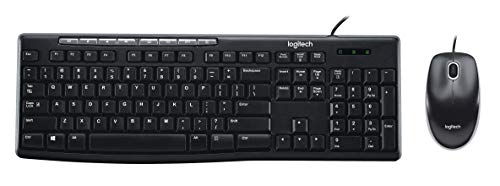
- Full-size layout with number pad
- One-touch media controls
- Wired plug-and-play USB setup
Best For: Simple Windows office workstations
Best Backlit Keyboard
TECKNET RGB Wired Gaming Keyboard

- 15-zone RGB backlighting
- Quiet switches with integrated wrist rest
- IP32 spill resistance and 104 keys
Best For: Office and gaming setups needing visible, comfortable keys
Best Wireless Flexibility
seenda COE200 Keyboard and Mouse Combo

- Bluetooth and 2.4G dual connectivity
- Full-size keyboard with wrist rest
- Quiet input for shared workspaces
Best For: Multi-device home offices and remote workstations
Quiet Office Value
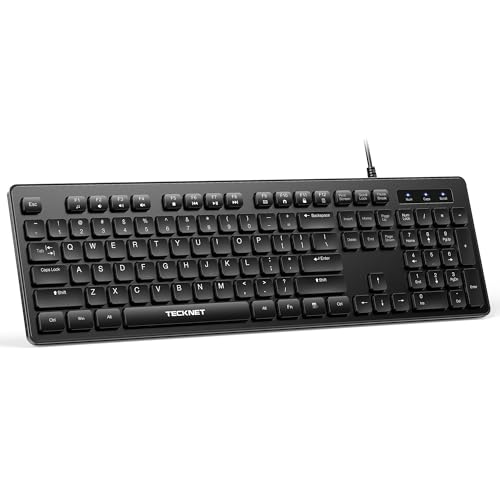
- Quiet low-profile membrane keys
- 104-key layout with tilt feet
- USB plug-and-play and spill-resistant
Best For: Quiet offices, shared spaces, and everyday data entry
Visibility-Focused Pick
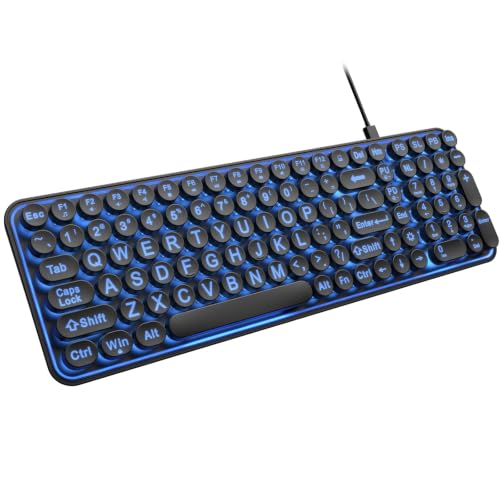
- Oversized, easy-to-find lettering
- Seven backlight colors with adjustable brightness
- Quiet keys and multimedia hotkeys
Best For: Seniors, low-light typing, libraries, and accessibility-focused desks
Backlit Office Upgrade

- Seven-color RGB lighting with two modes
- Quiet 104-key membrane layout
- Spill-resistant USB plug-and-play design
Best For: Quiet home offices needing customizable backlighting
High-Visibility Value

- High-contrast yellow keys with oversized black lettering
- Full-size 104-key layout with numeric keypad
- Water-resistant, quiet membrane design with USB setup
Best For: Users who need especially readable keys in a budget workstation
Low-Light Readability

- Oversized lettering paired with adjustable white LED lighting
- Full-size 104-key layout with numeric keypad
- Spill-resistant USB design with ergonomic feet
Best For: Users who type in dim spaces and need highly visible keys
Best Standing Desk Value – Claiks Electric Standing Desk
For shoppers comparing budget keyboard workstations, the Claiks Electric Standing Desk combines an adjustable sit-stand frame with a spacious slide-out tray. Its 48-by-24-inch surface and full-size keyboard support make it a practical option for a home office.
Best For: Users who want an electric standing desk with a full-size keyboard tray and programmable height settings.
Pros:
- Large 23.6-by-11.8-inch tray accommodates a full-size keyboard.
- Electric height adjustment ranges from 28.3 to 46.5 inches.
- Three memory presets, cable collector, and two hooks help organize the workspace.
- Steel frame supports up to 176 pounds, with a motor rated as low as 45 decibels.
Cons:
- Limited storage options beyond the keyboard tray and hooks.
- The tray may reduce available legroom when extended.
This is a strong budget keyboard workstation choice if standing flexibility matters more than drawers or built-in shelving. The quiet motor and generous tray add useful everyday convenience.
Best Basic Keyboard Combo – Logitech MK200 Wired Keyboard and Mouse
The Logitech MK200 is a straightforward choice for budget keyboard workstations where dependable wired input matters. It includes a full-size keyboard, number pad, media controls, and an optical mouse in one plug-and-play package.
Best For: Office users who need an affordable full-size keyboard-and-mouse setup with simple USB connectivity.
Pros:
- Full-size 104-key layout includes a number pad.
- One-touch controls provide quick access to media, volume, mute, and Internet functions.
- Low-profile keys are designed for quiet, fluid typing.
- Spill-resistant keyboard, adjustable tilt legs, and plug-and-play USB setup add convenience.
Cons:
- Wired design offers less flexibility for cable management.
- Compatibility is centered on Windows and older Linux versions; the listed product details do not specify Mac support.
The MK200 works well when the goal is to outfit a workstation inexpensively without adding wireless pairing or specialized features. Its included mouse also helps keep the setup simple.
Best Backlit Keyboard – TECKNET RGB Wired Gaming Keyboard
For budget keyboard workstations that need visibility and a more ergonomic typing surface, the TECKNET wired keyboard adds RGB lighting, an integrated wrist rest, and a metal panel design. It remains practical for office use with a quiet membrane switch.
Best For: Users who want a full-size backlit keyboard for mixed office work and gaming.
Pros:
- 15-zone RGB lighting offers multiple modes and four brightness levels.
- Seven-degree typing angle and integrated wrist rest support a more comfortable setup.
- Whisper-quiet switches suit shared workspaces and office environments.
- IP32 spill resistance, 25 anti-ghosting keys, and 12 multimedia keys add functionality.
Cons:
- Wired USB-A connection limits placement flexibility.
- Multimedia keys are not compatible with Mac.
- Its gaming-oriented styling may not suit minimalist office setups.
This keyboard is a good fit when a low-cost workstation needs lighting and comfort features without moving to mechanical switches. The 104-key layout preserves useful number-pad functionality.
Best Wireless Flexibility – seenda COE200 Keyboard and Mouse Combo
The seenda COE200 is a versatile pick for budget keyboard workstations shared between computers, tablets, or phones. Its full-size keyboard, wrist rest, quiet operation, and dual Bluetooth/2.4G connectivity support a tidy and adaptable desk.
Best For: Remote workers and students switching between Windows, Mac, and mobile devices.
Pros:
- Switches between a 2.4G USB receiver and Bluetooth connection for two-device use.
- Full-size layout with number pad supports data entry and productivity work.
- Integrated wrist rest, quiet keys, and low-noise mouse clicks suit extended or shared-space use.
- Supports Windows, macOS, iOS, iPadOS, and Android devices with compatible versions.
Cons:
- Batteries are required but not included.
- 2.4G USB mode is for Windows only.
- Bluetooth requires version 4.0 or above.
This combo stands out among budget keyboard workstations when reducing cable clutter and supporting multiple operating systems are priorities. The included mouse and full-size layout make it a convenient all-in-one upgrade.
Quiet Office Value – Silent Full-Size Keyboard
For shoppers comparing budget keyboard workstations, the TECKNET wired keyboard delivers a straightforward full-size layout, quiet membrane typing, and useful office features without requiring batteries or charging.
Best For: Quiet home offices, shared workspaces, and users who need a standard 104-key layout for typing and data entry.
Pros:
- Low-profile membrane keys help reduce typing noise.
- Full-size 104-key layout includes adjustable tilt feet and anti-slip pads.
- USB plug-and-play setup requires no drivers or battery changes.
- Spill-resistant construction and keys rated for up to 80 million keystrokes support everyday use.
Cons:
- Wired USB connectivity limits cable-free desk setups.
- Multimedia keys may have limited functionality on Mac OS.
This is a practical pick when reliability, quiet operation, and a familiar full-size layout matter more than lighting or extra desk accessories.
Visibility-Focused Pick – Large Print Backlit Keyboard
This EDJO model brings a visibility-first approach to budget keyboard workstations, combining oversized lettering, colorful backlighting, and quiet wired operation for low-light or accessibility-focused setups.
Best For: Seniors, users with limited keyboard visibility, students, libraries, and dimly lit home or office spaces.
Pros:
- Letters are designed to be four times larger than standard keyboard fonts.
- Seven backlight colors and three brightness levels improve visibility in low light.
- Quiet keys, ergonomic arrangement, and 12 multimedia hotkeys support comfortable everyday use.
- Plug-and-play wired setup works with Windows systems, desktops, Chromebooks, PCs, and laptops.
Cons:
- Its compact retro layout may feel different from a conventional full-size keyboard.
- Wired connectivity does not provide a wireless desk setup.
- The supplied details identify the backlighting as single-color support despite the seven-color lighting feature.
Choose this keyboard when easy-to-see lettering and distinctive backlighting are more important than a traditional office keyboard design.
Backlit Office Upgrade – RGB Full-Size Keyboard
Among budget keyboard workstations, this TECKNET model adds customizable RGB lighting to a quiet full-size membrane design, making it a useful choice for office work that sometimes continues after dark.
Best For: Home offices and workstations that need a quiet 104-key keyboard with adjustable decorative lighting.
Pros:
- Seven colors, four brightness levels, and static or breathing modes allow lighting customization.
- Quiet low-profile membrane keys suit shared workspaces and late-night typing.
- Full-size 104-key layout, tilt feet, and anti-slip pads support comfortable long sessions.
- Spill-resistant design, USB plug-and-play setup, and no battery requirement simplify daily use.
Cons:
- Wired USB connectivity may not suit cable-free workstations.
- Multimedia key functionality may be limited on Mac OS.
This version is a strong fit if you want the familiar practicality of a full-size office keyboard while adding RGB lighting for darker work environments.
High-Visibility Value – Large Print Yellow Keyboard
For budget keyboard workstations, the BOOGIIO Large Print Computer Keyboard prioritizes readability and straightforward wired connectivity. Its yellow keycaps, bold black lettering, full-size layout, and numeric keypad make everyday typing easier to see without requiring a new typing style.
Best For: Visually impaired users, older adults, schools, libraries, and workstations where high-contrast keys are especially useful.
Pros:
- Large, high-contrast lettering is designed to improve visibility, including in low light.
- Full 104-key QWERTY layout includes a numeric keypad and adjustable feet.
- USB plug-and-play setup works with Windows, macOS, and Linux systems for typing.
- Water-resistant design and a quieter membrane switch support everyday office use.
Cons:
- It uses a wired USB connection rather than wireless connectivity.
- Some system hotkeys may not work fully outside Windows.
- The bright yellow-and-black styling may not suit every workstation.
This is a practical low-cost choice when clear key legends matter more than extra gaming features or a compact footprint.
Stylish Office Pick – Pink Backlit Aluminum Keyboard
The LANGTU Pink Backlit Keyboard adds adjustable illumination and an aluminum panel to a budget keyboard workstation. Its quiet membrane feel, dedicated multimedia controls, and wired USB connection make it suitable for office typing, study areas, and casual gaming.
Best For: Users who want a colorful, backlit full-size keyboard with a sturdy-looking metal panel and quiet keystrokes.
Pros:
- Adjustable single-color backlighting can be brightened, dimmed, pulsed, or switched off.
- Aluminum construction and floating keycaps provide a modern workstation appearance.
- Quiet membrane keys, 25-key anti-ghosting, and 12 multimedia shortcuts support varied use.
- USB plug-and-play compatibility is listed for Windows, macOS, Linux, laptops, and PCs.
Cons:
- It is wired and does not offer wireless operation.
- The pink styling is distinctive and may not match every office setup.
- Its single-color lighting offers less customization than RGB keyboards.
Choose this model if you want a visually distinctive, illuminated keyboard with useful media controls while keeping the setup simple and budget-conscious.
Low-Light Readability – Large Print Backlit Keyboard
For budget keyboard workstations used in dim rooms, the KOPJIPPOM Large Print Backlit Keyboard combines oversized lettering with adjustable white LED illumination. The full-size USB keyboard also includes ergonomic feet, media keys, and a spill-resistant design for routine desktop work.
Best For: Office, studio, and home users who need both large key legends and adjustable illumination on a full-size keyboard.
Pros:
- Key fonts are described as four times larger than standard keyboard lettering.
- White backlighting is adjustable and can be turned on or off for lower-light typing.
- Full 104-key layout includes a numeric keypad, media keys, and fold-out ergonomic feet.
- USB plug-and-play setup works with Windows, Mac OS, and Raspberry Pi systems.
Cons:
- It uses a wired USB connection and requires an available USB port.
- Multimedia keys may not be fully compatible with Mac OS.
- The large full-size design takes more desk space than a compact keyboard.
This model is a strong fit when visibility is the priority but you also want flexible lighting for daytime and low-light workstation use.
How We Picked These Budget Keyboard Workstations
We selected these products based on the practical needs of an affordable workstation: usable desk space, dependable wired or wireless connectivity, full-size layouts, visibility, typing comfort, and useful features such as media controls, backlighting, wrist rests, or anti-ghosting. The selection includes both complete desk-and-peripheral solutions and standalone keyboards that can anchor a compact setup.
Because “budget” means different things to different buyers, we considered value in context rather than focusing only on the lowest price. A simple wired keyboard may be the best choice for reliability, while a standing desk or large-print model can provide greater value when ergonomics or accessibility matters most.
Quick Comparison
- Best for a complete workstation: Claiks Electric Standing Desk with keyboard tray.
- Best for straightforward office use: Logitech MK200 wired keyboard and mouse combo.
- Best for illuminated setups: TECKNET RGB models, EDJO, LANGTU, or KOPJIPPOM.
- Best for quiet typing: TECKNET silent full-size keyboards.
- Best for low-vision users: BOOGIIO or KOPJIPPOM large-print keyboards.
- Best for cable-free flexibility: seenda Bluetooth keyboard and mouse combo.
Key Buying Factors for Budget Keyboard Workstations
Desk Size and Posture
A 48-by-24-inch standing desk offers room for a monitor, keyboard, mouse, and accessories without dominating a small room. Check the desk’s height range, stability, weight capacity, and keyboard-tray dimensions before buying. If you already have a desk, prioritize a keyboard that leaves enough space for comfortable mouse movement.
Connection Type
Wired keyboards are usually the simplest and most dependable option, especially for desktop computers. Wireless or Bluetooth models reduce cable clutter but require battery management and device compatibility checks. A combo with a mouse can also be more economical than buying each peripheral separately.
Visibility and Lighting
Backlighting helps in dim rooms, but brightness levels and color effects vary. Large-print, high-contrast keycaps are often more useful than decorative RGB lighting for users with reduced vision. Confirm Windows or operating-system compatibility if the keyboard includes special controls.
Typing Feel and Noise
Membrane keyboards are generally affordable and easy to maintain. Silent designs suit shared offices, bedrooms, and recording spaces, while anti-ghosting can help gaming users register simultaneous key presses. A wrist rest may improve comfort, but desk height and chair position remain equally important.
Who Should Buy Which Budget Keyboard Workstations?
Choose the Claiks desk if you need a height-adjustable foundation rather than another keyboard. Select the Logitech combo for uncomplicated everyday office work, or the seenda set if you want fewer cables. TECKNET’s standard and RGB keyboards fit buyers who prioritize affordable full-size layouts, with the silent versions better suited to quiet environments and the gaming-style model better suited to illuminated setups.
For visibility, compare the oversized lettering and backlight styles of BOOGIIO, EDJO, and KOPJIPPOM. LANGTU is a good fit for shoppers who want a more decorative pink backlit design with a metal-panel appearance. Whichever model you choose, measure your available space, verify the connection type, and make sure the key legends are easy to read before purchasing.
