
The best budget golf launch monitors make practice more productive without requiring a tour-level investment. These portable devices can track useful metrics such as club speed, ball speed, carry distance, launch data, and swing tempo at the range, indoors, or at home.
Our roundup compares 10 affordable options across radar tracking, app-based simulator features, portability, battery life, and training tools so you can choose the right fit for your practice goals and budget.
Best 10 Budget Golf Launch Monitors Picks for 2026
Best Value Speed Trainer

- Tracks club and ball speed plus carry and total distance
- Measures swings without a ball for speed training
- Pocket-sized and stores up to 500 swings
Best For: Affordable, app-free swing-speed practice
Best Connected All-Rounder

- Tracks speed, smash factor, and carry and total distance
- Includes free GPS app and lifetime session history
- Offers five-plus hours of battery life and IPX3 weather resistance
Best For: App-connected practice and on-course tracking
Best for iPhone Practice

- Delivers speed, launch angle, carry, and shot-shape data
- Adds video replay with an on-screen shot tracer
- Supports range, backyard, and indoor-net practice
Best For: iPhone and iPad users wanting visual swing feedback
Best Voice-Feedback Trainer

- Provides real-time LCD and voice shot feedback
- Includes no-ball swing-speed training mode
- Stores shot data and average club distances
Best For: Phone-free indoor or outdoor practice
Best Data Depth
Rapsodo MLM2PRO with Chrome Tour Balls

- Tracks 15 key golf metrics
- Uses Doppler radar and dual cameras
- Includes a 21-day Premium/Core trial
Best For: Detailed practice feedback and simulator use
Best Portable Option

- Up to 10 hours of battery life
- Tracks key metrics through the Garmin Golf app
- Includes training, video, and virtual-round features
Best For: Portable home and driving-range practice
Best Ball Bundle
Rapsodo MLM2PRO with Pro V1 RPT Balls

- Includes three Pro V1 RPT golf balls
- Captures 15 shot and swing metrics
- Works with Android and iOS devices
Best For: Detailed tracking with included premium balls
Speed Training Pick
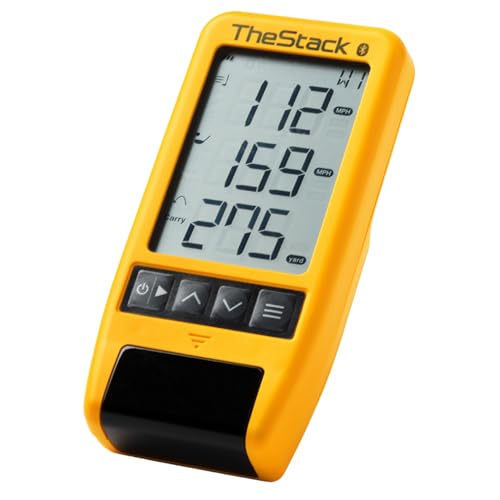
- Tracks swing speed, ball speed, carry, and smash factor
- Bluetooth app support for iOS and Android speed training
- iOS-only wedging and putting features included
Best For: Speed training and wedge practice
Metrics-Focused Option

- Tracks 13 metrics including launch angle, spin, and attack angle
- Environmental sensors adjust data for current conditions
- No subscription plus carry-distance calibration controls
Best For: Detailed swing analysis and calibrated practice
Best Value Speed Trainer – PRGR HS 130-A
For golfers seeking budget golf launch monitors, the PRGR HS 130-A is a straightforward, pocket-sized radar unit focused on core speed and distance metrics. It requires no Wi-Fi, Bluetooth, or app, and can measure club speed with or without a ball.
Best For: Golfers who want an affordable, portable monitor for swing-speed training and basic shot feedback.
Pros:
- Measures club speed, ball speed, smash factor, carry distance, and total distance.
- Works without a ball, making it useful for speed training.
- Stores up to 500 past swings and runs on AAA batteries.
- Compact 4.9-ounce design fits easily in a golf bag.
Cons:
- No Wi-Fi, Bluetooth, or companion app.
- Its listed measuring range is 135–270 yards.
The PRGR is a practical choice when affordability, simplicity, and speed practice matter more than app-based analysis or simulator features.
Best Connected All-Rounder – Shot Scope LM1
The Shot Scope LM1 adds app connectivity and session history to the core features expected from budget golf launch monitors. It measures speed, smash factor, and distance while supporting on-course, practice-range, and speed-training sessions.
Best For: Golfers who want a rechargeable monitor with free app-based GPS and long-term shot history.
Pros:
- Measures club speed, ball speed, smash factor, carry distance, and total distance.
- Includes a free Golf GPS app with no subscription fees.
- Offers lifetime session history and more than five hours of battery life.
- Supports indoor or outdoor use with IPX3 rain-ready construction.
Cons:
- Weighs 1.4 pounds, making it less compact than some alternatives.
- Its app-connected features require using a compatible mobile device.
Choose the LM1 if you value organized practice data and flexible session modes, along with the convenience of USB-C charging and unit selection.
Best for iPhone Practice – Rapsodo MLM
The Rapsodo MLM takes a different approach to budget golf launch monitors by pairing with an iPhone or iPad for shot data and video feedback. It reports speed, launch angle, carry distance, and shot shape for range, backyard, or indoor-net practice.
Best For: iPhone and iPad users who want shot-tracking data with video replay and a shot tracer.
Pros:
- Provides ball speed, club speed, launch angle, carry distance, and shot shape.
- Records swings with video replay and an on-screen shot tracer.
- Works at the driving range, in a backyard, or with an indoor net.
- Includes a carrying case and charging cord.
Cons:
- Compatible with iOS devices only.
- Premium features unlock simulator courses and game modes.
- Bluetooth and a compatible smartphone or tablet are required for its app-based experience.
The MLM is especially compelling for Apple users who learn from visual feedback and want more than standalone speed and distance readings.
Best Voice-Feedback Trainer – Voice Caddie SC200Plus
The Voice Caddie SC200Plus is a practical option among budget golf launch monitors for golfers who want immediate feedback without relying on a phone. Doppler radar, an LCD display, voice output, and stored club statistics make it useful for indoor and outdoor practice.
Best For: Golfers who want real-time distance feedback, voice output, and no-ball swing-speed training.
Pros:
- Uses Doppler radar and atmospheric-pressure sensors for data collection.
- Provides instant LCD and voice feedback.
- Includes a swing-speed mode that works without a ball.
- Stores shot data and club statistics for reviewing average distances.
Cons:
- Its listed included component is a remote, so setup depends on the supplied control accessories.
- The product is an older 2019 model.
- The supplied notes do not specify a companion app or simulator-course features.
The SC200Plus suits practice sessions where quick audible feedback and club-distance tracking are more important than phone-based video or advanced simulator functions.
Best Data Depth – Rapsodo MLM2PRO with Chrome Tour Balls
If you want budget golf launch monitors with detailed shot feedback, the Rapsodo MLM2PRO combines Doppler radar and dual cameras to capture 15 metrics. It is designed for indoor and outdoor practice, with swing video and a 21-day Premium/Core trial.
Best For: Golfers who prioritize detailed metrics, swing review, and simulator features.
Pros:
- Tracks 15 metrics, including spin rate, carry distance, club speed, club path, and launch angle.
- Dual-camera and Doppler-radar setup supports shot tracking and slow-motion contact review.
- Premium trial provides access to simulated courses, target range, and training features.
Cons:
- The Premium/Core trial lasts 21 days, so continued access may require a subscription.
- Simulator and app features require compatible devices and connectivity.
With its broad metric coverage and included Chrome Soft X RPT balls, this MLM2PRO package is a strong option for golfers seeking more than basic distance readings.
Best Portable Option – Garmin Approach R10
The Garmin Approach R10 is one of the more versatile budget golf launch monitors for home, indoor, and driving-range practice. It pairs with the Garmin Golf app to track key metrics, record swing clips, and provide training feedback, while its battery lasts up to 10 hours.
Best For: Golfers who want a portable monitor with long battery life and app-based practice tools.
Pros:
- Tracks club speed, ball speed, swing tempo, spin, launch angle, and other metrics through the Garmin Golf app.
- Offers up to 10 hours of battery life and an IPX7 waterproof rating.
- Supports training mode, shot dispersion charts, and automatically recorded swing videos.
- Active subscribers can access virtual rounds on more than 42,000 courses.
Cons:
- The monitor relies on a compatible smartphone and Garmin Golf app for viewing and analysis.
- Several simulator and virtual-course features require an active subscription.
The R10 is a practical pick for golfers who value portability and extended range sessions, especially if they already use a smartphone-based golf app.
Best Ball Bundle – Rapsodo MLM2PRO with Pro V1 RPT Balls
For golfers comparing budget golf launch monitors, this Rapsodo MLM2PRO package offers the same detailed dual-camera and Doppler-radar tracking approach in a bundle with three Pro V1 golf balls. It captures 15 metrics and works with Android and iOS devices for indoor or outdoor training.
Best For: Golfers who want detailed MLM2PRO tracking with included Pro V1 RPT balls.
Pros:
- Measures 15 metrics, including spin rate, spin axis, carry distance, club speed, and launch angle.
- Includes three Pro V1 golf balls and a tripod, carrying case, and charging cable.
- Supports swing capture, slow-motion contact review, and simulator features.
- Compatible with Android and iOS devices.
Cons:
- The included Premium/Core access is limited to a 21-day trial.
- Using simulator and third-party app features may require additional setup or subscription access.
This bundle makes sense for players who want the MLM2PRO’s broad data set and camera feedback while preferring the included Pro V1 RPT ball configuration.
Speed Training Pick – TheStack Radar
For golfers comparing budget golf launch monitors, TheStack Radar is a focused option built around speed training rather than a broad simulator feature set. It measures swing speed, ball speed, estimated carry distance, and smash factor, then sends training data to the TheStack app over Bluetooth.
Best For: Golfers using TheStack speed training, Stack Wedge practice, or range sessions who want a compact speed-tracking device.
Pros:
- Measures swing speed, ball speed, estimated carry distance, and smash factor.
- Connects with the TheStack app on iOS and Android for speed training.
- Includes access to gamified Stack Wedging and bundled Stack Putting features on iOS.
- Compact and lightweight, at approximately 0.12 kg.
Cons:
- Wedging and putting app features are iOS-only.
- Does not list the broader launch and club metrics found on more full-featured monitors.
TheStack Radar makes the most sense when speed development is your priority. Android users can access speed training, but golfers seeking the full wedging experience will need a compatible Apple device.
No-Subscription Value – Shot Scope LM1 Power Bundle
The Shot Scope LM1 is a practical choice among budget golf launch monitors for golfers who want core distance and speed data without recurring fees. This PlayBetter bundle adds a protective case, USB-C charging cable, wall adapter, and 5,000mAh portable charger.
Best For: Golfers who want indoor and outdoor launch data, session history, and a complete portable charging bundle with no subscription.
Pros:
- Measures club speed, ball speed, smash factor, carry distance, and total distance.
- Includes a free lifetime app subscription with no monthly fees.
- Supports indoor and outdoor use and has an IPX3 rating.
- Includes a 3.5-inch color screen, protective case, and portable charger.
Cons:
- Requires placement five feet behind the ball for use.
- The listed battery life is approximately five hours.
- The bundle is larger than a monitor-only purchase because of the included charging accessories.
With its core speed and distance metrics, lifetime app access, and useful power accessories, the LM1 bundle offers a well-rounded setup for practice at home or on the range.
Metrics-Focused Option – GX-03 Swing Analyzer
Golfers comparing budget golf launch monitors who want more swing detail may prefer this GX-03 analyzer. It tracks 13 metrics, including attack angle, launch angle, spin rate, ball speed, and club speed, while using environmental sensors to adjust data for current conditions.
Best For: Golfers who want expanded swing metrics, carry-distance calibration, and voice feedback for structured indoor or outdoor practice.
Pros:
- Tracks attack angle, launch angle, spin rate, ball speed, and club speed.
- Uses temperature, humidity, and barometric pressure sensors to adjust shot data.
- Offers distance compensation from 80% to 120% and claims carry accuracy within ±1 yard under recommended alignment.
- Requires no annual subscription and includes an OLED display and tripod.
Cons:
- Indoor use requires at least 15 feet of total space.
- Does not measure horizontal club face angle or swing path.
- Requires correct club selection and precise placement five feet behind the ball for best results.
The GX-03 stands out for its metric depth and calibration tools, but its space requirements and missing face-angle and swing-path data are important considerations before buying.
How We Picked the Best Budget Golf Launch Monitors
We selected these Budget Golf Launch Monitors based on the data they provide, portability, setup requirements, app compatibility, practice usefulness, and overall value. The lineup includes simple radar units for speed and distance feedback, app-connected models for simulator practice, and specialized swing-training tools.
We also considered whether each monitor suits indoor use, outdoor range sessions, or both. Because launch-monitor performance can vary with lighting, space, ball type, and setup, buyers should treat advertised metrics as practice guidance rather than a substitute for professional fitting equipment.
Quick Comparison
| Best For | Look For |
|---|---|
| Basic distance feedback | Club speed, ball speed, carry, and total distance |
| Indoor simulator practice | App support, adequate space, compatible device, and ball-flight tracking |
| Driving-range portability | Compact design, rechargeable battery, and fast setup |
| Swing-speed training | Reliable speed tracking, trend data, and training features |
| Advanced practice data | More metrics, shot history, and optional subscription features |
Key Buying Factors for Budget Golf Launch Monitors
Metrics and Accuracy
Decide which numbers matter most. Speed and distance may be enough for casual practice, while serious golfers may want launch angle, spin, apex, face data, or club-path information. More metrics do not always mean better results if setup requirements are difficult to meet.
Indoor and Outdoor Performance
Some units work best outdoors with sufficient ball flight, while others are designed to support indoor hitting and simulator software. Check minimum room dimensions, required ball placement, lighting conditions, and whether special balls or stickers are needed.
Apps, Subscriptions, and Compatibility
Review iOS and Android compatibility before buying. Also check whether simulator courses, advanced analytics, or shot-history tools require a paid membership. A lower purchase price can become less attractive if essential features are locked behind recurring fees.
Portability and Battery Life
For range use, prioritize a lightweight build, simple alignment, durable case, and enough battery life for a full practice session. A monitor that takes only a minute to position is more likely to be used consistently.
Who Should Buy Which Budget Golf Launch Monitors?
Choose a basic radar monitor if you mainly want quick club-speed, ball-speed, and distance feedback. It is the most practical choice for golfers who practice outdoors and do not need a full simulator.
Choose an app-connected mobile monitor if you want a more engaging indoor or backyard setup with shot history, virtual practice, and additional data. Confirm that your phone or tablet is supported and that you have enough space to hit safely.
Golfers focused on speed development should prioritize a dedicated swing tracker with responsive readings and useful progress feedback. Players wanting the broadest practice experience should consider a model with more metrics and simulator support, while remembering to budget for compatible accessories, premium balls, mats, nets, or subscriptions.
