
Budget digital signage displays can do far more than loop ads on a screen. The right model can handle menus, promotions, wayfinding, and in-store announcements without stretching your budget.
In this roundup, we focus on practical, affordable options for retail, restaurants, hotels, events, and countertop use, with attention to screen size, brightness, battery life, and content management.
Best 10 Budget Digital Signage Displays Picks for 2026
Portable Retail Signage Pick
32-Inch Indoor Digital Signage Display with Wheels

- FHD IPS panel with 178° viewing angle
- USB/HDMI plug-and-play with auto loop playback
- CMS remote publishing plus timed power settings
Best For: Businesses needing a movable indoor display for promotions and menus
Countertop Point-of-Service Display
18.5-Inch Countertop Digital Signage Display

- Portrait and landscape stands included
- 700-nit 1080p screen for indoor counters
- CMS, USB playback, loop playback, and scheduling
Best For: Countertops and reception areas that need compact indoor signage
Portable Interactive Display
15.6-Inch Touch Digital Signage Display

- 10-point capacitive touch screen
- 10,000 mAh battery for 4 to 6 hours
- Android 11 with mirroring and automatic playback
Best For: Portable interactive messaging in indoor retail and event spaces
Large-Format Commercial Signage
32-Inch Commercial Digital Signage Kiosk with Free CMS

- 32-inch FHD display for indoor advertising
- 700-nit brightness for clearer visibility
- Free CMS for remote content management
Best For: Large indoor advertising in retail, hospitality, and events
Portable Countertop Signage
9.7 Inch Digital Signage Display Kiosk

- 9.7-inch HD IPS touch panel
- 3000mAh battery for 4-5 hours
- Wireless casting with Eshare app
Best For: Small businesses needing a portable counter display
Bright Menu Board

- 18.5-inch screen for clearer menu viewing
- 700 nits brightness for indoor visibility
- Built-in CMS plus USB/HDMI plug-and-play
Best For: Businesses wanting a larger, simple menu display
Battery-Powered Touch Kiosk

- 2K FHD 10-point capacitive touchscreen
- 10000mAh battery for 4-6 hours
- Adjustable stand with wireless sharing
Best For: Teams wanting a portable touchscreen kiosk
Double-Sided Portable Menu Board
WeADS 8-inch Dual Screen with Battery

- Dual-sided 8-inch HD display for front-and-back visibility
- 23,200mAh battery includes phone charging capability
- Cloud CMS supports remote updates across multiple devices
Best For: Restaurants and retail counters needing portable, battery-powered signage
Floor-Standing Poster Kiosk
JIYANG 32-Inch Android Signage

- 32-inch Full HD portrait display with wide viewing angle
- USB autoplay and looping simplify content playback
- Wheels and floor-standing design make indoor placement easier
Best For: Indoor businesses needing a tall portable advertising kiosk
Tabletop Touchscreen Kiosk
10.1-Inch Android Counter Display
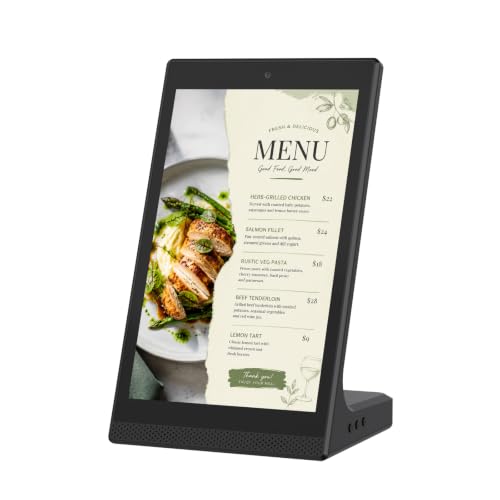
- Compact 10.1-inch touchscreen fits small countertop spaces
- WiFi and USB support basic local content management
- Good for menus, notices, and reception information
Best For: Close-range indoor displays on counters and desks
Portable Retail Signage Pick – 32-Inch Indoor Digital Signage Display with Wheels
If you want budget digital signage displays that can move with your promotions, this 32-inch MWE unit is built for plug-in playback and remote updates. The FHD IPS panel, wide viewing angle, and built-in wheels make it a practical choice for businesses that need a larger screen without a complicated setup.
Best For: Restaurants, hotels, retail stores, and events that need a movable indoor display for ads, menus, or announcements.
Pros:
- FHD IPS screen with a 178° viewing angle for clear visibility from different positions.
- USB and HDMI input with auto loop playback for simple plug-and-play use.
- CMS support for real-time remote content updates and synchronous publishing.
- Foldable, portable design with wheels for easier transport and setup.
Cons:
- Designed for indoor use, so it is not the right pick for outdoor placements.
- Works as a signage display rather than an interactive kiosk.
Overall, this is a strong fit if you need a larger budget-friendly signage screen that can stay on continuously and be updated remotely. Its portability and scheduling features add flexibility for businesses with changing promotions.
Countertop Point-of-Service Display – 18.5-Inch Countertop Digital Signage Display
This 18.5-inch countertop option is a practical choice among budget digital signage displays for close-range indoor messaging. It is designed for counters and desks, with both portrait and landscape stands so you can match the layout to menus, welcome messages, or product highlights.
Best For: Checkout counters, reception desks, waiting areas, cafes, salons, clinics, and retail service points.
Pros:
- Includes both portrait and landscape stands for flexible counter placement.
- 700-nit 1080p screen is suited to close-range indoor viewing.
- CMS publishing, USB playback, loop playback, and scheduling support easy updates.
- Durable metal housing with tempered glass front panel for commercial use.
Cons:
- Not a touchscreen tablet, POS terminal, self-order kiosk, or outdoor display.
- Best suited to indoor counter environments rather than wall-mounted or mobile setups.
For businesses that want a compact, polished display at the point of service, this model covers the basics well. The orientation flexibility and remote content tools make it easy to keep counter messaging current.
Portable Interactive Display – 15.6-Inch Touch Digital Signage Display
This 15.6-inch model stands out in budget digital signage displays if you need a compact screen that can also handle interaction. With Android 11, wireless screen mirroring, and a built-in battery, it works well for portable indoor messaging where quick setup and touch control matter.
Best For: Exhibitions, retail spaces, museums, bars, hotels, restaurants, and other indoor locations that benefit from a portable interactive display.
Pros:
- 10-point capacitive touch screen supports interactive use.
- Built-in 10,000 mAh battery provides up to 4 to 6 hours of use.
- Android 11 with app support, automatic playback, timing app, and wireless screen mirroring.
- FHD IPS screen with a slim bezel for a clean presentation.
Cons:
- Battery life is limited to a few hours, so it is not ideal for all-day unplugged use.
- Smaller 15.6-inch size may be less visible from longer viewing distances.
This is a strong pick when portability and interaction are more important than maximum screen size. It gives you several ways to manage content while remaining compact enough for flexible indoor placement.
Large-Format Commercial Signage – 32-Inch Commercial Digital Signage Kiosk with Free CMS
If you are comparing budget digital signage displays for a larger commercial setup, this 32-inch kiosk is positioned for retail stores, restaurants, exhibitions, hotels, and business advertising. Its 700-nit FHD panel and free CMS for remote content management make it a straightforward option for businesses that want centralized control over signage.
Best For: Retail, hospitality, and event venues that need a 32-inch indoor advertising display with remote content management.
Pros:
- 32-inch FHD commercial display sized for more visible indoor advertising.
- 700-nit brightness supports clear indoor viewing.
- Free CMS allows remote content management for business updates.
- Suited to retail stores, restaurants, exhibitions, and hotels.
Cons:
- No detailed connectivity or hardware specifications were provided in the notes.
- Best suited to indoor commercial use rather than portable or countertop applications.
This model is a sensible choice when you want a larger signage screen and centralized content control without extra complexity. The focus is on commercial visibility and remote management for everyday advertising needs.
Portable Countertop Signage – 9.7 Inch Digital Signage Display Kiosk
If you want budget digital signage displays that are easy to move and simple to set up, this 9.7-inch kiosk is built for compact counter use. The HD IPS touch panel, auto-rotation, and wireless screen mirroring make it practical for menus, promos, and announcements in busy spots like cafes, bars, and hotel desks.
Best For: Small businesses that need a portable, cable-light display for counters, menu boards, and quick content updates.
Pros:
- 9.7-inch HD capacitive touch panel with gravity-sensing auto-rotation.
- Built-in 3000mAh battery supports 4-5 hours of unplugged use.
- Wi-Fi, Bluetooth, MicroSD, Type-C, and Google Play support add flexibility.
- Free Eshare app enables wireless casting from iOS and Android devices.
Cons:
- Battery life is useful for short sessions, not all-day unplugged operation.
- Compact screen size may be too small for larger viewing distances.
This is a strong fit if you need a portable signage option rather than a large fixed display. Its mix of touch control, app access, and battery power makes it a versatile choice for lightweight commercial use.
Bright Menu Board – 18.5" Digital Signage Display
This 18.5-inch model is a straightforward pick among budget digital signage displays when you want a brighter, plug-and-play menu board. With 700 nits of brightness, built-in CMS support, and USB or HDMI input, it is aimed at simple commercial use in restaurants, retail, cafes, hotels, and other customer-facing spaces.
Best For: Businesses that want a larger, easy-to-operate digital menu board with built-in content management.
Pros:
- 18.5-inch display offers more screen area than small countertop units.
- 700 nits brightness helps the screen stand out indoors.
- Built-in CMS supports restaurant and retail content management.
- USB and HDMI plug-and-play options simplify setup.
Cons:
- No battery or portability features are listed.
- Touch, mirroring, and advanced app features are not specified in the notes.
If your priority is a larger, dependable signage screen instead of a mobile kiosk, this display keeps things simple. The built-in CMS and direct input options make it a practical fit for routine menu or advertising updates.
Battery-Powered Touch Kiosk – 15.6" Digital Signage Display
For buyers comparing budget digital signage displays with more power and interactivity, this 15.6-inch touchscreen stands out as a flexible all-in-one option. It combines a 2K FHD panel, adjustable stand, 10,000mAh battery, and wireless screen sharing, making it suitable for commercial advertising as well as interactive use in indoor business settings.
Best For: Teams that want a portable touchscreen signage unit with strong battery life and broad device compatibility.
Pros:
- 15.6-inch 2K FHD capacitive touchscreen supports interactive use.
- 10,000mAh battery is rated for 4-6 hours of continuous use.
- Adjustable all-metal stand lets you lift, rotate, and tilt the display.
- Eshare support enables wireless screen sharing and reverse control across multiple systems.
Cons:
- At 2.3 lbs plus stand, it is still more of a tabletop unit than a large-format display.
- Many features may be more than needed for simple static signage.
This model offers the broadest feature set of the three, especially if you want touch interaction and flexible positioning. The battery, open app ecosystem, and connectivity options make it a strong pick for portable commercial use.
Double-Sided Portable Menu Board – WeADS 8-inch Dual Screen with Battery
If you need budget digital signage displays that do more than show a static menu, this double-sided WeADS unit is built for compact commercial use. The 8-inch HD screens, touch control, and cloud-based remote management make it a practical fit for businesses that want flexible content updates without a complicated setup.
Best For: Restaurants, bars, and retail counters that want a portable two-sided display with built-in battery power and remote content control.
Pros:
- Double-sided 8-inch HD screens let you show content on both sides.
- Built-in 23,200mAh battery can also charge phones with the side cable.
- Cloud platform supports remote updates and control of multiple devices.
- Lightweight, commercial-grade design suits portable business use.
Cons:
- Smaller 8-inch screens may be too compact for larger viewing distances.
- Best suited to tabletop or close-range placement, not big open spaces.
- Advanced cloud features may be more than some simple sign holders need.
This model stands out for businesses that want a compact signage upgrade with battery backup and dual-sided visibility. It is a smart choice if your priority is flexibility, reduced printing costs, and easy content changes.
Floor-Standing Poster Kiosk – JIYANG 32-Inch Android Signage
For buyers comparing budget digital signage displays in a larger format, this 32-inch JIYANG floor-standing kiosk offers a straightforward indoor advertising solution. Its plug-and-play USB autoplay, split-screen options, and Android system make it useful for venues that want a more traditional poster-style display with flexible presentation modes.
Best For: Indoor locations like retail stores, restaurants, malls, and event spaces that need a tall, portable display for ads, menus, or wayfinding.
Pros:
- 32-inch 1920 × 1080 screen provides a clear, portrait-style presentation.
- USB autoplay and looping make content loading simple.
- Built-in split-screen modules support multiple windows at once.
- Floor-standing design with wheels improves portability indoors.
Cons:
- Requires more floor space than tabletop signage.
- Designed for indoor use, so it is not meant for outdoor deployment.
- Setup may be more involved than a basic static sign or small desktop display.
This kiosk is a strong fit when you want a larger, more visible display without moving into a highly complex signage system. It balances screen size, portability, and basic content controls for everyday commercial use.
Tabletop Touchscreen Kiosk – 10.1-Inch Android Counter Display
This 10.1-inch tabletop unit is a compact option for buyers looking for budget digital signage displays at close range. With WiFi, USB support, and a touchscreen interface, it is designed for small indoor spaces where staff need to update menus, notices, or promotional slides without much effort.
Best For: Counters, reception desks, cafes, and retail shelves that need a compact touchscreen display for everyday customer-facing information.
Pros:
- Compact 10.1-inch size fits tightly on counters and desks.
- Touchscreen support makes browsing and interaction simple.
- WiFi and USB connectivity help with local content management.
- Useful for menus, notices, product displays, and reception information.
Cons:
- Small screen size limits visibility from farther away.
- Best suited for close-range viewing rather than large open areas.
- USB-based hardware connectivity keeps the feature set relatively simple.
Overall, this is a practical desktop signage choice when space is limited and the audience is nearby. It offers enough flexibility for routine content changes without adding unnecessary complexity.
How We Picked These Budget Digital Signage Displays
We prioritized displays that offer the best value for everyday business use, not just the lowest sticker price. That means looking at display size, usable brightness, power options, portability, touch support, and whether the unit includes a simple CMS or media playback tools. We also favored models that fit common deployment needs, from countertop menus to floor-standing posters.
Quick Comparison: Which Type Fits Your Space?
Smaller 9.7-inch, 10.1-inch, and 15.6-inch units work well for counters, checkouts, and tablet-style menu boards. Mid-size 18.5-inch models are a strong fit for cafes, reception desks, and compact retail spaces. For higher-traffic areas, 32-inch displays are better for visibility at a distance, especially when you need stronger signage impact.
Key Buying Factors for Budget Digital Signage Displays
Brightness and Visibility
If the screen will face bright indoor lighting or a storefront window, look for higher-nit panels. A dim display may save money upfront but reduce readability and overall impact.
Power, Battery, and Placement
Plug-in models are best for permanent installs, while battery-powered units are useful for temporary promotions, pop-ups, and flexible layouts. Battery capacity matters if you plan to move the screen frequently.
Touch, CMS, and Connectivity
Touchscreens can improve interaction for menus and self-service workflows. Built-in CMS support can make updates easier for teams without technical staff. Also check for Wi-Fi, HDMI, USB, and screen-mirroring support if you want flexible content control.
Mounting and Mobility
Countertop stands, wall-mount compatibility, and wheeled floor stands each solve different problems. Choose the format that matches your floor plan so you are not paying for mobility or installation features you will not use.
Who Should Buy Which Budget Digital Signage Displays?
If you need a low-cost menu board or countertop promo screen, compact touchscreen models are usually the best starting point. Retailers and restaurants with larger viewing distances should lean toward brighter 18.5-inch or 32-inch displays. Businesses that host frequent events or change layouts often will get more value from portable, battery-powered options. For a fixed installation, Budget Digital Signage Displays with CMS tools and dependable brightness offer the best long-term return.
