
Finding the right budget desktop CNC router means balancing work area, rigidity, software support, and safety features—not simply choosing the lowest-priced machine.
These 10 options cover beginner-friendly 3018 models, enclosed routers, and larger all-metal machines for wood, acrylic, plastics, and light-duty metal work.
Best 10 Budget Desktop CNC Routers Picks for 2026
Best Beginner Value

- 300 x 180 x 45 mm working area
- GRBL control with offline controller
- Handles wood, acrylic, PCB, and soft aluminum
Best For: Beginners and small home-workshop projects
Best Compact All-Metal Option

- All-metal Z-axis with 0.1 mm positioning accuracy
- Compact 15-pound desktop design
- Includes cutters and ER11 collet
Best For: Small engraving and STEM training projects
Best Easy-Assembly Pick
SainSmart Genmitsu 3018-PROVer V2

- Pre-assembled main parts for faster setup
- Includes Z-probe, limit switches, and E-stop
- Supports several material types and upgrade accessories
Best For: First-time users and personalized small projects
Best Larger Work Area

- 400 x 400 x 60 mm engraving area
- All-aluminum structure with linear-rail Z-axis
- Pre-wired assembly and expandable spindle compatibility
Best For: Larger hobby woodworking and engraving projects
Beginner-Friendly Pick
Genmitsu Cubiko Desktop CNC Router
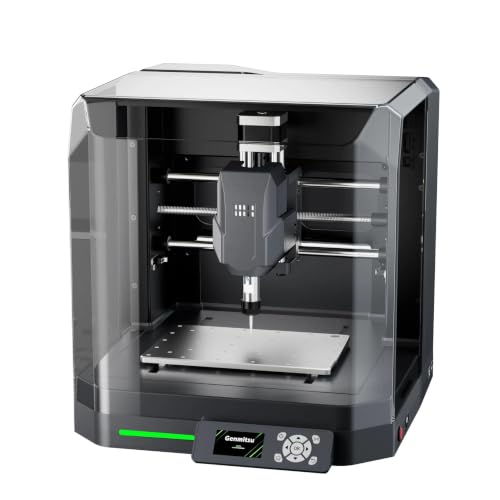
- Factory-assembled for quicker setup
- Enclosure helps reduce dust and noise
- Supports multiple design and control software options
Best For: Beginners and light-duty DIY projects
Power and Safety Pick
LUNYEE 3018 PRO MAX CNC Router

- 500W spindle with 0-12000 RPM range
- All-metal frame with 80mm Z travel
- Includes six limit switches and an emergency stop
Best For: Desktop cutting and carving with added safety controls
Large-Format Pick
FoxAlien Masuter Pro MAX CNC Router

- 600 x 600mm active work area
- 500W brushless spindle and 100mm pass height
- Dedicated port for 4th-axis rotary engraving
Best For: Larger DIY projects and future upgrade flexibility
Best Value 4040 CNC

- 15.7-by-15.7-inch work area
- 500W spindle with two clamp sizes
- GRBL/Candle control and full accessory kit
Best For: Hobbyists needing a larger budget work area
Best Power in a Compact CNC

- 710W spindle with 30,000 RPM maximum
- All-metal frame with linear rails and lead screws
- 60mm steppers rated at 7.3 Nm torque
Best For: Compact, higher-power metal and wood projects
Best Simple Pick

- 17.13-by-15.75-inch working area
- Reinforced spoilboard reduces bed flex
- Lead screws and 32-bit GRBL controller
Best For: Signs, reliefs, prototypes, and larger woodworking projects
Best Beginner Value – Genmitsu CNC 3018-PRO
The Genmitsu CNC 3018-PRO is a practical starting point among budget desktop CNC routers. Its compact 300 x 180 x 45 mm working area, GRBL control, and included offline controller suit small carving, engraving, milling, and PCB projects.
Best For: Beginners, home workshops, classrooms, and makers working with wood, acrylic, PVC, plastic, PCB, or soft aluminum.
Pros:
- Compact footprint with a useful 300 x 180 x 45 mm work area.
- GRBL control and Candle support provide a flexible learning workflow.
- Offline controller allows basic operation without a computer connected.
- Raised base and upgraded assembly help simplify setup and improve stability.
Cons:
- Its 3-axis, small-format design is intended for compact projects rather than large workpieces.
- Soft materials and aluminum require suitable bits and cutting settings.
With beginner-friendly controls and broad material compatibility, this is a well-rounded choice for learning CNC fundamentals without taking over a workbench.
Best Compact All-Metal Option – TTC3018 Pro CNC Router
The TTC3018 Pro is a compact pick for shoppers comparing budget desktop CNC routers with a more stable metal Z-axis. Its 300 x 180 x 40 mm work area and 0.1 mm positioning accuracy are suited to small engraving, nameplate, and DIY projects.
Best For: Makers, students, and small-business users who want a compact machine for wood, acrylic, MDF, nylon, and some sheet aluminum or brass work.
Pros:
- All-metal Z-axis with backlash-eliminating T8 lead screws.
- Lightweight 15-pound design fits small desk spaces.
- Includes cutters, ER11 collet, spindle motor, and assembly tools.
- Compatible with GRBL, ArtCam, and Fusion360 workflows.
Cons:
- USB wired connection is required; it has no Bluetooth, Wi-Fi, or built-in TF card slot.
- The 40 mm Z-axis working height limits larger or thicker projects.
The TTC3018 Pro emphasizes compactness and Z-axis stability, making it a useful option when desk space and included starter accessories matter most.
Best Easy-Assembly Pick – SainSmart Genmitsu 3018-PROVer V2
The SainSmart Genmitsu 3018-PROVer V2 is an approachable choice among budget desktop CNC routers, especially for first-time users. Pre-assembled main parts, a one-piece aluminum spoilboard, and clear cable management can help get small projects running in under an hour.
Best For: Beginners creating artwork, personalized gifts, signs, prototypes, and small business projects from wood, plastic, acrylic, PVC, PCB, carbon fiber, MDF, copper, or aluminum.
Pros:
- Pre-assembled gantry frame and aluminum spoilboard simplify setup.
- Includes a Z-probe, limit switches, and emergency stop.
- Supports accessory upgrades such as extension kits, a stronger spindle, and offline control.
- Works with common CAD/CAM options including Carveco, Fusion360, and Easel.
Cons:
- The 3018-format machine is better suited to small projects than large workpieces.
- Some advanced capabilities require separately added accessories.
Its beginner-focused assembly and upgrade path make the PROVer V2 a flexible entry point for users who want room to expand their setup over time.
Best Larger Work Area – FoxAlien Masuter Pro
The FoxAlien Masuter Pro stands out among budget desktop CNC routers for its 400 x 400 x 60 mm engraving area and all-aluminum structure. Pre-wired components, a linear-rail Z-axis, and included spindle clamps make it suitable for larger hobby woodworking and engraving projects.
Best For: Hobbyists and DIY users who need more working space for wood, acrylic, MDF, nylon, and similar materials.
Pros:
- Generous 400 x 400 x 60 mm working area.
- All-aluminum frame and linear-rail Z-axis support stability.
- Pre-wired parts can enable assembly in about 10–15 minutes.
- Includes 52 mm and 65 mm spindle clamps with optional expansion potential.
Cons:
- Its larger frame needs more bench space than 3018-size machines.
- Some spindle and expansion options are additional purchases.
- The machine weighs 13 kg, making it less convenient to move frequently.
Choose the Masuter Pro when project size is more important than the smallest footprint; its sturdy construction and expandable spindle compatibility provide a broader hobby platform.
Beginner-Friendly Pick – Genmitsu Cubiko Desktop CNC Router
For shoppers comparing budget desktop CNC routers, the Genmitsu Cubiko stands out as a ready-to-use option for learning, engraving, and light-duty carving. Its factory-assembled design, integrated frame, and included enclosure help simplify setup and contain some dust and operating noise.
Best For: Beginners, hobbyists, and maker workshops working with wood, acrylic, PCB boards, plastics, and selected soft metals.
Pros:
- Ships factory-assembled to reduce initial setup time.
- Works with Genmitsu App, Fusion 360, Candle, Easel, and Carveco.
- Supports auto Z-probing and height-mapping workflows.
- Includes an enclosure with dust and noise reduction features.
Cons:
- Designed for light-duty work rather than heavy machining.
- Proper calibration and a conductive probe connection are needed for optimal probing.
- The compact desktop format limits workpiece size.
The Cubiko is a practical entry point if convenience and a more contained workspace matter more than maximum cutting capacity. Its software flexibility and probing support also leave room for varied beginner projects.
Power and Safety Pick – LUNYEE 3018 PRO MAX CNC Router
Among budget desktop CNC routers, the LUNYEE 3018 PRO MAX offers an all-metal 3018 platform with a 500W spindle, extended 80mm Z-axis travel, and controls aimed at safer operation. It is suited to users who want more spindle power and manual positioning features for wood, acrylic, MDF, plastic, and selected metal projects.
Best For: DIY users who want an all-metal frame, higher spindle power, and built-in limit-switch and emergency-stop protection.
Pros:
- 500W spindle supports work across wood, acrylic, plastics, and some aluminum and copper applications.
- All-metal construction with reinforced aluminum profiles is designed for stability and durability.
- Six limit switches and an emergency-stop button add safety controls.
- 80mm Z-axis travel and manual handwheels support flexible positioning.
Cons:
- Installation and wiring still require following the supplied video instructions.
- The stated 300 x 180 x 80mm working area is relatively compact.
- The optional 12mm-axis upgrade kit is sold separately.
The LUNYEE is a strong fit when frame rigidity, spindle output, and safety hardware are priorities. Its smaller work area makes it better for desktop-sized projects than large stock.
Large-Format Pick – FoxAlien Masuter Pro MAX CNC Router
For budget desktop CNC routers, the FoxAlien Masuter Pro MAX is aimed at users who need substantially more workspace than a typical compact hobby machine. Its 600 x 600mm active area, 100mm pass height, 500W brushless spindle, and reinforced X-axis support larger and thicker projects.
Best For: Makers handling oversized wood, acrylic, plastic, and soft-metal projects who also want upgrade and rotary-engraving options.
Pros:
- 600 x 600mm work area accommodates larger workpieces.
- 100mm Z-axis pass height supports thicker material.
- 500W brushless spindle is designed for quieter, efficient, continuous operation.
- Dedicated A-axis port enables plug-and-play rotary engraving upgrades.
Cons:
- Its large footprint requires more bench space than compact desktop CNCs.
- The machine arrives in half-assembly rather than fully assembled.
- Closed-loop motors and rotary hardware are upgrade features rather than stated included components.
The Masuter Pro MAX makes the most sense for buyers who would otherwise outgrow a small 3018-style router. Its reinforced structure and expansion-ready control board add appeal for longer-term maker projects.
Best Value 4040 CNC – 4040-PRO 500W Router
For shoppers comparing budget desktop CNC routers, this 4040-PRO offers a relatively large 15.7-by-15.7-inch work area, a 500W spindle, and GRBL/Candle USB control. Its included accessories and pre-wired parts make it a practical starting point for hobby CNC work.
Best For: Hobbyists who want a roomier desktop machine for wood, acrylic, and light milling projects.
Pros:
- 15.7-by-15.7-by-2.9-inch working area supports larger projects than compact engravers.
- 500W spindle includes 52mm and 65mm clamp options for upgrade flexibility.
- Accessory kit includes clamps, Z-probe, test board, tools, cables, and manual.
- GRBL and Candle support provide USB-based job control and 3D preview features.
Cons:
- Its 500W spindle is less powerful than the 710W spindle in the Genmitsu 3020-PRO Ultra.
- The machine uses belt-driven X/Y motion, which may be less rigid than an all-lead-screw design.
This is a sensible budget desktop CNC router when working area and included setup accessories matter most. The combination of GRBL control and upgradeable spindle mounts leaves room to expand as your projects become more demanding.
Best Power in a Compact CNC – Genmitsu 3020-PRO Ultra
Among budget desktop CNC routers, the Genmitsu 3020-PRO Ultra stands out for its 710W spindle and all-metal construction. Dual linear rails, lead screws, and 60mm stepper motors are aimed at stable cutting in wood, acrylic, and selected metals.
Best For: Makers who prioritize cutting power and rigid construction in a compact desktop CNC.
Pros:
- 710W spindle offers adjustable speeds from 6,500 to 30,000 RPM.
- All-metal frame uses linear rails, polished rods, and lead screws for controlled motion.
- 60mm stepper motors provide 7.3 Nm of stated torque and support deeper aluminum cuts.
- Modular assembly and multiple spindle-holder options simplify setup and future expansion.
Cons:
- Its 11.8-by-8.1-by-3.1-inch work area is smaller than both 4040 machines in this roundup.
- The stronger metal-focused design weighs 15.3 kg and may be more machine than basic engraving requires.
The 3020-PRO Ultra is a strong choice if compact dimensions are acceptable and spindle power is a priority. Its work envelope is limited, but the reinforced all-metal platform gives it a more capable feel for demanding small-format jobs.
Best Simple Pick – Genmitsu 4040-PRO
This Genmitsu 4040-PRO is one of the more workspace-focused budget desktop CNC routers, with a 17.13-by-15.75-by-3.15-inch working area. Its reinforced spoilboard, lead-screw drives, and 32-bit controller are designed to support steadier carving and engraving across larger pieces.
Best For: Makers producing signs, reliefs, prototypes, and larger woodworking projects.
Pros:
- 17.13-by-15.75-by-3.15-inch work area provides generous room for desktop projects.
- Reinforced hybrid spoilboard and center aluminum support bar help reduce bed flex.
- Dual 16mm HSS steel tubes and lead-screw drives support rigid, smooth movement.
- Pre-assembled modules can reduce assembly time, and the 65mm/69mm mount support enables upgrades.
Cons:
- The product details list a 240V voltage, so buyers should verify electrical compatibility before ordering.
- The machine is heavier than the 3020-PRO Ultra at 20.84 kg.
Choose this model when a flatter bed and generous working area are more important than the smallest footprint. GRBL support and accessory ports also give experienced users a path toward a more advanced setup.
How We Picked the Best Budget Desktop CNC Routers
We focused on machines that offer useful capability without moving into professional-industrial pricing. Our comparison considers cutting area, frame construction, spindle power, motion components, included controls, expandability, safety features, and the availability of replacement parts and community support.
Because “budget” CNC routers vary considerably, the list includes compact 3018-style machines for small projects as well as 3020 and 4040 models with more working room. Product descriptions and specifications should be checked carefully before purchase, since included accessories, software, and spindle configurations can vary by seller.
Quick Comparison
| Machine type | Best suited to | Main advantage |
|---|---|---|
| 3018-class router | Beginners and small projects | Lower cost and compact footprint |
| Enclosed desktop router | Home workshops and classrooms | Better containment of chips and noise |
| All-metal 3020 router | Detailed, more rigid work | Improved stability and durability |
| 4040-class router | Larger signs and panels | Greater working area |
Key Buying Factors for Budget Desktop CNC Routers
Work Area and Project Size
Check the usable X, Y, and Z travel rather than the machine’s outside dimensions. A 3018 router is convenient for small signs, engravings, brackets, and prototypes, while a 4040 machine is more practical for larger panels. Remember to leave room around the workpiece for clamps and tool movement.
Frame Rigidity and Materials
Rigid aluminum or all-metal frames generally resist vibration better than lighter assemblies. Greater rigidity improves edge quality and helps the machine handle harder materials, although it does not automatically make a desktop router suitable for heavy metal removal.
Spindle, Tooling, and Material Limits
Spindle wattage is only one part of performance. Look for compatible collets, supported bit sizes, cooling requirements, and realistic material guidance. Most budget routers are strongest on wood, plastics, acrylic, MDF, and similar materials. Cutting metal usually requires conservative feeds, shallow passes, suitable tooling, lubrication where appropriate, and a rigid machine.
Controls, Software, and Upgrades
GRBL support is common and provides a broad ecosystem of sender software and tutorials. Offline controllers can be useful when you do not want to keep a computer connected. Also check whether the machine supports limit switches, emergency stops, spoilboards, dust collection, upgraded spindles, and stronger linear components.
Safety and Workspace
Plan for eye protection, chip control, dust extraction, secure workholding, and an emergency-stop routine. An enclosure can make a router more manageable in a home or classroom, but it does not eliminate the need for ventilation, supervision, and safe operating practices.
Who Should Buy Which Budget Desktop CNC Routers?
Choose a 3018-class machine if you are learning CNC, have limited space, or mainly make small engravings and prototypes. Choose an enclosed model if mess, noise, or shared-room use is a major concern. Choose an all-metal 3020 machine if rigidity and repeatability matter more than the smallest footprint. Choose a 4040 router if your projects include larger signs, panels, or multiple small parts in one setup.
Before ordering, confirm the machine’s actual cutting envelope, included accessories, power requirements, software compatibility, warranty terms, and replacement-part availability. The best budget desktop CNC router is the one that matches your materials and project dimensions while leaving enough room in the budget for bits, clamps, dust control, and safety equipment.
