
The best budget conference room cameras make hybrid meetings easier without requiring a full commercial installation. This roundup compares 10 affordable options, from compact all-in-one webcams to PTZ systems with auto-tracking, microphones, speakers, and multiple connection types.
Whether you are equipping a huddle room, classroom, home office, or small conference room, focus on the combination of coverage, audio performance, compatibility, and controls that match your meeting setup.
Best 10 Budget Conference Room Cameras Picks for 2026
Best All-in-One PTZ Value
TONGVEO AI Auto-Tracking Conference System

- 1080p at up to 60fps with 3x optical zoom
- AI face and humanoid speaker tracking
- Bluetooth speakerphone with 16.4-foot pickup
Best For: Small-to-medium rooms needing integrated video and audio
Best 4K Compact Camera
AV Access BizEye AI Conference Webcam
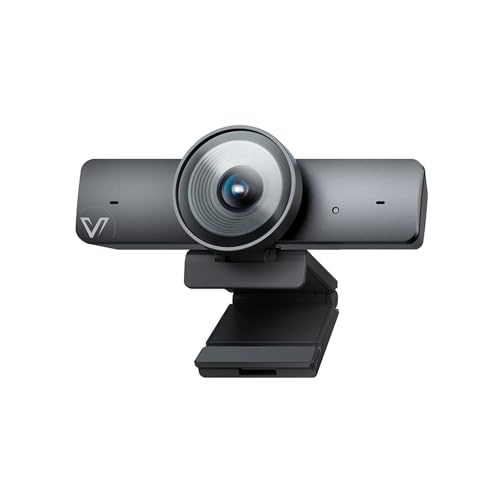
- 4K video with a large 1/1.8-inch CMOS sensor
- AI framing, presenter tracking, and gallery modes
- 120-degree view with integrated noise-reducing microphone
Best For: Small rooms seeking sharp video and simple USB setup
Best Proven Desktop Setup
Logitech BCC950 Conference Webcam

- 1080p video at 30fps with integrated speakerphone
- Full-duplex audio and echo cancellation
- Remote-controlled pan, tilt, zoom, and call functions
Best For: Small groups wanting a simple all-in-one USB device
Best Large-Room Coverage
WYRESTORM HALO VX10 4K Camera System

- 4K, 120-degree camera with 5x optical zoom
- AI auto framing and presenter tracking
- Four-mic array plus integrated speakers
Best For: Medium and large rooms needing an all-in-one video bar
Compact All-in-One Pick

- 4K camera, speaker, microphones, and remote in one unit
- AI auto framing and presenter tracking
- Plug-and-play USB setup with 5x digital zoom
Best For: Small meeting rooms and uncluttered desktop setups
Flexible PTZ System Pick
TONGVEO 4K AI Tracking Camera Kit

- 4K PTZ camera with 3x optical zoom
- AI face and presenter tracking
- Wireless speakerphone with 16.4-foot pickup
Best For: Small-to-medium rooms and presenter-focused meetings
Wide-Room Audio Pick
Yealink UVC34 4K Conference Camera

- 4K video with a 120-degree field of view
- Eight microphones with 5-meter pickup
- AI framing plus automatic privacy shutter
Best For: Huddle rooms using Teams or Zoom
Best Budget All-in-One Pick
PolaTab Q95 3-in-1 Conference Camera

- 1080p video with a 95-degree wide-angle view
- Built-in microphone and full-range speaker
- USB plug-and-play setup with DSP audio processing
Best For: Small meetings, home offices, and online teaching
Best Feature-Packed 4K Value
TONGVEO 4K AI-Tracking PTZ System

- 4K video at 30fps with a 120-degree field of view
- AI tracking, gesture control, and 5x digital zoom
- Separate speakerphone with 5-meter audio pickup
Best For: Small to medium rooms needing flexible framing and audio
Best for Medium Rooms
TONGVEO 12x Optical Zoom Camera System

- 1080p at 60fps with 12x optical zoom
- AI face and humanoid auto-tracking
- Bluetooth conference speaker with 16.4-foot pickup
Best For: Medium rooms and meetings with 20–30 participants
Best All-in-One PTZ Value – TONGVEO AI Auto-Tracking Conference System
For buyers comparing budget conference room cameras, the TONGVEO system combines a 1080p PTZ camera with a Bluetooth conference speakerphone. Its AI tracking, 3x optical zoom, and flexible USB 3.0/HDMI connectivity make it a practical fit for small-to-medium meeting spaces.
Best For: Small-to-medium rooms with up to 8–12 participants that need integrated video and wireless audio.
Pros:
- AI face and humanoid tracking keeps speakers in view.
- 1080p video can output at up to 60fps through USB 3.0 and HDMI.
- Speakerphone offers full-duplex audio, echo cancellation, and up to 16.4 feet of pickup.
- Supports USB, Bluetooth, and wireless-dongle audio connections.
Cons:
- The PTZ camera itself is wired, while only the speaker is wireless.
- Video resolution is limited to 1080p rather than 4K.
This is a strong value-oriented choice when automatic speaker tracking and built-in audio matter more than ultra-high-resolution video. The separate wired camera and wireless speaker design may require some cable planning.
Best 4K Compact Camera – AV Access BizEye AI Conference Webcam
The AV Access BizEye is a compelling option among budget conference room cameras for teams that want 4K detail in a compact USB setup. Its large 1/1.8-inch CMOS sensor, 120-degree lens, and AI framing tools are designed for small rooms and flexible desktop or tripod use.
Best For: Small meeting rooms, hybrid workspaces, and users who want 4K video with automatic framing.
Pros:
- 4K video at 30fps with backward compatibility for 1080p and 720p.
- AI auto framing, presenter tracking, and individual gallery modes support dynamic meetings.
- 120-degree field of view captures groups without distortion.
- Built-in noise-reducing microphone and plug-and-play USB connectivity simplify setup.
Cons:
- Microphone pickup is specified for up to 3 meters, which may limit larger rooms.
- Uses 5x digital zoom rather than optical zoom.
- Gesture control may require a firmware update if unavailable initially.
The BizEye prioritizes sharp video and intelligent framing in a compact form. It is best suited to smaller spaces where its integrated microphone can cover the room without needing separate audio hardware.
Best Proven Desktop Setup – Logitech BCC950 Conference Webcam
The Logitech BCC950 remains a straightforward choice for budget conference room cameras when dependable desktop video and audio are the priority. Its all-in-one design pairs 1080p video with a full-duplex speakerphone, noise-canceling microphone, and remote-controlled pan, tilt, and zoom.
Best For: Small meeting groups that want a simple USB conference device with integrated controls.
Pros:
- Combines 1080p video at 30fps with an integrated speakerphone.
- Full-duplex audio, echo cancellation, and noise-canceling microphone support clear conversations.
- Remote and base controls adjust camera movement, zoom, volume, mute, and calls.
- Plug-and-play USB connectivity works with Windows and macOS.
Cons:
- Audio pickup is specified for up to 8 feet, limiting larger rooms.
- It lacks newer AI framing and speaker-tracking features.
- Its 1080p resolution is lower than the 4K options in this roundup.
The BCC950 is a practical pick for small spaces where ease of use matters more than advanced automation. Its included remote and speakerphone reduce the need for separate meeting-room accessories.
Best Large-Room Coverage – WYRESTORM HALO VX10 4K Camera System
For larger spaces, the WYRESTORM HALO VX10 stands out among budget conference room cameras with a 120-degree 4K view, AI auto framing, presenter tracking, and a four-microphone array. Its integrated speakers and all-in-one bar design help reduce equipment and cable clutter.
Best For: Medium and large conference rooms used for group meetings, presentations, and hybrid collaboration.
Pros:
- 4K camera provides detailed video with a 120-degree wide-angle view.
- AI auto framing and presenter tracking adjust the shot automatically.
- Four-microphone array with noise reduction supports room-wide voice capture.
- Built-in speakers and plug-and-play support for Teams, Zoom, and Google Meet simplify installation.
Cons:
- The supplied details do not specify microphone pickup distance.
- It is a larger video bar, measuring 18 inches wide, so placement requires planning.
- Its 5x optical zoom and 8x digital zoom may not replace a dedicated PTZ camera in every large room.
The HALO VX10 is aimed at teams that need broad coverage and hands-free framing without assembling separate camera, microphone, and speaker components. Its room-oriented design makes it less suited to compact desktop setups.
Compact All-in-One Pick – RayBit SeeUp 4C 4K Camera
For shoppers comparing budget conference room cameras, the RayBit SeeUp 4C combines a 4K webcam, speaker, noise-canceling microphone array, and remote control in one compact USB system. AI auto framing and presenter tracking can help keep meetings centered without constant manual adjustments.
Best For: Small meeting spaces and desktop setups that need video and audio in one device.
Pros:
- Combines 4K video, speakers, microphones, and remote control.
- AI auto framing and presenter tracking adjust the view automatically.
- Supports 5x digital zoom, presets, and a 94-degree viewing angle.
- Plug-and-play compatibility with Windows, Mac, TVs, and major meeting apps.
Cons:
- Its zoom is digital rather than optical.
- The remote’s batteries are not included.
This is a practical choice when minimizing desk clutter matters more than advanced PTZ movement or optical zoom. Its built-in audio and simple USB setup make it a convenient entry-level conference system.
Flexible PTZ System Pick – TONGVEO 4K AI Tracking Camera Kit
Among budget conference room cameras, this TONGVEO kit stands out for pairing a 4K PTZ camera with a separate wireless Bluetooth speakerphone. It offers AI subject tracking, HDMI and USB connectivity, and flexible mounting options for small-to-medium meeting spaces.
Best For: Small-to-medium rooms, presentations, worship spaces, and setups needing flexible camera placement.
Pros:
- 4K camera supports 30fps output and 3x optical zoom.
- AI tracking follows faces and presenters as they move.
- PTZ design provides 350-degree horizontal and 180-degree vertical movement.
- Wireless speakerphone offers four microphones, 16.4-foot pickup, and multiple connection methods.
Cons:
- USB output is listed at 1080p, while 4K output is available through HDMI.
- The separate speakerphone adds more components than an all-in-one bar.
This kit is a strong fit when camera positioning and presenter movement are priorities. Its HDMI option and optical zoom add versatility, while the portable speakerphone makes it easier to adapt the system to different rooms.
Wide-Room Audio Pick – Yealink UVC34 4K Conference Camera
The Yealink UVC34 is a polished option for buyers seeking budget conference room cameras with broad room coverage and integrated audio. Its 120-degree field of view, 8-microphone array, AI framing, and speaker tracking are designed to simplify huddle-room meetings.
Best For: Huddle rooms and Teams or Zoom users who want wide coverage with built-in microphones.
Pros:
- 4K video uses an 8MP sensor and a 120-degree field of view.
- Eight-microphone array provides up to 5 meters of far-field pickup.
- AI auto framing, speaker tracking, and face enhancement support natural meetings.
- Includes an automatic electric privacy shutter and a 7-meter USB cable.
Cons:
- The system is relatively heavy at 1,620 grams.
- It is primarily intended for computer-based conferencing rather than a broad range of listed devices.
This model makes sense for a fixed huddle-room installation where wide framing, privacy, and room-wide voice pickup are more important than portability. Teams and Zoom certification also reduce setup uncertainty for common workplace platforms.
Best Budget All-in-One Pick – PolaTab Q95 3-in-1 Conference Camera
For buyers comparing budget conference room cameras, the PolaTab Q95 is a straightforward all-in-one option. It combines a 1080p camera, microphone, and speaker in one USB plug-and-play unit, making it practical for home offices, small meeting spaces, and online teaching.
Best For: Small meetings and users who want video, audio pickup, and speaker output in one compact device.
Pros:
- Combines a 1080p camera, omnidirectional microphone, and speaker.
- Wide 95-degree field of view helps include people seated near the edges.
- DSP noise reduction, echo cancellation, auto light correction, and plug-and-play USB setup.
Cons:
- Video resolution is limited to 1080p rather than 4K.
- The microphone pickup range is specified at up to 3 meters.
- It uses fixed digital zoom rather than optical zoom or PTZ movement.
The Q95 focuses on essentials instead of advanced tracking or room-scale control. If your priority is an affordable, simple setup with integrated audio, it offers a practical starting point for budget conference room cameras.
Best Feature-Packed 4K Value – TONGVEO 4K AI-Tracking PTZ System
Among budget conference room cameras, this TONGVEO system stands out for adding 4K video, PTZ movement, gesture control, and a separate speakerphone. It is a more capable choice for teams that want flexible framing and wireless audio without assembling every component separately.
Best For: Small to medium meeting rooms that need wide coverage, subject tracking, and flexible speakerphone connectivity.
Pros:
- Records in 4K at 30fps with a 120-degree field of view.
- Offers AI auto-tracking, gesture control, 5x digital zoom, and broad pan/tilt movement.
- Includes a speakerphone with two microphones, noise reduction, and a stated 5-meter pickup range.
- Supports USB 3.0, Bluetooth or wireless-dongle speakerphone connection, and multiple operating systems.
Cons:
- 4K requires compatible equipment and software.
- The listed zoom is digital rather than optical.
- The multi-piece camera and speakerphone setup is less minimal than an all-in-one webcam.
This system delivers more room coverage and control than basic budget conference room cameras. Its tracking and 4K features are useful when participants move around, but buyers should plan for a slightly more involved installation and configuration process.
Best for Medium Rooms – TONGVEO 12x Optical Zoom Camera System
This TONGVEO bundle is designed for buyers who need more reach than typical budget conference room cameras provide. Its 1080p 60fps PTZ camera pairs 12x optical zoom with a Bluetooth conference speaker, making it suited to medium and larger rooms where participants may sit farther from the camera.
Best For: Medium rooms and meetings with approximately 20–30 people, especially when distant speakers need clear framing and audio.
Pros:
- 12x optical zoom provides more useful reach than digital-only zoom systems.
- 1080p video at 60fps with simultaneous USB 3.0 and HDMI output.
- AI face and humanoid tracking helps keep speakers in view.
- Bundled speakerphone supports USB, Bluetooth 5.0, and wireless-dongle connections, with up to 16.4 feet of voice pickup.
Cons:
- The 75-degree field of view is narrower than some wide-angle conference cameras.
- It is more equipment than needed for a small desk or compact room.
- The camera provides Full HD rather than 4K resolution.
The 12x optical zoom and dual-output design make this a strong option when room size and speaker distance matter more than maximum resolution. It costs more complexity than basic budget conference room cameras, but the bundled audio and tracking features target a more professional meeting setup.
How We Picked the Best Budget Conference Room Cameras
We evaluated these Budget Conference Room Cameras by looking at the features that most affect everyday meetings: image resolution, field of view, zoom capability, automatic framing or tracking, built-in audio, connection options, and setup requirements. We also considered whether each system suits a compact huddle room, a larger meeting table, or a flexible multi-purpose space.
All-in-one designs can reduce cable clutter and simplify installation, while PTZ cameras offer more control over framing and presenter movement. Features such as HDMI output, USB 3.0, Bluetooth, remote controls, and wireless microphones may be especially useful when a room needs to support more than one meeting platform or display configuration.
Quick Comparison
| Feature | What to look for | Best suited to |
|---|---|---|
| Resolution | 1080p is adequate for many rooms; 4K provides additional detail and cropping flexibility. | Teams, Zoom, classrooms, and presentations |
| Camera movement | Fixed wide-angle, auto-framing, or PTZ tracking | Small rooms, active presenters, or larger tables |
| Audio | Built-in microphone and speaker, or a separate room audio system | Simple plug-and-play setups |
| Connectivity | USB, HDMI, Bluetooth, and wireless options | Computers, displays, and adaptable rooms |
Key Buying Factors for Budget Conference Room Cameras
Room Size and Viewing Angle
Measure the distance between the camera and the farthest participant. A wide-angle camera can cover a small table from close range, while optical or digital zoom is more useful when the camera sits farther away. A 120-degree view may capture more people, but it can also introduce edge distortion.
Resolution, Frame Rate, and Tracking
1080p remains practical for standard video calls and helps keep costs down. Choose 4K if you need sharper presentations, frequent cropping, or extra detail. Auto-framing is useful for groups, while auto-tracking is better when a presenter moves around the room. Check whether these functions work automatically or require a remote, software, or compatible platform.
Microphones and Speakers
Built-in audio is convenient, but microphone pickup range matters more than speaker volume. For longer tables or noisy rooms, consider a system with multiple microphones, echo cancellation, or expansion support. A separate speakerphone may deliver more consistent results than a compact all-in-one unit.
Compatibility and Installation
Confirm that the camera works with the operating system and meeting software your organization uses. USB plug-and-play models are usually the simplest, while HDMI and Bluetooth add flexibility but may require additional configuration. Also check cable length, mounting options, privacy controls, and power requirements before buying.
Who Should Buy Which Budget Conference Room Cameras?
Choose a compact 1080p all-in-one webcam for a home office, small huddle room, or occasional meetings where easy setup matters most. A 4K wide-angle system is a better fit for groups that want sharper video and more framing flexibility. Pick a PTZ model with optical zoom when the camera must cover a longer table or follow a presenter. If your priority is minimal equipment, select a system with an integrated microphone and speaker; if dependable room-wide audio matters most, prioritize expandable microphones or pair the camera with a dedicated speakerphone.
