
Looking for brother printers for mac that are easy to set up, dependable on Wi-Fi, and a good fit for your workflow? The right Brother model can make Mac printing simple, whether you need a compact monochrome laser, a color inkjet, or an all-in-one for scanning and copying.
Below, we focus on practical options that pair well with Mac laptops and desktops, with an eye on wireless convenience, duplex printing, and low-maintenance ownership.
Best 10 Brother Printers for Mac Picks for 2026
Best for Small Offices
Brother DCP-L2640DW Monochrome Laser MFP

- Fast 36 ppm black-and-white printing
- Auto duplex and 50-page ADF
- Wi-Fi, Ethernet, and USB for Mac connectivity
Best For: Mac users who need a compact monochrome laser all-in-one for office documents.
Best for Low-Cost Color Printing
Brother INKvestment Tank MFC-T580DW

- Up to 3 years of ink included
- Wireless, USB, and mobile app support
- Automatic duplex and 150-sheet tray
Best For: Mac users who want a low-maintenance color all-in-one for regular home or office printing.
Best for High-Volume Offices
Brother HL-6210DW Laser Printer

- 50 ppm monochrome output for fast office printing
- 520-sheet tray with expansion for bigger workloads
- Dual-band Wi‑Fi, Ethernet, and duplex printing
Best For: Mac users who need a fast, shared black-and-white printer for busy office workflows.
Best for Home Office
Brother INKvestment MFC-J4355DW All-in-One

- Print, copy, scan, and fax in one compact unit
- Mac-friendly wireless, USB, Wi-Fi Direct, and mobile/cloud support
- Includes duplex printing, ADF, and a 150-sheet tray
Best For: Mac users who need a compact, productivity-focused all-in-one for everyday office tasks.
Best for Fast Mac-Friendly Office Workflows
Brother MFC-L2900DW Monochrome All-in-One

- 36 ppm monochrome printing for busy offices
- Dual-band Wi-Fi, Ethernet, and USB connectivity
- Single-pass duplex scanning with auto duplex printing
Best For: Mac users who need a fast monochrome all-in-one printer for everyday business documents and shared office use.
Best for Everyday Use
Brother HL-L2480DW Wireless Compact Laser Printer

- 3-in-1 print, scan, and copy in a compact footprint
- Up to 36 ppm with automatic duplex printing
- Works with Wi-Fi, Ethernet, USB, and mobile apps
Best For: Mac users who need a compact monochrome laser all-in-one for home or small office use.
Fastest High-Volume Office Pick
Brother MFC-L5915DW Laser All-in-One

- Up to 50 ppm print and copy speeds
- 70-page ADF with duplex scanning
- Dual-band Wi-Fi and Gigabit Ethernet
Best For: Busy Mac-based offices that need a fast monochrome all-in-one.
Best for Small Office
Brother INKvestment 4555 Wireless All-in-One
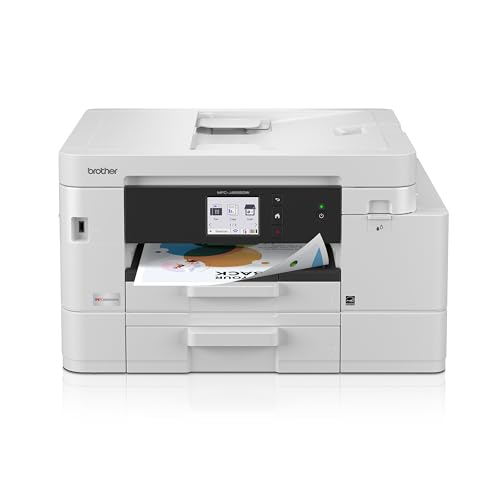
- Print, copy, scan, and fax in one compact machine
- Dual trays and 400-sheet capacity for fewer refills
- Wireless, Ethernet, USB, and mobile app support
Best For: Mac users running a small office or home office who want an all-in-one inkjet with strong connectivity.
Best Heavy-Duty Pick
Brother MFC-L2820DW Monochrome Laser All-in-One

- Fast monochrome printing with auto duplex
- Dual-band Wi-Fi, Ethernet, and USB connectivity
- 50-page ADF and 250-sheet tray for efficient workflows
Best For: Small offices and home users who need a compact black-and-white all-in-one for Mac-friendly document work.
Best for Budget-Conscious Home Offices

- All-in-one print, copy, and scan in a compact design
- Wireless, USB, and Wi-Fi Direct support for Mac setups
- Automatic duplex printing with useful cloud/app features
Best For: Mac users who want an affordable compact inkjet for everyday home office tasks.
Best for Small Offices – Brother DCP-L2640DW Monochrome Laser MFP
If you want one of the more practical brother printers for mac setups, the Brother DCP-L2640DW is a strong pick for home offices and small teams. It prints fast, scans and copies in one compact unit, and gives you wireless, Ethernet, and USB options for flexible Mac-friendly use.
Best For: Mac users who need a compact black-and-white laser printer for everyday document printing, scanning, and copying.
Pros:
- Fast 36 ppm printing helps keep up with busy workloads
- Automatic duplex printing saves paper on double-sided jobs
- 50-page ADF makes multi-page scans and copies easier
- Dual-band Wi-Fi, Ethernet, and USB support flexible Mac connections
Cons:
- Black-and-white only, so it is not suitable for color printing
- No built-in touchscreen, which may feel basic for some users
For Mac users who prioritize speed, compact size, and dependable document handling, this Brother model hits a very useful middle ground. Among brother printers for mac, it stands out as a business-ready monochrome option that is easy to place on a desk and efficient to run.
Best for Low-Cost Color Printing – Brother INKvestment Tank MFC-T580DW
If you want one of the more practical brother printers for mac, the Brother INKvestment Tank MFC-T580DW is built for home users and small offices that print regularly. It combines wireless printing, scanning, copying, and automatic duplexing with a refillable ink tank system that helps keep ongoing costs down.
Best For: Mac users who want an affordable, high-volume color all-in-one with low ink upkeep.
Pros:
- Includes up to 3 years of ink in the box for strong long-term value
- Wireless, USB, and Brother Mobile Connect support for flexible Mac-friendly printing
- Automatic 2-sided printing and a 150-sheet tray add everyday convenience
- Spill-free refill bottles make topping off the tank simpler than cartridge swaps
Cons:
- One-line LCD is basic compared with touchscreen models
- Not the fastest option if you print large batches frequently
For Mac owners who care more about value, color output, and low-maintenance operation than premium controls, this Brother is an easy fit. Among brother printers for mac, it stands out for its included ink supply and practical all-in-one feature set.
Best for High-Volume Offices – Brother HL-6210DW Laser Printer
If you need one of the more capable brother printers for mac in a busy office, the Brother HL-6210DW is built for speed, sharing, and low running costs. It’s a monochrome laser model with strong wireless networking, duplex printing, and enough paper capacity to handle demanding workloads without constant refills.
Best For: Mac users who need a fast, business-ready black-and-white printer for shared office use and heavy monthly volume.
Pros:
- Fast 50 ppm output keeps large jobs moving quickly
- Expandable paper capacity supports uninterrupted high-volume printing
- Dual-band wireless and Gigabit Ethernet make it easy to share on a Mac network
- High-yield toner helps lower cost per page
Cons:
- Monochrome only, so it won’t handle color documents
- Office-focused design is more printer than home all-rounder
- Large footprint may be overkill for small desks
For Mac buyers who care more about speed, paper handling, and network reliability than color output, this Brother is a strong fit. Among brother printers for mac, it stands out as a practical workhorse for teams that print a lot and want straightforward wireless integration.
Best for Home Office – Brother INKvestment MFC-J4355DW All-in-One
If you want a practical, do-it-all option in the brother printers for mac category, the Brother INKvestment MFC-J4355DW is built for everyday home office and small office work. It offers wireless, USB, and Wi-Fi Direct connectivity, plus mobile printing and cloud app support, so it fits a Mac-friendly workflow without adding much setup hassle.
Best For: Mac users who need a compact all-in-one inkjet for printing, scanning, copying, and faxing with strong everyday convenience.
Pros:
- All-in-one functionality with print, copy, scan, and fax in a compact body
- Mac-friendly wireless, USB, Wi-Fi Direct, and mobile/cloud app support
- Automatic duplex printing, 150-sheet tray, and ADF boost productivity
- Includes high-yield starter cartridges to help reduce early ink replacement
Cons:
- Small 1.8-inch display is functional but not especially large
- Manual feed slot is single-sheet only, which limits specialty media handling
- Inkjet running costs can still add up with heavier color printing
Overall, this Brother is a solid pick if you need dependable features first and foremost rather than photo-grade output. For buyers comparing brother printers for mac, it stands out as a convenient, office-ready model with enough connectivity and workflow tools to keep daily tasks moving smoothly.
Best for Fast Mac-Friendly Office Workflows – Brother MFC-L2900DW Monochrome All-in-One
If you want one of the more efficient brother printers for mac in a small office, the MFC-L2900DW is built for speed, simple network setup, and dependable black-and-white output. It is a strong fit when you need printing, scanning, and duplex handling without paying for features you may not use.
Best For: Mac users who need a fast monochrome all-in-one printer for everyday business documents, scanning, and shared office use.
Pros:
- Fast 36 ppm printing keeps busy document workflows moving.
- Dual-band Wi-Fi, Ethernet, and USB make Mac connectivity flexible.
- Single-pass duplex scanning and automatic duplex printing save time and paper.
- 3.5-inch touchscreen plus cloud app support simplify scanning and filing.
Cons:
- Prints in black and white only.
- Bulkier than a compact home printer, despite its small footprint.
- Best suited to users who need office-grade volume, not casual printing.
For Mac owners who need a workhorse instead of a photo printer, this Brother model offers a practical mix of speed, scanning, and wireless flexibility. Among brother printers for mac, it stands out more for productivity than for home convenience.
Best for Everyday Use – Brother HL-L2480DW Wireless Compact Laser Printer
If you want a compact black-and-white all-in-one that fits well in a home office, the Brother HL-L2480DW is a practical pick among brother printers for mac. It handles printing, scanning, and copying in one small footprint, with wireless, Ethernet, and USB connectivity for flexible setup.
Best For: Mac users who need a space-saving monochrome laser printer for everyday documents, scanning, and copying.
Pros:
- Fast black-and-white printing up to 36 ppm with automatic duplexing
- Compact 3-in-1 design with flatbed scan glass and copier function
- Dual-band Wi-Fi, Ethernet, USB, and mobile printing support
- 250-sheet tray helps cut down on refills in busy workspaces
Cons:
- Monochrome only, so it is not suitable for color printing
- Touchscreen is useful, but the feature set is still basic compared with higher-end models
- Toner costs can add up if you print heavily without a subscription
Overall, this model is a strong fit if you want dependable everyday output without taking up much desk space. For brother printers for mac, it offers the essentials that matter most: easy connectivity, solid speed, and simple all-in-one convenience.
Fastest High-Volume Office Pick – Brother MFC-L5915DW Laser All-in-One
If you need one of the more capable brother printers for mac in a busy office, the Brother MFC-L5915DW is built for speed, scanning, and low-cost monochrome output. It pairs strong wireless options with a business-friendly feature set, making it a practical fit for Mac users who print and scan a lot.
Best For: Workgroups and Mac users who want a fast monochrome all-in-one with strong scanning and office-ready connectivity.
Pros:
- Up to 50 ppm printing and copying helps keep up with heavy workloads
- 70-page auto document feeder with single-pass, two-sided scanning
- Dual-band Wi-Fi plus Gigabit Ethernet for flexible office setup
- High-yield toner support helps lower running costs over time
Cons:
- Monochrome only, so it is not suitable for color printing needs
- Larger footprint than a compact home printer
- Most valuable when you regularly print in high volume
For Mac buyers who care more about speed, scanning, and dependable office output than color, this Brother model is a strong match. Among brother printers for mac, it stands out as a serious productivity machine rather than a basic desktop printer.
Best for Small Office – Brother INKvestment 4555 Wireless All-in-One
If you want one of the more practical brother printers for mac setups, the Brother INKvestment 4555 is built for everyday office work without taking over your desk. It supports wireless, Ethernet, and USB connections, and the Brother Mobile Connect app makes it easy to print or scan from a Mac, phone, or tablet.
Best For: Small offices and home offices that need a reliable all-in-one printer with duplex printing, dual paper trays, and simple wireless use.
Pros:
- Works well for print, copy, scan, and fax tasks in one compact unit
- Two paper trays and 400-sheet capacity reduce refills
- Auto duplex printing and ADF boost productivity
- Cloud app and mobile printing support add flexibility
Cons:
- Inkjet running costs may be higher than a laser printer
- Setup options and app features may be more than casual users need
For Mac users who need a versatile all-in-one rather than a basic printer, this model strikes a strong balance of convenience and office features. It stands out among brother printers for mac because it combines solid connectivity with useful productivity tools in a single device.
Best Heavy-Duty Pick – Brother MFC-L2820DW Monochrome Laser All-in-One
If you need a reliable black-and-white all-in-one, the Brother MFC-L2820DW is a practical pick among brother printers for mac users who want fast laser output, scanning, faxing, and simple wireless setup in a compact design.
Best For: Small offices or home workspaces that want a compact monochrome laser printer with copying, scanning, and faxing.
Pros:
- Fast monochrome printing up to 36 ppm with automatic duplexing
- Built-in dual-band Wi-Fi, Ethernet, and USB for flexible Mac connectivity
- 50-page ADF and 250-sheet tray help reduce daily interruptions
- Works with Brother Mobile Connect plus cloud scan/print features
Cons:
- Black-and-white only, so it is not suitable for color documents
- Compact size is great for space, but not ideal for heavy-duty departments
For Mac users who mostly print text documents and want an efficient office all-in-one, this model hits a strong balance of speed, connectivity, and compactness. It stands out in brother printers for mac searches because it keeps setup flexible while staying focused on dependable monochrome work.
Best for Budget-Conscious Home Offices – Brother MFC-J1365DW
If you want one of the more practical brother printers for mac, the Brother MFC-J1365DW is a compact all-in-one that handles printing, scanning, and copying without taking over your desk. It connects over Wi-Fi, Wi-Fi Direct, USB, and the Brother Mobile Connect app, so it fits nicely into a Mac-based home office that needs flexible setup options.
Best For: Mac users who want a compact, affordable inkjet with duplex printing and useful productivity features for everyday documents.
Pros:
- Automatic duplex printing helps save paper on everyday jobs.
- Wireless, USB, and Wi-Fi Direct connections make Mac setup more flexible.
- Cloud app support and Mobile Connect add convenience for scanning and printing.
- Includes high-yield starter ink for better out-of-box value.
Cons:
- Not ideal if you need very fast printing for heavy workloads.
- Smaller paper capacity than larger office-focused printers.
- Color output is fine for home use, but not geared for photo-heavy workflows.
For shoppers comparing brother printers for mac, this model stands out as a straightforward, low-fuss option that covers the essentials well. It is a smart pick if you want easy wireless printing, duplex convenience, and compact size over advanced office-grade features.
How We Picked These Brother Printers for Mac
We prioritized models that are easy for Mac users to connect and keep using day to day: wireless networking, mobile printing support, duplex printing where useful, and multifunction features for people who also scan, copy, or fax. We also weighed print speed, paper handling, and whether a model is better suited to occasional home use or heavier office workloads.
Because Brother Printers for Mac should be simple rather than fussy, we looked for broad compatibility, straightforward setup, and features that reduce friction over time, such as automatic duplexing and larger input capacity.
Quick Comparison
Monochrome laser printers are usually the best choice if you print mostly text documents and want sharp output, fast speeds, and low cost per page. Color inkjet INKvestment models make more sense if you print presentations, schoolwork, photos, or mixed-color documents. If you need one device for a shared space, a business-oriented Brother laser with stronger security and higher pages per minute may be the better fit.
Key Buying Factors for Brother Printers for Mac
Connection and Setup
Check for wireless printing support and Mac-friendly connection methods. AirPrint support, Wi-Fi connectivity, and app-based setup can save time and reduce troubleshooting. If you move between devices often, these features matter more than raw print speed.
Print Type: Laser Vs. Inkjet
Laser is ideal for crisp text, frequent document printing, and lower maintenance. Inkjet is better for color output and occasional creative use. For most productivity-focused Brother Printers for Mac, monochrome laser models offer the best balance of speed and value.
Multifunction Features
Decide whether you need copy, scan, and fax functions. A basic printer is enough for many households, but all-in-one models are more efficient for remote work, school packets, and small offices.
Duplex and Paper Capacity
Automatic duplex printing helps cut paper use and is especially useful for longer reports. Larger trays are worth it if you print often or share the printer with others, since they reduce refills.
Running Costs
Look beyond purchase price. Ink or toner yield, replacement frequency, and bundled ink or toner can make a major difference in long-term value.
Who Should Buy Which Brother Printers for Mac?
If you mainly print black-and-white documents from a Mac, choose a compact monochrome laser. If you need color for school, home, or light creative work, an INKvestment inkjet is the better fit. Small businesses and busy households should consider faster business-class Brother models with stronger security, duplexing, and higher paper capacity.
In short, the best Brother Printers for Mac are the ones that match how you print today and how much maintenance you are willing to manage tomorrow.
