
A USB Bluetooth adapter can add wireless headphones, keyboards, mice, and other accessories to a desktop PC without opening the case. The right choice depends less on the biggest version number and more on Windows compatibility, placement, and how far your devices sit from the computer.
These 10 options include compact dongles, newer Bluetooth versions, a two-pack, and adapters marketed for longer range. Use the picks above to narrow your shortlist, then check the buying factors below before ordering.
Best 10 Bluetooth Adapters for Deskpcs Picks for 2026
Compact Pick
ASUS USB-BT500 Bluetooth 5 Adapter
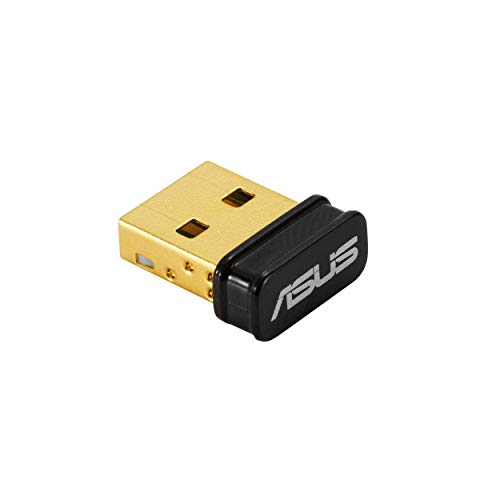
- Ultra-small USB design
- Bluetooth 5.0 with older-version support
- Windows 10 minimum
Best For: Windows desktops needing a low-profile adapter
Plug-and-Play Pick
UGREEN Bluetooth 5.3 USB Adapter

- Driver-free on Windows 8.1/10/11
- Connects up to five devices
- Built-in Bluetooth may need disabling
Best For: Windows users pairing several peripherals
Multi-Device Pick
Avantree DG45 Bluetooth Adapter

- Pairs with up to seven devices
- Supports headset audio and calls
- Bluetooth only; not Wi-Fi or 2.4 GHz
Best For: Windows desks with multiple Bluetooth accessories
Bluetooth 5.4 Pick

- Bluetooth 5.4 with backward compatibility
- Connects up to six devices
- Windows 8.1/10/11 only
Best For: Windows desktops with several Bluetooth peripherals
Best for Long Range
Techkey Bluetooth 5.4 USB Adapter

- Class 1 antenna; up to 500 ft in open space
- Plug-and-play on Windows 11/10/8.1
- Connects up to five devices
Best For: Windows desktops needing longer Bluetooth reach
Best for Multiple Peripherals
UGREEN Bluetooth 6.0 USB Adapter

- Connects up to five devices
- Driver-free on Windows 11/10/8.1
- Supports EDR and Bluetooth Low Energy
Best For: Windows setups with several Bluetooth peripherals
Best Low-Profile Pick
Eiszuso Bluetooth 5.3 Mini Dongle
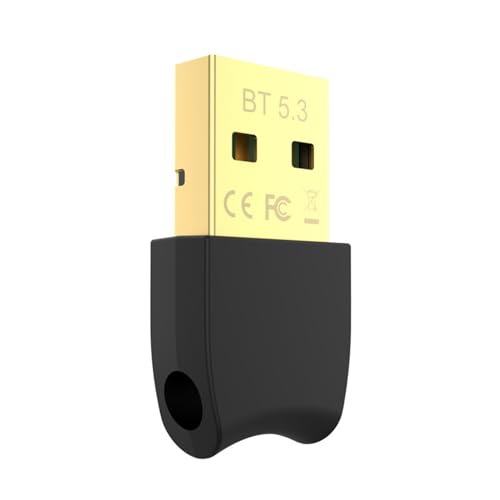
- Compact, leave-in USB design
- Up to 66 ft in open space
- Listed for Windows 11/10/8.1 and Linux
Best For: Small, unobtrusive Bluetooth connections on Windows or Linux
Best with Extra Features
Wansurs Bluetooth 5.3 USB Adapter

- Plug-and-play on Windows 11/10
- Connects up to five devices
- Up to 33 feet in open space
Best For: A discreet, everyday Windows desktop adapter
Two-Pack Pick
Eiszuso Bluetooth 5.1 USB Adapters

- Two adapters included
- Up to 3 Mbps stated transfer rate
- Requires drivers on Windows 10/11
Best For: Adding Bluetooth to two compatible Windows PCs
Long-Range Pick
KAIY Bluetooth 6.0 Antenna Adapter

- Rotatable Class 1 antenna
- Up to 393 feet stated range
- Plug-and-play on Windows 11/10/8.1
Best For: Windows PCs needing an adjustable, longer-range antenna
Compact Pick – ASUS USB-BT500 Bluetooth 5 Adapter
Among bluetooth adapters for deskpcs, the ASUS USB-BT500 is a compact choice for adding Bluetooth 5.0 to a Windows desktop. Its small USB design is easy to leave connected, and it supports Bluetooth Low Energy devices.
Best For: Windows 10 or newer desktops where a small, straightforward adapter is the priority.
Pros:
- Bluetooth 5.0 with backward compatibility for Bluetooth 2.1, 3.x, and 4.x devices.
- Ultra-small design takes up little space.
- Bluetooth Low Energy supports energy-saving connections.
Cons:
- Listed compatibility is limited to Windows, with Windows 10 as the minimum version.
- No stated simultaneous-device capacity.
Choose this one for a low-profile adapter with broad Bluetooth-version compatibility; check your Windows version before buying.
For shoppers comparing bluetooth adapters for deskpcs, the UGREEN Bluetooth 5.3 dongle offers driver-free setup on Windows 11, 10, and 8.1. It can connect up to five different types of Bluetooth devices at once.
Best For: Windows desktop users who want plug-and-play pairing for several peripherals.
Pros:
- No driver installation required on supported Windows versions.
- Supports up to five connected Bluetooth devices.
- Compact design can stay in a USB port.
Cons:
- Does not support Windows 7, macOS, or Linux.
- Only one connected audio device of the same type can play music at a time.
- Existing built-in Bluetooth may need to be disabled before use.
This is a practical fit for a Windows desk setup with a mouse, keyboard, and headphones, provided you do not need support for another operating system.
The Avantree DG45 stands out among bluetooth adapters for deskpcs if you pair several Bluetooth accessories. It supports pairing with up to seven devices and handles stereo audio and headset-microphone calls on supported Windows PCs.
Best For: Windows desktops that switch among Bluetooth peripherals and use a headset for calls.
Pros:
- Pairs with up to seven Bluetooth devices.
- Supports wireless music and voice calls through a Bluetooth headset.
- Works with Windows 8, 8.1, 10, and 11.
Cons:
- Only one Bluetooth audio device can be active at a time.
- Does not work with Wi-Fi or proprietary 2.4 GHz wireless devices.
- Not compatible with macOS, ChromeOS, or Linux.
Its pairing capacity is useful for an accessory-heavy desk, but make sure your peripherals actually use Bluetooth rather than a dedicated 2.4 GHz receiver.
The Amazon Basics dongle is an option among bluetooth adapters for deskpcs when you want Bluetooth 5.4 and connections for multiple peripherals. It supports up to six devices simultaneously and plugs into a standard USB port.
Best For: Windows 8.1, 10, or 11 desktops connecting several Bluetooth accessories.
Pros:
- Bluetooth 5.4 with backward compatibility across listed earlier versions.
- Connects up to six devices simultaneously.
- Includes EDR and BLE support.
Cons:
- Not compatible with macOS, Linux, ChromeOS, or Windows 7 and earlier.
- Built-in Bluetooth must be disabled before use.
This is a sensible choice if its six-device capacity suits your desk; confirm that your PC runs a supported version of Windows.
Best for Long Range – Techkey Bluetooth 5.4 USB Adapter
If your desktop sits far from your Bluetooth accessories, this Techkey model is one of the bluetooth adapters for deskpcs worth considering. Its Class 1 radio and external antenna are rated for up to 500 feet in open space, though walls and interference can reduce that range.
Best For: Windows desktop users who need a longer-reach connection for Bluetooth peripherals.
Pros:
- Plug-and-play on Windows 11, 10, and 8.1 without a driver installation.
- Supports up to five connected devices, including keyboards, headsets, and printers.
- Bluetooth 5.4 dual-mode support includes EDR and Bluetooth Low Energy.
Cons:
- Not compatible with macOS or Linux.
- The external antenna makes it less discreet than a mini dongle.
The open-space range rating is its main selling point; choose it for a Windows setup where reach matters more than a low-profile fit.
Best for Multiple Peripherals – UGREEN Bluetooth 6.0 USB Adapter
For a desk with several wireless accessories, UGREEN’s dongle is a straightforward choice among bluetooth adapters for deskpcs. It supports up to five simultaneous device connections and plugs in without a driver installation on Windows 11, 10, or 8.1.
Best For: Windows users connecting a mix of Bluetooth input devices, headphones, and other peripherals.
Pros:
- Supports up to five connected Bluetooth devices at once.
- Bluetooth 6.0 with EDR and Bluetooth Low Energy support.
- Plug-and-play setup on supported Windows versions.
Cons:
- No support for macOS, Linux, or Windows 7.
- Only one connected audio device of the same type can play music at a time.
This is a practical pick for consolidating several peripherals on a Windows PC. If your computer already has Bluetooth, the supplied instructions say to disable existing Bluetooth devices before using this adapter.
Best Low-Profile Pick – Eiszuso Bluetooth 5.3 Mini Dongle
If you want a dongle that can stay in a USB port, Eiszuso offers a compact option among bluetooth adapters for deskpcs. Its Bluetooth 5.3 connection is rated for up to 66 feet in open space, with real-world reach affected by barriers and interference.
Best For: Users who want a small Bluetooth adapter for a Windows or Linux computer.
Pros:
- Low-profile design can remain plugged in without blocking adjacent USB ports.
- Plug-and-play design does not require driver installation.
- Listed compatibility includes Windows 11/10/8.1 and Linux.
Cons:
- Not compatible with macOS, TVs, or game consoles listed in the product notes.
- Its stated open-space range is 66 feet, less than the long-range model in this roundup.
Choose this one when a tidy, portable setup matters more than maximum advertised range. Check your operating system before buying, particularly if you use a Mac.
Best with Extra Features – Wansurs Bluetooth 5.3 USB Adapter
Among bluetooth adapters for deskpcs, the Wansurs Bluetooth 5.3 dongle is a straightforward choice if you want a small adapter that can stay in a USB port. It works without a manual driver installation on Windows 11 and 10.
Best For: Windows 11 or 10 users who want a discreet adapter for several Bluetooth peripherals.
Pros:
- Supports up to five connected devices simultaneously.
- Compact design is intended not to block neighboring USB ports.
- Rated for up to 2 Mbps and 33 feet in open space.
Cons:
- Listed plug-and-play support is limited to Windows 11 and 10.
- Walls and wireless interference can reduce the stated range.
Choose this one for simple Windows setup and a low-profile fit; its 33-foot rating makes more sense for a desk or nearby room than for long-distance use.
Two-Pack Pick – Eiszuso Bluetooth 5.1 USB Adapters
If you need bluetooth adapters for deskpcs in two locations, this Eiszuso two-pack provides a dongle for each computer. The compact Bluetooth 5.1 adapters support common peripherals, but require driver installation.
Best For: Households or workspaces with two Windows 10 or 11 PCs that need Bluetooth adapters.
Pros:
- Includes two USB adapters.
- Supports headsets, speakers, keyboards, mice, and printers.
- Rated for data transfer up to 3 Mbps.
- Slim design is intended to leave adjacent USB ports accessible.
Cons:
- Requires a driver installation.
- Product notes limit support to Windows 10 and 11, despite Windows 7 appearing in the title.
The second adapter is the main reason to buy this pack. Check your PCs’ Windows versions before ordering, and do not count on plug-and-play setup.
Long-Range Pick – KAIY Bluetooth 6.0 Antenna Adapter
For bluetooth adapters for deskpcs positioned far from your peripherals, the KAIY adapter pairs a rotatable antenna with a stated range of up to 393 feet. It offers plug-and-play setup on Windows 11, 10, and 8.1.
Best For: Windows desktop users who want an adjustable antenna for Bluetooth connections across a larger space.
Pros:
- Class 1 radio and adjustable antenna support a stated range of up to 393 feet.
- Connects up to five devices simultaneously.
- Plug-and-play support is listed for Windows 11, 10, and 8.1.
- Supports AAC and SBC audio codecs.
Cons:
- Actual range can drop with walls or wireless interference.
- Listed as transmitter-only; not compatible with Mac, Linux, TVs, or game consoles.
- Its external antenna is less discreet than a mini dongle.
This is the option to consider when antenna placement matters more than a flush USB fit. Treat the 393-foot figure as a stated maximum, not a guarantee through walls.
How We Picked the Best Bluetooth Adapters for Deskpcs
We compared the listed Bluetooth versions, stated Windows compatibility, compact versus long-range designs, and practical use cases such as connecting input devices or headphones. The selection includes established-brand options, newer-version dongles, and a two-pack for people equipping more than one computer. Product claims are a starting point, not a guarantee: real-world range and connection stability depend on drivers, USB placement, interference, and the device at the other end.
Quick Comparison: Which Type Fits Your Setup?
For a tidy, everyday setup: Start with a compact adapter such as the ASUS USB-BT500, Avantree DG45, or a UGREEN USB model if the listing confirms support for your Windows version.
For a newer version number: Consider the Amazon Basics Bluetooth 5.4 adapter, UGREEN Bluetooth 6.0 model, or another 5.4 or 6.0 option—but verify features rather than assuming the version alone improves every connection.
For a PC under a desk: Compare the long-range models and plan to use a USB extension cable if the computer case blocks the signal. For two PCs: The Bluetooth 5.1 two-pack may be convenient, provided its compatibility meets both systems’ needs.
Key Buying Factors for Bluetooth Adapters for Desk PCs
Operating System and Drivers
Check the manufacturer’s current support page for your exact Windows version before buying. “Plug and play” can mean Windows installs a basic driver automatically; it does not promise every feature will work without additional software. If you use macOS or Linux, do not assume compatibility from a PC-focused listing.
Bluetooth Version and Accessory Features
A Bluetooth 5.3, 5.4, or 6.0 label identifies a version of the standard, not guaranteed audio quality, gaming latency, or range. Both the adapter and your accessory must support a feature for you to use it. If low-latency audio, a particular codec, or simultaneous connections matter, look for explicit documentation rather than relying on the version number.
Range, USB Placement, and Interference
Small dongles are convenient but can sit behind a metal tower, where reception may suffer. A front USB port or short extension cable can move the adapter into a clearer position. Nearby USB 3.0 devices and crowded 2.4 GHz wireless environments may also affect performance. Treat advertised long-range claims as best-case figures, not expected distances through walls.
Existing Bluetooth Hardware
Check whether your desktop already has Bluetooth through its motherboard or Wi-Fi card. If you add a USB adapter to fix an unreliable connection, you may need to disable the existing Bluetooth radio to avoid conflicts. Also confirm that you have a free USB port and that the dongle will not block adjacent ports.
Who Should Buy Which Bluetooth Adapters for Deskpcs?
Choose a small, well-supported dongle for nearby keyboards, mice, and general accessories. Prioritize driver support and documented audio features for headphones or headsets. If the PC is hidden under a desk or devices are farther away, try a long-range option with better placement—but set realistic expectations. Buy a two-pack when you genuinely need adapters for two computers, not as a substitute for checking compatibility.
