
Baseus USB C hubs are a simple way to turn one laptop port into a practical desktop setup with display output, charging, storage, and wired networking.
Below, we focus on the most useful options for different workflows, from portable everyday adapters to full docking stations built for multi-monitor productivity.
Best 10 Baseus USB C Hubs Picks for 2026
Best for Triple-Monitor Windows Desks
Baseus Spacemate 11-in-1 USB-C Dock

- Triple-display support for Windows workstations
- 10Gbps USB-C/USB-A ports plus Ethernet
- 100W PD passthrough and tidy vertical design
Best For: Windows laptop users building a multi-monitor desk setup with charging and wired networking.
Best for 4K Displays

- 4K@60Hz HDMI for sharp external display use
- Three 5Gbps data ports for fast accessories and files
- SD/TF readers plus 85W USB-C pass-through charging
Best For: Laptop users who want a compact hub with strong display output and everyday expansion.
Best for Triple Displays on Mac
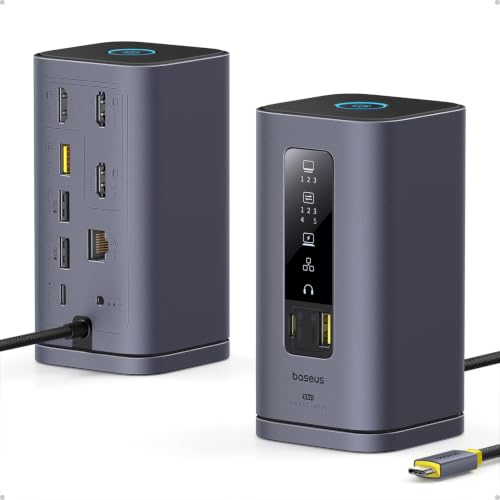
- Triple 4K monitor support on macOS with DisplayLink
- 10Gbps USB-C and USB-A ports for fast data transfers
- 100W PD input with up to 85W pass-through charging
Best For: MacBook users who want triple-monitor support, fast USB expansion, and pass-through charging.
Best for 4K Docking

- 4K@60Hz HDMI for crisp external display use
- 100W PD pass-through for charging support
- Three USB 3.0 ports plus SD/TF card slots
Best For: People who need a simple USB-C hub for 4K display output, charging, and everyday expansion.
Best for Wired Workstations
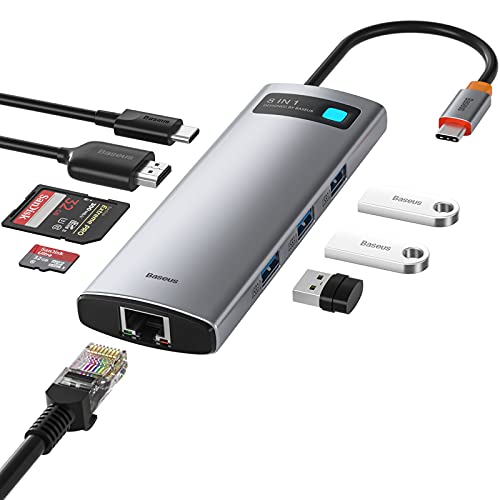
- 4K HDMI at 60Hz for external displays
- 1Gbps Ethernet for stable wired internet
- 3 USB 3.0 ports plus SD/TF card readers
Best For: Hybrid workers and creators who want a compact desk hub with display, network, and charging support.
Best for Dual Displays
Baseus Nomos Air Mac 12-in-1 Dock

- Dual 2K monitor support via HDMI and DisplayPort
- 12 ports including 10Gbps USB-C/A and Gigabit Ethernet
- 100W PD input with power-sharing design
Best For: Mac users and professionals who want a compact dock for dual monitors and a full desktop-style setup.
Best for Triple Displays
Baseus Spacemate 11-in-1 Docking Station

- Triple-monitor support for Windows workstations
- 10Gbps USB-C and USB-A data ports
- Includes 100W GaN power adapter
Best For: Windows users building a clean, multi-monitor desk setup with fast charging and wired Ethernet.
Best for Dual-Monitor Desks
Baseus 9-in-1 Dual Monitor USB-C Hub

- Dual HDMI with up to 4K@120Hz on one display
- 1000Mbps Ethernet, SD/TF reader, and 3 USB ports
- Up to 85W pass-through charging for laptops
Best For: Dual-monitor workstations and users who want a feature-packed USB-C dock.
Best for Triple-Display Setups
Baseus 7-in-1 Dual Monitor Dock
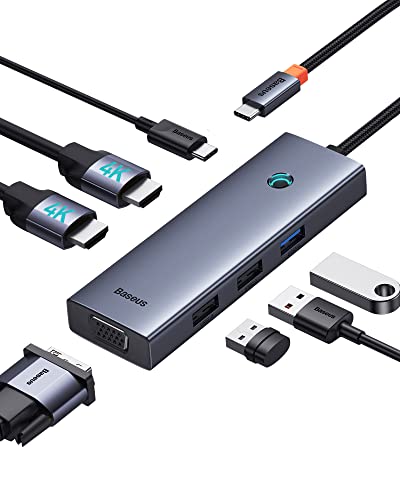
- 2 HDMI ports plus VGA for flexible monitor setups
- 100W PD keeps compatible laptops charging
- 3 USB ports and compact aluminum housing
Best For: Laptop users who want multi-monitor support, charging, and peripheral expansion in one hub.
Best for Triple-Monitor Windows Desks – Baseus Spacemate 11-in-1 USB-C Dock
If you need one of the more capable baseus usb c hubs for a busy workstation, the Baseus Spacemate is built for multi-monitor productivity. It combines dual HDMI, dual DisplayPort, fast 10Gbps USB ports, Ethernet, and 100W power passthrough in a vertical dock that aims to keep cables and clutter under control.
Best For: Windows users who want to run multiple external displays, move files quickly, and keep a laptop charged from a single desktop dock.
Pros:
- Supports triple-display setups on Windows with 4K HDMI and DisplayPort outputs
- Offers 10Gbps USB-C and USB-A ports for faster file transfers and peripherals
- Includes Gigabit Ethernet, 3.5mm audio, and 100W PD input for a full desktop setup
- Vertical design with LED status screen and lock button helps keep the desk tidy
Cons:
- Mac users do not get triple-display support
- Power adapter is not included
- Works best with a high-wattage charger and a compatible USB-C laptop
For Windows buyers who care more about display expansion than simple dongle portability, this is one of the most feature-packed baseus usb c hubs to consider. It makes the most sense as a desk dock for serious multitaskers rather than a lightweight travel accessory.
Best for 4K Displays – Anker 7-in-1 USB-C Hub
If you want a compact dock-style adapter for a laptop setup, this Anker option is a strong alternative to many baseus usb c hubs. It combines 4K@60Hz HDMI, fast USB data ports, card readers, and USB-C pass-through charging in one travel-friendly body.
Best For: Users who need a simple all-in-one hub for external displays, fast file transfers, and everyday laptop charging.
Pros:
- 4K@60Hz HDMI output is ideal for crisp monitor and presentation use.
- Three 5Gbps data ports, including USB-C, help handle drives and accessories quickly.
- SD and TF card slots make it useful for creators and frequent media transfers.
- Up to 85W laptop charging support reduces desk clutter with one-cable power.
Cons:
- Only the HDMI port supports video; the USB-C data port does not output display.
- No included charger, so you still need your own USB-C power brick.
- Single-display focus may be limiting for users who need multiple video outputs.
For shoppers comparing baseus usb c hubs, this Anker model stands out for straightforward 7-in-1 utility and strong 4K monitor support. It is a practical pick if you value a clean mix of display, charging, and storage expansion over extra bells and whistles.
Best for Triple Displays on Mac – Baseus Spacemate 11-in-1 Dock
If you need one of the most capable baseus usb c hubs for a MacBook setup, the Baseus Spacemate is built around DisplayLink support for triple 4K output, fast data ports, and desk-friendly cable management. It’s a strong pick for users who want a more serious docking station than a basic hub.
Best For: MacBook users who want triple-monitor support, fast USB expansion, and 100W pass-through charging in one dock.
Pros:
- Supports up to three 4K displays on macOS with DisplayLink
- Includes 10Gbps USB-C and USB-A ports for faster file transfers
- Upright design with LED status display and a screen-lock button
- 100W PD input with up to 85W laptop charging output
Cons:
- DisplayLink driver is required before the HDMI ports will work
- Power adapter and input cable are not included
- More of a docking station than a simple travel hub
For workstation-style setups, this is one of the more advanced baseus usb c hubs you can buy, especially if triple-monitor support matters more than portability. It’s best suited to desk users who want reliable expansion and don’t mind installing software first.
Best for 4K Docking – Baseus 7-in-1 USB-C Hub
For shoppers comparing baseus usb c hubs, this 7-in-1 adapter stands out as a compact dock with the essentials most laptop and handheld users need: 4K HDMI output, 100W USB-C pass-through charging, three USB-A ports, and SD/TF card access. It’s a practical pick if you want one hub that can handle display output, storage, and everyday peripherals without a lot of setup.
Best For: Users who want a single USB-C hub for 4K external displays, charging, and basic desk expansion.
Pros:
- 4K@60Hz HDMI output for sharp external display support
- 100W PD pass-through helps keep laptops powered while in use
- Three USB 3.0 ports plus SD/TF slots cover common accessory needs
- Plug-and-play design works across many USB-C devices
Cons:
- Charging requires an external power adapter
- Display performance can vary by device and monitor
- Not a full desktop dock with Ethernet or multiple video outputs
Overall, this is a strong all-around choice among baseus usb c hubs if you want dependable expansion in a slim, travel-friendly form factor. It’s especially appealing for mixed use at home, the office, or on the go.
Best for Power-User Desktops – Baseus Spacemate Pro 15-in-1 Dock
If you want one of the most fully loaded baseus usb c hubs for a desk setup, the Baseus Spacemate Pro goes well beyond basic port expansion. It combines dual-display support, high-speed USB-C data, wired networking, and built-in charging in a single dock, making it a strong fit for demanding laptop workstations.
Best For: Windows laptop users who want a single dock for monitors, peripherals, networking, and device charging.
Pros:
- 15-in-1 layout covers HDMI, USB-C, USB-A, Ethernet, SD/TF, and wireless charging
- Up to 4K@120Hz on one display or 4K@60Hz on dual monitors for flexible setups
- 160W total output with 100W laptop charging and 25W Qi2.2 charging pad
- Useful smart screen and mode switching for work vs. charging-only use
Cons:
- Best features are geared toward Windows; macOS display support is more limited
- Overkill if you only need a few extra ports
- Bulkier and more expensive than a simple travel hub
For a desk-first setup, this dock stands out among baseus usb c hubs because it packages serious display support and charging power into one tidy unit. If you want fewer cables and more capability, it is a very capable pick.
Best for Wired Workstations – Baseus 8-in-1 USB C Hub Dock
If you want one of the more practical baseus usb c hubs for a desk setup, this 8-in-1 dock covers the essentials: external display output, fast wired networking, USB expansion, and pass-through charging. It’s a strong fit for laptops and tablets that need a simple all-in-one port solution without adding much clutter.
Best For: Users who need a compact USB-C hub for a stable office-style setup with HDMI, Ethernet, and charging support.
Pros:
- 4K HDMI output with 60Hz support for smoother second-screen use
- 1Gbps Ethernet adds a more reliable connection than Wi-Fi
- 3 USB 3.0 ports plus SD/TF readers cover common accessories and media transfers
- 100W power delivery passthrough helps keep compatible devices charged
Cons:
- Not ideal if you only need a travel-light dongle with one or two ports
- Pass-through charging requires your own USB-C power adapter
- Best feature set depends on having a USB-C device that supports hub output
Overall, this is a well-rounded option among baseus usb c hubs when you want dependable desktop functionality more than ultra-portability. It’s especially appealing for hybrid workers, students, and creators who need wired internet, display expansion, and storage access in one hub.
Best for Dual Displays – Baseus Nomos Air Mac 12-in-1 Dock
If you need one of the more capable baseus usb c hubs for a Mac or mixed-workflow desk, this dock stands out for its dual-monitor support, broad port selection, and fast data connections. It is a strong fit for users who want a cleaner workstation without giving up Ethernet, high-speed USB, or external display options.
Best For: Mac users, creators, and professionals who want a compact dock with dual 2K display support and plenty of connectivity.
Pros:
- 12-in-1 layout with HDMI, DisplayPort, USB-C, USB-A, Ethernet, and 100W PD input
- Supports dual external monitors at up to 2K@60Hz for multitasking
- 10Gbps USB-C and USB-A ports help move large files quickly
- Energy-saving mode and screen-lock shortcut add convenience for daily desk use
Cons:
- DisplayLink driver is required, so setup is not completely plug-and-play
- PD charger and cables are not included
- Some advanced display features may depend on OS and driver support
Overall, this is a feature-rich option in the baseus usb c hubs lineup if your priority is expanding a laptop into a full desktop setup. It makes the most sense for users who value display flexibility and high-speed peripherals over the simplest possible dock.
Best for Triple Displays – Baseus Spacemate 11-in-1 Docking Station
If you want one of the more capable baseus usb c hubs for a Windows workstation, the Baseus Spacemate stands out with 11-in-1 expansion, triple-display support, and fast wired networking. It’s aimed at users who need a dock that can handle multiple monitors, high-speed peripherals, and pass-through charging without adding clutter.
Best For: Windows users who want a desktop-style USB-C dock for three monitors, fast data transfers, and a cleaner setup.
Pros:
- Supports up to three external displays with 4K HDMI and DisplayPort outputs
- Includes 10Gbps USB-C and USB-A ports for fast transfers and accessories
- Comes with a 100W GaN power adapter, so you don’t need to buy one separately
- Vertical design with screen-lock button helps save desk space and improve convenience
Cons:
- Triple-display functionality is limited to Windows systems
- More expensive and bulkier than a basic travel hub
For buyers comparing baseus usb c hubs, this is a strong pick if monitor support and dock-style productivity matter more than portability. The included adapter, 10Gbps ports, and compact upright layout make it especially appealing for a fixed desk setup.
Best for Dual-Monitor Desks – Baseus 9-in-1 Dual Monitor USB-C Hub
If you need one of the more capable baseus usb c hubs for a home office or travel setup, this dock stands out for its dual HDMI outputs, fast Ethernet, and solid power delivery. It is a practical pick for users who want to run multiple displays while keeping peripherals, storage cards, and charging in one compact adapter.
Best For: Dual-monitor workstations, laptop users who need wired internet, and anyone who wants a single USB-C dock for display, data, and charging.
Pros:
- Dual HDMI support for mirror or extended displays, with up to 4K@120Hz on a single screen
- Includes 1000Mbps Ethernet plus 3 USB ports and SD/TF card slots
- Up to 85W pass-through charging keeps a laptop powered while the hub is in use
- Broad compatibility across Mac, Windows laptops, iPhone, Surface, and Steam Deck
Cons:
- Uses some of your charger’s power for the hub itself, reducing max laptop charging to 85W
- Best performance depends on device support for dual displays and high refresh rates
- Not the simplest choice if you only need a basic USB port expander
For buyers comparing baseus usb c hubs, this model is a strong all-in-one dock when display flexibility and wired connectivity matter more than a minimal footprint. It covers the essentials well and is especially useful if your desk setup regularly swaps between work, media, and storage tasks.
Best for Triple-Display Setups – Baseus 7-in-1 Dual Monitor Dock
If you need one of the more flexible baseus usb c hubs for a desk setup, this 7-in-1 docking station stands out for its mix of dual HDMI plus VGA output, 100W PD charging, and a compact aluminum build. It is a practical pick for turning a USB-C laptop into a multi-monitor workstation without adding a lot of clutter.
Best For: Users who want to run up to three external displays and keep charging and peripherals connected through one hub.
Pros:
- Two HDMI ports plus VGA support flexible multi-monitor setups.
- 100W USB-C power delivery helps keep compatible laptops charged while in use.
- Includes three USB ports for accessories, storage, and everyday peripherals.
- Compact aluminum design is easy to move between home, office, and travel.
Cons:
- macOS mirrors extended displays, so it is not ideal for true separate-screen multitasking on Mac.
- Full 4K 60Hz output on HDMI depends on the source device supporting DP 1.4.
- Some USB-C ports may not support video output, which can limit compatibility.
Overall, this dock is a strong fit if your priority is display expansion more than minimal size alone. Among baseus usb c hubs, it offers a particularly useful balance of monitor support, charging, and everyday connectivity for laptop users who want a simple all-in-one desk solution.
How We Picked the Best Baseus USB C Hubs
We focused on real-world utility first: display support, port variety, charging throughput, and compatibility with common Windows and Mac laptops. Because Baseus USB C Hubs range from compact travel adapters to full desktop docks, the best choice depends on how many peripherals you use and whether you need one or two external displays.
We also prioritized models with faster data ports, Ethernet, SD card readers, and clearly stated power delivery, since those features matter most when a hub becomes part of your daily setup.
Quick Comparison: Which Type Fits Your Setup?
If you want a lightweight travel option, a 7-in-1 or 8-in-1 hub is usually enough. If you work at a desk with monitors, Ethernet, and multiple accessories, an 11-in-1 or 12-in-1 dock is more appropriate. For demanding creators or power users, the larger Baseus Spacemate and Pro models offer the most room for displays, data devices, and charging.
Compact Hubs
Best for basic expansion, presentations, and everyday office use.
Full Docking Stations
Best for dual- or triple-monitor workflows, wired internet, and permanent desk setups.
High-Power Docks
Best for users who need to charge a laptop and several devices at once without sacrificing ports.
Key Buying Factors for Baseus USB C Hubs
Display support: Check whether you need HDMI only, HDMI plus DisplayPort, or multi-monitor output. Some hubs support mirrored displays, while others use DisplayLink or specific system requirements to enable extended multi-display use.
Power delivery: Make sure the hub can pass enough wattage for your laptop. Many Baseus USB C Hubs advertise 85W or 100W PD, which is plenty for most ultrabooks, but you should still verify your device’s charging needs.
Port mix: Think about the devices you actually plug in. USB-A ports, USB-C data, SD/TF card readers, and Ethernet can be more valuable than extra video outputs if you work with storage cards or need a stable network connection.
Speed and stability: Faster 10Gbps USB ports are better for external drives and high-bandwidth accessories. If you use a dock every day, sturdy construction and reliable heat management matter just as much as the spec sheet.
Who Should Buy Which Baseus USB C Hubs?
Travelers and students: Choose a compact 7-in-1 or 8-in-1 hub for charging, HDMI, and a few extra ports without adding much bulk.
Office workers: A mid-size dock with Ethernet, card readers, and multiple USB ports is the most balanced choice for desk use.
Mac and multi-monitor users: Look closely at DisplayLink-based or Mac-specific docking stations if you need broader external display support.
Power users and creators: Go for the larger docks if you need dual or triple displays, faster data connections, and enough power for several connected devices at once.
In short, the best choice depends less on brand name alone and more on matching the dock to your laptop, display setup, and daily workload.
