
A PC that will not start can make the power supply an obvious suspect, but replacing it on a hunch gets expensive. An ATX power supply tester offers a quick way to check whether a PSU powers on and what its connected outputs report.
These 10 picks range from inexpensive LCD testers to a model that lists support for newer ATX specifications. The right choice depends on your PSU connectors and how much diagnostic detail you need.
Best 10 Atx Power Supply Testers Picks for 2026
Portable Aluminum Pick
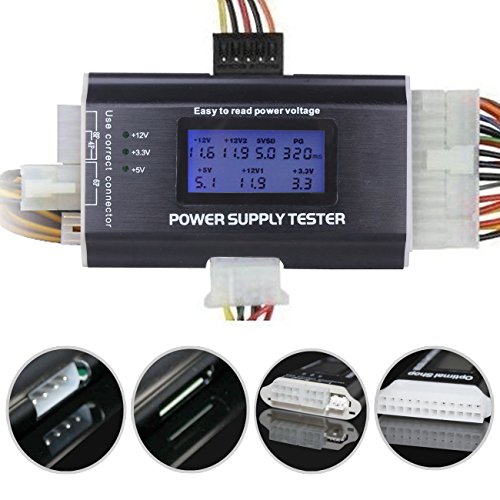
- Tests 20/24-pin and common peripheral connectors
- 1.8-inch LCD and PG buzzer
- Lightweight aluminum shell
Best For: Portable checks of common PC power connectors
Clear Connector Readout

- LCD shows main-connector voltages and PG
- LEDs check IDE, floppy and SATA outputs
- EPS 8-pin socket is not for PCIe 8-pin
Best For: Standard ATX connector checks with clear readout expectations
Modern GPU Connector Pick

- Tests 12V-2x6 and other modern connectors
- Reads voltage, PG timing and continuity
- Color display flags detected faults
Best For: ATX 3.1-era PSUs and GPU power connections
Classic Multi-Form-Factor Pick

- Listed for ATX, BTX, ITX and TFX supplies
- LCD reads main-plug voltage and PG
- Buzzer and flashing value flag faults
Best For: Quick 20/24-pin PSU checks across listed form factors
Broad PSU Compatibility
BUBUCAM WU0037 LCD Power Supply Tester

- LCD voltage and PG readings
- Buzzer and flashing fault alerts
- 20/24-pin plus auxiliary connectors
Best For: Quick checks across several desktop PSU formats
Detailed LCD Readout

- Displays listed rails and PG
- Buzzer flags abnormal readings
- Supports several PSU connectors
Best For: Repair checks needing visible voltage readings
Clear Auxiliary-Test Limits

- LCD readings on 20/24-pin
- Light-based auxiliary checks
- Compact 3.94-inch body
Best For: Main ATX readings plus basic peripheral checks
Compact Maintenance Pick
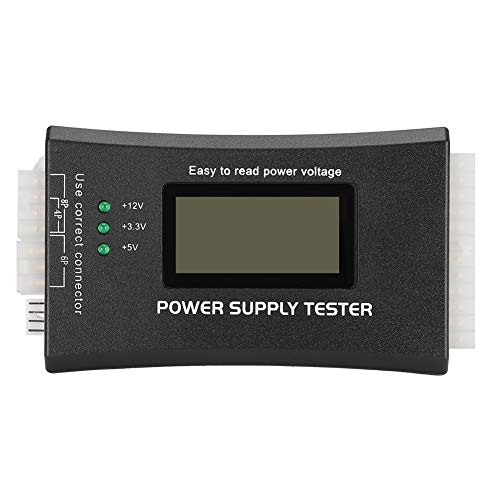
- LCD shows main voltages and PG values
- Buzzer signals detected faults
- Peripheral checks use indicator lights
Best For: Quick checks of PC supplies and peripheral power leads
Connector-Coverage Pick

- Backlit LCD and audible alarm
- Checks key rails, including +5VSB
- Ports for SATA, IDE, FDD, and PCI Express
Best For: Quick checks across motherboard and peripheral connectors
Multi-Connector Pick
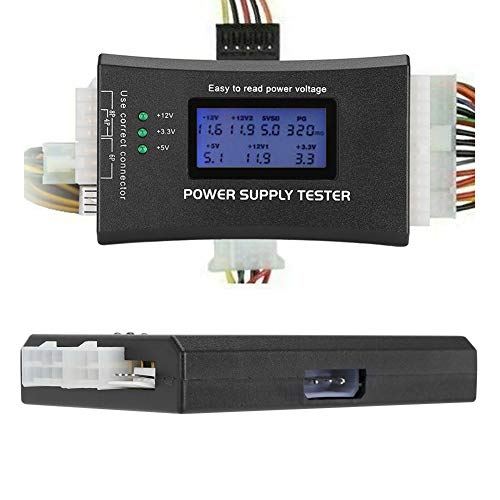
- LCD shows main voltages and PG values
- Buzzer alerts to detected faults
- Additional leads checked by indicator lights
Best For: Main-connector readings plus basic peripheral-lead checks
Portable Aluminum Pick – 20+4 Pin LCD PSU Tester
Optimal Shop 20+4 Pin LCD Computer Power Supply Tester for SATA IDE HDD ATX ITX BYI Connectors-Black
Check Price On AmazonAmong atx power supply testers, this compact aluminum model offers a straightforward way to check a 20- or 24-pin connection and several common peripheral connectors. Its 1.8-inch LCD shows voltage readings, while a buzzer flags a failing PG value.
Best For: PC builders who want a lightweight tester for common PSU connectors.
Pros:
- Supports 20/24-pin, SATA, HDD, floppy, PCIe 6-pin, 4-pin and 8-pin connections.
- Readable 1.8-inch LCD for voltage output.
- Aluminum alloy shell weighs about 3.2 ounces.
Cons:
- LCD requires power through the 20- or 24-pin connector.
- Peripheral-connector voltage is indicated by LEDs rather than detailed LCD readings.
This is a practical portable option if a quick connector check matters more than detailed readings for every output. The screen may arrive with a removable protective film.
Clear Connector Readout – Fuhengli LCD PSU Tester
This Fuhengli entry stands out among atx power supply testers for spelling out how its readings are presented: main-connector voltages and PG appear on the 1.8-inch LCD, while IDE, floppy and SATA outputs use indicator lights. A buzzer sounds when a test value falls outside the normal range.
Best For: Users checking standard ATX power supplies who want to distinguish LCD readings from peripheral LED checks.
Pros:
- Supports 20/24-pin ATX, IDE, floppy, PCIe 6-pin, 4-pin, EPS 8-pin and SATA connectors.
- LCD displays main-connector voltage and PG values.
- Aluminum alloy enclosure and audible out-of-range warning.
Cons:
- EPS 8-pin socket does not fit a PCIe 8-pin connector.
- IDE, floppy and SATA use LEDs rather than numeric LCD voltage readings.
- The LCD needs a connected 20- or 24-pin plug for power.
Choose this one when its supported connector list matches your PSU. For SATA, a normal four-wire plug lights only the +12V and +5V LEDs; the +3.3V LED applies to a five-wire plug.
Modern GPU Connector Pick – Thermaltake Dr. Power III Pro
For buyers comparing atx power supply testers for newer builds, the Thermaltake Dr. Power III Pro adds 12V-2×6 support and PCIe Gen 5.1 SENSE0/SENSE1 detection. It reports real-time voltage and PG readings on a color display and can check connections for continuity.
Best For: PC builders testing ATX 3.1-era PSUs and modern GPU power connections.
Pros:
- Supports 24-pin motherboard, 12V-2×6, 4+4 EPS, 6+2 PCIe, SATA and Molex connections.
- Displays +12V, +5V, +3.3V, +5Vsb and PG timing in milliseconds.
- Detects 12V-2×6 sense signals for 150W, 300W, 450W or 600W identification.
- Audible faults and a red display help identify detected problems.
Cons:
- Its modern-connector features may be unnecessary if you only need basic 20/24-pin checks.
- The supplied specifications list a 24-pin main-board connection, not a 20-pin one.
This is the most relevant choice here when 12V-2×6 sense information or continuity testing is on your checklist, rather than just a basic voltage indication.
Classic Multi-Form-Factor Pick – 20/24 Pin LCD Power Tester
Among atx power supply testers for routine PC troubleshooting, this compact LCD unit is listed for ATX, BTX, ITX and TFX supplies. Connecting the 20- or 24-pin plug provides LCD voltage and PG readings, with a buzzer and flashing value when a parameter exceeds its normal range.
Best For: Quick checks of 20/24-pin PC supplies across several listed form factors.
Pros:
- LCD shows 3.3V, +5V, +12V, -12V, +5V standby and PG information.
- Audible alarm and flashing reading identify out-of-range parameters.
- Supports SATA, 4-pin, 8-pin, PCIe 6-pin, floppy and hard-drive interfaces.
Cons:
- Only the 20/24-pin connection provides LCD voltage readings.
- Other supported outputs use lights rather than numeric LCD voltage readings.
It makes sense as a quick first check when you need main-plug readings and basic peripheral indications, but not a numeric voltage readout for each peripheral connector.
Broad PSU Compatibility – BUBUCAM WU0037 LCD Power Supply Tester
Among ATX power supply testers, the BUBUCAM WU0037 is a compact option for checking PSU output through the main ATX connector. Its LCD shows voltage readings and the PG value, while a buzzer and flashing value flag readings outside the normal range.
Best For: Buyers checking ATX, BTX, ITX, or TFX power supplies who want a quick visual fault alert.
Pros:
- Displays voltage and PG readings on an LCD.
- Uses an audible alarm and flashing display for abnormal parameters.
- Lists support for 20/24-pin and additional 4/6/8-pin, SATA, and IDE connections.
Cons:
- The supplied specifications do not clearly explain how readings appear for each auxiliary connector.
This is a practical fit when broad connector support matters, though buyers who need a specific per-connector readout should verify that detail before ordering.
If you are comparing ATX power supply testers for readable diagnostics, this compact model displays listed voltage rails along with standby and PG signals. It also sounds a buzzer and flashes an abnormal parameter when a reading falls outside the normal range.
Best For: PC repair and routine maintenance where visible rail readings and fault alerts are useful.
Pros:
- LCD presents +12V, -12V, +5V, -5V, +3.3V, standby, and PG information.
- Lists 0.01V measurement precision.
- Supports 20/24-pin ATX and listed SATA, 4-pin, 8-pin, PCI-E 6-pin, and floppy connections.
Cons:
- The supplied notes do not specify which auxiliary connectors receive numerical LCD readings.
Its main appeal is the combination of a detailed screen and audible warning in a small tester; confirm connector-specific display behavior if that is central to your workflow.
The ASHATA model is worth considering among ATX power supply testers if you want an LCD readout for the main 20/24-pin connector and basic checks for peripheral leads. Its notes specify an important distinction: auxiliary connectors use indicator lights rather than numerical LCD voltage readings.
Best For: Buyers who mainly need main-connector voltage and PG readings, with light-based checks for other leads.
Pros:
- Shows voltage and PG values on the LCD when connected to a 20/24-pin plug.
- Lists checks for P4, P6, P8, SATA, and IDE output wires.
- Compact body measures 3.94 × 1.97 × 0.79 inches.
Cons:
- Auxiliary P4/P6/P8/SATA/IDE checks do not provide numerical LCD voltage readings.
- The supplied notes describe the alarm behavior inconsistently, so its exact trigger is unclear.
Choose this one for the main ATX readout and convenient connector coverage, not for detailed voltage numbers on every auxiliary cable.
Compact Maintenance Pick – 20/24-Pin LCD PSU Tester
Among atx power supply testers, this compact model offers an LCD readout for main-connector voltages and PG values, plus a buzzer that signals detected faults. Its listed compatibility covers ATX, BTX, ITX, and TFX supplies.
Best For: PC owners who want a quick check of a 20- or 24-pin supply and its peripheral power connectors.
Pros:
- Displays main-connector voltage groups and PG values on its LCD.
- Audible alarm flags detected faults.
- Also checks P4, P6, P8, SATA, and IDE output leads.
Cons:
- Peripheral connector checks use indicator lights rather than LCD voltage readings.
This is a practical choice when a clear main-connector readout matters most; use a different measuring tool if you need numeric readings at every peripheral plug.
For shoppers comparing atx power supply testers, the Yankok model pairs a backlit LCD with an audible voltage-failure alarm. It checks key rails including +5VSB, +12V, +3.3V, and +5V on compatible PC supplies.
Best For: Hobbyists and technicians who want a quick functional check across motherboard and peripheral power connectors.
Pros:
- Backlit LCD displays supply voltages.
- Supports 20- and 24-pin supplies, including ATX, ITX, and BTX units.
- Provides ports for FDD, SATA, IDE HDD, dual-CPU, and PCI Express supply checks.
Cons:
- The supplied notes conflict on power source: one says the tester draws power from the PSU connector, while the specifications list it as battery powered.
Its broad connector coverage makes it useful for a first-pass PSU check. Confirm the power-source requirement before buying if battery-free operation is important to you.
This VBESTLIFE option stands out among atx power supply testers for its stated 20/24-pin and P4/P6/P8, SATA, and IDE connector coverage. With the main connector attached, its LCD shows voltage groups and PG values; a buzzer alerts you to detected faults.
Best For: PC troubleshooters who want an LCD check of the main supply connector alongside basic peripheral-lead checks.
Pros:
- LCD displays voltage groups and PG values through the 20- or 24-pin connection.
- Audible alarm signals detected faults.
- Listed for ATX, BTX, ITX, and TFX power supplies.
Cons:
- P4, P6, P8, SATA, and IDE checks use lights, not numeric LCD voltage readings.
Choose it for convenient main-connector readings and a quick look at additional leads, but not for measuring the exact voltage at each peripheral connector.
How We Picked These Atx Power Supply Testers
We focused on the connectors and functions stated in the selected product listings: 20/24-pin motherboard support, 4/6/8-pin and peripheral connections, LCD readouts, buzzer alarms, and power-good (PG) reporting where specified. We also considered whether a tester lists support for newer PSU connectors. Listing titles do not establish measurement accuracy or build quality, so confirm the seller’s full specifications before buying.
Quick Comparison: Which Type Fits Your PSU?
Basic 20/24-pin tester: A straightforward option for a quick check of a standard motherboard power connector. Check the listing for any additional connectors you plan to use.
Multi-connector LCD tester: Better suited to checking motherboard power alongside CPU, PCIe, SATA, or older peripheral outputs, provided the exact plugs are supported. A buzzer can make an abnormal reading easier to notice.
Newer-spec tester: The Thermaltake Dr. Power III Pro listing names ATX12V v3.1 and 12V-2×6 support. Consider it if those specifications match your PSU; verify its full compatibility before purchase.
Key Buying Factors for Atx Power Supply Testers
Match the Connectors First
Start with your PSU’s main 20/24-pin plug, then list any CPU 4+4-pin, PCIe, SATA, or older peripheral connectors you need to check. Do not assume that a tester accepting one type of 8-pin plug accepts every other type; CPU and PCIe connectors serve different purposes. If your PSU has a 12V-2×6 cable, look for explicit support rather than relying on a generic “PCIe” claim.
Know What the Display Tells You
An LCD can make reported voltages easier to read than simple status lights. PG reporting and an audible alarm may help flag a problem quickly, but check which rails and connectors the tester actually monitors. Similar-looking testers can have different stated capabilities.
Understand the Limits
A plug-in tester is useful for an initial PSU check, not proof that a power supply will remain stable under a gaming or workstation load. It may not expose intermittent faults or confirm power quality. If readings look wrong, stop using the PSU until you can investigate further; never open a PSU enclosure to troubleshoot it.
Who Should Buy Which Atx Power Supply Testers?
For an occasional check of an older or conventional PC, start with a basic tester that explicitly fits your connectors. If you maintain several PCs or want readable output across multiple cables, choose a multi-connector LCD model and consider a buzzer for quicker fault spotting. For a PSU using newer connector specifications, prioritize a tester that names those standards. If you need to diagnose crashes that happen only under load, treat any of these testers as a first step rather than your final verdict.
