
If you want a Mac-friendly printer that’s quick to set up and reliable day after day, AirPrint laser models are a smart choice. They handle text-heavy work especially well, with crisp output and low-maintenance operation.
Below, we’ve focused on 10 options that balance wireless convenience, speed, and value for different workspaces, from compact home desks to busy small offices.
Best 10 Airprint Laser Printers for Mac Picks for 2026
Best for Small Offices
Brother DCP-L2640DW Monochrome Laser Printer

- Fast 36 ppm black-and-white printing
- Scan, copy, and duplex in a compact 3-in-1 design
- Dual-band Wi-Fi, Ethernet, USB, and mobile app support
Best For: Small offices and home users who need a fast, compact monochrome all-in-one printer.
Best for Easy Setup
Xerox C235dni Wireless Color Laser All-in-One

- Apple AirPrint support works smoothly with Mac devices
- All-in-one printing, scanning, copying, and faxing
- High-yield toner support helps keep costs down
Best For: Mac users and small offices that want a wireless color laser all-in-one with simple setup.
Best for Compact Home Offices
Brother HL-L2460DW Compact Monochrome Laser Printer

- Small footprint suits tight desks and shelves.
- Fast 36 ppm output with automatic duplex printing.
- Wireless, Ethernet, USB, and mobile printing support.
Best For: Mac users who want a compact, reliable monochrome printer for everyday document printing.
Best for Small Office Workhorses
Xerox B315 Wireless B&W All-in-One
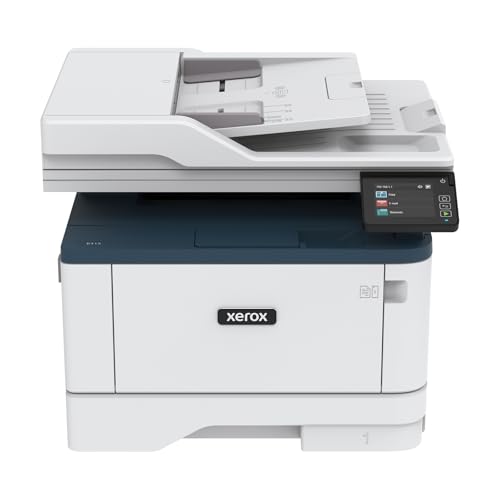
- AirPrint-ready wireless printing for Mac users
- Fast 42 ppm monochrome output
- Duplex printing and 50-sheet ADF
Best For: Small offices and home workspaces that need a fast monochrome all-in-one with AirPrint support.
Best for Compact Mac Home Offices
Brother HL-L2405W Compact Mono Laser Printer

- Compact design for small desks and home offices
- Fast monochrome printing up to 30 ppm
- Dual-band Wi‑Fi and USB connectivity for flexible setup
Best For: Mac home offices that need a compact, reliable black-and-white laser printer.
Best for Easy AirPrint Setup
Xerox B230 Wireless Laser Printer

- Apple AirPrint support for Mac-friendly printing
- Compact wireless design for small spaces
- Auto duplex printing helps save paper
Best For: Mac users who want a compact wireless monochrome printer with easy AirPrint support.
Best with Extra Features
HP LaserJet MFP M140w Wireless Mono Printer

- AirPrint and Mac support for simple wireless printing
- Compact footprint is ideal for tight workspaces
- Prints up to 21 ppm with scan and copy functions
Best For: Small teams and Mac users who need a compact monochrome printer for everyday documents.
Best Heavy-Duty Pick
Canon imageCLASS LBP6030w Compact Wireless Laser Printer

- Small footprint for tight desks
- Wireless printing for convenient Mac use
- Fast 19 ppm monochrome output
Best For: Mac users who need a compact, wireless monochrome printer for light home or small-office printing.
Best Simple Pick
HP LaserJet Pro MFP 3101fdw Wireless B&W All-in-One

- AirPrint and Mac compatible for easy wireless use
- Fast 35 ppm black-and-white printing
- All-in-one scanning, copying, faxing, and auto duplex
Best For: Small teams and Mac users who need a fast, secure monochrome all-in-one printer.
Best for Small Offices – Brother DCP-L2640DW Monochrome Laser Printer
If you want a compact workhorse for a home office or small team, the Brother DCP-L2640DW fits the bill. It’s a practical option for shoppers comparing airprint laser printers for mac, especially if you need fast black-and-white output, scanning, and copying in one device rather than a basic print-only model.
Best For: Busy users who need a compact monochrome multifunction printer with fast output, duplex printing, and flexible wireless connectivity.
Pros:
- Fast printing up to 36 ppm helps keep document jobs moving.
- Built-in scan and copy functions, plus a 50-page ADF for multi-page tasks.
- Dual-band Wi-Fi, Ethernet, USB, and mobile app support add setup flexibility.
- Automatic duplex printing helps save paper.
Cons:
- Monochrome only, so it’s not for color printing needs.
- AirPrint compatibility isn’t highlighted as a standout feature in the listing.
Overall, the DCP-L2640DW is a strong productivity pick if you care more about speed and reliability than color output. For buyers comparing airprint laser printers for mac, it’s worth a look when a compact all-in-one makes more sense than a simple desktop printer.
Best for Easy Setup – Xerox C235dni Wireless Color Laser All-in-One
If you want a compact all-in-one that works well in a Mac-friendly office, the Xerox C235dni is a solid pick among airprint laser printers for mac. It combines Apple AirPrint support, wireless connectivity, and simple app-based setup so you can start printing without dealing with a complicated driver hunt.
Best For: Home offices and small teams that want an easy-to-set-up color laser printer with AirPrint, scanning, copying, and faxing in one device.
Pros:
- Apple AirPrint and Wi‑Fi make it easy to print from a Mac, iPhone, or iPad
- All-in-one features include scanning, copying, faxing, and automatic duplex printing
- Low running costs with high-yield toner support for small-office use
- Fast enough for everyday work at up to 24 ppm
Cons:
- Starter toner yield is modest, so consumables may be needed sooner
- Best suited to light-to-moderate monthly volumes rather than heavy-duty printing
For buyers comparing airprint laser printers for mac, the Xerox C235dni stands out more for convenience and versatility than raw speed. It is a practical choice if you want reliable color output, painless wireless printing, and a full-featured desktop printer for a small office.
Best for Compact Home Offices – Brother HL-L2460DW Compact Monochrome Laser Printer
If you want a no-frills black-and-white laser model for a Mac setup, the Brother HL-L2460DW is a smart pick among airprint laser printers for mac. It keeps the footprint small, prints quickly, and adds automatic duplexing plus flexible wireless options for everyday home-office use.
Best For: Mac users who need an affordable, space-saving monochrome printer for documents, invoices, schoolwork, and other routine jobs.
Pros:
- Compact design fits easily on a desk or shelf.
- Fast 36 ppm printing with automatic duplex for lower paper use.
- Dual-band Wi-Fi, Ethernet, USB, and mobile printing support.
- 250-sheet tray helps reduce frequent paper refills.
Cons:
- Monochrome output only, so it won’t handle color printing.
- No built-in scanner or copier functions.
- Toner replacement costs can add up over time if you print heavily.
For Mac owners who mainly print text documents, this Brother balances speed, size, and wireless convenience very well. It’s not the flashiest option among airprint laser printers for mac, but it’s a practical workhorse for everyday printing.
Best for Small Office Workhorses – Xerox B315 Wireless B&W All-in-One
If you need one of the more capable airprint laser printers for mac, the Xerox B315 is built for speed, simple mobile printing, and everyday office tasks. It combines print, scan, copy, and fax features with built-in Wi-Fi, AirPrint support, and fast black-and-white output in a compact design.
Best For: Small teams or home offices that want a fast, wireless monochrome all-in-one with easy Mac printing support.
Pros:
- Apple AirPrint, Mopria, and Chromebook support for easy wireless printing
- Up to 42 ppm print speed for quick black-and-white output
- Automatic duplex printing plus a 50-sheet ADF for scanning and copying
- 250-sheet paper capacity helps reduce refill frequency
Cons:
- Monochrome only, so it is not for color printing needs
- Bulkier than a basic single-function printer
- May be more printer than a light home user needs
For buyers comparing airprint laser printers for mac, the B315 stands out for its speed, ADF, and office-friendly feature set rather than just basic printing. It is a practical choice when you want dependable wireless output and scanning in one machine.
Best for Compact Mac Home Offices – Brother HL-L2405W Compact Mono Laser Printer
If you want a simple, affordable option among airprint laser printers for mac, the Brother HL-L2405W is built for fast black-and-white everyday printing. It pairs a compact footprint with dual-band Wi‑Fi and USB connectivity, making it a practical fit for Mac users who need reliable document output without paying for extra features they may never use.
Best For: Mac home offices that need a space-saving monochrome laser printer for fast, dependable everyday printing.
Pros:
- Compact design works well on small desks and shared home office spaces
- Fast print speeds up to 30 ppm for everyday documents
- Dual-band wireless plus USB connection options
- 250-sheet tray helps reduce frequent refills
Cons:
- Black-and-white only, so it is not suited for color printing
- No automatic duplex printing listed in the key features
- AirPrint compatibility is not explicitly highlighted in the product notes
For Mac buyers who mainly print text documents, forms, and schoolwork, this Brother model offers strong value and a straightforward setup path. It is a sensible pick if you want one of the more practical airprint laser printers for mac alternatives focused on speed, size, and low-running-effort basics.
Best for Small Teams – HP LaserJet MFP M234sdw Wireless Printer
If you want a compact black-and-white laser that fits right into a Mac setup, the HP LaserJet MFP M234sdw is a practical pick among airprint laser printers for mac. It keeps things simple with AirPrint support, fast two-sided printing, and an easy wireless setup that works well for home offices and shared workspaces.
Best For: Small teams that need reliable, fast monochrome printing, scanning, and copying from Mac devices.
Pros:
- AirPrint and Mac support make wireless printing straightforward.
- Fast print speeds and automatic two-sided printing help with busy workloads.
- Scan, copy, and feed multi-page jobs hands-free with the ADF.
- Built-in Wi‑Fi self-reset and Ethernet add flexibility for shared use.
Cons:
- Monochrome only, so it is not suitable for color printing.
- Best suited to light-to-moderate office use rather than heavy-duty volumes.
For buyers comparing airprint laser printers for mac, this model stands out for balancing speed, ease of use, and small-office features without adding much complexity. It is a sensible choice if you mainly print documents and want dependable AirPrint support from a compact MFP.
Best for Easy AirPrint Setup – Xerox B230 Wireless Laser Printer
If you want one of the more straightforward airprint laser printers for mac, the Xerox B230 is a practical fit for home offices and small teams that need fast black-and-white printing without a complicated setup.
Best For: Mac users who want a compact, wireless laser printer with AirPrint support, simple setup, and dependable everyday document printing.
Pros:
- Built-in Apple AirPrint support makes it easy to print from Macs and iPhones
- Compact design works well in tight home office spaces
- Automatic two-sided printing helps reduce paper use
- Wireless connectivity keeps setup flexible and clutter-free
Cons:
- Black-and-white only, so it is not suited for color printing
- Best for basic document jobs rather than heavy-duty office workloads
For shoppers comparing airprint laser printers for mac, the B230 stands out as a no-fuss option that covers the essentials: AirPrint compatibility, compact size, and reliable wireless printing. It is a sensible pick if you mainly need sharp text output and easy Mac-friendly printing.
Best with Extra Features – HP LaserJet MFP M140w Wireless Mono Printer
If you want a compact, low-fuss option from the airprint laser printers for mac category, the HP LaserJet MFP M140w is built for simple black-and-white printing, scanning, and copying. It’s a good fit when you need reliable everyday output, quick wireless setup, and Mac-compatible AirPrint support without taking up much desk space.
Best For: Small teams, home offices, and Mac users who mainly print forms, reports, and other monochrome documents.
Pros:
- AirPrint, Mac, and mobile printing support for easy wireless use
- Very compact design that fits easily on crowded desks
- Fast 21 ppm black-and-white print speed for basic office tasks
- Scan and copy functions add versatility beyond printing
Cons:
- Black-and-white only, so it won’t handle color printing
- Single-sided printing only, with no automatic duplex
- Best suited to light-to-moderate workloads rather than heavy office use
For buyers comparing airprint laser printers for mac, this model stands out for its tiny footprint and easy wireless workflow more than advanced features. It’s a practical pick if you value straightforward document handling and compact size over extras like duplexing or color output.
Best Heavy-Duty Pick – Canon imageCLASS LBP6030w Compact Wireless Laser Printer
If you want a simple black-and-white laser option in the airprint laser printers for mac conversation, the Canon imageCLASS LBP6030w is a practical pick for small desks and light-duty printing. It keeps the footprint small, connects wirelessly, and focuses on fast, dependable output without extra features to pay for.
Best For: Mac users who need a compact, print-only laser printer for home, dorm, or small office use.
Pros:
- Compact design fits easily into tight spaces
- Wireless printing is convenient for shared work areas
- Fast 19 ppm output for everyday documents
- Low-energy operation helps reduce power use
Cons:
- No color printing or scanning features
- 150-sheet paper capacity is modest for heavier workloads
- Not ideal if you need advanced office functions
Overall, the LBP6030w makes sense if you value a small, straightforward laser printer over extras. For shoppers comparing airprint laser printers for mac, it stands out more for compact convenience and reliable mono printing than for full-feature flexibility.
Best Simple Pick – HP LaserJet Pro MFP 3101fdw Wireless B&W All-in-One
If you want one of the more practical airprint laser printers for mac, the HP LaserJet Pro MFP 3101fdw is built for fast black-and-white office work, with printing, scanning, copying, and faxing in one compact unit. It’s a strong fit when you need reliable Mac-friendly wireless printing plus the kind of speed and automation that keeps a small team moving.
Best For: Small teams and home offices that need a fast AirPrint-capable monochrome multifunction printer for Mac workflows.
Pros:
- Works with Mac and AirPrint for straightforward wireless printing
- Fast 35 ppm print speeds with auto 2-sided printing
- Automatic document feeder supports quicker scan and copy jobs
- Built-in HP Wolf Pro Security adds useful small-office protection
Cons:
- Black-and-white only, so it won’t handle color printing needs
- More printer than a casual home user may need
- HP toner and dynamic cartridge requirements can raise long-term costs
This is a solid pick if you need airprint laser printers for mac that prioritize speed, security, and office-ready multifunction features over photo output. For Mac users who want dependable everyday document printing, it delivers a lot of value without feeling overly complicated.
How We Picked the Best Airprint Laser Printers for Mac
We focused on Airprint Laser Printers for Mac that are easy to connect, consistently compatible with Apple devices, and practical for real-world use. Priority went to models with solid wireless support, dependable print quality, and features that matter most to Mac users, such as duplex printing, mobile setup, and multifunction tools like scan and copy.
We also weighed operating costs, paper handling, and footprint so you can match the printer to your workspace instead of overbuying for features you may not use.
Quick Comparison
For simple black-and-white document printing, single-function models can be the most affordable and compact. If you need scanning, copying, or faxing, an all-in-one is usually the better fit. Color laser models are worth considering only if your work truly benefits from color charts, presentations, or branded documents.
In general, the best pick depends on whether you care most about size, speed, office features, or total flexibility with your Mac setup.
Key Buying Factors for Airprint Laser Printers for Mac
AirPrint and MacOS Compatibility
Check that the printer supports native AirPrint so you can print directly from your Mac, iPhone, or iPad without extra drivers. This usually makes setup simpler and reduces troubleshooting later.
Print Type: Mono Vs. Color
Most buyers will be best served by monochrome laser printers for clean text and lower running costs. Choose color only if you regularly print graphics, slides, or client-facing materials.
Functionality
Single-function printers are great for straightforward document printing. If you scan contracts, make copies, or handle forms often, an all-in-one model can save time and desk space.
Speed, Duplexing, and Paper Handling
Look for enough pages per minute for your workload and automatic duplex printing if you want to save paper. A larger input tray can also make a big difference in busy home offices.
Setup, App Support, and Network Use
Even with AirPrint, a good companion app and easy wireless setup can improve the experience. This matters most if multiple people in your household or office will use the printer.
Who Should Buy Which Airprint Laser Printers for Mac?
If you want the simplest Mac printing experience, choose a compact AirPrint-enabled monochrome model. If your work includes scanning or copying, step up to an all-in-one. Small teams should look for faster output, automatic duplexing, and stronger paper handling. If color output is essential, narrow your search to a laser color all-in-one and make sure the added cost is worth it for your documents.
For most buyers, the best Airprint Laser Printers for Mac are the ones that combine easy Apple compatibility with the right mix of speed, function, and size for your daily workflow.
