
When it comes to cooling the Intel Core i9-14900K, selecting the right AIO cooler is essential for performance and longevity. With so many options available, you might be unsure which models truly stand out. From advanced cooling technologies to stylish designs, each cooler offers unique features that can meet your needs. Let’s explore the top picks that can help keep your CPU running smoothly under pressure.
CORSAIR iCUE Link Titan 360 RX LCD Liquid CPU Cooler

If you’re looking for top-tier cooling performance for your Intel Core i9-14900k, the CORSAIR iCUE Link Titan 360 RX LCD Liquid CPU Cooler is an excellent choice. This 360mm AIO cooler features a FlowDrive Cooling Engine, ensuring maximum CPU contact with its precision-engineered cold plate. With pre-mounted RX RGB fans optimized for airflow and static pressure, you’ll enjoy low-noise operation. The stunning 2.1” IPS LCD displays real-time CPU temperatures, animated GIFs, or custom logos. Plus, iCUE LINK technology simplifies your setup by reducing cable clutter, making installation a breeze. Experience superior cooling and style with this exceptional cooler.
Best For: Gamers and PC enthusiasts seeking high-performance cooling solutions for their Intel or AMD processors.
Pros:
- Exceptional cooling efficiency with FlowDrive Cooling Engine and optimized RX RGB fans for high airflow.
- Stunning display featuring a 2.1” IPS LCD screen that shows real-time CPU temperatures and customizable graphics.
- Easy installation with iCUE LINK technology that minimizes cable clutter and simplifies component connections.
Cons:
- Large size may not fit in smaller cases, requiring careful consideration of case compatibility.
- Potentially higher price point compared to standard air coolers, which could be a drawback for budget-conscious users.
- RGB lighting may not appeal to those who prefer a more understated aesthetic in their builds.
ARCTIC Liquid Freezer III Pro 360 AIO CPU Cooler

The ARCTIC Liquid Freezer III Pro 360 AIO CPU Cooler stands out as an excellent choice for gamers and content creators using the Intel Core I9-14900k. With its three 120 mm fans and 38 mm radiator, it delivers impressive cooling performance. The ARCTIC P12 PRO FAN guarantees quiet operation while maintaining high efficiency, even under heavy loads. Its unique mounting design enhances heat transfer by aligning the cold plate with the CPU hotspot. Plus, the integrated VRM fan keeps temperatures down, promoting reliability. Cable management is a breeze, as PWM cables stay neatly concealed, offering a clean aesthetic for your build.
Best For: Gamers and content creators seeking high-performance cooling solutions for their Intel Core I9-14900k setups.
Pros:
- Impressive cooling performance with three 120 mm fans and a 38 mm radiator for optimal temperature management.
- Quiet operation thanks to the ARCTIC P12 PRO FAN, even under heavy loads.
- Efficient heat transfer with a unique mounting design that aligns the cold plate with the CPU hotspot.
Cons:
- Larger size may require ample space in the case for installation.
- Potential compatibility issues with certain cases due to radiator dimensions.
- Higher price point compared to standard air coolers, which may not be ideal for budget builds.
ARCTIC Liquid Freezer III Pro 360 AIO CPU Cooler

For gamers and content creators seeking top-tier performance, the ARCTIC Liquid Freezer III Pro 360 AIO CPU cooler stands out with its exceptional cooling efficiency. With a robust 38 mm radiator and three 120 mm fans, it keeps your Intel Core i9-14900k running cool under load, achieving idle temps around 40°C and maxing out at 82°C during stress tests. Its integrated VRM fan assures even better heat dissipation, while optimized mounting and cable management make installation a breeze. Priced competitively, this cooler offers outstanding value, making it a top choice for those looking for reliable, efficient cooling without breaking the bank.
Best For: Gamers and content creators looking for high-performance cooling solutions at an affordable price.
Pros:
- Excellent cooling efficiency, keeping CPU temperatures low under load.
- Integrated VRM fan enhances heat dissipation for better overall performance.
- User-friendly installation with optimized mounting and cable management features.
Cons:
- Some users report difficulties with pump cable management during installation.
- RGB lighting may not be as elaborate as some competitors.
- Larger size requires careful case selection for fitment.
CORSAIR Nautilus 360 RS ARGB Liquid CPU Cooler

Designed for those seeking exceptional cooling performance, the CORSAIR Nautilus 360 RS ARGB Liquid CPU Cooler stands out with its 360mm AIO configuration that delivers strong, low-noise operation. With an efficient pump operating at just 20 dBA, it keeps your system quiet. The convex cold plate guarantees maximum contact with your CPU for peak heat dissipation. You’ll appreciate the three RS120 ARGB fans, providing high airflow and static pressure, all easily controlled via your compatible motherboard. Installation is a breeze, thanks to pre-applied thermal paste and daisy-chained connections, making this cooler ideal for both Intel and AMD systems.
Best For: Users looking for a high-performance liquid CPU cooler that operates quietly and offers easy installation for both Intel and AMD systems.
Pros:
- Strong cooling performance with low noise levels (20 dBA).
- Efficient installation with pre-applied thermal paste and daisy-chained connections.
- High airflow and static pressure provided by three RS120 ARGB fans.
Cons:
- Larger 360mm size may not fit in all cases.
- Requires compatible motherboard for ARGB control.
- Slightly higher price point compared to standard air coolers.
NZXT Kraken Elite 360 RGB AIO CPU Liquid Cooler

If you’re looking for a high-performance cooling solution for your Intel Core i9-14900k, the NZXT Kraken Elite 360 RGB AIO CPU Liquid Cooler stands out with its impressive 360mm radiator and innovative custom-designed turbine pump. This cooler efficiently handles overclocked CPUs, dropping temperatures from 50°C to 38°C under load. Its 2.72-inch LCD allows you to display real-time metrics and GIFs, while the RGB LED ring enhances your build’s aesthetics. Installation is a breeze with pre-applied thermal paste and tool-free mounting. Though it comes at a premium price, users rave about its performance and sleek design, making it a worthy investment.
Best For: PC enthusiasts seeking a high-performance, aesthetically pleasing cooling solution for overclocked Intel and AMD CPUs.
Pros:
- Exceptional cooling performance, efficiently reducing CPU temperatures under load.
- User-friendly installation with pre-applied thermal paste and tool-free mounting.
- Customizable 2.72-inch LCD and RGB lighting for enhanced personalization and aesthetics.
Cons:
- Higher price point compared to other AIO coolers on the market.
- Some users have reported potential pump noise issues.
- Occasional defects, including reports of pump failure within a few months.
Cooler Master MasterLiquid 360L AIO Liquid Cooler (MLW-D36M-A18PZ-R1)

The Cooler Master MasterLiquid 360L AIO Liquid Cooler (MLW-D36M-A18PZ-R1) is an ideal choice for those seeking exceptional thermal performance for their Intel Core i9-14900k. With its 360mm design, it fits perfectly in most cases, providing efficient cooling. The Gen S dual chamber pump and improved copper base guarantee targeted heat management and increased water flow. You’ll appreciate the customizable ARGB lighting, which enhances your build’s aesthetics while the frosted blade design boosts vibrancy. Plus, the premium CryoFuze thermal paste offers excellent conductivity, making this cooler a reliable choice for keeping your CPU temperatures in check during intense tasks.
Best For: Gamers and PC enthusiasts looking for high-performance cooling solutions for their high-end CPUs.
Pros:
- Efficient Cooling: The Gen S dual chamber pump and improved copper base ensure superior thermal management and increased water flow.
- Customizable Aesthetics: ARGB lighting with a frosted blade design enhances the visual appeal of your build.
- High-Quality Thermal Paste: Includes premium CryoFuze thermal paste for exceptional thermal conductivity and stability.
Cons:
- Size Compatibility: The 360mm size may not fit in smaller cases, limiting installation options.
- Potential Noise Levels: While designed for quiet operation, under heavy loads, the fans may still produce noticeable noise.
- Price Point: Higher priced compared to standard air coolers, which might not be necessary for all users.
ASUS ROG RYUO IV SLC 360 ARGB All-in-one CPU Liquid Cooler
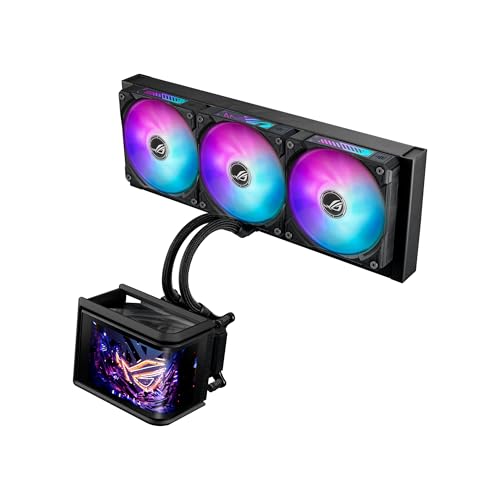
For gamers and enthusiasts seeking a blend of performance and aesthetics, the ASUS ROG RYUO IV SLC 360 ARGB All-in-one CPU Liquid Cooler stands out with its stunning curved 6.67-inch AMOLED display. This cooler not only showcases system information but also supports 3D-effect visuals. With a powerful pump, you’ll experience robust cooling performance that guarantees higher flow and lower impedance. The pre-mounted daisy-chained ARGB fans deliver high airflow while maintaining low noise levels. Plus, the intuitive software allows for hardware monitoring and content management, making it an ideal choice for anyone looking to optimize their cooling setup.
Best For: Gamers and PC enthusiasts looking for a high-performance and visually appealing cooling solution.
Pros:
- Stunning curved 6.67-inch AMOLED display that supports 3D visuals and customizable system information.
- Powerful pump provides robust cooling performance with higher flow and lower impedance.
- Daisy-chained ARGB fans ensure high airflow and low noise levels while adding aesthetic appeal.
Cons:
- Higher price point compared to standard air coolers may not suit all budgets.
- Installation can be complex for users unfamiliar with liquid cooling systems.
- Limited compatibility with some cases due to size and mounting requirements.
ARCTIC Liquid Freezer III Pro 240 mm AIO CPU Cooler

Designed for high-performance CPUs, the ARCTIC Liquid Freezer III Pro 240 mm AIO CPU Cooler is an excellent choice for anyone looking to maximize cooling efficiency in demanding setups, like those using the Intel Core i9-14900k. With a 240 mm radiator and PWM pump, it delivers impressive cooling while keeping noise levels low. Installation is straightforward, especially on AM4 boards, but verify compatibility with your setup. Users rave about its performance, managing to keep even demanding CPUs cool. Priced under €80, it offers great value, making it a solid option for anyone seeking effective cooling without the flashy RGB.
Best For: The ARCTIC Liquid Freezer III Pro 240 mm AIO CPU Cooler is best for gamers and content creators using high-performance CPUs who prioritize effective cooling and low noise levels.
Pros:
- Effective cooling performance, keeping even demanding CPUs like Ryzen 5950 and Intel Core i9-14900k at low temperatures under load.
- Quieter operation, especially at lower fan speeds, making it ideal for users who prefer a silent setup.
- Great value for money, priced under €80, competing well with more established brands without sacrificing performance.
Cons:
- Installation challenges may arise, particularly for AM5 motherboards due to the offset mounting design.
- Stiff tubing can make positioning the cooler more difficult during installation.
- Longevity concerns, as AIO coolers may need replacement sooner compared to traditional air coolers.
ARCTIC Liquid Freezer III Pro 420 AIO CPU Cooler

Offering impressive cooling performance, the ARCTIC Liquid Freezer III Pro 420 AIO CPU Cooler is an excellent choice for gamers and content creators using the Intel Core i9-14900K. With a robust 38 mm radiator and three 140 mm fans, it efficiently keeps CPU temperatures below 80°C under max load. The optimized contact frame enhances heat dissipation, while the integrated VRM fan guarantees stable performance. Installation is generally straightforward, though some users noted minor issues with the mounting system. Backed by a six-year warranty, this cooler combines excellent cooling efficiency with a sleek design, making it a top pick for your setup.
Best For: Gamers and content creators seeking high-performance cooling solutions for demanding CPUs like the Intel Core i9-14900K.
Pros:
- Excellent cooling performance, maintaining CPU temperatures below 80°C under max load.
- Integrated VRM fan for enhanced stability and efficiency.
- Sleek design with effective cable management for a clean installation look.
Cons:
- Some users reported difficulties with mounting instructions and brackets.
- Installation experience may vary, with occasional minor issues noted.
- The weight of 5.22 pounds may require careful handling during installation.
ARCTIC Liquid Freezer III Pro 360 A-RGB CPU Cooler

The ARCTIC Liquid Freezer III Pro 360 A-RGB CPU Cooler stands out as an ideal choice for gamers and high-performance enthusiasts seeking top-tier cooling for their Intel Core i9-14900k. With a powerful 38 mm radiator and three 120 mm fans, it excels in maintaining low temperatures, maxing out at just 82°C during stress tests. Its optimized contact pressure guarantees efficient heat transfer, while the integrated VRM fan helps regulate temperatures. Installation is straightforward, making it perfect for first-timers. Plus, the aesthetically pleasing RGB features enhance your build, proving it’s a solid investment for any serious user.
Best For: Gamers and high-performance enthusiasts seeking exceptional cooling for their Intel Core i9-14900k.
Pros:
- Excellent cooling performance, maxing out at just 82°C under heavy loads.
- Easy installation process, suitable for first-time users.
- Aesthetic RGB features that enhance the overall look of your build.
Cons:
- Some users reported challenges with pump fan header connections during installation.
- Fans can become loud at high speeds.
- Minor aesthetic issues noted, such as slight LED gaps.
Factors to Consider When Choosing Aio Coolers for 14900K
When choosing an AIO cooler for your 14900K, you’ll want to contemplate several key factors. Cooling performance, compatibility with socket types, and noise levels can greatly impact your build. Don’t forget to think about installation ease and the cooler’s aesthetic design to match your setup.
Cooling Performance Efficiency
Choosing the right AIO cooler for your Intel Core i9-14900K hinges on several critical factors that influence cooling performance efficiency. First, consider the radiator size; larger radiators, like 360mm, offer better heat dissipation thanks to increased airflow surface area. Next, look at fan design—high-performance PWM fans can optimize airflow while minimizing noise levels. Additionally, native offset mounting systems are essential, as they align the cold plate with the CPU hotspot for superior heat transfer. Integrated features, such as VRM fans, also help manage temperatures, promoting system stability. Finally, using advanced thermal paste with high thermal conductivity can greatly enhance the thermal interface, improving overall cooling efficiency.
Compatibility With Socket Types
Verifying your AIO cooler is compatible with the Intel LGA 1851/1700 socket types is essential for maximizing the performance of your i9-14900K. First, check if the cooler supports the required mounting system, as different models may have unique brackets. You’ll also want to confirm that the radiator size, whether 240mm or 360mm, fits within your PC case without obstructing other components. Additionally, look for coolers with adjustable mounting pressure to guarantee ideal contact with the CPU, enhancing heat dissipation. Finally, confirm that the AIO cooler comes with all necessary installation hardware and tailored instructions for your socket type, making the setup process smoother and more efficient.
Noise Level Considerations
After confirming compatibility with the LGA 1851/1700 socket types, it’s time to evaluate noise levels when selecting an AIO cooler for your i9-14900K. Look for models with noise levels around 20 dBA, as they’re ideal for noise-sensitive environments. Keep in mind that fan speed greatly impacts noise; consider setting a speed cap for quieter operation. The design of fan blades and bearing types, such as Magnetic Dome bearings, can also enhance efficiency while minimizing noise. Additionally, AIO coolers with integrated cable management reduce vibrations from loose cables. Finally, guarantee you balance cooling performance with noise levels, as some high-performance fans can operate quietly while effectively cooling your CPU under load.
Installation Ease and Complexity
When selecting an AIO cooler for your i9-14900K, installation ease can make a significant difference in your overall experience. Look for models with pre-applied thermal paste and tool-free mounting brackets, as these features can streamline the setup process. Integrated cable management options are also beneficial, helping reduce clutter and simplifying installation. However, keep in mind that some AIOs come with thicker radiators, which may require careful case selection for proper fitting. User feedback often points out challenges with pump cable management, especially for first-time builders. Fortunately, you can find online instructions and compatibility check tools that guide you through the installation, ensuring a smoother experience. Choose wisely to make your build hassle-free!
Aesthetic Design Features
While performance is essential, the aesthetic design features of AIO coolers for your i9-14900K can elevate your PC build’s overall look. Consider the size and shape of the cooler—radiator thickness and fan design play an important role in visual appeal. Some models come with displays, like IPS or AMOLED screens, showcasing real-time performance metrics or customizable graphics, adding a unique touch. Integrated cable management systems help keep your installation tidy, reducing visible cables for a cleaner appearance. Finally, pay attention to the materials and finish; whether you prefer matte or glossy surfaces, these choices affect both durability and how well the cooler integrates into your overall setup.
RGB Lighting Customization
RGB lighting customization can greatly enhance your AIO cooler’s visual appeal, allowing you to create a personalized look for your i9-14900K setup. Many coolers come with software that lets you customize effects like static colors, dynamic animations, and even reactive lighting based on your system’s performance. You’ll find models with brightness levels reaching up to 690 cd/m², ensuring vibrant displays in any lighting condition. Some AIO coolers even offer integrated LCD screens for displaying system metrics, animated GIFs, or logos, adding both functionality and flair. When choosing an AIO cooler, consider how well the RGB lighting integrates with your other components for a cohesive aesthetic that complements your overall build.
Price-to-Performance Ratio
Choosing the right AIO cooler for your Intel Core i9-14900K involves careful consideration of the price-to-performance ratio. High-end models often justify their price with superior cooling efficiency and lower noise levels, essential for maintaining peak performance under load. Look for coolers that effectively manage temperatures without breaking the bank. You’ll find competitive options that outperform pricier brands, delivering excellent thermal management for less. Remember to assess long-term value, factoring in durability and cooling performance over time. While aesthetics and RGB features can enhance your setup, they may inflate costs without improving cooling efficiency. Prioritize performance to guarantee you’re getting the best bang for your buck.
Brand Reliability and Warranty
Brand reliability plays an essential role when selecting an AIO cooler for your Intel Core i9-14900K. Established brands often have a proven track record of quality manufacturing and customer satisfaction, which can give you peace of mind. Look for warranty periods between 3 to 6 years, as they indicate the manufacturer’s confidence in their product’s longevity. Customer reviews and ratings can also reveal valuable insights; higher ratings typically mean fewer reported issues. Additionally, responsive customer service enhances your experience, especially if you encounter problems during installation. Finally, opting for brands known for innovation and solid performance in benchmarks can greatly improve cooling efficiency and system stability, ensuring your i9-14900K runs smoothly.
