
If you need reliable performance for AI training, inference, content creation, or simulation, ECC memory is a smart place to start. It helps reduce memory errors, which matters when long jobs and large datasets are on the line.
This roundup of ai workstations with ecc memory focuses on platforms that balance speed, expandability, and workstation-grade stability for 2026 buyers.
Best 8 AI Workstations with Ecc Memory Picks for 2026
Best for Heavy GPU Workloads
ASUS ExpertCenter Pro ET700I W7-B-750

- Xeon W-3400/W-2400 and DDR5 ECC support
- PCIe 5.0, dual 2.5Gb LAN, and dual M.2
- Two-GPU-ready platform with 750W Gold PSU
Best For: Engineers, AI builders, and creators who need a configurable ECC workstation with multi-GPU potential.
Best for Hybrid AI NAS
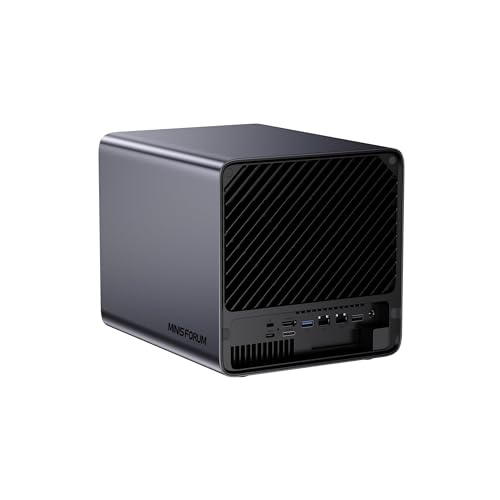
- Ryzen AI 9 HX Pro 370 with 50 TOPS NPU
- DDR5 ECC support for added stability
- 5-bay NAS with 10GbE, USB4, and PCIe/OCuLink
Best For: People who want an AI-capable NAS-style system with ECC memory support and fast expansion.
Best ECC Memory Kit for HP Z4 G5
NEMIX RAM 64GB DDR5-4800 ECC RDIMM

- ECC RDIMM workstation memory for stable operation
- 64GB DDR5-4800 capacity for demanding workloads
- Lifetime replacement warranty from NEMIX RAM
Best For: HP Z4 G5 users needing a reliable ECC memory upgrade for workstation and AI workloads.
Best for High-Speed Networking
MINISFORUM MS-02 Ultra Mini Workstation PC
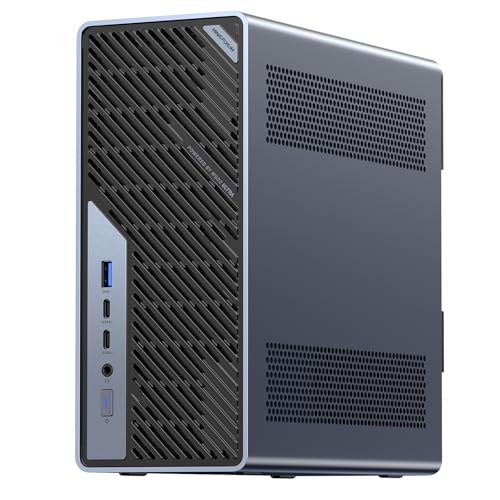
- Core Ultra 9 285HX for strong workstation performance
- 4 DDR5 slots, 4 M.2 slots, and PCIe 5.0 x16 expansion
- Dual 25GbE plus USB4 v2 80Gbps for fast data workflows
Best For: Developers and small labs that need a compact workstation with serious expansion and very fast networking.
Best ECC Capacity Upgrade
NEMIX RAM 128GB DDR5-5600 ECC RDIMM Kit

- 128GB total from 2 x 64GB modules
- Registered ECC for workstation reliability
- DDR5-5600 speed for demanding workloads
Best For: Workstation builders who need a high-capacity ECC memory kit for stable AI and pro workloads.
Best ARM AI Workstation
MINISFORUM MS-R1 ARM Mini Workstation

- 64GB LPDDR5 with ECC support
- Dual 10GbE networking for fast data movement
- 45 TOPS total compute for AI and edge workloads
Best For: Compact AI and networking workloads where ECC-capable memory and low power matter.
Best ECC Upgrade for Dell Precision
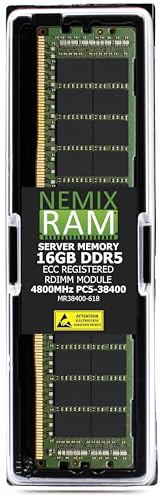
- DDR5-4800 ECC registered RDIMM
- Works with Dell Precision 7875 Tower
- Lifetime replacement warranty
Best For: Dell Precision workstation owners who need a reliable ECC memory upgrade for AI and professional workloads.
Best for High-Capacity Workstation Builds
NEMIX RAM 256GB DDR5 ECC RDIMM Kit

- 256GB capacity for large AI and pro workloads
- DDR5-5600 with ECC registered stability
- Built for compatible workstation/server boards
Best For: Professionals building a high-capacity, stability-focused AI workstation.
Best for Heavy GPU Workloads – ASUS ExpertCenter Pro ET700I W7-B-750
If you need ai workstations with ecc memory for stable, high-throughput professional work, the ASUS ExpertCenter Pro ET700I W7-B-750 is built around Xeon W-3400/W-2400 support, DDR5 ECC, and PCIe 5.0 expansion. It’s a barebones tower, so it makes the most sense for buyers who want to configure their own CPU, RAM, storage, and GPUs around a workstation-grade platform.
Best For: Engineering teams, AI developers, and content creators who need a configurable workstation with strong multi-GPU potential and ECC reliability.
Pros:
- Supports Intel Xeon W-3400/W-2400 processors with DDR5 ECC memory for dependable long-session workloads.
- PCIe 5.0, dual 2.5Gb LAN, and dual M.2 slots give it serious bandwidth and storage flexibility.
- Two-GPU support and a 750W 80 PLUS Gold PSU make it a strong base for rendering and AI builds.
- USB 20Gbps Type-C and ISV certification add practical workstation usability.
Cons:
- It’s a barebones system, so you still need to buy the CPU, RAM, storage, and graphics cards.
- Not the best fit if you want a ready-to-run machine out of the box.
Overall, this is a compelling choice for ai workstations with ecc memory when stability, expandability, and dual-GPU headroom matter more than simplicity. It’s aimed at serious users who want a workstation platform they can tailor to demanding production or AI tasks.
Best for Hybrid AI NAS – MINISFORUM AI NAS N5 Pro-P370
The MINISFORUM AI NAS N5 Pro-P370 is a strong fit for buyers comparing ai workstations with ecc memory, especially if they want a compact system that blends AI acceleration, fast networking, and serious storage expansion. Its Ryzen AI 9 HX Pro 370, 50 TOPS NPU, and ECC-capable DDR5 support make it a practical choice for mixed AI, media, and NAS workloads.
Best For: Users who want an AI-ready desktop NAS that can handle 4K media, Docker apps, and high-speed storage expansion with ECC memory support.
Pros:
- Ryzen AI 9 HX Pro 370 with 50 TOPS NPU for responsive AI workloads
- DDR5 ECC support helps improve data integrity and system stability
- Excellent expandability with 5-bay storage, M.2/U.2 options, and PCIe/OCuLink
- Dual 10GbE plus 5GbE networking suits fast file transfers and shared workloads
Cons:
- RAM and hard drives are not included
- To use all three M.2 slots, the preinstalled system drive must be removed
- Not a pure workstation tower; it is more NAS-focused than most AI PCs
This is a compelling option if you want ai workstations with ecc memory behavior in a storage-first form factor. It stands out most for users who need one machine to cover AI processing, shared storage, and pro-grade connectivity without moving to a full server chassis.
Best ECC Memory Kit for HP Z4 G5 – NEMIX RAM 64GB DDR5-4800 ECC RDIMM
If you’re building or upgrading ai workstations with ecc memory, this NEMIX RAM kit is aimed at reliability first: 64GB total across four 16GB DDR5 modules, ECC RDIMM support, and workstation/server-grade compatibility for the HP Z4 G5 platform. It’s a practical way to add capacity while keeping the stability benefits that matter in long render, simulation, and AI workflows.
Best For: HP Z4 G5 owners who want a validated ECC RDIMM memory upgrade for dependable workstation performance.
Pros:
- ECC RDIMM design suits workstation and server-class stability needs
- 64GB kit offers solid headroom for demanding multitasking and AI workloads
- DDR5-4800 and CL40 provide modern bandwidth for a productivity-focused upgrade
- Backed by NEMIX RAM’s lifetime replacement warranty and support
Cons:
- Only compatible with systems that support DDR5 ECC RDIMM memory
- Not a plug-and-play choice for consumer desktops or gaming rigs
- Targeted to a specific workstation platform, so fitment matters
For ai workstations with ecc memory, this kit makes sense when stability and platform compatibility matter more than flashy spec chasing. If your workflow depends on fewer errors and consistent uptime, it’s a straightforward upgrade path for the HP Z4 G5.
Best for High-Speed Networking – MINISFORUM MS-02 Ultra Mini Workstation PC
If you want a compact desktop built for heavy local AI workflows, the MINISFORUM MS-02 stands out with a Core Ultra 9 285HX, PCIe 5.0 x16 expansion, and unusually strong networking for ai workstations with ecc memory-style reliability priorities. It is a better fit for builders who care about fast I/O, expansion room, and dense connectivity than for plug-and-play simplicity.
Best For: Developers, power users, and small labs that need a compact workstation with serious expansion and multi-gig networking for AI, storage, and virtualization tasks.
Pros:
- Core Ultra 9 285HX brings high-end CPU performance for demanding workstation workloads
- 4 DDR5 slots and 4 M.2 slots give you strong upgrade and storage flexibility
- Dual 25GbE plus 10GbE and 2.5GbE is excellent for fast data movement
- USB4 v2 80Gbps and PCIe 5.0 x16 add modern high-bandwidth expansion options
Cons:
- Not a true turnkey AI box; you may need to add your own storage, memory, and GPU strategy
- Mini-workstation design can limit cooling headroom versus a larger tower
- High-end specs may push it beyond what casual users need
This is a strong choice if you want a compact, highly connected system for local inference, data transfer, and lab-style productivity. For buyers comparing ai workstations with ecc memory, the MS-02 is compelling on expandability and networking, though it is more of a performance chassis than a fully certified ECC-focused platform.
Best ECC Capacity Upgrade – NEMIX RAM 128GB DDR5-5600 ECC RDIMM Kit
If you’re building ai workstations with ecc memory, this NEMIX 128GB kit is aimed at users who need server-grade stability, high capacity, and DDR5 speed in a workstation platform that supports registered ECC modules. It’s a practical choice when reliability matters more than flashy extras.
Best For: Workstation builders who want a large 128GB ECC RDIMM kit for stable, error-resistant AI and pro workloads.
Pros:
- 128GB total capacity from a 2 x 64GB DDR5 kit
- Registered ECC design for workstation/server stability
- DDR5-5600 speed for high-throughput memory workloads
- Lifetime replacement warranty and support from the brand
Cons:
- Only works in systems that support ECC RDIMM memory
- Overkill for basic office or gaming builds
- Compatibility should be confirmed before purchase
For ai workstations with ecc memory, this kit makes the most sense when your priority is dependable large-memory capacity for model work, data processing, and other heavy workstation tasks. If your motherboard supports it, the mix of DDR5 speed and ECC protection is a strong fit for long sessions under load.
Best ARM AI Workstation – MINISFORUM MS-R1 ARM Mini Workstation
The MINISFORUM MS-R1 is a compelling pick for buyers comparing ai workstations with ecc memory, especially if you want an ARM-based compact system with serious I/O and network bandwidth. Its 12-core CIX CP8180 chip, 64GB LPDDR5 with ECC support, and 45 TOPS of total compute make it a practical fit for inference, edge workloads, and always-on productivity tasks.
Best For: Users who want a compact ARM workstation for AI inference, networking tasks, and multitasking with ECC-capable memory support.
Pros:
- 64GB LPDDR5 with ECC support adds stability for sustained workloads
- 2x 10GbE ports are excellent for fast transfers, routing, and lab use
- Triple-display output helps with monitoring and multitasking
- 45 TOPS total compute gives it useful headroom for AI and edge tasks
Cons:
- Sold without SSD, so you must budget for storage separately
- ARM software compatibility may be limiting for some x86-only apps
- Integrated graphics and compact cooling mean it is not a heavy 3D workstation
For shoppers focused on ai workstations with ecc memory, the MS-R1 stands out more for balanced reliability, networking, and edge-AI capability than raw desktop expansion. It is a smart choice if you value efficient performance in a small footprint over traditional tower-workstation flexibility.
Best ECC Upgrade for Dell Precision – 16GB DDR5-4800 ECC RDIMM
If you are building or refreshing ai workstations with ecc memory, this 16GB DDR5-4800 ECC registered RDIMM is a straightforward stability-first upgrade for compatible systems like the Dell Precision 7875 Tower. It is aimed at workloads where reliability matters more than flashy specs, making it a practical choice for inference, training support tasks, and other sustained compute jobs.
Best For: Dell Precision workstation owners who want a dependable ECC memory module for AI and pro workstation workloads.
Pros:
- DDR5-4800 ECC registered RDIMM for workstation/server-grade stability
- Compatible with Dell Precision 7875 Tower, a strong fit for AI workstation builds
- Backed by a lifetime replacement warranty and support from memory specialists
- Designed for quick installation in supported systems
Cons:
- Only 16GB, so larger AI projects will likely need multiple modules
- Registered ECC memory requires a compatible workstation platform
- Single-module configuration may be too limited for higher-end builds
For buyers comparing ai workstations with ecc memory, this NEMIX module stands out as a sensible compatibility-focused option rather than a capacity play. It is best when you want proven ECC reliability and platform-specific support over maximum RAM per stick.
Best for High-Capacity Workstation Builds – NEMIX RAM 256GB DDR5 ECC RDIMM Kit
If you’re building ai workstations with ecc memory, this 256GB NEMIX RAM kit is aimed squarely at heavy multitasking, large datasets, and long training sessions where stability matters as much as speed. It combines DDR5-5600 performance with ECC registered reliability, making it a strong fit for compatible workstation and server-class platforms.
Best For: Users who need a large, stable memory pool for workstation AI builds, simulation, content creation, or other memory-hungry professional workloads.
Pros:
- 256GB total capacity helps keep large models and datasets in memory.
- DDR5-5600 speed offers modern bandwidth for demanding workstation tasks.
- ECC RDIMM design supports stability in sustained pro-level workloads.
- Lifetime replacement warranty adds long-term ownership confidence.
Cons:
- Only works with compatible ECC RDIMM workstation/server motherboards.
- Higher-capacity kits like this are overkill for lighter desktop builds.
- May require manual checking of board support and memory population rules.
For ai workstations with ecc memory, this kit stands out more for capacity and reliability than for casual use. If your workflow benefits from lots of RAM and you’re building on a supported TRX50 workstation platform, it’s a practical high-end upgrade.
How We Picked the Best AI Workstations with Ecc Memory
We prioritized workstation platforms and memory kits that support ECC in ways that make sense for professional AI use: stable multitasking, high-capacity upgrades, modern I/O, and compatibility with performance-focused CPUs and boards. We also looked for options that suit both barebones builders and buyers who need drop-in memory for existing systems.
Quick Comparison
Among AI Workstations with Ecc Memory, the main differences usually come down to platform class, maximum memory capacity, and expansion headroom. Full-size towers tend to offer the best CPU and PCIe flexibility, while compact mini workstations trade some expandability for density and lower desk footprint. Memory kits should be matched carefully to the system’s supported speed, rank layout, and RDIMM/registered requirements.
Key Buying Factors for AI Workstations with Ecc Memory
Platform Compatibility
Start with the processor and motherboard family. Xeon W, Threadripper Pro-style systems, and select workstation mini PCs are the safest choices when you want validated ECC support and reliable high-capacity scaling.
Memory Type and Speed
Confirm whether the system requires ECC UDIMM, ECC RDIMM, or onboard ECC LPDDR. Mixing the wrong type will prevent booting or limit performance. Higher speeds are useful, but capacity and compatibility matter more for AI workloads.
Expansion and Storage
AI workloads benefit from multiple NVMe drives, fast networking, and PCIe lanes for GPUs or accelerators. If you plan to grow, choose a platform with PCIe 5.0, multiple M.2 slots, and enough power and cooling overhead.
Form Factor and Thermals
Compact systems can be excellent for edge inference or lab environments, but larger workstations usually handle sustained loads better. For long training sessions, thermals and acoustics can matter as much as raw CPU speed.
Who Should Buy Which AI Workstations with Ecc Memory?
Choose a tower-class workstation if you want the most upgrade room, the best expansion potential, and the easiest path to large ECC memory capacities. Choose a compact mini workstation if you need strong compute in a small space for local AI development, edge deployment, or a quiet office setup.
If your main priority is memory reliability at scale, pick a matched ECC RDIMM kit sized for your workload and platform. If you are building around a barebones system, verify motherboard, CPU, and cooling support before you buy so the rest of the configuration can grow with your projects.
