
Choosing an AI workstation desktop for model training is mostly about matching real workloads to the right mix of GPU power, system memory, and storage speed. The best pick depends on whether you are fine-tuning models locally, running inference, or building a more expandable desktop for long-term development.
In this roundup, we focus on desktops that make sense for creators, developers, and teams who want dependable performance without overbuying hardware they will not use.
Best 10 AI Workstation Desktop for Model Training Picks for 2026
Best for Local AI Power
NVIDIA DGX Spark Personal AI Desktop Supercomputer

- Up to 1 petaFLOP of AI performance
- 128GB unified memory for large models
- Compact desktop design with NVIDIA AI stack
Best For: Developers and researchers who want enterprise-style AI capability on a desktop.
Best for Large VRAM Training
AI Workstation Gaming PC with R9700 32GB

- 32GB Radeon AI Pro VRAM for larger models
- Ryzen 5 9600X delivers strong 6-core CPU speed
- Liquid cooling supports longer AI sessions
Best For: Developers who want high VRAM capacity for local AI training and experimentation.
Best for Local Model Tuning
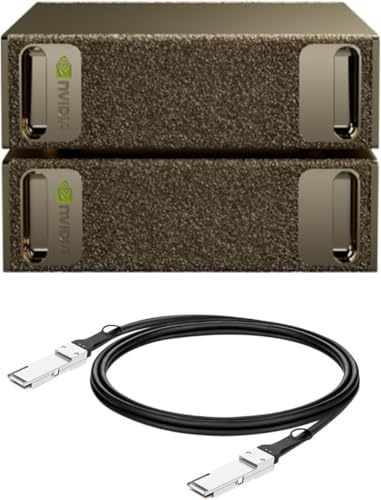
- Up to 1 petaFLOP of AI performance
- 128GB unified memory per unit
- Built for local fine-tuning and inference
Best For: Researchers and AI teams needing compact local model-training power.
Best for Compact AI Labs
Corsair AI Workstation 300 Desktop PC

- Tiny 4.4L footprint for tight desks and studios
- 64GB unified LPDDR5X memory supports local AI workflows
- Ryzen AI platform adds NPU acceleration for AI tasks
Best For: Developers and creators who need a compact desktop for local AI prototyping and memory-heavy workflows.
Best for Compact AI Workflows
Acer Veriton AI Mini Workstation GN100-UD11

- Compact footprint for small desks and home labs
- NVIDIA GB10 Grace Blackwell platform for AI-centric work
- Well suited to local prototyping and model experimentation
Best For: Developers and power users who want a compact AI desktop for local training and experimentation.
Best for Secure Business AI Workflows
Dell Pro Tower i7-14700T, 64GB RAM, 1TB SSD

- 20-core Intel i7 and 64GB DDR5 for demanding multitasking
- vPro, Windows 11 Pro, and remote management for business use
- Two 4K display support suits multi-monitor productivity
Best For: Corporate users and SMBs needing a secure, expandable tower for AI-adjacent workflows and office productivity.
Best Memory-Capped Workstation
Lenovo ThinkStation P2 Tower AI PC

- 64GB DDR5 for heavy multitasking and larger datasets
- 2TB SSD for fast boots and quick file access
- Business-ready connectivity with Wi‑Fi 7, HDMI, and DP
Best For: AI developers and business users who need a reliable desktop for light training, data work, and multitasking.
Best for Business AI Workflows
Dell Pro Tower i7-14700T, 32GB RAM, 1TB SSD
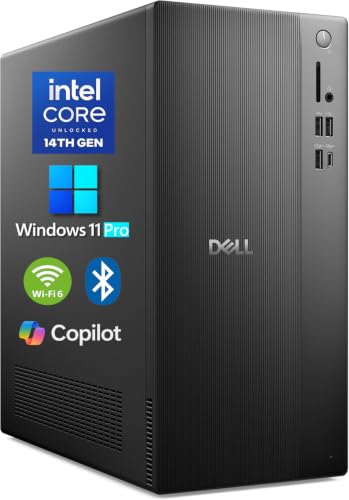
- 20-core i7-14700T handles demanding multitasking and data work
- 32GB DDR5 + 1TB NVMe SSD keep workflows snappy
- vPro, Windows 11 Pro, and dual 4K support suit business setups
Best For: Corporate teams and SMB users needing a secure desktop for analytics, development, and lighter AI workloads.
Best for Business IT
Dell Pro Tower i7-14700T Desktop
- 20-core Intel vPro CPU for heavy multitasking
- Windows 11 Pro with enterprise security and remote management
- Dual 4K display support for office and analyst workflows
Best For: IT-managed teams and SMB users who need a secure, reliable tower for productivity and light AI work.
Best for Enterprise Workflows
Dell Pro Tower i7 Business Desktop
- 20-core i7-14700T with vPro for secure business performance
- 1TB NVMe SSD and DDR5 memory support fast multitasking
- Dual 4K display support helps productivity setups
Best For: Corporate teams and SMB users who need a secure, upgradeable desktop for productivity and light AI workflows.
Best for Local AI Power – NVIDIA DGX Spark Personal AI Desktop Supercomputer
NVIDIA DGX Spark™ - Personal AI Desktop Supercomputer – Desktop GB10 Grace Blackwell Chip
Check Price On AmazonIf you want an ai workstation desktop for model training without moving to a full rack setup, the NVIDIA DGX Spark brings serious AI horsepower to a compact desktop footprint. It’s built around Grace Blackwell architecture with up to 1 petaFLOP of AI performance, making it a strong fit for local fine-tuning, inference, and rapid experimentation.
Best For: Developers, researchers, and power users who want a compact desktop system for local model work, prototyping, and iterative AI development.
Pros:
- Up to 1 petaFLOP of AI performance for demanding local workloads
- 128GB of unified memory supports large-model experimentation
- Full NVIDIA AI software stack integration for streamlined development
- Compact, energy-efficient design suited to a desk setup
Cons:
- Likely overkill for casual or beginner AI users
- Premium hardware means a high purchase price
- Desktop form factor still won’t replace a full enterprise GPU server for every workload
For buyers comparing an ai workstation desktop for model training, DGX Spark stands out when you need enterprise-class capabilities in a personal system. It’s especially compelling if you want to prototype locally, test faster, and keep more work on-device before scaling to cloud or data center resources.
Best for Large VRAM Training – AI Workstation Gaming PC with R9700 32GB
If you need an ai workstation desktop for model training, this build stands out for its 32GB AMD Radeon AI Pro R9700 and Ryzen 5 9600X pairing. It’s aimed at local AI development, larger model work, and sustained workloads where GPU memory and thermal stability matter more than flashy extras.
Best For: Developers and creators who want high VRAM capacity for local AI projects, LLM experimentation, and demanding multitasking.
Pros:
- 32GB VRAM on the Radeon AI Pro R9700 helps with larger models and complex neural nets
- Ryzen 5 9600X with up to 5.4GHz turbo offers strong CPU performance for parallel tasks
- 32GB DDR5 RAM and 1TB Gen4 SSD provide a responsive base for development workflows
- Liquid cooling and a digital display cooler are built for sustained performance
Cons:
- 32GB system RAM may feel light for heavier multitasking or data-heavy pipelines
- Ryzen 5 is capable, but not the strongest CPU tier for large-scale training workloads
- Primarily tuned for AI development, so it may be more machine than many general users need
Overall, this is a compelling ai workstation desktop for model training if your priority is VRAM headroom and stable local performance. It’s a practical choice for teams and solo builders who want to run bigger experiments without jumping straight to a far more expensive pro tower.
Best for Local Model Tuning – NVIDIA DGX Spark 2 Pack
If you want an ai workstation desktop for model training that brings serious AI compute onto your desk, the NVIDIA DGX Spark 2 Pack is built for rapid local experimentation, inference, and fine-tuning. Its compact design and integrated NVIDIA AI software stack make it easier to prototype locally before scaling workflows to the cloud or data center.
Best For: Researchers, developers, and AI teams that need a desktop-friendly system for local model tuning, testing, and iterative development.
Pros:
- Up to 1 petaFLOP of AI performance for demanding local workloads
- 128GB unified memory per unit helps handle large models and datasets
- Designed for seamless NVIDIA AI software stack integration
- Compact, energy-efficient form factor for desk-side deployment
Cons:
- Likely overkill for users who only need basic inference or light prototyping
- Premium pricing makes it a fit for serious AI workloads, not casual use
- 2-pack configuration may exceed what many solo buyers actually need
For teams that need an ai workstation desktop for model training with enterprise-grade capability in a compact setup, this stands out for speed, memory capacity, and local development flexibility. It is especially compelling when you want to iterate quickly without depending entirely on shared cloud resources.
Best for Compact AI Labs – Corsair AI Workstation 300 Desktop PC
If you want an ai workstation desktop for model training in a very small footprint, the Corsair AI Workstation 300 is built around unified memory, strong integrated graphics, and an AI-focused AMD Ryzen AI Max platform. It’s a practical choice for local LLM experiments, lighter model training, and creative AI workflows where space, efficiency, and enough shared memory matter more than a big tower build.
Best For: Developers, researchers, and creators who need a compact desktop for local AI work, prototyping, and memory-hungry workloads.
Pros:
- Compact 4.4L design fits easily on crowded desks or in small studios
- Unified 64GB LPDDR5X memory is well suited to local AI workflows
- AMD Ryzen AI platform adds built-in NPU acceleration for AI tasks
- Quiet, space-saving alternative to a full-size workstation tower
Cons:
- Integrated graphics won’t match a discrete GPU for heavier training jobs
- 1TB SSD may feel small once datasets and model files accumulate
- Memory is not the same as dedicated VRAM, so limits still apply
As an ai workstation desktop for model training, this Corsair stands out more for compactness and shared-memory flexibility than raw expandability. If your workflow values portability, onboard AI acceleration, and a tidy footprint, it’s a compelling workstation-style option; if you need large-scale training, you’ll still want a more expandable system with a discrete GPU.
Best for Compact AI Workflows – Acer Veriton AI Mini Workstation GN100-UD11
If you want an ai workstation desktop for model training without dedicating a full tower or rack, this Acer Veriton AI Mini Workstation is built around NVIDIA’s GB10 Grace Blackwell Superchip for a dense, modern local-AI setup. It’s a smart fit for creators and developers who need a compact desktop that can handle training-adjacent workloads, prototyping, and on-device experimentation in a smaller footprint.
Best For: Developers, ML practitioners, and power users who want a compact AI desktop for local training and experimentation.
Pros:
- Very compact chassis for tight desks and home labs
- GB10 Grace Blackwell platform targets AI-focused workloads
- Good fit for local prototyping, testing, and iterative model work
Cons:
- Mini form factor may limit upgrade flexibility versus a full tower
- Best suited to focused AI tasks rather than a do-everything workstation
For buyers comparing an ai workstation desktop for model training, this Acer stands out most for packing specialized AI hardware into a space-saving design. It’s a practical choice when you care more about local experimentation and desk footprint than traditional expandability.
Best for Secure Business AI Workflows – Dell Pro Tower i7-14700T, 64GB RAM, 1TB SSD
If you want an ai workstation desktop for model training workflows that also fits a corporate IT environment, this Dell Pro Tower is aimed at exactly that middle ground. It pairs a 20-core Intel Core i7-14700T with 64GB of DDR5 memory and a 1TB NVMe SSD, giving you strong multitasking headroom for data prep, light model development, analytics, and everyday productivity.
Best For: Corporate teams, SMBs, and professional users who need a secure, manageable tower for AI-adjacent workloads, analytics, and multi-monitor office setups.
Pros:
- 20-core i7-14700T and 64GB DDR5 handle heavy multitasking well
- Windows 11 Pro and Intel vPro support business security and remote management
- 1TB PCIe NVMe SSD keeps apps and datasets loading quickly
- Supports up to two 4K displays for productive multi-screen workflows
Cons:
- No built-in Wi-Fi, so you may need the included USB adapter or Ethernet
- Integrated graphics limit serious GPU-accelerated training
- Expandable, but not a turnkey high-end AI GPU workstation
As an ai workstation desktop for model training, this tower makes the most sense for CPU-heavy preprocessing, experimentation, and business AI work rather than large-scale GPU training. It is a practical pick if you value security, expandability, and reliable office deployment more than raw graphics horsepower.
Best Memory-Capped Workstation – Lenovo ThinkStation P2 Tower AI PC
If you want an ai workstation desktop for model training with strong multitasking headroom, the Lenovo ThinkStation P2 Tower is aimed at practical productivity rather than brute-force GPU-heavy workloads. Its Core Ultra 5 CPU, 64GB of DDR5 memory, and 2TB SSD make it a capable tower for data prep, light training runs, and keeping notebooks, tools, and browser tabs open at once.
Best For: Buyers who need a dependable business workstation for AI development, local experimentation, and heavy everyday multitasking.
Pros:
- 64GB DDR5 RAM helps handle large projects, datasets, and many open apps
- 2TB PCIe SSD offers fast boot times and plenty of local storage
- Wi-Fi 7, Bluetooth, HDMI, and dual DisplayPort outputs improve connectivity
- Windows 11 Pro and the ThinkStation platform fit office and lab workflows
Cons:
- Core Ultra 5 is more of a productivity chip than a top-end AI training CPU
- No dedicated high-performance GPU is listed, which limits serious model training
- The bundled flash drive is useful, but it doesn’t add core compute power
Overall, this is a solid choice if you need an ai workstation desktop for model training support work, dataset handling, and general development—not a machine for pushing the largest local models or training at scale.
Best for Business AI Workflows – Dell Pro Tower i7-14700T, 32GB RAM, 1TB SSD
If you need an ai workstation desktop for model training that also fits a corporate IT environment, this Dell Pro Tower is a practical middle ground. It offers strong 20-core CPU performance, fast DDR5 memory, and a 1TB NVMe SSD for data prep, multitasking, and local development work, though it relies on integrated graphics rather than a discrete GPU.
Best For: Corporate teams, SMBs, and technical users who want a secure, manageable desktop for analytics, software development, and lighter AI workloads.
Pros:
- 20-core Intel Core i7-14700T delivers strong multicore performance for heavy multitasking and compute-heavy office work.
- 32GB DDR5 RAM and a 1TB PCIe NVMe SSD support fast loading, smooth switching, and responsive data workflows.
- Intel vPro and Windows 11 Pro add enterprise security, remote management, and domain-friendly business features.
- Dual 4K display support and broad I/O make it easy to build a productive multi-monitor workstation.
Cons:
- No built-in Wi-Fi, so wireless networking requires the included USB adapter or Ethernet.
- Integrated Intel UHD Graphics 770 limits serious GPU-based model training and advanced rendering.
- It is better suited to CPU-centric AI tasks than large-scale deep learning workloads.
Overall, this is a dependable business tower for buyers who want an ai workstation desktop for model training adjacent tasks, not a full GPU training rig. It shines when security, manageability, and day-to-day performance matter more than raw graphics power.
Best for Business IT – Dell Pro Tower i7-14700T Desktop
If you need an ai workstation desktop for model training in a business setting, this Dell Pro Tower is better suited to light-to-moderate workflows, data prep, and multi-app productivity than heavy GPU-based training. It pairs enterprise security, remote management, and strong CPU performance in a durable tower that fits corporate and SMB environments.
Best For: IT-managed offices, SMB teams, and professionals who want a secure, scalable tower for analytics, content work, and everyday AI-assisted workloads.
Pros:
- Intel Core i7-14700T vPro delivers 20-core processing for demanding business multitasking
- Windows 11 Pro and vPro tools add the security and manageability IT teams need
- Supports dual 4K displays, making it practical for analyst and creator setups
- Fast DDR5 memory and NVMe SSD help keep apps and datasets responsive
Cons:
- No built-in Wi-Fi, so wireless networking needs an adapter or Ethernet
- Integrated graphics limit serious GPU-accelerated model training
- Base memory and storage may be modest for larger local AI projects
For buyers who prioritize security, uptime, and IT control over raw AI acceleration, this is a solid business tower. It works best as an ai workstation desktop for model training when your workflow centers on preprocessing, experimentation, and office-friendly AI tasks rather than large-scale training runs.
Best for Enterprise Workflows – Dell Pro Tower i7 Business Desktop
If you want an ai workstation desktop for model training that also fits corporate IT standards, this Dell Pro Tower is built for dependable multitasking rather than flashy gamer-style specs. The Intel Core i7-14700T, 16GB DDR5 memory, and 1TB NVMe SSD make it a strong fit for analytics, preprocessing, and everyday development work, while Windows 11 Pro and vPro add the manageability businesses often need.
Best For: Corporate teams, SMBs, and professionals who need a secure, upgradeable desktop for productivity, analytics, and light AI workflows.
Pros:
- 20-core Intel i7-14700T with vPro for business-focused performance and remote management
- 1TB SSD and DDR5 memory support fast loading, multitasking, and future upgrades
- Windows 11 Pro plus enterprise security features suit managed office deployments
- Supports dual 4K displays for multi-monitor productivity setups
Cons:
- No discrete GPU, so it is not ideal for heavy local model training
- 16GB RAM is adequate to start, but AI and data workloads may need an upgrade
- No built-in Wi-Fi, so wireless networking requires the included adapter
Overall, this is a practical ai workstation desktop for model training if your work leans toward business analytics, preprocessing, and lighter local development rather than GPU-intensive training. It stands out more for reliability, security, and expandability than raw accelerator power.
How We Picked the Best AI Workstation Desktop for Model Training
We prioritized systems that are practical for an AI Workstation Desktop for Model Training, with emphasis on memory capacity, GPU capability, storage responsiveness, and overall platform balance. We also looked for models that fit different use cases, from compact AI supercomputing boxes to traditional towers with broader upgrade paths.
Quick Comparison
The most specialized options in this list are the NVIDIA DGX Spark and Acer Veriton AI Mini Workstation, which are aimed at local AI development and compact high-performance workflows. The Corsair AI Workstation 300 and Radeon Pro-based desktop bring a different balance, favoring strong integrated or workstation-class graphics and modern CPU platforms. The Dell and Lenovo towers are better suited to general productivity, multi-display setups, and buyers who want a more conventional desktop form factor.
Key Buying Factors for AI Workstation Desktop for Model Training
GPU and Memory Capacity
For model training, GPU memory matters as much as raw compute. If you plan to fine-tune larger models or work with higher-resolution data, prioritize systems with more VRAM or unified memory capacity. Smaller workloads can still run well on more modest configurations, especially when paired with fast storage and enough system RAM.
System RAM and Storage
AI workflows benefit from 32GB of RAM at minimum, with 64GB or more being a better target for smoother dataset handling and multitasking. A fast SSD helps reduce load times, speeds up project swaps, and keeps large datasets more manageable during development.
Thermals and Expandability
Desktop AI work is often sustained work, so cooling matters. Compact systems are convenient, but tower desktops usually offer better thermal headroom and future upgrade flexibility. If you expect your needs to grow, choose a chassis with room for storage, memory, and potential GPU changes.
Software and Compatibility
Make sure the platform supports the tools you use most, whether that is CUDA-based development, ROCm-compatible workflows, or general AI experimentation on Windows. The best AI Workstation Desktop for Model Training is the one that fits your software stack as well as your hardware goals.
Who Should Buy Which AI Workstation Desktop for Model Training?
Buy a compact AI-focused desktop if you want a dedicated machine for local experimentation, prototyping, or model inference with minimal setup. Choose a workstation tower if you need a more flexible everyday system that can handle AI tasks alongside business, content, or engineering work. If you are building a shared lab or team environment, pay closest attention to memory, storage, and long-term support, not just headline processor speed.
In short, the right choice comes down to workload size, budget, and whether portability, quiet operation, or expansion matters most. Match the machine to your actual training habits, and you will get far more value than simply chasing the biggest spec sheet.
