
If you’re looking to enhance your workspace, adjustable monitor stands for your Mac can make a significant difference. These stands not only improve your ergonomic setup but also add a touch of elegance to your desk. With various options available, it’s essential to find one that meets your needs. Let’s explore the top choices that can transform how you work, making your environment more comfortable and stylish.
ARES WING Dual Monitor Arm for Ultrawide Monitors

If you’re using ultrawide monitors like the Samsung Odyssey G9 or LG, the ARES WING Dual Monitor Arm is the perfect choice for your Mac setup. It supports monitors ranging from 17 to 49 inches, holding up to 44 lbs securely. You’ll appreciate its adjustability, reaching heights of 27.9 inches and extending 22.4 inches with a tilt of -50° to +20°. Plus, it features USB-C and USB-A ports for charging your devices simultaneously. Installation is a breeze with its C-clamp or grommet mount options, and you’ll get one-on-one support if you need help. Elevate your workspace effortlessly!
Best For: Gamers and professionals using ultrawide monitors who need a sturdy and adjustable solution for their workspace.
Pros:
- Supports a wide range of monitor sizes from 17 to 49 inches, including ultrawide models.
- Highly adjustable with maximum height, arm extension, tilt, and rotation for optimal viewing comfort.
- Includes USB charging ports for convenient power supply to multiple devices simultaneously.
Cons:
- Requires VESA mount adapter for monitors that do not have VESA holes, which may be an additional cost.
- Heavy-duty design may require a sturdy desk to support the weight, limiting some desk choices.
- Initial installation may take time, despite having visual instructions, it could be complex for some users.
Single Monitor Stand VESA Mount for 13-32 Inch Screens
The Single Monitor Stand VESA Mount for 13-32 Inch Screens is ideal for anyone seeking a versatile and ergonomic solution to enhance their workspace. This free-standing riser supports most monitors up to 32 inches and offers a weight limit of 44 lbs. With adjustable height and a wide range of tilt, swivel, and rotation options, it aids in reducing neck and shoulder strain while promoting good posture. Its tempered glass base guarantees stability without damaging your desk. Assembly is quick, taking just about five minutes, and integrated cable management keeps your workspace tidy. Enjoy reliable support with a solid 4.4-star rating from users.
Best For: Individuals seeking an ergonomic and adjustable monitor stand to enhance their workspace comfort and organization.
Pros:
- Versatile Adjustability: Offers a wide range of tilt, swivel, and rotation options to suit different viewing angles.
- Easy Assembly: Quick and straightforward setup, taking approximately five minutes with minimal tools required.
- Stable Design: Features a tempered glass base and sturdy steel pole that ensure stability while protecting desk surfaces.
Cons:
- Weight Limit: Supports monitors only up to 44 lbs, which may limit compatibility with heavier screens.
- Limited Height Range: Height adjustments are confined to five levels, which may not accommodate all user preferences.
- Free-Standing Only: The design may take up desk space, which could be an issue in smaller work areas.
BoYata Adjustable Monitor Stand (Compatible with TV, PC, Laptop, iMac)

BoYata’s Adjustable Monitor Stand is ideal for those seeking an ergonomic solution for their workspace, especially Mac users. This versatile stand is compatible with TVs, PCs, laptops, and iMacs, making it a great addition to any setup. You’ll appreciate its adjustable height feature, allowing you to customize it for maximum comfort while reducing strain on your neck and shoulders. Constructed from durable metal, it supports up to 33.06 lbs and includes skidproof pads for stability. Plus, with ample room underneath for storage, you can keep your workspace tidy and efficient. Assembly is a breeze with the included screwdriver.
Best For: Those seeking an ergonomic monitor stand that enhances comfort and workspace organization, particularly suitable for Mac users and multi-device setups.
Pros:
- Adjustable height allows for personalized comfort, reducing strain on the neck and shoulders.
- Sturdy construction supports up to 33.06 lbs, ensuring durability and stability.
- Ample storage space underneath helps to maximize workspace efficiency and organization.
Cons:
- Limited color options, as it is only available in black.
- Adjustment mechanism may require some effort to twist and secure to the desired height.
- Weight capacity may not be sufficient for larger or heavier monitors beyond 33.06 lbs.
WALI Adjustable Computer Monitor Stand (STT003)

For those seeking both functionality and style, the WALI Adjustable Computer Monitor Stand (STT003) stands out as an ideal choice for Mac users. This sleek black riser features a large metal shelf, measuring 14.6 x 9.3 inches, accommodating most flat screens, laptops, and printers. With three height settings—3.9, 4.7, or 5.5 inches—you can easily find a comfortable viewing position, reducing neck and back strain. The vented design prevents overheating, while rubber pads protect your desk from scratches. Plus, the additional storage space underneath helps keep your workspace organized. Enjoy US-based customer support available seven days a week!
Best For: Individuals seeking an ergonomic and stylish solution for organizing their computer workspace, particularly Mac users.
Pros:
- Height adjustable with three settings to reduce neck and back strain.
- Vented design prevents overheating, ensuring devices remain cool during use.
- Sleek modern design complements any office decor while providing additional storage space.
Cons:
- Limited weight capacity of 44 lbs may not support heavier monitors or equipment.
- Only one color option (black) might not suit all personal preferences.
- Assembly required, which could be a drawback for those looking for a fully assembled product.
Single Monitor Stand VESA Mount for 13-32 Inch Screens
Designed for those seeking flexibility and comfort, the Single Monitor Stand VESA Mount for 13-32 Inch Screens offers an impressive range of ergonomic adjustments. You can easily tilt, swivel, and rotate your monitor to reduce neck and shoulder strain, promoting better posture. With five height settings, you can customize it from 8.2 to 16.1 inches. The tempered glass base guarantees stability without damaging your desk, and cable management keeps everything neat. Weighing just 4.11 pounds, it’s portable for meetings. Supported by a solid warranty and responsive customer service, this stand enhances your workspace effortlessly.
Best For: Those seeking an ergonomic and flexible monitor setup for improved posture and comfort in both home and office environments.
Pros:
- Adjustable height and tilt options promote better ergonomic positioning.
- Easy to assemble and portable for convenience in various settings.
- Sturdy tempered glass base provides stability while protecting the desk surface.
Cons:
- Limited to monitors up to 32 inches and 44 lbs, which might not suit larger displays.
- Some users may find the assembly instructions lacking in detail.
- The free-standing design may require more desk space compared to wall-mounted options.
Hemudu Clear Computer Monitor Stand Riser (HD01T-002)

Elevating your workspace, the Hemudu Clear Computer Monitor Stand Riser (HD01T-002) is the perfect choice for those seeking ergonomic comfort while using their Mac. With adjustable heights ranging from 3.4 to 4.9 inches and a tilt function of 0-15 degrees, you can customize your viewing experience. Made from tempered safety glass and stainless steel legs, it supports up to 88 lbs, ensuring durability. Its sleek design adds a modern touch, while the extra storage space underneath is perfect for your keyboard or trinkets. Rated 4.7 stars by over 3,300 users, it’s a stylish and functional addition to any desk.
Best For: Individuals looking to enhance their ergonomic workspace with a stylish and adjustable monitor stand.
Pros:
- Sleek design adds a modern aesthetic to any desk setup.
- Adjustable height and tilt provide customizable viewing angles for comfort.
- Sturdy construction supports up to 88 lbs, accommodating various devices.
Cons:
- Some users reported minor issues with leg adjustment during setup.
- A few customers experienced glass chips upon arrival, affecting initial quality perception.
- Initial setup adjustments may be necessary for optimal use.
HUANUO Single Monitor Arm for Ultrawide Screens
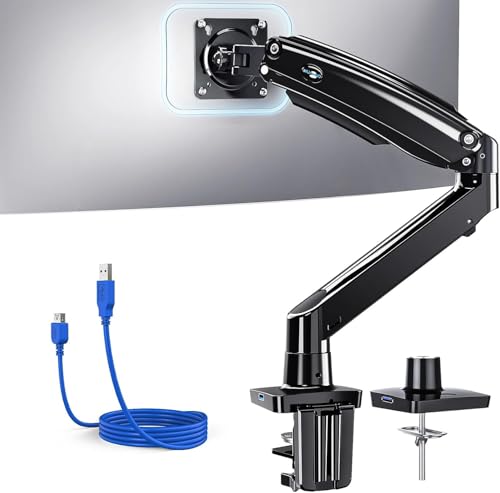
The HUANUO Single Monitor Arm is perfect for professionals and students who want to maximize their workspace while enjoying an ergonomic setup. It supports ultrawide monitors from 13 to 40 inches and features impressive adjustability with tilt, swivel, and rotation capabilities. You can easily customize the height up to 21.1 inches and extend it 25.6 inches to suit your needs. Made from durable aerospace-grade aluminum, it guarantees stability even during intense typing sessions. Plus, with built-in USB ports and cable management, you’ll reclaim desk space for a cleaner look. Installation is a breeze, making this stand a smart choice for any workspace.
Best For: Professionals and students seeking an ergonomic workspace with adjustable monitor support.
Pros:
- Impressive adjustability: Offers tilt, swivel, and rotation features for optimal viewing angles.
- Durable construction: Made from aerospace-grade aluminum, ensuring stability during use.
- USB integration and cable management: Built-in USB port and cable channels help to keep the workspace organized and clutter-free.
Cons:
- Weight limit: Only supports monitors weighing up to 26.4 lbs, which may not accommodate heavier models.
- Installation requirements: Requires a solid wood desk for optimal stability, which may limit installation options.
- Limited VESA compatibility: Only compatible with 75x75mm or 100x100mm VESA mount patterns, restricting monitor choices.
Klearlook Adjustable Monitor Stand Riser with Storage Drawer (Black)

For those seeking an ergonomic solution to enhance their workspace, the Klearlook Adjustable Monitor Stand Riser with Storage Drawer is a standout choice. This sleek black riser elevates your monitor to reduce back and neck strain, making those long hours more comfortable. It features adjustable widths of 16.5, 18.5, and 20.5 inches, accommodating various setups. With a sturdy construction that supports up to 55 pounds, it’s versatile enough for monitors, printers, or laptops. Plus, the hidden storage drawer keeps your essentials organized. Best of all, it requires no assembly, so you can start enjoying your improved workspace immediately!
Best For: Individuals seeking an ergonomic workspace solution that reduces strain during long hours of computer use.
Pros:
- Ergonomic design reduces back and neck strain by elevating your monitor to an optimal height.
- Adjustable widths allow compatibility with various workstation setups.
- No assembly required, making it easy to use right out of the box.
Cons:
- Limited color options, as it only comes in black.
- May not fit larger workstations due to size constraints in width adjustments.
- Some users may find the storage drawer small for larger items.
Single LCD Computer Monitor Free-Standing Desk Stand Mount Riser (HT05B-001)

If you’re seeking a versatile solution for your workspace, the Single LCD Computer Monitor Free-Standing Desk Stand Mount Riser (HT05B-001) is an excellent choice. This stand accommodates screens from 13 to 32 inches, supporting up to 77 lbs. Its ergonomic design promotes better posture, helping reduce neck and back strain during long hours. Enjoy the flexibility of -15° to +10° tilt, a -50° to +50° swivel, and 360° rotation with four height adjustment levels. Installation is a breeze, taking only about 15 minutes. Made from durable stainless steel and tempered glass, it combines style and functionality effortlessly.
Best For: Those seeking an ergonomic and stylish monitor stand that fits screens from 13 to 32 inches and promotes better posture during long work hours.
Pros:
- Ergonomic Design: Helps reduce neck and back strain with adjustable height and viewing angles.
- Easy Installation: Can be set up in about 15 minutes with all necessary tools included.
- Durable Materials: Constructed from stainless steel and tempered glass for a sleek and sturdy finish.
Cons:
- Weight Limit: Maximum weight capacity of 77 lbs may not accommodate heavier monitors.
- Fixed Base Size: The stand’s dimensions may not fit all desk setups or spaces perfectly.
- Limited Compatibility: Requires VESA mounting holes, which some monitors may not have.
Perlegear Monitor Stand for 13-34 inch Screens
Looking for an adjustable monitor stand that enhances your Mac experience? The Perlegear Monitor Stand (Model PGTVS29) fits screens from 13″ to 34″ and supports up to 44 lbs, making it versatile for your workspace. With 360° rotation, a -15° to +10° tilt, and 5 ergonomic height settings between 9.27″ and 15.26″, you can customize your setup for comfort. Its non-tilt base guarantees stability, while cable clips keep your area tidy. Easy to assemble in 15 minutes, this stand has a 4.5-star rating from users, proving it’s a reliable choice for anyone looking to elevate their workspace.
Best For: Those seeking an ergonomic and adjustable monitor stand to enhance comfort and organization in their workspace.
Pros:
- Versatile Compatibility: Supports a wide range of screen sizes (13″-34″) and weights (up to 44 lbs).
- Customizable Viewing Angles: Offers 360° rotation, tilt from -15° to +10°, and swivel +/-50° for optimal positioning.
- Easy Assembly: Quick setup in just 15 minutes with included instructions and hardware.
Cons:
- Limited VESA Patterns: Only compatible with VESA patterns of 50×50 and 100x100mm, which may not fit all monitors.
- Weight Limitations: May not support heavier monitors beyond the 44 lbs limit.
- Fixed Height Options: While adjustable, the height settings may not cater to all users’ preferences.
Factors to Consider When Choosing Adjustable Monitor Stands for Mac
When you’re choosing an adjustable monitor stand for your Mac, there are a few key factors to keep in mind. You’ll want to guarantee compatibility with your specific device, consider ergonomic features for comfort, and check the weight capacity for your monitor. Additionally, think about adjustability, flexibility, and the materials used for durability.
Compatibility With Mac Devices
Choosing an adjustable monitor stand that’s compatible with your Mac devices is vital for guaranteeing an ideal workspace. First, check for VESA mounting standards, typically 75x75mm or 100x100mm, to easily attach your monitor. Next, consider the weight capacity; most Mac monitors weigh between 20 and 30 pounds, so verify the stand can support your specific device. Height adjustment features are important for aligning the monitor with eye level, helping reduce neck and back strain during use. Additionally, look for tilt and swivel capabilities to enhance viewing angles and minimize glare. Finally, confirm the material and build quality are durable enough to provide stability, especially since Mac devices often require reliable support in dynamic environments.
Ergonomic Design Features
To create a comfortable and efficient workspace with your adjustable monitor stand for Mac, it is essential to prioritize ergonomic design features. Look for height adjustment capabilities to elevate your monitor to eye level, reducing neck and back strain during long hours of use. Adjustable tilt angles, typically between -15° and +10°, can help accommodate your viewing preferences and minimize glare. A swivel feature, offering a rotation of ±50° or more, enhances flexibility for sharing content or adjusting to different seating positions. Additionally, a well-designed cable management system keeps your workspace organized, reducing clutter. Finally, verify the stand has a solid base and non-slip pads for stability, promoting safe and consistent usage while protecting your desk surface.
Weight Capacity Considerations
A well-designed ergonomic setup goes beyond just comfort; it also involves ensuring your monitor stand can support your equipment effectively. When selecting an adjustable monitor stand, make sure it has a weight capacity that exceeds the combined weight of your monitor and any additional devices. Most stands support weights between 33 lbs and 88 lbs, so check your monitor’s weight for compatibility. Pay attention to the construction materials; metal stands typically offer greater durability and higher weight capacities than plastic ones. Also, verify the VESA compatibility, as this affects weight distribution and stability. Finally, consider future upgrades—choosing a stand with a higher weight capacity will accommodate heavier models down the line, ensuring your setup remains reliable.
Adjustability and Flexibility
While considering an adjustable monitor stand for your Mac, it’s crucial to prioritize adjustability and flexibility. Look for stands that offer a range of height settings, ideally between 3 to 5 levels, to suit your ergonomic needs. Tilt adjustments from -15° to +10° and swivel capabilities of ±50° will let you customize your viewing angles, reducing neck strain during long hours. A 360° rotation option is valuable for switching between landscape and portrait modes, catering to different tasks effortlessly. Verify the stand can support at least 44 lbs for stability, especially with larger monitors. Additionally, features like cable management will help keep your workspace tidy, reclaiming desk space and minimizing clutter.
Material and Durability
Choosing the right material for your adjustable monitor stand is essential for both durability and stability. Opt for stands made from high-quality materials like metal or tempered glass; they can support various monitor sizes without bending or breaking. Look for options with a weight capacity between 33 to 88 lbs to guarantee reliability. Additionally, designs featuring skidproof pads or rubberized legs prevent slipping and protect your desktop from scratches. It’s also important that the materials withstand frequent adjustments; those tested for over 20,000 adjustments indicate long-term reliability. Finally, don’t overlook aesthetics—select finishes that enhance your workspace while being resilient to wear and tear. Your choice of material can notably impact both function and style.
