
An 8TB portable SSD gives you room for large projects and backups without relying on a desktop drive. But the fastest connection on the box is not necessarily the fastest one your computer can use.
These six drives span everyday USB storage through USB4 and Thunderbolt 5. The right choice depends on your ports, workload, and whether you value transfer speed or broad compatibility.
Best 6 8tb Portable Ssds Picks for 2026
High-Capacity Everyday Pick

- 8TB in a 3.52-ounce portable drive
- Up to 460 MB/s via USB 3.2 Gen 1
- Rated for falls up to 6 feet
Best For: Portable storage for large game and project libraries
Peak-Speed Pick

- Over 6,000 MB/s peak real-world speed
- USB4 80Gb/s, bus-powered design
- Upgrade-ready NVMe M.2 enclosure
Best For: High-speed creative work on capable USB4 systems
Rugged USB4 Pick

- Stated speeds up to 2,800 MB/s
- MIL-Standard 810 protection rating
- USB-C and Thunderbolt host compatibility
Best For: Fast, rugged storage across USB-C and Thunderbolt hosts
Mac-Friendly 8TB Pick
Glyph Atom EV Portable NVMe SSD

- 8TB external SSD
- USB-C and USB-A cable options
- Removable protective cover
Best For: Mac users seeking roomy external storage
Thunderbolt 5 Speed Pick

- Over 6,000MB/s claimed speed
- Thunderbolt 3/4 and USB4 compatible
- Bus-powered, weatherproof design
Best For: High-throughput creative work on compatible hosts
Versatile USB-C Pick
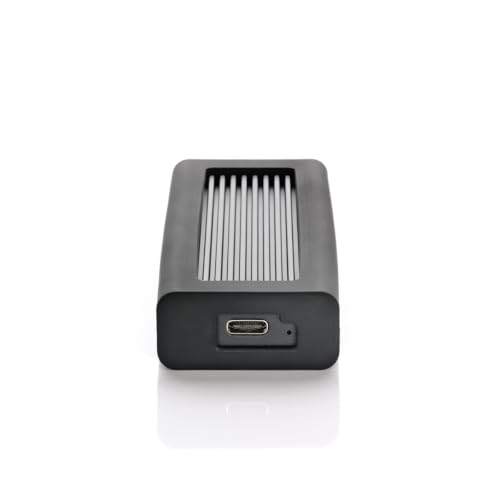
- Up to 1,050MB/s read/write
- USB and Thunderbolt host compatibility
- Four-year warranty
Best For: Moving large files between different computers
High-Capacity Everyday Pick – Samsung T5 EVO 8TB
Among 8tb portable ssds, the Samsung T5 EVO prioritizes compact, easy-to-carry storage over maximum transfer speed. Its USB 3.2 Gen 1 connection delivers up to 460 MB/s for moving large files.
Best For: Gamers and content creators who want substantial portable storage and can live with moderate transfer speeds.
Pros:
- 8TB capacity in a portable design weighing 3.52 ounces.
- Rated for falls up to 6 feet.
- Listed compatibility includes PCs, Macs, mobile devices, and gaming consoles.
Cons:
- Up to 460 MB/s is much slower than the USB4 options in this roundup.
- USB 3.2 Gen 1 limits its appeal for speed-focused workflows.
Choose the T5 EVO when carrying a large library matters more than finishing transfers as quickly as possible.
Peak-Speed Pick – OWC Express 1M2 80G 8TB
The OWC Express 1M2 80G targets buyers comparing 8tb portable ssds for demanding transfers. Its USB4 80Gb/s design is rated for over 6,000 MB/s peak real-world speed, making host capability an important part of the buying decision.
Best For: Creative professionals with compatible systems who prioritize peak transfer speed and an upgradeable NVMe design.
Pros:
- Rated for over 6,000 MB/s peak real-world speed.
- Bus-powered through the included USB4 cable.
- Supports future upgrades with 2280 or 2242 NVMe M.2 SSDs.
- Heat-dissipating enclosure is designed to help sustain performance.
Cons:
- Its peak-speed advantage depends on a suitably capable host connection.
- Gen 5 SSD upgrades require attention to host bus-power limits.
This is the performance-first choice if your computer can take advantage of USB4 80Gb/s; its replaceable SSD also adds flexibility beyond the initial 8TB configuration.
Rugged USB4 Pick – Oyen Digital U34 Bolt 8TB
Oyen Digital U34 Bolt 8TB USB4 40Gbps Thunderbolt 4 Portable USB-C SSD, Up to 2800 MB/sec
Check Price On AmazonThe Oyen Digital U34 Bolt stands out among 8tb portable ssds for its USB4 40Gbps connection, stated transfer rates up to 2,800 MB/s, and rugged construction. It ships formatted for macOS, so buyers using another operating system should account for that setup detail.
Best For: Professionals who want fast portable transfers, rugged protection, and USB-C or Thunderbolt host compatibility.
Pros:
- Stated transfer rates up to 2,800 MB/s.
- MIL-Standard 810 protection rating and a cooling aluminum core.
- Compatible with USB-C and Thunderbolt 3, 4, or 5 hosts.
Cons:
- Comes formatted for macOS, which may require preparation for other systems.
- Its stated speed is below the OWC drive’s stated peak speed.
The U34 Bolt balances speed and durability, particularly for a workflow that moves between supported USB-C and Thunderbolt computers.
Mac-Friendly 8TB Pick – Glyph Atom EV Portable NVMe SSD
Among 8tb portable ssds, the Glyph Atom EV is a practical choice if you want substantial external storage with USB-C connectivity. It includes both USB-C–to–USB-C and USB-C–to–USB-A cables, plus a removable protective cover.
Best For: Mac users who want an 8TB external SSD and flexible USB cable options.
Pros:
- 8TB capacity for large media and project libraries.
- Includes two cable types for different USB ports.
- Removable cover adds protection for travel.
Cons:
- Listed read speed is 480MB/s, below the faster drives in this roundup.
- Supplied specifications give conflicting interface and speed descriptions; verify the connection you need before buying.
The Atom EV makes more sense for capacity and included accessories than for a clearly documented top-end speed claim.
If transfer speed leads your search for 8tb portable ssds, the OWC Envoy Ultra stands out with a claimed read speed of over 6,000MB/s over Thunderbolt 5. Its bus-powered, fanless aluminum design keeps the setup self-contained.
Best For: Creative workflows that can benefit from Thunderbolt 5 speeds and rugged portable storage.
Pros:
- Claims transfer speeds over 6,000MB/s with Thunderbolt 5.
- Works with Thunderbolt 3/4 and USB4 hosts, with speed dependent on the host.
- Weatherproof, shock-resistant design with a built-in cable.
- Backed by a five-year limited warranty.
Cons:
- Older host connections cannot deliver its full Thunderbolt 5 speed.
- Built-in cable offers less cable-choice flexibility.
Choose the Envoy Ultra when you have a fast compatible host and want high throughput without a separate power adapter.
Oyen Digital 8TB Helix Dura USB-C (USB 3.2 Gen2) NVMe Portable SSD, Up to 1050MB/s
Check Price On AmazonThe Oyen Digital Helix Dura is worth considering among 8tb portable ssds when you want USB 3.2 Gen 2 connectivity and a stated read/write speed of up to 1,050MB/s. It ships with USB-C and USB-C–to–USB 3.0 cables.
Best For: Users moving an 8TB drive between USB and Thunderbolt-equipped computers.
Pros:
- Up to 1,050MB/s stated read and write speeds.
- Compatible with USB and Thunderbolt 3/4/5 hosts.
- Rugged, shock-resistant design with a four-year warranty.
Cons:
- USB 3.2 Gen 2’s 10Gbps connection does not offer Thunderbolt-class peak speeds.
- Actual speeds depend on the host connection.
The Helix Dura balances broad host compatibility with a straightforward USB-C speed tier, rather than chasing the fastest Thunderbolt performance.
How We Picked These 8tb Portable Ssds
We focused on capacity, advertised connection and speed, and the practical fit of each drive for common workflows. The selection covers straightforward USB models alongside higher-bandwidth USB4 and Thunderbolt options. Listed speeds are manufacturer claims, not a promise of sustained performance: results can vary with the host port, cable, file size, available space, and drive temperature.
Quick Comparison
For general backups and file storage, the Samsung T5 EVO offers a simpler USB option, with a listed maximum of 460MB/s. The Oyen Digital Helix Dura raises its stated ceiling to 1,050MB/s over USB 3.2 Gen 2. Buyers moving large projects frequently can consider the Oyen Digital U34 Bolt, advertised at up to 2,800MB/s, or compare the USB4 OWC Express 1M2 80G with their computer’s capabilities. The OWC Envoy Ultra is the Thunderbolt 5 choice for a suitably equipped host. The Glyph Atom EV is another 8TB NVMe alternative, but check its exact interface and performance specifications before comparing it on speed.
Key Buying Factors for 8tb Portable Ssds
Match the Drive to Your Port
USB-C describes a connector, not a speed. Check whether your computer supports USB 3.2, USB4, Thunderbolt 4, or Thunderbolt 5, then verify the drive’s stated compatibility and use an appropriate cable. A faster drive may work at reduced speeds on a slower port; do not assume every USB-C host supports every high-speed mode.
Consider Sustained Work, Not Just Peak Speed
Short transfers may approach advertised figures more readily than hours of continuous writing. If you regularly ingest video or move large archives, look for independent sustained-transfer testing and consider enclosure heat management. For occasional backups, paying extra for the highest peak bandwidth may bring little benefit.
Plan for Capacity and Data Safety
Usable formatted space will be lower than the advertised 8TB. Confirm the drive’s physical size, power requirements, warranty, and file-system compatibility with the computers you use. A portable SSD is convenient storage, not a backup strategy by itself; keep another copy of important files.
Who Should Buy Which 8tb Portable Ssds?
Choose the T5 EVO if capacity and routine storage matter more than transfer speed. Consider the Helix Dura for a USB 3.2 Gen 2 setup, and the U34 Bolt if your workflow can take advantage of its faster interface. The Express 1M2 80G and Envoy Ultra make the most sense when you can verify support for their higher-bandwidth connections; the latter specifically targets Thunderbolt 5 users. Consider the Glyph Atom EV if its confirmed specifications, price, and warranty suit your setup. When in doubt, buy for the ports you have—not the fastest number on the packaging.
