
When it comes to finding the perfect data storage solution, 8-bay Thunderbolt RAID enclosures offer an impressive combination of speed and capacity. You’ll want to evaluate your specific needs, whether you’re a creative professional or a tech enthusiast. Each model brings unique features that can enhance your workflow. Let’s explore the top contenders that stand out in this competitive market and find the right fit for your storage requirements.
OWC ThunderBay 8 0TB Eight-Bay Thunderbolt 40Gb/s RAID 5 Storage Enclosure

If you’re a creative professional or a content creator in need of high-speed, reliable storage, the OWC ThunderBay 8 is an exceptional choice. This eight-bay Thunderbolt 40Gb/s RAID 5 enclosure lets you use both 2.5 and 3.5-inch SSDs or HDDs, providing versatility for your storage needs. You can daisy-chain up to six units, reaching a massive 1,152TB of capacity. Plus, its plug-and-play design means you won’t waste time installing drivers. You’ll appreciate the quick drive swaps with thumb screw release trays and the included Thunderbolt 3 cable. It’s Thunderbolt certified for both Mac and Windows, ensuring seamless compatibility.
Best For: Creative professionals and content creators seeking high-speed, reliable storage solutions.
Pros:
- Versatile drive bays support both 2.5 and 3.5-inch SSDs or HDDs, accommodating various storage needs.
- Massive storage capacity allows daisy-chaining of up to six units for a total of 1,152TB.
- Plug-and-play design simplifies setup with no drivers required and includes a Thunderbolt 3 cable for immediate use.
Cons:
- Initial cost may be high depending on the drives purchased for the enclosure.
- Limited to Thunderbolt connections, which may not be compatible with all devices without adapters.
- No pre-installed drives means additional expense and effort to populate the enclosure with storage.
SanDisk Professional G-RAID Shuttle 8-Bay Thunderbolt 3 RAID Array
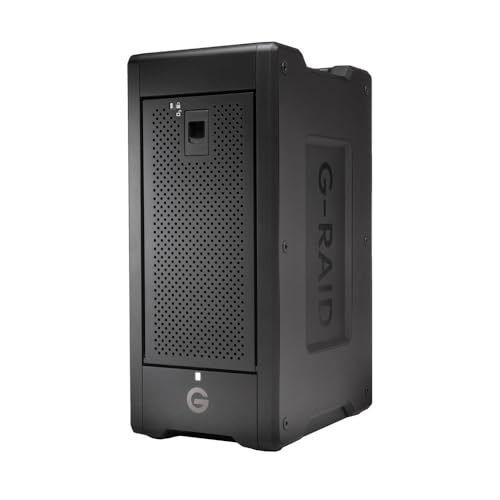
The SanDisk Professional G-RAID Shuttle 8-Bay Thunderbolt 3 RAID Array is an exceptional choice for creative professionals who require high-capacity, high-speed storage solutions. With up to 160TB of removable HDDs, it handles multi-stream 4K, 8K, and VR editing seamlessly. You’ll enjoy impressive read speeds of 1900MB/s and write speeds of 2000MB/s. This transportable RAID solution features dual Thunderbolt 3 ports for daisy-chaining up to five devices and offers USB Power Delivery to charge your MacBook. Pre-configured with RAID 5, it also supports various RAID configurations for ultimate flexibility, all backed by a 5-year limited warranty.
Best For: Creative professionals and teams requiring high-capacity, high-speed storage for multi-stream 4K, 8K, and VR editing.
Pros:
- High data transfer rates of up to 1900MB/s read and 2000MB/s write for efficient workflows.
- Flexible RAID configuration options, allowing users to customize based on their needs.
- Transportable design with dual Thunderbolt 3 ports for daisy-chaining multiple devices and USB Power Delivery for charging.
Cons:
- High initial investment cost may be a barrier for individual users or small teams.
- The weight and size may make it less convenient for frequent travel compared to smaller storage solutions.
- Limited to Thunderbolt 3 and USB-C connections, which may not be compatible with all devices without adapters.
CENMATE Aluminum 8 Bay Hard Drive RAID Enclosure

For those seeking a robust storage solution, the CENMATE Aluminum 8 Bay Hard Drive RAID Enclosure stands out with its impressive support for both 2.5” and 3.5” SATA HDDs and SSDs. With a maximum capacity of 160TB, it’s ideal for personal and enterprise use. The tool-free design simplifies installation, while the eight RAID modes offer flexibility for various needs. Just remember, you can’t use WD 20TB drives, but Seagate 20TB drives are fully supported. Plus, the enclosure features efficient cooling with dual fans, although noise levels might not suit sensitive environments. Enjoy reliable and powerful data storage with CENMATE.
Best For: Those needing a high-capacity, flexible RAID storage solution suitable for both personal and enterprise use.
Pros:
- Tool-free design allows for easy installation of drives.
- Supports multiple RAID configurations for versatile data management.
- Maximum capacity of 160TB, accommodating large data storage needs.
Cons:
- Not compatible with WD 20TB hard drives, limiting drive options.
- Fan noise levels may be disruptive in noise-sensitive environments.
- Changing RAID configurations can lead to data loss if not properly backed up.
Highpoint RocketStor 6628A Thunderbolt 3 RAID Enclosure

Designed specifically for professional media applications, the Highpoint RocketStor 6628A Thunderbolt 3 RAID Enclosure offers an impressive 40 Gb/s bandwidth, making it ideal for demanding media editing and post-production workflows. With support for up to eight 10TB or larger spindle HDDs, you can achieve a data transfer rate of up to 2,700 MB/s. This enclosure is compatible with Linux, MacOS, and Windows, ensuring versatility across platforms. Its sleek aluminum design is both durable and stylish, while the integrated SAS/SATA Hardware RAID 5 & 6 technology enhances data protection. Plus, you’ll appreciate the one-year warranty and 30-day return guarantee.
Best For: Professional media creators and editors who require high-speed data transfer and reliable storage solutions for large files.
Pros:
- High-speed performance with up to 2,700 MB/s data transfer rate and 40 Gb/s Thunderbolt 3 interface.
- Versatile compatibility across Linux, MacOS, and Windows platforms, making it suitable for various setups.
- Integrated RAID technology provides enhanced data protection with options for RAID 5 & 6.
Cons:
- Limited to 3.5-inch HDDs, which may restrict the use of other hard drive formats.
- Weighty design at 12 pounds could be cumbersome for portable use.
- Higher price point compared to basic storage solutions may be a barrier for casual users.
USB 4.0 Type-C 8 Bay SATA Hard Drive Enclosure

With its ultra-fast data transfer rate of up to 40Gbps, the USB 4.0 Type-C 8 Bay SATA Hard Drive Enclosure is perfect for professionals who demand high performance from their storage solutions. You can support up to eight hard drives, each capable of holding 24TB for a whopping total of 192TB. This enclosure is compatible with both 2.5-inch and 3.5-inch SATA drives. Its aluminum design guarantees durability, while removable trays and individual power buttons enhance usability. Plus, a smart fan function keeps your drives cool, extending their lifespan. Enjoy peace of mind with a 2-year warranty and easy returns.
Best For: Professionals and businesses requiring high-capacity, fast data transfer storage solutions for multiple SATA hard drives.
Pros:
- Supports up to 192TB of storage with eight hard drives, ideal for large data needs.
- Ultra-fast 40Gbps data transfer rate via USB-C, ensuring quick and efficient file transfers.
- Durable aluminum design and removable trays for easy organization and enhanced usability.
Cons:
- No RAID or NAS functions, limiting options for data redundancy and network storage.
- Potential additional fees for misrepresented returns or damages due to customer misuse.
- Weight of 7 pounds may make it less portable compared to smaller enclosures.
CENMATE Aluminum 8 Bay Hard Drive Enclosure with Cooling Fan
The CENMATE Aluminum 8 Bay Hard Drive Enclosure is an excellent choice for professionals needing reliable and high-capacity storage solutions. Supporting both 2.5” and 3.5” SATA HDDs/SSDs, this tool-free, hot-swappable device offers a staggering maximum capacity of 160TB. Its dual 2.9-inch cooling fans effectively manage heat, although the fan noise might not suit noise-sensitive settings. With USB C 3.0, you can enjoy data transfer speeds up to 5Gbps—transferring a 1GB movie in just 3-5 seconds. Plus, it’s compatible with various operating systems and requires no drivers, ensuring a hassle-free experience.
Best For: Professionals and businesses needing high-capacity, reliable storage solutions for data-intensive applications.
Pros:
- Tool-free, hot-swappable design allows for easy installation and maintenance.
- High transfer speeds of up to 5Gbps make data transfers quick and efficient.
- Compatible with multiple operating systems and requires no additional drivers, offering a plug-and-play experience.
Cons:
- Fan noise can reach 40-50 decibels, which may be disruptive in quiet environments.
- Lacks RAID or NAS functionality, limiting use cases for advanced storage configurations.
- Maximum capacity is dependent on using drives of 20TB each, which may require investment in larger drives.
ORICO 4 Bay RAID Hard Drive Enclosure (9848RU3)

For creative professionals and data-intensive users, the ORICO 4 Bay RAID Hard Drive Enclosure (9848RU3) stands out as an ideal choice, thanks to its robust RAID configuration options. Supporting up to 8 RAID modes, including RAID 0 and 5, it guarantees dual data backup and security. With a capacity for 3.5-inch SATA disks up to 88TB, it’s perfect for large projects. The USB 3.0 interface and SATA 6Gbps allow transmission speeds up to 235 MB/s. Its aluminum design features an 80mm fan for efficient heat dissipation, making it a reliable, secure, and efficient storage solution for your needs.
Best For: Creative professionals and data-intensive users who require reliable and high-capacity storage solutions.
Pros:
- Supports multiple RAID configurations for enhanced data security and backup options.
- High transmission speeds of up to 235 MB/s facilitate efficient file transfers and backups.
- Trayless design and independent safety lock ensure easy access and protection against data loss.
Cons:
- Limited to 3.5-inch SATA disks, which may not suit users with other disk formats.
- Requires a dedicated power supply, which may not be ideal for portable use.
- Aluminum design, while sturdy, may be susceptible to scratches and dents over time.
TERRAMASTER D8 Hybrid HDD NVMe Enclosure (Diskless)

Designed for professionals and creative enthusiasts who demand both high capacity and speed, the TERRAMASTER D8 Hybrid HDD NVMe Enclosure (Diskless) offers a versatile storage solution. With the ability to house 4 SATA HDDs/SSDs and 4 M.2 NVMe SSDs, you can achieve up to 152TB of total capacity. This hybrid design optimizes your storage, placing frequently accessed data on SSDs for rapid access while storing less-used data on HDDs. Enjoy transfer speeds up to 10Gbps and a user-friendly installation process. Plus, the intelligent fan guarantees your drives stay cool, making it a reliable choice for any data-intensive workload.
Best For: Professionals and creative enthusiasts seeking a high-capacity and high-speed storage solution for data-intensive workloads.
Pros:
- Versatile Storage: Accommodates both SATA HDDs/SSDs and M.2 NVMe SSDs, allowing for a mix of high capacity and speed.
- Fast Transfer Speeds: Supports USB 3.2 Gen2 with speeds up to 10Gbps, enhancing data transmission efficiency.
- User-Friendly Design: Tool-free hard drive tray and unique Push-Lock design facilitate easy installation and secure drive access.
Cons:
- Diskless Enclosure: Requires separate purchase of HDDs and SSDs, increasing initial setup costs.
- Limited to 8 Bays: Maximum capacity might not be sufficient for users with extensive storage needs.
- Cooling Noise: The intelligent fan, while beneficial for temperature control, may produce noise during operation.
IO CREST Hard Drive Enclosure (8-Bay, Black)

Ideal for users needing robust storage solutions, the IO CREST Hard Drive Enclosure offers eight bays that accommodate both 2.5-inch and 3.5-inch SATA hard drives, supporting capacities up to 24TB each. With Super Speed USB 3.0 connectivity, you’ll enjoy fast file transfers at 5Gbps. It supports SATA I/II/III and features a smart fan function with a built-in thermal sensor, ensuring efficient cooling through auto and manual modes. You can manage each drive independently with control switches, allowing for tailored power management. Just keep in mind, it doesn’t support RAID or NAS functions, so plan your storage needs accordingly.
Best For: Users seeking an efficient and spacious storage solution for multiple SATA hard drives without the need for RAID or NAS functionalities.
Pros:
- Supports both 2.5-inch and 3.5-inch SATA hard drives with capacities up to 24TB each.
- Fast file transfer speeds of up to 5Gbps with Super Speed USB 3.0 connectivity.
- Independent control switches for each drive allow for tailored power management.
Cons:
- Does not support RAID configurations.
- Lacks NAS functionality for network storage.
- Cooling system relies on a fan which may introduce noise, despite being designed for quiet operation.
OWC ThunderBay 4 0TB Four-Bay Thunderbolt 40Gb/s RAID Storage Enclosure

The OWC ThunderBay 4 0TB Four-Bay Thunderbolt 40Gb/s RAID Storage Enclosure stands out as a powerhouse for creative professionals and data-intensive users who demand high-speed performance and versatility in their storage solutions. With sustained performance up to 1527MB/s, it supports various RAID configurations, including RAID 0, 1, 4, 5, and 1+0. You can easily use 3.5 or 2.5-inch drives without needing an adapter. The dual Thunderbolt 3 ports and ultra-quiet aluminum chassis enhance usability and aesthetics. Plus, it’s compatible with both Mac and Windows systems, making it a flexible choice for your data storage needs.
Best For: Creative professionals and data-intensive users seeking high-speed and versatile storage solutions.
Pros:
- High-speed performance with sustained rates up to 1527MB/s, suitable for demanding applications.
- User-configurable RAID options (0, 1, 4, 5, 1+0) provide flexibility for data protection and performance.
- Compatibility with both Mac and Windows systems, along with support for various drive sizes without the need for adapters.
Cons:
- Initial cost may be high compared to other storage options, particularly for users with lower storage demands.
- Limited built-in storage at 0TB requires additional investment in drives to realize its full potential.
- Weight of 4.3 kg may make it less portable for users needing on-the-go storage solutions.
Factors to Consider When Choosing 8 Bay Thunderbolt RAID Enclosures
When you’re choosing an 8-bay Thunderbolt RAID enclosure, consider factors like storage capacity options and data transfer speeds that meet your needs. You’ll also want to think about RAID configuration flexibility and compatibility with your current systems. Finally, don’t overlook the importance of build quality and design for long-term durability and performance.
Storage Capacity Options
Choosing the right storage capacity for your 8-bay Thunderbolt RAID enclosure is crucial for meeting your needs. Evaluate the maximum storage each model supports, typically ranging from 160TB to 192TB, based on the drive sizes you choose. Many enclosures accommodate both 2.5-inch and 3.5-inch drives, giving you flexibility in performance and capacity. Consider models with removable hard drives, as they make upgrades and maintenance easier while maximizing storage. It’s also essential to look for enclosures that support multiple RAID configurations, as these can impact usable storage and data redundancy. If you need even more space, remember that you can daisy-chain multiple enclosures, creating a combined storage solution that can exceed 1,000TB.
Data Transfer Speeds
Data transfer speeds play an essential role in the performance of your 8-bay Thunderbolt RAID enclosure, especially if you’re working with large files or demanding applications. Models can support speeds up to 2,700 MB/s, thanks to the Thunderbolt 3 interface, which offers a maximum bandwidth of 40 Gb/s. This is considerably faster than standard USB connections, where speeds max out around 5 Gb/s. When choosing your enclosure, remember that the type of hard drives you use also affects performance—SSDs provide much faster speeds than traditional HDDs. Additionally, consider the RAID configurations available, as setups like RAID 0 or RAID 5 can optimize read and write speeds, ensuring efficient data handling for your tasks.
RAID Configuration Flexibility
Understanding RAID configuration flexibility is essential for maximizing the potential of your 8-bay Thunderbolt RAID enclosure. You can choose from multiple RAID levels like RAID 0, 1, 5, 6, and JBOD, each tailored to your needs for speed, redundancy, or storage capacity. Some enclosures even support up to 8 different RAID modes, giving you plenty of options for ideal data protection and performance. For critical applications, pre-configured RAID 5 setups offer a great balance of speed and fault tolerance. Keep in mind, switching RAID configurations can lead to data loss, so always back up your data first. Many enclosures also provide hardware RAID options, boosting performance by offloading processing from your host system.
Compatibility With Systems
When selecting an 8-bay Thunderbolt RAID enclosure, compatibility with your system is essential for peak performance. Make certain the enclosure supports your operating system, whether it’s Windows, MacOS, or Linux, to guarantee seamless integration and functionality. Check for Thunderbolt version compatibility; newer enclosures may utilize Thunderbolt 3 or 4 for faster data transfer rates compared to older versions. Additionally, confirm that the enclosure accommodates the hard drive sizes you plan to use—either 2.5-inch or 3.5-inch—and the types, such as HDD or SSD. Look for options with daisy-chaining capabilities, which let you connect multiple devices without sacrificing speed. Finally, be aware of any necessary drivers or software, as some units are plug-and-play while others require setup.
Build Quality and Design
Build quality and design are essential factors that directly impact the performance and longevity of your 8-bay Thunderbolt RAID enclosure. Opt for aluminum constructions over plastic; they offer better durability and heat dissipation. A tool-free design simplifies drive installation and maintenance, making your experience much smoother. While you might not notice cooling systems immediately, they play a significant role in maintaining ideal operating temperatures, which can affect performance and lifespan. Also, consider the dimensions and weight of the enclosure; lighter, more compact designs are easier to transport. Finally, a well-designed chassis aids in heat management and minimizes noise, which is critical if you’re in a noise-sensitive environment.
Cooling and Noise Levels
Selecting the right 8-bay Thunderbolt RAID enclosure goes beyond just build quality; cooling and noise levels are key factors that can greatly influence your experience. Many enclosures feature built-in cooling solutions, like fans, to maintain ideal temperatures and prevent overheating during intensive data transfers. However, noise levels can vary, with some enclosures generating 40-50 decibels, which might not suit noise-sensitive environments. Materials like aluminum help enhance heat dissipation and reduce noise during operation. Look for models with smart fan functions that adjust speeds based on temperature, maximizing cooling while minimizing noise. A reliable cooling system is essential for the longevity of your drives, as excessive heat can lead to failures or data loss.
Warranty and Support
A solid warranty and reliable support can make all the difference in your experience with an 8-bay Thunderbolt RAID enclosure. Warranty durations typically range from 1 to 5 years, providing essential protection for your long-term investment. Look for manufacturers that offer limited warranties covering defects in materials and workmanship, and some even include data recovery services. Support options are important too; check if they provide technical assistance via phone, email, or live chat, with response times varying from immediate to 24 hours. Additionally, consider enclosures with satisfaction guarantees or return policies, ensuring you can return damaged products or those that don’t meet your expectations. Robust documentation and knowledge bases can also enhance your troubleshooting and setup experience.
Port Connectivity Features
When choosing an 8-bay Thunderbolt RAID enclosure, it’s important to evaluate port connectivity features that can enhance your overall experience. Look for models with dual Thunderbolt 3 ports, allowing you to daisy-chain multiple devices for expanded connectivity and increased storage capacity. Guarantee compatibility with the latest USB standards like USB-C or USB 4.0 for higher data transfer rates and versatility in connecting various peripherals. It’s also wise to select enclosures supporting backward compatibility with older Thunderbolt versions, maximizing usability with your existing hardware. Additional options like USB-C and USB-A ports provide versatile connections beyond Thunderbolt. Finally, consider the power delivery capabilities, as some enclosures can power connected devices, reducing the need for extra adapters.
