
If you’re a content creator, you know the importance of reliable storage solutions. The right NAS can streamline your workflow and keep your projects secure. Among the various options available, two 8-bay NAS devices stand out for their performance and features. Curious about which ones could elevate your content creation? Let’s explore the top contenders and what makes them essential for your setup.
QNAP TS-832PX-4G 8 Bay High-Capacity NAS with 10GbE SFP+ and 2.5GbE
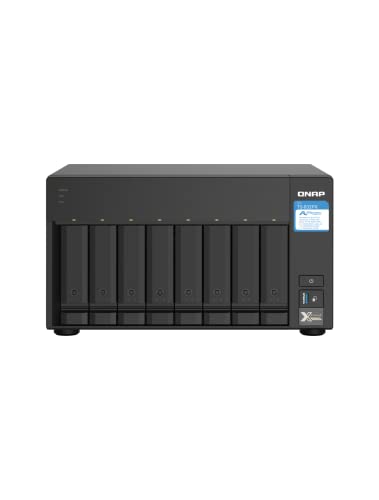
If you’re a content creator looking for a powerful storage solution, the QNAP TS-832PX-4G is an excellent choice thanks to its impressive networking capabilities. With 8 drive bays and support for SATA SSDs, you can easily expand your storage as needed. The dual 10GbE SFP+ and 2.5GbE ports guarantee lightning-fast data transfers, ideal for bandwidth-demanding projects. Plus, the AnnapurnaLabs quad-core processor and 4 GB of RAM (expandable to 16 GB) enhance performance, making multitasking seamless. With features like Qtier™ auto-tiering, you’ll experience optimized storage management, making certain your creative workflow remains efficient and effective.
Best For: Content creators and professionals needing high-capacity, high-speed storage solutions for bandwidth-demanding applications.
Pros:
- High-speed networking with dual 10GbE and 2.5GbE ports for fast data transfers.
- Expandable memory up to 16 GB, enhancing multitasking capabilities.
- Supports 8 drive bays for flexible storage expansion with SATA SSDs.
Cons:
- Diskless configuration requires additional investment in hard drives.
- Initial setup may be complex for users unfamiliar with NAS systems.
- Relatively heavy at 14.07 pounds, which may affect portability.
Asustor Lockerstor 8 AS6508T 8 Bay NAS

The Asustor Lockerstor 8 AS6508T is an excellent choice for content creators who demand high performance and vast storage capacity. With its Intel Atom Quad-Core C3538 processor and 8GB DDR4 RAM (expandable to 64GB), you’ll experience seamless multitasking. This 8-bay NAS supports up to 144TB of storage, ensuring you have plenty of room for all your projects. The dual 10-Gigabit and 2.5-Gigabit ports deliver impressive speeds up to 20 Gbps. Weighing 13.64 pounds, it’s compact yet powerful. Plus, with a 3-year warranty, you can trust it to meet your storage needs for years to come.
Best For: Content creators and businesses looking for high-performance network storage with substantial capacity.
Pros:
- High Storage Capacity: Supports up to 144TB, providing ample space for large files and projects.
- Fast Data Transfer: Equipped with dual 10-Gigabit and 2.5-Gigabit ports, allowing speeds up to 20 Gbps.
- Expandable RAM: Comes with 8GB DDR4 RAM, which can be expanded up to 64GB for enhanced multitasking.
Cons:
- Weight: At 13.64 pounds, it may be cumbersome for some users to move or install.
- Initial Cost: The investment may be higher compared to lower-capacity NAS options.
- Setup Complexity: May require a more advanced understanding of network configurations for optimal performance.
Factors to Consider When Choosing an 8 Bay NAS for Content Creators
When you’re choosing an 8-bay NAS for your creative projects, you’ll want to take into account several key factors. Performance and speed are vital for handling large files, while storage capacity options guarantee you have enough space for your growing library. Don’t forget to check network connectivity features and data security measures to keep your work safe and accessible.
Performance and Speed
Choosing an 8-bay NAS for your content creation needs hinges on performance and speed, as these factors directly affect your efficiency and workflow. The CPU type is vital; a quad-core processor enhances multitasking and speeds up data processing. Additionally, look for models with 8GB of RAM or more, which can be expanded to support demanding tasks like video editing. Dual-port configurations, such as two 10-Gigabit Ethernet ports, provide the aggregated bandwidth necessary for fast data transfers. M.2 NVMe ports for SSD caching can notably boost read/write speeds, essential for accessing large files. Finally, auto-tiering technologies optimize storage performance by moving frequently accessed data to faster tiers, improving your overall efficiency during content creation.
Storage Capacity Options
Selecting an 8-bay NAS involves careful consideration of storage capacity options that align with your content creation needs. Look for models that support up to 144TB when using 18TB drives, maximizing your storage potential. The type of drives you choose—2.5 or 3.5-inch SATA SSDs and HDDs—affects both capacity and performance. Consider NAS units with SSD caching, as this feature can greatly boost performance while allowing larger HDDs for bulk storage. Also, evaluate RAM expandability; more memory can enhance the NAS’s ability to manage multiple file transfers efficiently. Finally, assess the supported RAID configurations, since different setups can offer varying levels of redundancy and performance, ultimately impacting your effective storage capacity.
Network Connectivity Features
After determining the ideal storage capacity for your 8-bay NAS, the next step involves examining the network connectivity features that will support your content creation needs. Look for models with multiple high-speed Ethernet ports, like dual 10-Gigabit and 2.5-Gigabit options, as these can drastically enhance data transfer rates for demanding applications. Opt for NAS systems that support next-gen networking standards, ensuring you’re prepared for future connectivity demands. Utilizing multiple network interfaces simultaneously can boost performance and provide redundancy, allowing speeds up to 20 Gbps through aggregated connections. Additionally, check for PCIe card support for future expansion, as this can accommodate faster network interfaces or SSD caching to optimize overall performance.
Expandability and Upgrades
When you’re investing in an 8-bay NAS for content creation, expandability and upgrade options should be at the forefront of your decision-making. Look for NAS models that allow for RAM upgrades, ideally supporting up to 64GB, to enhance performance during demanding tasks. Confirm the system has M.2 NVMe ports for faster caching, which can greatly improve data access speeds. It’s also essential to choose a NAS that accommodates various drive sizes, allowing for an impressive total capacity of up to 144TB with 18TB drives. Evaluate available PCIe card slots for additional expansion cards that enhance functionality, and opt for dual-port configurations for 10-Gigabit and 2.5-Gigabit Ethernet, guaranteeing your network can grow alongside your bandwidth needs.
Data Security Measures
While expandability is important for future-proofing your investment, data security measures are equally essential for protecting your creative assets. Look for NAS devices that support RAID configurations to provide redundancy and safeguard against data loss from hard drive failures. Robust encryption options are vital, ensuring your sensitive content is protected both at rest and in transit. Consider models with built-in backup solutions or compatibility with third-party software for regular backups and disaster recovery. User authentication features, such as two-factor authentication, enhance security and control access to the NAS. Finally, evaluate the device’s ability to receive regular firmware updates, as these often include important security patches to protect against vulnerabilities.
User-Friendly Software
Choosing an 8-bay NAS isn’t just about storage capacity; it’s also about how easily you can manage your files and collaborate on projects. User-friendly software often features intuitive interfaces that simplify storage management, backups, and file sharing. Look for NAS solutions that come with bundled applications for easy media streaming, file synchronization, and collaboration tools, as these can boost your productivity considerably. Mobile apps and web access are essential, allowing you to manage your data and access files remotely, especially when you’re on the go. Advanced features like automated backups, snapshot capabilities, and cloud integration help safeguard your work. Finally, regular software updates and a strong support community are critical for maintaining ideal performance and security.
Cooling and Noise Levels
Managing your files and collaborating efficiently isn’t just about software; hardware considerations are equally important, particularly cooling and noise levels. Effective cooling systems are vital in 8-bay NAS devices to prevent overheating during high-performance tasks like video editing. If you work in quiet environments, opt for a NAS with efficient cooling and quieter fans to enhance your experience. Pay attention to the hard drive placement within the NAS, as an optimized internal layout promotes better airflow and helps maintain lower temperatures. Many NAS units feature temperature sensors and customizable fan speeds, allowing you to balance cooling efficiency with noise reduction. Remember, regular maintenance, such as cleaning dust filters, is essential for sustaining efficient cooling and minimizing noise over time.
Warranty and Support
When investing in an 8-bay NAS, the warranty and support options can greatly impact your overall experience and peace of mind. First, check the warranty duration; a longer warranty can provide reassurance, especially if you’re relying on the NAS for vital data. Make sure to look for return policies that allow full refunds within a specified period, typically 30 days, for any damaged or “dead on arrival” units. Responsive customer support is essential for troubleshooting issues you may encounter, so evaluate the availability of help when needed. Additional services like software updates or remote assistance can enhance usability and longevity. Finally, research customer ratings on warranty experiences and support responsiveness to gauge the reliability of the product and manufacturer.
