
A good Mac photo-editing monitor makes fine detail easy to inspect and color decisions easier to trust. But a 27-inch 5K display, a wider 5K2K screen, and a portable 5K monitor serve different workflows.
These seven listings cover desk setups, multitasking, and editing away from home. Check resolution, color specifications, connectivity, and macOS support before choosing—not just the 5K label.
Best 7 5k Monitor for Mac Photo Editing Picks for 2026
Best Ultrawide Workspace

- 39.7-inch curved 5120 × 2160 display
- 120 Hz matte screen
- Thunderbolt, Ethernet, and USB hub
Best For: A spacious editing canvas and side-by-side tools
Best Matte 5K Pick

- 27-inch 5120 × 2880 at 218 PPI
- 98% P3 nano-matte panel
- 90 W Thunderbolt 4 and built-in KVM
Best For: Detailed Mac editing in rooms with ambient light
Best 34-Inch Ultrawide

- 34-inch 5120 × 2160 workspace
- 120 Hz VA panel; stated Delta E < 2
- USB-C with 65 W power delivery
Best For: Wide editing layouts and laptop-based multitasking
Best Color-Focused IPS

- 27-inch 5120 × 2880 IPS panel
- 99% DCI-P3; Pantone Validated
- Thunderbolt 4 with up to 100 W charging
Best For: Color-focused Mac photo editing on an adjustable 5K display
Mac Desk Setup

- 27-inch 5120 × 2880 IPS display
- 99% DCI-P3; 500-nit brightness
- Thunderbolt 3 with up to 94W power delivery
Best For: Mac-based editing desks with Thunderbolt connectivity
Flexible Studio Screen
InnoView 27-Inch 5K Portable Monitor
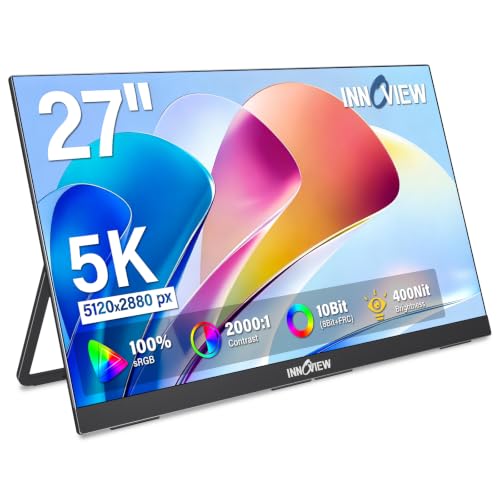
- 27-inch 5K anti-glare IPS panel
- Stated 100% sRGB coverage
- Kickstand, VESA, USB-C, HDMI, and DisplayPort
Best For: Movable secondary screens for sRGB-focused editing
Wide-Gamut Mac Pick

- 27-inch 5120 × 2880 display
- 99% DCI-P3; 500-nit brightness
- Thunderbolt 3 with up to 94W power delivery
Best For: Mac photographers comparing LG UltraFine listings
Best Ultrawide Workspace – Dell UltraSharp U4025QW
If your search for a 5k monitor for mac photo editing is really about fitting more tools beside your images, the Dell UltraSharp U4025QW offers a 39.7-inch curved, 5120 × 2160 workspace. Its 21:9 format favors room for editing panels over the taller 5120 × 2880 layout of a conventional 27-inch 5K display.
Best For: Photographers who want a large editing canvas with space for palettes and other windows.
Pros:
- 39.7-inch curved ultrawide screen provides ample horizontal workspace.
- 120 Hz refresh rate and matte finish add everyday usability.
- Thunderbolt, Ethernet, HDMI, DisplayPort, and a USB hub offer flexible connectivity.
Cons:
- 5120 × 2160 resolution has fewer vertical pixels than a 5120 × 2880 5K display.
- Its 37.3-inch width requires substantial desk space.
Choose this Dell for a broad, connected workstation rather than a compact Retina-like editing setup. Check desk clearance before committing.
Best Matte 5K Pick – BenQ PD2730S
The BenQ PD2730S is a strong 5k monitor for mac photo editing when fine detail and controlled reflections matter. Its 27-inch, 5120 × 2880 panel delivers 218 PPI, while the nano-matte finish diffuses ambient light.
Best For: Mac-based editors working in brighter rooms who also want a single-cable Thunderbolt setup.
Pros:
- Full 5K resolution, 98% P3 coverage, and a stated 2000:1 contrast ratio.
- Thunderbolt 4 supplies up to 90 W of laptop power.
- Built-in KVM and daisy-chain support suit multi-system desks.
Cons:
- 60 Hz refresh rate is less fluid than 120 Hz alternatives.
- 90 W charging may not meet every laptop’s power needs.
This is a practical choice if sharp previews, P3 coverage, and reduced glare take priority over a wider screen. The KVM is particularly useful when editing across two computers.
Best 34-Inch Ultrawide – INNOCN 34C1U
For a 5k monitor for mac photo editing that leaves room for toolbars and reference windows, the INNOCN 34C1U pairs a 34-inch ultrawide screen with 5120 × 2160 resolution. Its stated factory calibration of Delta E < 2 is a useful starting point for color-conscious work.
Best For: Editors who want an ultrawide layout, 120 Hz motion, and USB-C laptop connectivity.
Pros:
- 120 Hz VA panel with a stated 3000:1 contrast ratio.
- Factory pre-calibrated to a stated Delta E < 2, with 106% DCI-P3 gamut specified.
- USB-C provides up to 65 W power delivery; the stand adjusts for height, swivel, and tilt.
Cons:
- 5120 × 2160 offers less vertical resolution than a 5120 × 2880 5K panel.
- 65 W USB-C charging may be insufficient for some laptops.
Consider this model if horizontal workspace matters more than the pixel density of a 27-inch 5K screen. Its calibration claim is promising, though a color-managed workflow still benefits from checking the display with your own tools.
Best Color-Focused IPS – ViewSonic VP2788-5K
The ViewSonic VP2788-5K makes a compelling 5k monitor for mac photo editing if your priority is a sharp, color-focused 27-inch display. Its 5120 × 2880 IPS panel combines stated 99% DCI-P3 coverage with Pantone Validated color reproduction.
Best For: Mac photographers who want a full-resolution 5K IPS screen and flexible desk positioning.
Pros:
- 27-inch 5K IPS display with 99% DCI-P3 and 100% sRGB coverage.
- Thunderbolt 4 supports up to 100 W charging and a second 5K display via daisy chain.
- Stand supports height, tilt, swivel, and rotation adjustments.
Cons:
- 60 Hz refresh rate trails the 120 Hz ultrawide options.
- 14 ms stated response time makes fast-motion use less appealing.
For still-image work, its resolution, color-space coverage, and adjustability are the main draws. The Thunderbolt 4 connection also helps keep a MacBook editing desk tidy.
Mac Desk Setup – LG UltraFine 27MD5KL-B 5K
If you want a 5k monitor for mac photo editing, this 27-inch LG UltraFine pairs a 5120 × 2880 IPS display with 99% DCI-P3 coverage and 500-nit brightness. Its Thunderbolt 3 connection can also deliver up to 94W of power to a compatible Mac laptop.
Best For: Mac users who want a sharp, wide-gamut editing display with a streamlined Thunderbolt desk setup.
Pros:
- 27-inch 5K resolution leaves room for detailed images and editing controls.
- 99% DCI-P3 coverage and 500-nit brightness suit wide-gamut work.
- Built-in camera and speakers reduce desk clutter.
Cons:
- Glossy screen may be less comfortable in rooms with reflections.
- Connectivity centers on Thunderbolt 3 and USB-C rather than a broad selection of video inputs.
This is a practical pick when Mac compatibility, high pixel density, and a single-cable laptop connection matter more than input variety. For color-critical delivery, plan to calibrate and verify your workflow rather than relying on gamut coverage alone.
For a 5k monitor for mac photo editing that can move between workspaces, this InnoView offers a 27-inch 5120 × 2880 IPS panel, an adjustable kickstand, and 100 × 100mm VESA support. Its anti-glare finish and stated 100% sRGB coverage make it a useful secondary screen for sRGB-focused work.
Best For: Editors who need a movable, large secondary display for home, office, or studio use.
Pros:
- 5K resolution provides a detailed 27-inch workspace.
- USB-C, HDMI, and DisplayPort accommodate different computers.
- Kickstand and VESA support offer flexible placement.
Cons:
- At 9.5 pounds, it is better suited to moving between desks than daily commuting.
- The supplied 65W adapter powers the monitor; the notes do not promise laptop charging over USB-C.
- Stated 100% sRGB coverage does not establish DCI-P3 coverage.
Choose this model for placement and connection flexibility, especially if your output targets sRGB. If your photo workflow requires a specified wide-gamut display, confirm its suitability before buying.
Another listing for the LG 27MD5KL-B, this 5k monitor for mac photo editing combines a 27-inch 5120 × 2880 display with stated 99% DCI-P3 coverage and 500-nit brightness. Thunderbolt 3 supports up to 94W power delivery for a compatible Mac laptop.
Best For: Mac photographers seeking a high-density, wide-gamut desktop display with Thunderbolt connectivity.
Pros:
- 27-inch 5K panel provides fine detail for reviewing images.
- 99% DCI-P3 coverage supports wide-gamut editing workflows.
- Includes a built-in camera and speakers.
Cons:
- Glossy finish can reflect nearby lights or windows.
- The supplied notes do not document factory-calibration accuracy.
This ASIN describes the same LG model as the first pick, not a substantially different display. Compare the two listings’ price, seller, and included accessories, then calibrate as needed for color-critical work.
How We Picked the Best 5k Monitor for Mac Photo Editing
We focused on the specifications that affect editing in practice: pixel density, stated color-gamut coverage, panel features, connectivity, and usable screen space. We also considered how readily each display fits a Mac-based desk or portable setup. Published specifications are a starting point, not proof of color accuracy; if color-critical delivery matters, look for independent measurements and plan to calibrate the display yourself.
Quick Comparison: Which Screen Format Fits?
The 27-inch 5120 × 2880 options—including the BenQ PD2730S, ViewSonic VP2788-5K, LG UltraFine, and InnoView portable model—offer the classic 5K format. At a typical desk distance, that resolution provides crisp image detail and comfortable macOS scaling. The Dell U4025QW and INNOCN 34-inch model instead use 5120 × 2160 ultrawide layouts. They provide more horizontal room for editing panels or multiple windows, but fewer vertical pixels than a 5120 × 2880 display.
The product list contains two descriptions of the LG 27MD5KL-B. Treat them as listings for the same model rather than two different monitor choices, and compare seller details, condition, and included accessories.
Key Buying Factors for a 5k Monitor for Mac Photo Editing
Resolution, Size, and Scaling
Check the full pixel dimensions, not just “5K” in a product title. A 27-inch 5120 × 2880 screen and a 40-inch 5120 × 2160 ultrawide differ substantially in sharpness per inch and workspace shape. Decide whether you value close inspection of images or room to keep tools, reference files, and other apps visible.
Color and Consistency
Compare stated P3 coverage, brightness, and uniformity features, but remember that gamut coverage alone does not establish accuracy. For print-oriented work, check whether the monitor supports the color space and calibration workflow you need. Matte coatings can reduce reflections, while their effect on perceived contrast and clarity is a matter of preference.
Mac Connections and Ergonomics
Confirm that your specific Mac and cable can drive the monitor’s native resolution at the refresh rate you expect. Thunderbolt and USB-C ports are not interchangeable promises: verify display support, laptop charging wattage, and hub functions separately. Also check stand adjustment or VESA mounting, particularly with large curved screens and portable displays.
Who Should Buy Which 5k Monitor for Mac Photo Editing?
Choose a 27-inch 5120 × 2880 model if image sharpness and a familiar Mac desktop are your priorities. The BenQ and ViewSonic are worth comparing if you want editing-focused features; consider the LG UltraFine if its Mac-oriented connectivity suits your setup. Choose the Dell or INNOCN ultrawide when timeline, palette, and window space matter more than vertical resolution. The InnoView portable option makes more sense for editing in multiple locations than as a default studio screen. Before ordering, confirm the exact model, return policy, and your Mac’s display compatibility.
