
When you’re on the hunt for a 4U rackmount PC case, GPU clearance is an essential factor that can greatly impact your system’s performance. With so many options available, it’s important to know which cases provide the best compatibility for your graphics cards. In this guide, we’ll explore ten top choices that not only accommodate impressive GPU lengths but also feature robust cooling and expansion capabilities. Let’s see which cases stand out from the crowd.
Silverstone Technology RM4A 4U Rackmount Server Chassis
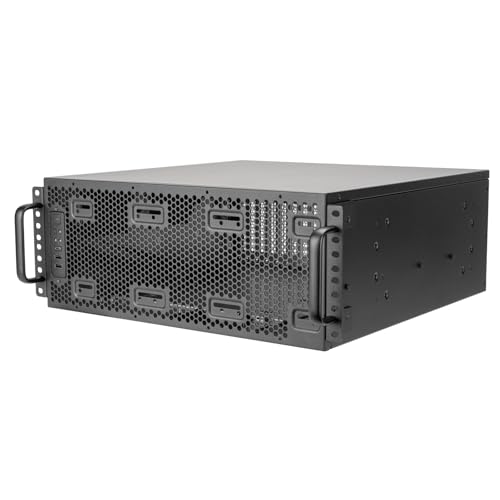
If you’re looking for a reliable and high-performance solution for your server needs, the Silverstone Technology RM4A 4U Rackmount Server Chassis stands out as an excellent choice. It supports SSI-EEB motherboards and accommodates a 360mm radiator, making it perfect for cooling high-performance components. With eight PCI expansion slots, you can easily install multiple graphics or specialized cards to enhance your system’s capabilities. The unique card retention bracket keeps your components secure, while the USB Type-C interface offers fast data transfer for efficiency. Plus, with a 1-year warranty and stellar customer reviews, you can trust your investment in this chassis.
Best For: The Silverstone Technology RM4A 4U Rackmount Server Chassis is best for users seeking a robust and adaptable solution for high-performance server installations.
Pros:
- Exceptional cooling performance with support for a 360mm radiator and dual rear fans, ensuring stable operation during heavy loads.
- Ample expansion capabilities with eight PCI slots, allowing for the installation of multiple graphics or specialized cards.
- User-friendly design featuring a USB Type-C interface for fast data transfer and a unique card retention bracket for secure component placement.
Cons:
- Limited warranty period of only 1 year, which may be shorter than some competitors.
- Size and weight may be cumbersome for some users, as it is a 4U rackmount chassis.
- Potentially higher cost compared to entry-level server chassis, which may not be suitable for budget-conscious buyers.
Rackchoice 4U Rackmount Server Chassis

The Rackchoice 4U Rackmount Server Chassis is an excellent choice for those seeking a durable and spacious solution for their server needs. With dimensions of 16.53D x 19W x 7H inches, it accommodates multiple motherboard types, offering up to 8 internal drive bays. You’ll benefit from efficient cooling thanks to three pre-installed 12cm fans and two 8cm rear fans. The chassis features seven expansion slots and ample space for a large GPU. Plus, it includes handy USB ports for connectivity. With a solid 4.1-star rating and a one-year warranty, it’s a reliable option for any server setup.
Best For: Those seeking a reliable and spacious rackmount server chassis for various motherboard types and extensive cooling options.
Pros:
- Ample drive bay configuration allowing for multiple internal drives.
- Efficient cooling with pre-installed fans to maintain optimal temperatures.
- Solid construction and good customer ratings, indicating reliability.
Cons:
- Limited return period of 30 days may not suit all buyers.
- Only supports standard ATX PS-2 power supplies, which may restrict some users.
- The weight and size may make it challenging to move or install in tight spaces.
4U Server Cabinet Case – Rackmount Server Chassis
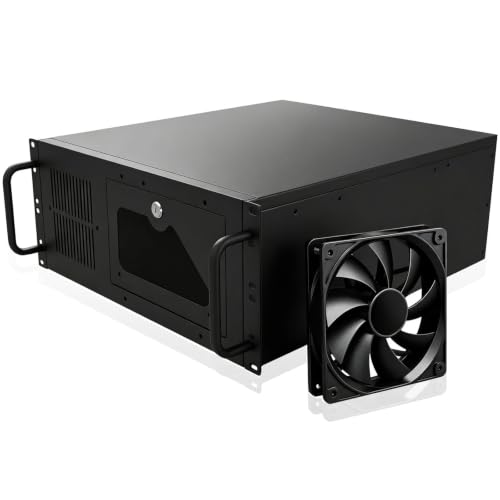
For those seeking a robust and secure solution for their server needs, the 4U Server Cabinet Case by GPERHUAN stands out with its impressive design and features. With dimensions of 17.72D x 6.97W x 16.93H inches and a weight of 7.55 kg, this black metal chassis offers efficient space utilization. It includes seven PCI slots, allowing for additional hardware or accessories. The lockable design enhances security, while the front door foam filter protects against dust. Universally mountable in standard racks, it supports various motherboard sizes. Plus, it comes with a two-year warranty for peace of mind.
Best For: Those in need of a secure and versatile rackmount solution for their server hardware.
Pros:
- Ample Expansion: Features seven PCI slots for additional hardware, enhancing versatility and functionality.
- Enhanced Security: Equipped with a lockable design to protect against unauthorized access or tampering.
- Dust Protection: Includes a front door foam filter, helping to reduce dust accumulation and prolong the chassis’s lifespan.
Cons:
- Weight: At 7.55 kg, it may be heavier than some users prefer for portability.
- Limited Compatibility: Only supports motherboards smaller than 305mm x 245mm, which may restrict options for some users.
- Restocking Fees: Return policy includes higher fees for customer misuse or tampering, which may deter potential buyers.
SilverStone RM44 4U Rackmount Server Chassis

Designed for those who demand high performance and versatility, the SilverStone RM44 4U Rackmount Server Chassis stands out with its impressive cooling capabilities, supporting up to 360mm liquid cooling radiators. With compatibility for SSI-EEB and Extended ATX motherboards, you can easily install high-end components. It accommodates graphics cards up to 424mm, ensuring peak performance. The chassis offers eight expansion slots and supports additional drives, making it perfect for various setups. You’ll appreciate the one USB Type-C port and anti-theft lock for security. With a solid 4.3-star rating, the RM44 is a reliable choice for your server needs.
Best For: Users seeking a high-performance, versatile server chassis that supports advanced cooling solutions and high-end components.
Pros:
- Supports up to 360mm liquid cooling radiators, enhancing cooling efficiency.
- Accommodates graphics cards up to 424mm, allowing for powerful hardware configurations.
- Includes USB Type-C connectivity and an anti-theft lock for added security and convenience.
Cons:
- Limited internal bays for additional drives compared to some competitors.
- Only a 1-year limited warranty, which may be shorter than some users prefer.
- Heavier and bulkier than standard desktop cases, requiring appropriate rack space.
4U Server Chassis for Data Center and Gaming
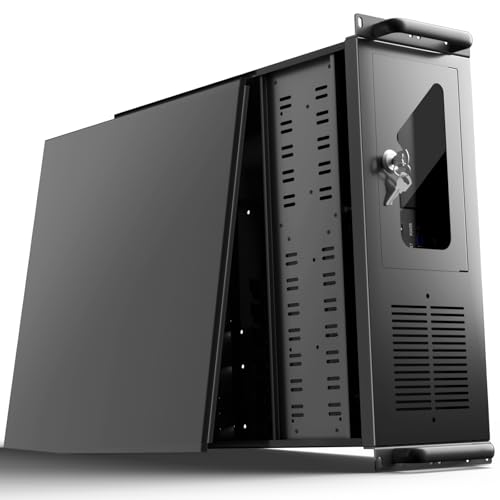
Looking for a powerful solution for your data center or gaming setup? The UTLGAMENG 4U Server Chassis delivers exceptional performance and versatility. It supports ATX, Micro-ATX, and Mini-ITX motherboards, ensuring compatibility with your preferred components. With 12 hard drive bays and 7 PCI slots, you’ll enjoy ample storage and expansion options. Security features like a key-lock mechanism protect against unauthorized access, while a dedicated side-panel air filter keeps dust at bay. Plus, with two front USB 3.0 ports, rapid data transfer is at your fingertips. This robust chassis is designed for peak performance in any demanding environment.
Best For: Data centers and gamers seeking a high-performance, versatile server chassis with ample storage and expansion capabilities.
Pros:
- Ample Storage: 12 hard drive bays for extensive data storage needs.
- Versatile Compatibility: Supports various motherboard sizes including ATX, Micro-ATX, and Mini-ITX.
- Enhanced Security: Features a key-lock mechanism to prevent unauthorized access.
Cons:
- Limited CPU Cooler Height: Maximum cooler height of 125mm may restrict some aftermarket cooling options.
- Heavy Weight: Alloy steel construction may make the chassis heavier than competitors.
- Narrow Graphics Card Space: Graphics card length is limited to 230mm unless the hard drive bay is removed.
CORSAIR 3500X RS ARGB Mid-Tower PC Case
The CORSAIR 3500X RS ARGB Mid-Tower PC Case stands out with its striking wraparound tempered glass panels, making it an excellent choice for gamers and PC builders who want to showcase their components while ensuring high-performance cooling. It features three pre-installed RS120-R ARGB fans and supports up to ten fans or a 360mm radiator for maximum airflow. With compatibility for Mini-ITX to EATX motherboards and a GPU Anti-Sag Stabilization Arm, it offers enhanced support. Removable panels simplify building and maintenance, while double-shot grommets improve cable management. Plus, it comes with a 2-year warranty for peace of mind.
Best For: Gamers and PC builders who want a stylish case with excellent cooling capabilities and ample component support.
Pros:
- High-performance cooling with three pre-installed ARGB fans and support for additional fans/radiators.
- Aesthetic design with wraparound tempered glass panels for showcasing components.
- Easy accessibility with removable panels and improved cable management features.
Cons:
- Limited color options as it only comes in black.
- May be overkill for users with minimal cooling needs or basic builds.
- Size may not be suitable for compact spaces due to its mid-tower dimensions.
Thermaltake View 600 TG Full Tower Case

If you’re seeking a case that combines style with outstanding performance, the Thermaltake View 600 TG Full Tower Case is an excellent choice. With a sleek black design and triple tempered glass panels, it showcases your components beautifully. You’ll appreciate the impressive GPU clearance of 480mm and ample space for up to ten fans, ensuring ideal cooling. The rotatable PCIe cage allows you to customize your GPU orientation easily. Plus, it supports various motherboard types and offers extra cutouts for clean cable management. Overall, this case is perfect for building a powerful, visually stunning PC.
Best For: Gamers and PC builders seeking a stylish, high-performance full tower case with excellent cooling options and customizable GPU orientation.
Pros:
- Supports up to ten fans for optimal airflow and cooling efficiency.
- Triple tempered glass panels provide a stunning view of internal components.
- Ample GPU clearance of 480mm allows for the installation of high-end graphics cards.
Cons:
- Full tower size may not fit in smaller spaces or setups.
- Riser cable for vertical GPU configuration sold separately, adding to overall cost.
- Potentially complicated cable management for beginners despite extra cutouts.
CORSAIR Frame 4500X RS ARGB Mid-Tower PC Case
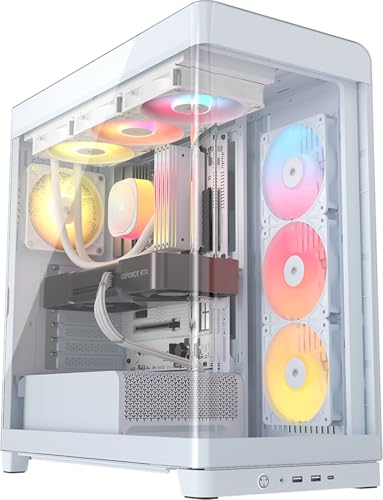
For gamers and PC enthusiasts seeking both performance and aesthetics, the CORSAIR Frame 4500X RS ARGB Mid-Tower PC Case stands out with its stunning single-piece curved glass panel that provides an unobstructed view of your build. Its cascading industrial design enhances airflow, while three pre-installed RS120R ARGB fans keep your components cool. You can customize your setup with support for various motherboard sizes and GPU clearance of up to 460mm. The InfiniRail fan mounting system offers flexible configurations, and with multiple storage options, this case is perfect for your next upgrade. Enjoy a seamless blend of style and functionality!
Best For: Gamers and PC enthusiasts looking for a stylish and customizable case that offers excellent cooling performance.
Pros:
- Stunning aesthetic: The single-piece curved glass panel offers an unobstructed view of the build.
- Excellent cooling capabilities: Comes with three pre-installed RGB fans and supports additional fan configurations.
- Versatile compatibility: Supports various motherboard sizes and has ample GPU clearance for high-end graphics cards.
Cons:
- Limited pre-installed fans: Only three fans are included, which may require additional purchases for optimal cooling.
- Size constraints: While versatile, the mid-tower design may not accommodate all larger components or custom cooling solutions.
- Potential cable management challenges: The modular design may require careful planning to ensure neat cable management.
4U Server Chassis – Rackmount Computer Enclosure (Tupavco TP1842)
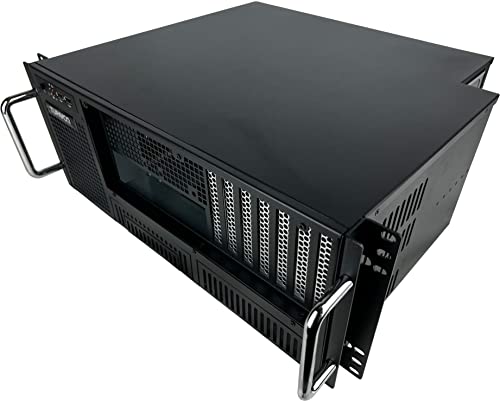
Designed with versatility in mind, the Tupavco TP1842 4U Server Chassis is an ideal choice for IT professionals and enthusiasts seeking a reliable rackmount solution. This compact enclosure fits standard 19” server racks and supports various motherboard sizes, including ATX and Mini-ITX. With a sturdy construction of heavy-duty SGCC steel and aluminum handles, it guarantees durability. You’ll appreciate the eight drive bays and seven expansion slots, which offer ample room for your components. Plus, it comes with efficient cooling options and front-accessible ports, making it a convenient addition to your setup. Enjoy peace of mind with a one-year warranty!
Best For: IT professionals and enthusiasts seeking a durable and versatile rackmount solution for their server setups.
Pros:
- Supports multiple motherboard sizes (ATX, Micro ATX, Mini-ITX) for flexibility in component selection.
- Sturdy construction with heavy-duty SGCC steel ensures longevity and reliability.
- Efficient cooling system with included fans and front-accessible ports enhances usability and performance.
Cons:
- Power supply not included, requiring additional purchase for full functionality.
- Weight of 229 ounces may make installation in racks more cumbersome.
- Customer rating of 3.9 out of 5 stars suggests mixed feedback from users.
RackChoice 4U Rackmount Server Chassis

The RackChoice 4U Rackmount Server Chassis stands out for its robust compatibility with both ATX and microATX motherboards, making it an ideal choice for users looking to build a powerful server setup. With a depth of 450mm, it provides ample space for components, including three external 5.25-inch drive bays and eight internal 3.5-inch bays. You’ll appreciate the pre-installed 12cm fan, plus the option for additional cooling. The two-door design adds security, while the zinc-coated steel construction guarantees durability. Connectivity is straightforward with two USB 3.0 ports, and it supports a standard ATX power supply for flexibility in your builds.
Best For: Users seeking a reliable and spacious chassis for building powerful server setups with ATX or microATX motherboards.
Pros:
- Robust compatibility with both ATX and microATX motherboards for versatile builds.
- Ample drive bays with three external and eight internal options for extensive storage capabilities.
- Enhanced security features with a two-door design and keylock for peace of mind.
Cons:
- Limited internal drive support as it does not accommodate 14TB+ HDDs, which may be a drawback for some users.
- Basic cooling options with only one pre-installed fan and optional smaller fans, which may require upgrades for high-performance setups.
- Zinc-coated steel construction may be heavier compared to aluminum alternatives, potentially affecting portability.
Factors to Consider When Choosing 4U Rackmount PC Cases With GPU Clearance
When choosing a 4U rackmount PC case, you’ll want to take into account several key factors to guarantee your GPU fits and performs at its best. Think about GPU size compatibility, cooling options, and how many expansion slots you need. Also, pay attention to the drive bay configuration and the overall material and build quality to get the best value for your setup.
GPU Size Compatibility
Selecting a 4U rackmount PC case that fits your GPU is essential for best performance. Start by checking the maximum GPU length supported; some cases can hold graphics cards up to 424mm, while others have shorter limits. Make sure the GPU clearance allows for effective airflow, as larger GPUs can obstruct airflow paths. Pay attention to the internal layout, since certain designs may restrict space with drive bays or other components. Look for cases with removable drive bays or adjustable mounting options to create additional space for longer GPUs. Finally, verify compatibility with your specific GPU model, especially for high-performance cards that might have unique dimensions or cooling needs.
Cooling Options Available
Cooling options play an essential role in maintaining the performance and longevity of your components within a 4U rackmount PC case. Many of these cases support large cooling solutions, like 360mm liquid cooling radiators, ensuring ideal temperatures for high-performance parts. Additionally, multiple pre-installed fans, such as three 12cm fans or extra rear fans, enhance airflow and heat dissipation. Some models come with dust filters to reduce dust buildup, which can hamper cooling efficiency. The internal architecture is typically designed for excellent airflow, with strategic fan mounting points and space for extra cooling accessories. With compatibility for various cooling methods, you can easily customize your setup to meet your thermal management needs.
Expansion Slot Count
Understanding the expansion slot count is essential for anyone looking to optimize their 4U rackmount PC case. Most models offer between 7 to 8 PCI expansion slots, which can greatly impact your system’s performance. A higher expansion slot count provides the flexibility to accommodate multiple graphics cards or specialized peripherals, making it ideal for gaming, data processing, or multi-GPU setups. If you’re aiming for high performance, look for cases with at least 8 slots to support extensive upgrades and customization. Additionally, having extra slots is great for future-proofing your build, allowing you to easily add new technologies. Just verify that the slots are compatible with the size of your intended graphics cards or peripherals.
Drive Bay Configuration
When you’re setting up a 4U rackmount PC case, the drive bay configuration plays a significant role in your overall build. You’ll typically find a mix of internal and external bays, accommodating various storage options like 3.5-inch and 2.5-inch drives. Many 4U chassis support multiple configurations, such as eight internal 3.5-inch bays, catering to different storage needs. Keep in mind that the arrangement of these bays can affect airflow and cooling efficiency; densely packed drives may restrict airflow to essential components. It’s also important to guarantee the drive bay setup doesn’t interfere with GPU clearance. Larger graphics cards often require extra space, so plan your layout carefully for peak performance.
Material and Build Quality
Choosing the right material and build quality for your 4U rackmount PC case is essential, especially if you want to guarantee peak GPU performance. Look for cases made from heavy-duty steel or metal, as these materials guarantee durability and protect your components during transport and operation. A reinforced chassis design minimizes vibrations that can affect your GPU’s performance. Opt for thicker gauge steel for better heat dissipation and to reduce the risk of flexing or warping over time. High-quality finishes like powder coating or anodizing not only enhance aesthetics but also protect against corrosion. Additionally, verify your case includes proper ventilation and cooling features to maintain peak temperatures, especially during heavy loads.
Security Features Included
While considering material and build quality for your 4U rackmount PC case, don’t overlook the importance of security features. Many cases come equipped with robust mechanisms, like key locks, to safeguard against unauthorized access and tampering. Look for anti-theft locks integrated into the chassis design, which add an extra layer of protection for your valuable components and data. Some models even include front door locks with foam filters, minimizing dust while enhancing security. Additionally, sliding rail mounting holes can facilitate secure installation and deter theft during transport. Enhanced features, such as aluminum front bezels with security key locks, contribute to a more secure operating environment, ensuring your equipment remains safe and operational.
Connectivity Options Provided
The connectivity options your 4U rackmount PC case provides can greatly enhance your overall user experience, especially when it comes to usability and accessibility. Look for cases with multiple USB ports, including USB 3.0 and USB Type-C, to guarantee high-speed data transfer. Ideally, you want at least two USB 3.0 ports along with additional USB 2.0 options for enhanced connectivity. Consider the placement of these ports; front-mounted options offer easier access for daily use compared to rear-mounted ones. Additionally, cases with audio jacks, power/reset switches, and key-lock mechanisms not only boost functionality but also enhance security. Evaluating the total number of connectivity options can make a significant difference in various environments.
