
When it comes to building or upgrading your PC, choosing the right case is essential. The 10 best 4U PC cases with front I/O options offer a perfect mix of accessibility and style. They not only enhance your workspace but also guarantee efficient performance. With various features to take into account, finding the right fit for your needs can be challenging. Let’s explore what these top contenders have to offer and what factors you should keep in mind.
Rosewill 4U Server Chassis (RSV-R4000U)

If you’re in the market for a reliable server chassis that balances performance and security, the Rosewill 4U Server Chassis (RSV-R4000U) is an excellent choice. It features eight internal 3.5” HDD bays and space for three additional 5.25” devices, accommodating your storage needs. With dimensions of 21″ deep, it supports ATX and CEB motherboards while offering seven PCI expansion slots for future upgrades. The cooling system includes four pre-installed fans, ensuring peak airflow and heat protection. Plus, the built-in front panel lock enhances security, while LED indicators keep you informed of power, HDD, and LAN status.
Best For: The Rosewill 4U Server Chassis (RSV-R4000U) is best for small to medium-sized businesses looking for a secure and efficient server solution with ample storage options.
Pros:
- Excellent airflow and heat protection due to the four pre-installed cooling fans.
- Ample storage capacity with eight internal 3.5” HDD bays and three additional 5.25” device slots.
- Built-in front panel lock provides enhanced security for sensitive server components.
Cons:
- The 21″ depth may require more space compared to smaller server chassis options.
- Limited to ATX and CEB motherboard compatibility which may restrict options for some users.
- The noise level, while reduced, may still be higher than desired in quiet environments due to multiple cooling fans.
Rosewill 4U Server Chassis Rackmount Case (RSV-R4100U)

The Rosewill 4U Server Chassis Rackmount Case (RSV-R4100U) stands out as an excellent choice for anyone needing robust server capabilities in a compact design. It supports ATX and CEB motherboards, offering seven 3.5” HDD bays and two 5.25” device bays for ample storage. With three pre-installed fans, including a 120mm PWM front fan, it guarantees peak airflow and minimal noise. You’ll appreciate the LED indicators for power and HDD monitoring on the front panel, along with two USB 3.0 ports for your connectivity needs. Plus, the built-in front panel lock provides an extra layer of security.
Best For: The Rosewill 4U Server Chassis is best for users seeking a reliable and expandable solution for server applications in a compact rackmount design.
Pros:
- Excellent airflow and cooling efficiency with three pre-installed fans.
- Ample storage options with seven 3.5” HDD bays and two 5.25” device bays.
- Built-in front panel lock enhances security for sensitive components.
Cons:
- Limited to 4U form factor, which may not fit all server environments.
- Requires additional cooling solutions for high-performance components.
- The design may be considered bulky for users with space constraints.
4U Server Chassis – Rackmount Computer Enclosure
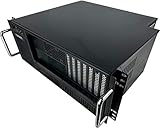
For those seeking a reliable and compact solution for their server needs, the Tupavco TP1842 4U Server Chassis stands out as a top choice. With a depth of just 15 inches, this rackmount enclosure supports ATX, Micro ATX, and Mini-ITX motherboards. It features seven full-height expansion slots and eight drive bays, ensuring ample storage options. The sturdy SGCC steel and aluminum construction guarantees durability, while the front I/O access facilitates easy connectivity. You’ll appreciate the included cooling fans and USB ports, making this chassis both functional and stylish for your server setup. No assembly is required—just mount it and go!
Best For: Those looking for a compact and durable server chassis that supports various motherboard sizes and offers ample expansion options.
Pros:
- Sturdy construction: Made from heavy-duty SGCC steel and aluminum for enhanced durability.
- Ample storage: Features eight drive bays and seven expansion slots for significant storage and upgrade potential.
- Easy connectivity: Front I/O access with USB ports and included cooling fans for convenience.
Cons:
- Limited power supply compatibility: Requires a PS-2 ATX or mini-redundant PSU, which are not included.
- Weight: At 14.31 pounds, it may be heavier than some other compact server chassis options.
- Customer rating: Holds a moderate rating of 3.8 out of 5 stars, indicating mixed customer feedback.
Rackchoice 4U Rackmount Server Chassis

Designed with versatility in mind, the Rackchoice 4U Rackmount Server Chassis is perfect for those needing robust support for multiple motherboard sizes, including EATX, ATX, and Micro ATX. With dimensions of 16.53″ x 19″ x 7″, it weighs 22.6 pounds and features internal drive bays for 4×3.5″ or 2×2.5″ drives. Cooling is efficient, thanks to three pre-installed 12cm front fans and two 8cm rear fans. You’ll also enjoy seven expansion slots and multiple USB ports for connectivity. Rated 4.1 out of 5 stars, this chassis combines functionality and style, making it a top choice for server setups.
Best For: Those seeking a versatile and robust server chassis that supports multiple motherboard sizes and offers efficient cooling options.
Pros:
- Ample expansion options with seven full-height slots for additional hardware.
- Efficient cooling system featuring three pre-installed 12cm front fans and two 8cm rear fans.
- Versatile compatibility with various motherboard sizes including EATX, ATX, Micro ATX, and Mini-ITX.
Cons:
- Relatively heavy at 22.6 pounds, which may affect portability.
- Standard ATX power supply required, which may limit options for specialized setups.
- Higher restocking fees for returns due to misrepresented conditions or customer misuse.
4U Rackmount Server Chassis with 15x 3.5 HDD Bays

If you’re in the market for a powerful and spacious server chassis, the RackOwl 4U Server Chassis stands out with its ability to accommodate up to 15 internal 3.5 HDD bays. Its sturdy black and silver design, coupled with dimensions of 21.1″ x 16.8″ x 7.0″, guarantees durability without sacrificing space. Equipped with 5 pre-installed fans for optimal cooling, this chassis keeps your components running smoothly. Plus, the front panel lock secures your data, while the dust filter maintains cleanliness. With 2 USB 2.0 ports and LED indicators, you’ll enjoy both accessibility and efficient monitoring.
Best For: Those seeking a reliable and spacious server chassis for high-capacity storage and efficient cooling.
Pros:
- Ample Storage: Supports up to 15 internal 3.5 HDD bays, providing extensive data storage options.
- Effective Cooling: Comes with 5 pre-installed fans to ensure optimal airflow and prevent overheating.
- Security Features: Includes a front panel lock and dust filter for enhanced data protection and system cleanliness.
Cons:
- Weight: At 30.6 pounds, it may be heavier than some users prefer for easy handling.
- Limited USB Ports: Only 2 x USB 2.0 ports may not suffice for users needing extensive connectivity.
- Size: The dimensions could be too large for smaller server racks or constrained spaces.
4U Server Cabinet Case – Rackmount Server Chassis

The 4U Server Cabinet Case stands out as the ideal choice for professionals needing a secure and efficient storage solution for their server hardware. With its lockable design, you can protect your valuable components from tampering or theft. The case features a combined internal architecture, offering 7 PCI slots for seamless expansion of your hardware and accessories. Plus, the front door foam filter minimizes dust inflow, ensuring your equipment lasts longer. Universally mountable in standard server racks, it supports ATX, M-ATX, and Mini-ITX motherboards, making it a versatile option for any setup.
Best For: Professionals seeking a secure and efficient storage solution for their server hardware.
Pros:
- Lockable design enhances security against tampering and theft.
- Ample PCI slots allow for extensive hardware expansion and customization.
- Dust filter prolongs the life of components by minimizing dust inflow.
Cons:
- Limited to specific motherboard sizes, which may not accommodate all setups.
- Requires standard server rack for installation, limiting placement options.
- Additional weight may be a concern for some users during transport or installation.
4U Server Case Rack Mount Chassis with 8 HDD Bays

For those seeking a reliable and spacious solution for their home lab or NAS setup, the 4U Server Case Rack Mount Chassis with 8 HDD bays stands out as an excellent choice. It features seven 3.5” and two 5.25” bays, ensuring ample storage for your needs. With a lockable design for security and a front door foam filter to keep dust at bay, your components will enjoy a longer lifespan. Constructed from high-quality SGCC-Steel, it’s both durable and comfortable to handle. Plus, its compatibility with various motherboard sizes and PCI slots allows for easy expansion in any standard server rack.
Best For: This product is best for individuals looking to set up a robust home lab or NAS system that requires significant storage capacity and expandability.
Pros:
- Ample Storage: Offers 8 HDD bays (7 x 3.5” + 2 x 5.25”) for extensive data storage.
- Durable Construction: Made from high-quality SGCC-Steel, ensuring longevity and stability.
- Enhanced Security: Features a lockable design and a foam filter to minimize dust and prolong component life.
Cons:
- Weight: At 9kg (20 lbs), it may be cumbersome for some users to handle.
- Limited Fan Included: Only one 120mm fan is pre-installed, with additional fans needing to be purchased separately.
- Basic USB Ports: Only dual USB 2.0 connectors are available on the front panel, which may be insufficient for some users.
Antec VSK4000E-U3_US Black SGCC Steel ATX Mid Tower Computer Case
Looking for a reliable and stylish case to house your gaming or workstation setup? The Antec VSK4000E-U3_US is an excellent choice, featuring a sleek black SGCC steel design. With dimensions of 17.3 x 7.3 x 16.2 inches and weighing just 10.88 pounds, it’s easy to fit into your space. You’ll appreciate its connectivity options, including 2 USB 2.0 and 2 USB 3.0 ports, plus audio in/out. With room for 3 external 5.25” drives and 5 internal 3.5” drives, it’s versatile too. Customers rate it 4.2 out of 5 stars, making it a trusted option for your needs.
Best For: Gamers and professionals seeking a stylish and functional mid-tower computer case with ample storage options.
Pros:
- Spacious Design: Accommodates multiple drives with 3 external 5.25” bays and 5 internal 3.5” bays.
- Connectivity Options: Features 2 USB 2.0 and 2 USB 3.0 ports, along with audio in/out ports for easy access.
- Durable Build: Constructed from SGCC steel, ensuring durability and a sleek appearance.
Cons:
- Weight: At 10.88 pounds, it may be heavier compared to other cases in its class.
- Limited Cooling Options: May require additional cooling solutions for high-performance builds due to its design.
- Return Fees: A 15% restocking fee applies for misrepresented returns, which could be a drawback for some buyers.
4U Rackmount Server Chassis with 8 HDD Bays and 3 5.25 Device Slots

Engineered for professionals needing robust storage solutions, the 4U Rackmount Server Chassis boasts an impressive capacity for up to 10 x 3.5-inch HDDs and 3 x 5.25-inch devices. With dimensions of 16.8 x 7.0 x 25.0 inches and a weight of 37.2 pounds, its silver and black design fits seamlessly into any setup. You’ll appreciate the excellent cooling performance offered by its multiple fans, ensuring quiet operation. Plus, the front panel lock adds an extra layer of security for your components. With 2 USB 2.0 ports and a 30-day return policy, this chassis delivers both functionality and peace of mind.
Best For: Professionals and businesses seeking a reliable and spacious server chassis for storage and organization.
Pros:
- Spacious Design: Accommodates up to 10 x 3.5-inch HDDs and 3 x 5.25-inch devices for ample storage capacity.
- Efficient Cooling: Equipped with multiple fans for excellent airflow and quiet operation, ensuring optimal performance.
- Enhanced Security: Features a front panel lock and dust filter to protect components and maintain cleanliness.
Cons:
- Weight: At 37.2 pounds, it may be cumbersome to install or transport.
- Limited USB Ports: Only 2 x USB 2.0 ports may be insufficient for users with multiple peripherals.
- Size Constraints: The 4U form factor may not fit in all rack environments, limiting placement options.
4U Rackmount Server Chassis with Multiple Front Bays

The 4U Rackmount Server Chassis stands out with its multiple front bays, making it an excellent choice for those who need ample storage for media or NAS setups. With six external 5.25-inch bays, plus one internal 3.5-inch and four 2.5-inch bays, you can easily expand your storage. However, be prepared for a bit of a learning curve; the drive bay layout can be confusing, and some users found the doors difficult to open. On the bright side, its sturdy aluminum and steel construction guarantees durability, making it a solid option for budget builds despite minor usability concerns.
Best For: Those seeking a cost-effective and expandable server chassis for media storage or budget NAS builds.
Pros:
- Sturdy aluminum and steel construction ensures durability.
- Ample storage options with multiple external and internal drive bays.
- Cost-effective solution for budget-conscious users.
Cons:
- Confusing drive bay layout may lead to installation challenges.
- Doors can be difficult to open, requiring potential modifications.
- Sharp edges inside the case may pose safety concerns.
Factors to Consider When Choosing 4U PC Cases With Front IO
When you’re choosing a 4U PC case with front I/O, you need to take into account several key factors. Think about the efficiency of the cooling system, the configuration of drive bays, and the availability of expansion slots. Don’t forget to check the security features and the quality of the build materials, as these will impact your overall experience.
Cooling System Efficiency
Choosing a 4U PC case with an efficient cooling system is essential for maintaining ideal performance, especially if you want to prevent overheating. Effective cooling systems are vital, as overheating can lead to hardware failure and reduced performance. Look for cases that come with pre-installed fans, which usually feature a mix of larger front fans and smaller rear fans for best airflow. Larger fans, like 120mm, move more air at lower noise levels compared to smaller ones. Additionally, cases with extra fan mounting options allow you to customize your cooling solutions based on your needs, enhancing thermal performance. Monitoring features, such as front panel LED indicators for temperature and fan status, give you real-time feedback on cooling efficiency, helping manage heat levels proactively.
Drive Bay Configuration
Selecting the right drive bay configuration is essential for maximizing storage and expandability in your 4U PC case. When you evaluate options, consider the number and type of drive bays available. Many 4U cases feature seven internal 3.5” HDD bays, perfect for applications needing extensive data storage. If you want to add optical drives or cooling solutions, look for models with 5.25” device bays—this enhances versatility. Additionally, pay attention to the layout of the drive bays, as it can impact airflow and cooling efficiency. Confirm your selected case is compatible with various motherboard sizes, such as ATX or CEB, to guarantee all components fit and function properly within the chassis.
Expansion Slot Availability
A critical factor in your 4U PC case decision is the availability of expansion slots. Look for cases that typically offer seven full-height PCI slots to accommodate crucial add-on cards like graphics cards and network interfaces. Some cases even allow for vertical GPU mounting or provide specialized slots for hardware like RAID controllers. Don’t overlook the layout; easy access to these slots can simplify upgrades and replacements without needing to disassemble the entire system. Verify compatibility with your motherboard form factors, such as ATX or CEB, for a proper fit. Finally, consider the cooling potential around the expansion slots, as good airflow is essential for keeping your high-performance components at ideal temperatures.
Security Features Included
When considering the right 4U PC case, security features play a significant role in safeguarding your components. Look for cases with built-in front panel locks; they enhance security by preventing unauthorized access. Lockable doors or panels deter theft and tampering, protecting your sensitive hardware. Additionally, cases with dust filters not only keep your internal components clean but also reduce damage risks from dust accumulation. LED indicators on the front panel provide real-time updates on power and hard drive activity, allowing you to monitor your system while maintaining security. Finally, a well-designed layout with robust construction materials can resist physical breaches, ensuring your valuable components remain secure and protected within the case.
Build Material Quality
Choosing the right build material for your 4U PC case can make a significant difference in the overall performance and longevity of your system. Opt for SGCC steel for its strength and resistance to physical damage. If weight and thermal efficiency matter, high-quality aluminum is an excellent choice, enhancing cooling for your components. Look for cases with thicker metal gauges, like 1.0 mm or 1.2 mm steel, to guarantee sturdiness in demanding environments. Denser materials also help dampen vibrations, reducing noise from internal fans. Additionally, cases with integrated dust filters in the front panel make maintenance easier, preventing dust buildup and extending the life of your internal components. Select wisely to guarantee peak performance and durability.
Compatibility With Motherboards
Ensuring compatibility with your motherboard is essential for a successful build when selecting a 4U PC case. First, check that the case supports the motherboard size you plan to use, as most 4U cases fit ATX, Micro ATX, and Mini-ITX motherboards. Pay attention to specific dimensions; some cases accommodate EEB, CEB, and standard ATX configurations. Also, consider the number of PCI expansion slots, which can limit your ability to install additional components alongside the motherboard. Make sure the mounting points align with the case specifications to avoid installation issues. Finally, review the internal layout, since some designs might restrict access to certain motherboard features or require extra space for larger components.
Connectivity Options Offered
In the world of 4U PC cases, connectivity options can make or break your experience. Look for cases with multiple USB ports, ideally featuring 2 x USB 3.0 for faster data transfer. Front I/O access to PCI cards is essential, making it easier to install or maintain expansion cards without hassle. If you’re into multimedia, consider cases that include audio ports for direct connections to your devices. LED indicators on the front panel are handy for quickly checking power, HDD, and LAN status. Finally, features like dust filters and lockable designs not only enhance usability but also provide security for your connected peripherals. Prioritizing these options will guarantee you get the most out of your 4U PC case.
