
Choosing the right monitor can make remote work feel faster, cleaner, and far less tiring. A sharp 4K display gives you more screen space, better text clarity, and a more comfortable all-day viewing experience.
Below, we focus on 4K computer monitors for remote work that balance resolution, ergonomics, connectivity, and value for real home-office use.
Best 10 4K Computer Monitors for Remote Work Picks for 2026
Value-Packed Creator Pick
LG 27US500-W 27-Inch 4K IPS Monitor

- 4K UHD with 1000:1 contrast ratio
- IPS panel with wide viewing angles
- Onscreen Control for split-screen workspace management
Best For: Remote workers who want a balanced 27-inch 4K display with useful image and workspace controls.
Premium Office Choice
Dell UltraSharp U2723QE 27-Inch 4K Monitor

- 27-inch display with 3840 x 2160 resolution
- UltraSharp line aimed at productivity use
- Simple option for a 4K desktop setup
Best For: Remote professionals who want a straightforward 27-inch 4K monitor from a premium office lineup.
Feature-Rich Productivity Pick
Samsung ViewFinity S7 27-Inch 4K Monitor

- 4K UHD with high pixel density
- HDR10 and 178° wide viewing angle
- Display Manager with split screen, KVM, and PIP/PBP
Best For: Remote workers who want built-in productivity features and a sharp 27-inch 4K screen.
Clean Desk Essential
Dell P2723QE 27-Inch 4K Monitor Bundle

- 27-inch 4K UHD monitor for a sharp desktop
- Bundle format may simplify setup
- Practical Dell P-series office monitor
Best For: Remote workers who want a basic 27-inch 4K Dell monitor bundle for office use.
Premium 4K USB-C Pick

- 4K IPS panel with 99% sRGB color
- USB-C with up to 65W power delivery
- 120Hz refresh and ComfortView Plus
Best For: Remote workers who want a premium USB-C 4K monitor
Best Budget-Friendly Productivity Option

- 27-inch 4K IPS panel with 95% DCI-P3
- DisplayHDR 400 and Reader Mode support
- Height, tilt, and pivot adjustments
Best For: Remote workers seeking value and ergonomic flexibility
Simple Reliable 4K Office Monitor
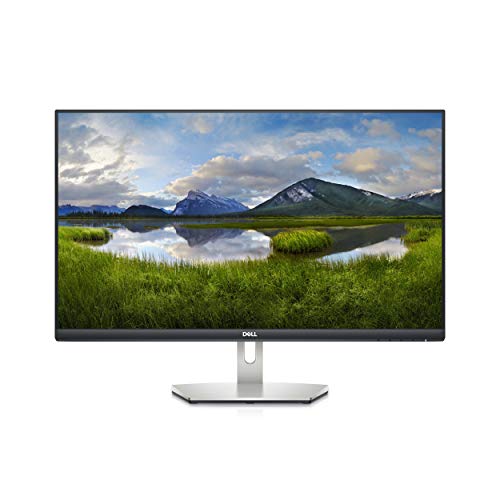
- 27-inch 4K IPS display with thin bezels
- AMD FreeSync and flexible video inputs
- VESA support for desk setup flexibility
Best For: Remote workers who prefer a simple, dependable 4K display
Editor Pick
LG 27US550-W 27-inch 4K UltraFine IPS Monitor

- 4K UHD IPS panel with HDR10
- Up to 90% DCI-P3 color gamut
- Switch app splits screen into up to 6 sections
Best For: Remote workers who want a color-rich 4K display with easy multitasking.
Business Favorite
ASUS 27-inch 4K Business Monitor with Ergonomics

- 27-inch 4K IPS display with HDR-10
- Dual HDMI, DisplayPort, and USB hub
- Tilt, swivel, pivot, and height adjustments
Best For: Remote professionals who want a business-oriented 4K monitor with flexible connectivity and comfort features.
Value-Packed Creator Pick – LG 27US500-W 27-Inch 4K IPS Monitor
If you want one of the more versatile 4K computer monitors for remote work, the LG 27US500-W leans into sharp UHD detail, wide viewing angles, and easy workspace tweaks. It is a practical fit for everyday productivity, especially if you want clear text, strong color, and a clean desk-friendly design.
Best For: Remote workers who want a balanced 27-inch 4K display with useful image and workspace controls.
Pros:
- 4K UHD resolution with a 1000:1 contrast ratio for deeper blacks and vivid colors.
- IPS panel with wide viewing angles for clear visibility from different positions.
- HDR10 support with up to 90% DCI-P3 color gamut expression.
- Onscreen Control lets you split the display and adjust settings with a few clicks.
Cons:
- No built-in speakers or webcam are listed in the supplied notes.
- The notes do not mention USB-C connectivity.
This is a straightforward productivity monitor that emphasizes clarity, color, and convenience over extras. For remote work, that combination makes it easy to organize windows and keep content readable throughout the day.
Premium Office Choice – Dell UltraSharp U2723QE 27-Inch 4K Monitor
Dell UltraSharp U2723QE - LED Monitor - 27-3840 x 2160 4K :: U2723QE (Monitors > Monitors)
Check Price On AmazonThe Dell UltraSharp U2723QE is an easy monitor to consider when comparing 4K computer monitors for remote work, especially if you want a polished 27-inch 4K option from Dell’s UltraSharp line. While the supplied notes are minimal, the listed 3840 x 2160 resolution makes it a clear fit for users focused on sharp desktop space and everyday productivity.
Best For: Remote professionals who want a straightforward 27-inch 4K monitor from a premium office lineup.
Pros:
- 27-inch display with 3840 x 2160 4K resolution.
- UltraSharp positioning suggests a productivity-focused monitor.
- Simple, direct model designation for buyers comparing Dell office displays.
Cons:
- The supplied notes do not list connectivity, stand adjustments, or image features.
- Limited detail makes it harder to compare against feature-rich alternatives.
If you already know you want a Dell UltraSharp 4K work monitor, this model keeps the decision simple. It stands out mainly for its 27-inch UHD format, which is the core requirement for a clean remote-work setup.
Feature-Rich Productivity Pick – Samsung ViewFinity S7 27-Inch 4K Monitor
The Samsung 27″ ViewFinity S7 is built for productivity, making it a strong option to review among 4K computer monitors for remote work. Its 4K UHD panel, HDR10 support, wide viewing angles, and multiple workspace tools make it a practical choice if you spend most of the day juggling documents, meetings, and split-screen workflows.
Best For: Remote workers who want built-in productivity features and a sharp 27-inch 4K screen.
Pros:
- 4K UHD resolution with high pixel density for detailed visuals.
- HDR10 support helps optimize contrast with darker blacks and brighter highlights.
- 178° wide viewing angle keeps brightness consistent across the screen.
- Samsung Display Manager adds split screen, KVM, PIP/PBP, and calibration tools.
Cons:
- No panel type or stand adjustment details are included in the supplied notes.
- The feature set may be more than casual users need.
This model stands out by offering more than just sharp resolution; it also bundles useful management tools for multitasking. For remote work, that can translate into a cleaner workflow and less time spent rearranging windows.
Clean Desk Essential – Dell P2723QE 27-Inch 4K Monitor Bundle
Dell P2723QE 27" 4K UHD Monitor (Black/Silver) Bundle | For Home & Office | 3840 x 2160
Check Price On AmazonThe Dell P2723QE is a sensible choice for buyers narrowing down 4K computer monitors for remote work and wanting a 27-inch UHD setup from Dell. The supplied listing is brief, but the bundle format and 4K desktop resolution point to a straightforward productivity monitor built around a familiar office size.
Best For: Remote workers who want a basic 27-inch 4K Dell monitor bundle for office use.
Pros:
- 27-inch 4K UHD monitor for a roomy, sharp desktop workspace.
- Bundle format may be convenient for getting set up quickly.
- Dell P-series naming fits a practical office-monitor category.
Cons:
- No feature details are provided in the supplied notes.
- Connectivity, stand flexibility, and image extras are not specified.
If you want a simple Dell 4K monitor bundle and do not need a long feature checklist, this model keeps the focus on the basics. It is best viewed as a no-frills remote-work display where the main value is the 27-inch UHD format.
Premium 4K USB-C Pick – Dell 27 S2725QC
If you want one of the more polished 4K computer monitors for remote work, the Dell S2725QC combines sharp 4K detail, a USB-C setup, and a fast 120Hz panel in a desk-friendly 27-inch size. It’s a strong fit when you want clear text, comfortable all-day viewing, and a cleaner single-cable connection for a laptop.
Best For: Remote workers who want a premium-feeling USB-C monitor with strong color, smooth motion, and built-in ergonomics.
Pros:
- 4K IPS panel with 99% sRGB for crisp text and vivid color
- USB-C connectivity with up to 65W power delivery helps reduce cable clutter
- ComfortView Plus reduces harmful blue light emissions by up to 35%
- 120Hz refresh rate and FreeSync Premium add extra smoothness for work and downtime
Cons:
- Only 27 inches, so it may feel compact if you prefer a very large workspace
- Built-in speakers are mentioned, but external audio may still be preferable for better sound
- Premium feature set may be more than you need for basic office tasks
Overall, this Dell is the most feature-rich option in the group for remote work, especially if you value USB-C simplicity and a more modern, fluid display. It balances productivity comfort and display quality better than a basic 60Hz office panel.
Best Budget-Friendly Productivity Option – LG 27UP650K-W
The LG 27UP650K-W is a practical choice among 4K computer monitors for remote work if you want sharp UHD resolution without moving up to a premium USB-C model. Its IPS panel, HDR support, and adjustable stand make it a straightforward pick for everyday office use, video calls, and side-by-side multitasking.
Best For: Remote workers who want a dependable 4K monitor with adjustable ergonomics and a strong value focus.
Pros:
- 27-inch 4K IPS display with up to 95% DCI-P3 color gamut
- DisplayHDR 400 support adds more dynamic range than standard office monitors
- Height, tilt, and pivot adjustments help dial in a comfortable setup
- Reader Mode and Flicker Safe are useful for long work sessions
Cons:
- 60Hz refresh rate is more basic than faster productivity-oriented panels
- Only 5ms response time, so it’s less suited to users chasing snappier motion
- No USB-C power delivery, so laptop users may need more cables
This LG makes sense when you want a capable 4K work monitor with good color and ergonomic flexibility, but don’t need premium connectivity. It’s a sensible middle-ground option for a remote office setup.
Simple Reliable 4K Office Monitor – Dell S2721Q
The Dell S2721Q is a straightforward 27-inch 4K monitor that fits remote work setups where you mainly want sharp resolution, an IPS viewing experience, and a clean thin-bezel design. Based on the supplied details, it keeps the focus on the essentials: UHD clarity, broad viewing angles, and flexible connectivity for a tidy desk.
Best For: Remote workers who want a no-fuss 4K monitor with a clean design and dependable core features.
Pros:
- 27-inch 4K UHD IPS panel for crisp everyday productivity
- Ultra-thin bezel design gives it a modern look on a home office desk
- AMD FreeSync support adds smoother motion when needed
- HDMI, DisplayPort, and VESA support offer flexible setup options
Cons:
- No detailed feature notes were supplied, so advanced extras are unclear
- Not enough provided information to confirm USB-C or built-in ergonomics
- May be less feature-packed than newer 4K monitors aimed at remote work
If you want a reliable 4K screen without a long feature list to sort through, this Dell is the most uncomplicated pick here. It’s best viewed as a clean, functional monitor for standard remote-work tasks.
Editor Pick – LG 27US550-W 27-inch 4K UltraFine IPS Monitor
If you want a polished option among 4K computer monitors for remote work, the LG 27US550-W focuses on clarity, color, and flexibility. Its 27-inch 4K UHD IPS panel, HDR10 support, and wide viewing angles make it a strong fit for spreadsheet-heavy days, design review, and long video calls.
Best For: Remote workers who want a color-rich 4K display with easy multitasking and ergonomic adjustments.
Pros:
- 4K UHD IPS panel for sharp text and detailed visuals
- Up to 90% DCI-P3 color gamut with HDR10 support
- Switch app can split the screen into up to 6 sections
- Tilt, height, swivel, and pivot adjustments for flexible setup
Cons:
- No built-in speakers are listed in the supplied notes
- Best suited to productivity and media, not high-refresh gaming
Overall, this LG monitor stands out for remote work setups that benefit from sharp 4K detail and easier window management. The ergonomic stand and multitasking software make it practical for keeping work organized across a long day.
Budget-Friendly Pick – Sceptre 27-inch 4K IPS Monitor with Speakers
The Sceptre Prime is a practical choice if you want one of the more affordable 4K computer monitors for remote work without giving up screen sharpness. Its 27-inch 4K IPS panel, matte finish, and 100% sRGB coverage aim to deliver clean visuals for daily productivity, while the built-in speakers and multiple ports add convenience.
Best For: Remote workers looking for a straightforward 4K monitor with solid color and simple connectivity.
Pros:
- 4K UHD resolution on a 27-inch IPS panel
- 100% sRGB and matte screen finish for cleaner-looking desktop use
- DisplayPort and HDMI connectivity with built-in speakers
- Up to 70+Hz refresh rate and blue light filter
Cons:
- No ergonomic stand adjustments are highlighted in the supplied notes
- 1-year warranty is shorter than some business-focused options
For remote work, this Sceptre monitor is best viewed as a value play: it gives you the 4K workspace you need, plus convenient extras like speakers and a matte panel. If you want a no-fuss setup, it covers the basics well.
Business Favorite – ASUS 27-inch 4K Business Monitor with Ergonomics
The ASUS VA27UQSB is built with office use in mind, making it a strong contender among 4K computer monitors for remote work. You get a 27-inch 4K IPS panel, dual HDMI, DisplayPort, and a USB hub, plus ergonomic adjustments that help you dial in a comfortable desk setup for long sessions.
Best For: Remote professionals who want a business-oriented 4K monitor with flexible connectivity and comfort features.
Pros:
- 27-inch 4K UHD IPS display with 178° wide viewing angles
- Dual HDMI, DisplayPort, and USB hub for flexible connections
- Ergonomic tilt, swivel, pivot, and height adjustments
- HDR-10 support, Eye Care features, and 3-year warranty
Cons:
- 60Hz refresh rate is geared more toward office use than fast motion
- Supplied notes list a native resolution entry that appears inconsistent with the 4K spec
As a remote-work monitor, the ASUS stands out for comfort and day-to-day practicality. The combination of ergonomic adjustment, multiple ports, and a 3-year warranty makes it especially appealing for a home office that needs to stay efficient.
How We Picked the Best 4K Computer Monitors for Remote Work
For this roundup of 4K Computer Monitors for Remote Work, we prioritized models that make everyday productivity easier: crisp 27-inch 4K panels, strong text rendering, practical stand adjustments, and reliable USB-C, HDMI, or DisplayPort options. We also favored monitors with eye-comfort features, broad color coverage, and good on-desk flexibility for mixed work setups.
Quick Comparison
Most buyers will be choosing between a straightforward 60Hz productivity monitor, a premium office display with stronger ergonomics and better ports, or a newer 4K model with a higher refresh rate for smoother scrolling and occasional light creative work. If your day is mostly documents, video calls, spreadsheets, and browser tabs, a well-calibrated 27-inch 4K monitor is usually the sweet spot.
Key Buying Factors for 4K Computer Monitors for Remote Work
Screen Size and Sharpness
At 27 inches, 4K resolution delivers excellent pixel density and makes text look clean without needing a huge desk. Larger screens can work well too, but they may require more scaling and more physical space.
Ergonomics
Height, tilt, swivel, and pivot adjustments matter more than many shoppers expect. A monitor that fits your posture reduces neck strain during long workdays.
Connectivity
Look for the ports that match your laptop and dock setup. USB-C is especially convenient for single-cable charging and display connection, while HDMI and DisplayPort remain important for desktops and multi-device use.
Panel Quality and Comfort
IPS panels are a strong fit for remote work because they offer wide viewing angles and generally better all-around image consistency. Eye-care features like flicker reduction, low blue light modes, and anti-glare coatings can also help during long sessions.
Refresh Rate and Extras
A 60Hz display is enough for office work, but 120Hz can make scrolling feel noticeably smoother. Built-in speakers, KVM support, and USB hubs are helpful extras, though they should not outweigh core image quality and ergonomics.
Who Should Buy Which 4K Computer Monitors for Remote Work?
If you want the simplest, best-value setup, choose a standard 27-inch 4K IPS monitor with solid eye-comfort features. If you work from a laptop and want a cleaner desk, prioritize USB-C and power delivery. If you split time between work, light design, and more fluid motion, a higher-refresh 4K option may be worth the upgrade. For most buyers, the best choice is the monitor that matches your ports, posture, and daily workload—not just the spec sheet.
