
When it comes to gaming, having the right monitor can make all the difference. A 4K 240Hz display brings together stunning visuals and smooth gameplay, enhancing your overall experience. With options like the MSI MPG 321URX and ASUS ROG Swift series, you’ll find a variety of features tailored for serious gamers. But what should you really look for to elevate your setup? Let’s explore the top contenders that could redefine your gaming sessions.
MSI MPG 321URX QD-OLED 32″ 4K UHD Gaming Monitor

If you’re a serious gamer looking for an immersive experience, the MSI MPG 321URX QD-OLED 32″ 4K UHD Gaming Monitor is a top contender. With its stunning 3840 x 2160 resolution and 240Hz refresh rate, you’ll enjoy seamless visuals during intense gaming sessions. The 0.03ms response time guarantees minimal ghosting, while the 1.07 billion colors and 99% DCI-P3 coverage bring lifelike graphics to your games. Its adaptive sync technology, including FreeSync compatibility, enhances performance across platforms. Plus, the 4-way adjustable stand and multiple connectivity options make it a versatile choice for any gaming setup.
Best For: Serious gamers seeking an immersive and high-performance gaming experience with stunning visuals.
Pros:
- Exceptional visual quality with 3840 x 2160 resolution and 1.07 billion colors.
- High refresh rate of 240Hz and ultra-fast 0.03ms response time for smooth gameplay.
- Versatile connectivity options including HDMI 2.1, DisplayPort 1.4a, and multiple USB Type-C ports.
Cons:
- Brightness level of 250 nits may not be sufficient for very bright environments.
- Weight of 27.2 pounds could make it less portable and harder to mount.
- Limited warranty period of 3 years compared to some competitors offering longer coverage.
ASUS ROG Swift 32” 4K OLED Gaming Monitor (PG32UCDM)

The ASUS ROG Swift 32” 4K OLED Gaming Monitor (PG32UCDM) stands out as an exceptional choice for gamers seeking a stunning visual experience with its vibrant QD-OLED panel and an impressive refresh rate of 240 Hz. With a 3840 x 2160 resolution and a jaw-dropping contrast ratio of 1,500,000:1, you’ll enjoy breathtaking image quality. Its 0.03 ms response time guarantees smooth gameplay, while the 99% DCI-P3 color gamut delivers vivid colors. Plus, features like G-SYNC compatibility and advanced cooling technology enhance performance. With adjustable height and tilt, this monitor adapts to your gaming setup perfectly.
Best For: Gamers seeking a high-performance monitor with stunning visuals and rapid response times for an immersive gaming experience.
Pros:
- Exceptional 4K UHD resolution with vibrant QD-OLED panel for stunning image quality.
- Ultra-fast 240 Hz refresh rate and 0.03 ms response time for smooth and fluid gameplay.
- Versatile adjustable features, including height, tilt, and swivel, for personalized viewing comfort.
Cons:
- The premium pricing may be a barrier for budget-conscious gamers.
- Limited HDR compliance (VESA DisplayHDR 400) compared to higher-tier monitors.
- Potential risk of burn-in with prolonged static images, despite enhanced heat management features.
ASUS ROG Swift 27” 4K QD-OLED Gaming Monitor (PG27UCDM)

Gamers seeking an immersive experience will find the ASUS ROG Swift 27” 4K QD-OLED Gaming Monitor (PG27UCDM) an exceptional choice. With a stunning 3840 x 2160 resolution and a 240Hz refresh rate, it delivers ultra-smooth gameplay. The 0.03ms response time guarantees minimal lag, while the 1,500,000:1 dynamic contrast ratio enhances visual depth. Featuring advanced QD-OLED technology and support for Dolby Vision, colors pop vividly, covering 99% of the DCI-P3 gamut. Its ergonomic design allows for height adjustments, and the extensive connectivity options keep you future-proof. Plus, the 3-year warranty gives you peace of mind with your investment.
Best For: Gamers seeking an immersive 4K experience with ultra-smooth gameplay and vibrant colors.
Pros:
- Exceptional 4K resolution (3840 x 2160) with a 240Hz refresh rate for smooth visuals.
- Advanced QD-OLED technology providing vibrant colors and a high contrast ratio.
- Ergonomic design with height adjustment and extensive connectivity options for versatility.
Cons:
- Premium price point may be a barrier for budget-conscious consumers.
- Limited to 27” screen size, which may not suit all gaming setups.
- Requires high-performance hardware to fully utilize its capabilities.
ASUS ROG Swift 32” 4K OLED Gaming Monitor (PG32UCDP)

Looking for a monitor that delivers stunning visuals and lightning-fast performance? The ASUS ROG Swift 32” 4K OLED Gaming Monitor (PG32UCDP) is your answer. With a 32-inch WOLED display and a resolution of 3840 x 2160, it supports 4K at 240 Hz and FHD at an impressive 480 Hz. Its 0.03ms response time and 99% DCI-P3 color accuracy enhance your gaming experience. ROG-exclusive anti-flicker technology minimizes distractions, while adaptive sync options guarantee smooth gameplay. Plus, you’ll benefit from a 3-year warranty and even get complimentary access to Adobe Creative Cloud for three months. Don’t miss out!
Best For: Gamers and content creators seeking high-quality visuals and fast performance in a 32-inch monitor.
Pros:
- Exceptional visual quality with 4K resolution and 99% DCI-P3 color accuracy.
- Ultra-fast response time of 0.03ms and refresh rates up to 480 Hz for smooth gameplay.
- ROG-exclusive features like anti-flicker technology and AI Assistant enhance the gaming experience.
Cons:
- Higher price point compared to standard monitors.
- Potential for burn-in despite the custom heatsink designed to minimize risk.
- Weight and dimensions may require a sturdy desk or mount for optimal setup.
ASUS ROG Strix 32” 4K OLED Gaming Monitor (XG32UCWMG)
For those who crave an immersive gaming experience, the ASUS ROG Strix 32” 4K OLED Gaming Monitor (XG32UCWMG) stands out with its stunning 4K resolution and lightning-fast 240Hz refresh rate. Featuring a TrueBlack Glossy WOLED panel, it delivers incredible color performance with 99% DCI-P3 gamut and true 10-bit color. Its rapid 0.03ms response time and dynamic contrast ratio of 1,500,000:1 guarantee sharp visuals. With G-SYNC and FreeSync compatibility, gameplay remains smooth. Plus, the monitor’s eye care technologies help reduce strain during long sessions. Enjoy seamless connectivity options and a three-year warranty for peace of mind.
Best For: Gamers seeking a high-performance monitor with vibrant colors and fast response times for an immersive gaming experience.
Pros:
- Exceptional 4K resolution with a 240Hz refresh rate for smooth gameplay.
- TrueBlack Glossy WOLED panel delivers stunning color accuracy and contrast.
- Comprehensive connectivity options, including HDMI 2.1 and DisplayPort 1.4.
Cons:
- Relatively heavy at 16.1 pounds, which may require a sturdy setup.
- Limited HDR compliance with only VESA DisplayHDR 400 True Black.
- Higher price point compared to standard monitors on the market.
LG Ultragear 27-inch QHD OLED Gaming Monitor (27GX704A-B)

The LG Ultragear 27-inch QHD OLED Gaming Monitor (27GX704A-B) stands out with its stunning 0.03ms response time, making it an exceptional choice for competitive gamers seeking ultra-responsive performance. With a 2560 x 1440 resolution and a refresh rate of up to 240Hz, you’ll enjoy fluid visuals in every game. The OLED display offers incredible contrast, 98.5% DCI-P3 color coverage, and enhanced HDR with VESA DisplayHDR True Black 400 for vibrant images. Plus, adaptive sync technologies guarantee tear-free gameplay. Its fully adjustable stand and sleek design complete this immersive gaming experience, making it a top contender for your setup.
Best For: Competitive gamers seeking ultra-responsive performance and vibrant visuals in their gaming setup.
Pros:
- Incredibly fast 0.03ms response time ensures minimal input lag for seamless gameplay.
- High refresh rate of up to 240Hz delivers fluid motion and smooth visuals during fast-paced gaming.
- VESA DisplayHDR True Black 400 certification provides enhanced contrast and color accuracy for an immersive viewing experience.
Cons:
- OLED technology may be more susceptible to burn-in compared to traditional LCD panels.
- Glossy screen finish may cause reflections in brightly lit environments, potentially affecting visibility.
- At 15.9 pounds, it may be heavier than some other monitors, requiring a sturdy desk or mount.
Acer Nitro 27″ WQHD Gaming Monitor (XV272U W2bmiiprx)

If you’re seeking an immersive gaming experience that combines stunning visuals and lightning-fast responsiveness, the Acer Nitro 27″ WQHD Gaming Monitor (XV272U W2bmiiprx) stands out with its impressive 240Hz refresh rate and 1ms response time. Featuring a vibrant IPS panel with a resolution of 2560 x 1440, it guarantees crystal-clear images. The AMD FreeSync Premium technology and DisplayHDR 400 enhance your gameplay, while the 99% sRGB coverage delivers true-to-life colors. With ergonomic adjustments and multiple connectivity options, including HDMI 2.1 and Display Port, this monitor meets all your gaming needs effortlessly. Enjoy built-in speakers for added audio convenience!
Best For: Gamers who demand high performance and stunning visuals for an immersive gaming experience.
Pros:
- High Refresh Rate: Offers a 240Hz refresh rate for smooth gameplay and reduced motion blur.
- Vibrant Colors: 99% sRGB coverage and DisplayHDR 400 provide true-to-life colors and enhanced contrast.
- Ergonomic Design: Features height adjustment, tilt, swivel, and pivot options for customizable comfort.
Cons:
- Built-in Speakers: The 2 x 2 Watts built-in speakers may lack the audio quality of external speakers.
- Limited HDR Capability: DisplayHDR 400 is relatively entry-level compared to higher HDR standards.
- Price Point: May be on the higher end for casual gamers or users not needing advanced features.
MSI MPG 321CURX QD-OLED 32-Inch 4K UHD Monitor
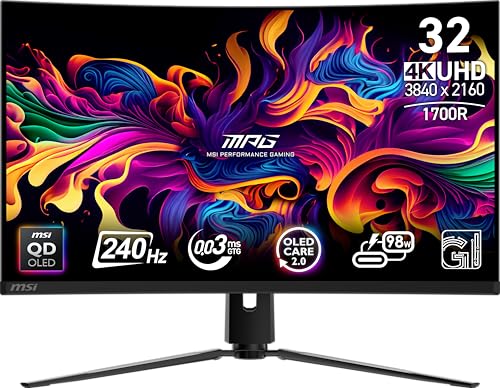
Gaming enthusiasts seeking an immersive experience will find the MSI MPG 321CURX QD-OLED 32-Inch 4K UHD Monitor hard to beat. With a stunning 240Hz refresh rate and a lightning-fast 0.03ms response time, your gameplay will be incredibly smooth. The 3840×2160 resolution and 1,500,000:1 contrast ratio deliver vibrant visuals, while the 1700R curvature enhances your field of view. Enjoy versatile connectivity options, including HDMI 2.1 and USB Type-C, alongside G-SYNC compatibility for seamless action. Plus, the ergonomic design guarantees comfort during long gaming sessions. Rated 4.5 stars, this monitor is a top contender for any serious gamer.
Best For: The MSI MPG 321CURX QD-OLED 32-Inch 4K UHD Monitor is best for gaming enthusiasts who demand high performance and immersive visuals.
Pros:
- Stunning 240Hz refresh rate and 0.03ms response time for incredibly smooth gameplay.
- Vibrant visuals with 3840×2160 resolution and a 1,500,000:1 contrast ratio.
- Versatile connectivity options, including HDMI 2.1 and USB Type-C, along with G-SYNC compatibility.
Cons:
- Weighty design at 27.1 pounds, which may require a sturdy desk setup.
- Limited USB ports compared to some other monitors on the market.
- Potential risk of image burn-in, despite the OLED Care 2.0 feature.
LG 34G630A-B 34-Inch Ultragear Curved Gaming Monitor

For competitive gamers who crave ultra-smooth visuals, the LG 34G630A-B 34-Inch Ultragear Curved Gaming Monitor stands out with its impressive 240Hz refresh rate and 1ms response time. This monitor’s WQHD resolution (3440 x 1440) and 21:9 aspect ratio provide an immersive experience, perfect for spotting enemies. FreeSync Premium eliminates screen tearing, while Dynamic Action Sync reduces input lag. Plus, features like Black Stabilizer enhance visibility in dark scenes. With a slim design and USB Type-C connectivity, it keeps your setup tidy. The built-in speaker and vibrant HDR colors further enhance your gaming adventures, making it a top choice for serious gamers.
Best For: Competitive gamers seeking an immersive and visually stunning gaming experience with ultra-smooth performance.
Pros:
- Ultra-high 240Hz refresh rate for seamless visuals and an edge in fast-paced gaming.
- 1ms response time minimizes ghosting, ensuring crisp image quality during intense gameplay.
- FreeSync Premium technology eliminates screen tearing for a smoother gaming experience.
Cons:
- Limited built-in speaker quality, which may not satisfy audiophiles.
- Higher price point compared to standard monitors, making it a larger investment.
- Curved design may not appeal to all users, especially those who prefer flat screens.
Samsung 49″ Odyssey G93SC Curved Gaming Monitor

The Samsung 49″ Odyssey G93SC Curved Gaming Monitor is a dream come true for avid gamers seeking an immersive experience. With its QD-OLED technology, you’ll enjoy stunning colors, deep contrasts, and true blacks that elevate your visuals. The ultrawide 49″ display and 1800R curvature wrap around your field of vision, pulling you deeper into the action. Plus, with a 240Hz refresh rate and 0.03ms response time, your reactions will be lightning-fast. G-Sync compatibility guarantees smooth gameplay, while the sleek design adds a modern touch to your setup. Connect multiple devices effortlessly through HDMI, DisplayPort, and USB options.
Best For: Avid gamers seeking an immersive and high-performance gaming experience with stunning visuals and fast response times.
Pros:
- Exceptional display quality with QD-OLED technology, offering vibrant colors and deep contrasts.
- Ultra-responsive performance featuring a 240Hz refresh rate and 0.03ms response time for seamless gaming.
- Versatile connectivity options including HDMI 2.1 and DisplayPort, allowing for easy connection to multiple devices.
Cons:
- Large physical size may require significant desk space and may not fit in smaller setups.
- Higher price point compared to traditional monitors, which may not be suitable for all budgets.
- Curved design may not appeal to all users or may take time to adjust to for some gamers.
Factors to Consider When Choosing 4K 240Hz Monitors for Gaming PCs
When choosing a 4K 240Hz monitor for your gaming setup, there are several key factors to keep in mind. You’ll want to take into account panel technology, refresh rate, and resolution to guarantee you get the best visual experience. Additionally, response time and connectivity options can greatly impact your gaming performance.
Panel Technology Importance
Choosing the right panel technology is essential for maximizing your gaming experience with 4K 240Hz monitors. QD-OLED panels stand out by offering up to 1.07 billion colors and a 99% DCI-P3 color gamut, delivering vibrant visuals that elevate your gameplay. Advanced technologies achieve impressive response times of 0.03ms (GtG), which considerably minimizes motion blur during fast-paced action. With high refresh rates like 240Hz, you’ll enjoy enhanced fluidity and responsiveness, reducing screen tearing. Additionally, certain panels provide viewing angles of up to 178 degrees, ensuring consistent colors and brightness for multi-player setups. Look for HDR certifications, such as VESA DisplayHDR True Black 400, which enhance dynamic range, offering deeper blacks and brighter highlights for a more immersive gaming experience.
Refresh Rate Benefits
High refresh rates, especially at 240Hz, play a crucial role in enhancing your gaming experience. With a 240Hz monitor, frames are displayed up to four times more frequently than a standard 60Hz screen, resulting in smoother motion and reduced motion blur. This is particularly beneficial in fast-paced games where every millisecond counts. You’ll notice improved reaction times, helping you stay competitive in intense matches. High refresh rates also minimize screen tearing and stuttering, providing a seamless visual experience. Plus, a 240Hz refresh rate greatly reduces input lag, ensuring your actions on-screen reflect your commands almost instantly. Overall, you’ll enjoy a more immersive experience that keeps up with the performance of your high-end gaming PC.
Resolution and Clarity
Four key factors define the resolution and clarity of a 4K 240Hz monitor for gaming PCs. First, the 4K resolution of 3840 x 2160 pixels delivers four times the pixel density of 1080p, ensuring sharper images. Next, that 240Hz refresh rate smooths out motion, drastically reducing blur in fast-paced scenes. This combination enhances your visual clarity, making it easier to spot enemies and react swiftly. A high pixel density minimizes the visibility of individual pixels, creating a more immersive experience. Finally, many 4K monitors support HDR (High Dynamic Range), boosting color accuracy and contrast for vibrant, lifelike visuals. Together, these factors elevate your gaming experience to new heights, ensuring you enjoy every detail.
Response Time Significance
While resolution and clarity greatly enhance your gaming experience, response time plays an equally important role in how well you perform in fast-paced scenarios. Response time indicates how quickly a pixel changes color, and lower times reduce motion blur and ghosting. For ideal gaming, look for monitors with a response time between 0.03 ms and 1 ms (GtG). A 0.03 ms response time, often found in high-performance displays, allows for nearly instantaneous pixel shifts, essential for competitive play. Higher response times can lead to blurring and trailing effects, which can hurt your precision during critical moments. Ultimately, monitors with lower response times provide smoother gameplay and improved responsiveness, making them the better choice for serious gamers.
Connectivity Options Availability
Connectivity is essential when selecting a 4K 240Hz monitor for your gaming PC. Make sure it includes HDMI 2.1 ports to support high bandwidth for 4K resolution at those impressive refresh rates. Look for DisplayPort 1.4 or higher, as this can handle 4K at 240Hz while utilizing adaptive sync technologies like FreeSync or G-SYNC. USB-C connectivity with Power Delivery is a great addition, allowing you to transfer data and charge devices simultaneously. Having multiple USB Type-A ports enhances flexibility for your peripherals, ensuring everything connects smoothly. Plus, features like Picture-in-Picture (PiP) or Picture-by-Picture (PbP) can greatly improve multitasking, letting you display multiple sources at once. Choose wisely to elevate your gaming experience!
Ergonomic Design Features
When choosing a 4K 240Hz monitor for your gaming setup, ergonomic design features play a significant role in enhancing your comfort and overall experience. Look for monitors with adjustable stands that allow you to modify height, tilt, swivel, and pivot, ensuring optimal viewing angles and reducing neck strain during long sessions. A matte screen finish can minimize glare, which helps combat eye fatigue. Monitors with VESA mounting compatibility offer flexible placement options for ideal height and distance. Additionally, features like blue light filters and flicker-free technology are essential for reducing eye strain. Finally, consider lighter monitors with compact designs, as they’re easier to adjust and reposition, contributing to a more ergonomic setup.
