
A 49-inch curved 240Hz monitor can make racing games and expansive worlds feel more immersive while giving you room to keep multiple windows open. But matching size and refresh rate doesn’t mean these displays deliver the same experience.
Panel type, resolution, ports, desk fit, and price all matter. This roundup covers 10 options, followed by a practical guide to choosing the right one for your setup.
Best 10 49 Inch Curved Gaming Monitors 240hz Picks for 2026
OLED Multitasking Pick
Deco Gear 49-Inch QD-OLED 240Hz

- 5120 × 1440 QD-OLED at 240Hz
- 90W USB-C, KVM, and PIP/PBP
- Adjustable stand and VESA support
Best For: Gaming and creative work across multiple devices
Connected VA Pick

- 1800R VA panel at 5120 × 1440
- 240Hz with Adaptive-Sync
- 65W USB-C and PIP/PBP
Best For: Mixed gaming and laptop-desktop workflows
Deep-Curve Pick

- 1500R curved 5120 × 1440 VA screen
- 240Hz with FreeSync compatibility
- Built-in speakers and height adjustment
Best For: Immersive PC gaming with a pronounced curve
144Hz OLED Alternative

- 49-inch Dual QHD QD-OLED screen
- 144Hz—not a 240Hz model
- G-Sync compatible and FreeSync Premium Pro
Best For: OLED-focused buyers comfortable with 144Hz
Best for Multi-Device Setups

- 5120 × 1440 QD-OLED at 240Hz
- 0.03ms GtG; G-SYNC compatible
- KVM and HDMI 2.1 connectivity
Best For: Fast gaming across multiple computers
Best for Immersive OLED Gaming

- 1800R, 5120 × 1440 QD-OLED
- 240Hz and 0.03ms GtG
- Picture-by-Picture and USB hub
Best For: Immersive gaming with occasional two-source viewing
Best for Mixed Work and Play
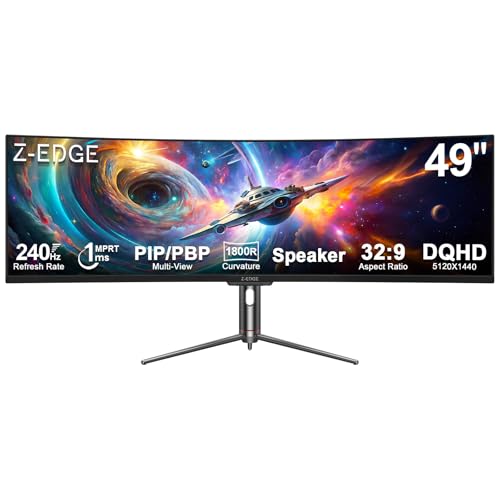
- 1800R VA panel at 5120 × 1440
- 240Hz with FreeSync
- PIP/PBP and USB-C video input
Best For: Gaming and multitasking across several sources
Best for USB-C Workstations

- 5120×1440 QD-OLED at 240Hz
- 90W USB-C and Ethernet
- Adjustable stand and PIP/PBP
Best For: Gaming and USB-C laptop setups
Best Matte VA Option

- Matte 5120×1440 VA panel
- Listed 240Hz; verify conflicting copy
- PIP/PBP and VESA support
Best For: Matte-screen gaming and multitasking
Best Glare-Free OLED

- Glare-free 5120×1440 QD-OLED
- 240Hz and 0.03ms stated response
- G-Sync compatible; Gaming Hub
Best For: OLED gaming in rooms with reflections
OLED Multitasking Pick – Deco Gear 49-Inch QD-OLED 240Hz
Among 49 inch curved gaming monitors 240hz shoppers may consider, this Deco Gear pairs a 5120 × 1440 QD-OLED panel with a 240Hz refresh rate and claimed 0.03ms response time. Its 32:9 canvas works for games as well as wide timelines and multiple work windows.
Best For: Gamers and creators who want OLED contrast alongside laptop-friendly connectivity.
Pros:
- QD-OLED panel offers deep blacks, HDR400 True Black, and wide stated color coverage.
- USB-C supports video, data, and up to 90W power delivery; KVM and PIP/PBP help with multi-device setups.
- Adjustable stand, non-glare surface, and 100 × 100mm VESA support offer setup flexibility.
Cons:
- OLED requires attention to static-image use despite the listed anti-burn-in protection.
- The 47.2-inch width demands substantial desk space.
Choose it if the combination of OLED picture quality, 240Hz speed, and one-cable laptop support matters more than keeping a compact setup.
Connected VA Pick – INNOCN 49C1S 240Hz DQHD
The INNOCN 49C1S is a practical option among 49 inch curved gaming monitors 240hz buyers are comparing: its 1800R VA screen combines 5120 × 1440 resolution, a 32:9 layout, and a listed 1ms response time.
Best For: Players who also need a wide workspace and connections for a laptop and desktop.
Pros:
- 240Hz refresh rate and Adaptive-Sync support suit fast-moving PC games.
- USB-C with 65W power delivery, two DisplayPort 1.4 inputs, HDMI 2.1, and RJ45 expand connection options.
- PIP/PBP can show two input sources on the same screen.
Cons:
- 65W USB-C power delivery may be insufficient for laptops that need more charging power.
- Its VA panel does not offer the pixel-level blacks of the QD-OLED models here.
This is a strong fit when you want high-refresh DQHD gaming and split-screen utility without making OLED a requirement.
Deep-Curve Pick – CRUA 49-Inch DQHD 240Hz
For shoppers comparing 49 inch curved gaming monitors 240hz, this CRUA stands out for its tighter 1500R curve. The 49-inch VA panel provides a 5120 × 1440, 32:9 view suited to racing games, broad dashboards, and side-by-side windows.
Best For: Gamers who prioritize a pronounced curve and straightforward PC connections.
Pros:
- 240Hz refresh rate and FreeSync compatibility target smoother fast-action play.
- VA panel lists 3000:1 contrast and 120% sRGB color gamut.
- Built-in speakers and stated height adjustment add everyday convenience.
Cons:
- Listed brightness is 250 cd/m², which may limit its appeal in bright rooms.
- The specified connections are HDMI and DisplayPort; no USB-C input is listed.
Its focused feature set makes sense if immersion and refresh rate matter more to you than extensive docking features.
144Hz OLED Alternative – Samsung Odyssey OLED G9 G91SD
The Samsung Odyssey OLED G9 G91SD offers a 49-inch curved QD-OLED screen at 5120 × 1440, but it is a 144Hz model—not one of the 49 inch curved gaming monitors 240hz buyers may be seeking. Consider it for its OLED image quality rather than a 240Hz refresh rate.
Best For: Buyers who favor QD-OLED contrast and color over reaching 240Hz.
Pros:
- QD-OLED pixels deliver true blacks across the 32:9 Dual QHD display.
- Claimed 0.03ms response time, G-Sync compatibility, and FreeSync Premium Pro support responsive gaming.
- Picture-in-Picture and an adjustable stand add flexibility.
Cons:
- Its 144Hz maximum falls short of this roundup’s 240Hz target.
- Static content still warrants care, even with the listed logo detection, thermal controls, and screen saver.
If 240Hz is nonnegotiable, look elsewhere in this list. If OLED visuals take priority, the G91SD remains a relevant alternative.
Best for Multi-Device Setups – MSI MPG 491CQPX QD-OLED
Among 49 inch curved gaming monitors 240hz shoppers may consider, the MSI MPG 491CQPX pairs a 5120 × 1440 QD-OLED panel with a quoted 0.03ms response time. Its built-in KVM is especially useful if you switch between computers.
Best For: Gamers who want QD-OLED speed and one keyboard-and-mouse setup for multiple devices.
Pros:
- 240Hz refresh rate, 0.03ms GtG response time, and G-SYNC compatibility.
- DisplayHDR True Black 400 and QD Premium Color.
- KVM, height adjustment, and HDMI 2.1 with 48Gbps bandwidth.
Cons:
- OLED image sticking remains a consideration, even with MSI OLED Care 2.0.
- The 47.05-inch-wide body needs substantial desk space.
This is a strong fit when fast gaming and device switching matter equally; check your available desk width before committing.
Best for Immersive OLED Gaming – Samsung Odyssey G93SC
The Samsung Odyssey G93SC stands out among 49 inch curved gaming monitors 240hz buyers compare for its 1800R QD-OLED screen. Its 5120 × 1440 resolution and 32:9 layout provide a broad view for games and side-by-side work.
Best For: Players who prioritize an enveloping OLED picture and fast, smooth gameplay.
Pros:
- 240Hz refresh rate and quoted 0.03ms GtG response time.
- DisplayHDR True Black 400, G-SYNC compatibility, and FreeSync Premium Pro.
- Picture-by-Picture, HDMI 2.1, DisplayPort, and a USB hub.
Cons:
- The 47.1-inch width calls for a large desk.
- No KVM is listed in the supplied specifications for sharing one keyboard and mouse between computers.
Choose this model for its curved QD-OLED presentation and flexible video inputs; its Picture-by-Picture mode is a useful bonus for two sources.
Best for Mixed Work and Play – Z-Edge UG49P
The Z-Edge UG49P offers a different approach to 49 inch curved gaming monitors 240hz shoppers might choose: a 5120 × 1440 VA panel rather than OLED. Its 1800R curve, 1ms quoted response time, and split-screen tools suit both games and desktop tasks.
Best For: Users who want a high-refresh ultrawide for gaming, multitasking, and multiple connected devices.
Pros:
- 240Hz refresh rate with FreeSync support.
- Picture-in-Picture and Picture-by-Picture modes for multiple sources.
- HDMI 2.1, two DisplayPort 1.4 inputs, USB-C video input, and built-in speakers.
Cons:
- Its listed 1ms response time is slower than the 0.03ms figures supplied for the two QD-OLED models.
- USB-C is described as supporting video transmission; charging capability is not specified.
Its broad input selection makes it practical for a shared work-and-gaming desk, provided you do not need the specific OLED features of the other models.
Best for USB-C Workstations – INNOCN 49Q1S QD-OLED
Among 49 inch curved gaming monitors 240Hz shoppers may consider, the INNOCN 49Q1S pairs a 5120×1440 QD-OLED screen with a 0.03ms stated response time. Its 32:9 layout also leaves room for work alongside games.
Best For: Gamers who want an OLED ultrawide that can also connect to a USB-C laptop.
Pros:
- 240Hz refresh rate and 0.03ms stated response time.
- USB-C with 90W power delivery, plus HDMI 2.1, two DisplayPort inputs, and Ethernet.
- Picture-in-picture/picture-by-picture and height, swivel, and tilt adjustments.
Cons:
- Glossy screen may be less suitable for rooms with troublesome reflections.
- 5120×1440 resolution requires considerable graphics horsepower for high-frame-rate gaming.
Choose this model if one display needs to handle both fast games and a laptop-based desk setup; its connectivity is the clearest practical advantage.
Best Matte VA Option – Great voell Q49B5G
The Great voell Q49B5G offers a matte VA alternative in the 49 inch curved gaming monitors 240Hz category. Its 5120×1440, 32:9 screen combines a listed 240Hz refresh rate with a 1ms stated response time.
Best For: Players who prefer a matte VA panel and want a wide screen for gaming and multiple windows.
Pros:
- 240Hz listed refresh rate with FreeSync Premium and G-Sync compatibility.
- 400-nit listed brightness, HDR400, and a 3000:1 listed contrast ratio.
- PIP/PBP modes and 100×100mm VESA mounting support.
Cons:
- The stand is described as tilt-adjustable, with no height or swivel adjustment specified.
- The listing mentions both 165Hz and 240Hz; confirm the supported refresh rate and connection before buying.
- Games may need native 32:9 support or a modification to fill the screen as intended.
This is worth considering for a matte super-ultrawide setup, but the conflicting refresh-rate wording makes verification especially important.
Best Glare-Free OLED – Samsung Odyssey G9 G95SD
The Samsung Odyssey G9 G95SD stands out among 49 inch curved gaming monitors 240Hz options for its glare-free QD-OLED screen. It combines 5120×1440 resolution, a 0.03ms stated response time, and adaptive-sync support in a 32:9 format.
Best For: OLED gamers who want reduced reflections and built-in gaming and smart-home features.
Pros:
- 240Hz QD-OLED panel with deep blacks and a 0.03ms stated response time.
- Glare Free finish helps reduce reflections from external light.
- G-Sync compatibility, FreeSync Premium Pro, and an adjustable stand.
- Gaming Hub and SmartThings add features beyond a standard PC monitor.
Cons:
- Its 32:9 resolution places a substantial demand on a PC targeting 240fps.
- The supplied specifications list 250 cd brightness; assess whether that suits your room and content.
Pick this G9 if glare control and OLED contrast matter more to you than keeping the feature set simple.
How We Picked the Best 49 Inch Curved Gaming Monitors 240hz
We focused on the listed 49-inch curved gaming monitors with 240Hz refresh rates, then considered the specifications most likely to affect a purchase: panel technology, stated resolution, curve, connectivity, and gaming features. A product name or listing cannot establish real-world response times, HDR quality, or long-term reliability, so check independent testing and the current manufacturer specifications before buying.
Quick Comparison: Where to Start
For deep blacks and fast pixel response, start with the QD-OLED choices from Samsung, MSI, Deco Gear, and INNOCN. If OLED’s price or potential burn-in risk gives you pause, compare the listed non-OLED DQHD options from INNOCN, CRUA, and Z-Edge. Treat less-specific listings as a prompt to verify the exact model and specifications rather than assuming they match a better-documented display.
Model names matter here. Samsung’s G91SD, G93SC, and G95SD are separate entries; confirm the exact model number before comparing prices or reviews. Likewise, check any “5K” or “5K2K” claim against the stated pixel dimensions: 5120 × 1440 DQHD and 5120 × 2160 5K2K are different resolutions.
Key Buying Factors for 49 Inch Curved Gaming Monitors 240hz
Resolution and Graphics Power
Many 49-inch 32:9 monitors use 5120 × 1440, providing the horizontal workspace of two 1440p displays without a center bezel. That is about 7.4 million pixels per frame, so demanding games may need a powerful GPU or reduced settings to approach 240 fps. Confirm the resolution for each exact model; size alone does not guarantee DQHD.
Panel Type and Everyday Use
QD-OLED is compelling for dark scenes and motion clarity, but static HUDs, taskbars, and productivity layouts make burn-in coverage and care features worth checking. Non-OLED panels may be a better fit for long hours of fixed desktop content. Compare verified brightness, contrast, text clarity, and warranty terms rather than relying on a response-time claim alone.
Curve, Connectivity, and Fit
A 1500R curve is more pronounced than an 1800R curve; preference depends on viewing distance and whether you also use the screen for straight-line work. Measure desk depth and stand footprint, and check VESA compatibility if you plan to use an arm. Verify that your GPU, cable, and the monitor’s specific DisplayPort or HDMI inputs support your intended resolution and 240Hz refresh rate. USB-C charging and video capability should be confirmed separately when relevant.
Who Should Buy Which 49 Inch Curved Gaming Monitors 240hz?
Choose a well-documented QD-OLED model if cinematic contrast and fast-paced gaming are your priorities and you’re comfortable following OLED care guidance. Favor a verified non-OLED DQHD option if you spend most of the day with static windows or want to compare lower-cost alternatives. For a shared work-and-play desk, prioritize readable text, usable ports, warranty coverage, and physical fit before brand or headline speed.
Whichever route you take, confirm the exact model, native resolution, 240Hz input support, return policy, and current price. Those checks are especially important among 49 Inch Curved Gaming Monitors 240hz, where similar-looking listings can represent meaningfully different hardware.
