
Choosing among today’s 3D scanners can feel overwhelming, especially when specs like accuracy, frame rate, and lighting compatibility all matter at once. The best choice depends on what you scan most often.
Whether you need a beginner-friendly handheld model, a high-precision laser option, or a scanner built for larger objects and 3D printing, this roundup focuses on practical buying decisions rather than hype.
Best 10 3D Scanners Picks for 2026
Premium AI 3D Scanner

- 0.03 mm single-frame accuracy
- Five scan modes for varied objects
- WiFi 6.0 with outdoor scanning support
Best For: Professional users needing versatile, high-detail scanning
Wireless Starter Scanner
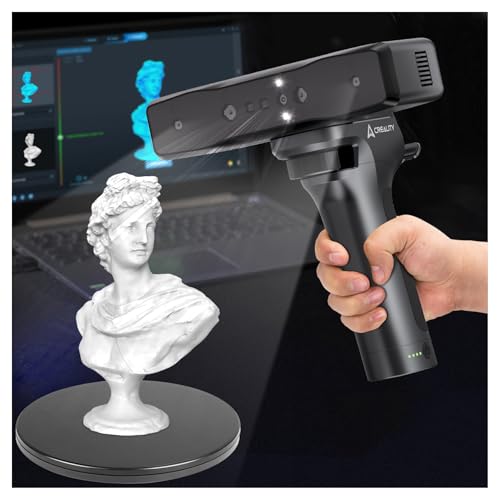
- 0.05 mm accuracy for detailed scans
- Wi-Fi and mobile control built in
- 30fps real-time scanning with anti-shake
Best For: Beginners and makers who want portable wireless scanning
Standard AI 3D Scanner

- 0.03 mm single-frame accuracy
- Multiple scan modes for varied surfaces
- AI segmentation and wireless scanning
Best For: Users who want POP 4 accuracy in a standard setup
Entry-Level Medium-Format Scanner

- 0.07 mm accuracy for useful detail
- Markerless AI tracking helps recover scans
- JMStudio handles scanning and editing
Best For: Beginners who want guided, practical 3D scanning
Portable Hybrid Pick
Creality Pika Portable 3D Scanner

- Dual-mode blue laser and NIR structured light
- Up to 0.03mm accuracy with 0.1mm resolution
- Wi-Fi 6, dual batteries, and 3-inch touchscreen
Best For: Users who want a portable, all-in-one scanner for small objects and body scans
Lightweight Print-Ready Pick
3DMakerpro Moose Lite Premium Kit

- 0.05mm accuracy with 0.1mm resolution
- AI visual tracking plus JMStudio workflow
- Lightweight 250g design with no fan noise
Best For: Hobbyists scanning medium objects for 3D printing or display
Industrial Precision Choice

- Up to 0.01mm single-frame precision
- Five scanning modes for parts and turntable use
- Scans dark, shiny, and metallic surfaces without spray
Best For: Engineers and advanced users needing tight-tolerance, multi-mode scanning
Beginner-Friendly Portable Scan

- Wireless WiFi 6 scanning with broad device support
- Up to 0.1 mm accuracy and 24-bit color capture
- Lightweight 105 g design with a travel kit
Best For: Entry-level users and DIY 3D printing projects
Industrial Precision Scanner

- Up to 0.01 mm precision for demanding work
- Four scanning modes for shiny, dark, and detailed surfaces
- Auto turntable and live PC-to-mobile streaming
Best For: Industrial measurement, reverse engineering, and precision modeling
Outdoor Wireless Scanner

- Wireless WiFi 6 scanning with real-time streaming
- Up to 0.05 mm accuracy and 0.03 mm precision
- Works on reflective or dark surfaces without spray
Best For: Portable outdoor scanning and detailed color models
Premium AI 3D Scanner – Revopoint POP 4 Premium
If you want a high-end option among 3D scanners for printing, the Revopoint POP 4 Premium is built for detail, speed, and demanding capture jobs. It combines very high single-frame accuracy with multiple scan modes, so it can handle small precision parts, large objects, and tricky surfaces in both indoor and outdoor workflows.
Best For: Users who need a premium handheld scanner for reverse engineering, 3D printing, and field scanning.
Pros:
- Single-frame accuracy up to 0.03 mm and volumetric accuracy of 0.03 mm + 0.05 mm x L(m)
- Five scan modes, including blue laser options for dark and reflective objects
- AI object segmentation helps isolate targets and reduce background noise
- WiFi 6.0 and a battery grip support untethered outdoor scanning
Cons:
- Outdoor filter and battery grip are not included with the base scanner notes provided
- Some AI and workflow features are Windows-only
- The feature set is extensive, which may be more than casual users need
Overall, this is the most capable option here for buyers who value flexibility and professional-grade capture. If your scanning work includes different object sizes, difficult materials, and mobile use, the POP 4 Premium offers a strong all-around package.
Wireless Starter Scanner – Creality Otter Lite Wireless
The Creality Otter Lite is a practical choice if you want a handheld 3D scanner that keeps setup simple while still aiming for precise results. It targets a wide object range, from tiny parts to large automotive components, and adds wireless control plus mobile monitoring for more flexible scanning sessions.
Best For: Hobbyists, designers, and engineers who want a wireless handheld scanner with easy mobile control.
Pros:
- 0.05 mm accuracy with infrared structured light technology
- Scans objects from 20 mm³ up to 2000 mm³
- Built-in Wi-Fi and smartphone display support via the Creality Scan app
- 30fps scanning with anti-shake support for smoother capture
Cons:
- Outdoor lighting support is specified up to 30,000 lux, which is lower than some premium models
- Best system support is limited to Windows and macOS
- It is positioned as a portable option rather than a top-end industrial scanner
For buyers comparing 3D scanners that balance portability, wireless convenience, and solid accuracy, the Otter Lite is easy to understand and easy to use. It looks especially appealing if you want real-time mobile control without moving to a more complex pro setup.
Standard AI 3D Scanner – Revopoint POP 4 Standard
The Revopoint POP 4 Standard brings the same core scanning capabilities as the premium version, making it a strong pick for shoppers looking at capable 3D scanners for printing and modeling. It focuses on high accuracy, fast capture, and flexible scan modes for objects ranging from small parts to large industrial pieces.
Best For: Buyers who want the POP 4 platform’s accuracy and AI features in a standard package.
Pros:
- Up to 0.03 mm single-frame accuracy and strong volumetric accuracy
- Multi-line laser, structured light, and VCSEL modes for different capture needs
- AI object segmentation helps remove background noise and simplify post-processing
- Supports dark and highly reflective objects with blue laser line scanning
Cons:
- Outdoor filter is sold separately
- Some features, like AI segmentation, are Windows-only
- The notes indicate the battery grip is available separately for untethered scanning
This standard model is a sensible fit if you want the POP 4 feature set without chasing the separate premium accessory bundle. It keeps the strengths of the platform intact, especially for users who need accurate scans and broad object compatibility.
Entry-Level Medium-Format Scanner – 3DMakerpro Fox
If you are comparing entry-level 3D scanners, the 3DMakerpro Fox stands out as a more approachable medium-format option. It is designed for beginners and hobbyists who want useful detail for 3D printing, modeling, measurement, and inspection without jumping straight into a highly complex pro workflow.
Best For: Beginners and hobbyists who want an accessible scanner with solid detail and guided software support.
Pros:
- 0.07 mm accuracy and 0.10 mm resolution for practical detail capture
- Markerless AI visual tracking can relock onto the object if tracking is lost
- JMStudio software combines scanning, editing, and optimization in one workflow
- Built on an ecosystem trusted by many 3DMakerpro users
Cons:
- Accuracy is good for entry-level use, but lower than premium scanners in this roundup
- The notes position it as a medium-format beginner solution, not an industrial system
- Weight and dimensions suggest a larger handheld unit than some compact alternatives
As a starter-friendly option, the Fox makes sense when you want a scanner that helps smooth out the hard parts of the process. It is a practical pick for users who value software support and reliable everyday results more than top-tier precision.
Portable Hybrid Pick – Creality Pika Portable 3D Scanner
If you want a 3D scanner that can move from tabletop parts to full-body captures without changing tools, the Creality Pika is built for that kind of flexible workflow. Its dual-mode setup combines 7-line blue laser scanning for fine detail with NIR structured light for larger subjects, while the wireless design and palm-sized body make it easy to use on the go.
Best For: Makers, creators, and small studios that need one portable scanner for detailed objects and larger body scans.
Pros:
- Dual-mode scanning with 7-line blue laser and NIR structured light.
- Up to 0.03mm accuracy and 0.1mm 3D resolution for fine detail work.
- Wireless Wi-Fi 6 support, dual swappable batteries, and a 3-inch touchscreen.
- AI features include body completion, retexturing, and hole filling.
Cons:
- Best results will depend on matching the right scan mode to the subject.
- The feature set may be more than casual users need for simple scans.
For buyers comparing 3D scanners by portability and versatility, the Pika stands out for packing precision features into a compact, cable-free package. It looks especially appealing if you want one scanner that can handle small parts, collectibles, and even body scanning in a single system.
Lightweight Print-Ready Pick – 3DMakerpro Moose Lite Premium Kit
The 3DMakerpro Moose Lite is a practical choice if you want a handheld 3D scanner focused on accurate models for printing and display. It uses blue light technology, AI visual tracking, and integrated JMStudio software to help simplify scanning, editing, and optimization in one workflow.
Best For: Hobbyists and makers scanning medium objects who want a lightweight, quiet handheld option.
Pros:
- 0.05mm accuracy and 0.1mm resolution for detailed 3D printing projects.
- AI visual tracking and point-cloud processing help streamline scanning.
- JMStudio combines scanning, editing, and optimizing in one software flow.
- Lightweight build at about 250g and designed with no fan noise.
Cons:
- Listed scanning speed is 10 FPS, which is slower than some competing scanners.
- Range is aimed at medium objects rather than very large captures.
Among 3D scanners in this class, the Moose Lite makes sense for users who value usable accuracy and a simple workflow over raw speed. Its lightweight body and software integration make it a solid pick for home printing, product models, and general object capture.
Industrial Precision Choice – Revopoint MetroY Ultra
If your priority is high-detail capture for inspection, reverse engineering, or demanding print workflows, the Revopoint MetroY Ultra is aimed squarely at that use case. It combines blue laser scanning, structured light, and turntable workflows with very high stated precision, making it a strong option for technical users who need more than a basic handheld scanner.
Best For: Industrial users, engineers, and advanced makers who need tight-tolerance scans and flexible scanning modes.
Pros:
- Up to 0.01mm single-frame precision and 0.015 + 0.04 mm x L volumetric accuracy.
- Five scanning modes, including laser cross-lines, parallel lines, single-line, structured light, and turntable scanning.
- Up to 90 FPS with an NVIDIA GPU for faster acquisition.
- Scans dark, glossy, and metallic parts without spray and works outdoors up to 100,000 lux.
Cons:
- The advanced feature set is likely more than casual users need.
- Maximum performance depends on using the right hardware, such as an NVIDIA GPU for top FPS.
For shoppers comparing higher-end 3D scanners, the MetroY Ultra stands out for precision, mode flexibility, and industrial-friendly scanning conditions. It is especially compelling if you need reliable capture of small parts and technical components in a professional workflow.
Beginner-Friendly Portable Scan – Creality CR-Scan Ferret Pro
If you’re shopping for 3D scanners and want an approachable handheld option, the Creality CR-Scan Ferret Pro is built with beginners and mobile creators in mind. It offers wireless scanning, full-color capture, and a lightweight body that makes it easier to learn without feeling tied to a desk.
Best For: Entry-level users, DIY creators, and 3D printing enthusiasts who want portable wireless scanning.
Pros:
- WiFi 6 wireless scanning supports flexible use with Windows, macOS, Android, and iOS.
- Up to 0.1 mm accuracy with full-color 24-bit scanning and anti-shake tracking.
- Very lightweight at 105 g, with a travel-ready kit that includes a tripod, power bank, phone holder, and case.
- Works in many environments, including outdoor light below 30,000 lux.
Cons:
- Not suited to very small or highly detailed objects like jewelry or precision parts.
- Best results depend on avoiding reflective, transparent, or very dark surfaces.
- Performance requirements may limit older devices or low-RAM setups.
Overall, the Ferret Pro is a practical choice if you want a portable scanner that balances ease of use with solid everyday detail capture. It is less specialized than industrial systems, but it covers a broad range of common 3D printing projects well.
Industrial Precision Scanner – Revopoint MetroX Pro
Among 3D scanners aimed at precision work, the Revopoint MetroX Pro stands out for high-accuracy blue laser scanning and multiple capture modes. It is designed for users who need detailed scans for industrial measurement, reverse engineering, or high-end prototyping.
Best For: Precision-focused users who need industrial-grade scanning, measurement, or reverse-engineering workflows.
Pros:
- Industrial-grade precision with up to 0.01 mm single-frame precision and 0.02 mm single-frame accuracy.
- Four scanning modes cover shiny, dark, flat, and feature-rich objects.
- Auto turntable scanning simplifies one-click capture of complex objects.
- PC-to-mobile real-time streaming helps you monitor scans without staying glued to the laptop.
Cons:
- Heavier and less portable than compact handheld scanners at 14.82 pounds.
- Revo Design and Revo Measure are paid add-ons and Windows only.
- More advanced than a casual beginner scanner, so it is best matched to technical workflows.
This is a strong option if scan accuracy and workflow flexibility matter more than portability. Its laser modes and software integration make it especially appealing for professional or industrial use cases.
Outdoor Wireless Scanner – Revopoint INSPIRE 2
If you want 3D scanners that can move beyond the studio, the Revopoint INSPIRE 2 is built for wireless, outdoor-friendly capture. It combines infrared structured light and multi-line laser scanning with a lightweight body, making it a versatile pick for mixed materials and portable workflows.
Best For: Creators who want lightweight wireless scanning for outdoor use, full-color models, and mixed-surface objects.
Pros:
- Built-in WiFi 6 supports wireless scanning and real-time PC-to-mobile streaming.
- Handles reflective or dark surfaces without scanning spray using 11 infrared laser lines.
- Up to 0.05 mm accuracy and 0.03 mm precision support detailed modeling and 3D printing.
- Lightweight 190 g design with included accessories for a complete scan setup.
Cons:
- Outdoor use is limited to up to 20,000 lux, so bright sunlight is not the ideal setting.
- Some advanced scan-to-CAD features require the separate paid Revo Design software.
- Best results still depend on proper setup and calibration for precise captures.
The INSPIRE 2 is a balanced option for users who need portability, color capture, and better handling of challenging surfaces. It is especially attractive if you want more freedom than a basic handheld scanner without jumping to a heavier industrial machine.
How We Picked These 3D Scanners
We focused on the factors that matter most in real use: capture accuracy, tracking stability, scanning speed, object-size flexibility, software support, and ease of setup. We also gave extra weight to models that make 3D scanning more approachable for beginners while still offering enough performance for makers and small studios.
Because different scanners excel at different jobs, this list balances portable handheld options, structured-light models, and more specialized laser systems. That means you can compare the right tools for everything from quick prototype capture to detailed parts for 3D printing.
Quick Comparison
For broad everyday use, standard handheld 3D Scanners tend to offer the easiest learning curve and the most flexibility. If you want sharper detail on smaller objects, laser-based models are often the better fit. For larger subjects, human subjects, or faster workflow needs, look for stronger tracking, wider capture range, and higher frame rates. If you’re mostly scanning for 3D printing, prioritize geometry accuracy and reliable software over flashy extras.
Key Buying Factors for 3D Scanners
Accuracy and Detail
Accuracy is one of the first specs to compare. Lower claimed error can help with mechanical parts, replacement pieces, and precision-fit prints. For artistic models or general hobby use, slightly less precision may still be perfectly acceptable if the scanner is easy to use and produces clean meshes.
Object Size and Scan Type
Some 3D Scanners are best for small-to-medium objects, while others are designed for bodies, furniture, or larger scenes. Handheld scanners are usually the most versatile, but the best result comes from matching the scanner’s strengths to the size and surface type of your target object.
Tracking, Speed, and Workflow
Fast capture can save time, but only if tracking stays stable. Anti-shake tools, AI segmentation, and strong real-time feedback can make scanning smoother and reduce rescans. This is especially important if you plan to scan frequently or work with reflective, dark, or complex surfaces.
Software and Export Support
Good software matters as much as the hardware. Look for easy mesh cleanup, export options that fit your 3D printing workflow, and compatibility with your operating system. If you plan to edit scans later, a cleaner file out of the scanner can save a lot of time.
Who Should Buy Which 3D Scanners?
Beginners should look for a scanner with simple setup, dependable tracking, and a forgiving workflow. Makers and 3D printing hobbyists will usually benefit most from versatile midrange models that balance detail and ease of use. If you need highly detailed captures for small parts, premium laser-focused 3D Scanners may be worth the extra cost. For body scanning or larger items, choose a model built for speed, range, and more flexible capture modes.
In short, the best choice is the one that fits your most common scan, not just the best spec sheet.
