
The right enclosure can make 3D printing easier to film, safer to operate, and more comfortable to keep in a studio or home workspace. These picks cover compact FDM setups, resin printers, large-format machines, and creator-friendly features such as LED lighting, ventilation, and accessory storage.
Use the comparison and buying advice below to match an enclosure with your printer dimensions, material choices, filming needs, and available space.
Best 10 3D Printer Enclosures for Content Creators Picks for 2026
Best LED-Lit Enclosure
Constant-Temperature Medium Cover

- Built-in LED strip improves print visibility
- Fire-resistant, dustproof, six-sided enclosure
- Fits many popular medium-size printers
Best For: Content creators who prioritize lighting and everyday print monitoring
Best Odor-Control Setup
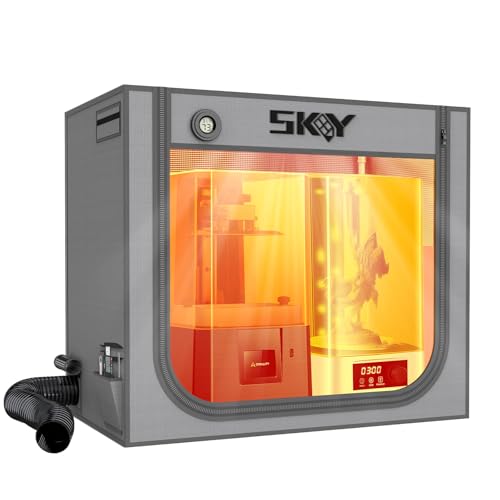
- Fits a resin printer and curing box
- Fan, duct, and carbon box target odors
- Includes LED light and thermo-hygrometer
Best For: Resin creators building an integrated print-and-cure workspace
Best Budget Filament Tent

- Flame-resistance tested enclosure design
- Supports stable temperatures for filament printing
- Folds for storage and includes tool pockets
Best For: Creality users wanting a portable, economical printer tent
Best Large Resin Workspace

- Accommodates a printer and curing machine
- Carbon filter, fan, and expandable exhaust pipes
- Clear front window supports closed-door monitoring
Best For: Resin creators needing space, visibility, and odor management
Resin Ventilation Pick
Filtered UV-Blocking Enclosure

- UV-blocking viewing window
- Adjustable fan with three-layer filter
- Designed for many LCD/resin printers
Best For: Resin-printing creators prioritizing filtration and visibility
Quiet High-Temperature Pick
FLASHFORGE Adventurer 5M Enclosure
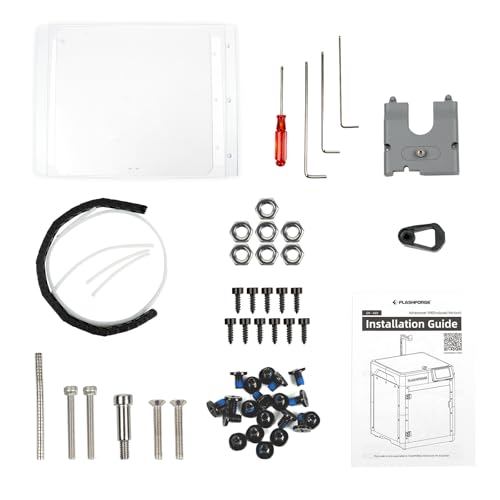
- Designed for the Adventurer 5M
- Reduces listed noise from 65 to 55 dB
- Supports ASA and PC printing
Best For: Adventurer 5M owners recording in home or office spaces
Feature-Rich Creality Pick

- Large window with built-in LED light
- Thermal, dust, and noise protection
- Supports multiple expansion accessories
Best For: Creality users who want lighting and real-time monitoring
Large-Format Creator Station
Oversized Ventilated 3D Printer Enclosure

- Fits large-format or multiple smaller printers
- Sealed fabric design with two exhaust ports
- Includes viewing window and lighting bar
Best For: Creators managing large printers or multi-printer setups
Resin Workflow Hub
Extra-Large Creality Resin Enclosure

- Room for a printer, curing machine, and cleaner
- Transparent window for process monitoring
- Flame-retardant fabric with metal frame
Best For: Resin creators covering printing and post-processing
Everyday FDM Studio
Quick-Setup YOOPAI Printer Enclosure

- Installs in about five minutes
- Supports external filament and DIY exhaust kits
- Helps reduce dust, noise, and vibration
Best For: Desktop FDM creators wanting quick, compact coverage
Best LED-Lit Enclosure – Constant-Temperature Medium Cover
For content creators comparing 3D printer enclosures, this medium cover focuses on clear monitoring and a more controlled print environment. Its built-in LED strip helps illuminate the printer, while the enclosed design is intended to reduce dust, noise, and accidental contact.
Best For: Creators who want built-in lighting, broad printer compatibility, and a stable enclosure for everyday filament printing.
Pros:
- Built-in LED lighting makes jams, adhesion issues, and misalignments easier to spot.
- Enclosed structure helps maintain a consistent temperature and reduce dust.
- Fire-resistant materials, sturdy construction, and six-sided coverage add practical protection.
- Interior measures 21.7 x 25.6 x 30.7 inches and fits several popular printer families.
Cons:
- Its large footprint requires careful workspace planning.
- Printer dimensions should be checked before purchase despite the broad compatibility claims.
- The notes do not specify a dedicated ventilation system.
This is a well-rounded choice when visibility and quieter operation matter as much as temperature control. Confirm the interior fit and available space before ordering.
Best Odor-Control Setup – Double-Space Resin Enclosure
Among 3D printer enclosures for content creators, the SKOUPHY is designed around resin-printing workflow and odor management. Its roomy interior can hold a resin printer and curing box, while the fan, duct, and activated-carbon box help move and filter odors.
Best For: Resin-printing creators who need space for both a printer and curing equipment and want integrated odor ventilation.
Pros:
- Large 31.5 x 18.1 x 28.3-inch interior accommodates a resin printer and curing box.
- Up to 4500 RPM fan, exhaust duct, and activated-carbon box support odor removal.
- LED lighting and an adjustable Fahrenheit/Celsius thermo-hygrometer aid monitoring.
- Double-layer Oxford cloth construction is described as waterproof, dustproof, and noise reducing.
Cons:
- The larger enclosure needs substantial bench or floor space.
- Exact printer and curing-box measurements must be verified before ordering.
- Ventilation components add setup considerations compared with a basic cover.
This is the most workflow-focused option for creators combining resin printing and curing in one enclosure. It is particularly appealing where odor control and monitoring are priorities.
Best Budget Filament Tent – Creality Fireproof Cover
This Creality tent is a practical pick for content creators seeking straightforward 3D printer enclosures for common filament printers. It provides a stable, enclosed printing area with flame-resistance testing, constant-temperature support, and a foldable design.
Best For: Creality and compatible-printer owners who want an economical, portable enclosure for temperature stability and dust protection.
Pros:
- Storage size of 18.89 x 23.62 x 28.34 inches supports a range of Ender and similar printers.
- Flame-resistance testing and flame-retardant materials provide added safety features.
- Constant-temperature design can support high-temperature filament printing and bed adhesion.
- Folding storage, tool pockets, and multi-sided observation improve portability and usability.
Cons:
- The listed interior is smaller than the large-format options in this roundup.
- Compatibility should be confirmed carefully for printers outside the listed models.
- The notes do not mention integrated lighting or an active ventilation kit.
This enclosure makes sense for creators who want essential protection and temperature management without moving to a larger, more feature-heavy setup. Its portability is a useful advantage for changing filming or printing locations.
Best Large Resin Workspace – YOOPAI Ventilated Enclosure
For creators working with resin, the YOOPAI offers a spacious approach to 3D printer enclosures for content creators. Its interior is designed to hold two resin-printing devices or a printer and curing machine, with ventilation, carbon filtration, and a transparent viewing window.
Best For: Resin creators who need room for printing and curing equipment while keeping the process enclosed and observable.
Pros:
- 30 x 19.7 x 28.3-inch interior is designed for a resin printer and curing machine.
- Carbon filter sheet, exhaust fan, and expandable pipes help manage odors and emissions.
- Large high-transparency front window allows observation without opening the cover.
- Six-sided enclosure helps limit dust and resin splashes, while insulation supports steadier temperatures.
Cons:
- Activated-carbon filtration can slow airflow, so air may need time to discharge before opening.
- Two-sided exhaust-pipe installation may be needed to increase airflow.
- The large interior requires careful measurement and a suitably sized workspace.
This is a strong fit for a resin workflow where visibility and equipment capacity are more important than compactness. Plan the ducting and allow for the recommended airflow considerations during use.
Resin Ventilation Pick – Filtered UV-Blocking Enclosure
For content creators seeking 3D printer enclosures, this tent is designed around small LCD/resin printers and combines a UV-blocking viewing window with adjustable ventilation. Its included fan kit and three-layer filter support a more controlled filming and printing workspace, although fit should be confirmed before ordering.
Best For: Resin-printing creators who need odor and particle filtration with a visible print window.
Pros:
- UV-blocking window helps shield resin prints while allowing progress monitoring.
- Includes adjustable-speed ventilation and a three-layer filter.
- Fire-resistant fabric and stainless-steel pipe construction add practical safety and durability features.
- Designed for many common LCD/resin printers and wash machines.
Cons:
- Not water resistant.
- Fit is limited to compatible printer dimensions, so measuring is important.
- A plastic adapter may need to be printed to replace the steel fan bracket.
This is the most specialized option here for resin-focused content, particularly when odor control, filtration, and visual monitoring matter. Check your printer’s full dimensions and note that the printer itself is not included.
Quiet High-Temperature Pick – FLASHFORGE Adventurer 5M Enclosure
Among 3D printer enclosures for content creators, this FLASHFORGE kit focuses on the Adventurer 5M and supports a quieter, more controlled recording environment. Its DIY design lets users customize the exterior, while temperature management and odor isolation are aimed at materials such as ASA and PC.
Best For: Adventurer 5M owners filming in home or office spaces and printing higher-temperature filaments.
Pros:
- Designed specifically as an Adventurer 5M enclosure kit.
- Reportedly reduces printing noise from 65 dB to 55 dB.
- Supports high-temperature materials such as ASA and PC.
- Helps isolate odors and keeps pets and children away from hot components.
Cons:
- Compatibility is centered on the FLASHFORGE Adventurer 5M.
- The enclosure is a DIY design, which may require assembly and setup.
- Its listed dimensions are relatively compact, so workspace planning is necessary.
This is a focused choice rather than a universal enclosure: it makes the most sense when you already use an Adventurer 5M and want reduced noise, odor isolation, and support for demanding filament types.
Feature-Rich Creality Pick – Enclosure S with LED Light
For content creators comparing 3D printer enclosures, Creality’s Enclosure S emphasizes visibility, thermal control, and organization. The large monitoring panel, built-in LED light, and temperature and humidity viewing are useful when documenting prints, while accessory expansion leaves room for a more customized setup.
Best For: Creality Hi and smaller-sized printer users who want lighting, monitoring, and accessory flexibility.
Pros:
- Large transparent panel and built-in LED light support clear project monitoring.
- Thermal insulation may help reduce cracking, warping, and shrinkage.
- Flame-retardant, water-resistant materials add safety features.
- Supports accessories such as exhaust fans, air purifiers, power modules, or heaters.
Cons:
- Compatibility is specified for Creality Hi and smaller-sized printers.
- Additional accessories may be needed for expanded ventilation or heating setups.
- Its 520 x 600 x 720 mm size should be checked against the printer and available workspace.
This enclosure suits creators who value presentation and practical monitoring, especially in dim spaces. Its expansion options are useful, but verify dimensions and plan for any add-on equipment needed for your workflow.
Large-Format Creator Station – Oversized Ventilated 3D Printer Enclosure
For content creators running large-format or multiple machines, this oversized option is one of the most capable 3D printer enclosures for content creators. Its dual-side access, viewing window, warming layer, and sealed fabric construction support a more controlled and practical filming or production workspace.
Best For: Creators with large printers, several compact printers, or mixed FDM and resin equipment.
Pros:
- Large 31.5 x 39.4 x 47.2-inch footprint accommodates a large-format printer or multiple smaller machines.
- Sealed openings and two four-inch exhaust ports help contain odors and support external ventilation.
- Warming layer may help reduce warping, cracking, clogging, and cold-weather resin-flow issues.
- Dark viewing window, lighting bar, and enclosed design support monitoring, UV filtering, dust protection, and noise reduction.
Cons:
- The ventilation kit is not included and must be ordered separately.
- Its very large size requires a work surface of at least 800 x 1200mm and sufficient room space.
- Assembly takes about 15–20 minutes with assistance from another person.
This is the strongest fit when your content setup involves oversized hardware or several printers. Measure your available space carefully, and budget for the separate ventilation kit if fume extraction is important.
Resin Workflow Hub – Extra-Large Creality Resin Enclosure
Resin-focused creators who want room for both printing and post-processing can consider this spacious entry among 3D printer enclosures for content creators. The large enclosure is designed to hold a UV printer alongside curing and cleaning equipment while helping reduce dust, noise, and odors in the workspace.
Best For: Resin creators who need an enclosure for a printer plus curing and cleaning machines.
Pros:
- The 1000 x 500 x 1000mm interior can accommodate a UV curing machine and resin cleaning machine alongside a printer.
- Enclosed construction supports a stable environment, dust protection, noise reduction, and odor isolation.
- Large transparent window allows creators to observe the print without opening the enclosure.
- Flame-retardant aluminum foil cloth and a metal frame provide durable, stable support.
Cons:
- You should measure your printer, curing machine, and cleaning machine before ordering.
- The supplied notes mention a fan interface but do not state that a ventilation fan is included.
- Its approximately 39.37-inch cubed dimensions may require substantial floor or desk space.
Choose this model when your videos or projects cover the complete resin workflow rather than printing alone. Its capacity is useful, but compatibility depends on measuring every machine you plan to place inside.
Everyday FDM Studio – Quick-Setup YOOPAI Printer Enclosure
For creators using a standard desktop printer, this compact YOOPAI model offers a straightforward way to organize a quieter, less dusty filming area. It is a practical choice among 3D printer enclosures for content creators, with quick installation, external filament feeding, and openings for a DIY exhaust setup.
Best For: Desktop FDM creators using compatible Creality, Anycubic, or ELEGOO printers.
Pros:
- Five-minute installation and easy disassembly make it convenient for changing locations or studio layouts.
- Enclosed, fire-resistant construction helps reduce dust, vibrations, noise, and accidental contact from children or pets.
- Right-side opening supports fan-based exhaust accessories, while the left port supports external filament feeding.
- 29.5 x 25.6 x 21.6-inch dimensions suit many listed Ender, Anycubic, and ELEGOO models.
Cons:
- The printer, including spool-holder height, must fit within the stated dimensions.
- It is not water resistant.
- Exhaust accessories are supported, but the supplied notes do not confirm that a fan kit is included.
This enclosure is a sensible starting point for a compact creator studio where fast setup and noise reduction matter. Confirm the full printer height and footprint before buying, especially if the spool holder sits above the machine.
How We Picked These 3D Printer Enclosures for Content Creators
We focused on practical features that matter when printing is part of a visible content-creation setup: printer compatibility, usable interior space, ventilation options, lighting, noise and odor control, temperature management, access to the print bed, and overall safety. The selection includes enclosures for both FDM and resin workflows, from compact covers to extra-large tents.
Because enclosure performance depends on the printer, filament or resin, and room conditions, treat claims such as “fireproof,” “constant temperature,” or odor elimination as design goals rather than a replacement for supervision, correct ventilation, or manufacturer safety guidance.
Quick Comparison
| Best for | Look for |
|---|---|
| Compact FDM creators | Printer-specific fit, front access, LED lighting, and cable openings |
| Resin printing | Ventilation compatibility, odor isolation, chemical-resistant handling space, and easy cleanup |
| Large printers | Interior dimensions, sturdy framing, wide doors, and adequate ventilation capacity |
| Video studios | Built-in lighting, clear viewing panels, reduced noise, and tidy cable management |
| Budget setups | Simple tent construction, compatible exhaust ports, and replaceable filters or fans |
Key Buying Factors for 3D Printer Enclosures for Content Creators
Size and Compatibility
Measure the printer with its spool holder, power cable, moving gantry, and any planned upgrades. Leave clearance around moving parts and ventilation connections. A close fit can reduce airflow and make maintenance awkward, while an oversized enclosure may take more room and hold heat differently.
Ventilation and Odor Control
For resin printing and odor-producing materials, prioritize a compatible fan interface or ventilation kit that can route air safely outdoors or through an appropriate filtration system. Do not assume a fabric enclosure alone removes fumes. Keep the workspace ventilated and follow resin and filament handling instructions.
Lighting and Filming Access
LED lighting helps cameras capture the print clearly without adding a separate lamp. Clear windows, wide openings, and accessible zippers or doors also make it easier to check layers, change filament, and record time-lapse footage without disturbing the printer.
Temperature, Noise, and Safety
Insulated walls can reduce drafts and sound, but temperature control should not block necessary cooling or create unsafe heat buildup. Look for stable frames, heat-resistant materials, reliable cable pass-throughs, and enough room to operate the printer safely. Never leave a printer running unattended simply because it is enclosed.
Who Should Buy Which 3D Printer Enclosures for Content Creators?
Choose a compact, printer-specific model if you use a standard Ender-series or similar FDM printer and want a neat filming background. Pick a ventilated resin enclosure if odor management and controlled access are your priorities. Large Creality, YOOPAI, or universal enclosures are better for oversized machines, multiple accessories, or future upgrades, provided the dimensions fit your workspace.
For creators who publish close-up process videos, built-in LEDs and clear viewing panels are especially valuable. For a shared room or bedroom studio, prioritize ventilation, noise reduction, and safe cable routing over decorative features. Before ordering, confirm the enclosure’s stated dimensions, included accessories, fan requirements, and return policy against your exact printer model.
