
A 3D printer enclosure can make a beginner’s setup cleaner, quieter, and easier to manage. The right model also helps contain dust, drafts, odors, and stray heat around the printer.
This roundup compares ten enclosure options, including compact tents, resin-focused designs, and models made for popular printers such as the Bambu Lab A1 and Creality Ender series.
Best 10 3D Printer Enclosures for Beginners Picks for 2026
Best Value
Creality Fireproof 3D Printer Enclosure

- Flame-resistance tested materials
- Stable-temperature printing environment
- Folding design fits several printer models
Best For: Creality Ender users seeking a portable beginner enclosure
Best for Resin Workspaces
SKOUPHY Double-Space Resin Enclosure
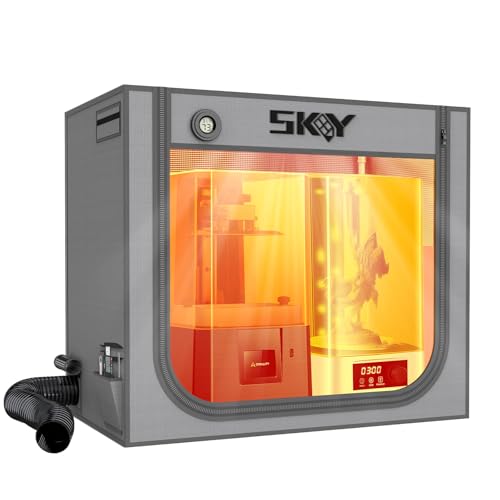
- Fits a resin printer and curing box
- Includes fan duct and activated-carbon box
- LED light and thermo-hygrometer included
Best For: Resin beginners managing odors and curing equipment
Best Flexible Fit
YOOPAI Constant-Temperature Enclosure

- Quick five-minute installation
- Ports for external filament and exhaust kits
- Wide listed printer compatibility
Best For: Beginners wanting easy setup and upgrade options
Best for Bambu Lab A1

- Designed for A1 Combo with AMS Lite
- Integrated LED and clear viewing window
- Tested internal temperature stays below 40°C
Best For: Bambu Lab A1 owners seeking a tailored enclosure
Best DIY Upgrade
FLASHFORGE Adventurer 5M Enclosure
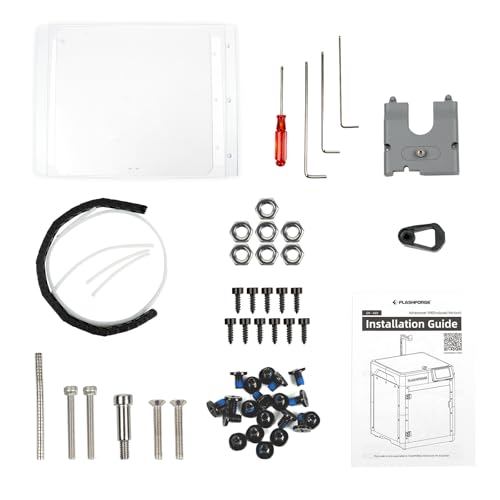
- Supports ASA and PC printing
- Reduces noise to 55 dB
- Customizable DIY exterior
Best For: Adventurer 5M owners seeking quieter, safer printing
Best Spacious Cover
LED Constant-Temperature Enclosure

- Built-in LED lighting
- Roomy multi-printer compatibility
- Dustproof and fire-resistant design
Best For: Users needing a large, easy-to-install enclosure
Best for Resin Ventilation

- Fits a printer and curing machine
- Carbon filter and exhaust fans
- Large transparent viewing window
Best For: Resin users prioritizing space and odor management
A1 Temperature-Control Enclosure

- 4,000-RPM ventilation fan and upgraded exhaust pipe
- LED light plus temperature and humidity monitoring
- Iron frame with maintenance window
Best For: Bambu Lab A1 and A1 Mini owners wanting an accessory-rich enclosure
Everyday Desktop Protection

- Six-sided flame-resistant fabric barrier
- LED and built-in thermo-hygrometer
- Ventilation kit with broad desktop compatibility
Best For: Beginners seeking basic dust protection and monitoring
Large Quiet-Workspace Tent

- Side-mountable 4,600-RPM ventilation fan
- 32 cm USB LED and large viewing window
- 600D fabric with maintenance and tool-storage features
Best For: Larger compatible printers and users wanting flexible exhaust placement
Best Value – Creality Fireproof 3D Printer Enclosure
For beginners comparing 3D printer enclosures for beginners, this Creality tent offers a straightforward way to create a more stable printing environment. Its 480 × 600 × 720 mm storage size fits several Creality and compatible printers, while the folding design keeps setup and storage simple.
Best For: Beginners using Creality Ender-series printers who want temperature control, dust protection, and a portable enclosure.
Pros:
- Passed a flame-resistance test and uses flame-retardant materials.
- Helps maintain a steadier temperature for high-temperature filaments and bed adhesion.
- Folding construction, tool pockets, and observation access support convenient everyday use.
- Compatible with multiple Creality, Anycubic, and ELEGOO models.
Cons:
- Compatibility still depends on the printer’s dimensions and spool-holder clearance.
- It is designed as a tent-style cover rather than a rigid cabinet.
This is a practical entry-level enclosure when you want broad compatibility and basic temperature and dust management without a complicated installation.
Best for Resin Workspaces – SKOUPHY Double-Space Resin Enclosure
This SKOUPHY model stands out among 3D printer enclosures for beginners who need room for both a resin printer and curing box. Its larger interior and included ventilation kit are aimed at keeping the workbench cleaner while helping remove resin-related odors.
Best For: Resin-printing beginners who need space for a printer and curing machine in the same enclosure.
Pros:
- Generous 31.5 × 18.1 × 28.3-inch internal space accommodates a printer and curing box.
- 4500 RPM exhaust fan and activated-carbon box help remove and absorb odors.
- Built-in LED lighting and a switchable Fahrenheit/Celsius thermo-hygrometer improve monitoring.
- Double-layer cover is designed to reduce dust, noise, and water exposure.
Cons:
- Its larger footprint requires more workbench space.
- You should measure both your printer and curing machine before ordering.
For resin users, the ventilation setup and double-space layout offer more specialized functionality than a basic printer cover, provided your workspace can accommodate its size.
Best Flexible Fit – YOOPAI Constant-Temperature Enclosure
The YOOPAI is a flexible pick for beginners exploring 3D printer enclosures for beginners across several popular printer brands. It provides a 29.5 × 25.6 × 21.6-inch enclosure, quick setup, noise reduction, and ports for external filament feeding or a fan-based exhaust accessory.
Best For: Beginners with compatible Creality, Anycubic, or ELEGOO printers who want easy setup and upgrade-friendly access ports.
Pros:
- Designed for installation in about five minutes and easy disassembly.
- Supports a wide range of listed Creality, Anycubic, and ELEGOO printers.
- Dedicated openings support external filament feeding and DIY exhaust kits.
- Six-sided enclosure helps reduce dust, accidental contact, and printing noise.
Cons:
- It is not water resistant.
- You must verify printer height, including the spool holder, before purchasing.
- Exhaust fan hardware is supported but not described as included.
This is a sensible choice when compatibility and future customization matter. Measure carefully, especially if your printer has a tall spool holder or accessories.
Best for Bambu Lab A1 – TOPCUBE A1 Enclosure with LED
Designed specifically for the Bambu Lab A1 Combo with AMS Lite, the TOPCUBE offers a beginner-friendly enclosure with integrated lighting and a clear viewing window. It is intended to support a more consistent environment while keeping the printer protected from dust and accidental contact.
Best For: Bambu Lab A1 Combo owners who want a purpose-designed enclosure with lighting and noise reduction.
Pros:
- Specifically sized for the Bambu Lab A1 Combo with AMS Lite.
- Integrated LED strip and transparent window make monitoring easier.
- Testing indicates the internal temperature will not exceed 40°C when enclosed.
- Fire-resistant materials, quick setup, and noise reduction add everyday convenience.
Cons:
- Its fit is specialized, so other printer models require careful dimension checking.
- The enclosure is not presented as a universal solution for all printers.
If you own the supported Bambu Lab setup, this enclosure combines a tailored fit with visibility and lighting features that make monitoring easier for new users.
Best DIY Upgrade – FLASHFORGE Adventurer 5M Enclosure
For beginners comparing 3D printer enclosures for beginners, this FLASHFORGE enclosure kit is a practical way to make an Adventurer 5M setup quieter, safer, and more suitable for certain high-temperature filaments. Its DIY design also lets you customize the exterior color.
Best For: Adventurer 5M owners who want noise reduction, odor isolation, and support for materials such as ASA and PC.
Pros:
- Helps maintain a stable internal temperature for improved print quality.
- Reduces reported printing noise from 65 dB to 55 dB.
- Helps isolate odors and keeps children or pets away from hot components.
- Supports high-temperature filaments including ASA and PC.
Cons:
- Designed as an Adventurer 5M enclosure kit, so compatibility with other printers is not established in the supplied information.
- The DIY design may require assembly.
This is a focused enclosure upgrade rather than a universal cabinet. If you own the compatible FLASHFORGE printer and value quieter, cleaner, safer printing, its combination of temperature management and odor isolation is appealing.
Best Spacious Cover – LED Constant-Temperature Enclosure
This medium enclosure is a strong option for beginners shopping for 3D printer enclosures for beginners, especially if you need broad printer compatibility and a roomy workspace. Built-in LED lighting, temperature control, and a six-sided cover make it easier to monitor and protect a printer.
Best For: Users with compatible medium-sized printers who want built-in lighting, dust and fire-resistant construction, and a spacious enclosed workspace.
Pros:
- Built-in LED strip improves visibility for spotting jams, adhesion issues, and misalignments.
- Designed to provide a stable temperature and help reduce clogs and jams.
- Six-sided enclosure helps isolate noise, dust, and accidental contact.
- Offers a stated interior size of 21.7 × 25.6 × 30.7 inches and supports many listed printer models.
Cons:
- Its large footprint may require substantial workspace.
- Compatibility still needs to be checked against the printer’s dimensions before purchase.
With five-minute installation and easy disassembly, this cover is beginner-friendly for users who want a flexible enclosure rather than a printer-specific kit. Verify the fit carefully, since the supplied dimensions and model list should not replace measuring your printer.
Best for Resin Ventilation – YOOPAI Large Resin Enclosure
For beginners researching 3D printer enclosures for beginners, this YOOPAI model is tailored to resin workflows that need more space and odor management. Its wide interior can accommodate a resin printer and curing machine, while carbon filtration, fans, and expandable exhaust pipes help manage emissions.
Best For: Resin users who need room for two devices and want a viewing window, odor filtration, and ventilation options.
Pros:
- Large 30 × 19.7 × 28.3-inch interior can accommodate two resin-related devices.
- Includes a carbon filter sheet, exhaust fans, and expandable pipes for odor and emission management.
- Transparent front window allows observation without opening the enclosure.
- Fully enclosed design helps limit dust and resin splashes while supporting a more constant temperature.
Cons:
- The large enclosure requires careful measurement before purchase.
- Activated-carbon filtration can slow airflow, so air may need time to discharge before opening.
- Additional exhaust piping may be needed to increase airflow.
This is the most specialized choice in the group, prioritizing resin odor control and extra capacity over compactness. Beginners should plan the ventilation layout and confirm that both the printer and curing machine fit inside.
A1 Temperature-Control Enclosure – Bambu Lab A1/A1 Mini Upgrade
For beginners comparing 3D printer enclosures for beginners, this upgrade is a printer-specific option for the Bambu Lab A1 and A1 Mini. It combines an iron frame, LED lighting, temperature and humidity monitoring, and a high-speed ventilation kit in a large 33.46 x 22.83 x 33.46-inch enclosure.
Best For: Bambu Lab A1 or A1 Mini users who want lighting, environmental monitoring, and directed exhaust in one enclosure.
Pros:
- Includes a ventilation fan rated up to 4,000 RPM and a three-layer exhaust pipe designed to reduce odor residue.
- Built-in LED lighting improves visibility for monitoring and maintenance.
- Thermo-hygrometer helps track temperature and humidity during printing.
- Iron-frame support and an openable perspective window provide a sturdier, more serviceable setup.
Cons:
- Designed specifically for the Bambu Lab A1 and A1 Mini; other printers require careful dimension checking.
- The enclosure is relatively large and weighs 7.28 pounds.
This is a feature-rich pick when compatibility is confirmed. Its monitoring and ventilation accessories make it more involved than a basic dust cover, but they can be useful for beginners building a more controlled workspace.
Everyday Desktop Protection – YOOPAI Medium Enclosure
This YOOPAI model is a straightforward choice for beginners shopping for 3D printer enclosures for beginners. Its six-sided, flame-resistant fabric enclosure creates a separated printing area, while the included LED, thermo-hygrometer, and ventilation kit add practical monitoring and airflow options.
Best For: Desktop printer users who want a defined, dust-reducing enclosure with basic lighting and environmental visibility.
Pros:
- Six-sided enclosure helps reduce everyday dust exposure and separates the printer from surrounding activity.
- Built-in thermo-hygrometer provides at-a-glance temperature and humidity readings.
- Integrated LED lighting helps illuminate the printer in dim surroundings.
- Medium 21.7 x 25.6 x 30.7-inch dimensions suit a range of desktop setups.
Cons:
- Available interior space should be checked against the printer, spool holder, and accessories before ordering.
- The notes describe airflow as an option rather than a specified high-performance exhaust system.
YOOPAI keeps the setup focused on everyday enclosure benefits rather than extensive extras. It is a sensible starting point for beginners who value dust separation, visibility, and simple monitoring, provided their printer fits the medium footprint.
Large Quiet-Workspace Tent – Anycubic Kobra X Large Cover
Among 3D printer enclosures for beginners, this large tent emphasizes visibility, airflow, and workspace separation. It has a 4,600-RPM fan that can mount on either side, a built-in 32 cm light, thickened 600D Oxford fabric, and a 26.77 x 19.68 x 28.34-inch footprint.
Best For: Users with a compatible larger desktop printer who want flexible exhaust placement, clear monitoring, and a more enclosed workspace.
Pros:
- 4,600-RPM ventilation fan can be mounted on either side for flexible setup.
- Large viewing window and built-in USB LED light make print monitoring easier.
- Thickened 600D Oxford fabric and aluminum-foil construction are designed to help isolate printing noise and retain temperature.
- Includes a quick-release top window, waste-removal window, and tool pouch.
Cons:
- Fit depends on the printer and spool holder staying below the listed interior limits.
- The product notes specifically caution that the Anycubic Kobra X fit is very compact.
- Its larger enclosure footprint may be excessive for smaller printers or limited desks.
This is the most feature-heavy option of the three, with flexible ventilation and several convenience details. Beginners should measure carefully, especially for the Kobra X, but the design suits users who want a more enclosed and observable printing station.
How We Picked These 3D Printer Enclosures for Beginners
We focused on the features that matter most when setting up a printer for the first time: compatible dimensions, frame stability, access to the controls and build plate, visibility, ventilation options, cable routing, and ease of assembly. We also included a range of enclosure styles, from simple dust covers to models with LED lighting, extraction fans, filters, and accessory storage.
Because enclosure performance depends on the printer, filament or resin, room layout, and ventilation method, treat claims such as “fireproof,” “soundproof,” or “constant temperature” as product-design goals rather than guarantees. Always follow the enclosure and printer manufacturer’s safety instructions.
Quick Comparison
| Best For | Look For | Most Useful Feature |
|---|---|---|
| Creality Ender owners | Correct printer fit and front access | Simple protective tent |
| Bambu Lab A1 or A1 Mini users | Model-specific clearance | LED lighting and extraction |
| Resin printing | Enclosed ventilation and generous access | Ventilation kit |
| Shared rooms | Noise and odor management | Fan or filter compatibility |
| Large-format printers | Interior height and footprint | Oversized enclosure design |
Key Buying Factors for 3D Printer Enclosures for Beginners
Size and Compatibility
Measure the printer with its spool holder, power cable, bed movement, and any external accessories installed. A close fit may restrict ventilation or moving parts. Confirm the enclosure’s internal dimensions, not only its advertised printer compatibility.
Ventilation and Materials
For resin printing and materials that produce noticeable odors, prioritize a sealed design with a duct, extraction fan, or filter connection. Ventilation should exhaust appropriately rather than simply recirculate air. For heated printing, leave enough room for safe airflow and follow the printer’s temperature limits.
Visibility and Daily Access
Clear windows, LED lighting, large front openings, and cable ports make routine tasks easier. Beginners should be able to load filament, remove prints, inspect the first layer, and reach the power switch without dismantling the enclosure.
Stability and Maintenance
A rigid frame is preferable for taller or heavier printers. Check zipper quality, panel construction, removable surfaces, and whether the enclosure can be cleaned easily. Keep combustible materials away from hot components, and never leave a printer running unattended unless your setup and manufacturer guidance explicitly support it.
Who Should Buy Which 3D Printer Enclosures for Beginners?
Choose a Creality-specific enclosure if you want straightforward sizing for an Ender-series machine. Bambu Lab A1 and A1 Mini owners should favor the model-specific options here, while checking clearance around the moving bed and spool path. Resin users should prioritize the SKOUPHY or YOOPAI designs with ventilation kits and enough space for safe handling.
If you print in a bedroom, office, or shared workspace, select an enclosure with a compatible extraction setup and consider noise reduction as a secondary benefit rather than a complete solution. For larger printers such as the Anycubic Kobra X, choose the roomier tent and verify every dimension before ordering. A basic LED-equipped medium enclosure is suitable when your main goals are dust control, visibility, and a tidier beginner workspace.
