
Choosing the right 360-degree camera can make remote meetings feel more natural, especially when multiple people share the same room. The best models help everyone stay visible, audible, and engaged without constant manual camera control.
Below, we focus on practical picks for different room sizes, budgets, and platform needs so you can find a setup that fits your team.
Best 10 360-Degree Cameras for Remote Work Picks for 2026
Premium Hybrid Collaboration Pick

- 360° 1080p video with 18-foot audio pickup
- Auto speaker tracking for hybrid meetings
- Plug-and-play setup with Teams certification
Best For: Hybrid teams needing an easy conference-room camera for active speaker tracking
Budget-Friendly Simple Setup
j5create 360 Degree Meeting Webcam

- Full HD 1080p with six viewing modes
- Built-in omnidirectional microphone
- USB plug-and-play for major meeting apps
Best For: Small teams and classes that need an easy 360° conferencing webcam
Renewed Smart Conference Upgrade
- 1080p 360° smart camera with speaker tracking
- Eight-mic array with 18-foot pickup radius
- Simple plug-and-play setup for meeting rooms
Best For: Medium to large rooms that need smart speaker tracking and stronger sound
AI Voice Isolation Pick
PANOCORE360 All-in-One Meeting Camera

- 360° capture with active-speaker and dual 180° modes
- Built-in speaker plus 3-mic array with AI voice processing
- Plug-and-play support with local MicroSD recording
Best For: Small to medium rooms needing flexible views and local recording
Panoramic Collaboration Pick
360 Conference Camera for Small Teams

- Shows a full-room view plus speaker close-ups.
- Three-lens stitching aims for a distortion-free image.
- USB plug-and-play setup works with PC and Mac.
Best For: Small and mid-size teams needing an easy 360 conference camera.
Premium 4K Smart Option
Meeting Owl 4+ for Hybrid Rooms

- Records 4K 360-degree video with 360-degree audio.
- Auto-focuses on active speakers using Owl Intelligence System.
- Plug-and-play setup with Teams certification.
Best For: Hybrid rooms that need automated speaker tracking and built-in audio.
All-in-One Team Meeting Choice
TOUCAN 360 Webcam with Mic and Speaker

- Offers 360-degree coverage with 1080p HD video.
- Includes 4 noise-reduction mics plus a speaker.
- Plug-and-play setup supports major meeting platforms.
Best For: Teams wanting an all-in-one 360 camera for everyday meetings.
Standalone Room System
KanDao Meeting Pro 360-degree Video Conference Camera

- Dual 195° lenses cover the full room.
- AI tracking follows the active speaker.
- Built-in Android OS supports no-computer use.
Best For: Hybrid teams needing a self-contained meeting-room camera
Secure Plug-and-Play Pick
COOLPO Camera 360 Smart Video Conference Room Camera

- 360° view with 4K resolution and no stitching.
- AI voice tracking and intelligent zoom help frame speakers.
- USB plug-and-play setup keeps deployment simple.
Best For: Teams that value secure local processing and easy room setup
Hybrid Collaboration Pick
Meeting Owl 3 Premium Pack 360-Degree HD Smart Video Conference Camera

- 360° video and audio cover the room up to 18 ft.
- Owl Intelligence System auto-focuses on speakers.
- USB plug-and-play setup takes about 6 minutes.
Best For: Hybrid teams that want reliable speaker tracking and room scalability
Premium Hybrid Collaboration Pick – Owl Labs Meeting Owl 3
If you want 360-degree cameras for remote work that make hybrid meetings feel more natural, the Owl Labs Meeting Owl 3 is built around automatic speaker tracking and full-room capture. It records 360° video in 1080p HD and picks up audio from up to 18 feet away, so remote attendees can follow the conversation without constant camera adjustments.
Best For: Teams running regular hybrid meetings in small to large conference rooms who want a plug-and-play, platform-friendly setup.
Pros:
- Captures 360° video in 1080p HD with 360° audio coverage up to 18 feet.
- Automatically focuses on the active speaker to help remote participants stay engaged.
- Plug-and-play USB setup can get you from unboxing to meeting in about 6 minutes.
- Works with Microsoft Teams and is compatible with Zoom, Google Meet, Webex, and more.
Cons:
- Designed for conference rooms, so it is less suited to solo desk setups.
- Expanding to larger rooms may require adding other Owl Labs ecosystem devices.
Overall, this is a strong choice when you need an all-in-one meeting device that prioritizes simple deployment and speaker-focused hybrid collaboration. It is especially appealing if your team wants a dependable room camera that is easy for IT to manage.
Budget-Friendly Simple Setup – j5create 360 Degree Meeting Webcam
For buyers comparing 360-degree cameras for remote work, the j5create 360 Degree All Around Meeting Webcam focuses on straightforward video conferencing at 1080p. It offers six display modes and a built-in omnidirectional microphone, making it a practical option when you want broad room visibility without a complicated setup.
Best For: Small teams, online classes, and collaboration sessions that need a simple USB conference camera.
Pros:
- 360° video conferencing camera with Full HD 1080p playback at 30 Hz.
- Built-in omnidirectional microphone for meeting audio.
- USB UVC/UAC plug-and-play design with touch bar participant selection.
- Supports Zoom, Teams, Google Meet, Cisco, Skype, and other major platforms.
Cons:
- Fixed focus limits flexibility compared with more advanced smart-tracking models.
- May require firmware updates and app permissions to optimize performance.
This is a sensible pick if you want a broad 360-degree view and easy compatibility across common conferencing apps. It is best when simplicity matters more than premium meeting-room automation.
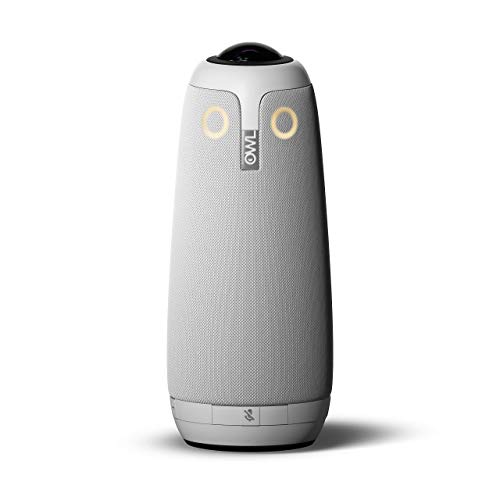
Renewed Smart Conference Upgrade – Meeting Owl Pro 360
If you’re shopping 360-degree cameras for remote work and want stronger room coverage, the renewed Meeting Owl Pro brings the familiar Owl-style smart conferencing approach in a more capable package. It delivers 1080p 360° video, automatically shifts focus to the person speaking, and combines the camera, mic, and speaker into one tabletop device.
Best For: Medium to large meeting rooms that need automatic speaker switching and stronger audio pickup.
Pros:
- Top 1080p 360° smart video conferencing camera with automatic speaker focus.
- Eight smart microphones equalize speaking volume and pick up sound within an 18-foot radius.
- Claims 2x louder sound and 2x sharper video than the original Meeting Owl.
- Quick setup with power and USB, no downloads or installs required.
Cons:
- Renewed product, which may matter if you prefer brand-new hardware only.
- Best suited to conference rooms rather than personal workstations.
Overall, the Meeting Owl Pro is a practical step up when your remote meetings depend on clear room coverage and automatic focus changes. It is a strong fit for teams that want a smart-room feel with minimal setup effort.
AI Voice Isolation Pick – PANOCORE360 All-in-One Meeting Camera
Among 360-degree cameras for remote work, the PANOCORE360 is a compact all-in-one option built for hybrid meetings in small to medium rooms. It combines 360° capture, automatic speaker focus, dual vision modes, and AI voice processing, while outputting a 1080p stream from its integrated processing system.
Best For: Small to medium meeting rooms with up to 12 participants that need flexible viewing modes and local recording.
Pros:
- All-in-one 360° camera with four-camera stitching and 1080p output stream.
- Auto-focuses on the active speaker or switches to dual 180° widescreen viewing.
- Built-in speaker and 3-mic array with AI voice processing for clear conversations.
- Driver-free plug-and-play operation with Zoom, Teams, Webex, and Google Meet.
Cons:
- Voice pickup range is listed at up to 10 feet, which may be limited for larger rooms.
- Best performance depends on adequate USB power, especially on older computers.
This model stands out if you want a compact meeting camera with more advanced processing and recording options than a basic webcam. It makes the most sense for teams that value flexible room views and integrated local capture.
Panoramic Collaboration Pick – 360 Conference Camera for Small Teams
If you’re shopping for 360-degree cameras for remote work, this conference room webcam is built to show the whole room while also bringing the current speaker into view. It uses three 2MP lenses with in-chip stitching to create a distortion-free 1080P image, making it a practical option for small to mid-size meeting spaces that want a more natural conference experience.
Best For: Small and mid-size teams that want a simple 360 camera with speaker close-up tracking.
Pros:
- Displays both a 360-degree panoramic view and real-time close-ups of speakers.
- Three-lens design with real-time stitching aims for a natural, non-fisheye look.
- Plug-and-play USB setup with no complicated driver installation.
- Compatible with most PC and Mac conferencing tools that support external USB cameras.
Cons:
- Listed as 1080P rather than 4K.
- If power is insufficient, an extra power cable may be needed for a clear image.
- Best suited to small and mid-size rooms rather than larger spaces.
Overall, this is a straightforward choice if you want a remote-work camera that balances room coverage and speaker focus without adding setup complexity. The included micro SD slot and two-year replacement warranty add a little extra practicality for everyday meeting use.
Premium 4K Smart Option – Meeting Owl 4+ for Hybrid Rooms
For teams comparing 360-degree cameras for remote work, the Meeting Owl 4+ stands out as an all-in-one system that captures 4K 360-degree video and 360-degree audio. Its Owl Intelligence System automatically focuses on the person speaking, which helps remote participants follow hybrid discussions more naturally in small to large rooms.
Best For: Hybrid teams that want an automated 4K 360 camera with built-in audio and speaker tracking.
Pros:
- Captures 360-degree video in 4K with 360-degree audio up to 18 feet.
- Automatically focuses on whoever is speaking using visual and audio cues.
- Plug-and-play USB design can get users from unboxing to meeting in about 6 minutes.
- Compatible with major platforms and certified for Microsoft Teams.
Cons:
- More of an enterprise-style device than a basic webcam.
- Expansion for larger spaces may require additional Owl Labs accessories.
- Wi-Fi, management tools, and room ecosystem features may be more than smaller teams need.
This is the strongest pick here if you want a polished hybrid-meeting experience with minimal manual control. It combines video, microphone, and speaker functionality in one unit, making it a capable room centerpiece for collaborative work.
All-in-One Team Meeting Choice – TOUCAN 360 Webcam with Mic and Speaker
If you need 360-degree cameras for remote work that are easy to deploy, the TOUCAN conference camera combines 360-degree omni-directional coverage with 1080p HD video, four noise-reduction microphones, and a built-in speaker. It is designed to make office communication feel more face-to-face while staying simple to plug in and use across common conferencing platforms.
Best For: Teams that want a 360 webcam with built-in mic and speaker for flexible room use.
Pros:
- 360-degree omni-directional shooting helps show facial expressions and gestures from anywhere in the room.
- Includes 4 microphones and a speaker for more complete meeting audio.
- Plug-and-play operation keeps setup quick and convenient.
- Works with Zoom, Microsoft Teams, Google Voice, and other conference software.
Cons:
- Video resolution is 1080p, not 4K.
- Some listed details reference auto focus and fixed focus, which may be less straightforward than a single-focus design.
- The device is relatively heavy compared with a basic webcam.
In practice, this TOUCAN model is a good fit when you want one device to cover video and audio without extra peripherals. It looks especially useful for offices that need a simple, adaptable meeting setup across different room sizes.
Standalone Room System – KanDao Meeting Pro 360-degree Video Conference Camera
If you want 360-degree cameras for remote work that can handle a full conference room without a laptop, the KanDao Meeting Pro is built for exactly that. Its dual 195° lenses, AI face and voice tracking, and built-in Android OS make it a practical all-in-one option for hybrid meetings.
Best For: Teams that want a standalone meeting-room camera with strong audio, AI tracking, and flexible meeting modes.
Pros:
- Dual 195° lenses provide full 360° room coverage.
- AI face and voice tracking highlights the active speaker, even in motion.
- Eight-mic array and 5W speaker are designed for clear pickup in rooms up to 18 ft.
- Built-in Android OS lets it work without a computer, plus it supports Teams, Zoom, and Google Meet.
Cons:
- 1080p/720p output is more modest than some 4K-focused alternatives.
- Best suited to meeting rooms rather than a simple personal desk setup.
- Smart modes and local recording add flexibility, but they may be more than casual users need.
The KanDao Meeting Pro stands out when you need a self-contained room system with camera, mics, and speaker in one unit. For teams prioritizing ease of deployment and active-speaker focus, it is a strong fit among 360-degree cameras for remote work.
Secure Plug-and-Play Pick – COOLPO Camera 360 Smart Video Conference Room Camera
Among 360-degree cameras for remote work, the COOLPO AI Huddle Pana is aimed at teams that want immersive room coverage with simple setup. Its 360° all-in-one design, AI voice tracking, and local edge processing make it a straightforward choice for conference rooms focused on privacy and ease of use.
Best For: Meeting rooms that need secure plug-and-play deployment with speaker tracking and 360° coverage.
Pros:
- 360° view with 4K resolution and no stitching.
- AI voice tracking and intelligent zoom follow active participants.
- Eight microphones capture voices within about 15 ft.
- USB plug-and-play setup with no driver installation required.
Cons:
- Best positioned as a room device, not a portable personal webcam.
- Audio pickup range is listed at 15 ft, which may be limiting for larger spaces.
- Security and edge-computing strengths may matter less for very small teams.
The COOLPO camera is a strong fit if you want local processing and simple USB deployment in a hybrid meeting space. It balances wide coverage, smart tracking, and privacy-minded hardware processing in one unit.
Hybrid Collaboration Pick – Meeting Owl 3 Premium Pack 360-Degree HD Smart Video Conference Camera
If you are comparing 360-degree cameras for remote work, the Meeting Owl 3 is a polished pick for hybrid collaboration. It captures 360° video in 1080p HD, uses Owl Intelligence System to focus on speakers automatically, and plugs in quickly for fast deployment.
Best For: Teams that want a proven hybrid-meeting camera with strong speaker focus and scalable room coverage.
Pros:
- Captures 360° video in 1080p HD with 360° audio up to 18 ft.
- Automatically focuses on whoever is speaking using visual and audio cues.
- Plug-and-play USB setup can get you into a meeting in about 6 minutes.
- Can be expanded with additional Owl devices and accessories for larger rooms.
Cons:
- Resolution is 1080p rather than 4K.
- Full ecosystem expansion may be more than smaller teams need.
- Best value is tied to hybrid collaboration use cases, not basic one-on-one calls.
The Meeting Owl 3 is a strong all-around choice for meeting spaces that need automatic speaker framing and easy setup. Its expansion options and platform compatibility make it especially useful as teams scale their remote work setup.
How We Picked These 360-Degree Cameras for Remote Work
We looked for models that solve the biggest pain points in hybrid meetings: wide room coverage, reliable speaker tracking, strong microphone pickup, and compatibility with common conferencing platforms. We also favored cameras that are straightforward to set up and easy to use day to day, since remote work teams need dependable gear more than flashy extras.
Quick Comparison of What Matters Most
When comparing options, focus on video quality, mic range, audio clarity, speaker-following behavior, and whether the camera suits a small huddle room or a larger conference space. Some 360-Degree Cameras for Remote Work are designed to be simple all-in-one units, while others offer better image quality or more advanced AI features for busier rooms.
Key Buying Factors for 360-Degree Cameras for Remote Work
Room Size and Seating Layout
Match the camera’s coverage and microphone pickup range to your room. A compact team room may work well with a smaller all-in-one camera, while larger rooms benefit from stronger mics, smarter framing, and better speaker detection.
Video Resolution and Framing
1080p is still solid for many teams, but 4K models can improve clarity when faces are farther from the lens or when you want a cleaner image on larger displays. Automatic framing and speaker focus are especially useful when multiple people are talking.
Audio Performance
For hybrid meetings, audio often matters more than video. Look for beamforming or multi-mic arrays, echo reduction, and enough pickup distance to capture everyone clearly without needing a separate microphone system.
Platform Compatibility
Make sure the camera works smoothly with Zoom, Microsoft Teams, Google Meet, and your preferred conferencing tools. Certification or verified compatibility can reduce setup issues for remote work teams.
Who Should Buy Which 360-Degree Cameras for Remote Work?
If you need a simple, budget-friendly option for smaller teams, choose a straightforward 1080p all-in-one model. If your group runs frequent meetings in a shared conference room, prioritize stronger speaker tracking, better microphones, and smarter framing. Teams that want the sharpest image and a more polished presentation should consider higher-end 4K options, especially if meetings often involve clients or larger internal presentations.
For most buyers, the best choice is the camera that balances clarity, audio, and ease of use in your actual meeting space. That combination matters more than chasing the highest spec sheet number.
