
A 2U rackmount case can house a GPU, but the right slot count alone does not guarantee a workable build. Card height, power connectors, airflow, and even the riser arrangement can determine whether it fits.
These 10 chassis cover compact, storage-oriented, and larger-motherboard builds. Use the guide below to narrow your choices before checking dimensions against your exact GPU and components.
Best 10 2u Server Chassis for GPU Use Picks for 2026
GPU-Length Pick
UTLGAMENG 2U Micro-ATX Chassis

- Stated GPU length limit: 11.4 inches
- Mini-ITX or Micro-ATX; ATX PSU
- Three 3.5-inch HDDs or mixed HDD/SSD storage
Best For: Compact builds needing a stated GPU length limit
Short-Depth ATX Pick

- 13.38-inch stated chassis depth, excluding handle
- Supports CEB, ATX, Micro-ATX, and Mini-ITX
- One 3.5-inch and five 2.5-inch drive bays
Best For: Shallow ATX builds with verified card clearance
Storage-Focused Pick
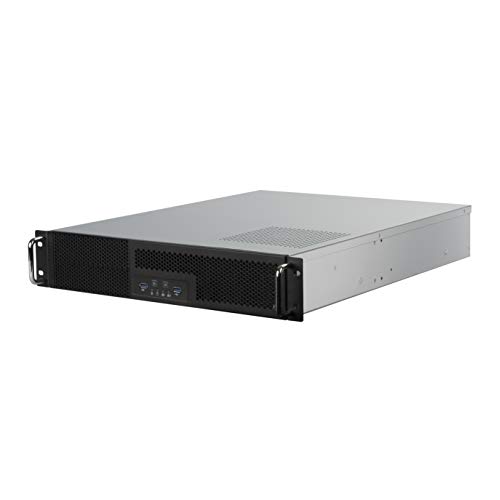
- Up to five 3.5-inch HDDs plus one 2.5-inch SSD
- Two 5.25-inch bays
- ATX PSU support up to 180 mm depth
Best For: Storage-heavy ATX rack systems
Front-I/O Pick
RackChoice 2U Short-Depth Chassis

- Front-access motherboard I/O
- 14.17-inch depth; three 80 mm fans
- Micro-ATX or Mini-ITX; ATX PS2 PSU
Best For: Shallow racks needing front motherboard-port access
E-ATX Expansion Pick
Rosewill RSV-Z2900U 2U Chassis

- Supports 12 × 13-inch E-ATX boards
- Seven expansion slots and six drive positions
- Three preinstalled 80mm PWM fans
Best For: E-ATX builds needing expansion and mixed drive storage
Compact Rack Pick

- 400mm chassis depth, excluding handle
- Four low-profile expansion positions
- Two 5.25-inch bays plus four internal 3.5-inch bays
Best For: Compact micro-ATX builds with low-profile expansion cards
ATX Cooling Flex Pick
Rosewill RSV-Z2850U 2U Chassis

- ATX compatibility and seven expansion slots
- Two included 80mm PWM fans; room for two more
- Four 3.5-inch bays plus two 2.5-inch positions
Best For: ATX builds that may need additional chassis fans
Storage-Heavy Pick
RackChoice 2U Micro-ATX Chassis

- Up to seven 3.5-inch drives
- Five listed expansion slots
- GPU dimensions not specified
Best For: Storage-focused Micro-ATX rack builds
Preinstalled-Fan Pick
Rosewill RSV-Z2600U 2U Chassis

- Three preinstalled 80mm PWM fans
- Four PCI slots and four HDD bays
- GPU clearance not specified
Best For: Micro-ATX builds needing included fans
Specified-GPU-Clearance Pick

- GPU limit: 29 cm long, 12 cm wide
- Two HDD bays plus one SSD bay
- Two listed expansion slots
Best For: Compact builds needing stated GPU size limits
GPU-Length Pick – UTLGAMENG 2U Micro-ATX Chassis
If you are shopping for a 2u server chassis for gpu use, this is the clearest fit of the four: it specifies support for a GPU up to 11.4 inches long, alongside Mini-ITX or Micro-ATX motherboards and a standard ATX power supply.
Best For: Compact rack builds that need a stated GPU length limit and room for several drives.
Pros:
- Supports GPUs up to 11.4 inches long and motherboards up to 9.6 × 9.6 inches.
- Offers either three 3.5-inch HDDs or two 3.5-inch HDDs plus one 2.5-inch SSD.
- Provides two front USB 3.0 ports and power, HDD, and LAN status LEDs.
Cons:
- CPU cooler height is limited to 65 mm.
- The notes do not specify GPU thickness or available power connectors.
Check the full dimensions of your card and cooler before ordering; the published GPU length alone does not establish complete compatibility.
Short-Depth ATX Pick – IPCHASSIS 2U Industrial Case
For buyers comparing a 2u server chassis for gpu use in a shallow installation, this IPCHASSIS case offers a stated 13.38-inch chassis depth, broad motherboard support, and a Flex ATX power-supply layout. The supplied specifications do not state GPU clearance, so treat card fit as a measurement to verify rather than an assumed feature.
Best For: Space-constrained ATX or CEB builds that prioritize storage and can verify expansion-card clearance.
Pros:
- Supports CEB, ATX, Micro-ATX, and Mini-ITX motherboards.
- Holds one 3.5-inch drive and five 2.5-inch drives.
- Includes dual front USB 3.0 ports and a wallmount bracket.
Cons:
- Requires a compatible Flex ATX power supply rather than a standard ATX unit.
- No GPU length or expansion-slot clearance is specified.
Its shallow body is useful where rack depth is tight, but confirm card dimensions and power-supply requirements before planning a GPU build.
Storage-Focused Pick – SilverStone RM23-502
The SilverStone RM23-502 is a storage-oriented option in a search for a 2u server chassis for gpu use. It supports an ATX motherboard and power supply, but its stated strengths are drive capacity, two 5.25-inch bays, and a fan bracket—not a published GPU clearance figure.
Best For: ATX rack systems that need multiple hard drives and 5.25-inch device bays, with GPU fit checked separately.
Pros:
- Accommodates up to five 3.5-inch HDDs and one 2.5-inch SSD.
- Has two 5.25-inch expansion bays.
- Supports ATX power supplies up to 180 mm deep and has a bracket for up to three 80 × 38 mm fans.
Cons:
- The supplied notes do not specify GPU length or slot clearance.
- At 22.83 inches deep, it needs more installation depth than the short-depth options here.
Choose it for its storage layout, then check how your intended card, drives, and cooling hardware will share the available space.
Front-I/O Pick – RackChoice 2U Short-Depth Chassis
This RackChoice model gives a 2u server chassis for gpu use a different priority: front-access motherboard I/O in a 14.17-inch-deep enclosure. It supports Micro-ATX or Mini-ITX boards and an ATX PS2 power supply, but the supplied notes do not establish which GPUs will fit.
Best For: Shallow rack installations where front motherboard-port access matters and card clearance can be confirmed before purchase.
Pros:
- Places motherboard I/O at the front for easier access.
- Uses a 14.17-inch-deep steel chassis with three 80 mm ventilation fans.
- Supports ATX PS2 power supplies with a top 120 mm or side 80 mm fan.
Cons:
- No maximum GPU length or supported card profile is stated.
- Drive-bay information is inconsistent: the title lists two internal 3.5-inch bays, while the bullets list one.
The front-access layout is its main differentiator. Verify expansion-card dimensions and the drive-bay count if either is critical to your build.
E-ATX Expansion Pick – Rosewill RSV-Z2900U 2U Chassis
If you’re shopping for a 2u server chassis for gpu use, the Rosewill RSV-Z2900U offers E-ATX motherboard support and seven expansion slots. Its three preinstalled 80mm PWM fans also give you a starting point for system airflow, though GPU clearance and slot compatibility need checking before you buy.
Best For: E-ATX builds that need multiple expansion slots and a mix of 3.5-inch and 2.5-inch storage.
Pros:
- Supports E-ATX motherboards up to 12 × 13 inches.
- Provides seven expansion slots, four 3.5-inch bays, and space for two 2.5-inch devices.
- Includes three 80mm PWM fans and two front USB 3.0 ports.
Cons:
- The supplied specifications do not establish GPU length, height, or power-connector clearance.
- Its 2U format requires careful selection of compatible expansion hardware.
The RSV-Z2900U is the E-ATX-oriented option here. Verify your intended GPU and power supply against the chassis layout before committing to a build.
The RackChoice 238C-A is a compact option to consider when searching for a 2u server chassis for gpu use, but its four expansion positions are specified for low-profile add-on cards. It supports micro-ATX or mini-ITX motherboards and has a 400mm chassis depth excluding the handle.
Best For: Compact rack builds using micro-ATX or mini-ITX boards and low-profile expansion cards.
Pros:
- Supports standard ATX PS2 power supplies.
- Offers two external 5.25-inch bays, four internal 3.5-inch bays, and an included 3.5-to-2.5-inch adapter.
- Includes two intake 80mm fans and two front USB 3.0 ports.
Cons:
- Expansion-card support is limited to low-profile cards.
- GPU clearance and power-connector space are not specified.
This is the space-conscious choice if your components fit its low-profile layout. Confirm the exact card dimensions and cooling needs before planning a GPU installation.
For buyers comparing a 2u server chassis for gpu use, the Rosewill RSV-Z2850U pairs ATX compatibility and seven expansion slots with two preinstalled 80mm PWM fans. It also leaves room for two additional 80mm fans, making its cooling layout worth considering when planning a build.
Best For: ATX rackmount builds that need multiple expansion slots and the option to add chassis fans.
Pros:
- Provides seven expansion slots and ATX motherboard compatibility.
- Has four 3.5-inch bays and space for two additional 2.5-inch devices.
- Includes two 80mm PWM fans, with mounting space for two more.
Cons:
- Additional fans are not listed as included.
- The supplied specifications do not confirm GPU dimensions or power-connector clearance.
Choose this model over a fixed-fan layout if you want the option to expand chassis cooling. As with any 2U GPU build, check the specific card’s fit before purchasing.
Storage-Heavy Pick – RackChoice 2U Micro-ATX Chassis
If your search for a 2u server chassis for gpu use also calls for substantial drive capacity, this RackChoice case offers room for up to seven 3.5-inch drives in a 15.75-inch-deep chassis. It supports Micro-ATX or Mini-ITX boards and a standard ATX power supply.
Best For: Compact rack builds that prioritize storage capacity alongside expansion options.
Pros:
- Holds up to seven 3.5-inch drives, or six 3.5-inch drives plus one 2.5-inch drive.
- Five listed expansion slots give you options when planning add-in cards.
- Supports standard ATX power supplies with either 120mm or 80mm fans.
Cons:
- No supported GPU length or width is specified; check your card and cooling clearance before buying.
- Motherboard support is limited to Micro-ATX and Mini-ITX.
The drive layout is the main attraction here. For a GPU build, treat fit as a measurement exercise rather than assuming the expansion-slot count guarantees card clearance.
Preinstalled-Fan Pick – Rosewill RSV-Z2600U 2U Chassis
The Rosewill RSV-Z2600U is a 2u server chassis for gpu use worth considering if you want included cooling and straightforward rack features. Its Micro-ATX layout provides four PCI slots, four internal 3.5-inch bays, and an extra 5.25-inch device slot.
Best For: Micro-ATX rack builds that benefit from preinstalled fans and front-panel access.
Pros:
- Three preinstalled 80mm PWM rear fans provide case airflow.
- Four PCI slots and four 3.5-inch bays accommodate expansion and storage.
- Front-panel lock, status LEDs, and two USB 3.0 ports add practical rack features.
Cons:
- No maximum GPU dimensions are provided, so card clearance needs verification.
- Motherboard compatibility is listed for Micro-ATX, not full-size ATX.
This is a practical starting point when you want fans already installed. Confirm your GPU’s physical fit and airflow needs before choosing it for a graphics-card build.
Specified-GPU-Clearance Pick – GPERHUAN Compact 2U Chassis
For shoppers comparing a 2u server chassis for gpu use, this GPERHUAN model gives unusually concrete card-size guidance: the supplied limits are 29 cm (11.4 inches) in length and 12 cm (4.72 inches) in width. It supports Micro-ATX or Mini-ITX boards and a standard ATX PS2 power supply.
Best For: Compact builds where checking a GPU against stated size limits is the priority.
Pros:
- States maximum GPU length and width for easier initial fit checks.
- Supports two 3.5-inch HDDs and one 2.5-inch SSD.
- Provides two front USB 3.0 ports and accepts an ATX PS2 power supply.
Cons:
- Only two expansion slots are listed.
- The stated GPU limits do not establish clearance for card thickness or power connectors; verify the complete card fit.
This is the clearest of these options for comparing a card’s listed length and width against chassis limits. Check thickness, cabling, and cooling space separately before committing.
How We Picked the Best 2u Server Chassis for GPU Use
We considered the listed motherboard formats, rack depths, drive provisions, fan configurations, and power-supply support, then focused on what those details mean for a GPU build. A chassis earns consideration here as a possible starting point, not a guarantee of GPU compatibility. Product listings rarely establish every critical clearance, so confirm dimensions and mounting hardware with the manufacturer before ordering.
Quick Comparison: Match the Case to the Build
For a larger motherboard, start with the Rosewill RSV-Z2900U, listed as E-ATX compatible, or the ATX-compatible RSV-Z2850U. If shallow rack space is the constraint, compare the 13.38-inch industrial chassis and the 14.17-inch RackChoice model—but expect tighter component and cable-clearance checks. Micro-ATX builds have several options, including the four-PCIe-slot chassis and Rosewill RSV-Z2600U. The SilverStone SST-RM23-502 and RackChoice cases with 5.25-inch bays are worth a look when front-accessible devices matter. None of those descriptions, by itself, confirms that a particular GPU will fit.
Key Buying Factors for 2u Server Chassis for GPU Use
GPU Height, Length, and Slot Orientation
Measure the card, including its cooler and power plugs, against the case’s published internal clearances. Many full-height GPUs need a compatible riser in a 2U enclosure; a listed PCIe slot count does not establish full-height support. Check the required riser type, slot orientation, card thickness, and whether the motherboard and case place the card where you expect.
Cooling and Power
GPU heat has to leave the chassis without being blocked by drive cages or cables. Check fan locations and supported sizes, the airflow path through your chosen card, and whether the cooling setup suits your expected workload. Verify that the specified PSU format fits, supplies sufficient wattage, and has the GPU power connectors you need. A case that supports an ATX PSU may still leave little room for long power supplies or stiff cables.
Rack Depth and Component Space
Compare chassis depth with the usable depth of your rack, allowing room behind it for power and network cables. Short-depth cases can save rack space but reduce room for long GPUs, drives, and cable routing. Also check motherboard form factor, drive-bay placement, and whether any optional rails or risers must be purchased separately.
Who Should Buy Which 2u Server Chassis for GPU Use?
Choose an E-ATX- or ATX-listed Rosewill chassis if your motherboard size is the first constraint, then verify GPU fit. Consider the short-depth models for shallow racks only after checking the full component layout. Pick a Micro-ATX option for a smaller board, and prioritize a case with accessible drive bays if your build needs them. For any GPU-focused system, buy only after confirming card clearance, riser compatibility, airflow, and PSU fit for the exact parts you plan to install.
