
A 280mm AIO can be a smart middle ground for a gaming PC: two 140mm fans offer substantial cooling without the space requirements of a 360mm radiator. But the best choice depends on more than radiator size.
These six coolers span straightforward designs, LCD and AMOLED displays, and RGB-focused ecosystems. Before choosing, check your case clearance, CPU socket, and how much you want to manage through software.
Best 6 280mm Aio Coolers for Gaming PCs Picks for 2026
Best for Wireless Fan Control
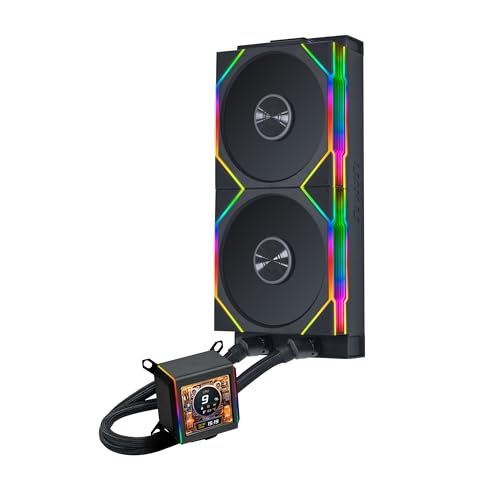
- 2.88-inch, 480 × 480 IPS display
- Asetek 8th-generation pump
- Pre-installed wireless TL fans
Best For: LCD-focused builds with coordinated fan and ARGB control
Best Statement Display

- 6.67-inch curved, L-shaped display
- Custom media and 3D effects via KANALI
- Pre-installed 140mm ARGB fans
Best For: Showcase PCs built around a large customizable screen
Performance-Focused Pick

- Manufacturer-rated 350W TDP capacity
- Dual 140mm fans with 300–1800 RPM PWM control
- Supports Intel LGA1851/1700 and AMD AM5/AM4
Best For: Straightforward cooling with broad socket support
Display-Centric Pick
NZXT Kraken Elite 280 RGB White

- Customizable IPS LCD and RGB lighting
- Single-frame RGB radiator fan
- Six-year manufacturer warranty
Best For: White builds centered on a customizable LCD
Cable-Tidy RGB Pick

- Included iCUE LINK System Hub
- Two QX140 RGB fans with fan-stop support
- Five-year manufacturer warranty
Best For: Coordinated RGB builds with cleaner cabling
Best for Wireless Fan Control – LIAN LI Galahad II LCD 280
Among 280mm aio coolers for gaming pcs, the LIAN LI Galahad II LCD 280 stands out for its 2.88-inch, 480 × 480 IPS screen and pre-installed wireless TL fans. Its Asetek 8th-generation pump and two 140mm fans pair cooling hardware with extensive display and fan customization.
Best For: Builders who want a prominent LCD and centralized fan and lighting control through L-Connect 3.
Pros:
- Large IPS display supports personalized visuals through L-Connect 3.
- Two 140mm TL wireless fans arrive pre-installed on the radiator.
- Included 2.4 GHz USB controller manages fan speed and ARGB; 45° rotating tube connectors add mounting flexibility.
Cons:
- Display and fan customization rely on L-Connect 3.
- The supplied listing specifies no warranty.
Choose this model if screen visibility and a coordinated fan-control setup matter as much as the cooling hardware. Check your case for 280mm radiator clearance before buying.
Best Statement Display – TRYX Panorama 280 ARGB
If you are comparing 280mm aio coolers for gaming pcs with a display as the centerpiece, the TRYX Panorama 280 ARGB has a 6.67-inch curved, L-shaped screen designed for viewing from multiple angles. It pairs an Asetek 8th-generation pump with a 30mm radiator and two pre-installed 140mm ARGB fans.
Best For: Showcase builds where custom on-screen media and the 3D anamorphic effect are priorities.
Pros:
- Large curved screen supports custom media and preloaded 3D content through KANALI software.
- Two 140mm ROTA ARGB fans come pre-installed, with an ARGB controller included.
- Included mounting hardware supports AMD AM4/AM5 and listed Intel sockets, including LGA 1851 and 1700.
Cons:
- Display customization and fan control depend on KANALI software.
- The prominent pump-mounted screen may require extra attention to case clearance and viewing angle.
The Panorama makes the most sense when its screen will be visible in your finished PC. If you do not plan to use the custom visuals, much of its distinctive appeal goes unused.
Best for Easy Installation – NZXT Kraken Plus 280
The NZXT Kraken Plus 280 is a practical pick among 280mm aio coolers for gaming pcs if you want an LCD without a complicated installation. It combines a 1.54-inch customizable screen, NZXT Turbine pump, and high-static-pressure fans with pre-applied thermal paste and a single pump-cap breakout cable.
Best For: Builders who want a customizable LCD, straightforward mounting, and fan-stop operation at low loads.
Pros:
- LCD can show temperatures, images, GIFs, and supported web integrations through NZXT CAM.
- Zero RPM Mode stops the fans at low loads.
- Pre-applied thermal paste, a single breakout cable, and tool-free brackets simplify setup.
- Includes a six-year manufacturer warranty.
Cons:
- The 1.54-inch screen is relatively small for buyers prioritizing display size.
- Screen customization uses NZXT CAM software.
This is the balanced choice for someone who values convenient assembly and useful screen features over an oversized display. Its mounting support includes AM5 and LGA 1851.
Performance-Focused Pick – ID-COOLING FX 280 PRO SE
Among 280mm aio coolers for gaming pcs, the ID-COOLING FX 280 PRO SE is a straightforward option for builders who prioritize cooling hardware over display features. It pairs a 280mm radiator with two 140mm PWM fans and a 2900 RPM pump.
Best For: Gaming builds that need broad socket support and adjustable fan speeds without a built-in screen.
Pros:
- Rated for up to 350W TDP cooling by the manufacturer.
- Dual PWM fans operate across a 300–1800 RPM range.
- Supports Intel LGA1851/1700 and AMD AM5/AM4, among other listed sockets.
Cons:
- Two-year warranty is shorter than the warranties listed for the other coolers here.
- Requires a case with room for a 280mm radiator.
The 400mm sleeved tubes and included mounting hardware round out a practical package. Check your case’s radiator clearance before buying.
Display-Centric Pick – NZXT Kraken Elite 280 RGB White
If you want 280mm aio coolers for gaming pcs to double as a visual centerpiece, the white NZXT Kraken Elite 280 RGB makes its LCD the main attraction. Its listed display specifications include a 2.72-inch IPS panel, 640 × 640 resolution, and a 60 Hz refresh rate.
Best For: White-themed gaming builds where customizable screen content and RGB lighting matter as much as cooling.
Pros:
- LCD can show images, GIFs, and real-time system information.
- RGB Core single-frame radiator fan offers integrated lighting and simplified connectivity.
- Pre-applied thermal paste and tool-free brackets ease installation on supported AMD and Intel sockets.
- Six-year manufacturer warranty.
Cons:
- Its display and RGB features may be unnecessary if you want a no-frills cooler.
- Plan for NZXT CAM if you want full display and lighting control.
The custom NZXT Turbine pump and included fan cover the cooling side, while the screen is the reason to choose this model over a simpler 280mm AIO. The supplied product details conflict on LCD size, so verify the display specification before ordering.
Cable-Tidy RGB Pick – CORSAIR iCUE LINK H115i RGB
For builders comparing 280mm aio coolers for gaming pcs with lots of lighting, the CORSAIR iCUE LINK H115i RGB stands out for its connection layout. Its included iCUE LINK System Hub and radiator-end connections are designed to reduce visible cabling.
Best For: RGB-heavy gaming builds using, or planning to use, CORSAIR’s iCUE LINK ecosystem.
Pros:
- Includes the iCUE LINK System Hub for compatible component connections.
- Two pre-installed QX140 RGB fans feature 34 LEDs each, with another 20 LEDs on the pump.
- PWM fan control reaches up to 2,000 RPM and supports a fan-stop mode at low temperatures.
- Five-year manufacturer warranty.
Cons:
- Its streamlined connections are tied to the iCUE LINK ecosystem.
- Check case clearance for the listed 12.68 × 5.51 × 1.06-inch radiator dimensions.
This is the most ecosystem-oriented choice of the three: it makes particular sense when tidy wiring and coordinated RGB are priorities, rather than just adding a standalone CPU cooler.
How We Picked the Best 280mm Aio Coolers for Gaming PCs
We looked for a useful range of 280mm Aio Coolers for Gaming PCs rather than six versions of the same build. The selection includes a simpler cooling-focused option alongside models with LCD or AMOLED screens, RGB lighting, and proprietary fan-control ecosystems. We prioritized practical differences shoppers can verify: radiator fit, socket compatibility, included fans, display type, cable and controller requirements, and the likely software setup. Product specifications alone cannot establish which cooler runs quietest or coolest in your particular case, so check independent thermal and noise tests if those are deciding factors.
Quick Comparison
For a less display-focused build, start with the ID-COOLING FX 280 PRO SE. If a screen is essential, compare the NZXT Kraken Plus 280 and Kraken Elite 280 RGB with the LIAN LI Galahad II LCD 280; the Elite also suits a white, RGB-oriented build. The TRYX Panorama 280 ARGB stands out for its large L-shaped AMOLED display. The CORSAIR iCUE Link H115i RGB is the clearest fit if you already use, or plan to build around, iCUE Link components. Compare current prices before paying extra for features you will rarely see.
Key Buying Factors for 280mm Aio Coolers for Gaming PCs
Case Fit Comes First
Confirm that your case supports a 280mm radiator in your preferred top or front position. A 280mm mounting location is not a guarantee of clearance: radiator thickness, fan thickness, motherboard heatsinks, tall memory, and GPU length can affect the installation. Check whether the tubes can reach the CPU comfortably and whether your intended orientation follows the cooler and case makers’ guidance.
Socket Support and Installation
Verify support for your exact Intel or AMD socket and confirm that the necessary mounting hardware is included in the listing you are buying. Also account for USB headers, SATA power, fan connections, and any controller or hub. An included hub may simplify an ecosystem-based build, but it still needs room and cabling.
Noise, Controls, and Displays
Radiator size is only part of cooling performance. Fan curves, pump behavior, case airflow, and your CPU’s power draw all influence temperatures and noise. For a quieter gaming PC, look beyond maximum fan-speed claims and consult comparable noise-normalized testing. Screens and lighting add personality, but check viewing angle, customization options, and required software before paying a premium.
Who Should Buy Which 280mm Aio Coolers for Gaming PCs?
Choose the ID-COOLING model if your priority is a more straightforward cooler rather than a built-in screen. Pick a Kraken model or the LIAN LI if you want an LCD at the center of the build; choose between them on aesthetics, software preferences, fit, and price. Consider the TRYX if its distinctive AMOLED presentation is the feature you specifically want. Choose the CORSAIR if iCUE Link integration matters to your overall setup. Whichever you prefer, verify case and socket compatibility before ordering.
