
As a designer, your workspace can greatly impact your creativity and productivity. With so many 27-inch 5K monitors available, finding the right one can be overwhelming. Each model offers unique features that cater to your specific needs, from color accuracy to ergonomic design. So, what should you consider when making your choice? Let’s explore the top options that can transform your creative workspace and enhance your design experience.
BenQ PD2730S 27″ 5K Mac Monitor

If you’re a designer seeking exceptional image quality and color accuracy, the BenQ PD2730S 27″ 5K Mac Monitor is a standout choice. With a stunning 5K resolution of 5120×2880 and a contrast ratio of 2000:1, it delivers ultra-sharp details and vibrant colors, covering 98% of the P3 color space. The built-in KVM switch lets you control two systems seamlessly, while the Thunderbolt 4 port offers impressive data transfer speeds. Plus, the TÜV certified Nano Matte panel reduces glare, ensuring comfort during long hours of work. Despite its price, the features make it a worthy investment for serious designers.
Best For: Designers and creative professionals seeking high image quality and color accuracy for their work.
Pros:
- Exceptional 5K resolution and color coverage (98% P3) enhance visual detail and vibrancy.
- Built-in KVM switch allows seamless control of two systems with one keyboard and mouse.
- TÜV certified Nano Matte panel reduces glare, providing comfort during extended use.
Cons:
- Limited USB ports (only 4) may require additional hubs for multiple peripherals.
- Absence of an Ethernet port necessitates a USB adapter for wired connectivity.
- Some backlighting uniformity issues and color shifts at wider viewing angles.
ASUS ProArt Display 27” 5K HDR Professional Monitor (PA27JCV)

The ASUS ProArt Display 27” 5K HDR Professional Monitor (PA27JCV) stands out as an exceptional choice for designers who demand unparalleled color accuracy and detail in their work. With a stunning 5K resolution and an impressive 99% DCI-P3 color gamut, you’ll see your projects come to life. Its IPS panel offers wide viewing angles and a factory pre-calibrated ΔE < 2 for precision. Plus, the built-in Auto KVM lets you effortlessly switch between devices. With USB-C support and four USB 3.0 ports, connectivity’s a breeze. Overall, it’s a fantastic addition to any creative workspace.
Best For: Designers and creative professionals seeking exceptional color accuracy and high-resolution detail for their projects.
Pros:
- Exceptional 5K resolution (5120 x 2880) for stunning image clarity.
- Wide color gamut coverage with 99% DCI-P3 and factory pre-calibrated accuracy (ΔE < 2).
- Convenient built-in Auto KVM functionality for seamless device switching.
Cons:
- Some users report issues with KVM switching speed and input detection after sleep mode.
- Minor backlight bleed has been noted by a few users.
- A portion of users experience eye strain at lower brightness settings.
KTC 27 Inch 5K Monitor (H27P3)
Designed for professionals who demand exceptional visual performance, the KTC 27 Inch 5K Monitor (H27P3) boasts an impressive 5120 x 2880 resolution with a remarkable 135% sRGB color gamut. You’ll enjoy stunning color accuracy and vibrant visuals, thanks to the IPS panel and HDR 400. With dual mode options, you can switch between 5K at 60Hz or 2K at 120Hz. Connectivity is a breeze with multiple ports, making it compatible with various devices, including Mac mini. Despite minor complaints about backlight bleeding, users rave about the monitor’s build quality and responsive customer support.
Best For: Professionals and creatives who require high-resolution displays with exceptional color accuracy for tasks such as graphic design, video editing, and gaming.
Pros:
- Exceptional color accuracy with a wide 135% sRGB color gamut and HDR 400 support.
- Versatile dual mode options allowing for 5K at 60Hz or 2K at 120Hz, catering to various usage needs.
- Strong build quality and responsive customer support with a three-year warranty.
Cons:
- Some users report backlight bleeding in dark scenes, which can affect viewing experience.
- Minor issues with dead pixels noted by some customers.
- Lack of built-in speakers, requiring external sound solutions like soundbars.
LG 27UP850K-W 27-inch Ultrafine 4K UHD Computer Monitor

For designers seeking a reliable and high-quality display, the LG 27UP850K-W 27-inch Ultrafine 4K UHD Monitor stands out with its impressive resolution of 3840 x 2160 pixels. With a refresh rate of 60Hz and a response time of 5ms, it delivers sharp, vibrant visuals perfect for design work. The monitor supports VESA DisplayHDR 400, enhancing color and brightness. Its ergonomic Ergo Stand allows for customizable adjustments, ensuring comfort during long hours. With multiple connectivity options, including USB Type-C, you’ll enjoy a clutter-free workspace. Users appreciate its performance for multitasking and overall value, especially for creative tasks.
Best For: Designers and creatives looking for a high-resolution monitor that offers vibrant visuals and ergonomic features for extended use.
Pros:
- Supports VESA DisplayHDR 400 for enhanced color accuracy and brightness.
- Ergonomic Ergo Stand allows for tilt, height, and pivot adjustments for user comfort.
- Multiple connectivity options, including USB Type-C, reduce cable clutter and enhance usability.
Cons:
- Built-in speakers receive mixed reviews, with some users preferring external audio solutions.
- The curved base of the stand may interfere with desk space for some users.
- Minor issues reported with USB-A ports, requiring power cycling for resolution.
Dell 27 Plus 4K Monitor (S2725QS)

With its stunning 27-inch 4K display and impressive 120Hz refresh rate, the Dell 27 Plus 4K Monitor (S2725QS) is a top choice for designers who crave vibrant visuals and smooth performance. This monitor features a fast 0.03ms response time and 99% sRGB color coverage, ensuring your work pops with detail and clarity. The sleek, ash white design and ultra-thin bezel enhance your workspace’s aesthetic. Plus, ComfortView Plus reduces harmful blue light, making long editing sessions easier on your eyes. With a solid 4.4-star rating, this monitor strikes the perfect balance between style and functionality for any creative professional.
Best For: Creative professionals and designers who require vibrant visuals and smooth performance for their work.
Pros:
- Ultra-thin bezel and sleek ash white design enhance workspace aesthetics.
- High refresh rate of 120Hz and ultra-low response time of 0.03ms provide a smooth, tear-free experience.
- ComfortView Plus technology reduces harmful blue light emissions, making it easier on the eyes during long sessions.
Cons:
- Integrated speakers may not provide the best audio quality for multimedia purposes.
- The weight of 14.26 pounds may make it less portable for users who need to move their setup frequently.
- Some users may find the 27-inch size not large enough for expansive multitasking setups.
Samsung 27 ViewFinity S9 Series 5K Computer Monitor

The Samsung 27 ViewFinity S9 Series 5K Computer Monitor stands out for its exceptional color accuracy, boasting 99% DCI-P3 coverage and a factory calibration of less than ΔE 2. With a stunning 5K resolution and a slim design, it enhances any creative workspace. You’ll appreciate features like the matte display, which minimizes reflections, and the built-in 4K SlimFit camera for seamless video calls. Connectivity options include Thunderbolt 4 and USB ports, making it versatile. However, be aware of some connectivity issues with Mac devices and reported quality control concerns. Overall, it’s a strong choice for designers seeking vibrant visuals.
Best For: Creative professionals and designers who require high color accuracy and high-resolution displays for their work.
Pros:
- Exceptional color accuracy with 99% DCI-P3 coverage and factory calibration (ΔE < 2).
- Versatile connectivity options including Thunderbolt 4, DisplayPort, and multiple USB ports.
- Features a built-in 4K SlimFit camera and matte display to reduce reflections, enhancing the user experience.
Cons:
- Connectivity issues reported with Mac devices, including random wake-up problems and input switching difficulties.
- Concerns about quality control, such as overheating and dead pixels.
- Customer dissatisfaction with slow warranty service and support resolution.
LG 27MD5KL-B Ultrafine 27-inch IPS LCD 5K UHD Monitor (Renewed)

Designed specifically for creative professionals, the LG 27MD5KL-B Ultrafine 27-inch IPS LCD 5K UHD Monitor (Renewed) offers stunning 5K resolution at 5120 x 2880, making it an excellent choice for designers who need exceptional detail and color accuracy. With a 16:9 aspect ratio and 500 nits brightness, your visuals will pop. It covers 99% of the DCI-P3 color gamut, ensuring vibrant colors in every project. You’ll appreciate the Thunderbolt 3 port for efficient connectivity and power delivery, alongside three USB Type C ports. Plus, built-in camera and speakers enhance your workspace, making collaboration effortless.
Best For: Creative professionals seeking a high-resolution monitor for design work with exceptional color accuracy.
Pros:
- Exceptional 5K UHD resolution (5120 x 2880) for detailed visuals.
- Covers 99% of the DCI-P3 color gamut, providing vibrant and accurate colors.
- Convenient connectivity options including Thunderbolt 3 and multiple USB Type C ports.
Cons:
- Limited to 60Hz refresh rate, which may not meet the needs of high-end gaming.
- As a renewed product, there may be concerns about long-term reliability.
- Potentially higher price point compared to standard monitors with lower resolutions.
LG Monitor 27MD5KL-B Ultrafine 27 IPS LCD 5K UHD Monitor for Apple Mac

For designers seeking unparalleled detail and color accuracy, the LG Monitor 27MD5KL-B Ultrafine 27 IPS LCD 5K UHD Monitor is an exceptional choice. With a stunning 5K resolution (5120 x 2880) and DCI-P3 99% color gamut, your creative projects will come to life. The 500 nits brightness guarantees vibrant visuals, while the 60Hz refresh rate supports smooth media playback. Connectivity options abound with Thunderbolt 3 and multiple USB ports. Although it’s Mac-compatible, customer reviews highlight mixed experiences with the built-in camera. Weighing 28.4 pounds, this monitor combines impressive performance with aesthetic appeal, making it a worthy addition to your workspace.
Best For: Designers and creative professionals who require exceptional detail and color accuracy in their projects.
Pros:
- Excellent display quality and color accuracy with a 5K resolution and DCI-P3 99% color gamut.
- Multiple connectivity options including Thunderbolt 3 and various USB ports for versatile use.
- Built-in camera and speaker for added functionality in a workspace.
Cons:
- Mixed experiences with the built-in camera quality, leading to dissatisfaction among some users.
- Reports of reliability issues over time, raising concerns about long-term performance.
- Heavier than average at 28.4 pounds, which may impact portability and setup.
ViewSonic VP2788-5K 27 Inch Mac-Ready Monitor
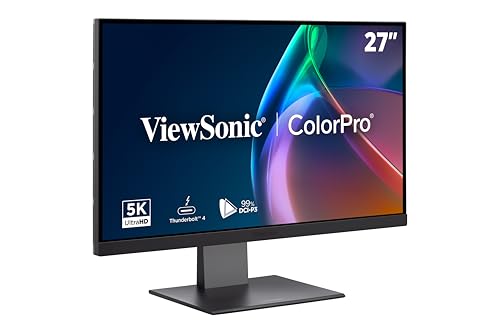
With its impressive 5K resolution and exceptional color accuracy, the ViewSonic VP2788-5K is an ideal choice for designers who demand precision in their work. This 27-inch IPS display offers a 75Hz refresh rate, ensuring smooth visuals. You’ll appreciate the 100% sRGB and 99% DCI-P3 color coverage, along with HDR400 for vibrant contrasts. Connectivity is seamless with Thunderbolt 4, allowing data transfer speeds up to 40 Gbps and dual 5K setups. Plus, the ergonomic stand lets you adjust height, tilt, and pivot for comfort. Compatible with Macs and PCs, it’s perfect for any creative workspace.
Best For: The ViewSonic VP2788-5K is best for creative professionals and designers who require high-resolution and color-accurate displays for their work.
Pros:
- Exceptional 5K resolution (5120x2880p) for stunning image clarity.
- Comprehensive color coverage with 100% sRGB and 99% DCI-P3, ensuring precise color reproduction.
- Ergonomic stand with multiple adjustments for enhanced comfort during extended use.
Cons:
- Higher price point compared to standard monitors, which may not fit all budgets.
- Limited refresh rate (75Hz) may not satisfy gamers seeking ultra-smooth motion.
- Thunderbolt 4 connectivity requires compatible devices to fully utilize its capabilities.
LG 27US500-W Ultrafine 27-Inch 4K UHD Monitor

The LG 27US500-W Ultrafine 27-Inch 4K UHD Monitor stands out for its impressive HDR10 support and a wide color gamut that covers up to 90% of DCI-P3, making it an exceptional choice for creative professionals who demand precise color accuracy. With a 1000:1 contrast ratio and wide viewing angles, you’ll appreciate the detailed imagery in every project. Its IPS borderless design and ergonomic stand allow for flexible adjustments, enhancing your workspace. Plus, features like Reader Mode and Flicker Safe technology reduce eye strain, ensuring comfort during long hours. This monitor truly elevates your creative experience.
Best For: Creative professionals seeking high detail and exceptional color accuracy in their work.
Pros:
- Exceptional HDR10 support and wide color gamut (up to 90% DCI-P3) for precise color accuracy.
- Ergonomic stand with flexible tilt adjustments enhances comfort during prolonged use.
- Features like Reader Mode and Flicker Safe technology help reduce eye strain for comfortable viewing.
Cons:
- Limited to a 27-inch size, which may not be suitable for all workspace setups.
- Higher price point compared to standard monitors, potentially out of reach for casual users.
- May require calibration for optimal color accuracy straight out of the box.
Factors to Consider When Choosing 27 Inch 5k Monitors for Designers
When you’re choosing a 27-inch 5K monitor for design work, several key factors come into play. You’ll want to take into account color accuracy, connectivity options, and ergonomics to guarantee it fits your workflow. Additionally, think about panel type and resolution for the best clarity in your projects.
Color Accuracy Importance
Color accuracy plays an essential role in your design work, as it guarantees the hues you see on your monitor closely match the colors intended in your projects. For graphic design, video editing, or photography, monitors with a color accuracy rating of ΔE < 2 are ideal, ensuring minimal color difference. Look for devices that cover 99% DCI-P3 or 100% sRGB, providing a broader range of vibrant and lifelike colors. Calibration is key; factory pre-calibrated monitors allow for accurate colors right out of the box, saving you time. Additionally, if you work with high dynamic range media, choose monitors with HDR capabilities to enhance color depth and contrast, making your designs truly stand out.
Connectivity Options Available
As you explore the best 27-inch 5K monitors for your design projects, connectivity options play a significant role in optimizing your workflow. Look for monitors with Thunderbolt 3 or 4 ports, as they provide high-speed data transfer rates of up to 40 Gbps and power delivery up to 100W. USB-C ports are also essential, allowing for seamless connections to modern laptops while simplifying power and data transfer with a single cable. Multiple USB 3.0 ports enhance workspace efficiency by connecting various peripherals without extra hubs. If you’re considering a multi-monitor setup, verify the monitor supports daisy chaining via DisplayPort. Additionally, built-in KVM switch functionality lets you control multiple systems with one keyboard and mouse, streamlining your creative process.
Ergonomics and Adjustability
Choosing the right ergonomics and adjustability features in a 27-inch 5K monitor can greatly enhance your design experience. Look for monitors with tilt, swivel, pivot, and height adjustments that allow you to maintain comfortable viewing angles, reducing neck and back strain during those long work sessions. Advanced ergonomic stands offer a wide range of adjustments, ensuring your monitor aligns perfectly with your eye level while minimizing glare. Consider a borderless or frameless design for a more immersive workspace, especially if you’re using multiple monitors. Features like flicker-free technology and blue light reduction can boost eye comfort, essential for extended hours of design work. Customizable onscreen controls let you quickly adjust display settings for ideal ergonomics and usability.
Panel Type Choices
When it comes to selecting a 27-inch 5K monitor for design work, panel type plays a significant role in your overall experience. The most common options are IPS and Nano Matte panels. IPS panels, like those in the ASUS ProArt Display PA27JCV, offer excellent color accuracy (up to 99% DCI-P3) and wider viewing angles, which are vital for your design tasks. On the other hand, the BenQ PD2730S features a Nano Matte panel that minimizes glare, making it ideal for brightly lit environments while still maintaining color precision. When choosing, weigh the trade-offs between color accuracy, viewing angles, and glare issues to guarantee your monitor enhances your creative workflow.
Resolution and Clarity
While selecting a 27-inch 5K monitor, resolution and clarity are fundamental elements that can greatly impact your design work. With a stunning resolution of 5120×2880, you’ll enjoy around 14.7 million pixels, enhancing image sharpness and detail. The high pixel density of 218 PPI guarantees text is crisp and images are exceptionally clear—perfect for your graphic design and video editing needs. Higher resolution displays also provide smoother gradients and more accurate color reproduction, essential for visual fidelity. Additionally, the increased screen real estate allows for better multitasking, accommodating multiple design windows seamlessly. Plus, 5K resolution reduces pixelation when zooming in on detailed graphics, critical for meticulous tasks in your design workflows.
Refresh Rate Considerations
Though many designers prioritize resolution and color accuracy, refresh rate is equally important for optimizing your workflow. A standard refresh rate of 60Hz is typically sufficient for design work and media consumption, providing smooth visuals without motion blur. However, if you also engage in gaming or video editing, consider monitors with higher refresh rates, like 75Hz or above, as they offer enhanced fluid motion. These faster rates can reduce input lag, making your interactions more responsive—crucial for precision tasks in design applications. Remember to balance refresh rate with resolution and color accuracy; sometimes, higher refresh rates can compromise these essential features, so choose wisely to suit your specific needs.
Eye Comfort Features
Refresh rate isn’t the only factor that impacts your design experience; eye comfort features play a considerable role too. Look for monitors with TÜV certification and a Nano Matte panel to reduce glare and enhance comfort during long hours of work. Eye-care technologies like Blue Light Reduction and Flicker-Free features can considerably cut down on eye strain and fatigue. Adjustable brightness settings that adapt to ambient light help optimize viewing comfort. Wide viewing angles maintain color accuracy and clarity, preventing distortion from different positions. Additionally, monitors equipped with adaptive sync technology minimize flicker and ghosting, providing a smoother visual experience that enhances your eye comfort. Prioritizing these features can greatly improve your design workflow.
Price vs. Performance Balance
Steering the price versus performance balance in 27-inch 5K monitors is essential for designers aiming to optimize their workflow. When you’re evaluating options, consider how the cost aligns with features like resolution and color accuracy. Higher-priced monitors often deliver superior specifications, such as 99% DCI-P3 coverage and factory calibration. Connectivity features, like Thunderbolt 4, may also elevate the price but enhance productivity through seamless device switching. Prioritize color reproduction; monitors with high accuracy ratings (ΔE < 2) usually justify their cost for visual tasks. Ergonomic designs and added functionalities, such as built-in cameras, can affect pricing too. Finally, don’t overlook warranty and customer support—they can provide valuable peace of mind for your investment.
