
If your edit bay is slowing down on big camera files, proxy shuttles, or shared storage access, a 10GbE upgrade can make a noticeable difference.
This roundup focuses on the best 10gbe network adapter for video editing setups, with options for laptops, desktops, Thunderbolt systems, and SFP+ or RJ45 workflows.
Best 10 10gbe Network Adapter for Video Editing Picks for 2026
Best for Mac and Thunderbolt
StarTech 10GbE USB4 Ethernet Adapter

- USB4 and Thunderbolt 3/4/5 compatible
- Supports 10/5/2.5/1Gbps and 100Mbps
- External design suits laptops and compact setups
Best For: Mac and Windows editors who want a simple external 10GbE upgrade for fast NAS workflows.
Best for Fiber-Channel Workflows
Intel X520-LR1 10GbE SFP+ Adapter

- SFP+ fiber-ready 10GbE connectivity
- Low-profile card for compact systems
- Built for low-latency, high-throughput transfers
Best For: Editors with existing SFP+ fiber networking who want fast, stable shared-storage performance.
Best for SFP+ Macs and Workstations
QNAP 10GbE SFP+ to USB4 Adapter

- 10Gb SFP+ port for fast NAS and switch links
- USB4 and Thunderbolt 3/4 compatibility
- Fanless, quiet design for editing spaces
Best For: Mac and PC editors with existing SFP+ networking who want a quiet USB4 adapter.
Best Value 10GbE Adapter

- 10 Gbps PCIe adapter for fast media transfers
- Includes CAT6A cable for proper 10GbE setup
- Windows, Server, and Linux compatibility
Best For: Editors and small studios upgrading a desktop for faster local transfers and NAS workflows.
Best for Mac & Windows TB4
OWC Thunderbolt 4 10G Ethernet Adapter

- Over 900MB/s real-world transfer speeds
- Thunderbolt 4 support for Mac and Windows
- AVB and Wake-on-LAN for pro workflows
Best For: Mac and Windows video editors who want fast, reliable Thunderbolt-to-10GbE networking.
Best for 2.5G/5G Upgrades
TRENDnet TEG-10GECTX 10G PCIe Adapter

- RJ-45 10GbE with 10G/5G/2.5G/1G support
- Fits a PCIe 3.0 x4 slot for desktop upgrades
- Good choice for Cat5e-based networks and NAS transfers
Best For: Editors and small studio users who want a flexible, RJ-45-based 10GbE upgrade.
Best for Mac & Thunderbolt
ACASIS USB4 10Gb Ethernet Adapter

- Over 900MB/s real-world transfer speeds
- USB4 and Thunderbolt 3/4/5 compatible
- Plug-and-play on Mac; driver required on Windows
Best For: Mac and Thunderbolt users editing large video files or moving data to a NAS.
Best for Multi-Port Workstations
StarTech Quad Port 10G SFP+ NIC

- Four 10GbE SFP+ ports for aggregation or redundancy
- Intel XL710 with virtualization and jumbo frame support
- Works with fiber transceivers or DAC cables
Best For: Editing workstations and media servers that need multiple 10GbE connections.
Best for PCIe 4.0 X1 Builds
NICGIGA 10G Base-T PCIe Network Card
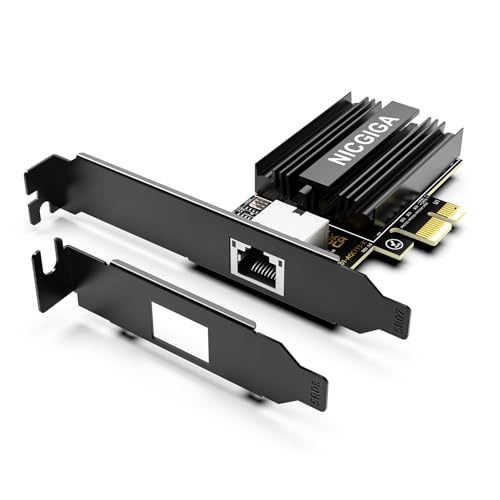
- PCIe x1-friendly card for wider slot compatibility
- Marvell AQC113 with 10GbE RJ45 and Wake-on-LAN
- Includes standard and low-profile brackets
Best For: Editors and compact PC builders who need 10Gb Ethernet without a bulky adapter.
Best for Compact Builds
VunLink 10GbE RJ45 PCIe 4.0 x1 NIC

- PCIe 4.0 x1 fits small systems
- Up to 10Gbps with multi-gig fallback
- Low CPU use for big file transfers
Best For: Compact editing PCs and NAS setups that need fast 10GbE on a single-slot card.
Best for Mac and Thunderbolt – StarTech 10GbE USB4 Ethernet Adapter
If you need a dependable 10gbe network adapter for video editing, this StarTech adapter is aimed at creators who want fast wired transfers without opening their workstation. With USB4 and Thunderbolt 3/4/5 compatibility plus multi-gig fallback speeds, it fits a wide range of Macs and Windows systems.
Best For: Editors using modern laptops or desktops who want a simple external 10GbE upgrade for NAS transfers, shared projects, and smoother media offloads.
Pros:
- USB4 and Thunderbolt 3/4/5 support makes it versatile across newer systems
- 10/5/2.5/1Gbps and 100Mbps support provides flexible network compatibility
- External design is convenient for laptops and compact editing setups
- Good fit for fast NAS workflows and large video file transfers
Cons:
- Depends on a compatible high-speed port to reach full performance
- External dongle design adds another cable to a busy desk
Overall, this is a practical 10gbe network adapter for video editing if you want a plug-in upgrade that works across both Mac and Windows systems. It is especially appealing for creators who value broad compatibility and easy deployment over internal expansion.
Best for Fiber-Channel Workflows – Intel X520-LR1 10GbE SFP+ Adapter
If you need a reliable 10gbe network adapter for video editing, the Intel X520-LR1 is a solid pick for fast NAS access, shared storage, and smooth large-file transfers. Its SFP+ design is geared toward fiber-based 10GbE setups, making it a practical fit for studios that already have compatible switches and transceivers.
Best For: Editors and small production teams using SFP+ fiber infrastructure for fast media ingest, project collaboration, and high-speed storage.
Pros:
- SFP+ connectivity is ideal for 10GbE fiber networks
- Low-latency features help keep transfer performance responsive
- Supports load balancing and advanced Intel networking functions
- Low-profile design fits compact workstations
Cons:
- Requires SFP+ compatible cabling, switch, or transceiver
- Not a simple RJ45 plug-and-play option for copper Ethernet
For studios already built around fiber networking, this Intel card is a dependable 10gbe network adapter for video editing with the stability and throughput needed for large media files. It’s less universal than copper 10GbE options, but in the right setup it delivers exactly what editing bays need.
Best for SFP+ Macs and Workstations – QNAP 10GbE SFP+ to USB4 Adapter
QNAP 10GbE SFP+ Network Adapter to USB 4 Type-C & Thunderbolt 3/4 Compatible (QNA-UC10G1SF)
Check Price On AmazonIf you need a straightforward 10gbe network adapter for video editing, this QNAP adapter is built for fast transfers over a single 10Gb SFP+ connection. It plugs into USB4 or Thunderbolt 3/4 ports, making it a practical add-on for Macs and Windows workstations that need a reliable wired link to NAS storage or high-speed switches.
Best For: Editors and creators who want a compact SFP+ adapter for USB4 or Thunderbolt systems and already have 10Gb fiber or DAC networking gear.
Pros:
- Single 10Gb SFP+ port suits fast NAS and switch connections
- USB4 and Thunderbolt 3/4 compatibility broadens desktop and laptop support
- Fanless design keeps noise low for quiet editing setups
- Includes a 1-meter USB 4 cable for easier setup
Cons:
- Requires driver installation on supported operating systems
- SFP+ means you may need separate transceivers or DAC cabling
- Not a plug-and-play option for users needing standard RJ45 Ethernet
For editors with compatible SFP+ infrastructure, this is a clean way to speed up media workflows without adding fan noise or complexity. If your studio already uses 10Gb switching, it can be a strong 10gbe network adapter for video editing.
Best Value 10GbE Adapter – TP-Link TX401 10Gb PCIe NIC
If you need a straightforward 10gbe network adapter for video editing, the TP-Link TX401 is a practical PCIe option that brings 10GbE speeds to a desktop workstation without a complicated setup. It is a strong fit for moving large project files across a fast local network, and the included CAT6A cable helps you get started with the right cabling.
Best For: Editors and small studio users who want an affordable 10GbE upgrade for faster transfers to shared storage, NAS devices, or another workstation.
Pros:
- Up to 10 Gbps speeds for fast local file transfers and media workflows
- Includes a 1.5 m CAT6A cable, so you have the right cable in the box
- Works with Windows, Windows Server, and Linux systems
- Comes with both low-profile and full-height brackets for flexible installs
Cons:
- Requires a desktop PCIe slot, so it is not for laptops
- To reach full 10GbE speeds, your network switch, NAS, and cabling must also support 10GbE
- More of a no-frills adapter than a feature-rich pro card
For editors prioritizing file transfer speed over extras, this TX401 is an easy recommendation. It delivers the core performance you want from a 10gbe network adapter for video editing and does so with broad compatibility and a useful cable bundle.
Best for Mac & Windows TB4 – OWC Thunderbolt 4 10G Ethernet Adapter
If you need a reliable 10gbe network adapter for video editing, this OWC Thunderbolt 4 10G Ethernet Adapter is built for fast transfers, stable workstation networking, and smooth large-file workflows. It’s a strong fit for editors moving media from NAS storage or shared servers over Thunderbolt 4.
Best For: Mac and Windows creators who want a simple Thunderbolt-to-10GbE upgrade for editing, streaming, and pro media work.
Pros:
- Real-world speeds over 900MB/s, which helps with large video files and project transfers
- Supports 10Gb/s, 5Gb/s, 2.5Gb/s, 1Gb/s, and 100Mb/s auto-negotiation
- Compatible with Thunderbolt-equipped Mac and Windows computers
- AVB and Wake-on-LAN support add value for pro AV and remote access setups
Cons:
- Requires a Thunderbolt host port, so it won’t work as a standard USB-C adapter
- Higher cost than basic 1GbE or USB network adapters
- Best performance depends on matching 10GbE switches, cabling, and storage
For editors who want a dependable 10gbe network adapter for video editing, this OWC model stands out for speed, broad compatibility, and pro-friendly features. It’s a practical choice if your workflow depends on fast access to shared footage and large project files.
Best for 2.5G/5G Upgrades – TRENDnet TEG-10GECTX 10G PCIe Adapter
If you need a practical 10gbe network adapter for video editing, the TRENDnet TEG-10GECTX is a solid pick for turning a free PCIe slot into a wired 10GbE connection. It supports multiple speeds, including 10G, 5G, 2.5G, and 1G, which makes it a flexible option for faster NAS transfers, project file shuttling, and smoother shared-storage workflows.
Best For: Editors and small studio users who want a flexible, RJ-45-based 10GbE upgrade with broad speed support.
Pros:
- Supports 10G, 5G, 2.5G, 1G, and 100Mbps over RJ-45
- Uses a PCIe 3.0 x4 slot, making it easy to add to a desktop workstation
- 2.5GBASE-T support helps it work well with Cat5e cabling at shorter upgrade paths
- Backed by TRENDnet’s 3-year manufacturer protection
Cons:
- Windows-focused support may limit appeal for macOS or Linux users
- Requires an open PCIe slot, so it is not ideal for compact systems
For editors who want a straightforward wired upgrade without moving to SFP+ gear, this TRENDnet card is a sensible 10gbe network adapter for video editing. It’s especially useful if your workflow depends on faster access to a NAS or shared project drive over standard Ethernet.
Best for Mac & Thunderbolt – ACASIS USB4 10Gb Ethernet Adapter
This ACASIS adapter is a solid pick if you want a 10gbe network adapter for video editing on a Mac or Thunderbolt-equipped laptop. It supports USB4 and Thunderbolt 3/4/5, delivers strong real-world transfer speeds for large media files, and uses an aluminum shell to help keep temperatures under control during long sessions.
Best For: MacBook, Mac mini, and Thunderbolt users who need fast wired networking for editing, NAS transfers, and large project backups.
Pros:
- Real-world speeds over 900MB/s for large file transfers and editing workflows
- USB4 and Thunderbolt 3/4/5 compatible for modern Mac and PC setups
- Plug-and-play on Mac, with driver support available for Windows
- Aluminum housing helps with heat dissipation under sustained load
Cons:
- Windows setup requires a driver install
- Full 10Gb performance depends on matching network equipment
- Best suited to USB-C/Thunderbolt systems, not older USB-A ports
For editors moving big 4K or 8K files to a NAS, this 10gbe network adapter for video editing stands out for its Mac-friendly setup and strong sustained throughput. It’s a practical choice if your workflow lives on USB4 or Thunderbolt and you want a simple, compact wired upgrade.
Best for Multi-Port Workstations – StarTech Quad Port 10G SFP+ NIC
If you need a 10gbe network adapter for video editing that can scale beyond a single port, this StarTech Quad Port 10G SFP+ card is built for fast shared-storage workflows, redundancy, and high-traffic workstations. It uses Intel XL710 hardware, supports SFP+ fiber or DAC connections, and fits well in server-class systems where stability matters.
Best For: Editing stations, media servers, and pro workgroups that need multiple 10GbE links for shared storage, backups, or network failover.
Pros:
- Four 10GbE SFP+ ports for aggregation, redundancy, or multiple high-speed links
- Intel XL710 chipset with virtualization, jumbo frame, and PXE boot support
- Flexible SFP+ setup works with fiber transceivers or DAC cables
- Compatible with many Windows and Linux server/workstation environments
Cons:
- Requires SFP+ optics or DAC cables, so total setup cost can rise
- Not the simplest choice if you only need one connection to a simple NAS
- Full-height, server-oriented design may not fit every desktop case
For editors building a fast shared-storage rig, this is a serious 10gbe network adapter for video editing when you want flexibility, multiple links, and enterprise-style reliability.
Best for PCIe 4.0 X1 Builds – NICGIGA 10G Base-T PCIe Network Card
If you need a practical 10gbe network adapter for video editing, this NICGIGA card is a strong fit for workstations and compact PCs that only have an open PCIe x1 slot. Its Marvell AQC113 controller delivers 10GbE over RJ45 while supporting auto-negotiation down to 100Mbps, so it can drop into mixed-speed networks without much fuss.
Best For: Editors, small studio PCs, and server builds that need 10Gb Ethernet in a PCIe 4.0 x1-friendly card.
Pros:
- PCIe x1 design works in x1/x4/x8/x16 slots
- Marvell AQC113 controller with 10GbE RJ45 and WOL support
- Includes standard and low-profile brackets for flexible installs
- Broad OS support for Windows 10/11, Windows Server, and Linux
Cons:
- Requires a PCIe slot, not a legacy PCI slot
- 10Gb speeds depend on Cat6a/Cat7 cabling and a 10G-capable network
For creators who want a straightforward 10gbe network adapter for video editing without moving up to a larger expansion card, this model hits a useful balance of speed, compatibility, and install flexibility. It is especially appealing if your case space is tight but your media workflow still needs fast local transfers.
Best for Compact Builds – VunLink 10GbE RJ45 PCIe 4.0 x1 NIC
If you need a practical 10gbe network adapter for video editing, this VunLink card is a strong fit for fast project transfers, NAS access, and small workstations where slot space is tight. Its Realtek RTL8127AT controller supports up to 10Gbps, while multi-gig fallback helps it blend into mixed home or studio networks.
Best For: Editors, home lab users, and compact-PC builders who want 10GbE without giving up a full-size expansion slot.
Pros:
- PCIe 4.0 x1 design works well in mini PCs and ITX builds
- 10G/5G/2.5G/1G auto-negotiation for easier upgrades
- Hardware offload helps keep CPU usage low during transfers
- Includes standard and low-profile brackets for flexible installs
Cons:
- RJ45 10GbE can run hotter and draw more power than simpler 1Gb cards
- Real-world speed still depends on your switch, cabling, and storage
Overall, this is a sensible 10gbe network adapter for video editing if you want high-speed Ethernet in a compact, budget-conscious PCIe card. It’s especially appealing for users moving large media files between an editing PC and NAS.
How We Picked the Best 10gbe Network Adapter for Video Editing
For a 10gbe Network Adapter for Video Editing, the most important factors are real-world throughput, host connection type, and compatibility with your workstation or laptop. We favored adapters that fit common editing workflows, including USB4 and Thunderbolt models for portable rigs, PCIe cards for desktops and NAS-connected studios, and 10GBase-T or SFP+ options depending on network gear.
We also looked for practical features that matter in creative environments: stable driver support, link-speed flexibility, low-friction installation, and formats that match the rest of the studio network.
Quick Comparison
Thunderbolt and USB4 adapters are usually the easiest choice for laptops and compact Mac or Windows edit stations. PCIe adapters tend to offer the best value and permanence for tower PCs. RJ45 models are convenient if your switch and cabling already support copper 10GbE, while SFP+ cards are often better for longer runs, fiber links, or existing high-speed infrastructure.
Key Buying Factors for 10gbe Network Adapter for Video Editing
Host Connection
Match the adapter to your computer first. USB4 and Thunderbolt units suit mobile editors; PCIe cards require an open slot but usually deliver the most straightforward desktop upgrade.
Port Type
Choose RJ45 for standard Ethernet cabling and broad compatibility. Choose SFP+ if your switch, DAC cable, or fiber setup is already built around 10GbE uplinks.
Compatibility and Drivers
Confirm support for your OS, especially macOS, Windows 11, and older workstation or server environments. Stable driver support matters as much as raw speed for editing work.
Network Design
Make sure the adapter matches your switch, NAS, and cabling. A fast adapter will not help if the rest of the path tops out at 1GbE.
Practical Workflow Needs
For single-editor systems, ease of setup may matter more than advanced features. For teams and shared storage, VLAN support, link stability, and expansion flexibility can be more valuable.
Who Should Buy Which 10gbe Network Adapter for Video Editing?
Laptop editors and hybrid creators should look first at Thunderbolt or USB4 adapters. Desktop users who want the best long-term value should usually choose PCIe. Studios already using copper 10GbE should lean toward RJ45 models, while larger post-production or server-style setups may benefit more from SFP+.
If you are building a new shared-storage workflow, choose the adapter that matches both your workstation and your network backbone. That is the fastest way to get dependable gains from a 10gbe Network Adapter for Video Editing.
