
Upgrading to 10GbE can make backups, VM storage, and large file transfers feel dramatically faster in a home lab. The right adapter depends on your host device, available slots, and switch or transceiver compatibility.
This roundup focuses on practical options for desktops, NAS units, and Thunderbolt systems, with an eye on power use, driver support, and ease of installation.
Best 10 10gbe Network Adapter for Home Lab Picks for 2026
Best for Windows Home Labs
TRENDnet 10G PCIe Network Adapter

- 10G RJ-45 port with multigig fallback
- VLAN tagging and jumbo frame support
- Includes standard and low-profile brackets
Best For: Windows-based home labs that want an easy copper 10GbE upgrade.
Best for Easy 10GbE Copper Uplifts

- Auto-senses 10G/5G/2.5G/1G for mixed-speed networks
- Plug-and-play with hot-swap support and no drivers
- Low power draw under 2.5W helps reduce heat
Best For: Home lab builders who want a simple copper upgrade from an SFP+ port.
Best for Easy 10G Upgrade
TP-Link TX401 10Gb PCIe Adapter

- Up to 10 Gbps over RJ45 Ethernet
- Includes CAT6A cable and both bracket sizes
- Compatible with Windows, Server, and Linux
Best For: Home lab builders who want a simple, widely compatible 10GbE PCIe upgrade.
Best Combo Upgrade
Synology E10M20-T1 10GbE M.2 Card
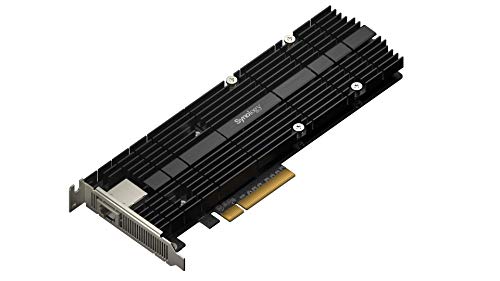
- Adds 10GbE and NVMe cache in one card
- Saves PCIe slots in Synology NAS builds
- RJ-45 port keeps networking straightforward
Best For: Synology NAS owners who want network and cache upgrades in one expansion card.
Best for USB4/Thunderbolt Desktops

- True 10GbE with auto-negotiation down to gigabit speeds
- Bus-powered aluminum housing with cooling-friendly design
- WOL and PXE support for lab and IT use
Best For: Home lab users and workstation owners with USB4 or Thunderbolt ports who want fast wired networking.
Best for PCIe 4.0 x1 Builds
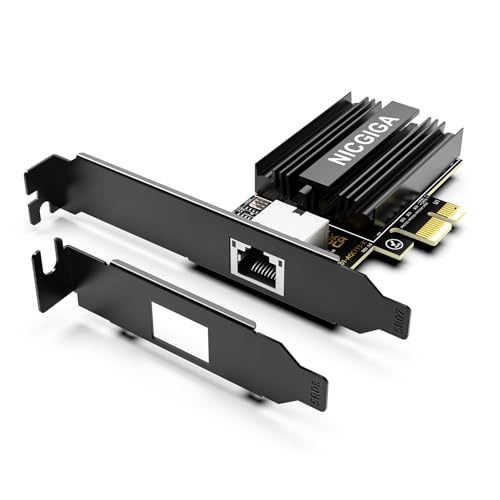
- PCIe 4.0 x1 design for flexible install options
- Marvell AQC113 controller with 10GBase-T RJ45
- Includes full-height and low-profile brackets
Best For: Home lab users who need a compact, copper-based 10GbE adapter for desktop or server builds.
Best for Cooler USB-C 10GbE
Cable Matters USB C to 10Gb Ethernet Adapter

- Low-heat aluminum build with thermal silicone
- Real-world speeds around 7Gbps on Windows and 5Gbps on macOS
- USB-C, USB4, and Thunderbolt 5/4/3 compatibility
Best For: Home lab users who want a cool-running, compact 10GbE adapter for NAS and fast file transfers.
Best for Compact Builds
VunLink 10GbE PCIe x1 RJ45 Card

- PCIe 4.0 x1 fits compact home lab systems
- 10G/5G/2.5G/1G auto-negotiation for easy upgrades
- Includes low-profile bracket for small cases
Best For: Compact home lab PCs, NAS devices, and small servers that need copper 10GbE.
Best for Thunderbolt Macs and PCs
OWC Thunderbolt 4 10G Ethernet Adapter

- Over 900MB/s real-world transfer performance
- Thunderbolt 4 compatibility for Mac and Windows systems
- Supports 10GbE plus 5G, 2.5G, 1G, and 100Mb/s
Best For: Thunderbolt-equipped users who need a fast, portable 10GbE adapter for home lab or creative work.
Best for Windows Home Labs – TRENDnet 10G PCIe Network Adapter
If you want a practical 10gbe network adapter for home lab use without moving to a fiber SFP+ setup, the TRENDnet TEG-10GECTX is a straightforward RJ-45 option. It slots into a PCIe x4 or larger system and adds multigig speeds plus useful extras like VLAN tagging and jumbo frame support.
Best For: Windows or Windows Server home lab builds that need a simple copper 10GbE upgrade with broad speed compatibility.
Pros:
- 10G RJ-45 port supports 10G, 5G, 2.5G, 1G, and 100Mbps links
- Includes VLAN tagging and jumbo frame support for lab networking
- Standard and low-profile brackets make it easy to fit different desktop cases
- Works with Windows and Windows Server systems
Cons:
- Designed around Windows, so it is less flexible for Linux-based labs
- Needs a PCIe slot and enough cooling space for a 10GbE copper card
For a copper-based 10gbe network adapter for home lab setups, this TRENDnet card is a solid middle-ground choice: it is simple to install, supports multigig fallback, and covers the core features most small labs actually use.
Best for Easy 10GbE Copper Uplifts – SFP+ to RJ45 10G Adapter
If you need a practical 10gbe network adapter for home lab use, this SFP+ to RJ45 module is an easy way to turn a spare SFP+ port into copper networking without adding a switch or converter box. It supports 10G, 5G, 2.5G, and 1G auto-sensing, works with Cat6a/Cat7 cabling, and keeps setup simple with plug-and-play installation.
Best For: Home lab builders who want a straightforward copper upgrade for switches, servers, or routers with SFP+ ports.
Pros:
- Auto-senses 10G/5G/2.5G/1G for flexible mixed-speed setups
- Plug-and-play design with hot-swap support and no drivers needed
- Low power draw under 2.5W helps limit heat in dense gear racks
- Works with common networking brands and supports up to 100 ft at lower speeds
Cons:
- Compatibility is not universal, especially with several HP, Arista, Dell, and Juniper platforms
- 10G reach tops out at 30m, so it is best for short copper runs
- May run warm in some environments despite the metal housing
This is a strong fit if your 10gbe network adapter for home lab needs are centered on simplicity, low power, and reusing existing copper cabling. It is less ideal if you need guaranteed compatibility across every switch brand, but for common lab gear it offers an efficient, no-fuss upgrade path.
Best for Easy 10G Upgrade – TP-Link TX401 10Gb PCIe Adapter
If you want a straightforward 10gbe network adapter for home lab use, the TP-Link TX401 is a practical PCIe add-in card that delivers 10GBase-T speeds with broad OS support and a bundled CAT6A cable. It is a sensible fit for faster NAS transfers, virtual machine storage, and general lab networking without jumping into more complex SFP+ setups.
Best For: Home lab builders who want an affordable, widely compatible 10GbE PCIe card for faster Ethernet upgrades.
Pros:
- Up to 10 Gbps over standard RJ45 Ethernet
- Includes CAT6A cable and both full-height and low-profile brackets
- Works with Windows, Windows Server, and Linux
- Backwards compatible with 5G, 2.5G, 1G, and 100 Mbps links
Cons:
- Runs hotter and may draw more power than lower-speed adapters
- Needs a PCIe slot and suitable cabling for full 10GbE performance
- Not as compact or power-efficient as some SFP+ options
Overall, the TX401 is a dependable pick when you want an easy 10gbe network adapter for home lab upgrades and prefer the simplicity of RJ45 Ethernet. It is especially appealing if you want broad compatibility, a included cable, and a no-fuss path to faster wired networking.
Best for Simple Copper Upgrades – SFP+ to RJ45 10G Adapter (2-Pack)
If you need a practical 10gbe network adapter for home lab use, this SFP+ to RJ45 module is a straightforward way to add 10GBase-T connectivity without extra software or complicated setup. It supports 10G, 5G, 2.5G, and 1G speeds, runs on low power, and is a good fit when you want to link copper Cat6a/Cat7 cabling to an SFP+ switch.
Best For: Home lab builders who want an easy plug-and-play SFP+ to copper upgrade for compatible switches and NAS gear.
Pros:
- Auto-senses 10G/5G/2.5G/1G for flexible mixed-speed networks
- Low power draw under 2.5W helps with heat and energy use
- Plug-and-play, hot-swappable design keeps installation simple
- Pack of 2 adds value for multi-port home lab setups
Cons:
- Compatibility is limited with some major switch brands and models
- 10G reach is shorter than lower-speed links on copper
- Best results depend on quality Cat6a/Cat7 cabling and a compatible SFP+ port
For a 10gbe network adapter for home lab builds that need copper Ethernet on a budget-friendly, low-maintenance module, this is a solid pick if your switch is on the compatibility list. It is especially useful when you want quick upgrades without adding DAC or fiber complexity.
Best Combo Upgrade – Synology E10M20-T1 10GbE M.2 Card
If you want one card to add both faster networking and NVMe cache support, this 10gbe network adapter for home lab use is a smart fit for Synology NAS owners with a compatible PCIe slot. It combines a single 10GbE RJ-45 port with dual M.2 slots, helping you improve both transfer speeds and responsiveness without burning extra expansion space.
Best For: Synology NAS users who want to upgrade network speed and add SSD cache with one expansion card.
Pros:
- Combines 10GbE networking and dual M.2 NVMe cache slots
- Uses one PCIe slot for two performance upgrades
- Free up primary drive bays for data storage
- RJ-45 copper port keeps cabling simple
Cons:
- Works only with compatible Synology models
- Single 10GbE port may be limiting for some setups
- Not the cheapest way to add 10GbE
For the right Synology system, this is an efficient way to get more out of a 10gbe network adapter for home lab workloads, especially if you also want cache-driven I/O gains. It is more specialized than a generic NIC, but the two-in-one design makes it appealing when PCIe slots are limited.
Best for USB4/Thunderbolt Desktops – SABRENT USB4 to 10GbE Adapter
If you need a reliable 10gbe network adapter for home lab setups and already have a USB4 or Thunderbolt 3/4/5 port, the SABRENT NT-P10G is a strong fit. It delivers true 10GbE speeds on the right network, falls back cleanly to multi-gig and gigabit links, and includes a USB4 cable so you can get started quickly.
Best For: Home lab users, NAS owners, and desktop or workstation setups that can use USB4/Thunderbolt for high-speed wired networking.
Pros:
- True 10GbE performance with automatic fallback to 5GbE, 2.5GbE, 1GbE, or 100Mbps
- Bus-powered aluminum design stays compact and helps with heat dissipation
- Supports WOL and PXE boot, which is useful for lab and IT workflows
- Includes a USB4 cable in the box
Cons:
- Not compatible with standard USB 3.x ports
- Windows and Linux require a driver install before use
- To reach full 10GbE, you still need a 10GbE-capable switch, router, or NAS
For a 10gbe network adapter for home lab use, this SABRENT model stands out if your machine already has the right port and you want a compact adapter that can scale from gigabit to full 10GbE without manual tweaking.
Best for PCIe 4.0 x1 Builds – NICGIGA 10G Base-T PCIe Card
If you need a practical 10gbe network adapter for home lab use, this NICGIGA card stands out for its PCIe 4.0 x1 design, Marvell AQC113 controller, and native RJ45 support. It’s a straightforward way to add 10GbE to a desktop, server, or compact workstation without moving to fiber.
Best For: Home lab users who want a compact 10GBase-T adapter for Windows, Linux, or server builds with limited PCIe lane availability.
Pros:
- PCIe 4.0 x1 interface keeps installation flexible for small builds and add-in slots.
- Marvell AQC113 controller supports up to 10Gbps with auto-negotiation down to 100Mbps.
- Includes standard and low-profile brackets for desktops, servers, and mini-towers.
- WOL support and broad OS compatibility make it useful for always-on lab machines.
Cons:
- Requires a PCIe slot, so it won’t work in older PCI-only systems.
- 10GBase-T adapters can run warmer than SFP+ options under sustained loads.
For a 10gbe network adapter for home lab setups that value easy RJ45 cabling and broad compatibility, this is a solid lane-efficient option. It’s especially appealing if you want 10G speed without changing your existing copper network gear.
Best for Cooler USB-C 10GbE – Cable Matters USB C to 10Gb Ethernet Adapter
If you want a practical 10gbe network adapter for home lab use without fighting excess heat, this Cable Matters adapter is a strong pick. It supports 10G/5G/2.5G/1G/100M auto-negotiation, uses a Realtek RTL8159 controller, and is built for steady wired performance with USB-C, USB4, and Thunderbolt-connected systems.
Best For: Users who want a compact, low-heat USB-C 10GbE adapter for NAS access, backups, and fast workstation networking.
Pros:
- Low-heat design with aluminum housing and thermal silicone for quieter, more reliable operation
- Good real-world throughput, with around 7Gbps on Windows and about 5Gbps on macOS in typical setups
- Works with USB-C, USB4, and Thunderbolt 5/4/3 devices for broad compatibility
- Plug-and-play on modern Windows and macOS, with driver support available when needed
Cons:
- Needs a fast host port to get close to its best performance
- macOS speeds may top out below full 10GbE theoretical rates
- Not a fit for Android or Xbox One S
For a 10gbe network adapter for home lab owners who care about heat, stability, and simple setup, this Cable Matters model is more about dependable daily use than chasing lab-spec bragging rights. It makes the most sense for NAS transfers, backups, and creator workflows where consistent throughput matters more than benchmark peaks.
Best for Compact Builds – VunLink 10GbE PCIe x1 RJ45 Card
If you need a 10gbe network adapter for home lab use but don’t have room for a full-size card, this VunLink option is built for compact PCs, NAS boxes, and entry-level servers. The PCIe 4.0 x1 design makes installation easier in tight systems, while multi-gig support helps you upgrade without replacing all your cabling.
Best For: Home lab users, mini-ITX builders, and NAS owners who want 10GbE in a small slot-friendly form factor.
Pros:
- PCIe 4.0 x1 layout fits compact systems and limited-slot builds
- 10G/5G/2.5G/1G auto-negotiation supports flexible network upgrades
- Low CPU offload features help keep transfers stable under load
- Includes standard and low-profile brackets for easier mounting
Cons:
- Requires a compatible PCIe slot and proper driver support
- RJ45 10GbE can run warmer than simpler 1GbE adapters
For builders who want a practical 10gbe network adapter for home lab expansion without giving up space or cabling flexibility, this card lands in a very useful middle ground. It is especially appealing if you’re upgrading a NAS, compact workstation, or virtualization node and want straightforward 10GbE over copper.
Best for Thunderbolt Macs and PCs – OWC Thunderbolt 4 10G Ethernet Adapter
If you want a straightforward 10gbe network adapter for home lab work, this OWC Thunderbolt 4 adapter is a strong fit for laptops and desktops with Thunderbolt ports. It delivers fast 10GbE performance, supports auto-negotiation down to 100Mb/s, and is easy to drop into a mixed network without extra configuration.
Best For: Thunderbolt-equipped Mac or Windows users who want a fast, portable 10GbE upgrade for file transfers, media work, or lab access.
Pros:
- Real-world speeds over 900MB/s make it useful for large transfers and shared storage
- Supports 10Gb/s, 5Gb/s, 2.5Gb/s, 1Gb/s, and 100Mb/s Ethernet auto-negotiation
- Works with Thunderbolt 4 hosts and includes a short TB cable in the box
- Wake-on-LAN and AVB support add flexibility for remote and pro workflows
Cons:
- Requires a Thunderbolt port, so it won’t work as a plain USB-C accessory
- Single RJ45 port means it’s focused on one high-speed connection rather than expansion
- Pricier than basic 1GbE adapters
For anyone building a 10gbe network adapter for home lab use around a Thunderbolt laptop, this is a polished and capable option. It’s especially appealing if you want high throughput without giving up compatibility with slower network gear.
How We Picked the Best 10gbe Network Adapter for Home Lab
We prioritized adapters that make sense for real-world home lab use: stable 10GbE performance, broad operating system support, reasonable heat output, and installation paths that match common builds. We also looked at whether each option suits PCIe desktops, USB-C laptops, or NAS devices, since the best choice for a 10gbe Network Adapter for Home Lab is often the one that fits your hardware with the fewest compromises.
Quick Comparison
As a fast rule: PCIe cards usually offer the best value and lowest latency, USB4 or Thunderbolt adapters are the most flexible, and SFP+ to RJ45 modules are useful when you already have a compatible SFP+ port or switch. Base-T cards and adapters are simpler for copper Ethernet runs, while SFP+ often runs cooler and can be more efficient in dense setups.
Key Buying Factors for a 10gbe Network Adapter for Home Lab
Host Interface
Check whether your system has PCIe, USB4/Thunderbolt, or SFP+ available. A great adapter is useless if it does not match the port or slot you can actually use.
Connector Type and Cabling
RJ45 is easiest if your network already uses Cat6 or Cat6a cabling. SFP+ may be better for short, high-performance links or mixed fiber/copper environments, but it requires compatible switches or transceivers.
Driver and OS Support
For home labs, driver maturity matters as much as raw speed. Look for support on Windows, Linux, server editions, or NAS platforms if you plan to reuse the adapter across systems.
Thermals and Power
Some 10GbE gear runs hot, especially compact USB adapters and low-profile transceivers. Low-power designs can improve reliability in quiet cases or always-on lab boxes.
Features That Matter
Wake-on-LAN, VLAN tagging, and auto-negotiation can be useful depending on how your lab is segmented and managed. If you run virtual machines or multiple services, those extras can save time later.
Who Should Buy Which 10gbe Network Adapter for Home Lab?
Choose a PCIe card if you want the best fit for a desktop, workstation, or server with an open slot. Choose a USB-C or Thunderbolt adapter if you need portability or want to add 10GbE to a laptop or compact host. Choose an SFP+ to RJ45 adapter if your switch or NAS already supports SFP+ and you want to connect standard copper Ethernet without replacing your cabling. For Synology and similar NAS users, a vendor-specific expansion card may be the most straightforward upgrade path.
If you are building a flexible, multi-device lab, start with the interface your main host supports best, then confirm driver compatibility and cooling before you buy.
