
In 2025, finding the right 10GbE NAS for video editing is essential for your workflow. The latest models promise not just speed but also efficiency, catering specifically to content creators like you. With options like the QNAP TS-h973AX and Asustor FLASHSTOR 12 Pro Gen2, you’ll discover features that enhance your editing experience. But what should you really look for in a NAS? Let’s explore the top contenders and key factors to evaluate.
QNAP TS-932PX-4G 5+4 Bay High-Speed NAS with Two 10GbE and 2.5GbE Ports

The QNAP TS-932PX-4G is an ideal choice for video editors and small businesses looking for high-speed storage solutions. With its 5+4 bay configuration, you can mix HDDs and SSDs to optimize performance. You’ll benefit from impressive read speeds of 1.1GB/s and write speeds up to 750MB/s, especially when utilizing the SSD cache. Its dual 10GbE and 2.5GbE ports guarantee seamless data transfer, making it perfect for media applications. Plus, the user-friendly interface caters to both tech-savvy users and beginners. Just keep in mind its limitations on expansion and upgrade options for a well-rounded experience.
Best For: The QNAP TS-932PX-4G is best for video editors and small businesses seeking high-speed storage solutions with a flexible drive configuration.
Pros:
- High-speed performance with read speeds of 1.1GB/s and write speeds up to 750MB/s.
- User-friendly interface suitable for both tech-savvy users and beginners.
- Versatile drive configuration supports both HDDs and SSDs for optimized performance.
Cons:
- Limited expansion options and no support for adding extension cards.
- Sluggish interface even with upgraded memory.
- Reliance on older SSD technology for cache may hinder performance upgrades.
Asustor FLASHSTOR 12 Pro Gen2 NAS (Diskless)

For video editors seeking a powerful and efficient storage solution, the Asustor FLASHSTOR 12 Pro Gen2 NAS stands out with its impressive 12 M.2 SSD bays that support blazing-fast PCIe 4.0 speeds. This diskless NAS, powered by an AMD Quad-Core processor and 16GB ECC DDR5 memory, guarantees smooth 4K video editing and content creation. With dual 10GbE Ethernet ports, you’ll experience quick file transfers and minimal noise. Installation is straightforward, making it accessible for beginners. However, keep an eye on SSD compatibility and consider upgrading RAM for peak performance. Overall, it’s a solid choice for any video editing setup.
Best For: Video editors and content creators looking for a high-performance, efficient storage solution with expandability options.
Pros:
- Easy installation process, making it user-friendly for beginners.
- Quiet operation due to the absence of mechanical drives, ideal for work environments.
- Supports high-speed data transfers with dual 10GbE Ethernet ports, enhancing workflow efficiency.
Cons:
- Potential compatibility issues with certain SSDs, requiring careful selection.
- Some users report clunkiness in the ADM OS and app installation process.
- Network traffic issues may arise with specific applications, such as Plex.
QNAP TS-h973AX-8G 9-Bay QuTS Hero NAS with 10GbE/2.5GbE Connectivity
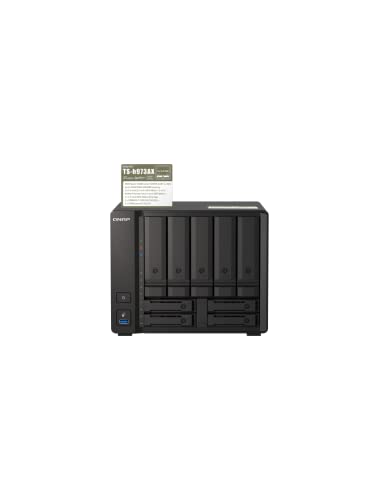
Designed for video editors and creative professionals, the QNAP TS-h973AX-8G offers robust 10GbE and 2.5GbE connectivity that markedly enhances data transfer speeds. Powered by an AMD Ryzen V1500B quad-core processor and 8GB of DDR4 RAM, it supports up to 64GB for demanding tasks. With nine drive bays, including SSD caching for fast IOPS, this NAS excels in collaborative video editing and data backup. While users praise its performance, some report slow boot times and thermal management issues. Overall, the QNAP TS-h973AX-8G is a powerful choice for those needing speed and efficiency in their workflow.
Best For: Creative professionals and video editors who require high-speed data transfer and robust storage solutions.
Pros:
- High-speed connectivity with 10GbE and 2.5GbE options for rapid data transfers.
- Flexible storage capacity with nine drive bays, including support for SSD caching for enhanced performance.
- Scalable memory options allowing upgrades up to 64GB, catering to demanding workloads.
Cons:
- Reported slow boot times and thermal management issues that may affect performance.
- Limited security features for IP access, lacking a whitelist option.
- Potential bugs related to LUKS encryption and high memory usage with ZFS implementation.
Asustor Lockerstor 10 AS6510T – 10 Bay NAS
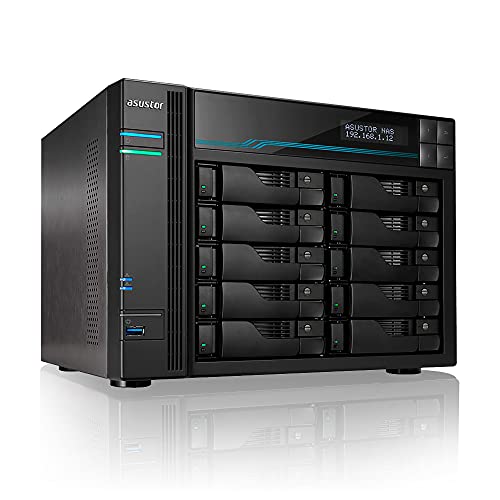
If you’re a video editor looking for a powerful and customizable storage solution, the Asustor Lockerstor 10 AS6510T is an excellent choice. This diskless NAS features a robust Intel Atom Quad-Core C3538 processor and 8GB of expandable DDR4 RAM, ensuring exceptional performance. You can install up to 10 drives, supporting a massive 180TB capacity, and utilize dual M.2 NVMe SSD ports for lightning-fast caching. With dual 10GbE ports, you’ll enjoy speeds up to 20 Gbps, perfect for seamless video editing. Plus, the 3-year warranty gives you peace of mind while you focus on your creative projects.
Best For: Video editors and creative professionals seeking a powerful and customizable NAS storage solution.
Pros:
- High storage capacity of up to 180TB with 10 drive bays, accommodating extensive media libraries.
- Fast performance with Intel Atom Quad-Core processor and expandable DDR4 RAM for smooth multitasking.
- Dual 10GbE ports provide exceptional network speeds, ensuring efficient data transfer during video editing.
Cons:
- Diskless design requires additional investment in drives for initial setup.
- Expandable RAM may lead to higher costs depending on the desired capacity upgrade.
- Limited built-in features compared to all-in-one NAS solutions, requiring more configuration for optimal use.
QNAP TS-h973AX-32G 9-Bay QuTS Hero NAS with 10GbE/2.5GbE Connectivity
The QNAP TS-h973AX-32G stands out as an excellent choice for video editors seeking robust performance and high-speed connectivity, thanks to its dual 2.5GbE LAN and 10GbE options. With an AMD Ryzen V1500B quad-core processor and 32GB RAM (expandable to 64GB), you’ll experience impressive transfer rates of up to 1.12 GB/sec. Its nine bays support various drives, including SSD caching for peak IOPS. Designed for collaborative video editing, it handles 4K transcoding effortlessly. While some users report slow boot times and fan noise, the responsive QNAP support helps you troubleshoot effectively, ensuring a smooth editing experience.
Best For: Video editors and professionals requiring high-performance storage solutions with advanced connectivity options.
Pros:
- High-speed data transfer rates of up to 1.12 GB/sec, ideal for large video files.
- Supports SSD caching for improved IOPS performance and efficient collaborative editing.
- Capable of on-the-fly 4K transcoding, making it suitable for demanding video workflows.
Cons:
- Some users experience slow boot times that may affect initial setup.
- Reported fan noise and thermal management issues could disrupt a quiet working environment.
- Limited options for IP access security and potential performance issues with LUKS encryption.
UGREEN NASync DXP2800 2-Bay Desktop NAS

For video editors seeking a powerful and cost-effective storage solution, the UGREEN NASync DXP2800 2-Bay Desktop NAS stands out with its impressive 76TB storage capacity. Powered by an Intel N100 quad-core CPU and 8GB DDR5 RAM, it handles multitasking effortlessly. The diskless design lets you choose compatible hard drives, while the user-friendly app simplifies file-sharing across multiple devices. Plus, with AI features that organize your photos and eliminate duplicates, managing your media becomes a breeze. With 2.5GbE connectivity and 4K HDMI output, this NAS is perfect for efficient video editing without the ongoing costs of cloud storage.
Best For: Video editors and content creators looking for a powerful, cost-effective storage solution with high capacity and efficient management features.
Pros:
- Massive storage capability of up to 76TB, ideal for large video files and backups.
- User-friendly app for easy setup and seamless file-sharing across various devices.
- AI-powered photo management features that automate organization and optimize storage.
Cons:
- Diskless design requires separate purchase of compatible hard drives, which can increase initial costs.
- Limited to 2-bay configuration, which may not suffice for users needing extensive RAID setups or additional drives.
- No built-in cloud integration, which might deter users looking for hybrid solutions with online storage options.
QNAP TVS-h1688X High-speed Media NAS

Engineered for professionals in video editing, the QNAP TVS-h1688X High-speed Media NAS boasts a powerful Intel Xeon W-1250 processor that delivers exceptional performance with its 6-core architecture. With 32GB of ECC UDIMM DDR4 memory, expandable up to 128GB, you can handle intensive tasks seamlessly. It supports 12 x 3.5-inch and 4 x 2.5-inch SATA drives, ensuring ample storage for your projects. Network connectivity is outstanding, featuring four 2.5 Gigabit Ethernet ports and two 10GbE ports for lightning-fast data transfer. This NAS is designed to keep your workflow efficient and your video editing experience smooth.
Best For: Professionals in video editing and media production who require high-performance storage solutions.
Pros:
- Powerful Performance: Equipped with an Intel Xeon W-1250 processor and 32GB of expandable memory, ensuring smooth multitasking and efficient handling of intensive tasks.
- Ample Storage Options: Supports a large number of SATA drives, providing significant storage capacity for large media files and projects.
- Fast Network Connectivity: Features multiple high-speed Ethernet ports, enabling rapid data transfer and collaboration in a networked environment.
Cons:
- Higher Initial Investment: Premium features and performance come at a higher price point compared to entry-level NAS solutions.
- Complex Setup: May require a more involved setup process, which could be challenging for less tech-savvy users.
- Limited to QNAP Ecosystem: Optimal performance may rely on using other QNAP products and services, which could limit flexibility.
Synology Network Upgrade Module adds 1x 10GbE RJ-45 (E10G22-T1-Mini)

When you need to elevate your video editing workflow, the Synology E10G22-T1-Mini Network Upgrade Module stands out with its 10GbE RJ-45 connectivity. This simple plug-and-play module enhances your Synology system, supporting higher resolution video editing and concurrent backup ingestion. Users have reported speeds up to 10Gbps, notably outpacing standard 1GbE connections. Installation is a breeze, requiring just a reboot for recognition. While it boasts a 4.7-star rating from 390 reviewers, some users mention the need for compatible hardware to maximize performance. Overall, it’s a smart investment for anyone serious about efficient data transfers in video production.
Best For: Professionals in video editing and data-intensive tasks who require high-speed network connectivity.
Pros:
- Easy installation with a simple plug-and-play setup.
- Supports high-performance tasks like concurrent backup ingestion and higher resolution video editing.
- Significant speed enhancement with reported speeds up to 10Gbps compared to standard connections.
Cons:
- Higher price point compared to traditional network modules.
- Requires compatible hardware to fully utilize 10GbE speeds.
- Installation may require a reboot, which could be inconvenient for some users.
Asustor Lockerstor 4 Gen3 NAS (AS6804T)

The Asustor Lockerstor 4 Gen3 NAS (AS6804T) stands out as an ideal choice for video editors seeking high-speed data transfer and robust performance. With a powerful Quad-Core AMD Ryzen CPU and 16GB of ECC DDR5 memory, it handles demanding tasks effortlessly. You’ll appreciate the dual 10GbE ports and multiple USB4 connections for lightning-fast data access. The four M.2 NVMe slots allow for seamless storage expansion. Setup is straightforward, letting you configure RAID quickly. Users rave about its speed, though some suggest tweaks for peak performance. With a solid warranty and return policy, it’s a reliable investment for your editing workflow.
Best For: Video editors and professionals who require high-speed data transfer and robust performance for demanding tasks.
Pros:
- High-speed connectivity with dual 10GbE ports and multiple USB4 connections.
- Powerful Quad-Core AMD Ryzen CPU and 16GB ECC DDR5 memory for efficient multitasking.
- Easy setup allows for quick RAID configuration and seamless storage expansion with M.2 NVMe slots.
Cons:
- Some users may need additional tutorials to fully understand network settings and security configurations.
- Optimal performance may require tweaks and adjustments based on individual setup.
- Being diskless, users need to purchase HDDs or SSDs separately, adding to initial costs.
QNAP TS-264 2 Bay Desktop NAS with 8TB Storage

For those seeking a reliable and high-performance solution for video editing, the QNAP TS-264 2 Bay Desktop NAS with 8TB of storage stands out with its dual 2.5GbE ports, offering enhanced network speeds that elevate your workflow. Powered by a quad-core Intel Celeron processor and 8GB of expandable RAM, it guarantees smooth performance. With built-in RAID 1, your data remains safe, while dual M.2 slots allow for SSD cache acceleration. Effortless backup for both Windows and Mac systems makes it user-friendly. Rated highly by users, it’s an excellent choice for budget-conscious media storage and management.
Best For: Those seeking an affordable and reliable NAS solution for personal or family media storage and backup.
Pros:
- High performance with quad-core Intel Celeron processor and 8GB expandable RAM.
- User-friendly backup support for both Windows and Mac systems.
- Dual M.2 PCIe slots for SSD cache acceleration enhance data access speeds.
Cons:
- Limited transcoding capabilities for high-bitrate content may affect playback on some devices.
- Noise issues reported by some users related to drive positioning and fan operation.
- Initial setup may require familiarity with network configurations for optimal performance.
Factors to Consider When Choosing a 10GBE NAS for Video Editing
When choosing a 10GbE NAS for video editing, you’ll want to reflect on several key factors. Think about storage capacity options, processor power, and memory upgrade potential to guarantee your system can handle demanding tasks. Don’t overlook network connectivity types and RAID configuration flexibility, as they play an essential role in your workflow efficiency.
Storage Capacity Options
Selecting the right storage capacity is essential for optimizing your video editing workflow with a 10GbE NAS. Look for models with multiple drive bays, enabling scalable options that can reach up to 180TB. This flexibility is vital for handling large video files. Additionally, consider NAS devices that support SSD caching, as this can greatly boost your read and write speeds. Guarantee compatibility with both 2.5-inch SATA SSDs and M.2 NVMe SSDs for optimized performance. RAID configurations like RAID 5 or RAID 6 are also important, as they maximize storage efficiency and protect your data. Finally, evaluate the maximum memory capacity; higher RAM (up to 64GB or more) enhances performance in multi-user environments.
Processor Power Requirements
While choosing the right storage capacity sets the foundation for your video editing workflow, the processor’s power demands can’t be overlooked. For 4K and higher resolution tasks, you’ll need a quad-core processor or better to efficiently manage real-time rendering and playback. Opt for a CPU with a higher base and turbo clock speed to boost responsiveness, ensuring smoother timeline scrubbing and quicker exports. Integrated graphics can help offload tasks, enhancing performance in GPU-accelerated applications. Don’t forget about thermal management; a cooler processor maintains better performance over long editing sessions. Finally, consider support for ECC memory, as it enhances data integrity during intensive processes, minimizing the risk of corruption when handling large files.
Memory Upgrade Potential
Upgrading memory is an essential factor in optimizing your 10GbE NAS for video editing. When choosing a model, look for expandable memory options. Systems supporting at least 16GB of RAM, with potential upgrades to 64GB or more, can greatly enhance your performance during multitasking and handling large files. Consider NAS devices that support ECC (Error-Correcting Code) RAM for improved data integrity and stability, especially during intensive tasks. Make sure the NAS has multiple memory slots, making it easy to increase capacity as your editing needs grow. Finally, assess the supported memory speed; faster DDR4 or DDR5 RAM can lead to quicker data processing and a smoother editing workflow, maximizing your efficiency in video production.
Network Connectivity Types
When optimizing your 10GbE NAS for video editing, network connectivity types play a significant role in ensuring smooth performance. 10GbE (10 Gigabit Ethernet) connections vastly outperform traditional 1GbE options, allowing for rapid file transfers and a more efficient editing process, especially with large media files. Consider models with dual 10GbE ports for redundancy and load balancing, which enhance performance during high-demand tasks. If you have existing networks, look for 2.5GbE or 5GbE options that provide improved speeds while integrating seamlessly. Many 10GbE NAS devices also support backward compatibility, ensuring you won’t need a complete infrastructure upgrade. By utilizing 10GbE, you can optimize collaborative editing, reducing latency and allowing multiple users to access high-resolution files without bottlenecks.
RAID Configuration Flexibility
RAID configuration flexibility is a key factor in choosing the right 10GbE NAS for video editing. It lets you balance performance, redundancy, and storage capacity according to your workflow needs. Popular options like RAID 5 and RAID 6 provide a solid mix of data protection and usable space. Supporting multiple RAID configurations, such as RAID 0 for speed or RAID 10 for performance with redundancy, can enhance your editing efficiency and data security. Be cautious of models with limited RAID options, as they might restrict future upgrades. Additionally, SSD caching in RAID setups can boost performance for IOPS-intensive tasks, while regular snapshots and data deduplication help maintain data integrity and manage large video files effectively.
Cooling and Noise Levels
While choosing a 10GbE NAS for video editing, cooling and noise levels play an essential role in your overall experience. Effective cooling solutions are significant, especially during intensive tasks, as high temperatures can lead to throttling and decreased performance. Look for NAS units with efficient cooling designs and quieter fan systems to minimize distractions during your editing sessions. Modular cooling options can help you customize airflow and noise levels, making it easier to maintain a peaceful working atmosphere. Additionally, proper thermal management, like heat sinks and multiple fan configurations, extends component lifespan by preventing overheating. Consider the operating environment; quieter surroundings may necessitate lower noise output models to guarantee a conducive workspace.
Software and Usability
Choosing the right software for your 10GbE NAS can dramatically enhance your video editing experience, as a user-friendly interface simplifies project management. Look for NAS systems with optimized applications tailored for video editing, featuring real-time transcoding and file versioning. These tools streamline your workflow and foster collaboration. Verify the software supports various file-sharing protocols for compatibility with different video editing programs, allowing seamless access across devices. Regular updates and an active support community are crucial, as they keep you informed about the latest features and offer troubleshooting assistance. Finally, consider NAS solutions that provide intuitive app management systems, making it easy to install and update the applications you need for efficient media management.
Price and Value Comparison
When evaluating the price and value of a 10GbE NAS for video editing, it’s vital to take into account not just the initial cost but also the long-term benefits. Basic models start around $300, while high-performance options can exceed $2,000, reflecting differences in processing power and storage capacity. Investing in a 10GbE NAS enhances productivity with faster data transfer rates, making it indispensable for high-resolution editing. Models with dual 10GbE ports can achieve speeds up to 20 Gbps, ideal for multi-user access. Don’t forget additional costs for compatible SSDs or HDDs, which can greatly boost performance. Evaluating total ownership costs, including upgrades and expansions, guarantees you’re making a worthwhile investment for your video editing needs.
