
The AsiaHorse Nyota Pro 120mm PC Fans review matters if you want a cleaner-looking build without giving up PWM control or bright ARGB effects.
This is a feature-heavy fan set aimed at builders who care about cable management, synchronized lighting, and easy radiator or case installation.
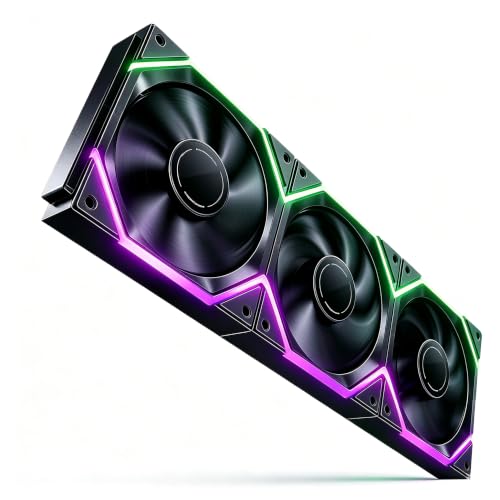
Nyota Pro Review Summary
The AsiaHorse Nyota Pro makes sense for builders who want less cable clutter, more lighting control, and respectable airflow in a standard 120mm format.
Its modular daisy-chain design is the main reason to buy it: the fans are meant to link together so one connection can handle a whole run, which is attractive in cases where clean routing matters as much as raw cooling.
It also suits users who want ARGB to be part of the build instead of an afterthought.
The listing’s dual-zone asynchronous lighting, 18 addressable LEDs, and compatibility with AsiaHorse UMBRA Hub/software point to a fan set that is trying to do more visually than a basic RGB fan.
At the same time, the specifications show enough airflow and pressure to keep it relevant for case ventilation and liquid cooler radiators, not just cosmetic builds.
If you are asking whether the Nyota Pro is worth it, the answer is yes for the right buyer: someone building a tidy gaming PC, a showcase tower, or a themed system where fan cabling would otherwise become messy fast.
If you mainly want the simplest possible cooling with no lighting or hub planning, there are easier choices.
Review Scorecard
| Category | Score | Rationale |
|---|---|---|
| Cable management | 9 | Modular daisy-chain connection reduces the number of visible cables and simplifies routing. |
| Cooling potential | 8 | 61.5 CFM max airflow and 2.16 mmH2O max pressure are strong enough for case and radiator use. |
| Noise balance | 7 | The listing claims 29 dB max and anti-vibration pads, which suggests a good but not silent profile. |
| RGB flexibility | 9 | Dual-zone asynchronous ARGB and 18 addressable LEDs offer more visual control than basic single-zone fans. |
| Installation versatility | 8 | Standard 120x120x25 mm sizing and radiator screws make it broadly usable. |
| Value for showcase builds | 8 | The feature mix is strong if you actually want cleaner wiring and lighting control. |
Key Features and Specifications of Nyota Pro
The Nyota Pro is a 120mm fan line built around a modular interlocking design.
According to the listing, a single cable can power an entire chain, which is the standout feature for builders trying to reduce visible wiring behind the motherboard tray or around the front intake area.
The cooling spec sheet is also credible for a mainstream performance fan.
The fans are rated for 800 to 2000 RPM through 4-pin PWM control, with up to 61.5 CFM airflow and up to 2.16 mmH2O static pressure.
That combination matters because a fan that only moves air well in open space is less useful on a radiator or restrictive front panel.
Lighting is not bolted on as a simple ring effect.
The listing describes 18 addressable LEDs, split as 9 per side, plus dual-zone asynchronous control when paired with the UMBRA Hub and software.
In plain terms, the fan is designed for more complex lighting patterns than a basic single-color or single-zone ARGB model.
Other listed details support the “premium build” angle:
- 120 x 120 x 25 mm standard size
- 5V 3-pin ARGB motherboard compatibility
- Water-cooling mounting screws included for radiator use
- Reversible blade design for intake or exhaust orientation
- Thick anti-vibration rubber pads
- HDB bearings for long-term operation
- Braided, flame-retardant cables and copper connections
Those are practical details, not just marketing language.
They suggest AsiaHorse is targeting builders who want a fan set that fits modern cable-managed cases and works in both airflow-focused and radiator-focused layouts.
Pros and Cons of Nyota Pro
Pros
- Modular daisy-chain setup can dramatically cut cable clutter.
- Dual-zone ARGB is more flexible than standard single-zone fan lighting.
- PWM control gives the motherboard or controller room to balance noise and speed.
- 2000 RPM top speed and 61.5 CFM max airflow make it suitable for more than decorative use.
- Included radiator mounting screws broaden installation options.
- Reversible blade orientation helps with intake and exhaust planning.
Cons
- The modular lighting and hub features may be more than a minimalist builder wants.
- Dual-zone effects depend on the right AsiaHorse ecosystem support, so the full experience is not just plug-and-play in the broadest sense.
- The fan’s feature set is strong, but the listing does not give enough detail here to compare real-world acoustics beyond the stated 29 dB maximum.
- Builders who do not care about RGB or cable cleanup may find the design focus unnecessary.
Who Should Buy Nyota Pro?
The Nyota Pro is a good fit for builders who want a clean internal layout and are willing to plan around ARGB control.
If you are putting together a glass-sided gaming PC, a themed battlestation, or any build where fan wiring would otherwise become visually distracting, this design has obvious value.
It also makes sense for someone who wants one fan family to cover both cases and liquid cooler radiators.
The listed airflow, pressure, PWM range, and included radiator screws suggest it is not limited to one narrow use case.
You should probably skip it if your priority is the cheapest possible cooling solution, or if you dislike relying on a hub/software ecosystem for the best lighting results.
It is also less compelling if you do not care about ARGB at all, because much of its identity is built around the visual and cable-management side of the product.
Cooling, Cabling, and Lighting on Nyota Pro
Modular Daisy-Chain Design
The biggest practical advantage is the modular fan-to-fan connection.
In a multi-fan build, that can save time during installation and reduce the cable bundle that normally accumulates around fan headers, splitters, and ARGB leads.
Airflow and PWM Control
The listed 800 to 2000 RPM range, 61.5 CFM airflow, and 2.16 mmH2O pressure place the Nyota Pro in a serious mainstream cooling category.
That makes it easier to justify on intake banks and radiators than on aesthetic claims alone.
Dual-Zone ARGB Effects
The dual-zone asynchronous lighting is the feature that separates this from generic RGB fans.
If the UMBRA Hub and software are part of your build plan, the lighting can become a visible design element rather than a simple glow effect.
Build and Installation Details
The standard 120mm footprint, reversible blade direction, anti-vibration pads, and included radiator screws make the fan family easy to place in a typical modern PC.
Those are the kinds of details that matter after the box is opened and the build actually starts.
Alternatives to Nyota Pro
If you want a different balance of appearance, pricing style, or ecosystem, these Amazon search alternatives are worth comparing:
Lian Li’s UNI FAN line is the closest conceptual alternative if your main goal is cleaner wiring and a premium daisy-chain style.
Corsair’s iCUE fans make more sense if you already live inside that ecosystem and want software-centered control.
DeepCool and Thermalright are practical comparison points if you want straightforward ARGB airflow without leaning as hard into modular presentation.
Is Nyota Pro Worth It?
Yes, if you want the cable-management and lighting advantages as much as the cooling. The AsiaHorse Nyota Pro is worth considering for showcase builds, radiator installs, and any PC where a neat interior matters enough to justify a more specialized fan design.
If you want the simplest fan possible, this is probably more feature-rich than you need.
But if you value modular wiring, PWM control, dual-zone ARGB, and a fan that looks designed for modern glass-panel builds, the Nyota Pro is a sensible buy.
